

Evernote
@evernote • 372,798 subscribers
💡 Ideas & feedback: https://t.co/KwO6I8lQOW 💚 Product: https://t.co/A0JNsoySz4 📚 Help: https://t.co/n8gSyRxQDx 📩 DMs not monitored
Shorts

Videos

Tired of old notes jumping to the top of your list when you don't change their content? A note now counts as updated only when you change what's in it. Moving notes between notebooks, adding tags or reminders, commenting, and changing who you share with no longer move them up the list. ✅ Spotted something else that shouldn’t reorder your list? Let us know. 💚
Evernote11,712 görüntüleme • 24 gün önce

We heard you: tables just got more powerful and more customizable 🙌 → Sort rows by name, number, or date → Filter out rows you don’t need → Set the first row or column as a header → Customize border style, width, and color → Find it all in the new dropdown above your table Rolling out gradually on Desktop and Mobile from version 11.36.3.
Evernote13,641 görüntüleme • 1 ay önce

A few highlights from August in Evernote. 🌻 🔍 Find objects inside images and spot exact Keyword Search matches faster 🔊 Manage recordings across tabs and start live transcription automatically ✍️ Print attachments and work more flexibly with tables 📱 Find Evernote notes straight from your iPhone’s Search 🧠 Open notes through AI Assistant and use @-mentions in AI Prompts for more precise context See these updates and more in action, plus a sneak peak of what’s coming next. 👇
Evernote13,602 görüntüleme • 1 ay önce

Exact keyword matches are now easier to spot and move through. 🔍 Keyword Search highlights matches in notes, audio transcripts, images, and files. Open a result to jump to the first match, then use Find in Note to move through the rest. Don’t remember the exact wording? Describe the topic to see relevant notes under Smart Results, or ask a question to get a Quick Answer based on your notes. These improvements to the keyword Search experience are available on Desktop and Web starting with v11.31.5. Coming to Mobile this week in v11.32.0.
Evernote13,907 görüntüleme • 2 ay önce

✈️ We made a short video about using Evernote for travel. Rebecca shares how she uses templates, the Scan function on mobile, the AI Assistant, and more to keep everything in one place. If travel is one way you use Evernote, we’d love to hear how you set things up. And if you’d enjoy more videos like this, tell us what types of examples you want to see next. 💚
Evernote16,193 görüntüleme • 3 ay önce

Evernote v11 is here! 🚀 Now, everyone can try our latest features: 🧠 AI Assistant 🔍 Semantic Search 📝 AI Meeting Notes Plus, improvements to core workflows like navigation and editing. We're excited to kick off the new year with v11, which marks a new chapter for Evernote. Stay tuned for even more development and innovation ahead. 💚 Evernote v11 is currently rolling out to all users. To start using it now, download it directly at
Evernote34,180 görüntüleme • 9 ay önce


📅 Create dynamic date mentions in your notes Type @ plus a date like "tomorrow" or "next Wednesday" to insert a date mention instantly. Relative dates update automatically as time passes, and you can click any date mention to change its format. 💡 Choose your default date format in Settings → Preferences → Notes → Date format.
Evernote14,121 görüntüleme • 3 ay önce

⚡ AI Assistant in Edit Mode Instead of jumping back and forth between a chat and your work, collaborate with AI Assistant directly inside the note. Review suggestions and see exactly what changed. Then accept or reject edits individually or in bulk, or return to the conversation to take things in a different direction. 💡Edit Mode can also create and insert new editor elements, such as callout blocks and Mermaid diagrams, based on your conversation or selected content. Does this new feature make AI Assistant more useful for you? Let us know what would make it even better 👇
Evernote13,323 görüntüleme • 3 ay önce


💚 Since v11 launched in January, we’ve shipped 115+ improvements across the Editor, AI, audio, and mobile. From Tabs and inline formatting tools to better audio transcription, AI Prompts, and AI Assistant on mobile, here’s a quick look at some of the highlights. Watch the recap video, read the blog, and explore the full list of improvements from January through June 2026. 📝 Blog: 🔎 Full list of improvements:
Evernote13,770 görüntüleme • 3 ay önce

✅With the latest Evernote Tasks update, you can organize your to-dos in the way that works best for you! Federico Simionato shares a deep dive of the latest Evernote Tasks experience, which includes a full-screen view, additional tabs, new metadata fields, and more.
Evernote55,249 görüntüleme • 2 yıl önce

You’ve heard about Evernote v11, now see it in action. ⚡📹 Watch Product Lead Federico Simionato demo the new AI Assistant, Semantic Search, and AI Meeting Notes, and share the story of how Evernote got to v11. We’re excited to start this new chapter together. V11 is available for everyone—update your app or download it at 💚
Evernote21,561 görüntüleme • 9 ay önce
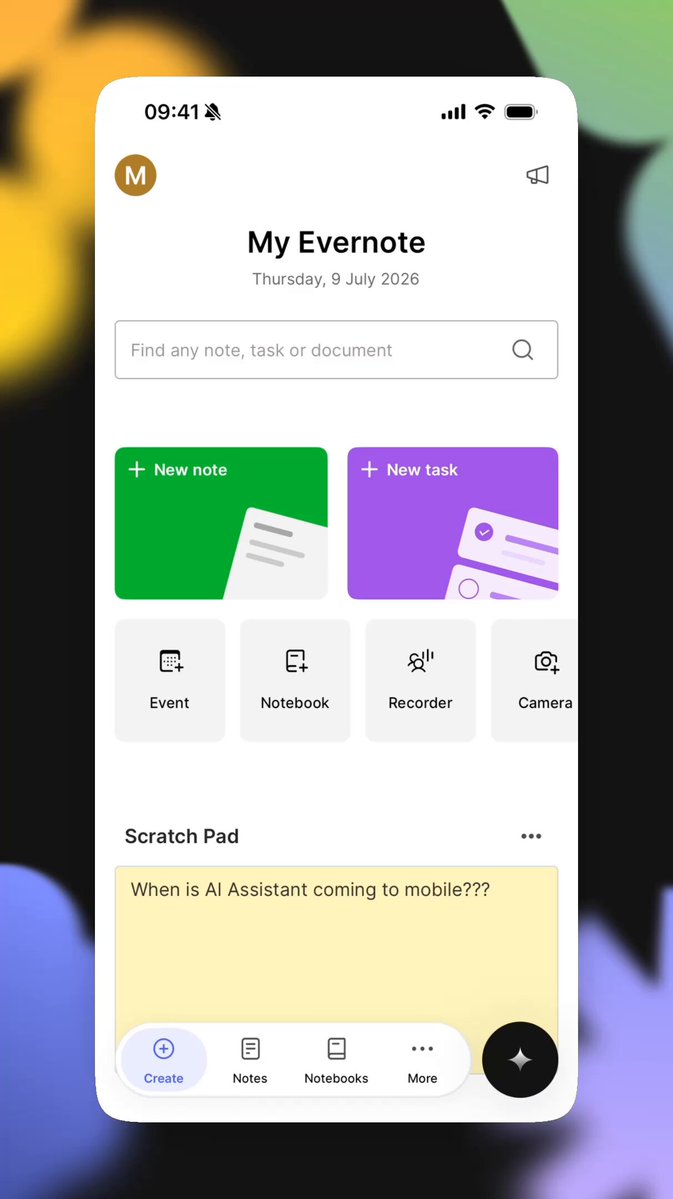
📱 AI Assistant, now on all your devices AI Assistant is now available on phones and tablets for all Evernote users. Wherever you are, you can organize notes, research ideas, create content, and interact with everything in your Evernote account through a simple chat. These two new features are also available on mobile with the AI Assistant: ⚡ AI Prompts let you save repeatable instructions to automate workflows, generate reports, review your work, and much more, using the content and context in your Evernote. 🧠 AI Memory lets AI Assistant remember your preferences across conversations. Just say “Remember to…” or “Store this in your memory for future conversations.” Update your Evernote app or download it now to get started! Available from version version 11.23.2.
Evernote11,315 görüntüleme • 3 ay önce


🎯 Introducing AI Prompts If you find yourself rewriting the same requests to AI over and over, save them as AI Prompts instead. Start with Evernote's Prompt Library for inspiration, then create your own reusable prompts that understand your context. Find AI Prompts when starting a new note, in the toolbar when selecting text, or from an audio recording. What AI Prompt would save you the most time? We'd love to hear your ideas in the comments. 👇
Evernote10,601 görüntüleme • 4 ay önce


