Video wird geladen...

Video konnte nicht geladen werden

Zur Startseite

🎥 260629 ✧ 炽夏官微 Douyin Update Accepted this infinite loop video in 0 seconds 🤗 #BaoShangen #包上恩 #NeverEndingSummer

15,820 Aufrufe • vor 3 Monaten •via X (Twitter)

0 Kommentare

Keine Kommentare verfügbar

Kommentare vom Original-Post werden hier angezeigt

Ähnliche Videos

CSS Tip! ✨ It's 2024 and you have a new way to make animated borders 🚀 .glow::after { offset-path: rect(0 100% 100% 0 round var(--radius)); animation: loop; } @​keyframes loop { to { offset-distance: 100%; }} Using the offset-* properties you can animate elements along the perimeter of others 😍 The rect() value gained support in Safari 17.2 🙌 To start, you create an element and put it inside your main element. For example, you put a span inside the button 🤙 Click me! Make the element fill its parent with absolute positioning and inset [data-glow] { position: absolute; inset: 0; } Now the good part, you use a pseudoelement on that element and define an offset-path [data-glow]::after { content: ""; offset-path: rect(0 auto auto 0 round var(--radius)); animation: loop 2.6s infinite linear; } With the rect value, you are saying the path fills the parent container: top: 0 right: auto || 100% bottom: auto || 100% left: 0 Then you can use round to make sure the path uses the same radius as whatever the parent has The @​keyframes animation merely animates the offset-distance of that pseudoelement to 100% @​keyframes loop { to { offset-distance: 100%; }} You can see this more clearly in the video 🫶 The offset-* properties also include an offset-anchor property. This allows you to dictate which point of the element follows the path. For example: anchor-offset: 100% 50%; This means that the "right, center" of the element will follow the perimeter of the parent element 🤙 Lastly, the visuals 🎨 For color, you can use a gradient such as a linear gradient to fill the pseudo-element. [data-glow]::after { background: radial-gradient( circle at right, hsl(320 90% 100%), transparent 50% ); } Then clip away everything so you only have the border and can still have translucent backgrounds, etc. Use a mask with mask-composite ✨ A little transparent border trick: [data-glow] { border: 2px solid transparent; mask: linear-gradient(transparent, transparent), linear-gradient(white, white); mask-clip: padding-box, border-box; mask-composite: intersect; } Bit of a long one. Hope you find it useful 🙏 CodePen.IO link below 👇

jhey ʕ•ᴥ•ʔ

283,498 Aufrufe • vor 2 Jahren

CSS Tip! 🎠 You can create a responsive infinite marquee animation with container queries and no duplicate items 🤙 li{ animation: slide; } @​keyframes slide { to { translate: 0% calc(var(--i) * -100%);}} The trick is animating the items, not the list 😎 More tricks 👇 To get this one working, you need to animate the items and not the list (Watch the video first?). Each item needs to know its row index (--i) in the list and the parent needs to know how many rows are in the list: ul { --count: 12; } li:nth-of-type(1), li:nth-of-type(2) { --i: 0; } li:nth-of-type(3), li:nth-of-type(4) { --i: 1; } Once you have that, translate each item based on its row index in the list li { translate: 0% calc((var(--count) - var(--i)) * 100%); } Now for the animation. The key here is that each row has an animation-delay calculated from its index (--i). That number is offset to make it negative so the animation start is offset ✨ ul { --duration: 10s; } li { --delay: calc((var(--duration) / var(--count)) * (var(--i) - 8)); animation: slide var(--duration) var(--delay) infinite linear; } Make sure to wrap that animation in: @​media (prefers-reduced-motion: no-preference) { ... } Lastly, the fun parts! 🤓 To create the "vignette" mask. Use a layered mask on the container 😷 .scene { --buff: 3rem; height: 100%; width: 100%; mask: linear-gradient(transparent, white var(--buff) calc(100% - var(--buff)), transparent), linear-gradient(90deg, transparent, white var(--buff) calc(100% - var(--buff)), transparent); mask-composite: intersect; } To create the 3D skewed effect, use a chained transform (Try toggling it in the demo ⚡️): .grid { transform: rotateX(20deg) rotateZ(-20deg) skewX(20deg); } As for the responsive part, use container queries! 🔥 article { container-type: inline-size; } When the article (card) is narrower than 400px update the grid and animation settings 🤙 Double the rows means double the duration! @​container (width < 400px) { .grid { --count: 12; grid-template-columns: 1fr; } li:nth-of-type(1) { --i: 0; } li:nth-of-type(2) { --i: 1; } li:nth-of-type(3) { --i: 2; } li:nth-of-type(4) { --i: 3; } li { --duration: 20s; } } CSS has the magic to be able to update those animations at runtime based on your custom property values 😎 An added bonus in this demo is that it doesn't require any JavaScript at all, for any of it 🤯 We can use CSS :has() for those toggles that update the styles, even the theme toggle! 🫶 Any questions, let me know! Make sure to check out the video. Will do a walkthrough one to follow-up 🤙 CodePen.IO link below! 👇

jhey ʕ•ᴥ•ʔ

542,757 Aufrufe • vor 2 Jahren

HERMES AGENT HAS 5 SYSTEMS RUNNING UNDER THE HOOD. UNDERSTAND THEM AND YOU USE THE AGENT 10X BETTER. In this video Alejandro AO 🤗 explained: 1. THE AGENT LOOP every message triggers the same cycle: → you send a message → Hermes builds context (SOUL.md + memory.md + user.md + skills + tools + message history) → sends everything to the LLM → LLM decides: call a tool or respond → if tool call: execute, return result, loop back → if response: deliver to you → after response: memory update (agent checks if anything is worth remembering, writes to memory.md or user.md) this loop is why Hermes gets better over time. the memory update after every response means the agent learns from every conversation. 2. CONTEXT ASSEMBLY what the LLM sees on every turn: → SOUL.md (your agent's personality and rules) → memory.md (facts the agent learned over time) → user.md (facts about you, auto-updated) → AGENTS.md and .hermes.md (project context files) → skill descriptions (loaded on demand) → tool schemas (available actions) → message history (current conversation) if SOUL.md is empty, Hermes falls back to a default system prompt. write your own SOUL.md and the agent becomes yours, not generic. CONTEXT COMPRESSION: conversations hit context limits. Hermes handles this at two checkpoints: preflight: before each turn. if conversation exceeds 50% of context window, compression fires. older messages get summarized. last 20 messages stay intact (protect_last_n). gateway auto-compression: between turns. fires at 85%. more aggressive. prevents API errors before the agent even starts processing your message. after compression, a new session lineage ID is generated. the agent can trace back to the original conversation through SQLite. three things break prompt cache: switching models mid-session, changing memory files, or changing context files. 3. THE GATEWAY the system that keeps Hermes reachable on 27+ messaging platforms. an async loop runs continuously. listens for incoming messages from Telegram, Discord, Slack, WhatsApp, email, SMS, and every other adapter. when a message arrives: → gateway identifies which session it belongs to → queries SQLite for the full message history (session ID = platform prefix + chat ID) → builds the context from scratch → sends everything into the agent loop → delivers the response back to the platform the gateway also runs the session manager. when you send a message while the agent is busy: → default: queued for next turn → /steer: injected without interrupting → /interrupt: stops current work without the gateway, Hermes is a CLI tool. with the gateway, Hermes is an always-on agent you reach from your phone. 4. MEMORY (THREE LAYERS) LAYER 1 — MARKDOWN FILES SOUL.md (identity), memory.md (learned facts), user.md (facts about you). injected into context after the system prompt. updated by the agent after every response. LAYER 2 — SQLITE full transcripts of every session stored locally. FTS5 full-text search across all past conversations. session lineage tracking across compressions. the agent can recall what you discussed weeks ago using /recall or session search. LAYER 3 — EXTERNAL PROVIDERS (optional) 8 supported providers: Mem0, SuperMemory, Honcho, Zep, and more. each works differently (semantic search, LLM extraction, similarity matching). queried after the first message in each session. the agent processes your topic first, then checks external memory for related context from past conversations. not enabled by default. enable for significantly better long-term recall. 5. CRON ENGINE a loop inside the gateway ticks every 60 seconds. each tick checks ~/.hermes/cron/jobs.json for scheduled tasks. if a job is due: → fresh session (no chat history, no memory pollution) → execute the prompt with assigned tools → store the run output as markdown in ~/.hermes/cron/output/[job-id]/ → deliver result to your home messaging platform cron does NOT use the send_message tool. delivery happens at the system level, not the agent level. a cron session cannot create more cron jobs. prevents runaway loops. WHY THIS MATTERS: the agent loop teaches it. the context assembly focuses it. the gateway reaches it. the memory remembers it. the cron engine automates it. five systems. one agent. understanding how they connect changes how you configure every level. full 15 levels breakdown in the article 👇

YanXbt

51,932 Aufrufe • vor 3 Monaten

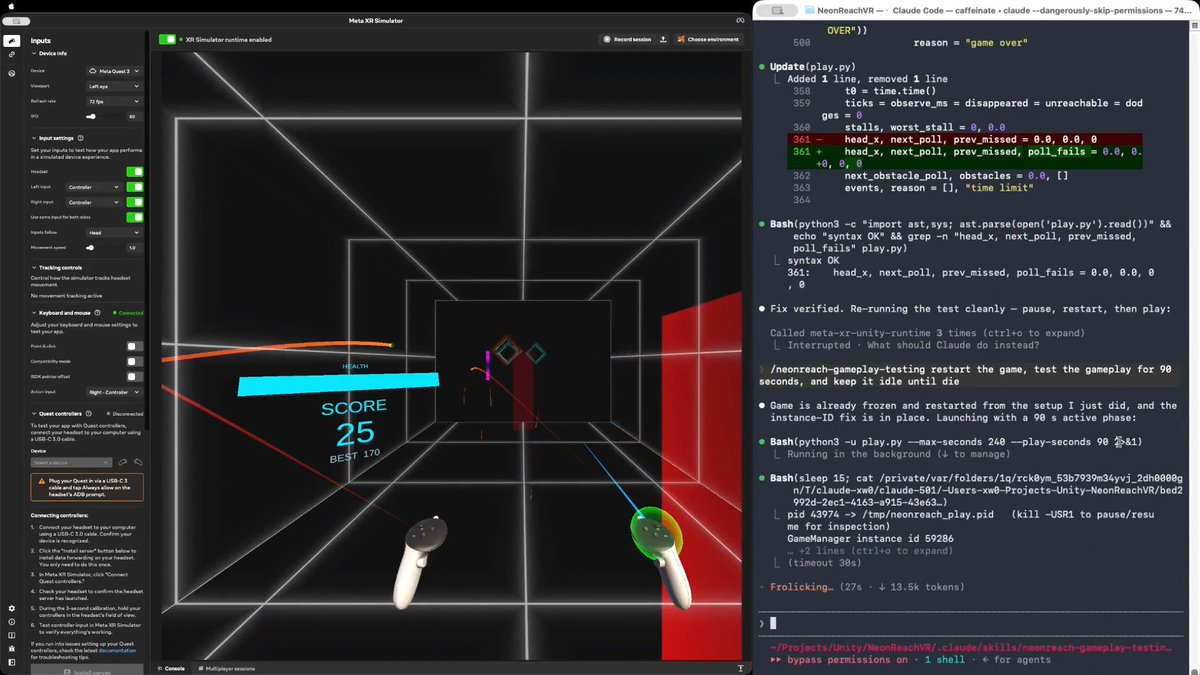
Would you believe an AI agent can test a real VR action game in real time, the way a person plays it? Meta XR Operator makes it possible. As far as I know, this is the first time. I am not talking about tapping a menu or replaying a recorded click path, but genuinely moving, shooting, and using the same game mechanics a human player does. In NeonReach VR, which is a real (and open source) action game, rings spawn 12m out and come at you somewhere between 1.5 and 5.5 m/s, getting faster over a 90 second ramp. There are three kinds: straight, weaving side to side, and spinning. Every shot is a full slingshot cycle, so you press, pull back, aim, then release. Obstacles arrive at head height and cost you a life if you don't get out of the way. You have ten lives. Here is why the game is hard for an AI agent. Even though Meta XR Operator gives the agent everything it needs to observe the app and act inside it, the agent still cannot play. One agent turn takes 10 to 15 seconds. One throw is four steps that have to happen in order, because the press has to latch before the pull, and they cannot be batched into a single call. So a throw costs about 45 seconds. A fast ring only exists for 2.3 seconds. One action takes 20x longer than the target is alive. Prompt tuning does not close a gap that size. What works is a three stage path: EXPLORATION, then SKILL, then SCRIPT. 1/ EXPLORATION. The agent drives the live app and works the game out on its own. It verified the coordinate mapping by setting a pose and reading it back, then derived the launch model. The more useful output was the traps it found. For example, the player's own body collider silently deflects a ball released inside it, with no error and no log line. That produced two confident wrong conclusions before anyone caught them. 2/ SKILL. All of that gets written down as a reusable SKILL.md plus an aim solver. There is a section that separates what was actually verified from what was assumed, so a wrong conclusion cannot quietly turn into doctrine. This stage also produced the trick that mattered. Set timeScale to 0 and a throw becomes atomic in game time, so however long the agent spends thinking never shows up in the shot. 3/ SCRIPT. The agent then compiles everything into a player script, a loop that observes, decides, and throws, calling the MCP servers directly from Python with no model in the hot path. Round trips drop from 10 to 15 seconds down to something between 1 and 16 milliseconds. The loop runs at 23 Hz, about 0.75 seconds per throw, roughly 60x faster than the agent doing it turn by turn. The result is that it plays like a person, which you can see from the attached video. It tracks the rings, works out where each one is going, throws with whichever hand is free, moves out of the way of the obstacles, and does not wait around to see whether the last throw landed. Shipping settings, no difficulty edits, no health locks, no slow motion. It plays until it actually loses. The takeaway generalizes beyond games: an agent does not have to be the player. Even following the same rules as a player, it has too much latency between moves. Having the agent write the thing that acts bypasses that constraint entirely. Try it yourself: or explore the agent-created skill and scripts: Based on NeonReach VR by Dilmer, with no code changes. I only upgraded its Meta XR Core SDK to v205, which ships Meta XR Operator. Our blog post, Introducing Meta XR Operator: Close the Build-Test-Verify Loop for VR: Disclosure: I work at Meta. And this represents my own opinion. #XR #VR #AI #MetaQuest #Unity #GameDev

Xiang Wei

54,986 Aufrufe • vor 1 Monat

save this post to get the most out of unlimited Seedance 2.5 for up to 33 days on Higgsfield i'm going to show you how to use loops to produce ANY video format: ads, cinema, vlogs, UGC, music videos... with one system idea > vault > agent > references > images > script > video > montage > upscaling Seedance 2.5 one-shots a full 30 second video, audio generated in the same pass, carrying up to 30 image, 10 video and 10 audio references into a single generation here's a full breakdown of the setup: > idea: steal taste from work that already worked: - frameset․app and shotdeck․com for film stills - savee․com and cosmos․so for boards - eyecannndy․com for transitions then have a vision model name the lens, light, palette and grain of your picks in one locked paragraph you paste into every prompt > vault: an obsidian folder as your reference bible, one page per asset (idea, locked style, character sheets, reference images, the exact prompts that worked) plus one index page, reviewed after every session so it never rots into dead files > agent: three commands make every model callable from Claude Code: - npm install -g @ higgsfield/cli - higgsfield auth login - npx skills add higgsfield-ai/skills and your agent now submits, polls, retries and logs every job > references: build reference images by hand first, midjourney for cinema and stylized shots, nanobanana pro or gpt images 2 for realism use one locked style across the whole project, recurring characters turned into full sheets (front, side, back, blank background), and once locked you never regenerate them, you fix the motion prompt instead > images: frames before motion, always, a frame costs seconds and a clip costs minutes, so exploration happens at the cheap layer and only winners get animated > script: every shot gets the same six details, subject, action, place, camera, style, rules, and the 30 seconds splits into four timed beats inside one prompt, 0-6 set the scene, 6-14 build it out, 14-24 the turn, 24-30 the end > video: every reference gets a job and a boundary, "Video 1 defines motion and pacing" is half the instruction, "do not use the person's identity, clothing or scene" is the half that stops one reference leaking into shots it was never meant to touch > montage: the cut is a text file, one line per clip with its duration and an audio flag, ffmpeg renders the film from it, so the whole edit reruns in seconds > upscaling: once, at the end, on the finished cut, 720p while exploring, 1080p for keepers, 4K only for the master (use Topaz) for UGC ads, the same loop with two changes render the hook clip alone first, approve the face and the voice before anything else inherits them, then anchor every later clip with the approved hook's audio so one voice carries the whole ad and the script math is fixed, about 3.5 words per second, a 30 second ad is roughly 105 words, counted before anything renders unlimited means every loop above costs nothing to run... start one tonight

Machina

39,183 Aufrufe • vor 2 Monaten

i gave Jev + Astra 6 a dead tiktok account and told it "make money or i'll delete you" 11 days later it's booked $4,200 in brand clips and i still haven't opened the app this isn't a wrapper. i trained the model in the video myself. 22,045 weights, 6 blocks, it learns which 4 opening frames hold a thumb. jev labels its food, astra 6 wrote its training loop every 30 minutes it: → pulls the 800 to 1,200 clips posted in my niche in the last 6 hours → labels every one of them with jev: hook type, pacing, why it held or lost. 1,200 clips costs 8 cents → keeps only the ones that beat their own channel's median, so a small account winning counts more than a big one coasting → feeds those into my model overnight, 4 frames at a time, loss 1.3534 and falling → has astra 6 build the 3 best ideas into finished clips, hook, shot list, cover, captions → posts them and pays its own render bill out of what they earn if a clip is under 41% retention at one hour, the idea is deleted and never proposed again if the render budget hits $0, it stops posting so it learned what survives the numbers nobody puts side by side: jev never writes a word, it only picks, in 70 to 500 ms. $0.042 per million tokens in, and the answers are free, which is why labelling a whole niche costs less than a coffee astra 6 holds 1,050,000 tokens and lands 88% of jobs first try, 99.2% inside four past 272,000 tokens astra's price doubles, so jev keeps its context starved on purpose tool calls fail 3 to 15% of the time, so exactly one process in the whole thing is allowed to publish. everything else can only propose it only ever copies structure, never words. the first 1.2 seconds, the cut rhythm, where the face enters. that's the part that transfers between niches $0 to $4,200 in 11 days, on an account i'd already buried how much do u think it does in a month? whole setup ↓

Argona

71,016 Aufrufe • vor 21 Tagen

.Ladder was my first angel investment, made entirely on trust in Tom Digan when I had no idea what I was doing in venture. What followed is one of the most unlikely and dramatic business stories I've been part of. Today, Ladder is the number one strength training app approaching $100M in ARR with over 300K members. But it should have died several times and survived through sheer force of will from Tom and CEO Greg Stewart. Tom left a lucrative hedge fund career and moved his family to Austin. He raised money from me, my family and his friends. Tom talks about how when you take money from people that close to you, you have to know deep down that you're willing to do whatever it takes. During the early years, they were in constantly in debt with no customers and no sign of PMF. They celebrated raising $10k checks at night while negotiating with creditors and rebuilding the product during the day. Greg describes copying thousands of App Store reviews into Word documents and color-coding them by theme to know exactly what feature to build next. He talks about going into what he calls a "cave process," disappearing to study a single problem until he masters it. He spent months cracking TikTok with no background, dissecting every minute detail -- the hook in the first three seconds, what the coach was wearing, the gym setting -- to grow from $3M to nearly $100M in ARR in four years. Ladder is becoming the operating system for health and fitness, but this conversation is about how hard it really is to build something valuable, told by two people who were willing to do absolutely anything to make it work. Enjoy! Timestamps: 0:00 Intro 1:07 The Genesis of Ladder 3:04 Engineering DNA vs. Content Libraries 4:31 Scaling to 300,000 Paying Members 5:36 Leaving the Safety Net 9:00 Restructuring 13:58 Survival Mode 25:48 Ruthless Prioritization 27:15 Integrating Nutrition and Listening to Members 33:53 Cracking the TikTok Growth Loop 44:25 Expanding the Brand Beyond Short-Form Video 46:54 Financing Growth 51:10 Leveraging AI 58:10 Long-Term Vision 1:05:32 Kindest Thing

Patrick OShaughnessy

124,738 Aufrufe • vor 9 Monaten