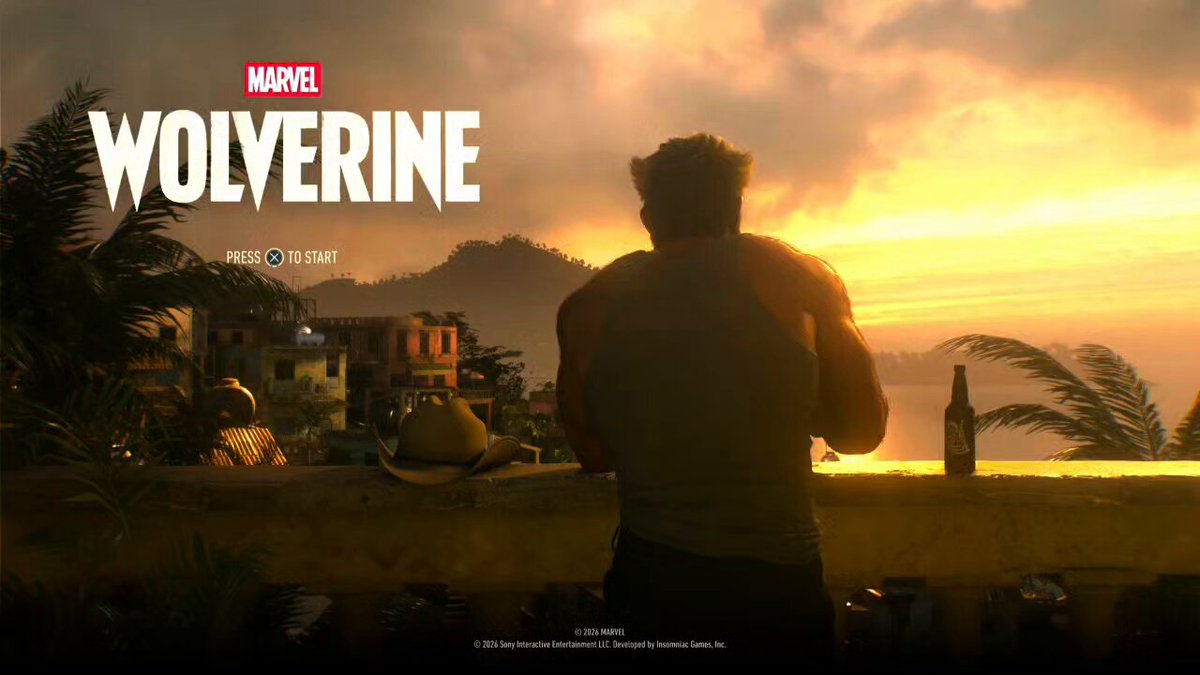
Loading video...
Video Failed to Load
Behind the shot🎬 #WolverinePS5
339,875 views • 9 days ago •via X (Twitter)
48 Comments

@insomniacgames

🔥🔥🔥

@insomniacgames That’s peak the amount of detail in photo mode is amazing 🔥🔥
Thanks!! I take so many photos that I’m not making any progress in the game!😂

@insomniacgames Wtffff u can do all this????
I edited it a little, but most of it was done in-game!👍🏻
All this was in game)?

@insomniacgames This is ridiculously incredible!!!!
Thanks, I like it myself.😎👍🏻👍🏻

@insomniacgames Great shot! Being able to reposition the main character is one of the cooler things in Insomniac photo modes.
Thank you, Brett!! Exactly! I just wish we could control the character’s gaze as well…🤨

@insomniacgames This is crazy man, wow.
Thanks!! I'm happy you like it!!😁👍🏻

@insomniacgames You can do this all in game ?
I edited the brightness and contrast a little, but most of it was done in-game😁

@insomniacgames playing on slower game speed for photos is a game changer thank you also this looks incredible
Yeah, Slow motion is really useful, and it’s an option I’ve loved since the Spider-Man games!😉👍🏻

@insomniacgames Stunning work!
Thank youuuuu😙💪🏻

@insomniacgames Man once I beat this game ima replay and take some of rhe craziest photos
I couldn’t resist and have been taking photos since first run, but maybe that’s actually better!😂👍🏻

@insomniacgames The only I appreciate insomiac that we’ve can do photos and make cool photos
Even if the game itself is a bit light on content, there’s still so much fun to be had with photography!😉

@insomniacgames Omg 😳 you are…🔥
Thank youuuuu so much💪🏻🔥🔥

@insomniacgames Great work
Thank you so much!!😆🙏

@insomniacgames Wait all this was done in game?? The editing too???!
I edited the brightness and contrast just a little, but it was mostly done in photomode!😉

@insomniacgames impressive
Thank you so much!!😉

@insomniacgames Damn this is amazing
Thank you so much!!😎🔥

Perfect 🫡✨
Thanks again Ang.Ins!!😆🙏✨

@insomniacgames HOLY SHIT!
😎👍🏻👍🏻

@insomniacgames Damn!!!! Thats awesomeee man! Good job. Whats the shortcut to the photo mode?
Thanks! You can assign photo mode and slow motion to the D-pad in the Accessibility options!😉👍🏻

@insomniacgames how do you slow the game down like that?
You can assign a slow-motion shortcut to the D-pad! Check the Accessibility options!😙
sick tysm

@insomniacgames @ruhtraldi entao toma

@insomniacgames

@insomniacgames Bro wtf I’m over here just titling an angle thinking it’s fire 😂 😂 😂
I got lucky and happened to capture a dynamic composition!😁👍🏻
@insomniacgames are those artificial lighting?? what program is that this is so cool
In this photo mode, you can edit five manual lights and one ambient light by default. Don't need any tools.😙