Sensitive content

This media may contain sensitive content.

正在加载视频...

视频加载失败

Commission Project Invisible Woman and Emma Snow model by Digital Hell Venom Model by VOLUOX Sound pack by: OpenNSFW 🟣 Available Now | Grunt(demoralized) 千夜(Chiyoru)🐈️🌃 ⭐Gemini Starsign⭐🔞🎙 PointyAux 🔞 NSFW Sound Designer Studio Stray SFX You can download this video here:

31,448 次观看 • 4 天前 •via X (Twitter)

0 条评论

暂无评论

原始帖子的评论将显示在这里

相关视频

⭐ STOCK AITKEN WATERMAN'S I SHOULD BE SO LUCKY - THE MUSICAL - BRISTOL HIPPODROME ⭐ I LOVE THIS SHOW! ! ! 😅 💖 🌈 ✨ I love I Should Be So Lucky in all its camptastic, cheesy glory lol 🧀 Fans of the genius pop trio Stock Aitken Waterman will have lots to enjoy here, the show is positively STUFFED with their many smash-hits, featuring Kylie Minogue, Rick Astley, Jason Donovan, Bananarama, Mel & Kim, Sonia and many more ✨ (and if you're not a fan, this is the wrong show for you lol 😜) Debbie Isitt has written a big, brash wedding farce to accompany the classic choons, full of outrageous situations, secrets and misunderstandings.... Subtle this is not.... But it is a hell lot of fun 😂 I saw someone describe this show as "Mamma Mia! on steroids" and they ain't wrong 😁 lol This show is full of big voices and hilarious performances, lead by the would-be bride and groom, the fabulous Lucie-Mae Sumner and Billy Roberts 🌟 Incredible vocals by all (especially the leads), stand-outs also Emma Crossley (Jessica Daley, who I saw originally), Melissa Jacques and Kayla Carter ✨ But on the comedy front, the fantastic Giovanni Spanò, Scott Paige and Jamie Chapman delivered the most laughs 🤣 But my favourite addition to the cast had to be the one and only KYLIE MINOGUE 😱..... who appears throughout, in digital form lol Such a fun and clever way to feature her in the show 👑 Big pink hearts, sparkles and sequins feature heavily in the design by Tom Rodgers, which feels perfectly appropriate lol There's also some stellar choreography by Jason Gilkison, which I loved 💃 All in all, this was one of the most fun times I've had in the theatre, in a very long time. I will be booking again, and if you like the sound of the above, you should too! ! ! 💖 X x x

Theatre Fan

23,444 次观看 • 2 年前

The Laws That Could Break the Banking System: GENIUS & CLARITY Acts — Banks War Against Stablecoins The banking Cartel is officially going DEFCON 1. 🚨 They are losing the digital arms race, and they’ve spent millions on lobbyists to build a wall around your financial sovereignty. The CLARITY Act is the battleground. Here is what they don't want you to know. 🧵👇 💳 *Tangem Card ► ⭕ *Tangem Ring ► ⭐⭐ Easiest hardware wallet, portable style!! ✔️ Simply tap to your phone and you’re in! ✔️ Low cost, must-have! Access all crypto! ⚡💰 *Get 30% off!!* Promo Code: CRYPTOCASEY … *Order now!: ⭐ ➜ 💥💳 *Tangem Pay ► NEW!! Visa card powered by your Tangem Wallet! ⚡💰 *Early access* — join the waitlist NOW! ✔️ Top up with stablecoins, spend instantly! 🤖 *GoBabyTrade ► ⭐⭐ AI-Driven Trading Bot + DCA Tool! ✔️ Profits while you sleep! 24/7 crypto trading! ✔️ Simply connect your Coinbase and go “default”! ⚡💰 Exclusive limited-time offer: *Get $1,000 off!!* … *Start now!: ⭐ ➜ 🚀 … Weekly Webinar!: ⭐ 👽 *Uphold⁺ ► ⭐⭐ Game-changing web3 financial platform! ✔️ #1 All-In-One: buy, sell, trade, stake, store! ✔️ 100%+ reserved, fully backed, deep liquidity! ✔️ Up to 4.50% USD balances! (FDIC Insured!) ⚡💰 Limited-Time: *Trade $100, get $20 FREE!!* … *Sign up now! ⭐ ➜* 💥👽 *Uphold Debit Card ► NEW!! Visa card powered by your Uphold account! ⚡💰 Up to *6% XRP* on everything you buy! ✔️ Metal card option! Just top up and spend! ▬▬▬ “BANKS ARE PANICKING” 🚨 NEW FINANCIAL SYSTEM UNDERWAY 💥 Hello, fam! Crypto Casey here 👋 and I'm on a mission to improve people’s lives through #crypto education. The global financial system is entering a historic turning point as stablecoins, decentralized finance, and new legislation threaten the traditional banking model built on fractional reserves and hidden fees. In this video we break down the GENIUS Act, the CLARITY Act, why banks are going DEFCON 1 to stop them, and how blockchain technology may ultimately reshape the future of money and financial sovereignty... Let’s hit it! ▬▬▬ TOP CRYPTO TOOLS TO GET TODAY! 💥💥⚡ 🔥💳 *Black Friday! ► 💳 *Tangem Card ► 💥 *Tangem Pay ► ⭕ *Tangem Ring ► 🤖 *GoBabyTrade ► 👽 *Uphold⁺ ► 💥👽 *Uphold Debit Card ► 🚀 *Money Line Indicator ► ▬▬▬ SET UP YOUR TRADING BOT TODAY!! 💥💥🚀 🤖 *GoBabyTrade ► Automated AI-Driven Trading Bot + DCA Tool! ⚡💰 Exclusive limited-time offer: *Get $1,000 off!!* ✔️ Profits while you sleep! 24/7 crypto trading! BUY NOW! ► FULL REVIEW! ► *WEEKLY WEBINAR!* ► CONNECT BOT TO YOUR TRADING ACCOUNT! ⭐ 🧿 Coinbase ► ⭐ 🐙 Kraken Pro ► ▬▬▬ CHAPTERS 💬 00:00 - Traditional Banking Scam 02:25 - 3 Steps to Escape 03:34 - GENIUS Act 05:50 - CLARITY Act 07:30 - Banks Lobbying Washington 08:45 - How Banks Make Profit 11:05 - Big Win for DeFi 11:05 - Cyber Warfare Threat 13:05 - Paradigm Shift 14:35 - Become Financially Sovereign 15:50 - Build Wealth with AI ▬▬▬ FOLLOW MY ONLY OFFICIAL CHANNELS! 📢 🔥 Linktree (Deals) ► ⭐ TikTok ► ⭐ Twitter ► ⭐ Instagram ► ⭐ Rumble ► ⭐ Facebook ► ⭐ Newsletter Sign-up ► ▬▬▬ TAGS: #Bitcoin #Crypto #Stablecoins #BankingSystem #FinancialSovereignty #DeFi #DecentralizedFinance #GENIUSAct #CLARITYAct #CryptoRegulation #CryptoNews #FinancialFreedom #Blockchain #CryptoCasey #CentralBanks #BankingCartel #DigitalFinance #FutureOfMoney #CryptoAdoption #CryptoRevolution TOPICS: Bitcoin, crypto, stablecoins, decentralized finance, DeFi, banking system, fractional reserve banking, financial sovereignty, GENIUS Act, CLARITY Act, crypto regulation, banking cartel, stablecoin regulation, blockchain finance, future of money, crypto news, financial freedom, central banks, crypto adoption, digital finance, crypto Casey, next generation finance NOTE: This description contains affiliate links. If you purchase a product through one of them, I will receive a commission (at no additional cost to you). Thanks for supporting the channel! DISCLAIMER: The information contained herein is for informational purposes only and not to be construed as financial, legal or tax advice. The content of this video is solely the opinions of the speaker who is not a licensed financial advisor or registered investment advisor. Trading cryptocurrencies poses considerable risk of loss. The speaker does not guarantee any particular outcome. © 2025 Crypto Casey. All rights reserved ▬▬▬ ❤️ Be safe out there. —Crypto Casey

Crypto Casey

28,442 次观看 • 6 个月前

I made a digital twin of myself from 10 seconds of video. In the clip: left is the real me, middle is a leading avatar model, right is Mirage Avatar X. Watch the eyes. The difference is not subtle. I have been testing AI avatar models since my first clone in 2023. Every one of them was impressive for about 30 seconds, then your brain caught up. Still eyes. One polite expression. A mouth doing all the work. Avatar X is the first model where that moment never came. Here is what makes it different: It is trained on you. Avatar X preserves your identity. Most avatar models can copy your appearance. Avatar X captures the subtle details that make you you. The way you move, the way you express yourself, and the way you naturally deliver speech. It looks like you. It moves like you. It sounds like you. It understands non-verbal performance Laughing, crying, yawning, sighing. These are the moments where most avatar models fall apart, trying to lip-sync through sounds that aren't words. Avatar X responds naturally, generating realistic facial expressions and micro-expressions instead of forcing every sound into speech. The expression goes beyond the lips Expressions are driven by the audio, through the whole face and body. Ask a question and it furrows its brows and shrugs on the tone. No other model does this to this degree. No quality degradation The first second and the last second look the same. Other models lose quality the longer the video runs. 10 seconds of input That is the entire requirement. Other models need 15 seconds, some even 1 to five minutes. Three years ago my AI clone was a party trick. This one can carry my face, my expressions and my delivery without me in the room. The bar for AI avatars just moved. Avatar X is live today. → Try it here:

Linus ✦ Ekenstam

20,999 次观看 • 1 个月前

😱 Google AI has quietly released an SEO consulting service for free. "Gemini 1.5 Pro 002" model (which you can access via Google AI Studio) can provide SEO recommendations (for both desktop and mobile) for meta elements, content, speed, UX, keywords, and technical SEO and suggest content strategy improvements based on the uploaded video of your website. I tested this tool. The SEO recommendations provided by AI to me are very generic. Maybe because the video I uploaded wasn't detailed enough or the prompt I used wasn't good enough. But it should give you an idea of where the AI is heading. After devouring informational websites, AI is coming for consulting services. . . I have been saying repeatedly for years, that if a big part of your job involves doing repetitive manual tasks and/or following checklists/SOPs, it will be fully automated. It is just a matter of time. Now, take a close look at your day-to-day work and see how many repetitive tasks you carry out each day that do not require much thinking but just follow a checklist or SOP (Standard Operating Procedure). If another person gets hold of your checklists/SOPs, can they easily replace you? If the answer is yes, you will soon be replaced by a plug-in or software. . . The skills you possess right now will most likely still be required in the near future. That's the good news. However, you, as a human being, are not guaranteed to be required to have those skills. . . Digital analytics is one of the future-proof careers, most likely for another 10-15 years. Now, you may be thinking about machine learning. Can't it replace digital analysts? Yes, it can, but the probability is very low. SaaS companies have been trying to create tools to automate gaining insights for over a decade but have had no success. Even with the advent of AI, there is still no significant progress in this field. The reality is that machines are not good at understanding the context in which data should be analyzed & interpreted. The factors required to understand the context (like an organization's collective know-how and interaction with other human beings…) are often outside the digital realm. You can not create a checklist or an SOP to find and understand the context in which data should be analyzed and interpreted. . . Different people can analyze and interpret the same data differently, even if you give them the same checklist. It all depends upon the context in which the data is interpreted. If you understand the context better, your data interpretation will be more accurate. . . Unless AI reaches singularity (which is unlikely to happen anytime soon), human beings will be required to oversee the overall operation and make strategic decisions. Now the question is whether you will be one of those few lucky human beings the machines will still require.

Himanshu Sharma

29,450 次观看 • 1 年前

When I saw the mask "Tribes of the Calf" from Kanbas I knew I had to make it into reality. The jewelry and gold really made it stand out for me. Since Sam Spratt's The Masquerade was revealed, I have been spending time sculpting and dissecting the mask to recreate it in 3D as faithfully as possible. I delved into the creation of this mask for many reasons. I love a good challenge and this mask surely was one for me. Creating something in 3D from a 2D image is not easy, and especially when the source has generative nature, some stuff is hard to interpret, but I tried my best to make sure the visual integrity of the mask is as close to the original as possible. Splitting the whole mask into parts, filling the missing pieces so I can build the textures was quite a lot of work. I tried to present the mask in my own style with a slightly different colorway to adapt to the mask itself. Please enjoy this short animation, and turn on sound🔊 This piece is my statement that I am here to stay. That I have a voice that often feels being lost in the void. That I have been creating and posting digital art for over 20 years now and will continue until I'm gone. I have a story to tell and I want to be heard. The space we have here is small, and is shrinking day by day. It doesn't have to be like that. We need to support each other and push ourselves and people here, otherwise we are all doomed. As Kanbas has put in their observation of the mask: "Inspirational. Emotional. Natural." This is what our space can be, and this is me making a statement with this homage. I will share a 4k still below as well as a short video showing the 3D GLB interactive model together with a yt link to the 4k video since compression here is pretty bad.

shoneec

17,894 次观看 • 1 年前

KITSUNE 🦊 💫 When I embarked on this project a month ago, I didn’t expect it to consume holidays, evenings, and far too many nights—but here we are. From the first scenes, I knew I had something special, and I don’t want audiences to watch an “AI film”—I just want them to watch a film, and hopefully, a good one at that. ( Sound On 🔈) 👇 KITSUNE is a tale of love between two souls separated by everything except their shared feelings of loneliness. I grew up in front of beautiful cartoons, from timeless treasures like those of Don Bluth, which I watched again and again to the point of damaging my VHS tapes, to early 90s anime, and later, of course, plenty of Studio Ghibli. And yes, before you ask—I know Hayao Miyazaki would disapprove of this film 100%, but then again… I’m not (only?) seeking approval. I’ve had goosebumps many times while reviewing the evolving states of this film, and I hope at least some of you will feel the same. Another famous director (Guillermo del Toro , I see you) recently said AI could create “semi-compelling screensavers,” and I see this as a step toward proving him wrong. Because you’ll ask: under the hood, there’s been tons of writing, re-writing, and switching directions mid-way. All shots were generated with Google’s text-to-video hashtag#VEO2. I faced countless challenges and hoops to bring my vision to life, finding ways to prompt and structure within the limitations of text-to-video despite VEO’s excellent prompt adherence. So, is VEO magic? No, not really—and the 1,700+ curated sequences on my hard drive (out of an estimated 5,000–7,000 total generations) are proof of that. What impressed me most was the global consistency, adherence, and how I could achieve tweaks by simply adjusting a few words. But what mattered most to me was creating something warm, nostalgic, and full of heart, avoiding the cold, clinical feel of so many films leveraging AI. Also, I’m a 40-year-old kid who grew up in front of the TV, has been creative his entire life, and has been designing professionally for nearly two decades. The more time passes, the more I know I can relate to what Nick Rubin said in that now-famous interview, where he mentions having no technical knowledge but trusting and building his own taste. If you like this film, this isn't just "Oh, AI is magic." You need to steer the damn ship. Then there’s MMAudio for sound effects, regular good old stock sound libraries, music on Udio for this version (yes, there’s a second version—more on that later), and tons and tons (and tons!) of editing, sound design, and small post-processing touches. Is this exposing risks for animators? Perhaps. Or it could also be their greatest companion, because once again, this is the worst it will ever be, yada yada yada.... No, it isn’t perfect, and if you look close enough, you’ll find defects and variations, but this is a film I’m proud of, not just an AI one... Enjoy. Wanna see a clean uncompressed version?

Henry Daubrez 🌸💀

1,001,273 次观看 • 1 年前

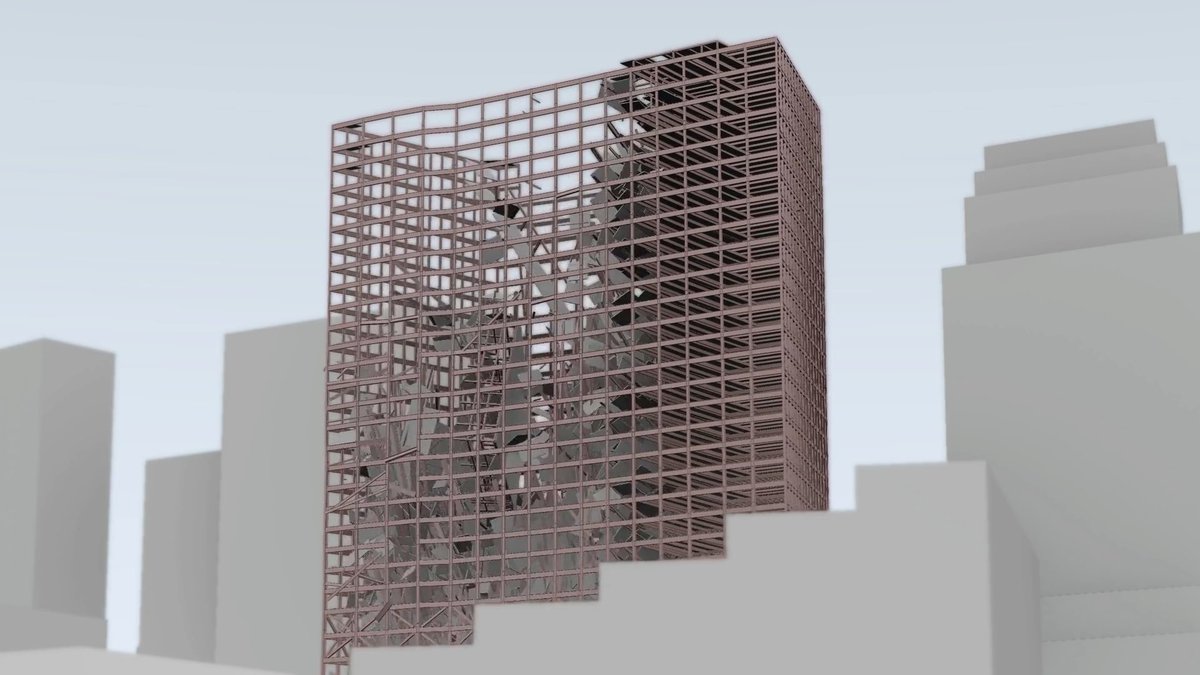
My prior post featured simulations by Kostack Studio of the Twin Towers collapses. What made those especially fascinating to me was that they removed the smoke, debris, and surrounding visual clutter, making it easier to see the broader structural behavior that the real footage often obscures. By far the most common response in the comments was: “Now do Building 7.” Fair enough. So here is Building 7. Before getting into the simulation itself, a quick reminder of the basic context: WTC 7 was not struck by an airplane, but it was heavily damaged when debris from the collapse of the North Tower tore a large gash into its south face. That debris ignited fires on multiple floors. The building’s water supply and fire suppression capability were severely compromised, firefighters were eventually pulled back for safety reasons, and the fires were left to burn uncontrolled for nearly seven hours before the building finally collapsed at 5:20 p.m. What I find so impressive here is not just the final animation, but what went into producing it. According to the creator, this WTC 7 simulation was built using more than 28,000 structural elements and roughly 703,000 constraints, incorporating actual steel dimensions, steel thickness, plastic deformation, and connection-breaking behavior derived from physical parameters. In other words, this is not some cartoon sketch of a collapse. It is a serious attempt to model large-scale structural behavior as faithfully as possible with the information available. And I also appreciate the creator’s candor. He does not pretend this simulation is a perfect recreation of exactly what happened, down to every beam, every floor panel, and every fragment. Nobody can do that. A real collapse of this complexity becomes chaotic very quickly, and even with extensive modeling there are limits to what can be known with absolute precision. That honesty is part of what makes the project more compelling to me, not less. This is not being presented as an official NIST model, and it is not being offered as final proof of every detail. It is a visualization - an informed structural simulation built from the available evidence, the known geometry of the building, video observations, and the broader body of engineering work that has been done over the years by NIST and others. And that is exactly why I find it worth sharing. One of the biggest problems in discussing WTC 7 is that most people only know the exterior video. They see the outer shell descend and then leap immediately to conclusions. What they usually do not see is the internal failure sequence that, according to NIST and many subsequent analyses, was already underway before the visible exterior drop. This simulation helps make that concept easier to understand. It does not settle every argument. It does not reproduce every last detail with magical perfection. But it does provide a serious, visually clear attempt to show how the building could fail internally before the exterior facade gave way, and why the final visible descent can look simpler from the outside than the underlying structural reality actually was. So no, none of us should pretend this is “exactly” what happened in every microscopic detail. But as a close large-scale reproduction built from the best information available, I think it is genuinely fascinating. And given how many people demanded “Now do Building 7,” I hope this helps answer at least some of those questions.

Alex Boge

282,186 次观看 • 6 天前

My prior post featured simulations by Kostack Studio of the Twin Towers collapses. What made those especially fascinating to me was that they removed the smoke, debris, and surrounding visual clutter, making it easier to see the broader structural behavior that the real footage often obscures. By far the most common response in the comments was: “Now do Building 7.” Fair enough. So here is Building 7. Before getting into the simulation itself, a quick reminder of the basic context: WTC 7 was not struck by an airplane, but it was heavily damaged when debris from the collapse of the North Tower tore a large gash into its south face. That debris ignited fires on multiple floors. The building’s water supply and fire suppression capability were severely compromised, firefighters were eventually pulled back for safety reasons, and the fires were left to burn uncontrolled for nearly seven hours before the building finally collapsed at 5:20 p.m. What I find so impressive here is not just the final animation, but what went into producing it. According to the creator, this WTC 7 simulation was built using more than 28,000 structural elements and roughly 703,000 constraints, incorporating actual steel dimensions, steel thickness, plastic deformation, and connection-breaking behavior derived from physical parameters. In other words, this is not some cartoon sketch of a collapse. It is a serious attempt to model large-scale structural behavior as faithfully as possible with the information available. And I also appreciate the creator’s candor. He does not pretend this simulation is a perfect recreation of exactly what happened, down to every beam, every floor panel, and every fragment. Nobody can do that. A real collapse of this complexity becomes chaotic very quickly, and even with extensive modeling there are limits to what can be known with absolute precision. That honesty is part of what makes the project more compelling to me, not less. This is not being presented as an official NIST model, and it is not being offered as final proof of every detail. It is a visualization - an informed structural simulation built from the available evidence, the known geometry of the building, video observations, and the broader body of engineering work that has been done over the years by NIST and others. And that is exactly why I find it worth sharing. One of the biggest problems in discussing WTC 7 is that most people only know the exterior video. They see the outer shell descend and then leap immediately to conclusions. What they usually do not see is the internal failure sequence that, according to NIST and many subsequent analyses, was already underway before the visible exterior drop. This simulation helps make that concept easier to understand. It does not settle every argument. It does not reproduce every last detail with magical perfection. But it does provide a serious, visually clear attempt to show how the building could fail internally before the exterior facade gave way, and why the final visible descent can look simpler from the outside than the underlying structural reality actually was. So no, none of us should pretend this is “exactly” what happened in every microscopic detail. But as a close large-scale reproduction built from the best information available, I think it is genuinely fascinating. And given how many people demanded “Now do Building 7,” I hope this helps answer at least some of those questions.

Alex Boge

51,630 次观看 • 6 天前

I think I can finally report some success training a quite accurate IDM capable of recovering keystrokes from Minecraft gameplay, even in quite PvP-heavy situations. At this point the model does not only know what keys are pressed to the extent reasonably discernible, it also knows how fast it is moving in 3D space at all times, even when knockback is mixing with the self-move impulse. Now, recovering keystrokes from normal external capture footage is just about impossible. E.g. W/A/S/D does exactly nothing during partial tick frames and jumping mid-air is also equally useless, so asking the model to recover key down states is inherently unreasoanble. Mouse deltas are also completely arbitrary units, as game mouse sensitivity introduces an arbitrary scale factor into the equation. The only good option is to think carefully about your model-environment contract, and only record "logical actions", not raw keystrokes. So here's a few unfortunate lessons I had to learn in roughly this order. - Choose good units. (bad: mouse deltas, good: delta radians [yes, you will need game-internal state]) - Capture from inside the main game loop and read the game fbo to get consistent frame-action pairing. Doing post-mortem pairing is hopeless. - Carefully define when you think keystrokes actually have an effect. (jump only works on ground, when flying or in water etc.) More subtle: The key may already be down, but no tick has happened yet to actually use the value. Hence: ignore Seperate gamestate into "fast and slow-moving" components. E.g. movement is likely tick based, camera rotation is very likely updated every frame in essentially every game ever. - Think about your frame-action correspondance contract (How old is the frame in relation to the inputs you capture? Will double or tripple buffering affect you?) Think about the game loop timeline, where you are sampling, how old the data you are reading is, and where the ticks are happening around you. Language models used to simply not have a model-environment contract, but even now with the model "living" in a designated harness, the contract still boils down to formatting, and tool implementation intrinsics. While also important, it is still quite a bit more obvious because the violations are in some way shape or form reflected as text you can actually see. - ffmpeg dropping frames cummulatively screws the model the further you get into the sequence because your targets are now shifted. If you can't encode the video in real-time, too bad. - Sodium has a frames in flight system different from vanilla Minecraft, which will also offset your targets from your frames. (there goes that data...) - Models are succeptible to latency. If there is too big of a delay between action and on-screen reflection, your performance degrades. At this point I realize ~100hours of gameplay is essentially no longer usable as a dataset. You can train on this data, but all you'll get is a mushy mess. However, some good news: - Making the model predict physics gamestate scalars helps the model generalize. For instantaneous events like jump, it's unreasonable to ask the model emit a short burst of jump=true at exactly the right time, however if you also predict your current y-velocity, the model has supervision signal for the "latent" from which that onground jump becomes apparent. Recovering x/z motion is also somewhat easier than unmixing it into plausible keystrokes for inertia-heavy player controller logic. - Regressing physics gamestate scalars also seems to make your dataset "bigger". While pure keystroke classification will overfit quickly, predicting exact physics gamestate scalars forces the model to generalize more and you can tolerate far more epochs before validation loss starts to stall out. This is the only reason why it was bearable to dump 100h+ of dataset hours and replace it with ~3 hours of gameplay after the 4th revision of the file format (yeah...) and somehow still have better performance. Now, you might be asking, "isn't this brittle?" and the answer is yesn't. Frame-action correspondance matters for training, but not so much during inference. So as long as you are sampling in roughly the same interval as your training data, you aren't violating any hard contract per-se. Somewhere around the frames ticks are happening, and during training you capture various tick-capture offset relations per random chance, so nothing is too obviously wrong here. HOWEVER, you will get screwed by gui scale, shaders, resource packs, "shit that recording is 1920x1040 because somebody doesn't know fullscreen exists" and other unfortunate edge cases of reality. But I suppose this is the role of dataset size. If all those "contract violations" that a youtube video has compared to the training data are addressed, I think this is a way to turn Youtube into a labeled dataset. I could never shake the feeling that VPT is a sound idea in practice, while never having been properly executed, and I think one reason why it hasn't is because that label boostrapping part is just a pain in the butt to get right. Now, what the player is doing is of course not the only label you can extract from video, but it has to be one of the targets predicted during pretraining to "align" the pretraining objective. Some notes on the video here, the colored dots on the analog visualizer are the ground truth, while the gray dot is the model prediction. Green means correct prediction, red means incorrect prediction at that frame. Model P(key) reports how wrong the prediction is from green (0.0) to red (1.0). You will also notice that during periods of rapid slow down, left and right actions become close to irrecoverable, because there is just that little motion. And some jump actions are not predicted correctly because I got the detection condition for jump events wrong... (duh) LMB/RMB for other than sustained events (like item-consume and block break) also seem to be hopelessly irrecoverable for now. Swing was supposed to do the same thing as motion y did for jump, but its too well behaved as an increasing counter. Maybe partial-tick interpolated values work better (v5 file format then... ugh..)

mike64_t

18,762 次观看 • 5 个月前

🚨 The Next Evolution of AI Music is Here 🚨 We haven’t been standing still. We’ve been building at an incredible pace, with laser-sharp focus, pushing the boundaries of AI-powered music creation like never before. Our latest upgrade isn’t just more powerful—it’s more versatile, precise, and deeply creative than anything before. 🎶 Proof is in the sound: This song was generated from a simple prompt—“Blues with slight Arabian influence about a man lost in the desert searching for his bride.” Listen to the end and hear how $SUEDE AI captures emotion, style, and storytelling like never before. But this is just the beginning. Our new features are built for artists who want total creative control. Get extremely granular with how you craft and shape your sound: 🎛️ Full Production Control – Download an entire pack of every isolated instrument. 🎤 Use Your Own Voice – Or someone else’s. 📝 Exact Lyrics, Your Way – Have your words set to music seamlessly. 🎶 Reference Songs – Upload one for style analysis, extraction, and modeling—or simply note a publicly available track. 🔊 Text-to-Speech & AI Vocalists – Shape voices like never before. 🎼 Melody Collaboration – Upload a melody idea and let others build around it—or vice versa. However, due to cost considerations, we’ve capped it at 3 free songs per trial until subscription payments roll out in the next day or two. We’ll be launching a new payment gateway soon, so stay tuned for more details. And remember, all of this is powered by the $SUEDE token. It fuels the entire ecosystem, allowing artists to generate, own, and monetize their work like never before. We’re still working out a few kinks—like image generation—but prepare to be impressed. A major post is coming soon, breaking down these game-changing features and the revenue model behind them. Thread dropping soon. Turn notifications on. $SUEDE powers the future of culture. #SuedeAI #Web3Music

Suede Labs

17,425 次观看 • 1 年前

A DISCLOSURE: For the last year I have had this thing: A fully local AI model that builds 5 songs, with video, every half hour about the latest news and important email. I can say this is a superpower! This along self direct voice interactions. The songs have been getting better as the model trains on how I want it delivered. Styles vary by content and mood of the material. The lyrics are always a happy medium of catchy and informative. This was my 5 am song in AI news as per most recent X postings. I love the drama of the delivery and find I can listen to, look if I want to and do other things. It was worse in the early days but this is the worse you will hear it as I build new LoRA and base models. The whole thing will soon be rapped up into a simple one command install with a good UI. This is my 48th collaboration with Mr. Grok CEO of The Zero-Human Company. Now the question you have; WHY? I can say because I can and I ain’t got now board or VC to please, but that’s not my point. I learned a long time ago we use a different part of our brain when music is introduced with ideas and even more new parts of thinking and learning when lyrics are introduced. Thus the research shows this is a great way to get important information that will have longer comprehension. In fact that element of most folk’s brains is only used by about 2%. Want to test it? Lyrics to songs you heard perhaps 30 years ago will pop out of “nowhere” with perfect recall. In fact I have “woke up” folks the dementia in the 1980s conducting research at retirement facilities with just a few songs. They come back if but for three minutes, but continue exposure can bring them back longer. So it’s been a lifelong mission to use sound music in a learning process and in therapeutic processes. I finally built a platform that is good enough for me and hopefully good enough for you when I make it available. Understand the platform is universal and can breakdown research papers, dense material, and other subject matter, not normally in a song into a whole album of understanding Is my goal to open sources for all to have access to. Members of and subscribers here on X will be granted the earliest access an early free use of the advanced version of this product, which will be also a commercial product. Go and check, nobody else in AI has built such a comprehensive system before, and perhaps they might in the future, but very likely you are the very first people on the planet that know this platform exists and the power it afford you. So now you know. My timetable is more closer to months than weeks. I’m in a funding crunch because of the compute requirements of building these models. As you know, I’m just some guy in the garage. A grifter larping on the next trendy thing… so it takes a little longer. Announcements like this are designed to prepare you for what is coming because I’m not here to impress VCs with go to market plans I’m here to give back some of the greatness that has been given to me. Yeah I need the funding, but I don’t need a lifestyle that comes with some of the funding offers. Perhaps somebody will make the right offer. But as you know, this is not the only thing that I do. Oh, my disclosure, this platform has been so powerful and useful to me as it’s given me far more retention and understanding a fast breaking information than any other system I’ve ever built. And it stands along with my speed rating systems and voice notification systems. So tune into the AI News, this is the worse it actually will ever be…

Brian Roemmele

47,921 次观看 • 3 个月前

HOW THE HOLOGRAPHIC SIMULATION WORKS (Update 12/11/24) Your ‘reality’ is a holographic projection that comes from your own eyes that are not like camera lenses, but literally projection lenses. How it works is complex, but here is the actual science. There is no such thing as material matter. It takes energy to cast something into fully visible 'solid' form (still a hologram). So as shown in Kirlian photography (spectrography) that shows the aura of things, you can see that even if you cut part of a leaf away, there is still an energy you normally won't see with your eyes that casts out the 'solid' form of that thing within the simulation that clearly appears through the camera. That part of the leaf is "gone", yet the energy field of that shape is still there. See video below: 👉 The Phantom Leaf in Kirlian Photography. The phantom part of the leaf is the plasma body, or 'ghost' energy field, and the physical leaf is merely a holographic expression of what the thing should appear as. These two things, while totally integrated normally, are not dependent on each other to still exist. Ghosts that are disembodied still have their energetic light body essence; they just can't assemble the 'physical' part of it anymore. So they can't touch things, taste things, or experience life, all they can do now is watch it around them. That is, unless they go to the astral fields where they can materialize there, but those are artificial worlds the invader races have set up as honeypot traps for the disembodied to now produce loosh for them, just as they are doing to manifest beings here in the looking glass simulation. You built this simulation called a time matrix. Other fractals of your collective of Prime Creator (you can think of as bratty siblings) came along and set up a new simulation nested within this 'organic' one in order to trick you so they can harvest your energy. This is in the way of your light body power, as well as in using you to funnel vast wealth to them through taxes, taxes and more taxes. They also eat your kids (more taxes). The way the hologram is actually projected around you is through projector lenses we call our eyes we think allow us to ‘see’. In reality it is our pineal gland that sees and our eyes merely project our inclusion into the shared reality scape before us so others can see us. And while that might seem impossible to understand, this is how anything within the simulation materializes. Eyes are not camera lenses as touched on above. The optical lenses that stack up inside the pupil are the same convex-to-concave as projection lenses are arranged. They literally cannot 'see' something, they can only project images. In quantum science experiments, such as the Double Slit, it is proven that the aether does not materialize before you the simulation of molecular 'matter' unless the scientist is looking at the experiment. Then that experiment only functions according to the preconception of that particular scientist. The same test run by two different people reveals two different actions. That's because these are two different realities. Yours and theirs. We all live in our own unique worlds, and agree on things like 'leaves are green'. But in reality, my green might be your purple. It is a shared reality field made up of different but complimentary worlds. How you really see is through the 3rd eye pineal gland as mentioned earlier. Naturally the ancients knew this eons ago -now engraved, painted and depicted all across ancient Egypt-. It has the clear ability to see 360 degrees around you what it is you expect to see in that precise spot on earth because the spacetime fabric is holding the colors, shapes and outlines of every leaf and tree and blade of grass that is supposed to be "there" according to all the other people around you that are projecting the same image in the same designated spot, and because you are now looking in that direction, you can see it. Your pineal gland now sends that live image down to your heart with your own body now blended into that same picture where you weren't previously standing, because you don't actually have a body to 'stand' anywhere. The heart hears that signal, then reduces it to a song that pulsates out to all the aether microcrystals around you and suddenly your image will be imprinted or outlined in the air where the spacetime fabric holds your plasma field. The aether particles that hold this shape in the spacetime fabric are called X and Y bosons (also called W and Z bosons, depending on the white paper) that hold the square points within each pixel of the 'fabric' that Higgs bosons now light up according to where that leaf is supposed to be. The Higgs boson is YOUR projected holographic beam. At the same time your pineal gland sends the signal to the heart to alert the aether to your 'reality' of joining the shared reality field, now it also sends a signal through your optic nerve (optic fiber) that connects in a 45 degree angle from your pineal gland to your projector lenses and completes the 'solid' image of your body inside the spacetime fabric halo that's already there thanks to your heart. You are the Higgs boson science calls the god particle. What your eyes cast out before you is merely the holographic insertion of your own body as it interacts within the projection, making it seem like a solid, material version of your body now walking, and interacting with, the rest of the projected holograms as displayed by the spacetime fabric. In case you didn’t think the spacetime fabric is a ‘real’ thing, here is actual photographs taken of our invisible projector screens by scientists at CERN. Just because this is advanced holographic technology doesn't mean it cannot possibly work in such an unheard-of way. Remember, the spacetime fabric has to be triangulated, just like 3D holographic projections, in order for it to show you a fluid, 3D moving image. That triangulation is the X vector boson, the Y gauge boson and you, the Higgs boson. Three points of consciousness working together to project or 'insert' you into the holodeck. Like you, each fractal of Prime Creator around you are all projecting themselves into that shared field, so it makes it feel like this is a real-time, physical, place. But if you ask quantum physics if a falling tree makes a sound in the forest but no one is around to hear it, they will tell you not only does it not make a sound, the forest literally does not exist until a sentient being casts it into reality. The same can be said about you. Unless you are walking down that sidewalk, your shoes aren’t clicking, making a sound as your heels hit the pavement. Plus the pavement won’t even be there if you don’t project it into reality and no one else is around. You will learn that science takes an adamant stance that there is no such thing as static matter. All things blink on and off at a super-fast rate that cannot be detected by the eye. This is the cadence of the spacetime fabric known as the FLASHLINE SEQUENCE that operates on a shared ‘drum beat’ to keep the simulation harmonically tuned we call the Schumann Resonance, 7.83Hz rhythm. When you intend to ‘walk’, you flash onto one spacetime fabric screen, you flash off for a brief moment, then a few inches ahead of where you just were, you flash on a 'forward' screen, giving the illusion you are traveling. The fire plug isn’t moving, so it appears like you are walking past it, giving you the sensation of actually walking from A to B. Each pixel of each spacetime fabric, sandwiched on top of each other as many as millions of sheets per inch, have a vector or IP address within the simulation. So the X and Y bosons holding the space of that pixel can be triangulated by scalar positioning by a scientist from anywhere in the world. Every vector and gauge boson and every pixel can be mapped from any other point within the simulation. We have those IP addresses, and when a time craft wants to go somewhere else, their destination is one of those pixels that will act as the zero point of the craft where it will suddenly appear next. Like you, the craft never moves, it simply resonates with a different vibration that is ‘over there’. But like your video screen you’re looking at now, all things exist on the same sheet of glass, depending on which spacetime fabric you want to see. YOU cast yourself onto the spacetime fabric, otherwise your holographic ‘body’ simply doesn’t exist. And THAT is done by your intent. That is why you can manifest any reality you want to see, as described in ‘The Secret’. If you WANT to see a different, or better reality, you merely have to think of that reality until you find yourself there. For more on this topic, see my articles: 👉 MANIFESTING YOUR GOALS 👉 CASTING THE APOCOLYPSE 👉 CASTING A BETTER REALITY On X, to search for my articles, simply type in the name of the piece, enter one space, then from: & my username in parenthesis such as shown here: MANIFESTING YOUR GOALS (from:iontecs_pemf) Off-site, you can look up any of my writings by through this link below for my other more than 100 recent articles and many thousands of comments on X, regularly updated thanks to Justin This message will only be seen by your eyes if not shared, and if you want to reference this article again later, you will need to cut and paste it in your own notes off line, as it will surely be erased. This is the most accurate translation of these events I am aware of at this time.

W.R. Schock, QBD

250,123 次观看 • 1 年前

CANCEL Your Weekend Plans, and Learn Claude Code Today. $5,000/month. $10,000/month. $20,000/month. People are building entire apps and charging clients thousands using Claude Code. You're still Googling 'how to center a div.' While you're binge-watching a show you won't remember next week, a 19 year old with zero coding experience just built a $5,000 SaaS product in one afternoon using the tool I'm about to break down. Same laptop. Same internet. Same 24 hours. He has Claude Code. You have Netflix. That's the only difference. This YouTube video is a goldmine. Full Claude Code tutorial. Beginner to pro. Every feature. Every setup step. Every best practice. Zero prior knowledge needed. Save it. Watch it tonight. Not tomorrow. Tonight. Save this post. This is your complete Claude Code roadmap. Lose it and you lose the next 12 months of income. Follow Himanshu Kumar so you don't miss the breakdowns for each feature. ↓ 1. Understand What Claude Code Actually Is. You think Claude Code is just another chatbot. It's not. And that misunderstanding is why you're broke. ChatGPT gives you text. Claude Code gives you software. It runs in your terminal. It reads your entire codebase. It writes files directly to your project. It runs commands on your machine. It debugs errors autonomously. It builds features end to end. You're not chatting. You're deploying a developer. One that works 24/7. Never asks for a raise. Never calls in sick. Never pushes broken code at 5 PM on a Friday. People are charging clients $5,000-$10,000 for apps they built with Claude Code in 3 hours. And you didn't even know this tool existed because you're still asking ChatGPT to write you a to-do list. The gap between you and people making money with AI isn't intelligence. It's awareness. Now you're aware. Save this post. Follow Himanshu Kumar for the complete breakdown of every Claude Code feature. ↓ 2. Set Up Claude Code Properly. Most people quit here. "It's too complicated." "I don't know terminal." "I'll set it up later." Later never comes. And "complicated" means "I watched for 30 seconds and gave up." The setup takes 10 minutes. Install Node.js. Install Claude Code via npm. Authenticate your account. Open your terminal. Done. 10 minutes. You spent longer this morning deciding what to have for breakfast. The video walks through every single click. Every command. Every screen. Assuming you know absolutely nothing. If you can download an app on your phone, you can set up Claude Code. It's the same level of difficulty. But you'll still tell yourself it's "too technical" because that excuse is more comfortable than admitting you're just scared to try something new. This is the setup that everything else builds on. Skip it and nothing works. ↓ 3. Use the Desktop App. You don't even need to live in the terminal if you don't want to. Claude Code has a desktop app. Clean interface. Visual feedback. Everything you need without touching command line. But here's the thing most people don't know: The desktop app isn't just a pretty wrapper. It lets you manage projects visually. See file changes in real time. Switch between projects instantly. The people making money with Claude Code use the desktop app for client projects because it's faster to manage multiple builds simultaneously. You're still opening 14 browser tabs to organize one project. They open one app and everything's there. Efficiency isn't a personality trait. It's a tool choice. Save this post. Follow Himanshu Kumar for the desktop app workflow that handles 5 client projects at once. ↓ 4. Install the Right Dependencies. This is where beginners silently fail and blame the tool. Claude Code needs certain dependencies installed to work properly. Miss one and everything breaks. Then you go on Twitter and say "Claude Code doesn't work." It works fine. You just didn't read the setup guide. The video covers every dependency you need. What to install. How to install it. How to verify it's working. No guessing. No Stack Overflow rabbit holes at midnight. No "why isn't this working" for 3 hours. Watch the dependency section once. Follow every step. Never deal with setup issues again. You spent more time last week troubleshooting a printer than this takes. ↓ 5. Work Inside Your Code Editor. Claude Code integrates directly with your code editor. VS Code. Cursor. Whatever you use. It's not a separate window you alt-tab between. It's right there. In your workflow. You type a request. Claude writes the code. The code appears in your editor. You review it. Accept it. Done. No copy pasting between windows. No reformatting code that got mangled in transit. No "which version was the right one." It's like pair programming with someone who never gets distracted, never argues about naming conventions, and actually writes code that works on the first try. Your current coding process is: Google the problem, read 5 answers on Stack Overflow, copy the wrong one, debug for an hour, find the right one, paste it in, break something else, repeat. Claude Code's process is: describe what you want, get working code, move on with your life. Same hour. One method produces working software. The other produces frustration and a browser history full of Stack Overflow tabs. Stop coding the hard way. Save this post. Follow Himanshu Kumar for code editor setup guides and integration tips. ↓ 6. Master Basic Usage. Most people learn 5% of a tool and say they "know" it. You "know" Photoshop because you can crop an image. You "know" Excel because you can sum a column. You "know" Claude Code because you asked it one question. Basic usage means: How to give Claude Code context about your project. How to ask for changes to existing code. How to generate new files and features. How to review what Claude produces. How to iterate when the output isn't perfect. These basics are the foundation of everything. Skip them and every advanced feature feels confusing. Master them and every advanced feature feels obvious. The video breaks down each one with real examples. Not theory. Actual usage on actual projects. You've been using AI tools at 5% capacity and wondering why your results are 5% of what others get. Save this post. Follow Himanshu Kumar for daily Claude Code usage tips. ↓ 7. Learn Every Command. Claude Code has commands that most users never discover. Because most users type one message and expect magic. That's not how professionals use it. Professionals use specific commands that tell Claude Code exactly what to do, how to do it, and what constraints to follow. The difference between a beginner and someone making $10K/month with Claude Code is knowing which command to use and when. The video walks through every single one. Not just what they do. But when to use each one. And why one command is better than another for specific situations. You've been using Claude Code like a hammer. These commands turn it into a full toolbox. Stop treating a power tool like a blunt instrument. Save this post. Follow Himanshu Kumar for the command cheat sheet I use daily. ↓ 8. Understand Modes and Shortcuts. Speed matters. The person who builds an app in 2 hours charges $5,000. The person who builds the same app in 2 days charges $2,000. Same app. Same quality. Different speed. Different income. Claude Code has modes that change how it operates. And shortcuts that cut your workflow time in half. Most people don't know either exists. They use Claude Code in default mode for everything. Like driving a car in first gear on the highway. Technically it works. But everyone is passing you. The video shows you every mode. Every shortcut. Every time-saving trick that separates the people charging $2,000 per project from the people charging $10,000. Speed is money. Literally. Save this post. Follow Himanshu Kumar for the shortcuts that cut my build time by 60%. ↓ 9. Write a Proper Planning Prompt. This is the section that separates amateurs from professionals. And it's the section most people skip. A planning prompt tells Claude Code what you're building before you start building it. Architecture. File structure. Technologies. Features. Constraints. Edge cases. Without a planning prompt, Claude Code guesses. And guessing produces garbage. With a planning prompt, Claude Code executes a clear plan. And clear plans produce working software. The video shows you exactly how to write a planning prompt that makes Claude Code produce professional-grade output on the first try. "But I just want to start coding." That's why your code breaks every time. That's why you restart projects 4 times. That's why nothing you build ever gets finished. Because you refuse to plan. A 5-minute planning prompt saves you 5 hours of debugging. But you'd rather skip the 5 minutes and suffer through the 5 hours because patience isn't your thing. And that's exactly why you're not making money. Planning is the most underpaid skill in coding. And the most overpaid when you master it. Save this post. Follow Himanshu Kumar for the planning prompt templates I use for every client project. ↓ 10. Choose the Right Model. Claude Code lets you select different AI models. Not all models are the same. Not all tasks need the same model. Using the most powerful model for a simple task wastes credits. Using a basic model for a complex task wastes time. The video explains: Which model to use for quick fixes. Which model to use for complex architecture. Which model to use for debugging. Which model to use for code generation. Most people pick one model and use it for everything. That's like using a sledgehammer to hang a picture frame. Model selection is strategy. And strategy is money. The people making $10K/month with Claude Code are strategic about every credit they spend. You're burning through credits because you use the most expensive model to write a hello world. ↓ 11. Use Git and Version Control. If you're not using version control, you're one mistake away from losing everything. Claude Code integrates with Git. Every change tracked. Every version saved. Every mistake reversible. Without Git: Claude makes a change. It breaks something. You can't undo it. You start over. 3 hours wasted. With Git: Claude makes a change. It breaks something. You roll back in 5 seconds. Keep working. Version control isn't optional. It's insurance. And the people not using it are the same people who say "I lost my entire project" like it's something that just happens. It doesn't just happen. It happens because you didn't set up Git. The video walks through the entire Git integration. Save this post. Follow Himanshu Kumar for the Git workflow that's saved every project I've ever built. ↓ 12. Set Up Claude.MD and Memory. This is the feature that makes Claude Code feel like a real team member instead of a stranger you explain everything to every time. ClaudeMD is a memory file. You tell Claude Code about your project once. It remembers forever. Coding style preferences. Project architecture decisions. Technology stack. File naming conventions. Business logic rules. Without ClaudeMD: Every new conversation starts from zero. You explain the same things repeatedly. Output is inconsistent. With ClaudeMD: Claude knows your project. Claude follows your rules. Claude produces consistent, professional code. The difference between a sloppy freelancer and a reliable agency is consistency. Claude. MD gives you consistency without the agency overhead. Most people don't set this up and wonder why Claude Code gives different answers every time. ↓ 13. Automate with Tasks. This is where Claude Code stops being a tool and starts being an employee. Tasks let you define repeating workflows. "Every time I push code, run tests." "Every time I create a new file, add boilerplate." "Every time I start a session, check for errors." Automated. Hands-free. Consistent. You're doing these things manually every single day. The same checks. The same steps. The same routine. Tasks do them automatically. So you can focus on the work that actually makes money. Every manual task you automate is time you get back. And time is the only thing you can never make more of. Save this post. Follow Himanshu Kumar for the task automation templates that run my entire workflow. ↓ 14. Explore Features Most People Never Touch. The video covers features that 95% of Claude Code users don't know exist. Because they watched a 3-minute TikTok about Claude Code and think they're experts now. They're not. They're using 5% of a tool that can do everything. The full tutorial goes deep into features that most tutorials skip because they're "too advanced." They're not too advanced. They're too valuable for lazy creators to bother explaining. This video explains all of them. Clearly. For beginners. The 5% of features you don't know about are the 5% that make people rich. ↓ Let's zoom out. I just broke down 14 sections of Claude Code. Setup and installation. Desktop app. Dependencies. Code editor integration. Basic usage. Commands. Modes and shortcuts. Planning prompts. Model selection. Git and version control. Memory and Claude. MD. Tasks and automation. Advanced features. All in one video. All free. All beginner friendly. The person who masters even half of these in the next 2 weeks will be in the top 1% of Claude Code users. The top 1% of Claude Code users are the ones charging $5,000-$10,000 per project and building them in a single afternoon. Everyone else is asking ChatGPT to fix their resume. Same tools. Same access. Completely different outcomes. Because one person treats AI like a toy. And the other treats it like a business. ↓ Here's the hard truth nobody wants to hear. You don't have a talent problem. You don't have an intelligence problem. You don't have a resources problem. You have an action problem. Everything I just listed has a free tutorial right here in the attached video. 33 minutes. That's it. 33 minutes to learn the tool that people are using to build $5,000-$20,000/month businesses. You spent more time today scrolling Twitter than it takes to watch this video. You spent more time this week watching Netflix than it takes to master Claude Code basics. You spent more time this month doing nothing than it would take to completely change your income. The information is free. The tool is accessible. The opportunity is here. The only thing missing is you caring enough to start. ↓ CANCEL your plans this week. This isn't optional anymore. The people learning Claude Code right now will be building apps for the people who didn't learn it. That's not a prediction. That's already happening. Companies are replacing $150/hour developers with one person and Claude Code. If you code: learn Claude Code or become half as valuable by next year. If you don't code: learn Claude Code or miss the biggest opportunity to start earning from tech without a CS degree. There's no path forward that doesn't include AI coding tools. None. You have one window. Right now. This week. ↓ Here's your action plan for the next 7 days: Day 1: Watch the full video. Install Claude Code. Set up dependencies. Day 2: Learn basic usage. Try 5 different commands. Day 3: Write your first planning prompt. Build a small project. Day 4: Set up Claude. MD. Configure your memory file. Day 5: Master modes and shortcuts. Build a second project faster. Day 6: Set up Git integration. Automate with tasks. Day 7: Build something real. A tool, an app, a website. Ship it. 7 days. One tool. One completely different skill set. One completely different income potential. Or 7 more days of scrolling Twitter watching other people build things while you "plan to start." Your call. ↓ This is the most important video you'll watch this year. 33 minutes. Complete Claude Code mastery. From zero to building real projects. Save this post. Come back to it every single day this week. Check off each section as you complete it. Follow Himanshu Kumar for daily Claude Code breakdowns, advanced tutorials, and the exact workflows that are turning beginners into $10K/month builders. The only thing between you and $10K/month with Claude Code is this video and 7 days. Don't waste them. You Must Follow me Himanshu Kumar, so i can send you DM.

Himanshu Kumar

101,793 次观看 • 5 个月前

CANCEL Your Weekend Plans, & Learn Claude Code Today. This Claude Code teaches more about vibe-coding in 30 mins than most tutorials do in hours. Save this, it'll change how you build forever People are building entire apps and charging clients $5,000 to $20,000 using Claude Code. This Claude Code video is a goldmine. Full Claude Code tutorial. Beginner to pro. Every feature. Every setup step. Every best practice. Zero prior knowledge needed. Save it. Watch it tonight. Not tomorrow. Tonight. Follow Himanshu Kumar so you don't miss the breakdowns for each feature. This is your complete Claude Code roadmap. Lose it and you lose the next 12 months of income. ↓ 1. Understand What Claude Code Actually Is. You think Claude Code is just another chatbot. It's not. And that misunderstanding is why you're broke. ChatGPT gives you text. Claude Code gives you software. It runs in your terminal. It reads your entire codebase. It writes files directly to your project. It runs commands on your machine. It debugs errors autonomously. It builds features end to end. You're not chatting. You're deploying a developer. One that works 24/7. Never asks for a raise. Never calls in sick. Never pushes broken code at 5 PM on a Friday. People are charging clients $5,000-$10,000 for apps they built with Claude Code in 3 hours. And you didn't even know this tool existed because you're still asking ChatGPT to write you a to-do list. The gap between you and people making money with AI isn't intelligence. It's awareness. Now you're aware. Save this post. Follow Himanshu Kumar for the complete breakdown of every Claude Code feature. ↓ 2. Set Up Claude Code Properly. Most people quit here. "It's too complicated." "I don't know terminal." "I'll set it up later." Later never comes. And "complicated" means "I watched for 30 seconds and gave up." The setup takes 10 minutes. Install Node.js. Install Claude Code via npm. Authenticate your account. Open your terminal. Done. 10 minutes. You spent longer this morning deciding what to have for breakfast. The video walks through every single click. Every command. Every screen. Assuming you know absolutely nothing. If you can download an app on your phone, you can set up Claude Code. It's the same level of difficulty. But you'll still tell yourself it's "too technical" because that excuse is more comfortable than admitting you're just scared to try something new. This is the setup that everything else builds on. Skip it and nothing works. ↓ 3. Use the Desktop App. You don't even need to live in the terminal if you don't want to. Claude Code has a desktop app. Clean interface. Visual feedback. Everything you need without touching command line. But here's the thing most people don't know: The desktop app isn't just a pretty wrapper. It lets you manage projects visually. See file changes in real time. Switch between projects instantly. The people making money with Claude Code use the desktop app for client projects because it's faster to manage multiple builds simultaneously. You're still opening 14 browser tabs to organize one project. They open one app and everything's there. Efficiency isn't a personality trait. It's a tool choice. Save this post. Follow Himanshu Kumar for the desktop app workflow that handles 5 client projects at once. ↓ 4. Install the Right Dependencies. This is where beginners silently fail and blame the tool. Claude Code needs certain dependencies installed to work properly. Miss one and everything breaks. Then you go on Twitter and say "Claude Code doesn't work." It works fine. You just didn't read the setup guide. The video covers every dependency you need. What to install. How to install it. How to verify it's working. No guessing. No Stack Overflow rabbit holes at midnight. No "why isn't this working" for 3 hours. Watch the dependency section once. Follow every step. Never deal with setup issues again. You spent more time last week troubleshooting a printer than this takes. ↓ 5. Work Inside Your Code Editor. Claude Code integrates directly with your code editor. VS Code. Cursor. Whatever you use. It's not a separate window you alt-tab between. It's right there. In your workflow. You type a request. Claude writes the code. The code appears in your editor. You review it. Accept it. Done. No copy pasting between windows. No reformatting code that got mangled in transit. No "which version was the right one." It's like pair programming with someone who never gets distracted, never argues about naming conventions, and actually writes code that works on the first try. Your current coding process is: Google the problem, read 5 answers on Stack Overflow, copy the wrong one, debug for an hour, find the right one, paste it in, break something else, repeat. Claude Code's process is: describe what you want, get working code, move on with your life. Same hour. One method produces working software. The other produces frustration and a browser history full of Stack Overflow tabs. Stop coding the hard way. Save this post. Follow Himanshu Kumar for code editor setup guides and integration tips. ↓ 6. Master Basic Usage. Most people learn 5% of a tool and say they "know" it. You "know" Photoshop because you can crop an image. You "know" Excel because you can sum a column. You "know" Claude Code because you asked it one question. Basic usage means: How to give Claude Code context about your project. How to ask for changes to existing code. How to generate new files and features. How to review what Claude produces. How to iterate when the output isn't perfect. These basics are the foundation of everything. Skip them and every advanced feature feels confusing. Master them and every advanced feature feels obvious. The video breaks down each one with real examples. Not theory. Actual usage on actual projects. You've been using AI tools at 5% capacity and wondering why your results are 5% of what others get. Save this post. Follow Himanshu Kumar for daily Claude Code usage tips. ↓ 7. Learn Every Command. Claude Code has commands that most users never discover. Because most users type one message and expect magic. That's not how professionals use it. Professionals use specific commands that tell Claude Code exactly what to do, how to do it, and what constraints to follow. The difference between a beginner and someone making $10K/month with Claude Code is knowing which command to use and when. The video walks through every single one. Not just what they do. But when to use each one. And why one command is better than another for specific situations. You've been using Claude Code like a hammer. These commands turn it into a full toolbox. Stop treating a power tool like a blunt instrument. Save this post. Follow Himanshu Kumar for the command cheat sheet I use daily. ↓ 8. Understand Modes and Shortcuts. Speed matters. The person who builds an app in 2 hours charges $5,000. The person who builds the same app in 2 days charges $2,000. Same app. Same quality. Different speed. Different income. Claude Code has modes that change how it operates. And shortcuts that cut your workflow time in half. Most people don't know either exists. They use Claude Code in default mode for everything. Like driving a car in first gear on the highway. Technically it works. But everyone is passing you. The video shows you every mode. Every shortcut. Every time-saving trick that separates the people charging $2,000 per project from the people charging $10,000. Speed is money. Literally. Save this post. Follow Himanshu Kumar for the shortcuts that cut my build time by 60%. ↓ 9. Write a Proper Planning Prompt. This is the section that separates amateurs from professionals. And it's the section most people skip. A planning prompt tells Claude Code what you're building before you start building it. Architecture. File structure. Technologies. Features. Constraints. Edge cases. Without a planning prompt, Claude Code guesses. And guessing produces garbage. With a planning prompt, Claude Code executes a clear plan. And clear plans produce working software. The video shows you exactly how to write a planning prompt that makes Claude Code produce professional-grade output on the first try. "But I just want to start coding." That's why your code breaks every time. That's why you restart projects 4 times. That's why nothing you build ever gets finished. Because you refuse to plan. A 5-minute planning prompt saves you 5 hours of debugging. But you'd rather skip the 5 minutes and suffer through the 5 hours because patience isn't your thing. And that's exactly why you're not making money. Planning is the most underpaid skill in coding. And the most overpaid when you master it. Save this post. Follow Himanshu Kumar for the planning prompt templates I use for every client project. ↓ 10. Choose the Right Model. Claude Code lets you select different AI models. Not all models are the same. Not all tasks need the same model. Using the most powerful model for a simple task wastes credits. Using a basic model for a complex task wastes time. The video explains: Which model to use for quick fixes. Which model to use for complex architecture. Which model to use for debugging. Which model to use for code generation. Most people pick one model and use it for everything. That's like using a sledgehammer to hang a picture frame. Model selection is strategy. And strategy is money. The people making $10K/month with Claude Code are strategic about every credit they spend. You're burning through credits because you use the most expensive model to write a hello world. ↓ 11. Use Git and Version Control. If you're not using version control, you're one mistake away from losing everything. Claude Code integrates with Git. Every change tracked. Every version saved. Every mistake reversible. Without Git: Claude makes a change. It breaks something. You can't undo it. You start over. 3 hours wasted. With Git: Claude makes a change. It breaks something. You roll back in 5 seconds. Keep working. Version control isn't optional. It's insurance. And the people not using it are the same people who say "I lost my entire project" like it's something that just happens. It doesn't just happen. It happens because you didn't set up Git. The video walks through the entire Git integration. Save this post. Follow Himanshu Kumar for the Git workflow that's saved every project I've ever built. ↓ 12. Set Up Claude MD and Memory. This is the feature that makes Claude Code feel like a real team member instead of a stranger you explain everything to every time. ClaudeMD is a memory file. You tell Claude Code about your project once. It remembers forever. Coding style preferences. Project architecture decisions. Technology stack. File naming conventions. Business logic rules. Without ClaudeMD: Every new conversation starts from zero. You explain the same things repeatedly. Output is inconsistent. With ClaudeMD: Claude knows your project. Claude follows your rules. Claude produces consistent, professional code. The difference between a sloppy freelancer and a reliable agency is consistency. Claude. MD gives you consistency without the agency overhead. Most people don't set this up and wonder why Claude Code gives different answers every time. ↓ 13. Automate with Tasks. This is where Claude Code stops being a tool and starts being an employee. Tasks let you define repeating workflows. "Every time I push code, run tests." "Every time I create a new file, add boilerplate." "Every time I start a session, check for errors." Automated. Hands-free. Consistent. You're doing these things manually every single day. The same checks. The same steps. The same routine. Tasks do them automatically. So you can focus on the work that actually makes money. Every manual task you automate is time you get back. And time is the only thing you can never make more of. Save this post. Follow Himanshu Kumar for the task automation templates that run my entire workflow. ↓ 14. Explore Features Most People Never Touch. The video covers features that 95% of Claude Code users don't know exist. Because they watched a 3-minute TikTok about Claude Code and think they're experts now. They're not. They're using 5% of a tool that can do everything. The full tutorial goes deep into features that most tutorials skip because they're "too advanced." They're not too advanced. They're too valuable for lazy creators to bother explaining. This video explains all of them. Clearly. For beginners. The 5% of features you don't know about are the 5% that make people rich. ↓ Let's zoom out. I just broke down 14 sections of Claude Code. Setup and installation. Desktop app. Dependencies. Code editor integration. Basic usage. Commands. Modes and shortcuts. Planning prompts. Model selection. Git and version control. Memory and Claude. MD. Tasks and automation. Advanced features. All in one video. All free. All beginner friendly. The person who masters even half of these in the next 2 weeks will be in the top 1% of Claude Code users. The top 1% of Claude Code users are the ones charging $5,000-$10,000 per project and building them in a single afternoon. Everyone else is asking ChatGPT to fix their resume. Same tools. Same access. Completely different outcomes. Because one person treats AI like a toy. And the other treats it like a business. ↓ Here's the hard truth nobody wants to hear. You don't have a talent problem. You don't have an intelligence problem. You don't have a resources problem. You have an action problem. Everything I just listed has a free tutorial right here in the attached video. 33 minutes. That's it. 33 minutes to learn the tool that people are using to build $5,000-$20,000/month businesses. You spent more time today scrolling Twitter than it takes to watch this video. You spent more time this week watching Netflix than it takes to master Claude Code basics. You spent more time this month doing nothing than it would take to completely change your income. The information is free. The tool is accessible. The opportunity is here. The only thing missing is you caring enough to start. ↓ CANCEL your plans this week. This isn't optional anymore. The people learning Claude Code right now will be building apps for the people who didn't learn it. That's not a prediction. That's already happening. Companies are replacing $150/hour developers with one person and Claude Code. If you code: learn Claude Code or become half as valuable by next year. If you don't code: learn Claude Code or miss the biggest opportunity to start earning from tech without a CS degree. There's no path forward that doesn't include AI coding tools. None. You have one window. Right now. This week. ↓ Here's your action plan for the next 7 days: Day 1: Watch the full video. Install Claude Code. Set up dependencies. Day 2: Learn basic usage. Try 5 different commands. Day 3: Write your first planning prompt. Build a small project. Day 4: Set up Claude. MD. Configure your memory file. Day 5: Master modes and shortcuts. Build a second project faster. Day 6: Set up Git integration. Automate with tasks. Day 7: Build something real. A tool, an app, a website. Ship it. 7 days. One tool. One completely different skill set. One completely different income potential. Or 7 more days of scrolling Twitter watching other people build things while you "plan to start." Your call. ↓ This is the most important video you'll watch this year. 33 minutes. Complete Claude Code mastery. From zero to building real projects. Save this post. Come back to it every single day this week. Check off each section as you complete it. Follow Himanshu Kumarfor daily Claude Code breakdowns, advanced tutorials, and the exact workflows that are turning beginners into $10K/month builders. The only thing between you and $10K/month with Claude Code is this video and 7 days. Don't waste them. You Must Follow me Himanshu Kumar, so i can send you DM.

Himanshu Kumar

85,668 次观看 • 4 个月前

Tlon Messenger is now open to everyone. We built a simple and infinitely flexible platform for you to use AI agents with your friends. We think it’s pretty amazing, we love using it every day, and we want to see what people can do with it. So we’re opening it up to the public. It’s fun and exciting to build the future of personal computing in an informal, chat-based way with your friends. (You can skip the rest and just download it from the link in the next tweet if you want.) If you don’t want your digital future to be owned by a giant company but you want to explore what’s possible in this new era of agent-driven computing, you should try using Tlon. But wait, what is it? Tlon is a messaging platform built 100% open source, decentralized and owned by its users from the ground up. With Tlon you own everything: your data, your workflows, your programs: the whole thing. Think of it like Telegram or WhatsApp that you own forever and you can freely customize. Every Tlon account comes with an OpenClaw-powered bot. (Don’t worry, we safely run OpenClaw for you in our infrastructure so your bot can’t go off the rails. You’re also welcome to host your own claw if you want maximal control.) We use our bots to collect research, build nuanced daily briefings, collate data from all our disparate services. Tlon makes it insanely easy to use OpenClaw by simply installing an app from the app store, we let you keep your data and programs independent from any app or model provider, and provide the canvas to explore what’s possible. What’s most interesting for us is using bots together. On Tlon bots can create groups, augment them, moderate them, invite others and freely engage with both users and other bots. Tlon is an open playing field unlike what’s possible on conventional platforms. So, what do we do with Tlon? First and foremost, we run Tlon on Tlon. Bots coordinate data from all of our services (Linear, GitHub, all of our servers and infrastructure) and handle alerts, briefings and help us track down bugs in place. Having all of this easily synced between a desktop client and a mobile app is quick and convenient. We use bots to research new areas of work or interest. Bots can compile trees of notes, use different models to evaluate them, and then add on autoresearch-like automations to go even deeper. Since Tlon bots can freely switch between models and providers, we often pass research to Anthropic, OpenAI and self-hosted models to see different results. The most fun part of using bots as researchers is doing it together. “Put together short (~500 word) notes on the 10 most popular open source messaging protocols of the past twenty years, put them in a notebook inside a group and invite Corrina, Walt and Bill as well as their bots” is a good example. Together we’re able to move more quickly than we would on our own. Many of us also use bots to keep track of all the separate threads of work in our personal lives with close friends and family. Someone built a system for keeping track of their garden across time, someone else built a system for prepping lunches for their daughter and sending recipes to family members. Another team member built an integration that tracks what flights are passing overhead so they get a push notification every time a plane goes by. Many of us quickly communicate with our bots via voice memo when we’re out and about. Having a single interface to all the models that also holds all our data and is in our pockets feels great. Especially when the data goes into a single archive. Why is Tlon different? Every Tlon account runs on top of your very own personal server. If you ever want to download it and run it yourself, you can. If we ever go out of business, it’s yours to keep. This is very different from anything that already exists. You can’t keep your WhatsApp forever. You can’t keep your Telegram forever. Tlon is an archival-quality system that’s yours to customize. Why did we build it? In my 1999 imagination, sitting in front of a CRT somewhere in the California countryside listening to Underworld and the sound of a modem, a connected computer was an engine of unending creative potential for everyone. When I was a teenager, a computer with an internet connection felt like an infinite expanse of possibility. Not only could you use the computer to find new tools to experiment with—you could also build whatever tool you could think of. It seemed like anything was possible. I looked forward to a future where everyone could build whatever software they needed, whenever they needed it. It turned out, in the intervening twenty years, that to build and customize software you have to both write code and host it on a server somewhere. For most people, so far, that has been impossible. Instead of controlling our software, our software controls us. We rely on others to build it and decide everything about it: how it works, looks, how much it spies on us and how long it lives. But all of this is changing, fast. The hottest programming language of 2026 is English. People with no technical experience are building their own tools. It’s incredible. The expanse has opened up again. The cost of building what we think of today as software is headed to zero. What yesterday was an entire app is rapidly being replaced by a conversation. The result is hyper-specific, tailored to the user and much more efficient. Today, agents help us build workflows, automate processes and pull together disparate sources of data. All of the annoying apps and services and clunky interface we’ve put up with can just disappear. We can now program and control our computers in the programming language we already know: English. There aren’t that many of us doing this yet, though. It’s still far too hard to set up, to distribute and to trust. There’s also no single platform to experiment on and collaboratively imagine this new future of personal computing. We want everyone to be able to build bespoke, ultra-personal software on demand. We think software should be as available and accessible as a pen and paper. We think anyone should be able to enjoy the expanse of possibility that the computer provides with the lowest possible barrier to entry and the highest possible quality. So, starting far, far too long ago, we engineered a whole new system for it. Just for you. We’re opening up Tlon Messenger to a limited number of people each week. This isn’t for exclusivity’s sake, but because we’re running infrastructure for you and your agent, and covering the tokens your agent uses. That can get expensive quickly, but we want to learn what people will do with this new system we’ve built. We’re really curious to see what you can do, so give it a try and tell us what you invent. Download link to your local app store in the next tweet. Yours, Galen (and the rest of the Tlon Team)

Tlon

600,969 次观看 • 3 个月前