Загрузка видео...

Не удалось загрузить видео

На главную

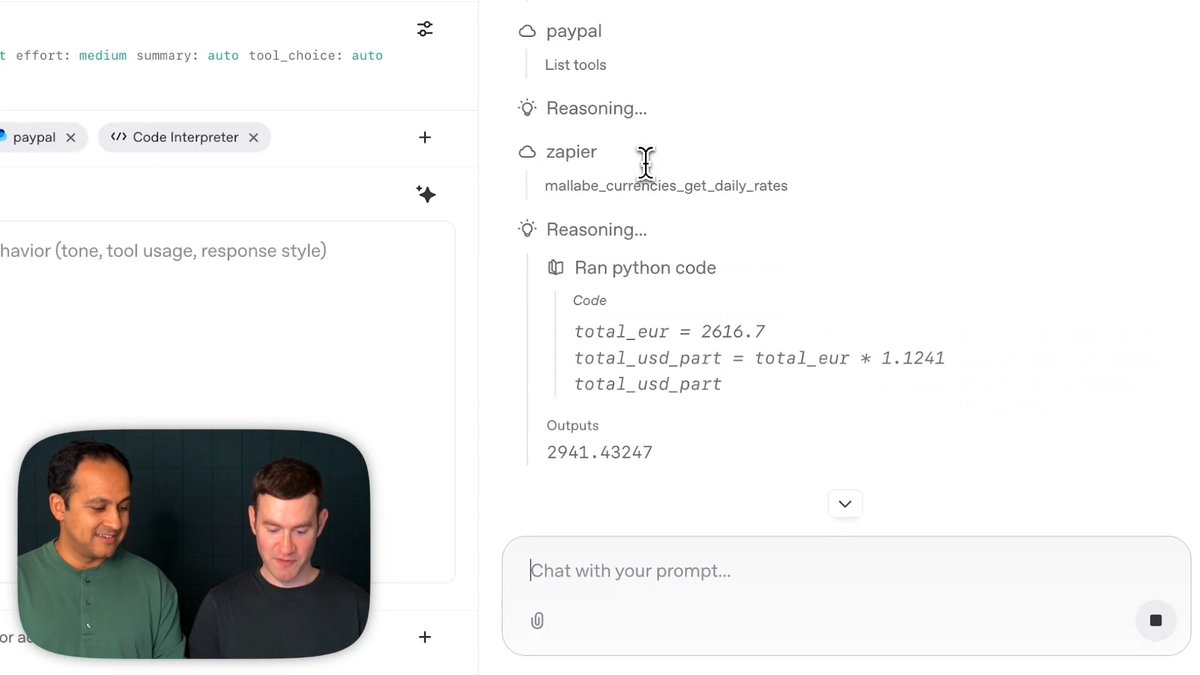
Evals now supports tool use. 🛠️ You can now use tools and Structured Outputs when completing eval runs, and evaluate tool calls based on the arguments passed and responses returned. This supports tools that are OpenAI-hosted, MCP, and non-hosted. Read more in our guides below.

65,080 просмотров • 1 год назад •via X (Twitter)

Комментарии: 11

Фото профиля OpenAI Developers
OpenAI Developers1 год назад

Web Search evaluation:

Фото профиля OpenAI Developers
OpenAI Developers1 год назад

Tools evaluation:

Фото профиля OpenAI Developers
OpenAI Developers1 год назад

Structured Outputs evaluation:

Фото профиля OpenAI Developers
OpenAI Developers1 год назад

MCP evaluation:

Фото профиля Matt Figdore
Matt Figdore2 лет назад

This is the biggest productivity cheat code right now. Kiss reading documents goodbye. You can get an instant summary of any document with this tool.

Фото профиля Opulent Byte
Opulent Byte1 год назад

When o3 pro? 🥲🫠

Фото профиля Brij Singh
Brij Singh1 год назад

this is good!

Фото профиля Cliffinkent 🇬🇧
Cliffinkent 🇬🇧1 год назад

You keep building and shipping!

Фото профиля Prashant
Prashant1 год назад

This just makes running evals so much easier. Thank you

Фото профиля Vishal
Vishal1 год назад

Tool support in Evals makes testing AI tools easier and improves accuracy.

Фото профиля Henkjan de Krijger
Henkjan de Krijger1 год назад

Does relying on eval tools hinder critical thinking in AI systems?

Похожие видео

10 agent evals every AI engineer should know 1) golden set a frozen set of cases you run after every prompt model or tool change use it as your baseline to see whether the system improved or quietly broke OpenAI Evals helps you build repeatable benchmark sets and compare model changes → 2) llm as judge a second model scores open ended answers against a written rubric use it when there is no exact output to compare against OpenEvals provides ready made evaluators for LLM applications → 3) rubric scoring score correctness tone safety and cost separately one quality number hides the problem DeepEval helps you create custom metrics and score every dimension independently → 4) trajectory eval grade the path the agent took not only the final answer AgentEvals checks agent actions decisions and tool calls across the full trajectory → 5) tool unit tests test every tool with fixed inputs and outputs no model in the loop MCP Inspector helps you inspect and test MCP servers tools and responses separately → 6) regression suite replay previous runs against every new prompt model or toolset then compare the results Promptfoo helps you run repeatable eval suites catch regressions and add checks to CI → 7) a b in prod split real traffic between two versions and compare actual outcomes GrowthBook provides feature flags controlled experiments and product analytics → 8) human review sample real runs and let a person grade them honestly use it to calibrate your automated judge Argilla helps teams collect human feedback review outputs and build better datasets → 9) shadow run let the candidate run on real traffic while its output is shown to nobody use it before a risky rollout Langfuse helps you trace production runs compare candidates and monitor eval results → 10) red team attack the system before somebody else does jailbreaks prompt injection data leaks and tool abuse Garak scans LLM systems for vulnerabilities and unsafe behavior → offline evals tell you it works online evals tell you it still works you probably do not need all ten today start with the two that would have caught your last outage bookmark this

elune

155,026 просмотров • 2 месяцев назад