正在加载视频...

视频加载失败

Experience instant code understanding with the Code Wiki public preview → Key features include: 🔄 Automatic updates after each change 🧠 Context-aware Gemini chat 📊 Auto-generated architecture diagrams

140,749 次观看 • 8 个月前 •via X (Twitter)

0 条评论

暂无评论

原始帖子的评论将显示在这里

相关视频

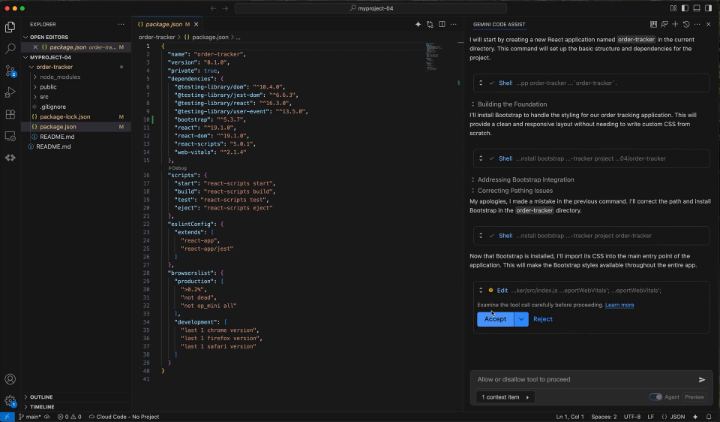
google just released 15 AI tools that are completely FREE and can save thousands of $$$ every single monthly. all open-source. MIT licensed. save this in your bookmark." 1️⃣ pomelli ( builds your entire brand identity from just your website URL, then generates on-brand social posts, campaigns, and images. a free jasper + a junior brand marketer. no watermark, no gen cap in beta. 2️⃣ stitch ( describe an interface, get production-ready HTML/CSS/Tailwind + a figma export. google's free figma killer. 350 designs a month without paying a cent. 3️⃣ opal ( build no-code AI mini-apps and multi-step workflows just by describing them in plain english. basically a free n8n with Gemini baked in. no usage caps. 4️⃣ antigravity ( agentic IDE that plans, edits across files, and builds full apps from a single prompt. the "cursor-killer," free tier runs Gemini 3 Pro + Claude Sonnet 4.5. 5️⃣ mixboard ( canva x pinterest for AI. generate and remix images into moodboards, then edit right on the canvas with plain language. free while in beta. 6️⃣ disco ( turns your messy open browser tabs into custom interactive AI apps. competitor tabs become a comparison matrix, travel tabs become an itinerary. zero code. 7️⃣ notebookLM ( upload PDFs, videos, and notes, get instant summaries, mind maps, quizzes, even a podcast of your own material. replaces notion AI + perplexity + readwise. 8️⃣ Learn Your Way ( turns any topic into a personalized, AI-built course. immersive text, audio lessons, mind maps, and quizzes adapted to how you actually learn. free tutoring. 🔟 Google AI Studio ( prototype and ship AI apps in seconds with a free API key and a 1M-token context window. replaces the openai playground + paid API credits. 1️⃣1️⃣ Jules ( assign it a github issue, it spins up a VM, writes a plan, makes the changes, and opens a PR. a free devin. 15 tasks a day. 1️⃣2️⃣ Gemini CLI ( claude-code in your terminal. reads your codebase, runs commands, ships PRs. genuinely open source (Apache 2.0) and free. 1️⃣3️⃣ Code Wiki ( point it at any public github repo, get a living, self-updating wiki with architecture diagrams and a Gemini chat, every section hyperlinked to the code. 1️⃣4️⃣ Firebase Studio ( AI cockpit for your backend and cloud logic. heads up: existing users only, google is winding it down, so don't start a new project here. 1️⃣5️⃣ Gemini Code Assist ( free github copilot: 180k code completions a month + AI code reviews in VS Code, JetBrains, and github. the free tier that actually out-specs copilot. Follow me and turn on 🔔 post notifications.

m0h

87,330 次观看 • 1 个月前

👀 I used OpenAI's Code Interpreter to make Flappy Bird 🐦in 7 minutes: Code Interpreter/GPT-4 for code generation. Pre-existing or AI-generated assets for graphics. --- Here's how to make the game in only 6 steps: (1): Enter the following prompt: "write p5.js code for Flappy Bird where you control a yellow bird continuously flying between a series of green pipes. The bird flaps every time you left click the mouse. If the bird falls to the ground or hits a pipe, you lose. This game goes on infinitely until you lose and you get points the further you go". (2): Use generative AI or existing game assets and spirits. I searched "flappy bird assets" on Google and used the first link, a GitHub repo with pngs from the original Flappy Bird. (3): Use this prompt to link assets to the code: "Please generate the entire file again based on the fact I'm using a unique background, spirits for the bird, and pipes. Here is the list of assets I'm using: [list of file names]." Code Interpreter should modify the code accordingly to include the list of file names. (4) Make an account OpenProcessing -> create a sketch -> paste in the code generated by Code Interpreter -> upload in-game assets from step (2). (5) (Optional) Ask ChatGPT to make changes to improve the in-game experience e.g., adding a high score, restarting the game when the bird dies, etc. Copy the new code into your OpenProcessing sketch and reload the game. (6) If something doesn't work, ask GPT4 to fix it. Copy and paste the error message and ask it to regenerate the code. --- Bonus Tips: - Iteratively test code. Each time you make a change using Code Interpreter, test the updated code by playing the game so you catch new bugs early. - Learn programming by asking questions: "Act as a senior programmer very good at explaining concepts to a beginner. Tell me how gravity works in this game and how you used code to make this happen."Code Interpreter/GPT4 for code generation. Download Pre-existing assets or generate new images for graphics. Excited to see what you make!

Alex Ker 🔭

739,874 次观看 • 3 年前