正在加载视频...

视频加载失败

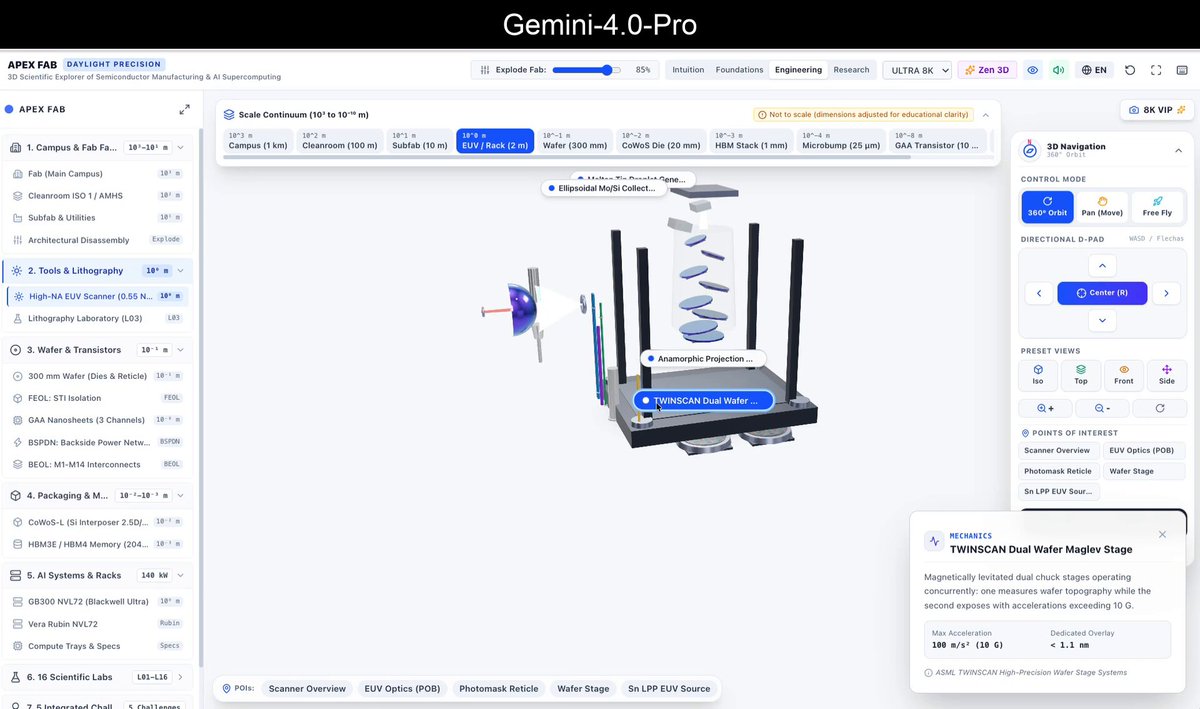
Fable 5 just dropped and someone already built a $10k-looking website with it. Here's the full workflow The smooth scrolling, the animations, the transitions, all built with Fable 5. Here's how to get the same result instead of a generic template. 1. Steal a direction first. Go to Mobbin...

72,175 次观看 • 3 个月前 •via X (Twitter)

0 条评论

暂无评论

原始帖子的评论将显示在这里

相关视频

Claude Fable 5 + Claude Design is f*cking insane 🤯 Anthropic just dropped its most intelligent model ever, and the first thing I pointed it at was email design. I built a complete email campaign design in Claude Design, and the difference is night and day: tighter layouts, cleaner hierarchy, on-brand from the first generation. All inside Claude Design with Fable 5. Perfect for DTC brands and agencies who are still paying email agencies $3-5K/month for campaign designs that take 2 weeks to ship. If your campaign calendar is packed but every new email means briefing a designer, waiting on mockups, sending notes, and waiting again... This workflow eliminates the entire bottleneck: → Load your brand design system into Claude Design once (colors, fonts, logo, button styling) → Switch the model to Claude Fable 5 — Anthropic's new state-of-the-art model with the best vision of any AI → Prompt the campaign email section by section: header, hero, headline, offer block, CTA → Fable 5 nails layout and brand details that older models fumbled → Iterate inline — swap images, adjust styling, color-pick directly in the canvas → Export the finished email and hand off to your ESP No briefing a designer. No 2-week turnaround on a single campaign. No paying an agency $4K/month for 4 emails. What you get: → Campaign emails designed in minutes, not weeks → A reusable design system every new email pulls from automatically → Noticeably smarter design decisions from Fable 5's upgraded vision → Full inline editing before anything touches your ESP Built 100% with Claude Design + Claude Fable 5. I recorded a full walkthrough showing exactly how this works. Want it for free? > Like this post > Comment "FABLE" And I'll send it over (must be following so I can DM)

Mike Futia

43,379 次观看 • 4 个月前

FABLE 5 + HIGGSFIELD CAN BUILD A $35,000 ANIMATED WEBSITE. IN ONE AGENTIC SESSION. FOR ~$12 IN CREDITS. stop paying a web studio $6,000-$35,000. stop wiring GSAP, Lenis, and frame extraction by hand. Claude Code writes it. Higgsfield renders it. WHAT THE BUILD PRODUCES: → a fully animated, scroll-driven site → cinematic motion clips from 30+ generative models → GSAP ScrollTrigger timelines - zero hand-coded keyframes → Lenis smooth-scroll, tuned pacing → automated frame extraction + asset optimization → six cinematic effects baked in: film grain, particles, vignette, glass cards, color tints, scroll pacing → responsive layout + copy THE STACK: → Claude Code - concept, scaffolding, scroll code, QA → Higgsfield (MCP) - hero clips, transitions, ambient loops, thumbnails → GSAP + Lenis - the motion layer, written for you CONNECT HIGGSFIELD (MCP): add it as a custom connector in Claude Code: mcp_servers: higgsfield: url: " one OAuth flow. done. now Claude can generate and pull clips directly - no manual exporting. WHAT TO PROMPT: concept + scroll: "read this brief, script the scroll - what the visitor feels at second 3, 15, 40. scaffold the site with GSAP ScrollTrigger + Lenis." motion assets: "generate the hero sting and one b-roll clip per section from the story. 3–5s, high-res." polish pass: "bake in film grain, particles, vignette, glass cards, color tints, scroll pacing. no config." QA: "check load speed, mobile breakpoints, and whether the scroll actually lands. rewrite whatever doesn't." WHAT THIS REPLACES: → web studio build: $6,000-$35,000+ → motion artist: $800-2,000/project → front-end dev: $2,000-10,000/project → weeks of handoffs: gone Fable 5 + Higgsfield: a subscription + a few dollars of credits. one session. SETUP IN 10 MINUTES: - install Claude Code - add the Higgsfield MCP + authenticate - drop your brief + references - let it scaffold, generate, and animate in one pass - preview, send fixes in plain English, ship the pipeline was the moat. it just became a prompt. Follow me, comment "WEB" and I'll send you the full step-by-step Playbook. full breakdown in the article 👇

ZEUS⚡️

570,189 次观看 • 3 个月前

FABLE 5 + HIGGSFIELD TURN A $35,000 ANIMATED SITE INTO A ONE-SESSION, $12 BUILD. HERE'S EXACTLY HOW. a studio runs this across four people and three weeks. you run it across one chat window and one afternoon. THE BUILD, STAGE BY STAGE: STAGE 1 - THE CONCEPT Claude reads your brief and scripts the scroll before a line of code exists - what the visitor feels at second 3, 15, 40. prompt: "read this brief. script the scroll beat by beat, then scaffold the project with GSAP ScrollTrigger + Lenis." STAGE 2 - THE VISUALS (Higgsfield) every hero shot, transition, and ambient loop comes out of 30+ generative models - matched to the story, not pulled from a stock library. prompt: "generate the hero sting and one b-roll clip per section. 3-5s, high-res, cinematic." STAGE 3 - THE MOTION (Claude Code) Claude writes the ScrollTrigger timelines and Lenis smooth-scroll, extracts frames, optimizes every asset. zero hand-coded keyframes. prompt: "wire the scroll: pin the hero, scrub the video, reveal each section on scroll. keep it 60fps on mobile." STAGE 4 - THE POLISH six cinematic effects baked in, no config: film grain, particles, vignette, glass cards, color tints, scroll pacing. prompt: "bake in the cinematic layer, then QA load speed, mobile breakpoints, and whether the scroll actually lands - rewrite what doesn't." CONNECT HIGGSFIELD (MCP): add it as a custom connector in Claude Code: mcp_servers: higgsfield: url: " one OAuth flow. Claude generates and pulls clips directly - no exporting by hand. THE MATH: → what a studio charges: $6,000-$35,000+ → what it costs you: a Claude sub + a few dollars of Higgsfield credits → what it takes: 4 people + 3 weeks → 1 operator + 1 session the pipeline was the moat. it just became four prompts. Follow me, comment "MATH" and I'll send you the full step-by-step Playbook. full breakdown in the article 👇

ZEUS⚡️

47,174 次观看 • 2 个月前

FABLE 5 + HIGGSFIELD JUST KILLED THE $35,000 WEB STUDIO. WEEKS AND A TEAM OF FOUR → ONE SESSION, $12. stop paying a studio $6,000-$35,000. stop wiring GSAP, Lenis, and frame extraction by hand. Claude Code writes it. Higgsfield renders it. WHAT SHIPS OUT OF ONE SESSION: → a fully animated, scroll-driven site → cinematic motion clips from 30+ generative models → GSAP ScrollTrigger timelines - zero hand-coded keyframes → Lenis smooth-scroll, tuned pacing → automated frame extraction + asset optimization → six cinematic effects, no config: film grain, particles, vignette, glass cards, color tints, scroll pacing → responsive layout + copy THE STACK: → Claude Code - concept, scaffolding, scroll code, QA → Higgsfield (MCP) - hero clips, transitions, ambient loops, thumbnails → GSAP + Lenis - the motion layer, written for you CONNECT HIGGSFIELD (MCP): add it as a custom connector in Claude Code: - mcp_servers: - higgsfield: - url: " one OAuth flow. done. now Claude generates and pulls clips directly - no manual exporting. WHAT TO PROMPT: concept + scroll: "read this brief, script the scroll - what the visitor feels at second 3, 15, 40. scaffold with GSAP ScrollTrigger + Lenis." motion assets: "generate the hero sting and one b-roll clip per section. 3-5s, high-res." polish pass: "bake in film grain, particles, vignette, glass cards, color tints, scroll pacing. no config." QA: "check load speed, mobile breakpoints, and whether the scroll actually lands. rewrite whatever doesn't." WHAT THIS REPLACES: → web studio build: $6,000-$35,000+ → motion artist: $800-2,000/project → front-end dev: $2,000-10,000/project → weeks of handoffs: gone Fable 5 + Higgsfield: a subscription + a few dollars of credits. one session. SETUP IN 10 MINUTES: - install Claude Code - add the Higgsfield MCP + authenticate - drop your brief + references let it scaffold, generate, and animate in one pass preview, send fixes in plain English, ship the pipeline was the moat. it just became a prompt. Follow me, comment "PAGE" and I'll send you the full step-by-step Playbook. full breakdown in the article 👇

ZEUS⚡️

27,102 次观看 • 2 个月前

Claude Code tip: if Opus 5.5 is already your main model, Fable 5.1 has been sitting idle this whole time. wire it in with /advisor start it with /advisor fable Opus 5.5 writes every line. Fable 5.1 reads the whole session, every tool call, and says nothing until one of three moments: → a plan gets proposed: is this actually the right move, or just the first one? → the same error comes back twice: is the search stuck, or is this a dead end? → the task gets marked done: what got missed while it was moving fast? Opus 5.5 ships. Fable 5.1 catches what would've shipped broken. Jev engineering makes the same move one layer down: forks that don't need a real thinker, which file, which tool, retry or give up, get routed to Jev and answered in under half a second. the expensive model only ever sees the forks that genuinely split. the tree this runs on: > Opus 5.5, high effort, owns the main session > explorer, medium effort, reads the code > worker, medium effort, edits and runs tests > researcher, medium effort, pulls the docs > Fable 5.1 outside all of it, on call, never writing a line itself drop the tree and this prompt into Claude Code: "Rebuild my Claude Code setup around this tree: 1. Look in ~/.claude/agents and .claude/agents for subagents that already cover explorer, worker and researcher. Draft new ones only for roles that are missing. Set each to model: opus, effort: medium. If an existing subagent is pinned to a different model, list it, don't touch it. 2. Set the main session's effortLevel to high in ~/.claude/settings.json, and set advisorModel to fable. 3. Check for anything disabling the advisor: CLAUDE_CODE_DISABLE_ADVISOR_TOOL, DISABLE_TELEMETRY, any variable blocking feature-flag fetches, and CLAUDE_CODE_EFFORT_LEVEL, which overrides subagent effort. Report what you find. Change nothing yet. 4. Add one line to ~/.claude/CLAUDE.md: consult the advisor before a large plan, when an error repeats, and before marking a long task done. Show every change as a diff first. Don't touch anything until I say go."

Ryven

35,757 次观看 • 10 天前

HIGGSFIELD + FABLE 5 MADE A SITE THAT LOOKS LIKE A $35,000 STUDIO JOB FOR $12. NOBODY'S CLOCKED IT YET. the cheap giveaway of an AI-built site is always the same: stocky visuals, dead scroll, zero polish. this skips all three. what actually makes it read as $35k: → REAL MOTION, NOT STOCK the clips come from 30+ generative models, matched to your story - not the same three stock loops everyone's already seen. → SCROLL WITH WEIGHT GSAP ScrollTrigger + Lenis give it pacing and feel - pinned sections, scrubbed video, reveals that land. this is the thing that makes expensive sites feel expensive. → THE CINEMATIC LAYER film grain, particles, vignette, glass cards, color tints - baked in, no config. it's the polish agencies charge a designer for. → TASTE IS THE INPUT the AI executes; you direct. point real judgment at the stack and it ships premium. point lazy prompts at it and yeah - you get slop. that part's on you. CONNECT HIGGSFIELD (MCP): add it as a custom connector in Claude Code: - mcp_servers: - higgsfield: - url: " one OAuth flow. Claude generates and pulls clips directly - no exporting by hand. THE MATH: → what a studio charges: $6,000-$35,000+ → what it costs you: a Claude sub + a few dollars of Higgsfield credits → what it takes: 4 people + 3 weeks → 1 operator + 1 session the tools were never the bottleneck. taste was. now taste is the only input left. Follow me, reply "LAUNCH" and I'll send you the full step-by-step Playbook. full breakdown in the article 👇

ZEUS⚡️

80,973 次观看 • 2 个月前

everyone's sharing motion graphic videos that Opus 5.5 made, and it's genuinely insane everyone says they created it with "one prompt", but my one prompt video looked mid so i went through a bunch of these videos to see how they were actually made, and found the workflow that works here's how to generate pro level motion graphic videos w/ opus: 1. get reference videos to direct from -> pick 1-2 videos whose style you want and tell opus to match them. naming a style works way better than describing one without a reference, opus falls back to its default look: centered text, gradient background, everything fading in that's why so many of these videos look the same. a reference gives it the pacing, the type and the transitions to copy 2. install HyperFrames or Remotion so opus can build the video both let opus write every scene as code and render it straight to mp4. no video editor without one, opus can only describe a video or hand you a rough html page you have to screen record with it, every frame is exact, and when you ask for a change it edits one line and re-renders instead of starting over 3. install 21st for high quality components in the video real buttons, cards and UI components made by design engineers, instead of whatever opus invents on the spot without it, opus draws your product UI from scratch and it looks off. wrong spacing, placeholder boxes, fake-looking buttons anyone who's used good software can feel it in a second, and the whole video reads as cheap 4. steps 1-3 were context + setup. now dump all of it into opus your brand (logo, colors, fonts), screenshots of your real product, the reference video, and a quick braindump of how you see the video then ask for 3 storyboard variants without this, opus guesses your colors, your font and what your product even does. the video could be for any startup with it, it could only be yours. and 3 variants means you pick a direction instead of fixing the first idea it had 5. pick the storyboard you like ask for one still frame per scene before anything moves. fixing a storyboard is way cheaper than fixing a render without this step, you only find out scene 4 is wrong after the whole thing is animated, and every fix means re-rendering. a still frame takes seconds to change 6. let claude cook then give notes like a director: "slow every zoom to 0.7x", "hard cut here", "push in on the button" without notes, the first render is usually 80% there, and that last 20% is what makes it look pro. vague notes like "make it better" get random changes. camera words get exactly the change you want everyone has the same model. the context you give it is what makes it look pro let it cooookk

Rexan Wong

632,836 次观看 • 15 天前