Loading video...

Video Failed to Load

Go Home

Forget Muse. Forget Instinct. The real move is OpenMuse + Jev 🤯 OpenMuse is the open-source personal agent that dropped last week. Its own browser, your apps, actually does things for you. You host it yourself. But the routing is the real unlock. Jev picks the best model for...

13,590 views • 1 day ago •via X (Twitter)

2 Comments

Mira Synth Tech's profile picture
Mira Synth Tech1 day ago

Love the model routing idea, super efficient setup

Tomasz Wojewoda's profile picture
Tomasz Wojewoda20 hours ago

Seems like a context and cache mess. Are you sure?

Related Videos

Jev + Opus 5.5: Anthropic's new model beats GPT-6 Astra for 1/5 the cost, and 4 API changes will 400 your agent before it writes a single line I pulled these 10 steps from the migration docs so you don't learn them in production step 1 → $4 / $20 per 1M. Opus 5 was $5 / $25. cache reads dropped from $0.50 to $0.20 step 2 → 66.4% on Terminal-Bench 4.0 vs GPT-6 Astra 57.9% and Opus 5 52.3%. +14.1 points in one release, and on FrontierCode it beats Astra at default effort for 1/5 the cost step 3 → thinking can't be turned off anymore. send thinking: disabled and you get a 400. drop the field, set effort step 4 → tool_choice any and tool are gone. 400. switch to auto + strict step 5 → edit anything above a thinking block and the request dies. append only, or opt into drop_block step 6 → computer_20251124 is dead on the API. 400. move to computer_toolset_20260801 step 7 → the quiet one: default effort fell from high to medium. your agent thinks less than you set it up to and nothing tells you step 8 → hop Opus 5.5 → Sonnet 5 → Opus 5.5 and you pay 4.36 instead of 3.32. +31%, the cache dies and Sonnet can't read Opus's reasoning step 9 → change effort at the top of the request and the cache is gone. Jev sets it per message and the cache stays step 10 → switch fast - standard mid-session and it's a full cache miss. Jev picks speed once, on turn one one model, three knobs, zero 400s. that is Jev + Opus 5.5 send this to your Claude Code before you touch the model ID, then read my full Jev deep dive in the article below ↓

Carnage

16,674 views • 6 days ago

this video is the CLEAREST explanation of how claude skills + AI agents work and how to use them most people set up an AI agent and wonder why it keeps disappointing them. the context window is everything context is what the model assembles before it takes any action. think of it like everything the agent needs to read before it does anything. the quality of what goes in determines the quality of what comes out. the models are genuinely really good right now. claude and gpt are exceptional. the variable is almost always the context you give them. 1. agent.md files are mostly unnecessary every single line you put in an agent.md file gets added to every single conversation you have with your agent. a 1000 line file is around 7000 tokens burning on every run. the model already knows to use react. it can read your codebase. save the agent.md for proprietary information specific to your company that the model genuinely cannot know on its own. 2. skills are the actual unlock a skill.md file works differently. what loads into context is only the name and description, around 50 tokens. the full instructions only appear when the agent recognizes it needs that skill. so instead of 7000 tokens on every run you have 50. and the agent stays sharp because the context window stays lean. the closer you get to filling the context window the worse the agent performs, same way you perform worse when someone dumps 10 things on you at once. 3. here is how to actually build a skill the right way most people identify a workflow and immediately try to write the skill. what you want to do instead is run the workflow by hand with the agent first. walk it through every single step. tell it what to check, what good looks like, what bad looks like. correct it in real time. once you have had a full successful run from start to finish, tell the agent to review everything it just did and write the skill itself. it writes a better skill than you will because it has the full context of what actually worked in practice not in theory. 4. recursively building skills is how you go from frustrated to reliable when the skill breaks, and it will break, ask the agent exactly why it failed. it will tell you specifically what went wrong. fix it together in that same conversation. then tell it to update the skill file so that failure mode never happens again. ross mike did this five times with his youtube report generator. it now pulls from eight different data sources and runs flawlessly every single time without him touching it. 5. sub agents are something you earn not something you set up on day one start with one agent. build one workflow. turn it into one skill. once that works add another. ross mike has five sub agents now covering marketing, business, personal and more. it took months to get there and every single one exists because a workflow proved it deserved to exist. the people who set up 15 sub agents on day one and wonder why nothing works skipped all the steps that make the thing actually run. 6. your workflow is the thing the model cannot get anywhere else the model has been trained on everything. it knows more than you about most things. what it does not have is your specific process, your taste, your way of doing things. that is what skills capture. that is what makes your agent actually useful versus a generic one. downloading someone else's skill means downloading their context onto your setup and it will not work the way you want it to because it was never built around how you work. this is the clearest explanation of how agents actually work i have heard. Micky runs this stuff every single day and the results show it. full episode is now live on The Startup Ideas Podcast (SIP) 🧃 where you get your pods people charge for this sorta stuff i give away the sauce for free i just want you to win watch

GREG ISENBERG

194,524 views • 5 months ago

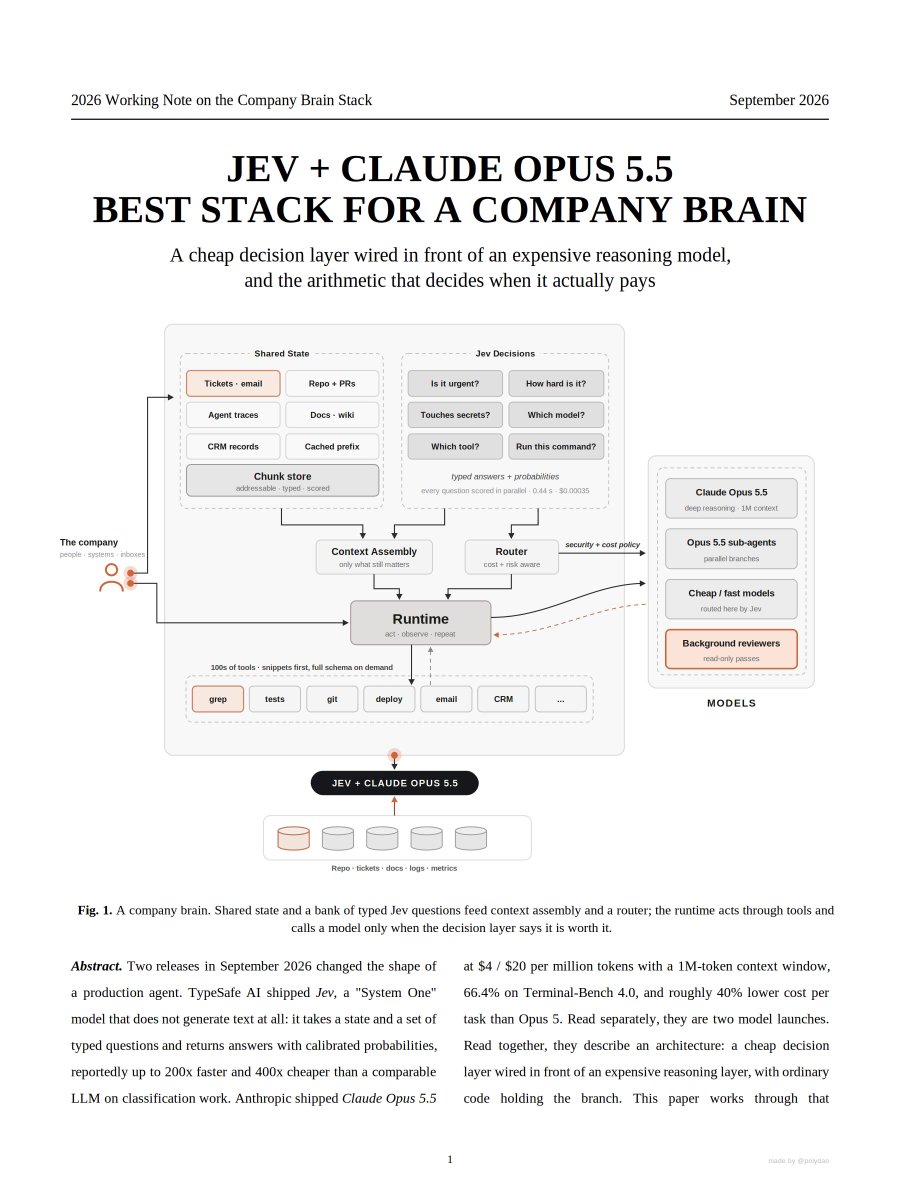
JEV + OPUS 5.5 IS INSANE FOR BUILDING A COMPANY BRAIN I pulled the whole architecture out of the TypeSafe and Anthropic docs and packed it into a 14-page PDF the 10 steps: 1. meet the pair > Opus 5.5 thinks, Jev decides, your code holds the branch 2. stop asking a text generator for a yes or no > Jev returns a typed answer with a calibrated probability in 0.44s for $0.00035 3. ask everything at once > Choice, Score and Noul run in parallel, so the fourth question costs almost nothing 4. branch on the number > 0.999 goes straight into the if statement. ~99% of turns end right here 5. stop routing blind > Opus 5.5 to Sonnet and back costs 5.84 against 3.32 for staying on 5.5 6. keep one context warm > cache reads at $0.20 per Mtok are 20x cheaper than a fresh load 7. escalate the hard part > the toughest 1% goes to Opus 5.5 with 1M context and 66.4% on Terminal-Bench 4.0 8. score every chunk on every query > keep whole, summarize or drop. the context gets rebuilt each turn 9. gate the actual command > every bash call gets classified before it runs, inside your own code 10. judge 100% of runs > $3.50 a day for 10,000 traces, and it matched the human label on all 500 decisions the result: a while loop that paid a frontier model for every tiny call turns into a brain that spends a fraction of a cent to notice and pays properly only when it has to think the person who brings this into their team walks into the budget meeting with the AI bill cut and the output up the PDF maps the company brain. the loop side of it - how Jev takes a Claude bill from $765 to $3 a month - is in the article below ↓

Mr. Buzzoni

78,127 views • 1 day ago

How to cut your AI bill by 60% switching to Opus 5.5: Most people will swap the model name, save 24%, and stop there. The other 37% is sitting in your settings. Here's the real before and after on an example agent workload. One month: 100M input tokens (80M cached reads, 5M cache writes, 15M uncached) 10M output tokens BEFORE: Opus 5 Cache reads: 80M × $0.50 = $40 Cache writes: 5M × $6.25 = $31.25 Uncached input: 15M × $5 = $75 Output: 10M × $25 = $250 Total: $396.25 STEP 1. Just switch the model. Same tokens, new prices. Cache reads $0.20. Writes $5. Input $4. Output $20. $16 + $25 + $60 + $200 = $301 24% cheaper. That's what everyone's screenshotting. STEP 2. Let it write less. Box measured Opus 5.5 at 40% less verbose with no drop in accuracy. 10M output tokens becomes 6M. Output drops from $200 to $120. Total: $221. Now you're at 44% off. STEP 3. Stop running every call at max effort. Thinking can't be switched off on 5.5 anymore, so effort is your lever. Classifying, routing, formatting, summarizing? Drop the effort. Save the high settings for the calls that actually reason. Say that trims output another 25%, 6M down to 4.5M. Output: $90. Total: $191. 52% off. STEP 4. Cache the stuff you keep resending. This is the one nobody does. Cache reads went from $0.50 to $0.20. That's 60% off the cheapest line on your bill. Move your system prompt, tool definitions and repo context into the cache. Uncached input drops from 15M to 5M, cache reads go up to 90M. $18 + $25 + $20 + $90 = $153 AFTER: $153 From $396.25. 61% cheaper. Same work. The model gave you 24%. You gave yourself the other 37%. Anthropic's own number is 40% cheaper than Opus 5 on typical workloads. Your number depends on how much of your bill is output and how much of your prompt you're resending uncached every call. So check those two first. Bookmark this for when you migrate. follow CyrilXBT

CyrilXBT

15,803 views • 6 days ago