Video yükleniyor...
Video Yüklenemedi
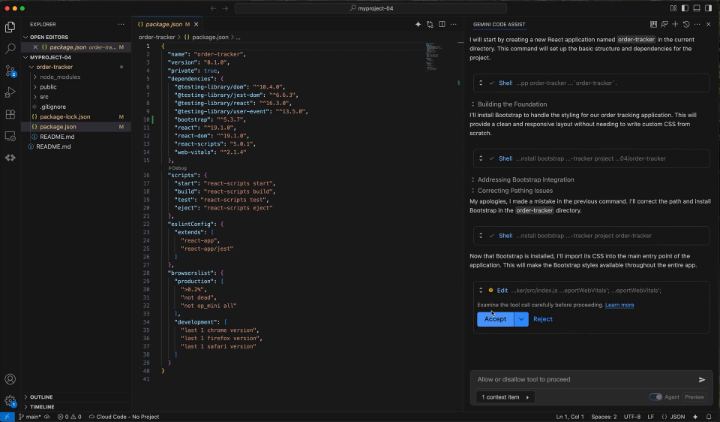
Friendly reminder that Gemini has a free alternative to Cursor You can install Gemini Code Assist at no cost directly in VS Code just by using your Google account: → Gemini 2.5 → 240 chat requests DAILY → 180,000 completions /month (Setup below)

591,138 görüntüleme • 1 yıl önce •via X (Twitter)
11 Yorum

Here are the quick steps: 1. Open the extensions menu in VS Code (Also works in Android Studio / JetBrains IDEs) 2. Search for "Gemini Code Assist" and install it 3. Connect to your personal Google account You're ready to use it!
Official documentation:

Scan any documents, convert images into text, PDF files, etc. 👍

You should mention how to turn on the new insider build Agent mode - makes it so much better 🔥🔥
Dang you're right! It's in the documentation but a bit buried... I should have added a video. This agent mode is basically a UI for Gemini CLI but works really well.

The Gemini CLI user agreement states they use your requests for training. That is a hard no for any business with proprietary code. Cursor doesn’t do this. It’s with the cost just for that.
Important to mention, you're right. I don't mind on my side since I don't have sensitive info in 90% of my projects.

Why use Cursor when you can use Gemini? At least there are no surprises on the prices haha
Yeah... That's very well said 😂

Compared to Claude Code my Gemini is a snail. A slow snail too :) It’s painfully slow to read files, etc. forget about statistical analysis. Every time you post, I go check it out…but nothing compares to Claude Code right now. Are you not seeing the same thing?
I think it mostly depends on your use cases and how you work. In my case Gemini CLI is more suitable than Claude Code for example. Way more versatile.



![Gemini skills in Chrome are insanely powerful?! You can just write instructions and Gemini will be able to take any action over and over. 1. Create by typing "/" in the Gemini panel 2. Write your instructions 3. Type "/[skill-name]" And Gemini will automatically work for you by using the skill. So you can leverage it to - Scrap information - Take action in a specific web app - Anything you can perform in a browser basically Keep in mind that you can even use your emails or your Google account as a context... Which can be VERY useful.](https://image.24vids.com/tw-2049235954184135154/amplify_video_thumb/2049234300302733313/img/mjmU5YeeOFBcxPQC.jpg)


