Загрузка видео...
Не удалось загрузить видео
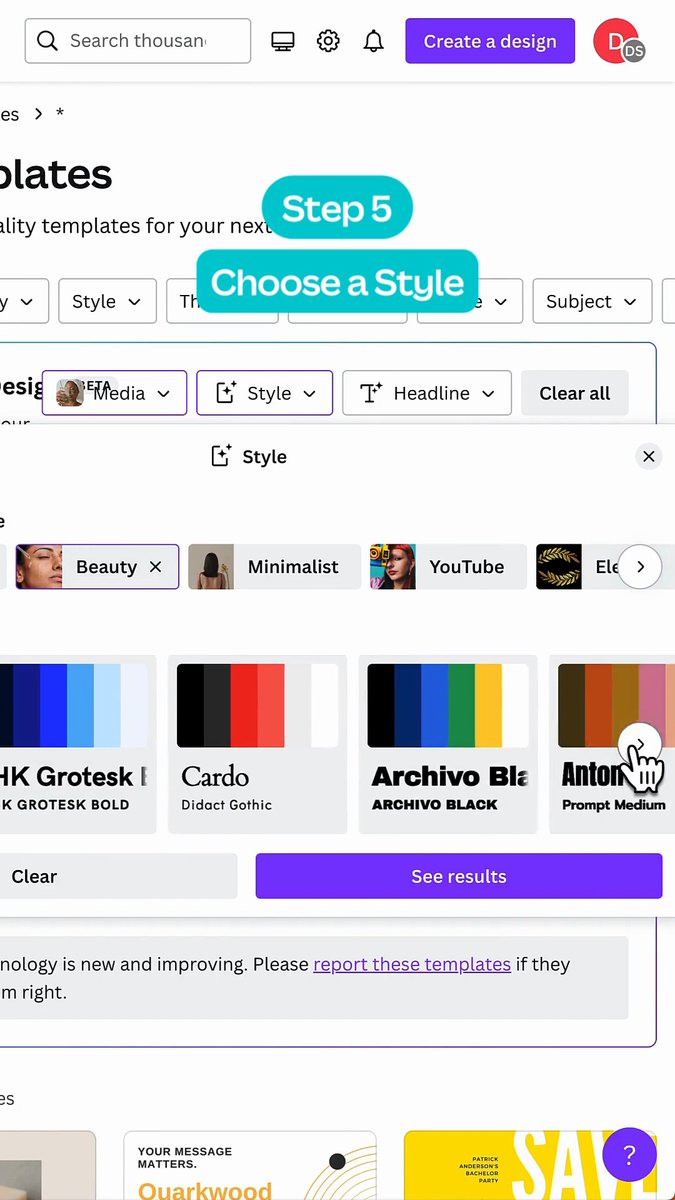
Have an idea but need help getting started? Use templates for popular image formats like posters or merch, then add your message, design elements, or style to make it your own.
248,406 просмотров • 23 дней назад •via X (Twitter)
Комментарии: 12

Some ideas are easier to draw than describe. Use Sketch to draw right in ChatGPT and show it exactly what you have in mind. Just type “@ Sketch” in ChatGPT.
ChatGPT Images 2.5—faster, sharper, smarter, with better tools for creating whatever you can dream of. - Faster image generation to keep your ideas flowing - Improved fidelity for more natural, recognizable images - Consistent details across multiple edits - Comment-based edits to change only what you want
ChatGPT Images 2.5 is rolling out today to all ChatGPT, ChatGPT Work, and Codex users across desktop, mobile, and web. We’re also introducing two new models in the API: GPT-Image-2.5 Flare brings the same quality, editing, and speed improvements, while GPT-Image-2.5 Sunburst adds precision for detailed creative work, with longer generation times.

Okay this is great , please let’s get started with video generation…can’t wait 🥰🥰🥰😎😎😎

Templates are useful for getting past the blank canvas, especially when the goal is to customize rather than design everything from scratch.

WOW

what they said: use templates for popular image formats what they meant: we are too broke to hire a designer

Correct me if I'm wrong, but from my understanding, if you create the logo of your brand using this (like in the example) you won't be able to copyright it and that's something very essential for a brand's logo.

Boss mode activated!

obliterated Canva in one stroke

The Death of Canva is near

👇?