Video yükleniyor...

Video Yüklenemedi

Ana Sayfaya Dön

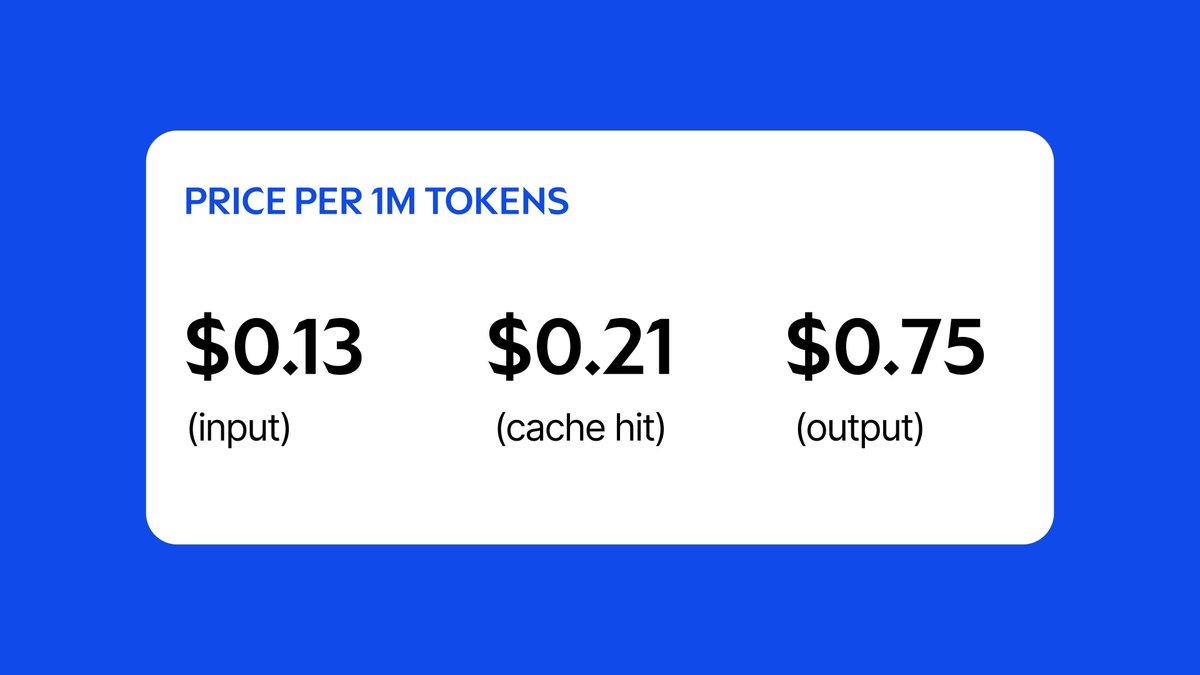
instead of generating text, jev from TypeSafe AI generates structured output this makes it great for classification tasks like model routing, tool selection/search, and guardrails of many forms! it's also ridiculously fast and cheap compared to LLMs doing the same tasks

52,876 görüntüleme • 1 ay önce •via X (Twitter)

0 Yorum

Yorum bulunmuyor

Orijinal gönderinin yorumları burada görünecek

Benzer Videolar

Jev + SERV is actually insane. We already showed you can increase Jev's performance with SERV Reasoning. Now we're taking it further, bringing Jev-powered Decision nodes into Graph Sharding with the upcoming SERV v3. Here's a breakdown of how it works: Jev is a decision-making model. Given a task and a set of options, it predicts which path is more likely. Think of the octopus that predicted World Cup results. Jev does that for your business, except it's not luck. It weighs every option and tells you how sure it is. It does this by assigning probabilities to outcomes. It doesn't generate text on its own, so you can't expect it to create a new outcome for you. But that's also what enables it to be lightning fast and dirt cheap. For example, in customer service you can ask Jev how to triage an incoming query and route it to the correct department. It can only select from the list of departments you provide it. This also means it can't hallucinate a new outcome outside the options it's given, which makes it incredibly interesting for OpenServ. In Graph Sharding, we take a single system prompt and break it down into multiple LLM steps with deterministic input and output shapes. Some of these steps require an LLM to produce new output, while others are simply decision routers that determine the next possible path. Traditionally, LLMs are slow and expensive. Breaking a single prompt into multiple steps increases accuracy and reliability by a ton, but it also introduces latency. Jev takes on those decision nodes, which are the backbone of a business process and therefore SERV graphs, and makes them super consistent and lightning fast, lowering the overall cost and latency of graph execution. SERV Reasoning on its own is a great force multiplier for Jev because, like all other models, it works by interpreting input instructions. The clearer those instructions are, the better the model performs. That's where SERV Reasoning comes into play. Just like amplifying any other model, we also amplify the accuracy and consistency of Jev's responses. And now we're bringing Jev-powered Decision nodes into Graph Sharding with SERV v3.

Armagan Amcalar

366,601 görüntüleme • 1 ay önce

Boom! Grok Tasks Make It One Of The Most POWERFUL Real-Time AI Systems In The World. — My How to Use Grok Tasks With Hidden Tools For Powerful Daily Output. Grok Tasks are customizable AI workflows that integrate a variety of tools to streamline daily activities, from research and analysis to creative planning and problem-solving. I have been using them for quite sometime and because of the vital heartbeat of news and first person data on X, it is the most powerful AI platform available. By combining Tasks with tools like web searches, X platform interactions, code execution, and media viewers, you can build efficient, automated processes. These tasks work by prompting Grok with a clear description of what you want to achieve, and Grok will intelligently call the necessary tools in sequence or parallel to deliver results. Here's a step-by-step guide to creating and using Grok Tasks: Step 1: Define Your Task Start by clearly outlining the daily activity or goal. Consider what inputs you have (e.g., a URL, a query, or an attachment) and what output you need (e.g., a summary, calculation, or visual analysis). Break it down into subtasks to identify tool needs. For example, if your task involves researching current events, note that you'll need search and browsing capabilities. Step 2: Review Available Tools Familiarize yourself with the tools Grok can access. Here's a quick overview: - Code Execution: Run Python code for calculations, data processing, or simulations using libraries like numpy, pandas, or sympy. - Browse Page: Fetch and summarize content from any website URL with custom instructions. - Web Search: Perform general internet searches, returning results with optional operators like site:. - Web Search With Snippets: Get quick, detailed excerpts from search results for fact-checking. - X Keyword Search: Advanced search for X posts using operators like from:, since:, or filter:. - X Semantic Search: Find semantically related X posts based on a query, with filters for dates or users. - X User Search: Locate X users by name or handle. - X Thread Fetch: Retrieve a full X post thread, including context like replies and parents. - View Image: Analyze an image from a URL or conversation ID. - View X Video: Extract frames and subtitles from an X-hosted video. - Search PDF Attachment: Query a PDF file for relevant pages using keyword or regex modes. - Browse PDF Attachment: View specific pages of a PDF with text and screenshots. Select tools that align with your task. Aim for a mix to handle data gathering, processing, and visualization. Step 3: Craft Your Prompt Write a detailed prompt to Grok describing the task. Include: - The overall goal. - Specific steps or subtasks. - References to tools if you want to guide the process (e.g., "Use web_search to find sources, then code_execution to analyze data"). - Any constraints, like dates or limits. Example prompt: "Create a Grok Task for my morning routine: Search recent X posts about tech news using x_keyword_search, fetch a key thread with x_thread_fetch, and summarize with browse_page on linked articles." Step 4: Submit and Interact Send your prompt to Grok. It will process the task by calling tools as needed, often in parallel for efficiency. Review the output and refine with follow-up prompts if required (e.g., "Expand on that using view_image for visuals"). Iterate to fine-tune the workflow for reuse. Step 5: Save and Reuse Once refined, note the prompt as a template for future use. You can adapt it for similar tasks, making Grok Tasks a habitual part of your day. Finding Grok Tasks To discover existing Grok Tasks or inspiration for new ones, use X searches with tools like x_keyword_search or x_semantic_search (e.g., query: "Grok Tasks examples" with mode: Latest). Browse community-shared threads via x_thread_fetch, or web_search for tutorials on xAI features. Prompt Grok directly: "Show me popular Grok Tasks for productivity." 1 of 3

Brian Roemmele

152,242 görüntüleme • 10 ay önce

Jev dropped and people immediately started doing stupid sh*t with it people gave this thing trading bots, browsers, Doom, drones, dinosaurs and tax forms and basically said: “you decide.” here’s what happened: > jev-trader Jev gets a new Monad block every ~300ms and decides whether to place a live limit order. no essay. just the decision. 1,911 stars ▸ ⁠ > jev-ultrafast a browser agent where Jev decides every click. the text model only wakes up when something actually needs to be written. 16,758 stars ▸ ⁠ > jev-doom-agent someone compiled actual Chocolate Doom to WebAssembly and let Jev make the tactical decisions every frame. yes. Doom. ▸ ⁠ > jev-t-rex-runner remember that stupid Chrome dinosaur? now Jev plays it. jump → duck → run → repeat ▸ ⁠ > typesafe-chess Jev went against a real chess search engine. two games. colors swapped. the search engine won both — and overruled Jev’s first instinct on roughly half the moves. ▸ ⁠ > jev-drone camera → Jev → drone. a simulated quadrotor has to clear five stations while Jev looks at the situation twice a second and decides what happens next. ▸ ⁠ > tax-doc-classifier then someone gave it IRS forms. 261 documents. 100% strict accuracy. roughly $0.001/page. ▸ ⁠ > killmyidea this one is evil lol tell it your startup idea. Jev looks at it from different angles and gives you: KILL / FIX / SHIP ▸ ⁠ > jev-curate throw huge Parquet / JSONL datasets at it. Jev judges 1,500+ rows/sec and keeps only the stuff that passes your rules. ▸ ⁠ > pg-jev and now it’s inside PostgreSQL. ask questions about your own tables in plain English → get the decision back. ▸ ⁠ and this is the weird part: none of these need Jev to write you a beautiful paragraph. they need it to look at a situation and pick: BUY / WAIT CLICK A / CLICK B JUMP / DUCK KILL / FIX / SHIP KEEP / DROP that’s basically the whole Jev idea. LLMs think and write. Jev decides. code does. full setup + my three-question Jev test below

kiosa

67,916 görüntüleme • 1 ay önce