Загрузка видео...

Не удалось загрузить видео

На главную

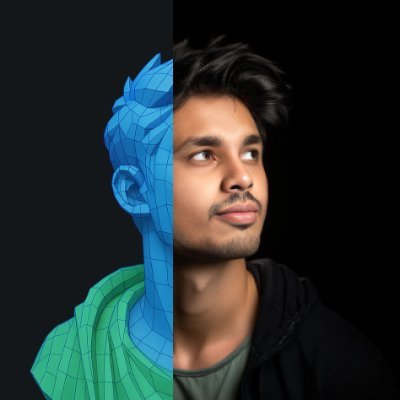
✳︎ Launching — JSON Visuals for ChatGPT 50+ unique aesthetic codes, with attribute randomiser to get infinite style combinations. [input image] + [json style code] → 🪄 Link in comments 👇 One of my fav is the Absurd Technology style. Do try out your fav styles and comment •...

214,505 просмотров • 1 год назад •via X (Twitter)

Комментарии: 12

Фото профиля Rahul Chakraborty
Rahul Chakraborty1 год назад

🔗 Try out → Retexturing is pretty simple – video attached. Check the "How to Prompt" page for more prompting and fusion techniques. The style codes should work in previous free models of GPT (Dall-E) also (but the latest 4o model gives the best results).

Фото профиля Rahul Chakraborty
Rahul Chakraborty1 год назад

The style codes work really great on 3d images. Some outputs from the raw JSON Base Style codes applied on some real device images

Фото профиля Rahul Chakraborty
Rahul Chakraborty1 год назад

Site was built using Cursor, Claude 3.7. And a fully functioning read-write database via Notion MCP

Фото профиля Square Deal Recordings & Supplies
Square Deal Recordings & Supplies1 год назад

🌼✨ Add California vibes to your style with our Poppy Embroidered Iron-On Patch! 🌸 Easy to apply and perfect for jackets, bags, or hats. Rep the Golden State today! 🌞 #CaliforniaPoppy #IronOnPatch #DIYFashion

Фото профиля Filipe Soares
Filipe Soares1 год назад

Doing something similar with , i’m actually doing json in the background. Love your approach Did everything in cursor and had integrated with sanity for the CMS Portion of it

Фото профиля Rahul Chakraborty
Rahul Chakraborty1 год назад

great. how are the pro sales? i have been thinking about it. no clear answer

Фото профиля David
David1 год назад

Cool, great way to get people started with JSON styles

Фото профиля Rahul Chakraborty
Rahul Chakraborty1 год назад

the left one 🥵

Фото профиля Ege
Ege1 год назад

amazing bro!

Фото профиля Rahul Chakraborty
Rahul Chakraborty1 год назад

thanks! would love to see what you come up with.

Фото профиля Howard Chen
Howard Chen1 год назад

Very cool and inspiring stuff!

Фото профиля Rahul Chakraborty
Rahul Chakraborty1 год назад

thanks man!

Похожие видео

📖 MOST PEOPLE ARE USING SEEDANCE 2.0 JSON WRONGLY AND HERE'S WHY One small JSON change can improve every video you generate Most users write a prompt, generate a video, dislike the result, and start over. The best creators don’t work that way. They use JSON to give Seedance 2.0 a structured set of instructions that defines exactly what should happen in the video. Instead of a single block of text, JSON breaks everything into components: • Character description • Environment • Camera movement • Actions • Timing • Visual style • Scene transitions This makes outputs far more consistent and predictable. Why JSON is powerful: • Better character consistency across scenes • More control over camera movement • Easier to edit individual elements • Reusable templates for future projects • Faster workflow when creating multiple videos • Less randomness and fewer failed generations A simple workflow: 1.Define the goal of the video. 2.Create the main character description. 3.Describe the environment and visual style. 4.Add actions and camera movements. 5.Organize everything into a JSON structure. Example: Character - AI fitness coach Environment - modern gym Action - walking toward camera Camera - slow cinematic push-in Style - realistic, commercial quality Instead of rewriting the entire prompt every time, you can simply modify individual JSON fields and keep the rest unchanged. That’s why advanced Seedance 2.0 users are moving from prompting to system design. The future of AI video isn’t writing better prompts. It’s building reusable production pipelines. 📥Tomorrow I'll show you what's sitting right next to this opportunity. 🔖The pinned post has the complete system. Use it or watch someone else do it first

Zentrix⌚️

112,210 просмотров • 3 месяцев назад

THIS IS HOW A $10K/MONTH PRODUCT CONTENT PIPELINE GETS BUILT FROM 1 REFERENCE IMAGE AND A JSON PROMPT The video is not about "better prompting." It is a very simple cheat code: find an image with the exact lighting, color grade and camera feel you want, make AI reverse-engineer the style into a detailed JSON, then feed that structure into Nano Banana Pro with your own product. That is the part people keep missing. They write vague prompts like “make it realistic” and blame the model when it produces plastic garbage. The better workflow gives the model a style contract before asking for the final image. One reference image becomes the art director. The JSON becomes the brief. Your product becomes the asset dropped into a visual language that already works. This is how a solo operator can sell 20-30 "premium" product shots a week without owning a camera, renting a studio or touching a lighting rig. At $150-$300 per image, that is a $3K -$9K/week offer if you can bring clients. Not guaranteed. But the math is why this workflow matters. The article is the same business model underneath: AI output gets valuable when you stop asking for random generation and start building reusable instructions that copy proven formats. No photographer, no studio, no lighting setup, no retoucher, no 12-round creative call. Just reference, extraction, structure and execution. The prompt does not make the photo look expensive. The stolen style system does.

Nekt0

14,833 просмотров • 3 месяцев назад