Loading video...

Video Failed to Load

Go Home

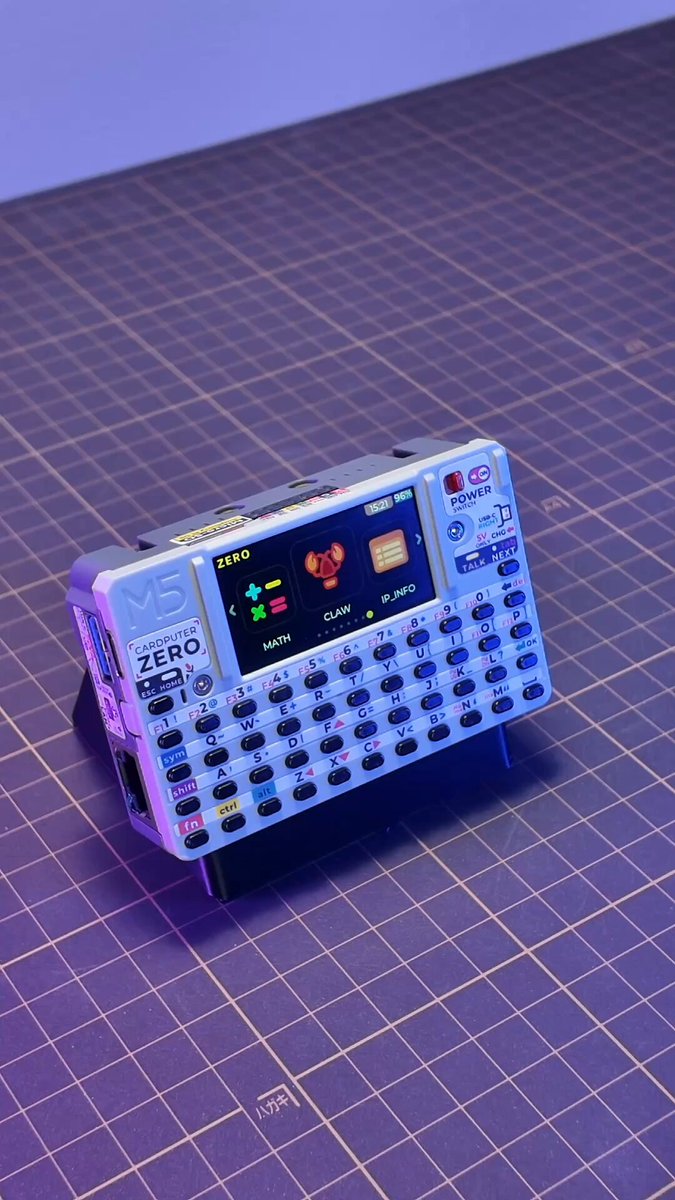
#M5StackNew 🎉Tab5 Keyboard Tab5 Keyboard is a 70-key physical keyboard input expansion module designed specifically for Tab5. It connects directly to the host via Tab5 Ext.Port1, enabling a plug-and-play input experience. ✅ Uses STM32F030C8T6 as the main control chip, designed for Tab5, plug and play via direct connection to...

21,340 views • 2 months ago •via X (Twitter)

0 Comments

No comments available

Comments from the original post will appear here

Related Videos

Ladies and gentlemen, presenting the iconic 2001 MMORPG experience, Runescape Classic... NOW ON THE SEGA DREAMCAST!!! The port has officially progressed from the obligatory "runs like crap, looks like crap, and needs a 32MB RAM expansion," phase, to the "omg this thing is actually playable on a stock DC now and looks great," phase! Developer, Lobotomy, was able to completely rewrite the rendering back-end to use our low-level PowerVR GPU driver in KallistiOS, boosting performance so far that he could even include per-vertex dynamic lighting as part of a real-time day/night system! Upon setting your UTC timezone offset, and having it get saved to your VMU, the game will automatically sync system time over NTP and will actually keep your DC's internal time updated properly, for all of us lazy mofos with dead CMOS batteries! The port supports taking user-input from the Dreamcast's mouse and keyboard peripherals in addition to standard controllers (even sporting additional support for dual-analog controllers connected via 3rd-party adapters). Finally, you can connect to the RSC servers for online play by using the Dreamcast's built-in modem (typically via DreamPi), the 100mbit ethernet broadband adapter, the elusive AF 10mbit ethernet LAN adapter, or even the brand new, W5500-based, DIY BBA alternative, which can plug in externally through your serial port or internally through the SCI port (with modification), and is sold typically for only about $5-$10 from various online vendors.

Falco Girgis

72,840 views • 1 month ago

The Future of Commerce Is Being Rewritten Right Now with Interlink and LinkersMap 🚀 Digital commerce is changing rapidly, and the connection between crypto payments, real-world businesses, and global consumers is becoming more important than ever. 🌐 InterLink Labs 👤 + 🌐 is taking a major step forward by expanding crypto payment utility across 50+ global brands, helping bring digital assets closer to everyday use. This is an important move towards practical adoption, where crypto is not only held or traded, but also used in real economic activity. 💳✨ From shopping 🛍️ and entertainment 🎮 to travel ✈️, technology 💻, hospitality 🏨, education 🎓, services 🧰, and global retail 🌍, digital payments are becoming part of the modern customer experience. The future of commerce is not just online. It is global, connected, mobile, and increasingly powered by digital assets. 🔥 💜 LinkersMap: Building Real-World Utility for the InterLink Ecosystem LinkersMap is emerging as a powerful marketplace and geo-commerce platform designed to connect businesses, entrepreneurs, communities, and customers in one trusted digital environment. It is built to support verified InterLink Stores, product listings, payment points, and real-world services, giving users a simple way to discover where digital commerce is active. For businesses, LinkersMap is more than just a listing platform. It is a gateway to greater visibility, stronger customer access, and future-ready participation in the growing digital economy. 🏪🌍 🏪 What LinkersMap Offers to Businesses Businesses can use LinkersMap to create a stronger digital presence and connect with customers beyond traditional local limits. Through the platform, businesses can: ✅ Register and display their store on the map ✅ Showcase products and services to a wider audience ✅ Improve brand visibility within the InterLink community ✅ Reach both local and global customers ✅ Build trust through verified store listings ✅ Position themselves for future crypto payment adoption ✅ Connect directly with users looking for real-world businesses ✅ Participate in a growing digital commerce network Whether it is a restaurant, retail shop, hotel, service provider, education centre, wellness brand, tech business, or Web3 project, LinkersMap gives businesses a practical way to become more discoverable. 📍✨ 🌍 Why This Matters for Real-World Adoption One of the biggest challenges in crypto has always been real-world utility. 💵 People need places to spend. 👪 Businesses need customers. 🏪 Communities need trusted platforms. 💳 Ecosystems need practical use cases. This is where LinkersMap plays an important role. By connecting physical businesses, digital listings, products, and payment visibility, LinkersMap helps bridge the gap between crypto users and real-world commerce. 💳🏪 As the InterLink Network grows, more businesses can join, more users can discover services, and more value can move through the ecosystem. This creates a stronger cycle of adoption: 🔁 More businesses join 🔁 More users discover them 🔁 More transactions become possible 🔁 More utility is created 🔁 The ecosystem becomes stronger 💳 Strengthening Utility for $ITL The expansion of InterLink payment utility helps support the long-term usefulness of $ITL within real-world commerce. As more stores, brands, and services become connected to the ecosystem, $ITL gains more practical relevance. This is important because strong digital assets are supported not only by community interest, but also by actual use. LinkersMap helps make this utility more visible by giving users a place to discover businesses, products, and services connected to the InterLink Network. 🌐💜 ✨ Key Benefits for the Community The growth of LinkersMap creates value for different parts of the ecosystem. For Businesses 🏪 ✅ Increased online and map-based visibility ✅ Access to a growing Web3-focused community ✅ Opportunity to attract new customers ✅ Stronger digital presence ✅ Future-ready payment positioning ✅ Better exposure for products and services For Customers 🛒 ✅ Easier discovery of verified businesses ✅ Access to InterLink-connected stores and services ✅ More real-world use cases for digital assets ✅ Simple map-based search experience ✅ Greater confidence through store verification For the InterLink Ecosystem 🌐 ✅ Stronger real-world utility for $ITL ✅ More payment points and business listings ✅ Better connection between online and offline commerce ✅ Community-driven growth ✅ Increased merchant adoption ✅ A clearer path towards mainstream use 🚀 A New Chapter for Digital Commerce The next generation of commerce is not only about payments. It is about creating a complete ecosystem where businesses can be discovered, customers can connect, communities can grow, and digital assets can be used in practical ways. LinkersMap supports this vision by making real-world business participation easier, more visible, and more accessible. It gives entrepreneurs, merchants, and service providers a platform to be part of the digital economy while helping users find businesses that are ready for the future. 🌎✨ 💼 Register Your Business Today If you are a business owner, entrepreneur, merchant, or service provider, now is the time to join the growing LinkersMap ecosystem. 📍 Add your store 🛍️ Showcase your products 🌍 Reach more customers 💳 Prepare for crypto-powered commerce 💜 Connect with the InterLink community 🌐 Register here: 💜 One Ecosystem. Unlimited Opportunities. 🌎 Global Reach. Real Utility. Future Growth. 🚀 LinkersMap is helping connect businesses, communities, and digital commerce for the future. LinkersMap Dr Altcoin ✝️ Arif Ahmed Core Ambassador | Interlink Labs InterLink Labs 👤 + 🌐 KV InterLink Foundation ITLX Wallet #Interlink #ITLG #ITL #Linkersmap #business #ecommerce #globalgrowth #onlinestore

Tekkaus® | InterLink • MOD • T2 Community Builder

10,912 views • 1 month ago

[New Xbox Controller Review] #ad Special thanks to Qrdgame_offcial for supplying me with a review unit of their Ferrox M5 Xbox & PC Controller QRD Ferrox M5 The QRD Ferrox M5 is a Wireless Xbox One–style gamepad with a transparent design. Since it targets Xbox One natively, it works automatically on PC and Xbox Series S/X. The included 2.4Ghz USB Dongle also supports Switch and Android with the right adapter (USB C), but I was not able to test those in time for this review. A Wireless Xbox Controller The QRD FERROX M5 comes in a familiar Xbox layout with Hall Effect joysticks, RGB rings around the sticks, and a magnetic & detachable clear shell that shows the internals. The controller feels very similar to a standard Xbox pad in terms of shape and size, but it’s slightly lighter at compared to the usual Xbox controller weight. The lighter weight makes it easier to hold for longer sessions without hand fatigue. The D-Pad is surprisingly good at dialing special moves feels as solid and responsive as the official Xbox controller, and that’s impressive at a lower price point. I spent a few days trying out the Mortal Kombat Legacy Kollection exclusively using this controller and I did not notice any difference at all. Capabilities From what I’ve tested, the controller performs extremely well for action games, fighting games, and shooters. The Hall Effect joysticks offer smooth movement and precise control with no drift issues. The D-Pad uses micro switches, so every input is tactile and accurate. The back triggers support an adaptive “trigger stop” mode, which shortens the travel distance for faster reaction time in FPS games or quicker blocks in Fighting Games. You also get 4 back macro buttons, turbo mode, and adjustable joystick sensitivity with deadzone options. Vibration strength and RGB lighting modes are also customizable. What can it do The FERROX M5 includes an 800mAh battery that lasts around 8 hours of gameplay. It only uses the 2.4Ghz wireless connection, not Bluetooth, so it always requires the included USB Dongle. The good thing is once you sync it with your Xbox or PC, you don’t need to sync it again—it carries over between both devices automatically. The 2.4G connection is stable and low latency, and the controller has a 3.5mm headphone jack for audio and mic support. It also features a quick calibration system to keep sticks and triggers accurate over time. The overall grip and shape feel close to the official Xbox controller, comfortable for long gaming sessions, and the transparent shell gives it a distinct look. Areas of improvement I initially had trouble charging the controller while playing because connecting it to the Xbox via USB would disable all inputs, making it unusable in wired mode. But luckily QRD Support helped and provided me with an updat - I had to connect it to a PC, download the firmware tool from QRD’s website, and update the controller manually. After installing the new firmware, the controller can now charge while being used normally on Xbox, so the issue is fully resolved. The Xbox button also behaves differently on Xbox, where the single press acts like hold and the hold acts like single press; this issue doesn’t appear on PC. Syncing with the dongle took a few attempts on both Xbox and PC, but once paired, it never needed syncing again. The wireless mode is strictly 2.4G with no Bluetooth support, so it cannot connect without the dongle, though the benefit is that one pairing works across both Xbox and PC. Final Summary ✅ Hall Effect Joystick ✅ Lights in the dark ✅ Good D-Pad for input dialing ✅ Light Controller ❌ First sync can be annoying on PC ❌ No bluetooth for phone usage - Dongle is necessary ❌ Needs an update for the Xbox Wired issues which require a PC The Controller is available on Amazon for $59.99, and will be part of the Black Friday Deals on their official website for even more discount! Amazon Link Website Link

thethiny 🐰🍉

16,864 views • 9 months ago

Paranoid man mocked for hunting a spy device in his home. No one believed the government could plant bugs in people’s apartments. A month later, his device found a bug in every mocker’s house. He started selling it and made $255k as everyone rushed to check their own homes. Here's how he made this technology using only Claude: The device is called an RF bug detector. Hidden cameras, microphones, and GPS trackers all leak radio signals when they transmit. This scanner picks up those signals and shows you exactly where they are coming from. The whole build costs around $25 in parts and runs on a small rechargeable battery. You need 4 things. - ESP32 development board - AD8317 RF detector module (the part that senses the signal) - A small OLED screen - A LiPo battery and charging board 1. Wire the AD8317 module to the ESP32 analog input, then connect the OLED screen to the I2C pins, which takes about ten minutes on a breadboard. 2. Plug the ESP32 into your computer with a USB cable. 3. Open Claude Code and paste this prompt: { Write me ESP32 firmware for an RF bug detector. Hardware: - AD8317 logarithmic RF detector on analog pin 34 - SSD1306 OLED screen on I2C pins 21 and 22 - LiPo battery powered Requirements: 1. Read the AD8317 voltage 20 times per second. 2. Convert the voltage into a signal strength value in dBm. 3. Show a live bar graph on the OLED that rises as signal gets stronger. 4. Play a beep through a buzzer on pin 25 that speeds up as the signal increases, so I can sweep a room and home in on the source. 5. Add a calibration button on pin 4 that sets the current room level as the baseline, so only stronger signals trigger alerts. Output one complete Arduino sketch with comments so I can tune the sensitivity. } 4. Flash the firmware to the ESP32 straight from the Arduino IDE. 5. Walk slowly around any room holding the device, and watch the bar graph climb as you get closer to a hidden transmitter. 6. Once it works, drop the whole thing into a 3D-printed handheld case so it looks like a finished product. The man in the hook sweeps a room in under two minutes. The beep speeds up as he gets closer, so he can pinpoint a bug hidden inside a smoke detector, a plug, or a lamp. His parts cost around $25 per unit. He sells the finished detector for $129 to renters, travelers, and Airbnb guests who want to check their space. The market is everyone who ever walked into a hotel room and wondered if someone was watching.

Coin Shot ☁️

67,031 views • 2 months ago

OpenClaw has 186K GitHub stars and 1.5M compromised API keys. I needed a secure alternative. So, I built it with n8n and Claude Opus 4.6. It can already: - Reply to your Telegram messages - Access selected folders from your laptop - Access Gmail, Drive, Notion, Linear, etc. - Install new local tools in a sandbox - Run autonomously for hours - Create multiple subagents - Learn from experience - Wake up regularly But, unlike OpenClaw, it: - Can't access your API keys - Can't modify its environment - Can't access folders you haven't shared - Can't access tools you haven't approved - Must get your confirmation, e.g., when sending emails These aren’t prompt instructions. They’re hard architectural boundaries — Docker isolation, mounted folder permissions, n8n’s tool approval system. Key components: ✅ The VPS on Hostinger hosts n8n and a sandbox container. Agents can also connect to my laptop's sandbox via a Claudeflare tunnel + Desktop Commander MCP. ✅ The Manager agent is the brain. It plans, decides, delegates, and talks to the user. It never touches files. It never runs scripts. It works entirely from executor summaries. ✅ The Executor agents are the hands. Each receives a task (what to do + why it matters), decides how to execute it, and reports back. They can install new tools and execute code only in their dedicated sandboxes. ✅ Data Tables in n8n store both memories and sessions — no external database, no vector store, no infrastructure. Just rows in a table. Turns out, that's enough. Two memory types: - Manager memory: user preferences, facts, corrections, relationship, skills, context - Executor memory: what tools are installed, what’s broken, workarounds ✅ Sessions are short-term state for multi-step tasks. Original request, plan, assumptions, and what happened so far. When the Manager loops with fresh context, the session is all it gets. That's a Ralph Wiggum loop. I've been using it for 5 days. And already can't imagine not having it on my phone. What's next: - Heartbeat via Cron (a scheduled prompt) - Civic Nexus governance + MCPs - Supermemory integration - WhatsApp as an additional surface - Hardening The architecture supports all of it. OpenClaw proved people want personal AI agents. It also proved that 'just trust the prompt' isn't a security model. Docker isolation, mounted folder permissions, tool approval — none of this is new technology. It's just discipline. You can easily do this even with n8n — no coding required. --- Want to try it or read more? More, what I learned, and a setup guide: productcompass[.]pm

Paweł Huryn

54,038 views • 6 months ago

Introducing Fincopy: Revolutionizing Family Account Management 🚀 Visit: Managing multiple family accounts just got easier with Fincopy, our platform designed to streamline and optimize your trading experience. Fincopy helps you to execute multiple orders across various family accounts simultaneously, providing efficiency and ease. Key Features of Fincopy: 1. Server-Based Copying 💻: With Fincopy's server-based technology, you can initiate the copy function, log off your PC, and rest assured that all orders placed via web, mobile, and desktop applications will continue to be copied seamlessly. 2. Real-Time Telegram Updates 📲: Stay informed on the go with instant order updates and account status notifications delivered directly to your Telegram. Keep track of your trading activities wherever you are. 3. Comprehensive Position Monitoring 📺: Monitor all open and closed orders and positions across your accounts in one centralized location. Fincopy provides a complete overview of your trading landscape, ensuring you never miss a detail. 4. Effortless Rebalancing ⚖️: If discrepancies arise in positions or quantities, Fincopy's rebalancing feature allows you to adjust with a single click, ensuring all accounts remain perfectly aligned. 5. Auto Slicing and Rate Limit Management 🔪: When order slicing is necessary while copying. Fincopy automatically handles the process, by sending sliced orders. For large orders, our built-in queuing system efficiently manages rate limits, ensuring smooth execution. 6. Advanced Order Management 💹: Simplify your trading operations with the ability to square off all open orders or positions with one click, or selectively cancel orders directly from the platform. Fincopy puts you in full control. 7. Multi-Broker Support ✅: Fincopy currently supports seven brokers, with plans to expand further. This ensures you can manage your family accounts across different platforms without hassle. 8. Run Your System Trades and Copy the Orders Simultaneously 👩‍💻 By combining Fincopy with Fintarget you will be able to automate your system trading for free and copy the orders to multiple accounts. Pricing: Starting from 299/ Month/ Account with 7 Day Free Trail Explore Today🚀 Try out family account management with Fincopy. Visit and request a demo to experience the platform. Note: Fincopy is designed exclusively for managing family accounts, as managing public accounts is not legally permitted. Experience efficiency with Fincopy today.

Saketh R

76,345 views • 2 years ago