Загрузка видео...
Не удалось загрузить видео
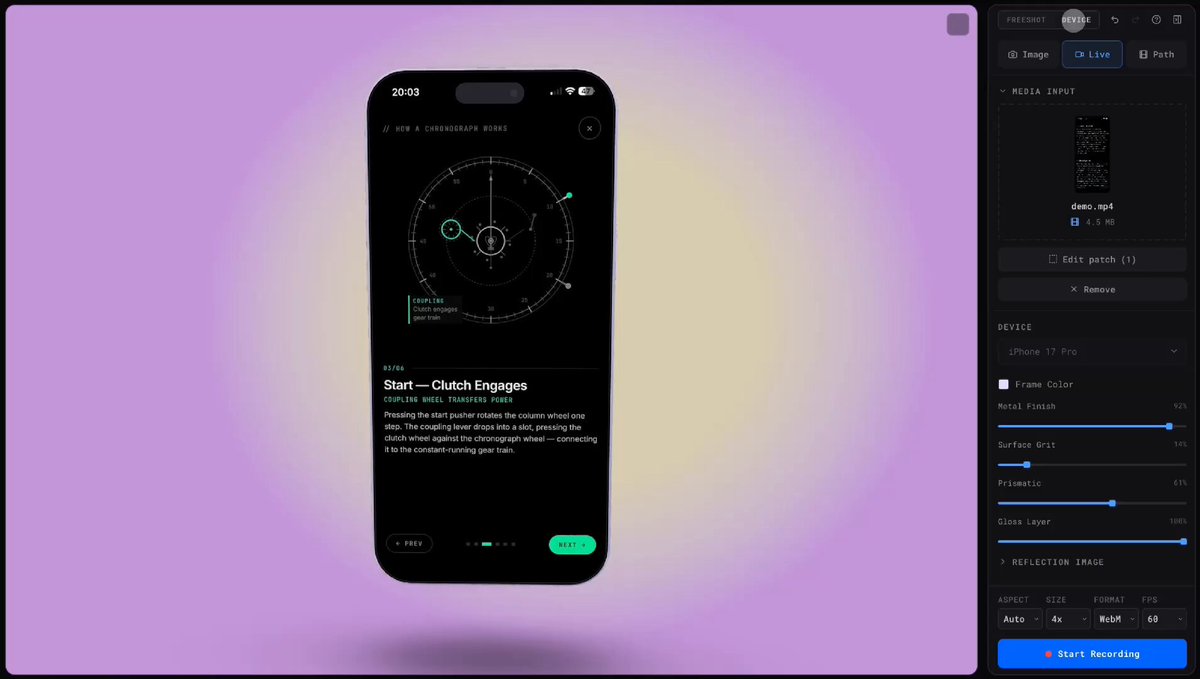
Most product screenshots are boring. Flat. Static. Forgettable. Screenshot Studio is officially live and it changes that. Formerly @stageeart. Completely rebuilt from the ground up. What started as a simple screenshot editor is now a browser-based studio for screenshots, animated visuals, and export-ready videos. No signup. No watermarks. No... show more

34,243 просмотров • 7 месяцев назад •via X (Twitter)
Комментарии: 47

try it now:

i might be wrong but many people, for screenshot tools, LOVE to just directly jump into the editor (like how does it) Also, do you have any plans on expanding it to have videos as well? example rotato
Video has been added manu sir please check it out. Same ux as shots.
Just need to add more variations and make it polish
it open source you can give a star here:
huge shout to .@jaywyawhare for building the export video feature and making the system scalable. now you can use the video features on this platform because of arinjay. do follow that guy.
launch video made by @naymur_dev creator of do check it out.

looks great, btw whats the price for screenshot for com domain?
1k
my domain price
I was asking about, screenshot dot com

Bro cooked gain 🔥🔥🔥

much needed 🔥

crazyy man , was much needed
thanks man

buddy for "Start Creating" and "Watch Demo" button make the cursor pointer a better UX

it’s good
thanks render

very nice man

Finally, a way to make my boring screenshots less boring.
😂

The UI is lot better than previous and the presets and animations are great!! The UI now feels smooth!! Great work mann!!

the GOAT

love it.
thanks

saying it again bro can't stop shipping

based as usual, bro keeps delivering

wow name changed

🔥 cooked

Strong upgrade from a “static editor” to a visual studio. Timeline + video export is a smart move.

this is next-level stuff, bro
thanks man

Great work 🔥
thanks man

it is actually good mate 🫣 nice work, ill be using it soon

Dude, all this open source!!

If the code is mid, at least the screenshot looks expensive.
😂

Respect the hustle 🫡🫡🫡

Nice!

🔥

cooked 🔥 congrats man! deserved it!

@mannupaaji Crazy w

Congrats! It looks so good 😵 I will try after the weekend when I’m back to work 🙌

It was already good now it was even better
Oh this is exactly what I need to market my almost-ready-to-ship app 🤝

impressive and unique