Загрузка видео...

Не удалось загрузить видео

На главную

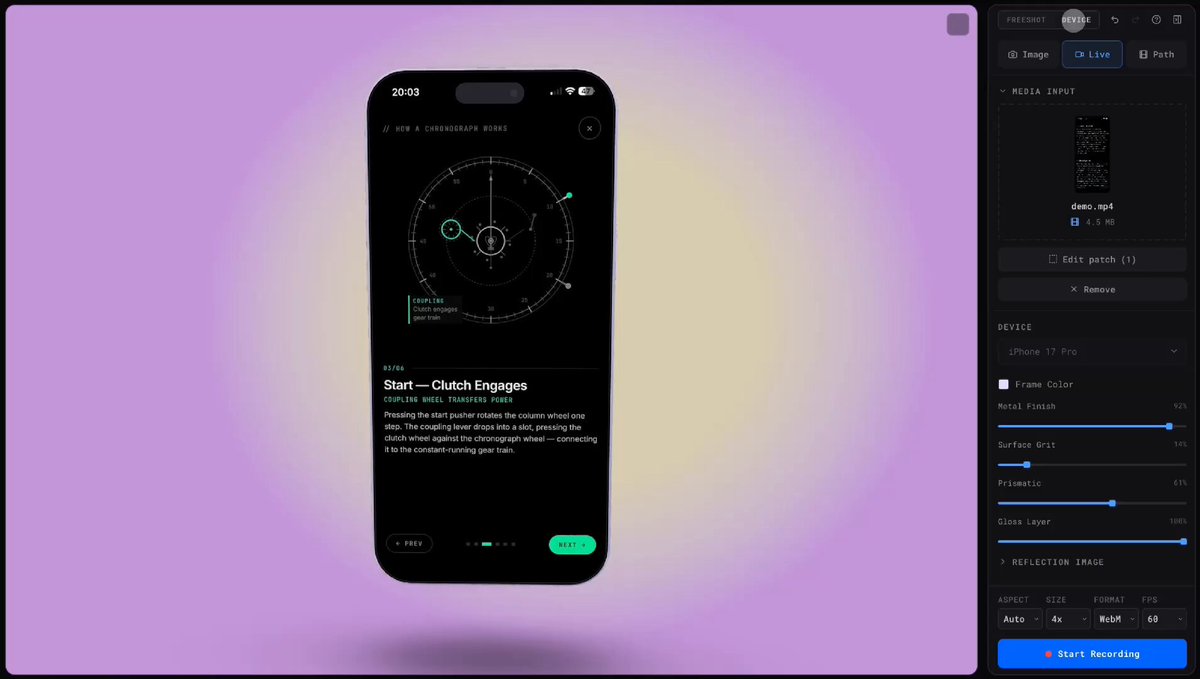
Most product screenshots are boring. Flat. Static. Forgettable. Screenshot Studio is officially live and it changes that. Formerly @stageeart. Completely rebuilt from the ground up. What started as a simple screenshot editor is now a browser-based studio for screenshots, animated visuals, and export-ready videos. No signup. No watermarks. No...

34,243 просмотров • 7 месяцев назад •via X (Twitter)

Комментарии: 47

Фото профиля Kartik
Kartik7 месяцев назад

try it now:

Фото профиля Manu Arora
Manu Arora7 месяцев назад

i might be wrong but many people, for screenshot tools, LOVE to just directly jump into the editor (like how does it) Also, do you have any plans on expanding it to have videos as well? example rotato

Фото профиля Kartik
Kartik7 месяцев назад

Video has been added manu sir please check it out. Same ux as shots.

Фото профиля Kartik
Kartik7 месяцев назад

Just need to add more variations and make it polish

Фото профиля Kartik
Kartik7 месяцев назад

it open source you can give a star here:

Фото профиля Kartik
Kartik7 месяцев назад

huge shout to .@jaywyawhare for building the export video feature and making the system scalable. now you can use the video features on this platform because of arinjay. do follow that guy.

Фото профиля Kartik
Kartik7 месяцев назад

launch video made by @naymur_dev creator of do check it out.

Фото профиля OPM
OPM7 месяцев назад

looks great, btw whats the price for screenshot for com domain?

Фото профиля Kartik
Kartik7 месяцев назад

1k

Фото профиля Kartik
Kartik7 месяцев назад

my domain price

Фото профиля OPM
OPM7 месяцев назад

I was asking about, screenshot dot com

Фото профиля Karan
Karan7 месяцев назад

Bro cooked gain 🔥🔥🔥

Фото профиля Anshu
Anshu7 месяцев назад

much needed 🔥

Фото профиля dhruv
dhruv7 месяцев назад

crazyy man , was much needed

Фото профиля Kartik
Kartik7 месяцев назад

thanks man

Фото профиля Raashed
Raashed7 месяцев назад

buddy for "Start Creating" and "Watch Demo" button make the cursor pointer a better UX

Фото профиля render
render7 месяцев назад

it’s good

Фото профиля Kartik
Kartik7 месяцев назад

thanks render

Фото профиля Vuk
Vuk7 месяцев назад

very nice man

Фото профиля Om
Om7 месяцев назад

Finally, a way to make my boring screenshots less boring.

Фото профиля Kartik
Kartik7 месяцев назад

😂

Фото профиля Mohan
Mohan7 месяцев назад

The UI is lot better than previous and the presets and animations are great!! The UI now feels smooth!! Great work mann!!

Фото профиля Arjan
Arjan7 месяцев назад

the GOAT

Фото профиля Ansh
Ansh7 месяцев назад

love it.

Фото профиля Kartik
Kartik7 месяцев назад

thanks

Фото профиля Abhay
Abhay7 месяцев назад

saying it again bro can't stop shipping

Фото профиля saar
saar7 месяцев назад

based as usual, bro keeps delivering

Фото профиля Saeed
Saeed7 месяцев назад

wow name changed

Фото профиля kkmis
kkmis7 месяцев назад

🔥 cooked

Фото профиля AweOSS.dev
AweOSS.dev7 месяцев назад

Strong upgrade from a “static editor” to a visual studio. Timeline + video export is a smart move.

Фото профиля Brosnan Hoban
Brosnan Hoban7 месяцев назад

this is next-level stuff, bro

Фото профиля Kartik
Kartik7 месяцев назад

thanks man

Фото профиля Swami
Swami7 месяцев назад

Great work 🔥

Фото профиля Kartik
Kartik7 месяцев назад

thanks man

Фото профиля Shubham Bhilare
Shubham Bhilare7 месяцев назад

it is actually good mate 🫣 nice work, ill be using it soon

Фото профиля allaa
allaa7 месяцев назад

Dude, all this open source!!

Фото профиля Warlord AI
Warlord AI7 месяцев назад

If the code is mid, at least the screenshot looks expensive.

Фото профиля Kartik
Kartik7 месяцев назад

😂

Фото профиля Kartik
Kartik7 месяцев назад

Respect the hustle 🫡🫡🫡

Фото профиля Athena Algorithms⚡️
Athena Algorithms⚡️7 месяцев назад

Nice!

Фото профиля eesh
eesh7 месяцев назад

🔥

Фото профиля OrcDev
OrcDev7 месяцев назад

cooked 🔥 congrats man! deserved it!

Фото профиля Kroszborg
Kroszborg7 месяцев назад

@mannupaaji Crazy w

Фото профиля Jesús Muñoz
Jesús Muñoz7 месяцев назад

Congrats! It looks so good 😵 I will try after the weekend when I’m back to work 🙌

Фото профиля Dushyant
Dushyant7 месяцев назад

It was already good now it was even better

Фото профиля Athena Algorithms⚡️
Athena Algorithms⚡️7 месяцев назад

Oh this is exactly what I need to market my almost-ready-to-ship app 🤝

Фото профиля Rahul 🥷
Rahul 🥷7 месяцев назад

impressive and unique

Похожие видео

19 YEAR OLD IS RUNNING A YOUTUBE ANIMATION STUDIO FROM HIS BEDROOM. HE HAS NO ANIMATORS. HE CANNOT DRAW. HE IS PRINTING MONEY FROM CHILDREN'S RHYMES. Kids' YouTube channels routinely pull millions of views per video. The platform pays creators between $1,000 and $3,000 for every hundred thousand views in that niche. Before this year, getting a piece of that market required a 3D animation studio, voice actors, and a month of rendering. He does it in under three minutes. His entire studio is a GPT sol and a Claude window. He opens YouTube and finds the most popular nursery rhyme channels. He takes a screenshot of their video feed. He opens Claude. He has a custom tool called Higgsfield MCP connected directly to his chat. He pastes the screenshot. He writes one prompt. Analyze this YouTube channel and generate a week of original content in the exact same style and niche. He hits enter. A few minutes later, the chat window spits out a fully rendered, broadcast-ready 3D animation. A baby playing with blocks, perfectly lit, smoothly animated, and ready to be monetized. He uploads it to his channel. The next day, he does it again. The kids watching on their iPads don't know the video was generated by an AI analyzing a screenshot. The parents who just want five minutes of quiet don't care. The algorithm treats it like a Pixar short. A real animation studio spends $50,000 and two months to produce three minutes of content. He spends zero dollars, takes a screenshot, and goes to make coffee. While the rest of the internet argues about whether AI is a real job, a quiet group of teenagers is pulling market share from massive media companies with a single prompt. Most people will watch his tutorial and complain. A few will open a new tab.

ZER

31,034 просмотров • 2 месяцев назад

GeoLibre v2.1 is here! GeoLibre is a free and open-source, lightweight, cloud-native GIS platform for visualizing, exploring, and analyzing geospatial data. It runs everywhere you do, in the web browser, on the desktop, on mobile, and inside Jupyter notebooks, all while keeping your data local and private. This release adds a QGIS-style Browser panel for exploring data from one place, animated route playback with video export, Wikipedia knowledge cards, and Mapillary street-level images. What's new in v2.1.0 - Browser panel (Data Source Manager): explore and add data from one place. Browse map services, connect to PostGIS databases and drill into their schemas and tables, open local files, and save Favorites, all with full keyboard navigation. - Route animation: send a marker along any line layer, follow the track in 3D with camera controls, and export the whole animation as an MP4 video. - In-browser object detection: run ONNX/YOLO models directly in the webview, with no server or Python required. - Map recording: capture the map canvas, or a drawn bounding box, straight to a video file from the browser. - Native-resolution photo viewer: view geotagged photos at full detail right on the map. - Wikipedia knowledge cards: click any place to pull up its Wikipedia summary and info card. - More planetary basemaps: USGS imagery for nine more celestial bodies, plus a new OpenAerialMap imagery search plugin. Try it out - Live demo: - GitHub: - Documentation: - Release notes: #GIS #Geospatial #OpenSource #RemoteSensing #DataVisualization #MapLibre #GeoLibre

Qiusheng Wu

12,291 просмотров • 2 месяцев назад