Загрузка видео...

Не удалось загрузить видео

На главную

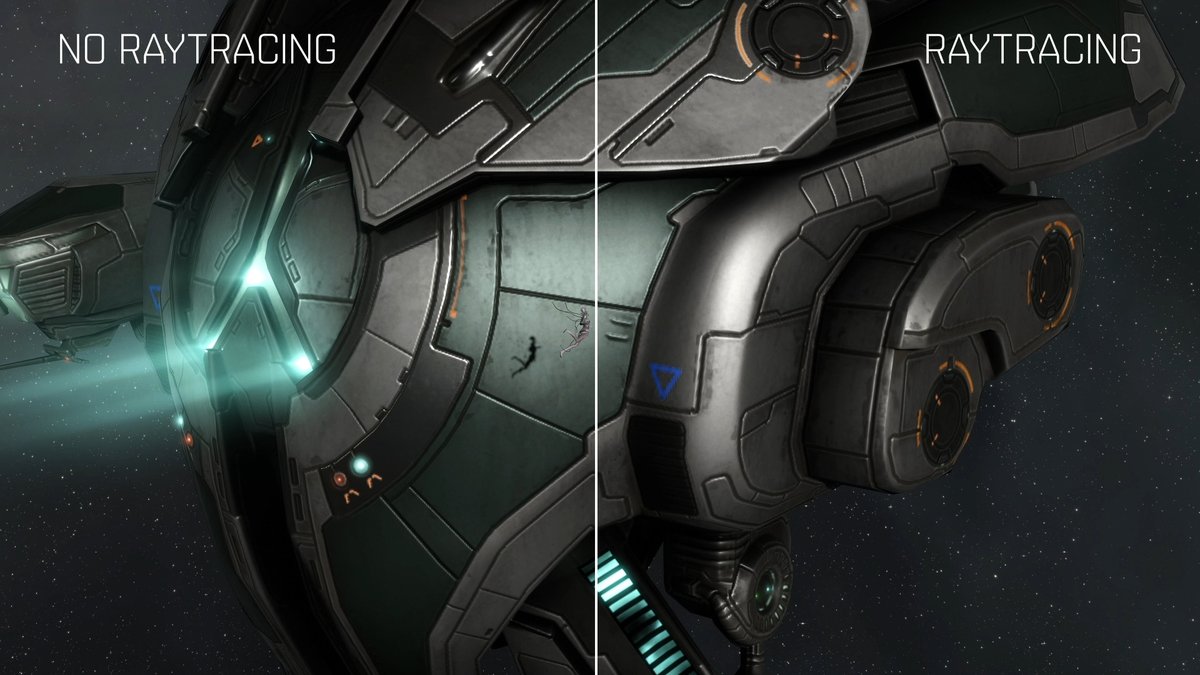
#PhantomBladeZero includes an option called Super Resolution Output Scale and By default it’s set to Auto, which most of the time uses a resolution scale lower than 100%. and this is not an ideal way to use Upscaling as it lowers both the rendering and output resolution and adds...

129,363 просмотров • 7 дней назад •via X (Twitter)

Комментарии: 20

Фото профиля Vel
Vel7 дней назад

are you on driver 617? or 621? I read something about the dev saying to swap to 617

Фото профиля BenchmarKing
BenchmarKing7 дней назад

I tried the older 617.42 driver but didn't notice any differences, though results may vary on other systems.

Фото профиля Lu1Min
Lu1Min7 дней назад

This is genuinely disgusting to try and trick people. black flag resynched did the same thing

Фото профиля Tristan
Tristan7 дней назад

I can’t help but feel this is done for the wrong reasons. Just trying to make people think the game runs better than it does

Фото профиля Pedro
Pedro7 дней назад

Já estou ansioso pelo vídeo, sai hoje?

Фото профиля AcMoriarty
AcMoriarty7 дней назад

Você viu algo sobre o drive que causa quedas de desempenho no NVidia ? Foi o último drive antes do hotfix

Фото профиля BenchmarKing
BenchmarKing7 дней назад

I tried the older 617.42 driver but didn't notice any differences, though results may vary on other systems.

Фото профиля Laura R🍓
Laura R🍓7 дней назад

the way 90% auto is literally making the game look worse so it can brag about fps is so backwards to me. like 55 fps at full res is still perfectly playable and you actually get to see the game.

Фото профиля ZI LA
ZI LA7 дней назад

Developers doing this actively makes me want to avoid the game. There is absolutely no reason to do it except tricking gamers into thinking the game performs better than it does. If you want to play at a non-native resolution for some reason, you can already change that.

Фото профиля Daniel
Daniel7 дней назад

Sabe qual devo colocar na amd ? Tá consumindo quase toda minha ram e só de colocar no auto ele diminuiu 2gb de uso.

Фото профиля Tuturu
Tuturu7 дней назад

I have a 3060 with a r5 3600, I hope this games runs well, because i cant do any upgrades for the time being

Фото профиля SAFTALEX.
SAFTALEX.7 дней назад

do you know if your video will be ready when the game releases?

Фото профиля BenchmarKing
BenchmarKing7 дней назад

It’ll be available in a few hours 😉

Фото профиля Raynier
Raynier7 дней назад

I’m sorry if it’s a dumb question. But this has nothing to do with dlss, right? It’s more like the internal resolution the game is running at, isn’t it?

Фото профиля BenchmarKing
BenchmarKing7 дней назад

It affects all upscalers.

Фото профиля Ollet 🌠
Ollet 🌠7 дней назад

@alex60916864

Фото профиля ᴛᴀᴋᴀᴄʜɪɪ~ かたな
ᴛᴀᴋᴀᴄʜɪɪ~ かたな7 дней назад

you take too long bro, your videos need to be on release day or maybe 1 day after

Фото профиля HeyWilliam
HeyWilliam7 дней назад

非常感谢你的测试🙏🙏

Фото профиля Phenomena
Phenomena7 дней назад

Video out today ? 👀

Фото профиля BenchmarKing
BenchmarKing7 дней назад

Yes 😉

Похожие видео

You might have seen some posts that Highguard runs at a fake in-game resolution, but its not exactly what you think. Steam User Captain_SmellyRat noticed this issue first by pointing out that if you set render scale at 100%,the game would still show 80% of the resolution in DLSS hud UI. So If you're playing at 1080p, the internal resolution would be 864p and If you don't change the default render scale (which seems to be always set to 75%) the final resolution would be 648p. However it turns out that the in-game resolution is changed in value directly from post-processing settings that you set. Post-processing quality settings would change the internal resolution as follows: Low - 80% of in-game resolution Medium - 90% of in-game resolution High - 100% of in-game resolution If you're playing at high settings, you will not notice the game looking blurry, but if you play at medium or low settings, the game will look extremely blurry even though you think you're playing at 1080p or 4k. I find it weird that post-processing quality directly affects the internal game resolution, but if you're playing the game and it looks blurry to you, make sure you set the post processing quality to high. Whenever this was intentional or not to achieve a higher FPS, I don't exactly know. However, I still think the developers should have clarified what each settings affects the game, which in this case here it directly affects the resolution.

NikTek

20,832 просмотров • 9 месяцев назад

Wuthering Waves PS5 Performance Test • Test Setup PS5 Slim (brand new, clean, no dust) Room temperature: 22°C with AC • Map Issue Yes, it's real. The new map is locked to around 2 FPS when opened from the menu, making it extremely laggy. • Stuttering Problems The game has severe stuttering. In some areas, it even freezes for 4–5 seconds, making the experience frustrating. • My Observation From my testing, the game appears to be running at a very high internal resolution on PS5 instead of relying on aggressive upscaling. For example, DLSS Quality at 1440p renders the game internally at approximately 1707×960 before upscaling it to 2560×1440. On PS5, however, it looks like the game is rendering at or near 2560×1440 internally and then upscaling to 4K. If that's true, it's an extremely demanding target for a base PS5. • Is This Fixable? Yes. If the game is indeed using such a high internal resolution, lowering it and using better reconstruction or dynamic resolution scaling could significantly improve performance. Running at such a high internal resolution on a base PS5 doesn't make much sense, and the game has suffered from performance issues for nearly 12 months. • Final Thoughts Kuro Games needs to address this. At this point, we can't keep blaming players, their hardware, or the engine. If the high internal resolution is the cause, it should be adjusted. If it isn't, then something else in the game's optimization is seriously wrong. #WutheringWaves #Gacha

Kaito

51,989 просмотров • 3 месяцев назад

2026 = The end of upscaling? One of generative AI's biggest drawbacks was the resolution, and I'm not talking about the output resolution as 1080p would be enough for most of the projects. I'm talking about the "internal" resolution of how these models work, that makes small faces distorted in your generations, the ones that will make a wide-shot impossible because the small details will morph and of course with some models text rendering is not possible. Upscaling with AI was always a strange case, local upscalers sometimes lacked the quality compared to the closed source competitors, but those can be pretty pricey and the results are sometimes way too "creative". So I was very, very interested when Kling AI announced native, not upscaled 4K generation but wanted to have a good method test it. Again, I never missed the 4K output resolution with genAI, but I missed the nuanced detail rendering of the engines and the lack of that made it impossible to create for example very wide shots with tiny details. So I fired up some image models to generate stills inspired by Morocco and see how Kling behaves, now in 4K. Some notable moments: 00:22 - Skin and eye texture, the movements, the little coins in the headdress 01:18 - The reflection in the water 01:39 - The reflection in the eye, and the scarf textures 02:10 - Check all the details on the rails 02:20 - Water particles and leaves 02:29 - The rendering of the rusty parts of the rail 02:50 - How the waves change the reflection in the foreground 02:55 - The cloud movement in the background

László Gaál

17,514 просмотров • 5 месяцев назад