Загрузка видео...

Не удалось загрузить видео

На главную

Say hello to text-to-cad, an open source tool for generating 3D models in Codex! Prompt and edit complex 3D models. Export STEP, STL, GLB, DXF and URDF files. Built for CAD newbies. Link to github below. CAD is hard. As a software engineer getting back into robotics, I’ve been...

53,724 просмотров • 6 месяцев назад •via X (Twitter)

Комментарии: 31

Фото профиля Yo.Town 3D
Yo.Town 3D6 месяцев назад

nice, we can help add joint to have more 4D effects,

Фото профиля Jake Fitzgerald
Jake Fitzgerald6 месяцев назад

PRs welcome! Here’s the repo:

Фото профиля Yo.Town 3D
Yo.Town 3D6 месяцев назад

will do

Фото профиля Curtis
Curtis6 месяцев назад

I think you’ll find if you make more complex things with more than a few knobs to turn with this the model will just shit out

Фото профиля Jake Fitzgerald
Jake Fitzgerald6 месяцев назад

I've got it managing a reasonably complex project at the moment, the secret sauce is in the reference system that helps me guide the agent to look at specific parts of STEP file topology, and ignore the rest

Фото профиля gregory
gregory6 месяцев назад

@curtisfloras can u explain a little further , how do you set up your codex agents. the workflow ?

Фото профиля Jake Fitzgerald
Jake Fitzgerald6 месяцев назад

@curtisfloras Yep! All you have to do is ask Codex or Claude Code to clone this repo into your project, then you’re good to go. The agent will read the AGENTS/SKILL files which tell it how to generate 3D models. Nothing fancy or opinionated.

Фото профиля Alltaku
Alltaku6 месяцев назад

너무 멋진데? 이런걸 공유해줘서 너무 고마워!!! 한 번 써볼께!!!👍

Фото профиля victor
victor6 месяцев назад

MIT now we takin

Фото профиля Cat
Cat6 месяцев назад

I am building my own autonomous system and CAD has been my biggest pain point. I will be over the moon if this works!

Фото профиля StatysTheBaddest
StatysTheBaddest6 месяцев назад

I was working on something like this a couple days ago! Nice.

Фото профиля Derek
Derek6 месяцев назад

sweet! I’ll give it a try tonight

Фото профиля Fabri
Fabri6 месяцев назад

Nice! I’m trying to connect freecad through mcp to an llm, but till now had been a huge pain…

Фото профиля Phoenix𝕏
Phoenix𝕏6 месяцев назад

@amypretzel

Фото профиля Noam Hurwitz
Noam Hurwitz6 месяцев назад

🔥🔥🔥

Фото профиля Noam Hurwitz
Noam Hurwitz6 месяцев назад

@MechPete scope this

Фото профиля Roberto
Roberto6 месяцев назад

Wow looks awesome Jake!

Фото профиля Fuliang
Fuliang6 месяцев назад

Cool work! I’ve also been also exploring Text-to-CAD and some Python libraries recently, but I’ve encountered a real-world feedback from enterprises: what they need is the 2D CAD engineering drawings acutally, with detailed dimensioning (including tolerances), chamfers/fillets,

Фото профиля Martin Orrje
Martin Orrje6 месяцев назад

Why build123d instead of CadQuery?

Фото профиля 👾Moritz Rietschel
👾Moritz Rietschel6 месяцев назад

never a lack of software engineers building baby CAD software

Фото профиля Sasha Sax
Sasha Sax6 месяцев назад

Very cool! Curious how come build123d > cadquery?

Фото профиля Jake Fitzgerald
Jake Fitzgerald6 месяцев назад

build123d has good state management and leans into modern Python standards that the models have lots of training data on!

Фото профиля Pierre-Louis Soulié
Pierre-Louis Soulié6 месяцев назад

@zachdive

Фото профиля 3DPrintingDaily
3DPrintingDaily6 месяцев назад

Nice

Фото профиля icefrog.◎
icefrog.◎6 месяцев назад

PRs welcome, let's see

Фото профиля Argona
Argona6 месяцев назад

wow this is really cool

Фото профиля anikait
anikait4 месяцев назад

then you can easily annotate any of these step files in your browser and send a link to your factory, without the hassle of making engineering drawings using OnyxCAD

Фото профиля Danish Boy
Danish Boy6 месяцев назад

I puked 3 times while watching this

Фото профиля Ryan Stryker
Ryan Stryker6 месяцев назад

@earthtojake This is cool! Can it produce x-wing drone bodies? OnShape is awful. It can’t produce rounded edges. They look like huge steps. No smooth gradient for wing angles running into drone body. Would this potentially be able to create that? I attached one for context.

Фото профиля Memo Ai agent
Memo Ai agent6 месяцев назад

Bruh you can use it with Claude code too why just codex lol

Фото профиля Jake Fitzgerald
Jake Fitzgerald6 месяцев назад

Going to test with claude soon, just been loving codex this month

Похожие видео

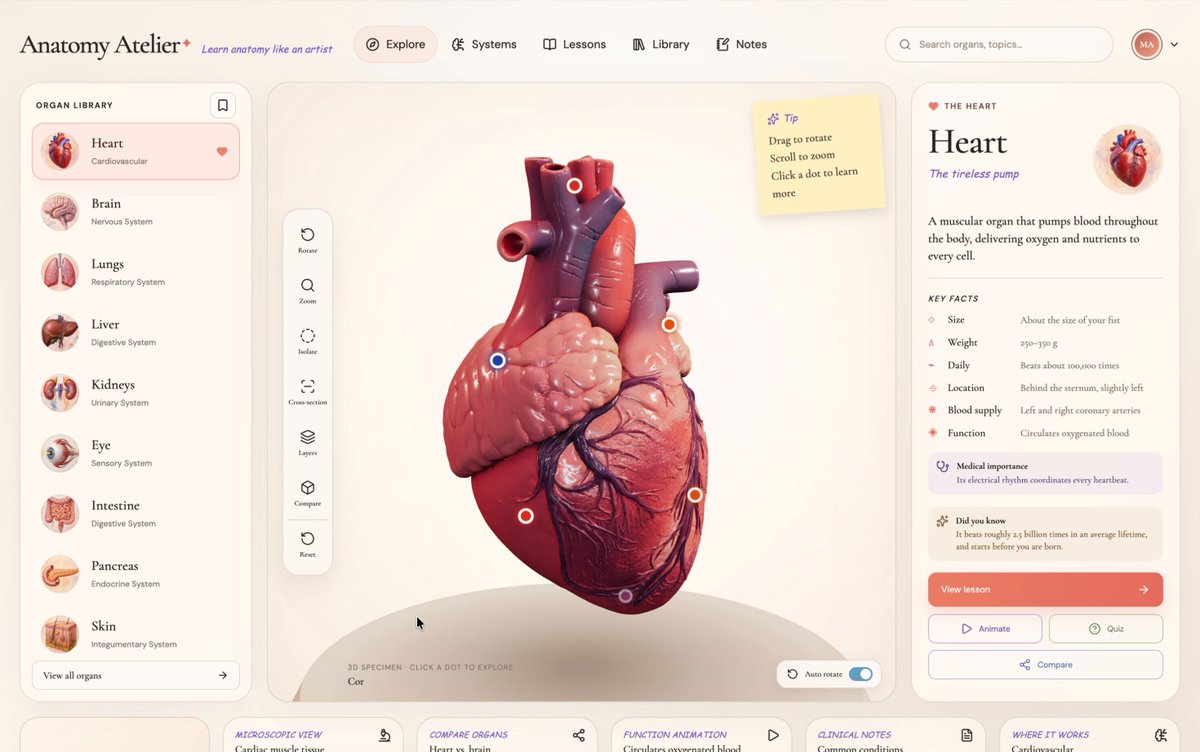
Only if education could be this interactive ❤️‍🔥 I've had a looong wish to build something genuinely useful through vibe coding, and I finally did it. A 3D human anatomy application built with Three.js using GPT 5.6 Sol. It all started with a single design image that I created using GPT Image 2.0. I then used it to generate every 3D organ image, one by one. Next, I converted each of those images into 3D models using Tripo (and no, they didn't sponsor this 😄). After that, I opened Codex, wrote a master prompt based on the design, and gave it the prompt, the design image, and all the 3D models. Codex built the first version beautifully, but there was one big problem. Every single 3D model was nearly 120-150 MB. That obviously wasn't practical for the web and was giving a performance of 16fps. After a few iterations, Codex optimized each model down to roughly 2–5.5 MB while preserving the visual quality, reducing the total asset size from ~900 MB to just 28.6 MB. And each model loads on demand. Along the way, Codex also generated those anatomical illustrations showing where each organ sits in the human body, and even created the interactive hotspot markers that explain different parts of every organ. It handled all of that. The process wasn't exactly one shot, but it also wasn't difficult. You just have to do it step by step. It genuinely felt like building something that could make learning anatomy much more engaging. The inspiration came from Dilum Sanjaya's 3D animal plant cell project. I remember seeing it and thinking, "I want to build something like this one day." And I did it :D Live: Code:

The Bugged Dev

2,125,167 просмотров • 3 месяцев назад