正在加载视频...

视频加载失败

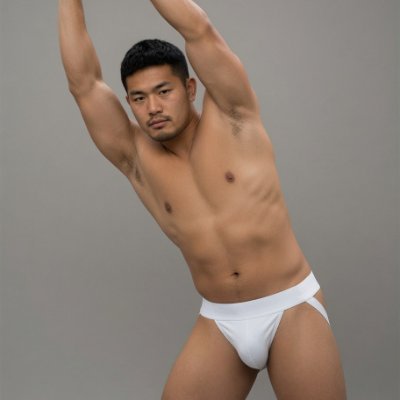
Seated Rest Pose 360° Figure Reference. Every angle matters. #FigureReference #ArtReference #MaleFigure
33,408 次观看 • 13 天前 •via X (Twitter)

0 条评论

暂无评论

原始帖子的评论将显示在这里

相关视频

📖THE STEP MOST CREATORS SKIP IS WHY THEIR AI ANIMATION LOOKS INCONSISTENT Consistency across clips doesn't come from prompting — it comes from the reference image. The pipeline, step by step: ▪ Start with ChatGPT Image 2 — generate a full character design sheet first, not just a single frame. Multiple angles, expressions, and outfit variations in one image keeps the character consistent across every scene ▪ Build a storyboard inside ChatGPT Image 2 as well — define each shot, camera angle, action, and mood before touching Seedance at all. This is the step most people skip and it's the reason clips look disconnected ▪ Define a color palette and lighting mood early — golden afternoon light, soft warm tones, dramatic shadows. Lock those values and repeat them across every prompt ▪ Take each storyboard frame into Seedance 2.0 as the reference image — one frame becomes one clip ▪ Write the Seedance prompt around the character action, not the scene description. The scene is already in the image. The prompt handles motion, camera behavior, and timing ▪ Keep clip duration between 4-6 seconds per shot — shorter clips give more control over pacing and reduce motion drift on character faces ▪ Match camera movement type across consecutive clips — if one shot dollies in, the next should hold or pull back, not dolly again The consistency across these frames comes from the character design sheet, not from luck. Seedance reads the reference image and the prompt together — if the reference is detailed enough, the output stays on-model. This video was created by ALOKXMEHTA 📥 tomorrow: the exact ChatGPT Image 2 prompt structure used to generate a multi-angle character design sheet like this one 🔖One article covers the entire workflow — it is pinned below, do not scroll past it.

Zentrix⌚️

12,846 次观看 • 22 天前

I encourage attackers to drive at the hips of defenders for a few reason; — 1v1 is a duel of footwork (momentum) & angles, the avenue to space is through an angle which can disrupt the opponent’s footwork (momentum) — It offers big-space players a reference to be successful in small spaces — Directly confronting the defender (driving/touching the ball towards their hips [centre]) means you’re moving into their ‘personal space’, which naturally makes humans uncomfortable, increasing the probability for the defender to make an impulsive reaction to your action. • We know Garnacho’s relationship with the ball isn’t watertight, a consequence of his narrow footwork, which reflects in his dribbling & shooting actions —> more specifically, his inability to make many multi-directional touches in his stride + his loose connections with the ball. Because of this he’s more likely to pose threat in bigger spaces, as he’s a willing goal-getter & has fair speed, but struggles to manufacture big enough space for his key actions when the opponents congest space deeper. • What trumps all of this is Garnacho lacking methodology in his dribbling, which would help him maximise his strengths & minamise the affect of his weaknesses. Garnacho drives towards the goal with the intention to cut inside and open an angle on his strong foot, but this angle of approach keeps the defender parallel to the ball (good momentum & maintain footwork) and closer to the space inside that Garnacho wants to take If he had driven at the hips (squared his man up) he could’ve; = pushed the opponent’s momentum onto back foot = reduced the need for sharp COD touches to access the inside angle (his weak point) & maintain his own momentum = kept open bigger space either side of him If you want big space, you have to make it. Targetting the defender’s central point within their personal space can support this.

.

14,214 次观看 • 1 年前

What did you do to my friend !! 😡 This is the trending “Fight Prompt” going viral Prompt : Use the first uploaded image as the main reference for the school uniform, body proportions, pose, posture, background, camera angle, framing, and overall composition. Use the second uploaded image as the identity reference for the face and hairstyle. Create a realistic Korean influencer-style school uniform portrait where the person from the second image naturally appears wearing the school uniform from the first image, photographed in the same studio setting. Important: Keep the school uniform, blazer, shirt, tie, skirt or pants, and overall outfit design from the first image. Keep the body proportions, standing pose, hand placement, posture, camera angle, framing, and studio background from the first image. Replace the face with the person from the second image. Also preserve the hairstyle from the second image, including bangs, hairline, hair part, hair length, hair framing around the face, and overall hair silhouette. Do not use the hairstyle from the first image if it differs from the second image. Identity: The face from the second image must remain clearly recognizable. Preserve the second person’s face shape, eyes, nose, lips, skin tone, jawline, and overall facial impression. Do not turn the face into a generic attractive face. Do not beautify too heavily. Preserve the person’s recognizable identity, but do not copy the face too rigidly. Reinterpret it naturally so it looks like a realistic photo of the same person in this new school-uniform scene. Keep the same overall facial impression and identity while allowing natural refinement and seamless adaptation to the lighting, angle, and mood of the target image. Hair: Follow the hairstyle from the second image. Preserve the second person’s bangs, hairline, hair part, hair texture, hair length, and overall hairstyle impression. Only adapt the hair naturally so it fits the pose, lighting, and composition of the first image. Korean influencer mood: clean modern Korean influencer portrait polished but natural beauty soft photogenic expression subtle editorial mood stylish, slightly chic, youthful, and confident atmosphere refined but believable skin texture clear eyes with soft catchlights naturally pretty, not over-retouched avoid stiff ID-photo mood Lighting: soft Korean beauty lighting gentle facial brightness clean skin tone soft natural highlights on the face natural shadow transition subtle glow, but realistic skin texture avoid harsh flash avoid flat passport-photo lighting avoid dramatic studio glamour lighting Style: realistic photography clean studio portrait quality Korean influencer-style school portrait mood natural skin texture high detail seamless face and hair integration polished but believable Negative prompt: no identity loss no generic attractive face no over-beautified face no first-image hairstyle if different no awkward face blending no mismatched skin tone no mismatched hairline no distorted facial features no blurry eyes no deformed hands no extra fingers no change to the school uniform no change to the body pose no change to the background no cartoon style no anime style no text no watermark

Ai Arainz

104,348 次观看 • 2 个月前

I just vibe coded a Meta Ads creative analytics tool in Claude Code 🤯 It syncs your ad accounts, AI-analyzes every creative, and tells you exactly what's working, what's not, and WHY. Built 100% in Claude Code. Perfect for DTC brands and agencies who are tired of staring at Meta Ads Manager trying to figure out WHY an ad is working or not. Here's the problem: Meta gives you the data. Spend, ROAS, CTR, hook rate. But it never tells you WHY an ad is performing or what to do about it. You're left manually watching videos, guessing at angles, and making gut-call decisions on what to iterate. This tool solves it: → Connect your Meta ad accounts → AI watches every video and analyzes every static → Auto-labels each ad by asset type, messaging angle, hook tactic, and funnel stage → Win rate analysis broken down by every category → Kill/scale recommendations segmented by TOF, MOF, and BOF → AI-generated iteration recommendations for every underperforming ad No manual video watching. No guessing at what's working. No spreadsheets to track creative performance. What you get: - Full creative analytics dashboard - AI classification on every ad - Iteration priorities for ads with real spend behind them - Weekly reports with top/bottom performers and AI insights I recorded a full walkthrough showing exactly how this works and what every feature does, including ALL the prompts I used so you can build it yourself. Want access to all the prompts for free? > Like this post > Comment "META" And I'll send it over (must be following so I can DM)

Mike Futia

82,619 次观看 • 5 个月前