Video yükleniyor...

Video Yüklenemedi

Ana Sayfaya Dön

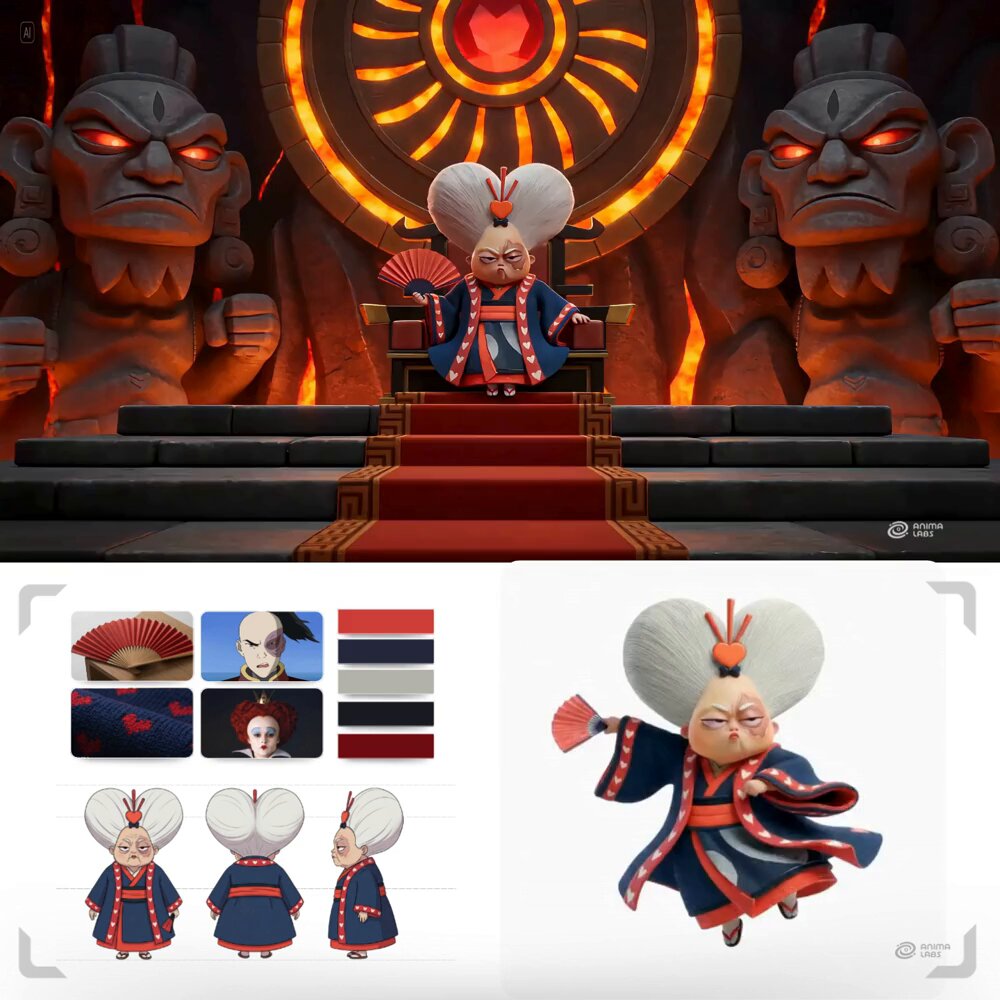
Today I'm testing horizontal character design sheets, including the 2D version from different angles. 🪲 I have other ideas for making this type of character design sheet more interactive. I'm currently doing a lot of research on insects and crustaceans. 🦀 AI Tools : Midjourney (2D) + Leonardo.Ai :...

102,114 görüntüleme • 6 ay önce •via X (Twitter)

0 Yorum

Yorum bulunmuyor

Orijinal gönderinin yorumları burada görünecek

Benzer Videolar

📖THE STEP MOST CREATORS SKIP IS WHY THEIR AI ANIMATION LOOKS INCONSISTENT Consistency across clips doesn't come from prompting — it comes from the reference image. The pipeline, step by step: ▪ Start with ChatGPT Image 2 — generate a full character design sheet first, not just a single frame. Multiple angles, expressions, and outfit variations in one image keeps the character consistent across every scene ▪ Build a storyboard inside ChatGPT Image 2 as well — define each shot, camera angle, action, and mood before touching Seedance at all. This is the step most people skip and it's the reason clips look disconnected ▪ Define a color palette and lighting mood early — golden afternoon light, soft warm tones, dramatic shadows. Lock those values and repeat them across every prompt ▪ Take each storyboard frame into Seedance 2.0 as the reference image — one frame becomes one clip ▪ Write the Seedance prompt around the character action, not the scene description. The scene is already in the image. The prompt handles motion, camera behavior, and timing ▪ Keep clip duration between 4-6 seconds per shot — shorter clips give more control over pacing and reduce motion drift on character faces ▪ Match camera movement type across consecutive clips — if one shot dollies in, the next should hold or pull back, not dolly again The consistency across these frames comes from the character design sheet, not from luck. Seedance reads the reference image and the prompt together — if the reference is detailed enough, the output stays on-model. This video was created by ALOKXMEHTA 📥 tomorrow: the exact ChatGPT Image 2 prompt structure used to generate a multi-angle character design sheet like this one 🔖One article covers the entire workflow — it is pinned below, do not scroll past it.

Zentrix⌚️

12,846 görüntüleme • 29 gün önce

this effect is all over tiktok right now and nobody's explaining how to actually do it properly... the 3d balloon character thing. where someone turns into a shiny inflatable version of themselves that still moves and talks. looks pretty smooth in feeds. the workflow is stupid simple once you see it. step 1: take any photo. drop it into an image gen tool (nano banana pro). prompt it with something like "make the person in the photo a plastic blow up balloon character with a shiny surface. keep the face details as 3d balloon details including the person in the background. don't change background" that's it for the image. don't overcomplicate the prompt. shorter = more consistent results. (learned this after wasting like 2 hours trying to get "perfect" prompts that kept giving me garbage) step 2: take that balloon image + your original video and drop both into kling motion control. prompt: "turn the motion and detailed mouth movement of the video to the setting of the image" that's literally it. kling maps the motion from the real video onto the balloon character. mouth moves. head turns. expressions transfer. the whole thing renders in a few minutes. the result looks like a $500 custom animation and costs you maybe $0.30 in kling credits. people are getting 500k+ views with these because the scroll-stop factor is insane. nobody expects to see a shiny inflatable version of someone giving a real speech or doing a product review. the play here is obvious btw. run this for client content (mix with the hook and real body, check the results yourself) or use it on your own faceless channels as a hook pattern before the algo catches up...

KNOX

25,773 görüntüleme • 5 ay önce

When strangers become big sisters in seconds. GPT Image 2 + Seedance 2.0 on Renoise prompt Create a clean, professional Pixar-style 3D character sheet of a 6-year-old girl, highly detailed, vibrant colors, polished family-friendly animation style. Character Description: Adorable 6-year-old girl with soft dark wavy hair tied in a cute high ponytail with a small pink bow. Big sparkling brown eyes, round expressive face, rosy cheeks, small button nose, and a warm friendly smile. She has a healthy, energetic child body type suitable for a 6-year-old. Outfit: Bright yellow t-shirt, light pink shorts, white ankle socks, and colorful small sneakers (blue and pink accents). Character Sheet Layout: A single clean vertical character sheet with multiple views of the same girl arranged neatly: Top Left: Full-body front view, standing naturally with hands on hips, smiling confidently. Top Right: Full-body 3/4 angle view, showing depth and personality. Middle Left: Full-body side profile view (facing right). Middle Right: Full-body back view. Bottom Center: Large close-up of her face showing 4 different expressions in small circles — Happy smile, Surprised, Shy/embarrassed, and Excited/grinning. Bottom Right: Small extra details — close-up of her ponytail with bow, shoe details, and hand poses. Style & Quality: Beautiful 3D Pixar animation style, smooth rounded shapes, expressive eyes, soft realistic textures, vibrant yet soft lighting, clean white background with subtle light shadows, highly polished, professional character design sheet, perfect proportions, studio quality, sharp details, warm and wholesome feel. 16:9 aspect ratio, ultra-detailed, cinematic lighting. #RenoiseCanvas

Sharon Riley

157,146 görüntüleme • 2 ay önce

Contact sheet prompting is the hottest AI video technique right now 🤯 One image in → 6 consistent frames out → cinematic video ads in minutes. But everyone's doing it manually. I automated the entire workflow in n8n + Airtable. Here's why contact sheet prompting is blowing up: You give AI one reference image, and it generates a grid of consistent shots — same face, same outfit, different angles. Instant storyboarding, full creative control, no photoshoots. The problem? It's super tedious: → Write the prompt manually → Generate the contact sheet → Crop each frame by hand → Feed frames into a video model one by one → Repeat for every product This n8n automation handles all of it: → Upload character image + product image → AI analyzes both and writes the contact sheet prompt → Nano Banana Pro generates a 6-frame grid → System extracts each frame automatically → Kling 2.5 generates smooth transitions between frames → You get 5 video clips ready to stitch Approval checkpoints at every stage, no surprises. What lands in your Airtable: → AI-generated creative prompt → Core hero image (model + product) → 6-frame contact sheet → 5 cinematic video clips → Full control before each generation step Contact sheet prompting on autopilot. I filmed a 20 minute Loom video showing you exactly how I set it up. Want the Loom + the complete n8n workflow + Airtable base? > Comment "SHEET" > Like this post And I'll send it over (must be following so I can DM)

Mike Futia

53,632 görüntüleme • 7 ay önce

Claude Code + Google Stitch 2.0 is f*cking cracked 🤯 Google just dropped a free AI design agent that solves Claude Code's biggest weakness: frontend design. One screenshot of a high-converting landing page → a production-ready site for your brand in minutes. All inside Google Stitch + Claude Code. Perfect for DTC brands and agencies who are building advertorial pages and product launch pages for Meta but burning days on designer back-and-forth. If you're running Meta ads and need 5-10 different landing pages testing different hooks, angles, and offers — each one targeting a different audience and pain point — you know the bottleneck isn't the ads. It's the pages. Briefing designers, waiting for revisions, paying $2-5K per page. Stitch eliminates the design bottleneck: → Find a high-converting advertorial that's scaling on Meta → Screenshot it and drop it into Stitch (powered by Gemini 3.1) → Stitch redesigns it with your brand's colors, fonts, and imagery using Nano Banana 2 → Edit sections visually — headlines, CTAs, layouts — without touching code → Export the code and paste it into Claude Code → Claude builds the full production site and deploys to Vercel or Netlify in 60 seconds No designer. No $3K per landing page. No Claude Code frontend that looks like a template from 2019. What you get: → Designer-quality landing pages and advertorials built in minutes, not weeks → Visual editing so you actually see the design before you code it → Nano Banana 2 generating on-brand product imagery and hero shots → A repeatable system — new angle, new page, same pipeline Built 100% with Google Stitch 2.0 + Claude Code. I put together a full playbook showing the exact workflow: how to find winning pages, redesign them in Stitch, and deploy with Claude Code. Want it for free? > Like this post > Comment "STITCH" And I'll send it over (must be following so I can DM)

Mike Futia

125,781 görüntüleme • 4 ay önce

In the summer of 2023, I cold emailed Jensen Huang and asked to capture a NeRF of him at SIGGRAPH. He responded in about an hour and said yes. A radiance field is, in the simplest terms, akin to a 3D photograph. A moment in time, so completely reconstructed that you can move through it and see it from angles the original cameras never occupied. NeRFs were the original method. Gaussian splatting, which debuted at that same SIGGRAPH, has since become the dominant form of radiance field. I called my late friend James, who told me we needed to begin practicing immediately. We ran capture after capture for weeks until we consistently got the capture time down to ~30 seconds with one camera. Later, in a hallway at the LA Convention Center during SIGGRAPH, I captured the portrait you're seeing now, a full 360° gaussian splat of Jensen, rendered here as a 2D flythrough. Afterward, I continued the conversation with him and members of his team to make the case for radiance fields as a foundational representation for imaging. To my surprise, they listened. Three years later, NVIDIA has several works, including NuRec, fVDB, 3DGRUT, and gsplat all utilizing radiance fields. The landscape has evolved enough that the reasoning is obvious. Gaussian splatting has begun to ship across some of the world’s largest industries, including autonomous vehicles, AEC, geospatial, media and entertainment, robotics, e-commerce, hospitality. It’s become clear that lifelike 3D is here to stay. And yet I think we will look back and be disappointed by how late we started taking 3D portraits of the people around us, just like how we have sparse 2D photos of our grandparents and great grandparents. We have billions of photographs of the people we know and love, but almost no radiance fields of them. I'll be returning to SIGGRAPH in LA where this was initially captured three years ago, with the landscape looking significantly different. Radiance fields are more under deployed than ever relative to what they can do. I'm excited for the future of imaging, and for 2D to transition into 3D. I have a few things up my sleeve that I think will make that case plainly.

Radiance Fields

17,663 görüntüleme • 1 ay önce