Loading video...

Video Failed to Load

Go Home

Two legends. Born in duality.​ Experience Pragmata on the ROG NUC 16 — a compact gaming powerhouse built to unleash high-FPS gameplay without missing a beat. Powered by up to an NVIDIA® GeForce RTX™ 5080 Laptop GPU with DLSS 4.5 Super Resolution and next-gen Transformer AI, it brings smooth,...

17,183 views • 3 months ago •via X (Twitter)

0 Comments

No comments available

Comments from the original post will appear here

Related Videos

$KNDX 🤖 Theres 3 big narratives that are sending coins left right and centre rn. 🚀 #AI, #Gamefi, & #NFTs 🔹Theres 50% mindshare for #AI. 🤖 🔹#GameFi mcap is hitting ATH's with #OfftheGrid, $XBG and $SUPER making spectacular moves. 🎮 🔹NFTs and the #Metaverse are making a strong comeback with $APE up 100% over the weekend. 🐵 What if there's a project that touches all these trending narratives with groundbreaking technology to disrupt all 3 of them? 🔥 💡- That's where $KNDX comes in. -💡 Kondux is a cutting-edge Web3 SaaS platform, combining NVIDIA’s Omniverse, AI, Blockchain, and dynamic NFTs to revolutionize secure asset management across industries. 👏 Their flagship product, kNFTs, are 3D digital assets usable across Metaverse and Gaming platforms, AR/VR/XR environments, and manufacturing applications. Kondux’s scalable model opens new revenue streams by enabling effective digital asset monetization. 💰 Kondux is the first Web3 project to integrate VFX pipelines with NVIDIA’s Omniverse and bringing it onto the Blockchain. ⛓️ It is also the only Web3 project with a *Select Status Partnership* with NVIDIA, operating under NVIDIA NDAs and working with them directly for more than 2 years. About their NVIDIA Integrations: 🤖 🔹There are three areas of the Kondux tech stack that coincide with three divisions of NVIDIA: 📡GDN (Graphics Delivery Network, the backbone of GeForce Now) 💡Omniverse for 3D aspects such as, geospatial data, real world physics, lighting, and raytracing 🤖NVIDIA AI Foundation, which covers many aspects of #AI, including inference and deployment scaling. The convergence of all these components lie within .USD file format . 🔹 They are the first blockchain project to integrate NVIDIA’s Omniverse Cloud and Graphics Delivery Network (GDN) to provide high-quality 3D content accessible on any device without requiring high-end hardware. 🔹 This setup streamlines content management, democratises access to resource-intensive 3D content, and enables real-time interaction with 3D NFTs. Now, I haven’t seen any crypto project so deeply connected with NVIDIA and NVIDIA technology. GDN is a HUGE competitive advantage. With it, the need for #GPU’s basically goes out the window. 🤯 Now lets take a look at some of the other main features... 👀 OpenUSD (Universal Scene Description): 📽️ 🔹 Kondux is leveraging USD technology, developed by Pixar and used by Meta, Apple, Microsoft and other industry leaders to enhance 3D graphics and interoperability within its creative ecosystem. 🔹 Originally created for high-end film production, USD now supports a variety of applications, including gaming and virtual reality, making it a key asset for Kondux. kNFT's: 🎨 🔹 Kondux is pioneering a new category of NFTs known as kNFTs, which aim to redefine NFT utility through innovative features. 🔹 A standout feature is the upgradeable aspect provided by Kondux DNA, allowing kNFTs to transform and combine with other NFTs, creating limitless possibilities in art, gaming, and music. 🔹Through the Kondux AI portal it will be possible to communicate with kNFTs. They can learn and adapt. This AI technology is revolutionary because it makes human to kNFT interaction possible, turning it into a unique, personalized experience. Check out the clip of kNFTs in Unreal Engine 5 gameplay below. 👇 Kondux is a very obvious utility play with huge upside because it’s multi narrative. 📈 It's seriously groundbreaking stuff that they’re about to launch. 🚀 After speaking with the team there’s no doubt in my mind this will do crazy big numbers in the next months. 🤑

Altcoin Miyagi🇯🇵

17,323 views • 1 year ago

Run Gemma 4 26B MoE on 8GB VRAM with 250k context at 20+ tokens/sec If you own any 8GB VRAM graphics card, stop what you are doing. Local AI just had its absolute "Holy Shit" moment for budget hardware. Yesterday, I benchmarked Unsloth Gemma 4 12B Q4_K_XL on an 8GB card. The community went wild but immediately demanded more: "Can we run a 25B+ model on budget GPUs?" Today, I’m delivering exactly that. I am running a massive 26B parameter Mixture of Experts (MoE) model locally on a standard 8GB VRAM setup with 250k full native context!. If you own an RTX 3060, 3070, 4060, or any budget GPU with 8GB of VRAM, the local AI paradigm has completely changed. The performance metrics are astonishing: - 20 tokens/sec flat decode throughput. - Stable, flat decode speed even with massive prompts. - I threw a 60k token prompt at it, and it still clocked in at 20 TPS without dropping a single frame. # What about prefill? Yes, Time To First Token (TTFT) is slightly high when swallowing massive contexts. But with a solid 200 tokens/sec prefill speed, the wait is barely noticeable and highly usable. And this is running completely without Multi Token Prediction (MTP) active. How is this possible? It’s the magic of Google's new QAT (Quantization Aware Training) quants for Gemma 4. The model weight file (unsloth gemma-4-26B-A4B-it-qat-UD-Q4_K_XL.gguf) is only 13.2 GB, making it the ultimate local powerhouse. # The Test Setup: CPU: Intel Core i7 RAM: 16GB System RAM GPU: NVIDIA GeForce RTX 4060 Laptop GPU (8GB VRAM) # The Secret Sauce (The -cmoe Flag) To make this work properly on any 8GB card, you must use the -cmoe (CPU MoE) flag in llama.cpp. This flag isolates the heavy MoE expert weights directly to system memory (CPU/RAM) while letting your GPU focus strictly on the Attention layers and the KV Cache. It prevents VRAM spillage and holds the throughput rock solid. # The flags: -m "gemma-4-26B-A4B-it-qat-UD-Q4_K_XL.gguf" -cmoe -c 248000 -v Once running, just open the UI on localhost and toggle the new reasoning lightbulb icon in the text input box to watch the model perform multi step thinking. Are you still running smaller models, or are you ready to scale up your budget local setups? Let's discuss in the replies

Alok

292,770 views • 3 months ago

CoinMarketCap AI Is Live: What Does It Really Change ? 🌱 In the fast paced world of crypto, information is power but its often scattered, delayed, or hard to trust. CoinMarketCap newly launched CMC AI aims to fix that by offering real time insights with no friction. ✨ Real Time Q&A on Coin Pages 🌱CMC AI is now integrated into major coin detail pages, generating automatic Q&As every 30 minutes. During periods of volatility, it updates dynamically, helping users understand price movements with short and structured explanations. No login required, no delays. 🌱However, while this speeds up the process, its not a substitute for deeper analysis. It answers the “what” and “why,” but not always the “what’s next.” ✨What’s Coming Next? 🌱CMC AI is just getting started. According to its roadmap, several new features are on the way • Homepage Integration: A quick view of market trends and opportunities, without clicking into individual coins. • Live Chart Analysis: AI will add context to price moves by linking them to news, sentiment, and social media. • Token Comparison Tool: Users will be able to compare tokens like BTC vs SOL across utility, performance, and tech specs. • Portfolio Insights: One click portfolio analysis with rebalancing suggestions and market outlooks. • Cross Device Continuity: Start an AI conversation on desktop and continue it seamlessly on mobile. ✨A Tool Not a Strategy 🌱 CMC AI brings speed and clarity, two things crypto investors often lack. But it’s still just a tool. It won’t make decisions for you. It helps guide your thinking not replace it. 🌱 The smartest way to use it? Treat it as a compass, not a map. It can point you in the right direction, but the journey is still yours. 🌱 CMC AI represents a step forward in how users interact with crypto data. It filters the noise, shortens research time, and brings useful context closer to the user. But like any shortcut, it works best when you already understand the long route.

Loji

37,459 views • 1 year ago

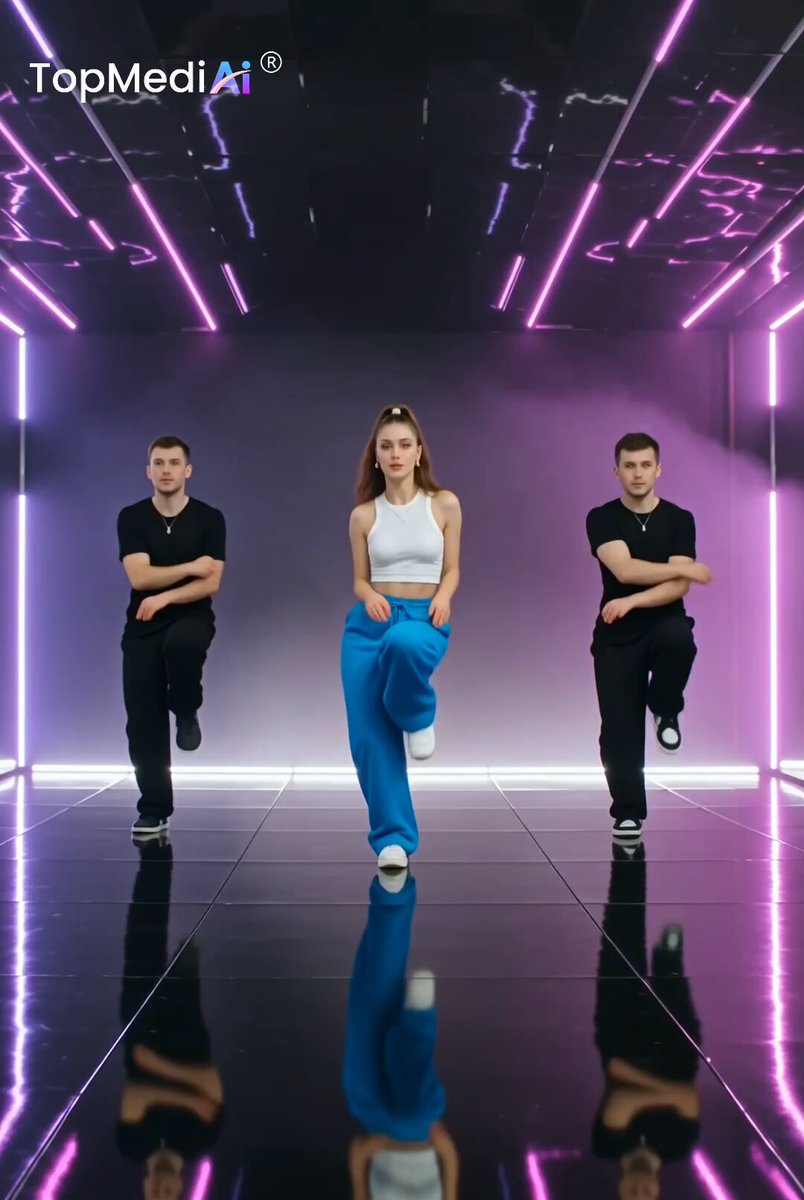
Good vibes, smooth moves, and a beat you can’t resist. When the music hits, you just have to move. Made with Seedance 2.0 on TopMediai Prompt: A cinematic K-pop dance performance on a futuristic dark stage illuminated by vibrant purple and magenta neon lights. A confident female dancer with a high ponytail, wearing a fitted white crop top and oversized electric-blue pants, performs sharp, powerful choreography with two male backup dancers dressed in black. Start with a full-body symmetrical shot, then smoothly push the camera toward the lead dancer for an intense close-up. Include dynamic hand movements, precise choreography, subtle body motion, realistic facial expressions, flowing hair movement, dramatic stage lighting, glossy reflective floor, atmospheric haze, soft lens flares, and energetic concert visuals. Audio / Sound Design: Create an energetic modern K-pop instrumental with a powerful electronic beat, punchy bass, crisp kick and snare, rhythmic synths, atmospheric pads, and subtle crowd ambience. Sync the beat precisely with the dancers' movements, adding bass hits and impact sounds on major choreography transitions. Include smooth beat drops, rising synth effects, and cinematic whooshes during camera movements. No dialogue, no vocals, clean polished music-video audio, immersive stereo sound. Smooth cinematic camera movement, realistic human motion, detailed skin and fabric textures, high-end music-video cinematography, dramatic neon lighting, dynamic choreography, glossy reflections, 4K quality, vertical 9:16.

Calira

12,501 views • 11 days ago

This guy built a visual scanner that reads 468 points on his face and 42 points on his hands from a regular webcam and turns them into a cloud of thousands of particles right between his palms. Inside, MediaPipe and TouchDesigner are linked: the first captures hands and face from the webcam with high accuracy, the second turns those coordinates into a live plane and feeds it into a POP system that instantly generates a swarm of particles in the shape of a head. No studio, no render farmer, no VR headset. Just a laptop, a webcam, and 1 TouchDesigner session. And traditional VJ studios keep teams of 5 people on a setup with lighting, custom hardware, and commercial plugins, while his expenses are only a TouchDesigner subscription and a regular USB camera. One laptop runs MediaPipe and TouchDesigner simultaneously, holds the camera stream at 60 FPS without drops, and in parallel processes 468 face points + 21 points on each hand. The camera captures frame after frame, MediaPipe in real time sends TouchDesigner the finger coordinates and face geometry, and the POP operator inside the engine translates those numbers into thousands of particle points with colors from bright pink to gold. This setup immediately defines the role of the tool and the limits of its autonomy. It knows where the fingertips are at every moment of the frame. It knows how to read the face geometry at any angle to the camera. It knows how to draw a swarm of particles between them with the right color and contour. → MediaPipe pulls 468 points from the face and 21 points from each hand, 60 times per second → TouchDesigner receives those coordinates, builds a virtual rectangle between the fingertips, and feeds it into the POP system → POP generates thousands of particle points in the shape of a head, coloring them in a gradient from bright pink to gold → The HUD layer adds green corners and a blue neon frame, styling the image like an AR interface → All layers assemble into 1 real-time frame that projects back onto the video in the camera window → The final image is recorded to a file or broadcast to a projector for a live installation And only when the guy spreads his hands wider does the plane between the palms stretch; brings them together, it narrows. Otherwise the system runs on its own. And when he moves from his home room to a concert hall, the same laptop with the same webcam launches the same TouchDesigner session in just 5 minutes, without reconfiguration, without a new team, and without a single line of new code. In his work setup there is no studio of his own and no team for assembly. On the desk sits a laptop with a webcam, on top run MediaPipe and TouchDesigner with POP operators, and the same setup through a USB camera moves to any concert without a new configuration. Out of everything I have seen this year, this is the cleanest Creative Coding setup on 1 laptop: 0 render farms, 0 studio lighting, and between them 3 libraries, thousands of particle points, and 1 webcam.

Blaze

38,242 views • 4 months ago

Create more. Do more. AI Tools brings image generation, video creation, AI chat, and coding together in one powerful workspace. Prompt: Create a 10-second ultra-realistic premium SaaS technology commercial using the uploaded storyboard image as the exact visual reference. Preserve the same dark futuristic workspace, laptop and smartphone positioning, purple-blue lighting, UI design, typography style, and overall premium tech aesthetic throughout the video. 0–2 seconds APP REVEAL Start with a cinematic close-up of the laptop on the modern desk. The screen displays the AI Tools platform homepage with the AI Chat, Image Generator, Video Generator, and Code Generator options clearly visible. Slowly push the camera toward the laptop screen with subtle ambient lighting and realistic reflections. 2–5 seconds AI IN ACTION Smoothly transition into the Image Generator interface. A hand types a creative prompt into the input field and clicks Generate. The interface responds instantly, with elegant UI animation as a high-quality image appears on screen. Keep the laptop, interface and branding visually consistent. 5–8 seconds MULTIPLE AI TOOLS Use fast, seamless cinematic transitions between four features: Image Generator → Video Generator → AI Chat → Code Generator. Show each tool briefly in action with smooth interface animations, dynamic screen transitions, and subtle camera movement. Make the experience feel fast, powerful and effortless. 8–10 seconds HERO SHOT Pull the camera back to reveal the laptop and smartphone together on the desk. Both screens display the AI Tools branding. Add a subtle purple glow and cinematic reflections. End with clean on-screen text: AI TOOLS Create. Generate. Elevate. Visual style: photorealistic, premium SaaS advertisement, cinematic lighting, dark modern desk setup, purple and blue ambient glow, realistic hands, sharp screen details, smooth camera movements, elegant UI animations, high-end technology commercial, no distorted text, no extra objects, no changing product design, no flickering, no warped hands, consistent branding throughout.

𝐒𝐊_𝐀𝐈

31,392 views • 12 days ago