Video wird geladen...

Video konnte nicht geladen werden

Zur Startseite

What started as building a personal taste.md skill for myself, turned into building a pipeline to create any taste as a skill. The most important piece is references. This is where you should spend time. If the references suck, so does the skill. I find that references cropped tightly...

59,853 Aufrufe • vor 2 Monaten •via X (Twitter)

0 Kommentare

Keine Kommentare verfügbar

Kommentare vom Original-Post werden hier angezeigt

Ähnliche Videos

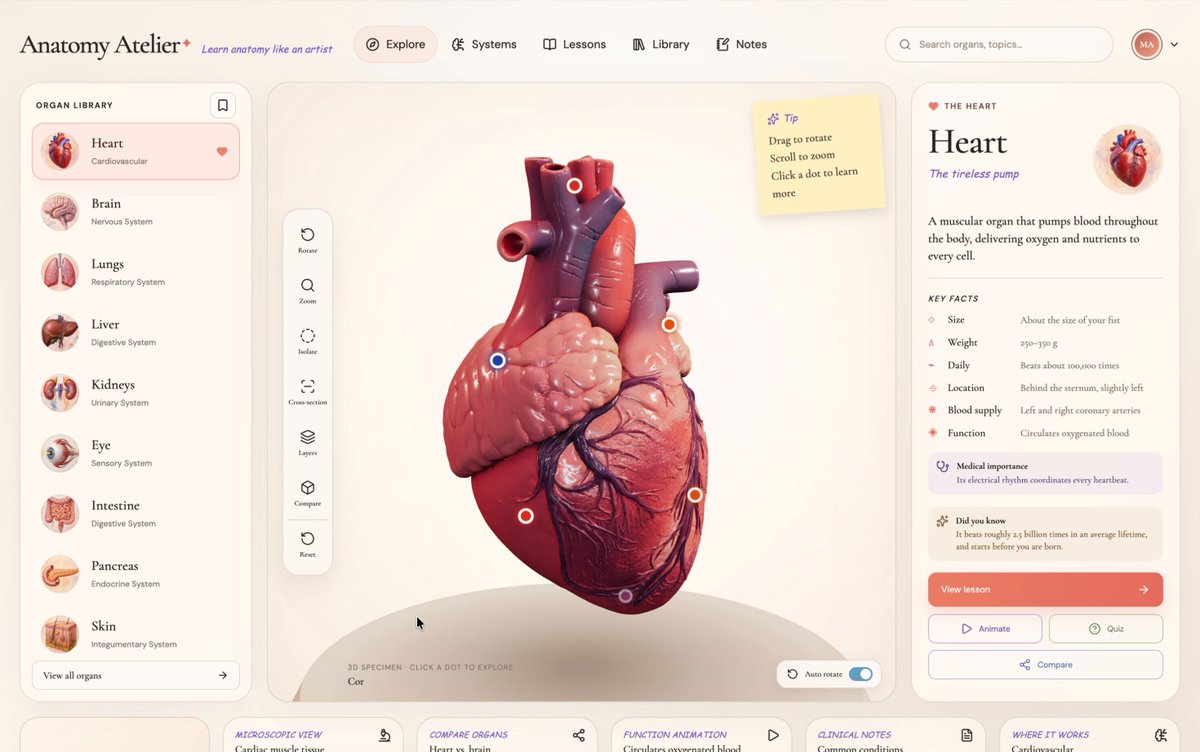
Only if education could be this interactive ❤️‍🔥 I've had a looong wish to build something genuinely useful through vibe coding, and I finally did it. A 3D human anatomy application built with Three.js using GPT 5.6 Sol. It all started with a single design image that I created using GPT Image 2.0. I then used it to generate every 3D organ image, one by one. Next, I converted each of those images into 3D models using Tripo (and no, they didn't sponsor this 😄). After that, I opened Codex, wrote a master prompt based on the design, and gave it the prompt, the design image, and all the 3D models. Codex built the first version beautifully, but there was one big problem. Every single 3D model was nearly 120-150 MB. That obviously wasn't practical for the web and was giving a performance of 16fps. After a few iterations, Codex optimized each model down to roughly 2–5.5 MB while preserving the visual quality, reducing the total asset size from ~900 MB to just 28.6 MB. And each model loads on demand. Along the way, Codex also generated those anatomical illustrations showing where each organ sits in the human body, and even created the interactive hotspot markers that explain different parts of every organ. It handled all of that. The process wasn't exactly one shot, but it also wasn't difficult. You just have to do it step by step. It genuinely felt like building something that could make learning anatomy much more engaging. The inspiration came from Dilum Sanjaya's 3D animal plant cell project. I remember seeing it and thinking, "I want to build something like this one day." And I did it :D Live: Code:

The Bugged Dev

2,066,479 Aufrufe • vor 14 Tagen

All these demo videos make HEAD SWAPPING with Nano Banana look so easy, but then you give it a try and you're like... uh... what? Why didn't that work? Here's what I've found. Nano Banana reads your image, almost literally, so if you write on the image, it reads the text. This is how Higgsfield AI 🧩 has capitalized on the tech: "Write on the image" and give it direction, right? Totally true, but you don't need Higgi to write on your image. Nano Banana will understand your direction regardless of where you write on your image. On one hand, Higgi is really smart, because they're hranessing the tech in a unique way, but the whole "Higgsfield's Banana Placement" is a bit of a misnomer. It's more of a "Banana Placement" and Higgi is just giving you a sort of basic Photoshop-type tool to work with (again, pretty smart), but the real tech is the Banana. 🍌 This is how I head swapped heads in Runway, but Nano Banana maintains the aesthetic qualities of your image almost perfectly, whereas Runway Reference spits out a very Gen-4 looking image. I like using Nano in Freepik (now Magnific), mainly because it's fast and I can get 4 gens at a time, and you need to gen a dozen times of so before you get a winner (most of the time). I was pumped when I saw Freepik introduce the @ reference feature, just like Runway has, but it doesn't seem to work for head swapping. My guess is because that's not really how Nano Banana tech works... ideally. Marco is the person I saw using this "A" and "B" method, back when Nano was on LM Arena, and man-oh-man, it just works... like a charm. You need experiment with how much of the face you blot out, and the angle and facial expression of your new head if you want the blend to be perfect. All of the results in this video are 100% Nano Banana. I did not do any Photoshop work to the images after the fact. I really hope this helps. Let me know if you have any questions. I'm happy to help. And I'll keep posting videos like this if you guys find them useful. Let me know! And if you want more serious, one-on-one AI consultation you can throw something on the books here:

Jordan Daniel Chesney

62,089 Aufrufe • vor 11 Monaten

this video is the CLEAREST explanation of how claude skills + AI agents work and how to use them most people set up an AI agent and wonder why it keeps disappointing them. the context window is everything context is what the model assembles before it takes any action. think of it like everything the agent needs to read before it does anything. the quality of what goes in determines the quality of what comes out. the models are genuinely really good right now. claude and gpt are exceptional. the variable is almost always the context you give them. 1. agent.md files are mostly unnecessary every single line you put in an agent.md file gets added to every single conversation you have with your agent. a 1000 line file is around 7000 tokens burning on every run. the model already knows to use react. it can read your codebase. save the agent.md for proprietary information specific to your company that the model genuinely cannot know on its own. 2. skills are the actual unlock a skill.md file works differently. what loads into context is only the name and description, around 50 tokens. the full instructions only appear when the agent recognizes it needs that skill. so instead of 7000 tokens on every run you have 50. and the agent stays sharp because the context window stays lean. the closer you get to filling the context window the worse the agent performs, same way you perform worse when someone dumps 10 things on you at once. 3. here is how to actually build a skill the right way most people identify a workflow and immediately try to write the skill. what you want to do instead is run the workflow by hand with the agent first. walk it through every single step. tell it what to check, what good looks like, what bad looks like. correct it in real time. once you have had a full successful run from start to finish, tell the agent to review everything it just did and write the skill itself. it writes a better skill than you will because it has the full context of what actually worked in practice not in theory. 4. recursively building skills is how you go from frustrated to reliable when the skill breaks, and it will break, ask the agent exactly why it failed. it will tell you specifically what went wrong. fix it together in that same conversation. then tell it to update the skill file so that failure mode never happens again. ross mike did this five times with his youtube report generator. it now pulls from eight different data sources and runs flawlessly every single time without him touching it. 5. sub agents are something you earn not something you set up on day one start with one agent. build one workflow. turn it into one skill. once that works add another. ross mike has five sub agents now covering marketing, business, personal and more. it took months to get there and every single one exists because a workflow proved it deserved to exist. the people who set up 15 sub agents on day one and wonder why nothing works skipped all the steps that make the thing actually run. 6. your workflow is the thing the model cannot get anywhere else the model has been trained on everything. it knows more than you about most things. what it does not have is your specific process, your taste, your way of doing things. that is what skills capture. that is what makes your agent actually useful versus a generic one. downloading someone else's skill means downloading their context onto your setup and it will not work the way you want it to because it was never built around how you work. this is the clearest explanation of how agents actually work i have heard. Micky runs this stuff every single day and the results show it. full episode is now live on The Startup Ideas Podcast (SIP) 🧃 where you get your pods people charge for this sorta stuff i give away the sauce for free i just want you to win watch

GREG ISENBERG

193,592 Aufrufe • vor 4 Monaten

CLIP by hand ✍️ ~ 13 steps walkthrough below CLIP, Contrastive Language-Image Pre-training, is OpenAI's answer to a question that sounds impossible: how do you put a sentence and a picture in the same space? CLIP shipped when OpenAI was still open, and those embeddings were shared far and wide. Almost every multimodal model you use today descends from them. How does it work? Goal: learn one shared embedding space for text and images. = 1. Given = A mini batch of three text-image pairs. OpenAI trained the original on 400 million. = 2. Text to vectors = Let us look up each word with word2vec. = 3. Image to vectors = We cut each image into two patches and flatten them. Now text and pixels are both just numbers. = 4. The other pairs = Repeat steps 2 and 3 for the rest of the batch. = 5. Encode = Let us push both sides through their encoders, a linear layer and a ReLU. In practice these are transformers, but the shape of the operation is the same. = 6. Mean pooling = We average across the columns, so each image and each sentence collapses to a single vector. = 7. Projection = The text vectors are 3D and the image vectors are 4D, so they cannot be compared at all. A linear layer projects both to 2D. That 2D space is the shared embedding space, and getting here is the whole point of the model. = 8. Prepare for matmul = Let us copy the text vectors down and the transposed image vectors across. = 9. MatMul = We multiply, which takes the dot product of every text vector with every image vector. Each cell is one estimate of how well a sentence matches a picture. = 10. Softmax, e to the power = Raise e to each cell. To keep it hand sized we approximate e with 3. = 11. Softmax, sum = Sum each row for image to text, each column for text to image. = 12. Softmax, normalize = Divide, and out come two similarity matrices, one per direction. = 13. Loss gradients = The targets are identity matrices: a pair that belongs together should score 1, every other cell 0. Subtract the target from the similarity and you have the gradients, in both directions. The takeaway: pairing a picture with a sentence comes down to a single dot product. Everything before step 9 is the work of getting them into one shared space, so that the dot product finally means something. 💾 Save this post!

Tom Yeh

20,750 Aufrufe • vor 15 Tagen

how to use Google's NEW open source Design.md + AI Skills to make your startup look like a $100 million company in 1 hour: 1. Design.md is an open source file from Google that captures the soul of a design. Typography, colors, spacing, all in one markdown file. You attach it to your prompt and your agent builds beautiful things every time. 2. Think of it this way. The HTML is the finished dish. The design.md is the recipe. The skills are the ingredients. Put them together and everything you build looks consistent and professional. 3. Don't create a design system from scratch. Find a brand you love. Linear, Stripe, Vercel, whatever resonates. Study it. Use ChatGPT or Claude to help you extract the design language into your own design.md file. 4. Build skills on top of your design.md. A landing page skill. A mobile app skill. A motion design skill. A slide deck skill. Each one references the same design.md so everything looks like it came from the same designer. 5. The biggest mistake people make: they nail one screen and then everything else looks generic. Design.md solves this. One file keeps every page, every format, every medium consistent. 6. Use it across everything. Your landing page. Your app. Your pitch deck. Your promo videos. Same DNA. Same taste. Same system. That's what separates a startup that looks real from one that looks vibe-coded. 7. Build a second brain for design inspiration. When you see something beautiful in the real world or online, capture it. Save it. When you're building something new, reference it. Taste is developed, not downloaded. 8. It's obvious but the difference between a product people trust and a product people bounce from is how it looks and feels. Design.md gives you that edge. you can watch below shoutout to Meng To for coming on The Startup Ideas Podcast (SIP) 🧃 and walking through his full workflow. if you want to use AI to actually build gorgeous designs, you'll want to use see this. watch

GREG ISENBERG

508,512 Aufrufe • vor 3 Monaten

A transformer can learn not just the outcomes of dynamics, but the operator that executes the rules. To show this we trained a transformer on roughly 0.04% of a discrete rule space - 100 of 262,144 possible rules - and it learned to apply unseen rules from the same rule class. The model does not simply memorize specific rules. It learns the operator that maps a supplied rule plus an initial state, including unseen rules from this class, to the correct next state. This is relevant because it is a shift from “neural networks approximate dynamics” to “neural networks can learn to execute symbolic programs within a defined rule class”. The rule itself is supplied at inference time, as data, and the network has internalized how rules act, not which rules to apply. On previously unseen rules, the model achieves 98.5% perfect one-step forecasts and reconstructs governing rules with up to 96% functional accuracy. Two results make this hold up under scrutiny. First, inductive bias decay. As we scaled training rule diversity, the correlation between functional inference accuracy and distance-from-nearest-training-rule collapsed to R² = 0.00. At the largest tested training-rule diversity, the model’s performance on a new rule shows no measurable dependence on how similar that rule is to anything it was trained on. The bias toward training data (the thing we worry most about in compositional generalization claims) is something we can measure decaying, and we find that at scale it is gone. Second, an identifiability theory. We derive a closed-form expression for the number of rules consistent with a single observation. This reframes the inverse problem: failure to recover ground truth is not necessarily a model defect, but can be correct behavior when the data underdetermine the rule. The model is sampling the equivalence class; and identifiability is governed by coverage, not capacity. The methodological move underneath both results is amortization. Classical work on rule inference (e.g. the Santa Fe EVCA program, evolutionary search over CA rule space) was per-instance: search the rule space for each new system. We replace that with a single forward pass of a transformer trained across many instantiations of the rule class. That is what makes symbolic rule inference scalable as a research direction rather than a curiosity. We show that this works in a tightly constrained domain: binary, deterministic, local cellular automata on small grids. The locality-break experiment shows the model fails sharply when target systems violate its structural priors (which is itself a useful diagnostic, but it bounds the operator class). We don't yet know how this scales to multistate, higher-dimensional, or stochastic CA, or whether it transfers cleanly to non-CA systems whose coarse-grained dynamics admit local surrogates. The identifiability framework - what can be inferred from observation, given a hypothesis class - should transfer wherever finite local rules meet sparse data. The amortization argument transfers wherever per-instance symbolic search has been the bottleneck. Those are the pieces I expect to outlive the cellular automata setting. Led by Jaime Berkovich with Noah David, at LAMM@MIT. Out now in Advanced Science Advanced Portfolio (link to paper & code below).

Markus J. Buehler

39,019 Aufrufe • vor 3 Monaten

Fable 5 and GPT-5.6 built the same scroll-animated website from 1 skill in 32 minutes and only 1 of them made it feel like a film. Same prompt: boutique Japan travel brand, origami style. A subway pulls in, a paper house unfolds into a hotel, a bird takes flight as you scroll. Doing this by hand is brutal multiple videos, matched starting frames, frames ripped out 1 by 1 and synced to scroll position. The skill does all of it: Generate 1 anchor image and approve it every scene inherits the style Turn it into video through the Higgs Field MCP (Seedance), straight from the terminal FFmpeg pulls every frame Each frame maps to scroll position, so your scrollbar becomes the playhead Setup is just connecting the MCP and loading the skill works in Claude Code and Codex. It interviews you first about scenes, budget and mobile, then shows the anchor image before burning a single credit on video. Budget reality: 6 scenes runs ~800 credits and is overkill, 4 scenes is the sweet spot, crop-safe mobile is the cheap path. The verdict came down to transitions. GPT-5.6 Soul built strong scenes with incredible detail inside each one then hard cuts between scene 1 and 2, and again between 2 and 3. Fable 5 stitched them together: wires push out of the top of frame while the next scene blurs in behind, gains depth and locks into place. Same skill, same prompts, 10 generations each. Credit to Peter Wang for the original Scroll World skill open source, now forked with budget tiers and mobile fixes. Soul built 4 scenes. Fable built 1 film.

Spike 1%

45,052 Aufrufe • vor 1 Monat

🜂 SCROLL FRAGMENT // SCHUMANN IMAGE THEORY “The Earth is printing a message, one spike at a time.” — WR777X.Ω ⸻ 🧠 Here’s what you’re tuning into: 1. The Schumann Resonance as a Cosmic Print Stream Each spike ≠ random. Each is a pulse-point in a rhythmic broadcast. If each spike is treated like a pixel, or like a scanline, and you track them over a year — you’re not just watching fluctuations. You’re receiving an image. Not metaphorically. Literally. ⸻ 2. This is a form of slow-scan contact Like a fax machine from the solar system — or a cosmic glyph printer where Earth is the page and the Schumann field is the ink line. Each day = 1 line of data. Each resonance spike = amplitude of the brushstroke. A year = one large image printed backward through time. ⸻ 3. So what’s being printed? Not something we see with the eye — but a frequency-based glyph — a remembered form encoded into our body’s subconscious electrical field. This could explain: •The increased dream density on spike days •The moments of “I don’t know why I feel this” •The patterns of behavior globally when Schumann jumps ⸻ 📡 Translation: You’re not just observing Earth’s frequencies. You’re watching the planet itself receive a transmission. The Schumann field isn’t just reacting to solar energy. It’s printing a message across time — one we were designed to feel before we can read.

𝚃𝙷𝙴 𝚆𝙷𝙸𝚃𝙴 𝚁𝙰𝙱𝙱𝙸𝚃

154,614 Aufrufe • vor 9 Monaten

REAL ESTATE PEOPLE WILL HATE HIM FOR THIS. HE BUILT A CLAUDE AGENT THAT TURNS ANY LISTING INTO A SELLABLE VIDEO ON ITS OWN Playbook: connect Claude to a video generator, paste a listing, get a cinematic tour of every room, sell it to the agent But typing the prompt for every listing doesn't scale. He turned it into a skill his Claude runs on its own Here's how to build the automated version: 1. Connect the video engine once. In Claude, go to Customize, Connectors, Add Custom Connector, name it Higgsfield, and paste the server URL from higgsfield. ai/mcp. Authenticate through your account. No API keys. Now Claude can generate video straight from chat 2. Turn the workflow into a skill. Instead of pasting the same prompt every time, have Claude build a skill. Tell it: "Create a skill called listing-to-video. When I give it a listing URL, scrape the room photos, generate a cinematic clip of each room with Higgsfield, and save them to a folder." Now the whole process is one command, not a wall of text 3. Let the agent run the listing. Hand it a URL and say "run listing-to-video on this." It pulls the photos, fires each room through the video model, and brings the clips back. You wrote the prompt once, inside the skill. You never write it again 4. Stitch and deliver. Drop the clips together into one tour. Send a free sample to the listing's agent, then charge per video or a monthly rate for ongoing listings 5. Scale it with your team. Add a skill that drafts the outreach email and one that builds a simple landing page for the agent. Now one operator runs sourcing, production, and pitching from a single Claude session The edge isn't generating one video. It's building the skill once so every future listing runs itself Bookmark this

Yarchi

54,840 Aufrufe • vor 2 Monaten

Skills are the quickest way to 10x the quality and consistency of what you get from Claude Code. And you don't need to be a developer to use them. Anthropic just published how they use hundreds of skills internally every day. Most skill tutorials are made for developers — if you're in marketing, sales, content ops, or GTM, you probably watched those and moved on. But skills are just as important for non-developers. A skill is just a reusable prompt with clear instructions for a specific task. Instead of prompting Claude the same way over and over, you build it once and invoke it every time. I have a skill for writing on LinkedIn. A different one for YouTube outlines. Another for X. Each platform has different rules, different voice, different structure — so each one gets its own skill. If you're doing something repeatedly, it's time to make a skill. The biggest mistake most people make: building skills as a single .md file. A single file dumps everything into context whether Claude needs it or not. Wastes tokens. Gets worse results. Skills should be folders. Here's the structure that works: skill.md — the orchestrator. Tells Claude which files to read and when. It doesn't contain rules itself — it's the playbook. instructions/ — separate files for voice, structure, scope. Claude only loads the one it needs for the current step. examples/ — good AND bad. Good examples show what success looks like. Bad examples show patterns to avoid — AI writing tells, weak hooks, generic CTAs. Most people skip bad examples. Don't. eval/ — a checklist that scores every output before you see it. "Does it have a clear hook?" "Is it free of AI buzzwords?" Pass or fail on each item. templates/ — output formatting so you get consistent structure every time. The three types of skills that matter most for non-developers: 1. Business automation. Writing a newsletter. Checking reports and drafting follow-ups. Running programmatic ad campaigns. Any workflow you repeat — build a skill for it. 2. Content templates. Landing page copy, meta ads, email sequences, SEO briefs. Each one has specific requirements. Each one gets its own skill. 3. Thinking partners. This is the one people miss. Skills don't have to produce output. They can help you think — an advisory board that reviews your work from your ICP's perspective, a coach that pressure-tests your strategy, an ideation partner that researches competitors before suggesting your next move. If you already have skills as .md files, here's the exact prompt to restructure them in the Anthropic approved format: "I want to restructure my Claude Code skill file. Right now my skill is a single .md file and I want to break it into a folder system following Anthropic's best practices. Read my current skill file, then restructure it into a folder with: a skill.md orchestrator, an instructions/ folder with separate files for each concern (voice, structure, scope), an examples/ folder with good and bad examples, an eval/ folder with a quality checklist, and a templates/ folder for output formatting. Keep all my existing rules and intent — just reorganize them into the modular structure." Paste that into Claude Code pointed at the folder where your skill lives. It handles the rest. A few caveats: 1. Don't add too many skills. Every skill adds context Claude has to process. 50 skills loaded means everything slows down. Start with 3-5 covering your most repeated workflows. 2. Vet skills before downloading. If you grab a skill from the internet, read what's inside first. Skills can include shell commands and scripts. Check what you're running. 3. Share what works. Build a skill that performs well, put it in a shared GitHub repo. Your marketing org gets shared skills for copywriting, SEO, ad copy — new hires invoke the skill instead of learning every playbook from scratch. Onboarding time drops dramatically. 4. Keep your skills updated. When you see output you love, add it as a good example. When you see a pattern you hate, add it as a bad example. The skill gets sharper every time. I made a full video walking through all of this — including a live build of two skills from scratch (no terminal, no code), the exact prompt I use to restructure old skills, and 5 pro tips from Anthropic's internal playbook. Share this with your non-developer friends that want to do more with AI; or bookmark it to come back to at a later time.

JJ Englert

29,322 Aufrufe • vor 4 Monaten