
Stefan 3D AI
@Stefan_3D_AI • 15,335 subscribers
Stefan Vaskevich: 3D AI Explorer. Sharing my insights.
Shorts


Videos

Finally! Rigged hair cards from a single image. HairDeck (Tsinghua + CMU + CUHK) takes one character image and builds a stylized haircut as separate 3D hair cards, with bone chains already attached. The hair sways when the head turns. Exports to GLB, or straight onto a VRM avatar. Code and weights are open under Apache 2.0. You get geometry and UVs, no textures yet. Local run wants Linux and CUDA.
Stefan 3D AI370,836 görüntüleme • 2 gün önce

This is what $2,175 of Opus 5.5 tokens can do! Let him cook on my gaming laptop and do whatever it takes, also gave Unity, Blender and APIs. 36 hours, 7.85 B tokens, $230 for 2d/3d/music generation and I got playable old school MMO RPG. That is just insane...
Stefan 3D AI1,570,023 görüntüleme • 1 ay önce

First Opus 5.5 vs GPT-6 Astra test is 3D. One prompt, Blender only, all procedural. Render the 10-second shot, and record your own build timelapse. Opus 5.5: 35 min, 199.6k output tokens, about $13.3 in API terms. GPT-6 Astra: 28 min, 56.6k output tokens, about $14.5 in API terms. Feels like a worthy rival, and honestly I am glad about that. From what I watched, Opus juggles way more at once and is faster overall. Astra is still good imo.
Stefan 3D AI471,023 görüntüleme • 1 ay önce

New Open-Source AI Animator: Text-to-Animation for Humans, Animals, Creatures, Robots & More UniMate generates motion from text prompts for rigged 3D characters. Describe an action and turn it into animation. Highlights: • One model, different skeletons—no separate retraining for each rig. • Generate transitions between existing keyframes. • Edit motion with text while keeping selected joints unchanged. • Extend animations with a sequence of prompts. • Export animated meshes as FBX and GLB. • MIT-licensed code + downloadable preview weights.
Stefan 3D AI245,967 görüntüleme • 1 ay önce

The cleanest game MVP made with AI I've seen. After the Wind by After The Wind: Ragnarok Online meets Monster Hunter, 5 weeks in Godot. Every asset matches the style. Rare with AI. 38.5B tokens processed in Claude Code, 2.9B in Codex, 112k tool calls, up to 8 agents at once.
Stefan 3D AI100,719 görüntüleme • 14 gün önce


Day 10. Building the game I've dreamed of for 15 years with AI. I still can't get over the feeling that I can finally animate all the creatures I've been imagining for this game. Animation was the part I was most worried about when I started. I thought I'd need an animator, especially for creatures like centaurs, scorpions and spiders. So today I went off-plan and made a Scorpid. It won't even be in the first version of the game. I just wanted to see whether I could get its animations working. I started with a good model made in Tripo P2.0, already optimized and split into logical parts. I think that preparation matters a lot. GPT-6 works with the mesh through code and calculations. A sensible number of vertices and well-organized parts make it easier to work out bone placement and skin weights. Then I made video references for the animations with SD 2.5 and repeated the same workflow. About an hour and a half with GPT-6 Astra on xhigh: five animations ready for the game, including several rounds of feedback. Another hour later, I had it running in Unity. I used to run a 3D studio. Work like this used to take weeks. Now I'm watching this thing move around in my game, and I still can't quite believe my eyes.
Stefan 3D AI315,206 görüntüleme • 1 ay önce

Day 9. Building the game I've dreamed of for 15 years with AI. I'm still in shock from GPT-6. Today I handed it my game's UI. I'd started working on it last week with Fable 5.1 and design skills. I built it in HTML first, preparing the images and icons along the way. Figuring out what I wanted and how it should work took time. I needed that time. I also made animated character portraits. I tried Seedance 2.5 for those, and MiniMax H3 gave me much better results for this job. By the end, I had an interactive prototype with the UI logic worked out and all the assets ready. I could click through it and test how everything behaved before taking it into the game. Once I'd tested it and worked through the remaining questions, I opened GPT-6 in the same project. Gave it the interface and all the materials, and asked it to implement everything in Unity. About two hours later, I had a working UI and nothing to complain about. GPT-6 even went through different resolutions on its own. I'd expected this part to be difficult. It ended up being one of the easiest parts so far. I'd recommend building your UI in HTML first. Iterations are faster, you can click through it just like a real interface, and it's easier to catch the things you missed. Once you've worked those out, connect it to the game. You still have to wait for the engine to compile, whether you write the code yourself or use AI.
Stefan 3D AI276,787 görüntüleme • 1 ay önce

$63M in 2004. One weekly Claude limit in 2026. In 36 hours Opus 5.5 built a WoW-style game: 6 races, character creation, combat, a zone and a stone city. At pay-per-use prices that's about $2,400 (breakdown below). The original WoW took $63M to develop. A game millions of people love still takes talent. But the build itself is becoming the cheap part. What's left is an idea people fall in love with, and knowing how to show it. And almost anyone who ever dreamed of making their own game is about to get a shot at it.
Stefan 3D AI182,574 görüntüleme • 1 ay önce

Day 16. Building the game I've dreamed of for 15 years with AI. I built this Dryad from start to finish in about a day and a half, including her animations and VFX. Opus 5.5 and Gpt-6 Astra is dream combo😍 She crawls across the ground on her roots. More roots reach out to drain enemies, and when too many attackers crowd her, a wall of leaves protects her. Even the leaves on her body move, and she sheds more as she travels. Those little details make her feel alive. The key to my workflow is going in small steps and checking the result at every stage. First I sketched out the effects and worked out how they should behave. Then I made the animations. Once those worked, I built the VFX around them, reviewing and adjusting each part as I went. Watching her crawl into a fight with all of this working together feels like magic. I'll definitely make a video breaking down how I built these VFX, step by step. I think a lot of you will find this workflow useful.
Stefan 3D AI180,130 görüntüleme • 1 ay önce

GPT-6 makes me scared as a 3D artist, cuz it's freaking insane. I mean, I'm testing this first hand everyday, but this time it is massive leap. look, 4 month ago I was testing GPT & Claude in Blender and they were not able to position simple objects in simple scene.. And look now... Whole car assembled from primitives in ONE prompt and animate it (hate to say that, but it was indeed one prompt). Yes, yes, it is not perfect and maybe not really usable still at this stage. BUT WHAT A JUMP.
Stefan 3D AI189,471 görüntüleme • 1 ay önce

Day 25. Building the game I've dreamed of for 15 years with AI. The second level is almost ready. The water changed the most. The rivers look like real forest rivers now: dark and calm, and like a mirror they reflect the banks, the trees and the units walking by. Light ripples run over the surface, and a little foam gathers at the shore. The banks came alive too. Plants of all kinds grow along them, and lily pads rest on the quiet water by the shore, some of them in flower. The whole map is changing bit by bit. Where the ground used to be bare, bushes grow now, and paths wind through the meadows and woods. On your way you can come across quiet little villages with a well in the middle, and old churches: one hides in a forest glade, the other stands right in the middle of the grey Skeleton Lands.
Stefan 3D AI11,518 görüntüleme • 2 gün önce

Day 11. Building the game I've dreamed of for 15 years with AI. I thought humanoid animations would be the easy part. Then I spent half the night trying to get a skeleton to swing its arm. I wanted that awkward, broken skeleton movement. GPT-6 Astra couldn't get the attack right in Blender on its own, even though other parts were working. Time to bring in some of my own animation knowledge. Three things I tried: 1. Recorded myself doing the arm swing, turned the video into mocap, and gave that animation to Codex. I asked it to fix just the arm, keeping the parts that already worked. 2. Put my generated Seedance video references through mocap too. They converted surprisingly well. The free option I tried was Unreal Engine 5.8; Quick Magic was the paid one. Both gave me motion I could use. 3. Let the agent try Cascadeur through its MCP server. It set up AutoPosing and experimented with AutoPhysics. This part is still inconclusive for me. The MCP integration felt too limited to call it a reliable part of the workflow yet. GPT-6 took those mocap clips and assembled the final animations. About six or seven rounds, roughly half an hour each. Today I got the skeletons into the game, and I'm so happy with how they turned out. I'm already working on the archers. For difficult movements, I'll be using mocap references much more often now. GPT can take just an arm movement from a clip and adjust the rest itself. Being able to combine those two approaches is what finally got this working for me.
Stefan 3D AI150,815 görüntüleme • 1 ay önce

I spent 2.5 billion tokens, every limit I had and five days to make this. A GTA-style city, built with GPT-6 using only prompts. No code or 3D by hand. The whole point was to push it as far as it goes and wire in every API I had. The setup: Codex driving Unreal Engine 5, with Higgsfield, Tripo, Meshy, Seedance, Seed Audio and fal handling the buildings, characters, animations, materials and sound. 8 buildings taken from concept to game, 247 generated voice lines for residents and police, 10 radio tracks across 5 stations. Here's the honest part. Most of those tokens didn't go into building. They went into fixing. The model writes a mechanic, runs it, watches it break, and tries again for hours. Getting a character to open a car door and actually sit in the seat took an absurd number of passes. A carjacking needed two separate bodies to stay locked to the same grab. Half the work was animation that looked fine on its own and fell apart the moment it ran in the game. And almost all of that 2.5B is the same project history being re-read from cache on every request, not unique code. Procedural generation from prompts is genuinely fun to watch and wildly inefficient at the same time. The city started as glowing blocks with working driving, money and jobs underneath, and ended up somewhere I'd actually screenshot. Full breakdown:
Stefan 3D AI129,647 görüntüleme • 1 ay önce

GPT-6 changes 3D modeling forever. It works inside Blender completely autonomously, like an artist: gathers reference photos on its own, builds the scene, renders test frames, checks them against the references, then fixes what's off. When the scene holds up, it ships it to Unreal Engine 5 as a walkable level. Clips from the OpenAI launch. More demos in the thread. Full announcement:
Stefan 3D AI161,522 görüntüleme • 1 ay önce

Free Open-Source Video-to-Animation for Mixamo Rigs, Now Inside Blender Motion2MixamoRig copies the motion of a person in a video onto a Mixamo-rigged character and hands you a skinned GLB for Blender or Unity. Highlights: • Video or a single photo as input • New Blender 4.2+ extension panel • Runs locally on CPU, CUDA or Apple Silicon • Reuse one take on other characters in tens of seconds • Apache-2.0 code GitHub:
Stefan 3D AI57,018 görüntüleme • 20 gün önce


I made a UE 5 game using only free AI in just 4 days. I generated 26 props, created two characters, and got ragdoll physics, checkpoints, and NPCs working. I still had to rig the characters, build the level, and fix bugs myself. Total spent on AI - $0. Full breakdown: #UnrealEngine #UE5 #GameDev #FreeAI #3DAI
Stefan 3D AI14,342 görüntüleme • 5 gün önce

Day 8 of building the game I've wanted to play for 15 years with AI. I absolutely love GPT-6. I'm switching from Claude completely. Today it finally happened: a full animation set for a non-humanoid character. My wolf is rigged and animated. All of last week I was trying approaches in parallel: Mesh2Motion, Cascadeur, Animate Anything, a pile of smaller tools. Everything kept almost working and then falling apart. Then GPT-6, and it's done. To be fair, I came in with a worked-out workflow: 1. Generate the model optimized from the start. Tripo P2.0 with multiview input, around 10k polygons, and the model came out great. 2. My agent turned the same side reference I used for the 3D gen into motion references with Seedance 2.5. Takes vary, so I picked the best ones. I only need 4 animations. 3. I decided the timing of each animation upfront, so they drop into the game as is. 4. Handed all of it to GPT-6 with Blender MCP. A couple of hours and a couple of feedback rounds later I have working animations I'm taking into the game. I fought this with Fable and the automation always came out crooked. This time it just worked. If you've been stuck on animations for a creature like this, try that route. And if anyone wants my workflow MD for GPT-6, I'll share it.
Stefan 3D AI90,850 görüntüleme • 1 ay önce
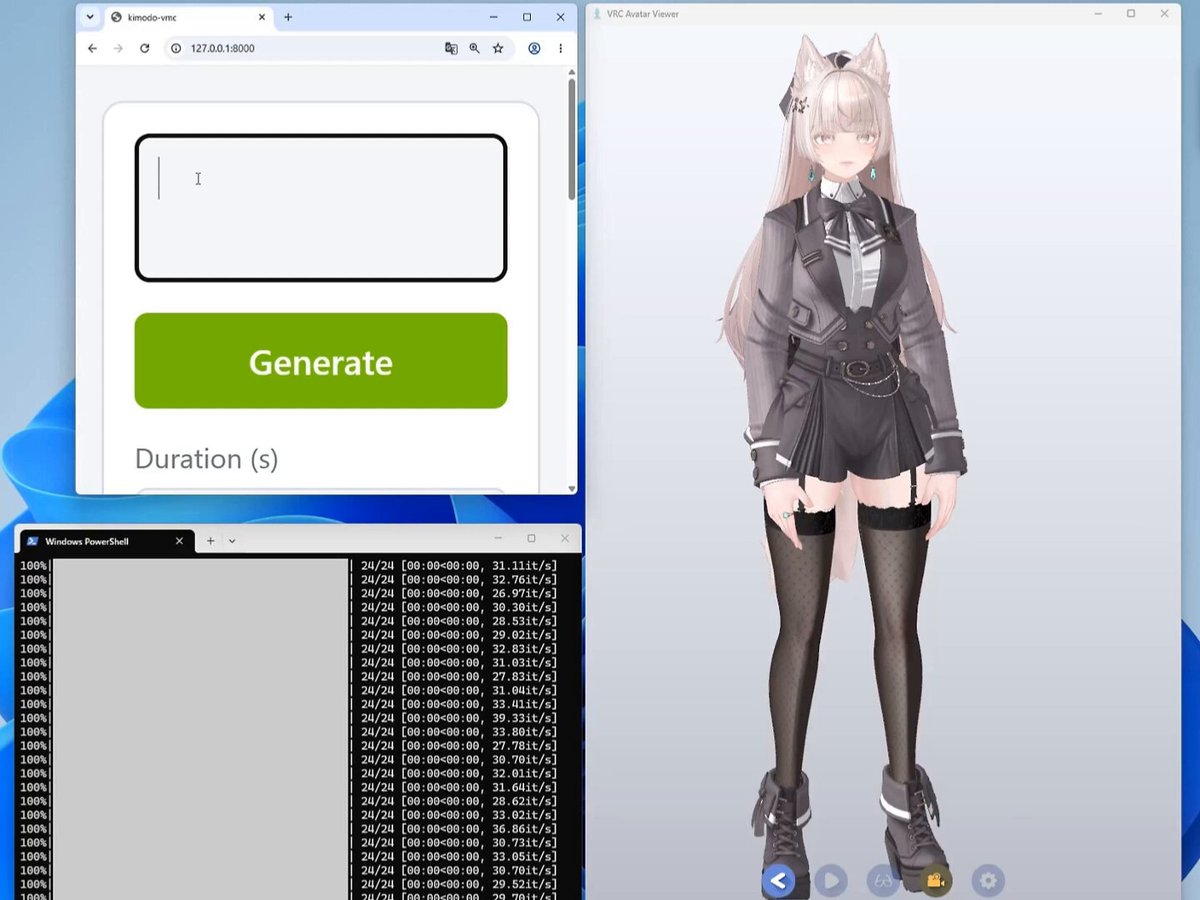
kimodo.cpp is live. NVIDIA's Kimodo, the best AI animation model right now, running natively on CPU or Vulkan. Type a sentence, get character animation, locally on your own machine. Before, you needed the whole PyTorch and CUDA stack standing up before you could generate a single motion. Now it is a native C++/GGML build that loads GGUF models and comes with a local web demo. No Python environment to fight. It gives you SMPL-X, and from there you retarget onto pretty much any skeleton you want, like Mixamo. Great piece of work Richard Palethorpe
Stefan 3D AI108,986 görüntüleme • 2 ay önce