
CSS by T. Afif's banner
CSS by T. Afif's profile picture

CSS by T. Afif

@ChallengesCss14,037 subscribers

💡 https://t.co/xk3TRqX1f1 🧩 https://t.co/4jGcDxtd38 💫 https://t.co/lRAAxfrQ09 📝 https://t.co/oOgtxdf5i9 ⚙️ https://t.co/UtXPa9iUiT 🏆 https://t.co/KgsRpeby7Q 🎨 https://t.co/0bhdtiVFTU 🎨 https://t.co/sZ8q2fgRBB

Shorts

Who said range sliders need to be straight and boring?! Hey CSS, distort the line! 〰️ Another funny demo powered by border-shape, scroll-driven animations, and more The HTML code? Only an input element (no extra code is needed)

Who said range sliders need to be straight and boring?! Hey CSS, distort the line! 〰️ Another funny demo powered by border-shape, scroll-driven animations, and more The HTML code? Only an input element (no extra code is needed)

32,241 views

💡 CSS Tip! Two circles, one arrow, and CSS magic. 🪄 A cool demo packed with modern features (anchor positioning, attr(), container queries, shape(), and more!) 🤩 The shape and position of the arrow are fully controlled using CSS.

💡 CSS Tip! Two circles, one arrow, and CSS magic. 🪄 A cool demo packed with modern features (anchor positioning, attr(), container queries, shape(), and more!) 🤩 The shape and position of the arrow are fully controlled using CSS.

82,668 views

💡CSS Tip! Create a tooltip that follows an anchor with modern CSS! No JavaScript is used to control the position of the tooltip or its tail. It's 100% CSS magic!

💡CSS Tip! Create a tooltip that follows an anchor with modern CSS! No JavaScript is used to control the position of the tooltip or its tail. It's 100% CSS magic!

57,924 views

💡 CSS Tip! Create a Sticky Header that "sticks"! A fancy effect powered by Scroll-Driven Animations and shape().

💡 CSS Tip! Create a Sticky Header that "sticks"! A fancy effect powered by Scroll-Driven Animations and shape().

22,524 views

What we can do with modern CSS is impressive! 🤩 A cool demo is in progress. Stay tuned! 👀

What we can do with modern CSS is impressive! 🤩 A cool demo is in progress. Stay tuned! 👀

12,187 views

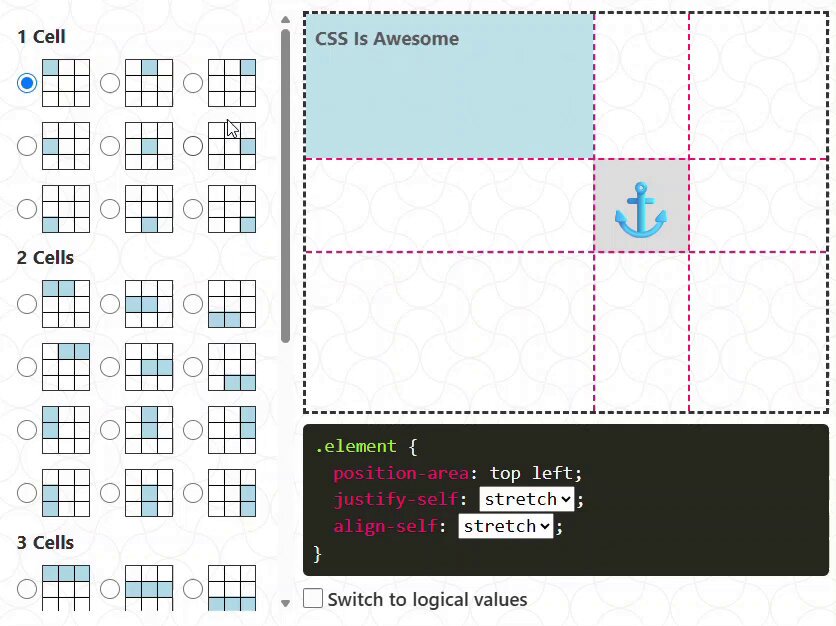
Updated the interactive demo to include the "anchor-center" value. It's a special value different from "center" and is probably the one you will be using the most. Example with position-area: top 👇

Updated the interactive demo to include the "anchor-center" value. It's a special value different from "center" and is probably the one you will be using the most. Example with position-area: top 👇

22,403 views

💡 CSS Tip! Get the scroll progress of the page as a CSS variable using a few lines of code ✅ Powered by Scroll driven animations ✅ Defined at the root level ✅ Typed using @​property ✅ You can easily use it within any formula CodePen.IO demo in the reply 👇

💡 CSS Tip! Get the scroll progress of the page as a CSS variable using a few lines of code ✅ Powered by Scroll driven animations ✅ Defined at the root level ✅ Typed using @​property ✅ You can easily use it within any formula CodePen.IO demo in the reply 👇

35,659 views

A direction-aware and more realistic version.

A direction-aware and more realistic version.

14,033 views

💡 CSS Tip! Do you know that One-Time password field? You can create it using only one input and a few lines of CSS. The HTML: <input type="text" maxlength="6"> Code & Demo: You can control the number of characters by adjusting the maxlength attribute.

💡 CSS Tip! Do you know that One-Time password field? You can create it using only one input and a few lines of CSS. The HTML: <input type="text" maxlength="6"> Code & Demo: You can control the number of characters by adjusting the maxlength attribute.

25,205 views

A fun CSS-only experimentation using modern features (anchor positioning, @​property, :has(), and more!) for this week #codepenchallenge Demo: via CodePen.IO

A fun CSS-only experimentation using modern features (anchor positioning, @​property, :has(), and more!) for this week #codepenchallenge Demo: via CodePen.IO

12,160 views

Another (cool) demo where I am using the same technique. Demo: via CodePen.IO The border will smoothly stop (always) at the same position on hover. #codepenchallenge

Another (cool) demo where I am using the same technique. Demo: via CodePen.IO The border will smoothly stop (always) at the same position on hover. #codepenchallenge

12,022 views

🎮 New CSS Game! What about a CSS game that you can play with your keyboard? No, it's not a joke but a reality! Play "Super CSS Mario", the first CSS-Only game playable using your keyboard. CodePen.IO demo in the next tweet 👇 0% JavaScript - 100% CSS Magic! Have fun🤩

🎮 New CSS Game! What about a CSS game that you can play with your keyboard? No, it's not a joke but a reality! Play "Super CSS Mario", the first CSS-Only game playable using your keyboard. CodePen.IO demo in the next tweet 👇 0% JavaScript - 100% CSS Magic! Have fun🤩

13,762 views

The triangle🔺 is the most popular shape and I still see old and obsolete methods to create it. ⚠️STOP DOING THIS⚠️ 👉 A collection of CSS-only triangles made with a single-element and modern CSS. With the border-only and rounded corners variations.

The triangle🔺 is the most popular shape and I still see old and obsolete methods to create it. ⚠️STOP DOING THIS⚠️ 👉 A collection of CSS-only triangles made with a single-element and modern CSS. With the border-only and rounded corners variations.

14,689 views

Videos

No more content to load