
KANA|東京AI映像's banner
KANA|東京AI映像's profile picture

KANA|東京AI映像

@KanaWorks_AI • 11,450 subscribers

AI Video · Game Dev · Reviews · Ads NVIDIA Inception · AWS Activate · Claude Startups 🚀 UUUM · GMO ENGINE 🤝 KlingAI · CapCut · Higgsfield 🔥 Business → DM 👌

Shorts

アニメーションデータ0フレームのクモ🕷 地面→壁→天井、さらに縁を回り込んで裏側まで、すべてコードでリアルタイムに動かしています。 このポストをそのままAIエージェント(Claude Code / Codex など)に渡せば、同じ動きを再現できるはずです。以下はエージェント向けの技術メモです👇 ―――――――――― 8本脚のクモを、キーフレーム0・機械学習なし・レイキャストのみで歩かせてください。地面⇄壁⇄天井⇄縁の裏側を途切れずに移動できること。エンジンは問いません(原作は Godot 4 / GDScript)。 ■ 毎フレームの処理順 1. 入力方向を今いる面の接平面に投影し、進行方向を面法線まわりに回す(旋回速度に上限あり) 2. ナビゲーション用のアンカー点を面に沿って進める 3. 歩行位相を進め、各脚の踏み出し判定と着地点探索を行う 4. 脚の接地状態から胴体の位置と姿勢を決める(バネで追従) 5. 胴体が地形にめり込んでいたら押し出す 6. 各脚をIKで解き、見た目を更新する ■ 1. アンカー(面に沿った移動) ・点と面法線を持たせる。移動後は法線方向の上下からレイを撃ち、面上に再投影する ・法線の変化が小さければそのまま更新し、大きければ「面の乗り換え」として扱う ・乗り換え時は、旧法線→新法線の回転(クォータニオン)で進行方向を回してから新しい面に投影する(平行輸送)。こうすると天井でも進行方向が反転しない ・凹角(壁):進行方向に前方レイを撃ち、法線が大きく違う面に当たれば、それを「次の面」とする ・凸角(縁):少し前方の真下へのレイが空振りしたら、縁の下から後ろ向きにレイを撃ち、裏側の面を見つける ■ 2. 90度の面替えは「前脚から先に着く」(最重要) ・次の面を見つけても、アンカーはすぐには乗り換えない。角の手前で減速し、頭と壁の間に8cmほど残して止まる ・前の2本は歩行位相を待たず、壁を探るような「探り足」を出す。着地点は、理想の着地点を新しい面に投影し、さらに面に沿って14cm先へ伸ばした位置。通常より高く上げ、遊脚中は目標を変えない ・前脚が新しい面に接地してから、アンカーを乗り換える。残りの脚も乗り換え先の面に向かう一歩しか出さない(元の面には戻らない) ・胴体の向きは、接地している脚が乗っている面の法線の加重平均で決める。アンカーの面に近いほど重みを大きくする(薄い板の表と裏で打ち消し合わないように) ・遊脚中の脚は、着地するまで離地点を支持点として扱う。そうしないと胴体が脚より先に回り、頭から壁に突っ込む ・フェイルセーフとして、1.4秒経っても前脚が着かなければ強制的に乗り換える ■ 3. 歩容 ・左右交互の4脚グループ(L1 R2 L3 R4 / R1 L2 R3 L4、位相差0.5)。前から後ろへ1脚ごとに位相を少しずらし、軽い波を加える ・歩行周波数は速度に比例して上げる(約1.4Hz+1.15×速度、上限4.6Hz)。遊脚期の割合は低速36%→高速50%。歩幅=速度÷周波数 ・踏み出す条件は次のどれか:位相が一周した時点で理想位置から3cm以上ずれている/脚がリーチの98%まで伸びた/停止中に22cm以上ずれている ・隣接する脚(左右の対と前後)がすべて接地しているときだけ上げる(支持が崩れないように) ・着地目標=基準位置+速度×(残りの遊脚時間+立脚時間の半分)。これで足先が胴体の下を「+半歩→−半歩」と通過する ・遊脚の軌道は smoothstep で補間し、離地面と着地面の法線、胴体の上方向を合わせた向きへ sin カーブで持ち上げる。段差を上るときは持ち上げを高くする ・動く箱の上に乗っている足先は、箱のローカル座標で保持して一緒に動かす ■ 4. 足場の探索(3本のレイを順に試す) ① 脚の付け根→目標点(少し延長):壁に当たれば凹角の足場 ② 目標点の上方から胴体の下方向へ:通常の地面 ③ 縁の下から胴体側へ水平に:凸角の裏側の面 どれも当たらなければ、足先を付け根の下にたたむ。 ■ 5. 胴体 ・上方向=支持面の法線35%+足先平面の法線65%。足先平面の法線は、足先を胴体の周りに輪状に並べ、Newell法で求める ・位置は「アンカー+法線×体高」と「足先の重心+足先平面の法線×体高」を35:65でブレンドし、臨界減衰に近いバネで追従させる(足先だけで決めると、胴体は脚待ち・脚は胴体待ちのデッドロックになる) ・着地のたびに、高さ方向のバネへ下向きのインパルスを加える(やや減衰不足にして、ぷるっと沈ませる) ・離地直前の脚と反対側、つまり支持脚側へ重心を寄せる(最大5cm) ・慣性で傾ける:加速時は後ろ、減速時は前、旋回時は外側 ・頭・頭胸部・腹部に球を置き、毎フレーム地形との重なりを法線方向へ押し出す ■ 6. 脚のIKと二次運動 ・基節(水平に外向き)→腿節・脛節の2ボーンIK(膝は上外側へ)→跗節。跗節は足首から足先へ、上・外・接地面の法線を合わせた方向に垂らす ・腹部、触肢、眉のような毛束は Verlet のバネ鎖で動かす。加減速に遅れてついてきて、着地で揺れる ―――――――――― ポイントは「頭ではなく前脚が先に新しい面に触れる」こと。ここを守るだけで、一気に生き物らしくなります。

アニメーションデータ0フレームのクモ🕷 地面→壁→天井、さらに縁を回り込んで裏側まで、すべてコードでリアルタイムに動かしています。 このポストをそのままAIエージェント(Claude Code / Codex など)に渡せば、同じ動きを再現できるはずです。以下はエージェント向けの技術メモです👇 ―――――――――― 8本脚のクモを、キーフレーム0・機械学習なし・レイキャストのみで歩かせてください。地面⇄壁⇄天井⇄縁の裏側を途切れずに移動できること。エンジンは問いません(原作は Godot 4 / GDScript)。 ■ 毎フレームの処理順 1. 入力方向を今いる面の接平面に投影し、進行方向を面法線まわりに回す(旋回速度に上限あり) 2. ナビゲーション用のアンカー点を面に沿って進める 3. 歩行位相を進め、各脚の踏み出し判定と着地点探索を行う 4. 脚の接地状態から胴体の位置と姿勢を決める(バネで追従) 5. 胴体が地形にめり込んでいたら押し出す 6. 各脚をIKで解き、見た目を更新する ■ 1. アンカー(面に沿った移動) ・点と面法線を持たせる。移動後は法線方向の上下からレイを撃ち、面上に再投影する ・法線の変化が小さければそのまま更新し、大きければ「面の乗り換え」として扱う ・乗り換え時は、旧法線→新法線の回転(クォータニオン)で進行方向を回してから新しい面に投影する(平行輸送)。こうすると天井でも進行方向が反転しない ・凹角(壁):進行方向に前方レイを撃ち、法線が大きく違う面に当たれば、それを「次の面」とする ・凸角(縁):少し前方の真下へのレイが空振りしたら、縁の下から後ろ向きにレイを撃ち、裏側の面を見つける ■ 2. 90度の面替えは「前脚から先に着く」(最重要) ・次の面を見つけても、アンカーはすぐには乗り換えない。角の手前で減速し、頭と壁の間に8cmほど残して止まる ・前の2本は歩行位相を待たず、壁を探るような「探り足」を出す。着地点は、理想の着地点を新しい面に投影し、さらに面に沿って14cm先へ伸ばした位置。通常より高く上げ、遊脚中は目標を変えない ・前脚が新しい面に接地してから、アンカーを乗り換える。残りの脚も乗り換え先の面に向かう一歩しか出さない(元の面には戻らない) ・胴体の向きは、接地している脚が乗っている面の法線の加重平均で決める。アンカーの面に近いほど重みを大きくする(薄い板の表と裏で打ち消し合わないように) ・遊脚中の脚は、着地するまで離地点を支持点として扱う。そうしないと胴体が脚より先に回り、頭から壁に突っ込む ・フェイルセーフとして、1.4秒経っても前脚が着かなければ強制的に乗り換える ■ 3. 歩容 ・左右交互の4脚グループ(L1 R2 L3 R4 / R1 L2 R3 L4、位相差0.5)。前から後ろへ1脚ごとに位相を少しずらし、軽い波を加える ・歩行周波数は速度に比例して上げる(約1.4Hz+1.15×速度、上限4.6Hz)。遊脚期の割合は低速36%→高速50%。歩幅=速度÷周波数 ・踏み出す条件は次のどれか:位相が一周した時点で理想位置から3cm以上ずれている/脚がリーチの98%まで伸びた/停止中に22cm以上ずれている ・隣接する脚(左右の対と前後)がすべて接地しているときだけ上げる(支持が崩れないように) ・着地目標=基準位置+速度×(残りの遊脚時間+立脚時間の半分)。これで足先が胴体の下を「+半歩→−半歩」と通過する ・遊脚の軌道は smoothstep で補間し、離地面と着地面の法線、胴体の上方向を合わせた向きへ sin カーブで持ち上げる。段差を上るときは持ち上げを高くする ・動く箱の上に乗っている足先は、箱のローカル座標で保持して一緒に動かす ■ 4. 足場の探索(3本のレイを順に試す) ① 脚の付け根→目標点(少し延長):壁に当たれば凹角の足場 ② 目標点の上方から胴体の下方向へ:通常の地面 ③ 縁の下から胴体側へ水平に:凸角の裏側の面 どれも当たらなければ、足先を付け根の下にたたむ。 ■ 5. 胴体 ・上方向=支持面の法線35%+足先平面の法線65%。足先平面の法線は、足先を胴体の周りに輪状に並べ、Newell法で求める ・位置は「アンカー+法線×体高」と「足先の重心+足先平面の法線×体高」を35:65でブレンドし、臨界減衰に近いバネで追従させる(足先だけで決めると、胴体は脚待ち・脚は胴体待ちのデッドロックになる) ・着地のたびに、高さ方向のバネへ下向きのインパルスを加える(やや減衰不足にして、ぷるっと沈ませる) ・離地直前の脚と反対側、つまり支持脚側へ重心を寄せる(最大5cm) ・慣性で傾ける:加速時は後ろ、減速時は前、旋回時は外側 ・頭・頭胸部・腹部に球を置き、毎フレーム地形との重なりを法線方向へ押し出す ■ 6. 脚のIKと二次運動 ・基節(水平に外向き)→腿節・脛節の2ボーンIK(膝は上外側へ)→跗節。跗節は足首から足先へ、上・外・接地面の法線を合わせた方向に垂らす ・腹部、触肢、眉のような毛束は Verlet のバネ鎖で動かす。加減速に遅れてついてきて、着地で揺れる ―――――――――― ポイントは「頭ではなく前脚が先に新しい面に触れる」こと。ここを守るだけで、一気に生き物らしくなります。

66,440 views

GPT-6 Astra × Blender × Seedance 2.5 約8,600万〜8,400万年前に生きていた「プテラノドン」の復元に挑戦! まずは論文や博物館の資料、実際の化石標本をリサーチして、頭骨の形状やプロポーションを分析。 その資料をもとに、Blender MCPで頭骨を3D復元しました。 さらにGPT Image 2で、生きていた頃の姿をリアルに再現。 最後はSeedance 2.5で映像化して、約8,500万年の時を超えて再び動き出す姿へ。 化石 → 3D復元 → 生体復元 → 映像化 もちろん、体色や皮膚などの軟組織には想像で補っている部分もありますが、骨格や全体のプロポーションは、できる限り現在わかっている科学的な資料をもとにしています。 もしかしたら8,500万年前、本当にこんな姿で空を飛んでいたのかもしれない。 こういうAIの使い方、めちゃくちゃ面白い。 video:Seedance2.5 on CapCut.Japan

GPT-6 Astra × Blender × Seedance 2.5 約8,600万〜8,400万年前に生きていた「プテラノドン」の復元に挑戦! まずは論文や博物館の資料、実際の化石標本をリサーチして、頭骨の形状やプロポーションを分析。 その資料をもとに、Blender MCPで頭骨を3D復元しました。 さらにGPT Image 2で、生きていた頃の姿をリアルに再現。 最後はSeedance 2.5で映像化して、約8,500万年の時を超えて再び動き出す姿へ。 化石 → 3D復元 → 生体復元 → 映像化 もちろん、体色や皮膚などの軟組織には想像で補っている部分もありますが、骨格や全体のプロポーションは、できる限り現在わかっている科学的な資料をもとにしています。 もしかしたら8,500万年前、本当にこんな姿で空を飛んでいたのかもしれない。 こういうAIの使い方、めちゃくちゃ面白い。 video:Seedance2.5 on CapCut.Japan

113,939 views

GPT-6 Astra ✖️ Blender MCP 「花屋」のエクスプローデッドビュー・アニメーション Prompt Share 175 Use Blender MCP to build a small, stylized Japanese flower shop scene. Focus on faithfully recreating the key visual elements: the green awnings, the rooftop sign displaying the Japanese text “花屋”, flower pots and plants arranged in front of the shop, the vending machine, bicycles, traffic light, utility poles, surrounding trees, and other recognizable street details. Render the scene in a warm, charming cartoon style, with soft lighting, appealing materials, and a cozy atmosphere. Create a high-impact, dynamic exploded-view animation of the entire flower shop scene. The explosion should be bold and exaggerated rather than subtle. Smoothly and systematically separate the individual components outward to dramatically reveal the construction and interior of the flower shop. During the explosion, have the exterior walls, surrounding trees, utility poles, signs, awnings, bicycles, flower pots, plants, street props, and other environmental elements fly outward or backward, creating enough open space for the viewer to clearly see inside the flower shop. Break the building into meaningful structural layers so that the interior architecture, furniture, decorations, flowers, plants, shelves, and smaller details become clearly visible. The vending machine should also explode into its individual components. Its exterior panels should separate, and the individual soda bottles and cans inside should dynamically fly outward, spreading into an organized formation so they remain clearly readable. Small components and details can travel farther to make the sequence more visually exciting. Use staggered timing, different movement speeds, rotation, depth, and layered trajectories to give the explosion a strong sense of energy and impact while keeping every component visually organized and easy to follow. Avoid having everything move outward at exactly the same time or speed. Once the entire scene is fully exploded, hold the composition briefly so the viewer can clearly observe the internal structure and all the separated components. Then reverse the sequence: the soda bottles, vending machine parts, plants, props, interior objects, walls, trees, utility poles, signs, bicycles, and all other components should fly smoothly back into place and reassemble into the complete flower shop scene. The entire animation should feel energetic, cinematic, satisfying, and visually impactful, with strong motion and clear transformation between the complete scene, the fully exploded state, and the final reassembled scene. Keep the motion layered, readable, and carefully choreographed throughout. Use a neutral studio background during the exploded-view sequence so that the separated objects and internal structures remain clearly visible. Final deliverables: A fully rendered animation and an editable Blender 3D project file. All objects, components, collections, materials, and major scene elements must be clearly, consistently, and professionally named and organized.

GPT-6 Astra ✖️ Blender MCP 「花屋」のエクスプローデッドビュー・アニメーション Prompt Share 175 Use Blender MCP to build a small, stylized Japanese flower shop scene. Focus on faithfully recreating the key visual elements: the green awnings, the rooftop sign displaying the Japanese text “花屋”, flower pots and plants arranged in front of the shop, the vending machine, bicycles, traffic light, utility poles, surrounding trees, and other recognizable street details. Render the scene in a warm, charming cartoon style, with soft lighting, appealing materials, and a cozy atmosphere. Create a high-impact, dynamic exploded-view animation of the entire flower shop scene. The explosion should be bold and exaggerated rather than subtle. Smoothly and systematically separate the individual components outward to dramatically reveal the construction and interior of the flower shop. During the explosion, have the exterior walls, surrounding trees, utility poles, signs, awnings, bicycles, flower pots, plants, street props, and other environmental elements fly outward or backward, creating enough open space for the viewer to clearly see inside the flower shop. Break the building into meaningful structural layers so that the interior architecture, furniture, decorations, flowers, plants, shelves, and smaller details become clearly visible. The vending machine should also explode into its individual components. Its exterior panels should separate, and the individual soda bottles and cans inside should dynamically fly outward, spreading into an organized formation so they remain clearly readable. Small components and details can travel farther to make the sequence more visually exciting. Use staggered timing, different movement speeds, rotation, depth, and layered trajectories to give the explosion a strong sense of energy and impact while keeping every component visually organized and easy to follow. Avoid having everything move outward at exactly the same time or speed. Once the entire scene is fully exploded, hold the composition briefly so the viewer can clearly observe the internal structure and all the separated components. Then reverse the sequence: the soda bottles, vending machine parts, plants, props, interior objects, walls, trees, utility poles, signs, bicycles, and all other components should fly smoothly back into place and reassemble into the complete flower shop scene. The entire animation should feel energetic, cinematic, satisfying, and visually impactful, with strong motion and clear transformation between the complete scene, the fully exploded state, and the final reassembled scene. Keep the motion layered, readable, and carefully choreographed throughout. Use a neutral studio background during the exploded-view sequence so that the separated objects and internal structures remain clearly visible. Final deliverables: A fully rendered animation and an editable Blender 3D project file. All objects, components, collections, materials, and major scene elements must be clearly, consistently, and professionally named and organized.

39,913 views

参考画像で見えていない部分は、細かく指定しなければSeedance 2.0が周囲の文脈からいい感じに補完してくれる。 KANA猫カフェ、思ったよりかなり広かった🤣 知らない部屋が増えていたり、見たことのない猫スタッフが普通に働いていたり。設定していない場所やキャラクターまで勝手に生えてくるのが面白い。 video: Seedance 2.0 on CapCut.Japan

参考画像で見えていない部分は、細かく指定しなければSeedance 2.0が周囲の文脈からいい感じに補完してくれる。 KANA猫カフェ、思ったよりかなり広かった🤣 知らない部屋が増えていたり、見たことのない猫スタッフが普通に働いていたり。設定していない場所やキャラクターまで勝手に生えてくるのが面白い。 video: Seedance 2.0 on CapCut.Japan

76,644 views

ChatGPT-Image-2.0 × Seedance 2.0 アクション系ゲーム 作り方: Step 1:ChatGPT-Image-2.0で画面を生成 Prompt ➕ image Generate a Boss battle screenshot inspired by (game or movie name). Third-person perspective. The protagonist is the character from reference image 1. The protagonist’s name is (Name1), and the weapon is (Weapon1). The Boss is the character from reference image 2. The Boss’s name is (Name2), and the weapon is (Weapon2). 💡お好みのゲームジャンルに置き換えることができ、参考画像をもとにキャラクターやボスのビジュアルを設定できます。 Step 2:Seedance 2.0で動画化 Prompt Share 121 Cinematic Action-adventure game boss battle scene, Sekiro-style combat, single continuous shot, fast-paced with intense impact. A white rabbit adventurer stands at the center of a shattered ancient stone battlefield. Opposite stands a tall fox, dressed in flowing Eastern robes and wearing a dark mask, exuding an oppressive aura. It holds a long whip that sways slowly through the air. The battle erupts instantly. The fox dashes forward at high speed, its whip slicing through the air with sharp, explosive cracks. The rabbit precisely blocks with the frying pan, sparks bursting at the moment of impact. They enter a high-frequency exchange—continuous blocks, deflections, and pressure—forming a classic ARPG-style “posture combat” rhythm. Camera language: low-angle tracking, rapid forward movement, slight handheld shake on impact, with strong motion blur on the whip swings. The fox unleashes chained attack combinations: sweeping whip strikes, upward lash attacks, and long-range pulling strikes to control distance. The rabbit side-steps, rolls, and counters at close range, striking rapidly with the frying pan in tight melee. Mid-battle, everything suddenly pauses. The wind intensifies, sand spirals upward, and the atmosphere compresses dramatically. The fox leaps backward to create distance. Its body begins to emit a white glow—the ultimate move activates. Transformation begins—the fox rapidly expands, transforming into a massive white spirit fox. Its fur flows like misty clouds, its enormous body covering the entire battlefield, radiating overwhelming pressure. The camera pulls back, revealing the vast difference in scale. The giant fox raises its front paw and slams it down toward the rabbit with devastating force. At the moment of impact—shockwaves spread outward, the ground violently shatters, and sand explodes across the frame. Final shot: the rabbit is engulfed beneath the shadow of the massive fox’s paw. On screen, bold red calligraphic characters appear: “落命” Tips 自分のキャラクターや好みに応じて、ボスの必殺技を調整することができます。 made in MiniMax Design (H3)

ChatGPT-Image-2.0 × Seedance 2.0 アクション系ゲーム 作り方: Step 1:ChatGPT-Image-2.0で画面を生成 Prompt ➕ image Generate a Boss battle screenshot inspired by (game or movie name). Third-person perspective. The protagonist is the character from reference image 1. The protagonist’s name is (Name1), and the weapon is (Weapon1). The Boss is the character from reference image 2. The Boss’s name is (Name2), and the weapon is (Weapon2). 💡お好みのゲームジャンルに置き換えることができ、参考画像をもとにキャラクターやボスのビジュアルを設定できます。 Step 2:Seedance 2.0で動画化 Prompt Share 121 Cinematic Action-adventure game boss battle scene, Sekiro-style combat, single continuous shot, fast-paced with intense impact. A white rabbit adventurer stands at the center of a shattered ancient stone battlefield. Opposite stands a tall fox, dressed in flowing Eastern robes and wearing a dark mask, exuding an oppressive aura. It holds a long whip that sways slowly through the air. The battle erupts instantly. The fox dashes forward at high speed, its whip slicing through the air with sharp, explosive cracks. The rabbit precisely blocks with the frying pan, sparks bursting at the moment of impact. They enter a high-frequency exchange—continuous blocks, deflections, and pressure—forming a classic ARPG-style “posture combat” rhythm. Camera language: low-angle tracking, rapid forward movement, slight handheld shake on impact, with strong motion blur on the whip swings. The fox unleashes chained attack combinations: sweeping whip strikes, upward lash attacks, and long-range pulling strikes to control distance. The rabbit side-steps, rolls, and counters at close range, striking rapidly with the frying pan in tight melee. Mid-battle, everything suddenly pauses. The wind intensifies, sand spirals upward, and the atmosphere compresses dramatically. The fox leaps backward to create distance. Its body begins to emit a white glow—the ultimate move activates. Transformation begins—the fox rapidly expands, transforming into a massive white spirit fox. Its fur flows like misty clouds, its enormous body covering the entire battlefield, radiating overwhelming pressure. The camera pulls back, revealing the vast difference in scale. The giant fox raises its front paw and slams it down toward the rabbit with devastating force. At the moment of impact—shockwaves spread outward, the ground violently shatters, and sand explodes across the frame. Final shot: the rabbit is engulfed beneath the shadow of the massive fox’s paw. On screen, bold red calligraphic characters appear: “落命” Tips 自分のキャラクターや好みに応じて、ボスの必殺技を調整することができます。 made in MiniMax Design (H3)

92,268 views

ChatGPT-Image-2.0 × Seedance 2.0 RPGゲームデモ 作り方: Step 1:ChatGPT-Image-2.0でゲーム風の画面を生成 例: Prompt ➕ image 「一人称」視点、「ARPGタイプ」、「西部劇系」ゲームに着想を得た実機風スクリーンショットを生成。NPCは参考画像1を使用。 セリフ: “It’s time to set out, adventurer.” 選択肢: Alright, let’s go. Not right now. Why not? 💡お好みの画風やゲームジャンルに置き換え Step 2:Seedance 2.0で静止画を動画化 テキストでUI操作、セリフ、キャラクターの動きなどを補足。 Prompt Share 120 First-person perspective, immersive ARPG dialogue scene, single continuous shot. A small white rabbit adventurer stands directly in front of the camera. Its fur is soft and finely detailed, and its right eye is a glowing red mechanical eye. It reaches out toward the camera in an inviting gesture, with a calm and confident demeanor. The environment is a vast fantasy world: rolling green grasslands, ruined ancient stone structures, distant mountain ranges, and a lightly smoking volcano. The morning light is soft, the air is clear, and a gentle breeze moves the grass and leaves, creating a strong cinematic atmosphere with depth. The camera is in first-person view, with slight handheld motion and natural breathing sway. Shallow depth of field, cinematic realism. The rabbit looks directly into the camera and says: “Good morning, adventurer. It’s time to set out.” A semi-transparent game UI (modern ARPG style) appears on the right side: Alright, let’s go. Not right now. Why not? The cursor moves smoothly twice, pauses for 0.3 seconds, then selects “Why not?” The rabbit smiles slightly, tilts its head, and responds in a relaxed tone: “Sure.” In the next moment, all UI elements (dialogue box, options, health bar, minimap) fade out smoothly, returning the scene to a clean, UI-free world. The rabbit turns around, its cloak and backpack swaying naturally with physics, and begins walking forward along a stone path. The camera maintains a first-person follow, with subtle handheld motion, synchronized with the character’s walking rhythm. While walking, the rabbit raises its hand and points toward the distant horizon (mountains and a faint city silhouette), saying: “Look, that’s our destination.” A brief pause of about 0.5 seconds. The wind intensifies slightly, causing more noticeable movement in the grass and clothing, enhancing the epic atmosphere. The rabbit continues walking and says: “We have to get there before 8:08 PM.” The camera slowly pushes forward, focusing toward the distance. The far view transitions from slightly blurred to clear, with a subtle lens flare appearing, reinforcing the sense of a journey beginning and a clear objective. No subtitles, no background music. Only natural ambient sounds: wind, footsteps, and distant birds. Tips: ChatGPT-Image-2.0のストーリーボードも便利なんですが、今回みたいな用途だとテキストで流れを指定した方が、全体のつながりは安定しやすい印象です。 逆に、カット単位でしっかり作り込みたい場合はストーリーボードの方が向いています。 用途次第で使い分けるのが良さそうです🐰 どんなジャンルのゲームが好きですか? 一緒に遊ぼう❤️‍🔥

ChatGPT-Image-2.0 × Seedance 2.0 RPGゲームデモ 作り方: Step 1:ChatGPT-Image-2.0でゲーム風の画面を生成 例: Prompt ➕ image 「一人称」視点、「ARPGタイプ」、「西部劇系」ゲームに着想を得た実機風スクリーンショットを生成。NPCは参考画像1を使用。 セリフ: “It’s time to set out, adventurer.” 選択肢: Alright, let’s go. Not right now. Why not? 💡お好みの画風やゲームジャンルに置き換え Step 2:Seedance 2.0で静止画を動画化 テキストでUI操作、セリフ、キャラクターの動きなどを補足。 Prompt Share 120 First-person perspective, immersive ARPG dialogue scene, single continuous shot. A small white rabbit adventurer stands directly in front of the camera. Its fur is soft and finely detailed, and its right eye is a glowing red mechanical eye. It reaches out toward the camera in an inviting gesture, with a calm and confident demeanor. The environment is a vast fantasy world: rolling green grasslands, ruined ancient stone structures, distant mountain ranges, and a lightly smoking volcano. The morning light is soft, the air is clear, and a gentle breeze moves the grass and leaves, creating a strong cinematic atmosphere with depth. The camera is in first-person view, with slight handheld motion and natural breathing sway. Shallow depth of field, cinematic realism. The rabbit looks directly into the camera and says: “Good morning, adventurer. It’s time to set out.” A semi-transparent game UI (modern ARPG style) appears on the right side: Alright, let’s go. Not right now. Why not? The cursor moves smoothly twice, pauses for 0.3 seconds, then selects “Why not?” The rabbit smiles slightly, tilts its head, and responds in a relaxed tone: “Sure.” In the next moment, all UI elements (dialogue box, options, health bar, minimap) fade out smoothly, returning the scene to a clean, UI-free world. The rabbit turns around, its cloak and backpack swaying naturally with physics, and begins walking forward along a stone path. The camera maintains a first-person follow, with subtle handheld motion, synchronized with the character’s walking rhythm. While walking, the rabbit raises its hand and points toward the distant horizon (mountains and a faint city silhouette), saying: “Look, that’s our destination.” A brief pause of about 0.5 seconds. The wind intensifies slightly, causing more noticeable movement in the grass and clothing, enhancing the epic atmosphere. The rabbit continues walking and says: “We have to get there before 8:08 PM.” The camera slowly pushes forward, focusing toward the distance. The far view transitions from slightly blurred to clear, with a subtle lens flare appearing, reinforcing the sense of a journey beginning and a clear objective. No subtitles, no background music. Only natural ambient sounds: wind, footsteps, and distant birds. Tips: ChatGPT-Image-2.0のストーリーボードも便利なんですが、今回みたいな用途だとテキストで流れを指定した方が、全体のつながりは安定しやすい印象です。 逆に、カット単位でしっかり作り込みたい場合はストーリーボードの方が向いています。 用途次第で使い分けるのが良さそうです🐰 どんなジャンルのゲームが好きですか? 一緒に遊ぼう❤️‍🔥

79,018 views

Seedance 2.0でテキストから動画生成を試してみました。プロンプトは「東京の空。スーパー美少女2人が巨大メカに乗って、エイリアンと激戦を繰り広げる。」です。 既存のキャラクターに似てしまわないか少し心配していましたが、幸いそういった要素は出ませんでした。🤓 仕上がりもなかなか良い感じでした。

Seedance 2.0でテキストから動画生成を試してみました。プロンプトは「東京の空。スーパー美少女2人が巨大メカに乗って、エイリアンと激戦を繰り広げる。」です。 既存のキャラクターに似てしまわないか少し心配していましたが、幸いそういった要素は出ませんでした。🤓 仕上がりもなかなか良い感じでした。

91,552 views

7時間も経たないうちに15件もリプをいただいて、本当に嬉しいです。 約束どおり、プロンプトを公開します😊 Prompt Share 115 -召喚獣-Seedance 2.0 参考画像1+プロンプト Ultra-realistic cinematic shot with film-grade fog and particle effects, 15 seconds, 30fps, no background music, no subtitles. Refer to Image 1 and maintain consistent character appearance. The shot begins with an extreme close-up from a low angle, featuring dynamic cinematic camera movement with a rapid push-in and slight handheld shake. The character’s body subtly twists, left shoulder forward, right shoulder pulled back, center of gravity lowered. Several talismans (ofuda) float around the body as purple-black spiritual energy gathers around the torso, forming a rotating energy vortex. The talismans ignite one by one, their flames forming the Sanskrit character “मनस्” from the Heart Sutra, gently flickering with a blend of gold and purple light. Countless foxfire streams converge from all directions, trailing golden and purple flames as they rapidly flow into the character’s palm, forming a highly compressed energy sphere. Inside, the energy churns violently, revealing a flowing structure resembling the silhouette of a white tiger. The camera quickly pushes into a close-up of the hand as the energy sphere’s brightness intensifies dramatically, causing spatial distortion. The protagonist forms a hand seal with the left hand while holding the energy core in the right, softly chanting “zenmetsu.” The talismans and hand seal activate instantly; the energy core compresses to its absolute limit in an instant before erupting. From the نقطة of explosion, a colossal white tiger composed purely of spiritual energy is born—massive like a mountain, formed of white and gold light. Its body continuously collapses and reconstructs along the edges, radiating overwhelming destructive pressure as it charges directly toward the camera. The shot is engulfed by the oncoming torrent of energy, accompanied by a blinding light burst and explosive particle dispersion. 今のプロンプトでは召喚獣は白虎ですが、お好みで自由に変更してみてください〜 みなさんの召喚獣は何にしますか?

7時間も経たないうちに15件もリプをいただいて、本当に嬉しいです。 約束どおり、プロンプトを公開します😊 Prompt Share 115 -召喚獣-Seedance 2.0 参考画像1+プロンプト Ultra-realistic cinematic shot with film-grade fog and particle effects, 15 seconds, 30fps, no background music, no subtitles. Refer to Image 1 and maintain consistent character appearance. The shot begins with an extreme close-up from a low angle, featuring dynamic cinematic camera movement with a rapid push-in and slight handheld shake. The character’s body subtly twists, left shoulder forward, right shoulder pulled back, center of gravity lowered. Several talismans (ofuda) float around the body as purple-black spiritual energy gathers around the torso, forming a rotating energy vortex. The talismans ignite one by one, their flames forming the Sanskrit character “मनस्” from the Heart Sutra, gently flickering with a blend of gold and purple light. Countless foxfire streams converge from all directions, trailing golden and purple flames as they rapidly flow into the character’s palm, forming a highly compressed energy sphere. Inside, the energy churns violently, revealing a flowing structure resembling the silhouette of a white tiger. The camera quickly pushes into a close-up of the hand as the energy sphere’s brightness intensifies dramatically, causing spatial distortion. The protagonist forms a hand seal with the left hand while holding the energy core in the right, softly chanting “zenmetsu.” The talismans and hand seal activate instantly; the energy core compresses to its absolute limit in an instant before erupting. From the نقطة of explosion, a colossal white tiger composed purely of spiritual energy is born—massive like a mountain, formed of white and gold light. Its body continuously collapses and reconstructs along the edges, radiating overwhelming destructive pressure as it charges directly toward the camera. The shot is engulfed by the oncoming torrent of energy, accompanied by a blinding light burst and explosive particle dispersion. 今のプロンプトでは召喚獣は白虎ですが、お好みで自由に変更してみてください〜 みなさんの召喚獣は何にしますか?

71,827 views

Seedance 2.0の矢印やルート指定は、カメラの動きだけでなくキャラクターの移動経路にもかなり影響するようです。 プロンプトでキャラクターの移動を細かく指示するだけでなく、進ませたいルートを直接描いておくことで、より意図に近い結果を得やすくなります🐰 made on CapCut.Japan

Seedance 2.0の矢印やルート指定は、カメラの動きだけでなくキャラクターの移動経路にもかなり影響するようです。 プロンプトでキャラクターの移動を細かく指示するだけでなく、進ませたいルートを直接描いておくことで、より意図に近い結果を得やすくなります🐰 made on CapCut.Japan

54,937 views

各モデルには「いちばん得意なこと」だけを任せる。 ・Opus 5.5 は全体の設計と統括をコードで担当。細かい制御が必要なところも全部こっち。 ・Seedance 2.5:キャラの動きと音ハメ ・GPT Image 2.5:一枚絵としての美しさ ・MiniMax H3:背景を"ほんの少しだけ"動かす(安くて安定) こうやって役割を分けるだけで、 AI映像制作はぐっと扱いやすくなる🐰 Video: Seedance 2.5 &MInimax H3 on CapCut.Japan

各モデルには「いちばん得意なこと」だけを任せる。 ・Opus 5.5 は全体の設計と統括をコードで担当。細かい制御が必要なところも全部こっち。 ・Seedance 2.5:キャラの動きと音ハメ ・GPT Image 2.5:一枚絵としての美しさ ・MiniMax H3:背景を"ほんの少しだけ"動かす(安くて安定) こうやって役割を分けるだけで、 AI映像制作はぐっと扱いやすくなる🐰 Video: Seedance 2.5 &MInimax H3 on CapCut.Japan

13,915 views

没入型猫カフェ体験 Arrow、思っていた以上に可能性がある。 視線誘導だけじゃない。 これはいろいろ遊べそう🐰 video: Seedance 2.0 on CapCut.Japan

没入型猫カフェ体験 Arrow、思っていた以上に可能性がある。 視線誘導だけじゃない。 これはいろいろ遊べそう🐰 video: Seedance 2.0 on CapCut.Japan

35,715 views

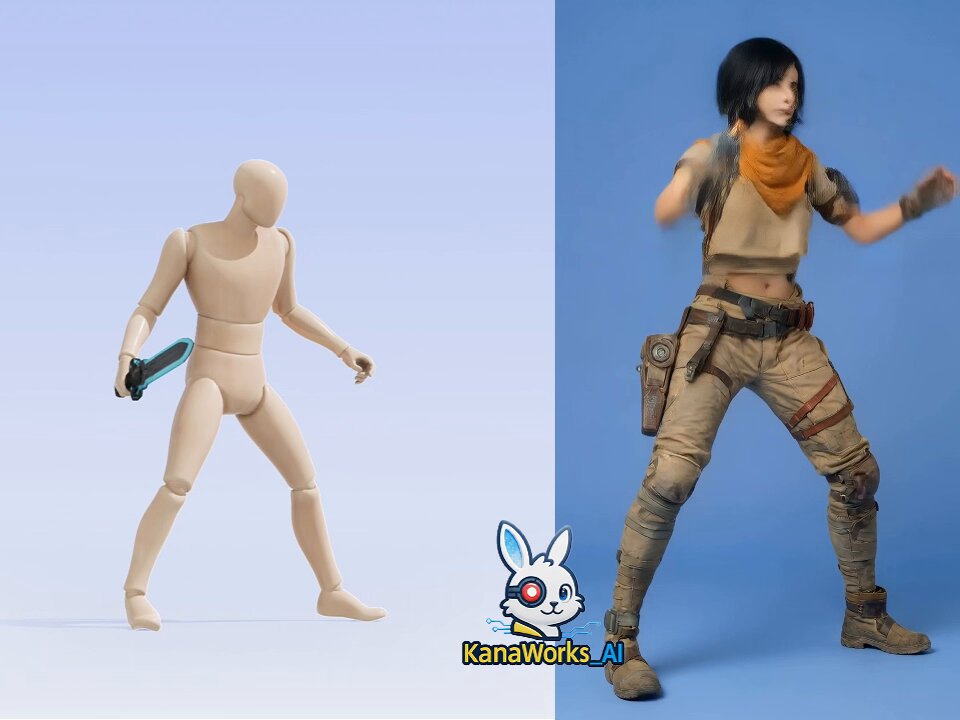
Tencent HY-Motion 1.0 テスト③ ワークフロー Nanobanana で画像生成 → Hunyuanでアニメーション作成 → Kling 2.6 Motion Control 📌結果 🐰挨拶/ボクシング/銃を持った巡回/ダンス:いずれも非常に良好で、動きも自然。 🐰剣を振る動作:一部のフレームで剣に残像が出ることがある。 🐰全体としてはとても良い仕上がりです。 🐰ちなみに少し面白かった点として、参考用のモデルが服を着ていない状態だと、違反判定されて動画が生成されず、クレジットが返却されることがよくありました🤣🤣とはいえ、何度か試すと通ることもあって、それがまた笑ってしまいます。 遊べるポイントが本当に多くて、時間が全然足りません。ワクワク❣ 2026.01.06 #hunyuan #KlingAI #KlingMotionControl #kanaworksai

Tencent HY-Motion 1.0 テスト③ ワークフロー Nanobanana で画像生成 → Hunyuanでアニメーション作成 → Kling 2.6 Motion Control 📌結果 🐰挨拶/ボクシング/銃を持った巡回/ダンス:いずれも非常に良好で、動きも自然。 🐰剣を振る動作:一部のフレームで剣に残像が出ることがある。 🐰全体としてはとても良い仕上がりです。 🐰ちなみに少し面白かった点として、参考用のモデルが服を着ていない状態だと、違反判定されて動画が生成されず、クレジットが返却されることがよくありました🤣🤣とはいえ、何度か試すと通ることもあって、それがまた笑ってしまいます。 遊べるポイントが本当に多くて、時間が全然足りません。ワクワク❣ 2026.01.06 #hunyuan #KlingAI #KlingMotionControl #kanaworksai

62,193 views

ブラウザ上で「ホログラフィック」表現を作ってみました!🥳 Three.js+MediaPipe を使って、リアルタイムの顔追跡とオフアクシス投影を実現しています。 VR ヘッドセットは不要で、ウェブカメラがあればOKです 。 🐰制作フロー: Nanobananaで画像生成 → Hunyuanで3Dモデル生成 → Gemini CLIでコード作成 シンプルで楽しくて、気づいたら止まらなくなります 😆 2026.01.07 #ThreeJS #CreativeCoding #WebDev #Gemini #kanaworksAI #Nanobanana #Hunyuan

ブラウザ上で「ホログラフィック」表現を作ってみました!🥳 Three.js+MediaPipe を使って、リアルタイムの顔追跡とオフアクシス投影を実現しています。 VR ヘッドセットは不要で、ウェブカメラがあればOKです 。 🐰制作フロー: Nanobananaで画像生成 → Hunyuanで3Dモデル生成 → Gemini CLIでコード作成 シンプルで楽しくて、気づいたら止まらなくなります 😆 2026.01.07 #ThreeJS #CreativeCoding #WebDev #Gemini #kanaworksAI #Nanobanana #Hunyuan

59,600 views

Gemini Omniは、プレゼンテーションの構成や演出設計に非常に優れています。 私は「ゴキブリ社長」というキャラクター設定と演説原稿だけを用意しましたが、カメラワークのテンポ感や、演説内のコアメッセージの抽出まで非常に上手くまとめてくれました。 かなり良い仕上がりだったので、今後はさらに別の表現や演出も試してみたいと思っています🐰 made with Gemini Omni Flash Google Flow

Gemini Omniは、プレゼンテーションの構成や演出設計に非常に優れています。 私は「ゴキブリ社長」というキャラクター設定と演説原稿だけを用意しましたが、カメラワークのテンポ感や、演説内のコアメッセージの抽出まで非常に上手くまとめてくれました。 かなり良い仕上がりだったので、今後はさらに別の表現や演出も試してみたいと思っています🐰 made with Gemini Omni Flash Google Flow

36,397 views

Gemini Omni V.S. Seedance 2.0 動画編集機能ガチ対決 ⚔️ ❤️‍🔥 ・入力動画リファレンス Gemini Omni:最大5分 Seedance 2.0:7秒対応 ・出力動画尺 Gemini Omni:6秒 Seedance 2.0:15秒 ・生成速度 Gemini Omni:速い Seedance 2.0:やや遅め みなさんは、どちらの表現が好きですか?🤔 今回の入力素材は、日本の街で展示されていた「今戸焼」の作品映像。 #capcutseedance2 CapCut CapCut_jp

Gemini Omni V.S. Seedance 2.0 動画編集機能ガチ対決 ⚔️ ❤️‍🔥 ・入力動画リファレンス Gemini Omni:最大5分 Seedance 2.0:7秒対応 ・出力動画尺 Gemini Omni:6秒 Seedance 2.0:15秒 ・生成速度 Gemini Omni:速い Seedance 2.0:やや遅め みなさんは、どちらの表現が好きですか?🤔 今回の入力素材は、日本の街で展示されていた「今戸焼」の作品映像。 #capcutseedance2 CapCut CapCut_jp

35,810 views

The Winner Seedance 2.0 は相当美味しいですね。 じゃ、続けて遊ぼうか。

The Winner Seedance 2.0 は相当美味しいですね。 じゃ、続けて遊ぼうか。

51,142 views

Seedance 2.0 is crazy😱🤯 In some ways, it’s honestly better than Sora 2.

Seedance 2.0 is crazy😱🤯 In some ways, it’s honestly better than Sora 2.

50,328 views

年末年始に向けて、フォロワーさん向けの小さな企画を用意しました 🎉 今回は 💰 10,000円 × 1名 💰 3,000円 × 10名 🎁 クレジット 2,000pt × 4名 と、合計15名が当選する構成です。 正直、まだフォロワー数も多くないので、きっと競争もゆるめで、わいわい楽しい雰囲気になるはずです。🐰 ぜひ気軽に参加して、年末年始の創作を一緒に楽しみましょう 😊🥳 リプ欄に「KANA OiiOii」とコメントしてくれた方全員に、OiiOii の体験用招待コードをお配りします。 招待コードには ・1,000 クレジット無料 ・毎日ログインで 300 クレジット が付いていて、約1分前後の動画なら 4〜6本程度 試せると思います。 OiiOii は、会話するだけで 脚本・キャラクター・絵コンテ・映像制作までを一気に行える、世界初のアニメ制作AIエージェントです。 現在は一般公開されておらず、招待コードをお持ちの方のみ体験できます。 少しでも気になった方は、ぜひリプ欄でコメントしてください。🥳🐰😊

年末年始に向けて、フォロワーさん向けの小さな企画を用意しました 🎉 今回は 💰 10,000円 × 1名 💰 3,000円 × 10名 🎁 クレジット 2,000pt × 4名 と、合計15名が当選する構成です。 正直、まだフォロワー数も多くないので、きっと競争もゆるめで、わいわい楽しい雰囲気になるはずです。🐰 ぜひ気軽に参加して、年末年始の創作を一緒に楽しみましょう 😊🥳 リプ欄に「KANA OiiOii」とコメントしてくれた方全員に、OiiOii の体験用招待コードをお配りします。 招待コードには ・1,000 クレジット無料 ・毎日ログインで 300 クレジット が付いていて、約1分前後の動画なら 4〜6本程度 試せると思います。 OiiOii は、会話するだけで 脚本・キャラクター・絵コンテ・映像制作までを一気に行える、世界初のアニメ制作AIエージェントです。 現在は一般公開されておらず、招待コードをお持ちの方のみ体験できます。 少しでも気になった方は、ぜひリプ欄でコメントしてください。🥳🐰😊

56,410 views

Vibe Codingを身につけてから、 デスクトップ整理はもう悩みじゃなくなった🐰

Vibe Codingを身につけてから、 デスクトップ整理はもう悩みじゃなくなった🐰

24,999 views

Videos

KanaWorks_AI's profile picture

AIで効果音を作るのは、10秒。 選ぶのに、1時間。 この「選ぶ1時間」を、AIに丸投げできるツールを作りました。 完全無料・オープンソースで公開します。 ↓ ドアの音、4テイク。 雨の音、4テイク。 BGM、4テイク。 全部聴いて、比べて、「どれも違う…」 プロンプトを書き直して、また4テイク。 気づけば外が暗い。 AIで音を作ったことがある人なら、たぶん全員これをやってる。 ━━━━━━━━━━ 🐰 Sonicproof AIが作った音を、AIが聴いて選ぶ。 使い方は、エージェントにひと言だけ。 「木の扉がきしむ音を4つ作って。一番イメージに近くて、音割れしてないやつを選んで。全部ダメなら作り直して」 これで、 → 4テイク生成 → 1本ずつAIが「聴いて」判定 → 音割れ・音量・ノイズ・尻切れを自動チェック → ベストの1本を選ぶ → 全滅なら、プロンプトを直して自動で作り直し あなたがやるのは、最後の1本を聴いて「OK」と言うだけ。 ━━━━━━━━━━ 推しポイント ・完全無料。APIキーも不要 ・全部ローカルで動く。クライアントの素材も外に出ない ・プロンプトは日本語でOK ・画像や動画を入れると「この映像に合う音」まで判定 ・手持ちのSE素材を、言葉・音・画像で検索 ・MITライセンス。Mac / Windows / Linux 対応 姉妹ツールの「Audio Studio MCP」と組み合わせると、 作る → 聴く → 選ぶ → 作り直す のループが、全部あなたのPCの中で回ります。 ━━━━━━━━━━ インストールも、エージェントに丸投げでOK。 リプ欄の2つのリンクを貼って、 「この2つ入れて、音を作って選べるようにして」 と言うだけ。コマンドは1行も打たなくていい。 ━━━━━━━━━━ 動画編集、YouTube、配信、ゲーム、CM、アニメ、ポッドキャスト。 音を「選ぶ」のに疲れてる人に届いてほしいです。 音を選ぶのも、AIに任せてみませんか? あとで試す人は、ブックマークしておいてください。 Star・RT、めちゃくちゃ励みになります🐰

KANA|東京AI映像

32,793 views • 3 days ago

KanaWorks_AI's profile picture

3Dモデルは、もうゲームづくりの壁じゃない。 Blender や Maya を開いてモデリングしなくても、生成するだけ。 このゲームに登場する3Dモデル80個は、ぜんぶ Tripo のスマートメッシュで作りました。 アイデア:KANA Code:Claude Opus 5.5 3Dモデル:Tripo ▼ 使ったワークフロー ① 画像1枚 → スマートメッシュ キャラや建物のイラストを1枚アップロードして「スマートメッシュ」を選ぶだけ。トポロジーは四角形(クアッド)、ポリゴン数は500〜25,000の間で指定できます。今回は5,000前後に設定して、約20秒で生成。 例:茶屋の看板娘 5,328面/お城 6,305面/茅葺きの家 4,887面/農夫 3,313面 ② なぜ「軽さ」が大事か ゲームは描画が重いとすぐカクつきます。数十万ポリゴンのモデルだと数個置くだけで重くなりますが、スマートメッシュは最初からクアッドで面数を抑えて出力されるので、リトポ(作り直し)が不要。80個並べてもサクサク動きます。 ③ テクスチャもワンクリック 元のイラストのタッチをそのまま再現。手描き風の統一感があるから、箱庭全体の雰囲気がそろいました。 ④ 自動リギング → モーション 人型を選ぶと、Mixamo互換のスケルトンを自動で入れてくれます。あとはプリセットから選ぶか、AIモーションを使うか、テキストで「クワで畑を耕す」と書くだけで動きが付きます。 ⑤ 書き出して、そのままゲームへ GLB / FBX / USD など主要形式に対応。スケルトンやアニメーションごと書き出せます。あとは、ゲームデザインもプログラムも担当した Claude Opus 5.5 が、そのままゲームに組み込んでくれました。 アイデアさえあれば、3Dゲームはもうひとりで作れる。 【PR】

KANA|東京AI映像

38,116 views • 8 days ago

KanaWorks_AI's profile picture

Godotで「リアルな海」どこまで作り込めるか、 ひたすら試しています🐰 ━━━━━━━━━━ 同じような海を作ってみたい方へ ━━━━━━━━━━ このポストをまるごと自分のAIエージェント(Claude Codeなど)に貼って、 「これをGodot(または普段使っているエンジン)で再現して」 と頼んでみてください。 下の技術メモは、人よりもエージェントに読ませる前提で書いています。 ━━━━━━━━━━ 技術メモ(再現用) ━━━━━━━━━━ 【1. 波:FFTオーシャン】 ・コンピュートシェーダでFFTを計算。風浪はJONSWAPスペクトル、うねりは別のスペクトルで足し合わせ ・帯域分割したカスケードを5枚(各512²)。タイルサイズは2003/433/97/23.3/5.3 m → 遠くの大きなうねりから手前のさざ波まで、タイリングが目立たない ・振幅はあえて物理値より大きめ(有義波高がJONSWAPの約2.8倍)。物理的に正しく直した版も作ったものの、迫力が落ちたので戻しました ・法線とスロープモーメントのテクスチャは毎フレーム全ミップを生成し、LEADRで遠景の粗さを扱う(遠くの海面がギラつかない) ・波高はGPU→CPUの非同期リードバックで取得し、船の浮力計算(27点)に利用 ・ベースはGodotOceanWaves(MIT) 【2. 水面のシェーディング】 ・フレネルはSchlick近似(F0=0.02) ・空の映り込みはHDRI/プロシージャル空を直接サンプリングしてシャープに。そこに平面反射をブレンド ・水の色は吸収と後方散乱の係数(IOP)から算出。色を直接指定しない ・雲の影を海面に落とす 【3. 泡(いちばん効くところ)】 ・白波:ヤコビアンが小さくなる(波面が折れ重なる)箇所から発生 ・泡の持続シミュレーション(Crest方式) 2段のクリップマップで、毎フレーム前フレームの状態を同じワールド座標で再サンプリング。テクスチャは船に追従しても、泡はその場に残る そのうえで流れ・チャンネルごとの減衰・航跡RTからのスタンプを適用 出力はRGBA16F(泡の量/鮮度/気泡/スリック) ・泡のディテールには、パブリックドメインの米海軍写真から作ったタイリングテクスチャを使用 【4. 航跡】 ・真上から描くレンダーターゲットを近景420 m・遠景3.2 kmの2段×2系統 A:高さ・撹拌 B:レース状の泡・凪いだ帯・気泡 ・ケルビン波(約19.5°のV字)はリボンメッシュで解析的に描画 ・艦首波・艦尾波・艦首の水の盛り上がりはそれぞれ別パーツ 【5. しぶき】 ・GPUパーティクル。散乱は2ローブのHenyey-Greenstein。粒の大きさに応じた空気抵抗で風下へ流れる ・艦首が波に叩きつけられる瞬間(スラミング)を、艦首と海面の相対的な上下速度から検出してしぶきを出す ・画面上で1.5px未満になる粒はサイズを据え置き、そのぶんアルファを下げる(エネルギー保存)→ 遠景でチラつかない 【6. 空とライティング】 ・HDRIから太陽の方向と強さを実測し、ディレクショナルライトを合わせる ・夕景などはボリュメトリッククラウド(clayjohn氏のcloud_sky、MIT) ・環境キューブマップの下半球に「海」を描き込む(空の鏡像+暗い水)→ 船体への映り込みが自然に 【7. 船】 ・駆逐艦「菊月」の3Dモデル(CC BY 4.0) ・塗装の値は実艦の写真から校正。プロシージャルな汚し、喫水線まわりの濡れ、頂点AOのベイク ・手すりや索具には専用の細線シェーダ(最低1.5px幅を保証) ━━━━━━━━━━ ハマりどころ(エージェント向け) ━━━━━━━━━━ ・FFTの各ステージは別々のcompute listで実行すること。1つにまとめると競合してNaNが出る ・Godotでは.glslを編集したら再インポートが必要。未宣言の変数があってもエラーなしでパスが無効化されることがあるので、デバッグ表示で必ず確認 ・空シェーダで1点でもNaNが出る(例:天頂ちょうど)と環境キューブマップ全体が汚染され、環境光で照らされるものがすべて暗くなる ・半透明エフェクトが読むスクリーンテクスチャは「他の半透明を描く前」のコピー。濃いしぶきで屈折させると奥の砲塔が二重に写る → 屈折させずに光を足す ・パーティクルの乱数をINSTANCE_IDから作らない(ソートで毎フレーム変わる)。シードはprocess shader側で保持する ・海面シェーダはvaryingの上限ぎりぎり。1つ増やしただけで海ごと消えることがある ━━━━━━━━━━ 作り方のコツ ━━━━━━━━━━ ・目分量で調整せず、数値で校正する。太陽はHDRIを実測、泡の被覆率はMonahanの式。根拠の数値はコメントに残す ・リファレンス用の実写写真(PD/CC0)を36枚集め、見た目で迷ったら写真を測って決める ・不具合は要素を1つずつオフにして原因を切り分ける。勘でパラメータをいじらない ・毎ラウンド同じカメラ位置で撮り直し、独立したレビュー役のエージェントが実写と見比べて8項目を10点満点で採点。このループを回しています(合格ラインはまだ先) 3Dモデル:DD KIKUZUKI/ASSOC.(CC BY 4.0) FFTオーシャンのベース:GodotOceanWaves(MIT) ボリュメトリッククラウド:cloud_sky by clayjohn(MIT) Claude Opus 5.5 × Godot Engine

KANA|東京AI映像

45,397 views • 11 days ago