

Obsidian
@obsdmd • 216,132 subscribers
The free and flexible app for your private thoughts. For help and deeper discussions, join our community: https://t.co/wHB7xZ3AjA
Shorts


Videos

Obsidian 1.14.1 (early access) is now available to Catalyst members for desktop and mobile. - iOS: New Quick Capture widget instantly launches a capture with configurable location and template. - Accessibility: Mobile app now scales with your system's preferred text size.
Obsidian104,729 Aufrufe • vor 6 Tagen

Anything you can do in Obsidian you can do from the command line. Obsidian CLI is now available in 1.12 (early access).
Obsidian4,077,674 Aufrufe • vor 7 Monaten


Obsidian 1.13 is now available to everyone on desktop and mobile! - Added search and keyboard navigation to settings - Images are easier to resize and zoom - iOS share sheet lets you save content from other apps without opening Obsidian - Many bug fixes and performance improvements
Obsidian263,169 Aufrufe • vor 1 Monat

Obsidian 1.11 is now available for desktop and mobile! Mobile: - The interface has been refreshed to improve the editing and reading experience. - Lock Screen, Control Center, and Home Screen widgets let you quickly create a new note, open a specific note, open daily note, open search, or open Obsidian. - When scrolling down in a note, the navigation hides to maximize screen space for reading. - New sidebar navigation for switching sidebar tabs and actions, aligned to the bottom for better ergonomics. - Added double-tap to switch a note from reading mode to editing mode. iOS - Shortcuts to open a note, open daily note, capture to a note. Capture shortcuts allow you to append or prepend text to a note, without opening the Obsidian app. - Siri integration such as "Capture using Obsidian", "Capture to Obsidian", "Open my daily note in Obsidian", "Search in Obsidian". -Searching for Obsidian in Spotlight shows additional actions: New Note, Search, and Daily Note. Android - New widgets: Open Note, New Note, Search, Daily Note, Open Obsidian. You can add multiple widgets of the same type to open different files, or trigger different search queries. - Quick Settings Tile and new shortcuts: Open note, Daily note. Editor - Markdown links are now supported in text and list properties. Internal links are automatically updated when the destination file is moved or renamed. - When text is selected, pasting a URL into the editor will convert the selection into a Markdown link using the URL. Settings - New "Keychain" settings section for storing plugin secrets. A guide for plugin developers is published in our docs. - Added icons to settings sections. - Community Plugins › Automatically check for plugin updates. Obsidian will check for plugin updates in the background every 3 days, or after the app updates. - New setting Files & links › Default file to open. Choose between "Last opened files", "New note", "Specific note", or "Daily note". - The daily note format can be selected from a list of predefined formats. Obsidian URI - New, open, and daily URI actions now support a new paneType param.
Obsidian191,929 Aufrufe • vor 8 Monaten


Obsidian 1.5 is now available for early access! This release includes a brand new editor for tables. Table rows and columns are now easier to create, edit, sort, reorder, copy and paste. These new table features can also be accessed via context menu, command palette, and hotkeys. Tables are still saved to plain text Markdown. This release also includes dozens of improvements and bug fixes — some highlights: - Properties can be renamed globally - Property search now supports boolean and number values - Number markers are now right-aligned in lists - Right click a callout to change its type - Defaults to system setting for light/dark mode - Improved auto-pairing to better handle apostrophes To download early access releases, become a Catalyst member. Catalyst is a one-time $25 donation that helps support Obsidian development.
Obsidian270,699 Aufrufe • vor 2 Jahren

Obsidian Properties. A simple way to add structured data to your notes: dates, tags, checkboxes, lists, even links. You can also search notes by property and value. ✨ Now available to all with Obsidian 1.4. As always, your data is stored durably and privately on your device.
Obsidian233,794 Aufrufe • vor 3 Jahren

Obsidian 1.8.3 is now available to all for desktop and mobile! - Web viewer. New core plugin lets you open external links within Obsidian on desktop. This makes it easier to read linked content without leaving the app and improves multitasking for web research. The plugin can be enabled manually in settings. - Improved iCloud sync. Obsidian no longer waits to confirm that configuration files have synced. - New mobile onboarding. This guided flow helps new mobile users create and sync a vault. - New "Download attachments for current file" command. Downloads all externally embedded images and replaces the external links with internal embeds. A few notable improvements: - When modifying a numbered list, the numbers are now updated automatically. - Pressing Enter in a multi-line list item now continues the list properly. - New "Insert footnote" command. Footnote autocomplete now provides a fallback to create a new footnote if no match is found. - Tags view now includes search. - File Explorer now includes an option to automatically reveal the active file. - Outline now has an "Auto-scroll to current section" option. - Sync now has a new view option, "Hide my changes," which hides your own file changes in a shared Obsidian sync vault. - Recently used commands now appear at the top of the command palette. - "Search current file" search bar now displays the total number of results. - "Insert template" command now sorts templates by file path and displays folder names. - , , and tags with relative src paths are now rendered in Live Preview and Reading mode. - Graph view no longer considers Canvas files as attachments. See the changelog for dozens more improvements and bug fixes.
Obsidian118,904 Aufrufe • vor 1 Jahr
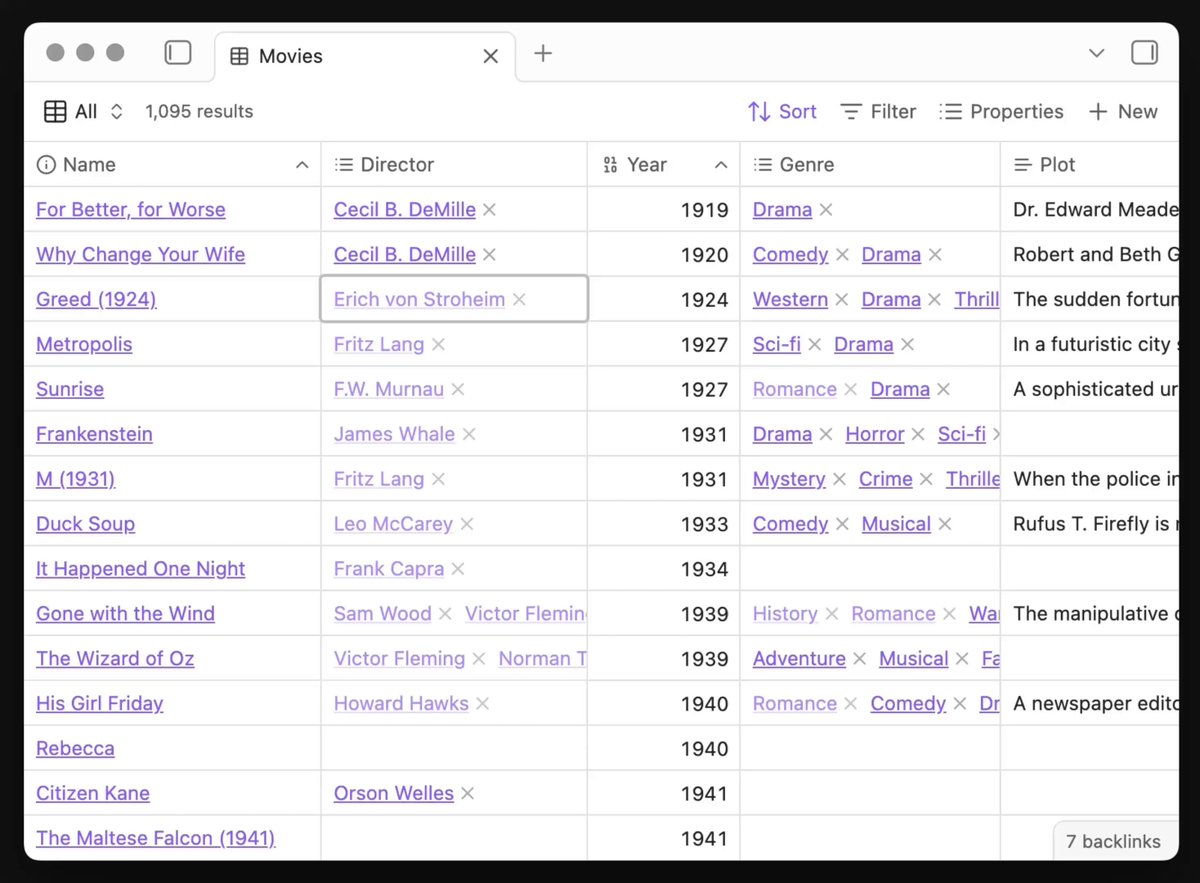
Obsidian 1.10.0 (early access) is now available to Catalyst members with tons of improvements for Bases! - New List view - New Map view an official open source plugin - Bases API for views - Group results by property Many new table view features: - Keyboard navigation - Select cells - Copy/paste - Summarize results (sum, average, etc) - Undo/redo changes
Obsidian64,322 Aufrufe • vor 11 Monaten


Obsidian 1.9.5 (early access) is now available to Catalyst members - New formula editor for Bases, with autocomplete and syntax highlighting - Bases remember your scroll position when navigating forward and backward - New commands: "Add item" and "Add view" for Bases
Obsidian60,140 Aufrufe • vor 1 Jahr

Obsidian 1.9.3 (early access) is now available for desktop and mobile, with more improvements to Bases: - New Cards view lets you display files in a grid layout - "New item" button creates a file that matches filters of the current view - Sort menu lets you easily sort items
Obsidian59,198 Aufrufe • vor 1 Jahr
Keine weiteren Inhalte verfügbar