Video yükleniyor...

Video Yüklenemedi

Ana Sayfaya Dön

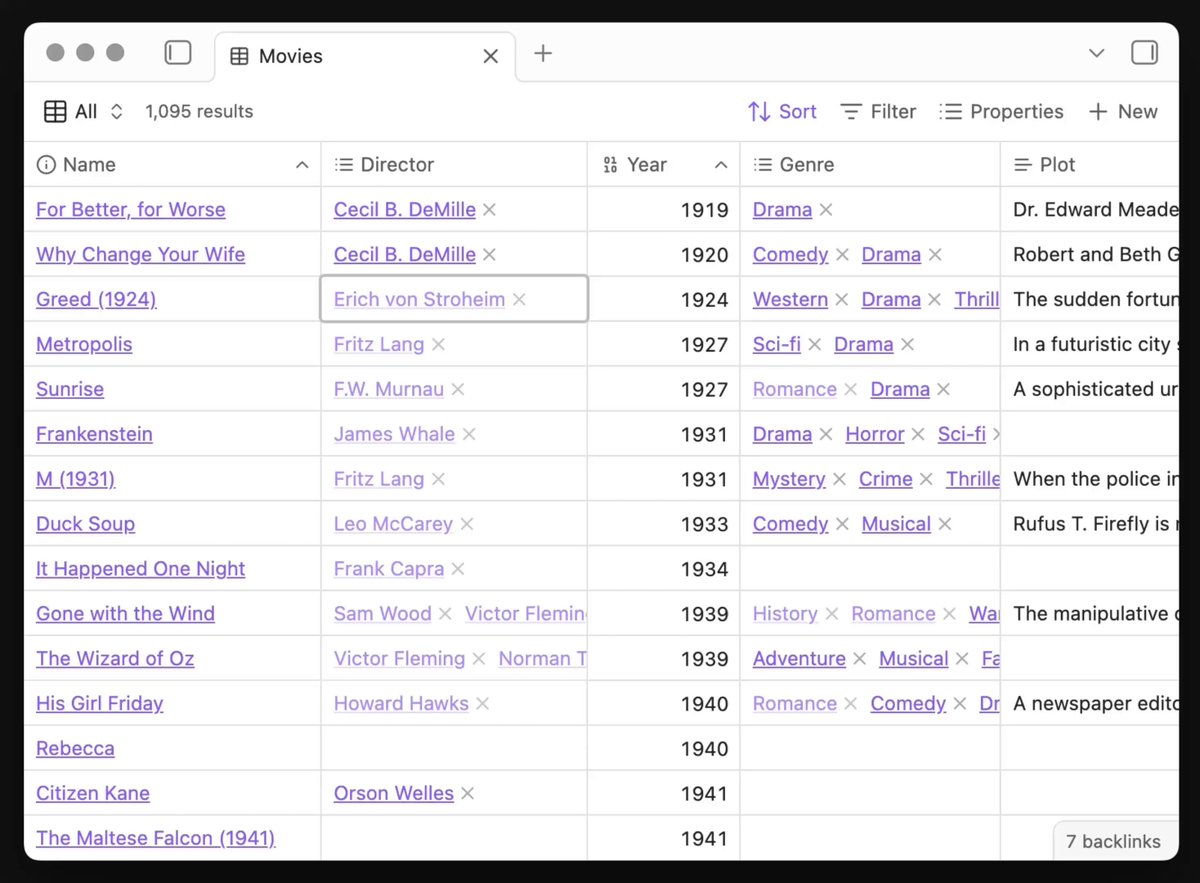
Obsidian 1.9.3 (early access) is now available for desktop and mobile, with more improvements to Bases: - New Cards view lets you display files in a grid layout - "New item" button creates a file that matches filters of the current view - Sort menu lets you easily sort items

59,198 görüntüleme • 1 yıl önce •via X (Twitter)

10 Yorum

Obsidian profil fotoğrafı
Obsidian1 yıl önce

Obsidian 1.9.3 Desktop (early access)

Obsidian profil fotoğrafı
Obsidian1 yıl önce

Obsidian 1.9.3 Mobile (early access)

Hùng Phan profil fotoğrafı
Hùng Phan1 yıl önce

No wayyy we got card view this soon!!! Amazing work!

Michael 🔸 profil fotoğrafı
Michael 🔸1 yıl önce

NEW ITEM wow! I saw comments asking for it but suspected it wouldn't be in scope. Happy to be wrong!!

gigaArpit profil fotoğrafı
gigaArpit1 yıl önce

when is it going to release for *regular* users?

ludthestud profil fotoğrafı
ludthestud1 yıl önce

YOO, cards view so good

Tariq Khan profil fotoğrafı
Tariq Khan1 yıl önce

Fantastic, brilliant to see this functionality as part of core. Keep up the great work!

Manfred Mustermann profil fotoğrafı
Manfred Mustermann1 yıl önce

What's the property formula for displaying the poster?

Loaf profil fotoğrafı
Loaf1 yıl önce

Amazing

Robert Cincotta profil fotoğrafı
Robert Cincotta1 yıl önce

I’m so happy with this! I’ve been struggling trying to set this up for the last year with various plugins. Great to see it now native and built in.

Benzer Videolar

Obsidian 1.8.3 is now available to all for desktop and mobile! - Web viewer. New core plugin lets you open external links within Obsidian on desktop. This makes it easier to read linked content without leaving the app and improves multitasking for web research. The plugin can be enabled manually in settings. - Improved iCloud sync. Obsidian no longer waits to confirm that configuration files have synced. - New mobile onboarding. This guided flow helps new mobile users create and sync a vault. - New "Download attachments for current file" command. Downloads all externally embedded images and replaces the external links with internal embeds. A few notable improvements: - When modifying a numbered list, the numbers are now updated automatically. - Pressing Enter in a multi-line list item now continues the list properly. - New "Insert footnote" command. Footnote autocomplete now provides a fallback to create a new footnote if no match is found. - Tags view now includes search. - File Explorer now includes an option to automatically reveal the active file. - Outline now has an "Auto-scroll to current section" option. - Sync now has a new view option, "Hide my changes," which hides your own file changes in a shared Obsidian sync vault. - Recently used commands now appear at the top of the command palette. - "Search current file" search bar now displays the total number of results. - "Insert template" command now sorts templates by file path and displays folder names. - , , and tags with relative src paths are now rendered in Live Preview and Reading mode. - Graph view no longer considers Canvas files as attachments. See the changelog for dozens more improvements and bug fixes.

Obsidian

118,904 görüntüleme • 1 yıl önce

Obsidian 1.11 is now available for desktop and mobile! Mobile: - The interface has been refreshed to improve the editing and reading experience. - Lock Screen, Control Center, and Home Screen widgets let you quickly create a new note, open a specific note, open daily note, open search, or open Obsidian. - When scrolling down in a note, the navigation hides to maximize screen space for reading. - New sidebar navigation for switching sidebar tabs and actions, aligned to the bottom for better ergonomics. - Added double-tap to switch a note from reading mode to editing mode. iOS - Shortcuts to open a note, open daily note, capture to a note. Capture shortcuts allow you to append or prepend text to a note, without opening the Obsidian app. - Siri integration such as "Capture using Obsidian", "Capture to Obsidian", "Open my daily note in Obsidian", "Search in Obsidian". -Searching for Obsidian in Spotlight shows additional actions: New Note, Search, and Daily Note. Android - New widgets: Open Note, New Note, Search, Daily Note, Open Obsidian. You can add multiple widgets of the same type to open different files, or trigger different search queries. - Quick Settings Tile and new shortcuts: Open note, Daily note. Editor - Markdown links are now supported in text and list properties. Internal links are automatically updated when the destination file is moved or renamed. - When text is selected, pasting a URL into the editor will convert the selection into a Markdown link using the URL. Settings - New "Keychain" settings section for storing plugin secrets. A guide for plugin developers is published in our docs. - Added icons to settings sections. - Community Plugins › Automatically check for plugin updates. Obsidian will check for plugin updates in the background every 3 days, or after the app updates. - New setting Files & links › Default file to open. Choose between "Last opened files", "New note", "Specific note", or "Daily note". - The daily note format can be selected from a list of predefined formats. Obsidian URI - New, open, and daily URI actions now support a new paneType param.

Obsidian

191,929 görüntüleme • 7 ay önce