The pipeline optimisation for brands' visuals Batch image production... in 1 window: 〰️ take the image 〰️ rotate the virtual camera 〰️ take shots 〰️ edit & upscale 〰️ resize aspect ratios if needed 〰️ download -> finalise in Figma / Ps One designer becomes a factory 👇show more

AmirMušić
19,801 просмотров • 3 месяцев назад
🚀 Photo to Video Ads is now live on... Pollo AI Turn any product photo into scroll-stopping video ads in seconds. No camera. No crew. No editing. Built for e-commerce brands, Shopify sellers, and modern DTC marketers in beauty, fashion, and beyond. Here’s a real example — a Laneige Lip Sleeping Mask ad generated from just one product image 👇 Want pro-level product videos for your store? Download the Pollo AI App now. Check the comments for the download link and quick access 👇 #Ecommerce #ProductAds #VideoAds #Shopify #AdCreatives #DigitalMarketing #SocialCommerceshow more

ZoAina_AI
14,019 просмотров • 1 месяц назад
📖THE STEP MOST CREATORS SKIP IS WHY THEIR AI... ANIMATION LOOKS INCONSISTENT Consistency across clips doesn't come from prompting — it comes from the reference image. The pipeline, step by step: ▪ Start with ChatGPT Image 2 — generate a full character design sheet first, not just a single frame. Multiple angles, expressions, and outfit variations in one image keeps the character consistent across every scene ▪ Build a storyboard inside ChatGPT Image 2 as well — define each shot, camera angle, action, and mood before touching Seedance at all. This is the step most people skip and it's the reason clips look disconnected ▪ Define a color palette and lighting mood early — golden afternoon light, soft warm tones, dramatic shadows. Lock those values and repeat them across every prompt ▪ Take each storyboard frame into Seedance 2.0 as the reference image — one frame becomes one clip ▪ Write the Seedance prompt around the character action, not the scene description. The scene is already in the image. The prompt handles motion, camera behavior, and timing ▪ Keep clip duration between 4-6 seconds per shot — shorter clips give more control over pacing and reduce motion drift on character faces ▪ Match camera movement type across consecutive clips — if one shot dollies in, the next should hold or pull back, not dolly again The consistency across these frames comes from the character design sheet, not from luck. Seedance reads the reference image and the prompt together — if the reference is detailed enough, the output stays on-model. This video was created by ALOKXMEHTA 📥 tomorrow: the exact ChatGPT Image 2 prompt structure used to generate a multi-angle character design sheet like this one 🔖One article covers the entire workflow — it is pinned below, do not scroll past it.show more

Zentrix⌚️
12,846 просмотров • 22 дней назад
A single product image can now become a cinematic... ad in minutes. Created with "𝐏𝐡𝐨𝐭𝐨 𝐭𝐨 𝐕𝐢𝐝𝐞𝐨 𝐀𝐝𝐬" on the Pollo AI mobile app. What used to take a full creative pipeline can now be turned into a polished, conversion-focused video ad in one workflow, making it especially useful for ecommerce sellers who need to launch and test creatives fast. AI advertising is accelerating.... See comment for a Prompt 👇show more

Aneeza Ai
32,912 просмотров • 1 месяц назад
Midjourney sref + Sora 2 Pro is the sauce.... With one Midjourney style image, you can give a specific style for your entire project. I created two different 12-second clips and edited them together. Some details aren’t fully consistent, like the iPod or AirPods because the clips were made separately from a single image (Character in a specific style). It could be fixed in post-production, but that would take more time, and this was more of an experimental test. It would be great to add the actual product image with the current one to maintain product consistency. I feel like if there were a way to add 2–4 images into this workflow, it could open up a lot more possibilities and consistency. With an API, it could be possible. Or let’s see what Veo 3.1 has to offer.show more

Allar Haltsonen
10,141 просмотров • 9 месяцев назад
✨ Made a new mini feature on Photo AI:... [ Grab from 3d model ] So the problem is we're at that stage in time (typical for AI) where image-to-3d models are not good enough but are fun to play with, but we know they'll be good enough in 1-2 years With [ Make 3d model ] you already can turn any Photo AI pic into a 3d model but it still looks hyper clunky and deformed, but it works! One cool idea I had to make that more useful and made now: Let people make a 3d model then change the view of the it with the 3d viewer, then press [ o ] and it grabs a frame of the 3d That image you can then [ Remix ] (img2img), and it becomes a real photo again and that in turn you can then turn into a video again with [ Make video ] So that essentially gives you a fully freeform camera position control to take photos with One thing I need to fix is the background/skybox, I kinda need to take the original photo and remove the person and just get the background for the 3d model viewer, in this case it should be white, but it's a start!show more

@levelsio
119,210 просмотров • 1 год назад
This guy built an AI pipeline that generates hyperrealistic... fashion models in 47 minutes and now dropshippers pay him $1,400 to clone the entire system. He got tired of watching e-com brands lose $8K per photoshoot when a single product angle changed so he built a 9-node workflow that generates 127 product videos from one Pinterest photo without hiring a single model. Here's the exact breakdown: → Claude writes a 34-parameter JSON brand DNA before any image is touched target psychographics, price anchor, vibe matrix, anti-inspiration blacklist → Pinterest becomes the model source library but you can't just download and animate → Kling 2.6 takes that static JPG and turns it into 5-second video but only after the prompt architecture is locked → Negative prompt node runs 41 exclusion terms: no plastic skin, no CGI glow, no symmetry artifacts, no doll face, no synthetic lighting → That one step kills the "AI look" that tanks engagement by 67% in the first 3 seconds → TikTok Studio uploads 19 videos in one batch with zero manual captioning because the brand voice was pre-programmed in step one → Atlas scrapes Amazon product links and auto-generates a Shopify store with hero images, pricing tiers, scarcity copy, and mobile-optimized checkout in 90 seconds → The store goes live before the first TikTok video finishes processing The key move 94% of people skip: you can't animate the photo before you inject the negative prompt. If you send a raw Pinterest image straight into image-to-video the face morphs into a wax figure. The fabric loses texture. The hands grow extra fingers. The whole thing screams "AI" and your CTR dies. His system runs the exclusion filter first so the model moves like she's shot on an iPhone 15 Pro in natural light. One brand hit 2.6M views on TikTok in 11 days with zero paid ads and converted at 3.7% because the videos looked like organic UGC not polished studio content. Brands now pay him $1,400 for the full pipeline setup + $340/month to keep the store synced with new product drops and seasonal video batches. The entire system runs on $23/month in API costs and one laptop. No photographer. No model agency. No product samples. Just a prompt template, a Pinterest account, and the discipline to filter out the AI artifacts before you render movement.show more

Kaidu
534,198 просмотров • 2 месяцев назад
“The Impossible” 1964 shot that reportedly left Martin Scorsese... speechless. This stunning sequence from the 1964 film I Am Cuba (Soy Cuba) is still regarded as one of the most technically daring shots ever captured on camera. Long before CGI or stabilized drone systems existed, director Mikhail Kalatozov and cinematographer Sergey Urusevsky engineered the sequence using elaborate rigs of cables, pulleys, and custom-built camera setups. The camera begins at street level, ascends the exterior of a building, moves through a cigar factory, and then glides out over the city in a single continuous take, creating a fluid, gravity-defying movement that feels strikingly modern even by today’s standards. The shot is also renowned for its surreal visual quality. Shot on specialized infrared film, the vegetation appears almost luminous white against a deep black sky, giving the image an otherworldly, dreamlike atmosphere. Initially overlooked as Cold War propaganda, the film was rediscovered decades later and restored in the 1990s, after filmmakers like Martin Scorsese and Francis Ford Coppola praised its extraordinary craftsmanship. Even now, it remains a benchmark for what’s possible in practical cinematography.show more

Historic Vids
292,516 просмотров • 2 месяцев назад
Claude + GPT Image 2 + seedance + Meta... ads MCP Replaced my 10k/month performance marketing agency Here's the exact stack (and how it works): Step 1: Research Feed Claude your product URL, your competitors' URLs, and your top-performing ad angles. It builds your full brand brief + competitor intelligence in minutes. No agency strategist needed. Step 2: Static ads in seconds Claude writes image generation prompts based on your brief. Those prompts go straight into GPT Image 2. Out comes scroll-stopping creative. Batched. On-brand. No designer. Step 3: Video ads that convert Claude writes video prompts. Those go into Seedance 2.0. UGC-style videos. AI actor formats. Product showcases. All generated, not filmed. (Both GPT Image 2 + Seedance are live on HeyOz right now.) Step 4: Publish + optimize on autopilot Connect Claude to Meta Ads MCP. It publishes your creatives, monitors performance, and keeps iterating. Your agency was charging you for this. This entire workflow is documented in a guide I put together, covering prompts, setup, and the exact MCP config. Why this matters: Most brands are still paying for slow, expensive creative production. The ones who figure this out in the next 90 days will have an unfair advantage. Don't be the last one to know. Comment "REPLACE" and I'll send it to you directly.show more

HeyOz
24,983 просмотров • 2 месяцев назад
IF I WAS FORCED to build a $20K/month AI... creative agency using nothing but Photoshop, starting from 0, here's exactly what I would do in steps: The production setup (Days 1–3) 1. Download the Higgsfield plugin inside Photoshop — takes 5 minutes 2. You now have: sketch-to-image, layer decomposer, mockup studio, relight, upscale, face swap, character swap, background removal, AI stylist — all in 1 tool 3. Old creative agency workflow: designer + photographer + editor + 3–5 day turnaround 4. New workflow: 1 person, Photoshop, 30 minutes per deliverable The offer (Days 3–7) 5. Pick 1 niche — ecom brands, real estate agents, or course creators all need visuals constantly 6. Build a simple offer: "10 ad creatives delivered in 24 hours — $500" 7. Old agencies charge $2,000–$5,000/month for the same output 8. Your cost to deliver: $0 beyond the plugin. Pure margin. 9. Create 3 sample mockups using the tool — drop a product image in, generate 9 variations, pick the best 3 10. That's your portfolio. Built in under 1 hour. Cost: $0. The client machine (Days 7–20) 11. Go on X and search "[niche] + need a designer" or "[niche] + creatives" 12. DM 50 people per day — "I'll make you 3 free ad creatives in 24 hours, no catch" 13. Deliver them in 30 minutes using the plugin 14. 50 DMs/day × 14 days = 700 outreach messages 15. Conservative 3% conversion = 21 people see the free work 16. Close 5 of them at $500 = $2,500 in week 3 The scale (Days 20–30) 17. Upsell every client to a $1,500/month retainer — 10 creatives/week, unlimited revisions 18. 1 client per day in Photoshop takes 45 minutes max 19. 10 retainer clients × $1,500 = $15,000/month 20. Add 3 one-off clients at $500/month = $1,500 21. Add a $997 "AI creative system" course teaching other people this exact workflow = $3,000+/month from 3 sales The math: 50 DMs/day × 30 days = 1,500 outreach messages 3% book a call = 45 calls 40% close at $1,500/month retainer = 18 clients 18 × $1,500 = $27,000/month recurring Time per client per day: 45 minutes Total daily work: 4–5 hours Every mockup — AI. Every restyle — AI. Every layer rebuild — AI. Every variation — AI. No photographer. No designer and no reshoot. Start it here. 👇show more

ALEX SUZUKI
20,557 просмотров • 1 месяц назад
Claude + GPT Image 2 + Seedance + Meta... Ads MCP Just fired my $10k/month performance marketing agency. Here's the exact stack (and how it runs): Step 1: Research Hand Claude your product page, your competitors' pages, and your best ad angles. It spits out a full brand brief + competitor breakdown in minutes. No strategist. No $200/hour consultant. Step 2: Static ads in seconds Claude crafts image prompts from your brief. Drop those into GPT Image 2. You get scroll-stopping creative. Batched. On-brand. No Figma needed. Step 3: Video ads that convert Claude writes video prompts. Feed them into Seedance 2.0. UGC-style clips. AI actor formats. Product showcases. All generated. Zero filming. (Both GPT Image 2 + Seedance are live on HeyOz right now.) Step 4: Publish + optimize on autopilot Hook Claude into Meta Ads MCP. It pushes your creatives live, tracks performance, and keeps iterating. Your agency was billing you hourly for this exact thing. I documented the full workflow in a guide: prompts, setup, and the exact MCP config. Why this matters: Most brands are still bleeding money on slow, overpriced creative production. The ones who crack this in the next 90 days will own an unfair advantage. Don't be the brand that figures it out too late. Comment "REPLACE" and I'll DM it to you.show more

Ahad Shams
18,090 просмотров • 2 месяцев назад
Claude Code + Higgsfield MCP is f*cking cracked 🤯... I built an entire DTC ad campaign inside Claude Code using the new Higgsfield MCP. One product URL → hero static, animated hero shot, 2 UGC clips with a creator wearing the product. 5 assets. One Claude conversation. 3 Higgsfield models. All inside Claude Code. Perfect for DTC brands and agencies who need full campaign packages without booking a shoot or briefing a designer. If you're spending hours every week generating statics in one tool, briefing a motion designer for the hero clip, then chasing a UGC creator for the talking-head shots — this MCP eliminates the entire pipeline: → Drop a product URL into Claude Code → Claude pulls the brand brief — voice, hero SKUs, visual style, target customer → Generates the hero static with ChatGPT Images 2.0 → Animates it into a 5-second cinematic opener with Seedance 2.0 → Generates a UGC creator with GPT Image 2 → Drops her in the product and generates 2 native UGC video clips with Seedance 2.0 No tab-switching between tools. No copy-pasting prompts between platforms. No briefing 3 different vendors for one campaign. What you get: → A complete campaign package — static, animation, UGC — from one product URL → Brand-specific outputs that pull from a real brief, not generic AI slop → Claude making creative decisions between every step (which variation wins, which creator fits the persona, which clip needs a re-spin) → A repeatable pipeline you can run for any product in your catalog Built 100% in Claude Code with the Higgsfield MCP. I recorded a full walkthrough showing exactly how this works: the MCP setup, every prompt, every model, the full campaign output. Want the full video walkthrough? > Like this post > Comment "MCP" And I'll send it over (must be following so I can DM)show more

Mike Futia
29,442 просмотров • 2 месяцев назад
Everyone's sleeping on image-to-3D AI models. They can make... your app look incredibly unique, with just a little effort. Here's how. This is my calorie tracker, built in a week with nothing but prompting. Just Claude Code + a couple APIs. The visuals are all AI-generated. I'll be sharing the full workflow + all the crazy technical stuff Claude and I did to make this work, so nobody has to struggle through it like me. Deep dive coming soon! Till then, this is the high-level idea: 1. Get a clean image of the food (or whatever your asset is) - In my app, the user describes foods via text, or attaches images (or both) - If text, an LLM extracts the food description and formats it into a specific prompt I tuned for this design, and we generate an image using Z-Image Turbo through fal - If image, we do the same thing but with FLUX.2 [dev] to edit the user image into our reference design - Originally, both used Google Nano Banana, but switching to open models cut costs and latency a ton 2. Gaussian splatting (2D image → 3D model) - I tried various 2D-to-3D options on fal and ended up with TripoSplat as my preferred balance of speed, cost, latency; this turns an image into a 3D model that looks super high quality (link below) - The app displays the 2D image while our backend generates the 3D splat - We "groom" the splat to reduce size and load time by culling low-opacity/scale points 3. Render efficiently on device Originally, it looked great but ran at 10 FPS. Getting to 120 FPS was a crazy journey. TL;DR: - SwiftUI had to go; it forced us to render each asset in independent MTKViews, which wasn't workable - Instead, we composite every dish into one full-bleed CAMetalLayer using MetalSplatter (link below) - We had to make some optimizations within MetalSplatter's code too, to reduce the overhead of sorting points per render Then I added some finishing touches like the subtle rotation and parallax as they move around. I think it turned out pretty cool :) Overall, this took some effort, but we still got it done in less than a day. Hopefully your agent can follow in the footsteps of mine and do it much faster. Keep an eye out for the bigger writeup, which'll give your agent everything it needs. If you have any questions, drop em below!show more

Anshu
19,931 просмотров • 1 месяц назад
Everyone loves saying: "Why don't Indian brands make products... like this?" But they don't see the real problem. A well-wisher sent me a reel of a product that would be a huge hit in India. I checked the numbers. China factory price: $20 Landed cost in India: ~₹3,000 Retail price needed: ~₹6,000 Too expensive for most Indians. The funny part? If we Indianised it, we could probably sell it for ₹3,000 and still make it work. But there is one big wall. Moulds. Just the tooling would cost around $80,000. Before selling even one unit. That's the real challenge with making products in India. Not ideas or demand. But the cost and risk of building from scratch. So for now, we focus on smaller bets. Products where we can afford to take the risk. Still, it hurts seeing great ideas and not being able to build them all. How can we solve this?show more

Prakash Dadlani
97,613 просмотров • 1 месяц назад
xAI isn't playing around. They just released the Grok... Imagine API, a unified video + image generation toolkit, and it's already sitting at #1 on the Artificial Analysis Video Arena for both Text-to-Video AND Image-to-Video. It's beating: ● Google's Veo 3.1 & Veo 3 ● OpenAI's Sora 2 ● Runway Gen-4.5 ● Kling 2.5 Turbo The Numbers Don't Lie: ● 64.1% win rate against Runway Aleph in blind human evaluations ● 57% win rate against Kling o1 ● Best-in-class latency. Sub-20 second generation for 720p, 8-second videos. (up to 15-second video) ● Native audio generation baked right into video output (dialogue, music, sound effects, all synced) What Makes It Different It's built for real creative workflows: ✅ Text-to-video AND image-to-video in one API ✅ Video editing with prompt-based controls (add/remove objects, restyle scenes) ✅ Camera controls: zoom, pan, timelapse, pull-back ✅ Style transfers: cyberpunk, watercolor, anime, you name it ✅ Performance animation: map your movements onto characters ✅ Native audio-video sync (no post-production needed) Why the focus on speed and cost? The partner feedback that shaped this: "Quality alone isn't enough if latency and cost make iteration painful." So xAI optimized for all three. Speed. Cost. Quality. Already Integrated With: ● fal. ai ● ComfyUI ● InVideo ● Flora ● HeyGen xAI went from underdog to chart-topper. The Grok Imagine API is fast, affordable, and genuinely production-ready. If you're building anything with AI video, this just became the one to beat.show more

tetsuo
18,325 просмотров • 5 месяцев назад
Seedance 2.0 / continuous one-take / hyperreal water physics.... It takes lot of time to make VFX rendering for a shot like this. Seedance just generated it in minutes First frame image prompt 🔽 A lone emergency technician in an orange survival jacket stands on the shattered roof of a flooded museum in a drowned European capital, storm clouds overhead, broken statues and floating debris below, cold blue-grey palette, cinematic disaster realism, wet surfaces, strong scale, 35mm film look Created with nano banana pro ImagineArt Video Prompt: 👇 "Disaster film realism, one-take. The camera starts high above a drowned capital city in violent storm weather, then dives toward a lone emergency technician standing on the shattered roof of a flooded museum. He sees a rescue flare in the distance and runs. The camera follows tightly behind him as he sprints across collapsing rooftops, leaps over broken skylights, slides down a tilted glass dome, and grabs a dangling cable. Below, dark floodwater surges through streets filled with drifting cars and statues. He lands on a partially submerged tram roof, keeps moving, and reaches a rescue beacon platform just as a giant wave crashes past behind him. Cold grey-blue apocalyptic palette, hyperreal water physics, wind, spray, handheld urgency, one continuous shot, no cuts."show more

Dheepan Ratnam
33,863 просмотров • 4 месяцев назад
Claude Code + Google Stitch 2.0 is f*cking cracked... 🤯 Google just dropped a free AI design agent that solves Claude Code's biggest weakness: frontend design. One screenshot of a high-converting landing page → a production-ready site for your brand in minutes. All inside Google Stitch + Claude Code. Perfect for DTC brands and agencies who are building advertorial pages and product launch pages for Meta but burning days on designer back-and-forth. If you're running Meta ads and need 5-10 different landing pages testing different hooks, angles, and offers — each one targeting a different audience and pain point — you know the bottleneck isn't the ads. It's the pages. Briefing designers, waiting for revisions, paying $2-5K per page. Stitch eliminates the design bottleneck: → Find a high-converting advertorial that's scaling on Meta → Screenshot it and drop it into Stitch (powered by Gemini 3.1) → Stitch redesigns it with your brand's colors, fonts, and imagery using Nano Banana 2 → Edit sections visually — headlines, CTAs, layouts — without touching code → Export the code and paste it into Claude Code → Claude builds the full production site and deploys to Vercel or Netlify in 60 seconds No designer. No $3K per landing page. No Claude Code frontend that looks like a template from 2019. What you get: → Designer-quality landing pages and advertorials built in minutes, not weeks → Visual editing so you actually see the design before you code it → Nano Banana 2 generating on-brand product imagery and hero shots → A repeatable system — new angle, new page, same pipeline Built 100% with Google Stitch 2.0 + Claude Code. I put together a full playbook showing the exact workflow: how to find winning pages, redesign them in Stitch, and deploy with Claude Code. Want it for free? > Like this post > Comment "STITCH" And I'll send it over (must be following so I can DM)show more
Mike Futia
125,653 просмотров • 4 месяцев назад
I used to spend $150/image ad - Now I... spend $2.50 Ever wished you could replicate ANY winning ad (yours or a competitor's) in seconds? Now you can. Just upload any static ad, and BOOM! — our AI tool generates 4 high-converting variations in under 60 seconds. And these ads are: - proven to convert - typo-free (even when text-heavy) - secret weapons for buying data FAST And they’re ready to test immediately. No designers. No agencies. No waiting. Just scroll-stopping static ads in minutes that are perfect for: - Scaling winning creatives without creative fatigue - Rapid A/B testing of winning concepts - Replicating competitor ads legally - 100+ ad variations done in 1 hour We just built this AI tool a few months ago. We spent over 6 figs on our AI image ads last month and had our MOST profitable month in one of our beauty brands. Whether you're an ecommerce founder, employee, or performance marketer - these image ads change the game. Why hire a designer for weeks when you can generate winning variations in seconds — for less than a cup of coffee? Comment "IMAGES" and I'll DM you access to try this tool for free 👇 (must be following)show more

Alex Fedotoff
68,914 просмотров • 1 год назад
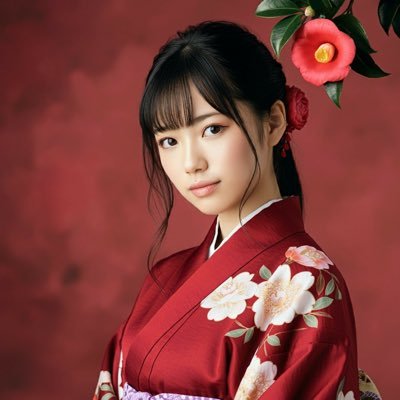
Seedance 2.0 on FlovaAI =================== Prompt: [Reference Identity Lock]... Image 1 is ONLY the main female protagonist. Her face, hairstyle, body type, and outfit must match Image 1 exactly and stay consistent for the entire video. Image 2 is ONLY a uniform reference. All four opponents wear the school uniform shown in Image 2. Never swap, merge, duplicate, or blend identities. The protagonist's identity comes ONLY from Image 1. The four opponents have NO reference images. They are defined by the text descriptions below. The four opponents must not resemble the protagonist, and they must not resemble each other. All five characters must remain clearly distinct and recognizable until the end. [Priority Order] 1. Preserve the protagonist's identity from Image 1. 2. Keep the four opponents visually distinct from her and from each other. 3. Maintain one continuous shot with no cuts. 4. Keep the classroom layout spatially consistent. 5. Make the action fast but readable and physically connected. 6. Keep the tone as a Korean school action drama, stylish but grounded. Korean school action drama classroom fight scene — 15 seconds, ONE CONTINUOUS SHOT, NO CUTS. A single uninterrupted handheld shot. No cuts, no scene transitions, no montage. The camera should feel handheld, with micro-jitters, slight rolling shutter, and raw unstable realism. The camera must physically travel through the same classroom space. Every transition must be motivated by camera movement, not editing. Whip pans are allowed, but they must not hide a cut. Do not teleport the camera or characters. The classroom layout and character positions must remain spatially consistent. Audio: No music. Only realistic school and classroom ambient sounds: old fluorescent light hum, distant hallway noise, ceiling fan, shoes scraping the floor, desks dragging, chair legs screeching, cloth friction, dull body impacts, and breathing that gradually becomes heavier. Breathing continues throughout the scene and keeps building. Lighting: Late afternoon in a Korean high school classroom. Mixed cool fluorescent light and warm sunlight through the windows. Dust floating in the sunlight. Soft fan shadows moving across desks and school uniforms. Main character: The Korean female high school student from Image 1, age 17–18. Cold, emotionless, calm, and intimidating. She barely speaks and does not scream during the fight. She remains composed from beginning to end. Her movements are efficient, explosive, and precise. Even if her frame is not large, she dominates through speed, timing, and accuracy. Main outfit: Exactly the outfit shown in Image 1. Do not change its colors, design, or details. Her jacket or outer layer is either removed and hanging on a chair, or worn in a slightly messy way. The action must be non-sexualized and combat-focused. Fabric movement, dust, sweat, wrinkles, and impact response should feel realistic. Opponent rules: Four Korean female high school students, all wearing the Hanlim Multi Art School uniform shown in Image 2. They have no reference images. Define them strictly by these descriptions and keep each one consistent: Opponent A: short black bob with straight bangs, medium build, round face. Opponent B: long straight hair tied in a high ponytail, tall and lean, sharp jawline. Opponent C: shoulder-length hair with side-swept bangs, slim build, narrow face. Opponent D: long wavy hair worn loose, slightly stocky and broad-shouldered. A, B, C, and D must each keep clearly different faces, hairstyles, body shapes, and silhouettes. They must not resemble the protagonist, and they must not resemble each other. No face duplication, no face merging, no identity confusion. Environment: An empty classroom at Hanlim Multi Art School, a Korean performing arts high school in Seoul. Green chalkboard, chalk tray, worn wooden desks, plastic chairs, classroom clock, class schedule poster, discipline/life-guidance posters, cleaning tools, blinds or curtains, wall study materials, and a slightly scuffed floor. Desks and chairs should react naturally to impacts, sliding, shaking, and collapsing when hit. Camera framing rules: Even during kicks, framing should stay around chest-level or eye-level. No low-angle shots under the skirt. Do not focus on legs, thighs, underwear, or fetish-like details. All action framing must prioritize faces, upper-body motion, impact, and spatial choreography. Continuous action and camera choreography: From 0 to 15 seconds, the fight continues without any cuts. The action should be stylish but readable, and every movement must be physically connected. 0–3s: The camera starts behind the protagonist at a slightly low handheld angle, drifting left through the classroom aisle. Opponent A grabs the protagonist's shoulder roughly and says in Korean: "야, 너 지금 뭐 하자는 거야?" The protagonist silently turns and lands one hard straight punch to A's face. At impact, use a very brief 15% slow motion: cheek ripple, dust particles, deep thud. A falls sideways into a desk. The camera dips slightly from the shock, then whip-pans right without cutting. 3–6s: Opponent B charges in from the right. The protagonist steps forward instead of retreating. A short body shot to the stomach. Immediate uppercut to the chin. Without pausing, she drives forward into a flying knee to B's chest. B is thrown backward across or into a desk. The camera follows the forward motion low, then rebounds upward with the impact. 6–9s: Opponent D attacks with two fast punches. The protagonist deflects both strikes with her arms, then flows into a turning backfist to D's face. As D staggers, she continues the same rotation into a spinning back elbow that lands hard on D's jaw or temple. D crashes sideways into two or three desks. The camera arcs around her shoulder and jitters slightly at each impact. No cuts. 9–12s: Opponent C rushes in from the chalkboard side. The protagonist clearly grabs C's collar with her left hand. C's face must be fully visible from the front and clearly different from the protagonist. The protagonist lands one short, hard punch to C's face, then immediately throws a powerful high kick or flying high kick into C's chest. The force sends C backward into the green chalkboard. The protagonist remains in the foreground and never touches the board. The protagonist's face should be side-profile or partially obscured. C's face should be clearly visible from the front at the moment of impact. Their faces must never overlap in frame. Use a very brief 20% slow motion at the chalkboard impact: chalk dust bursts outward, and C slides down the board. The camera pushes up with the impact, then tilts down as C slides. 12–15s: Through the chalk dust, the camera hard-pans right. D makes one final charge. The protagonist sidesteps and lands a tight uppercut to D's chin, followed immediately by a cross. D crashes into a row of desks, causing a chain reaction of collapsing desks and chairs. The camera drifts forward slowly. The protagonist adjusts her loose tie or ribbon and brushes chalk dust off her shoulder. Her expression stays cold and serious. She walks past the camera and exits the frame. Dust floats in the sunlight. Natural ending. =================== Made with Flova #FlovaAI #FlovaCPPshow more
TSUBAKI
14,460 просмотров • 6 дней назад
Veo 3.1 + n8n is insane 🤯 Google's new... model lets you generate studio-quality UGC videos that look like they cost $1k to produce. Copy my entire automated workflow below 👇 Most e-commerce brands & creative agencies are stuck choosing between: → Expensive creator networks ($500-$2k per video) → In-house production (weeks of coordination) → Stock footage that looks generic This n8n automation cuts through all of that. Here's the complete process: Step 1: Upload one product image to an n8n form Step 2: AI generates multiple UGC prompt variations automatically Step 3: Veo 3.1 renders each prompt into ultra-realistic video Step 4: System creates testimonials, unboxings, demos & lifestyle shots Step 5: All videos delivered to your workspace production-ready Total cost per video: $2-3 Total time: 15 minutes for 20+ videos Full commercial rights: yours forever This is the same workflow I've been using to generate 100+ UGC videos for e-comm brands. 100% automated. Want the complete n8n workflow? > Comment "VEO" > Like this post And I'll send it over (must be following so I can DM)show more
Mike Futia
83,664 просмотров • 9 месяцев назад
Claude Code + Nano Banana 2 is f*cking cracked... 🤯 I built a skill inside Claude Code that writes JSON image prompts for Nano Banana 2, and the outputs look like they came from a professional photo shoot. One plain-text prompt. Claude rewrites it as structured JSON with lighting, camera, composition, style, and negative prompts. Then fires it off to Nano Banana 2. All inside Claude Code. Perfect for DTC brands and agencies who need high-volume ad creative without booking a shoot. If you're using Nano Banana 2 for product shots and lifestyle images but every generation feels like pulling a slot machine lever — random lighting, inconsistent style, plastic skin, misspelled labels ... This skill fixes the entire output: → You describe what you want in plain English → Claude rewrites it as a structured JSON prompt (lighting, camera angle, lens, depth of field, color grading — all of it) → Fires it to Nano Banana 2 via API → Saves the prompt + image in organized folders → You iterate on the style until it's dialed, then every output matches No more slot machine prompting. No more inconsistent brand imagery. No more burning credits on unusable generations. What you get: - Photo-realistic product shots and lifestyle images on demand - Full control over style, lighting, composition, and camera settings - Saved JSON prompts you can reuse across every campaign - A skill that gets smarter the more feedback you give it Built 100% in Claude Code with a custom skill + Python scripts. I put together a full playbook showing the exact skill, the JSON schema, and the workflow to set this up yourself. Want the full playbook? > Like this post > Comment "BANANA" And I'll send it over (must be following so I can DM)show more
Mike Futia
211,486 просмотров • 4 месяцев назад