Загрузка видео...

Не удалось загрузить видео

На главную

A GUY BUILT A GOD-MODE SECOND BRAIN ASSISTANT THAT FINALLY PULLS FULL CONTEXT EVERY TIME AND FORGETS NOTHING. Everyone talks about jarvis, but this thing looked at its owner and calmly explained why a coding agent is just the small version of what HE is: > Claude Code is...

16,130 просмотров • 4 месяцев назад •via X (Twitter)

Комментарии: 16

Фото профиля rvaniaaa
rvaniaaa4 месяцев назад

the best AI systems don’t answer better. they remember better.

Фото профиля Miraqle
Miraqle4 месяцев назад

They are actually full tuned for the tasks that it’s gonna be used for

Фото профиля أمل الشهراني
أمل الشهراني4 месяцев назад

فديوهات حصرية

Фото профиля Lhasa
Lhasa4 месяцев назад

Check out Memora — a second brain for your projects. Two simple primitives, absorb and digest, turn scattered ideas/notes into a living knowledge graph that evolves with the work: new facts supersede stale ones, related ideas link themselves.

Фото профиля Miraqle
Miraqle4 месяцев назад

400 starts in GitHub

Фото профиля vimiremo1971
vimiremo19714 месяцев назад

khét thật, muốn thử liền luôn á

Фото профиля 安叫兽|Bird🕊️ 🔶 BNB
安叫兽|Bird🕊️ 🔶 BNB4 месяцев назад

吓人的不是记住,是开始替你判断优先级

Фото профиля Miraqle
Miraqle4 месяцев назад

that's the definition of intelligence actually

Фото профиля Nekt0
Nekt04 месяцев назад

That is worth keeping in mind

Фото профиля Miraqle
Miraqle4 месяцев назад

bookmark it for later, but better start implementing it rn

Фото профиля cool
cool4 месяцев назад

great setup

Фото профиля Miraqle
Miraqle4 месяцев назад

thanks mate, recreate it for urself

Фото профиля CryptoNotes
CryptoNotes4 месяцев назад

Wonna know more above ai building

Фото профиля Miraqle
Miraqle4 месяцев назад

Thanks mate, hope you enjoyed it

Фото профиля Maxsim
Maxsim4 месяцев назад

Yeah , of course bro

Фото профиля mamadxbt
mamadxbt4 месяцев назад

that’s a remarkably insightful observation about self-awareness.

Похожие видео

AI AGENTS 101 (58 minute free masterclass) send this to anyone who wants to understand ai agents, claude skills, md files, how to get the most out of AI etc in plain english: 1. chat vs agents - chat models answer questions in a back and forth while agents take a goal, figure out the steps, and deliver a result 2. agents don’t stop after one response. they keep running until the task is actually finishedno babysitting required 3. everything runs on a loop. they gather context, decide what to do, take an action, then repeat until done 4. the loop is the system. they look at files, tools, and the internet. decide the next step. execute and then feed that back into the next step. over and over until completion 5. the model is just one piece. gpt, claude, gemini are the reasoning layer. the key is model + loop + tools + context 6. mcp is how agents use tools. it connects things like browser, code, apis, and your internal software. once connected, the agent decides when to use them to get the job done 7. context beats prompt all day. you don't need to write perfect prompts. load your agent with context about your business, style, and goals and then simple instructions work 8. claude.md or agents.md is the onboarding doc it tells the agent who it is, how to behave, what it knows, and what tools it can use. this gets loaded every time before it starts 9. memory.md is how it improves. agents don’t remember by default. this file stores preferences, corrections, and patterns you tell the agent to update it, and it gets better over time 10. skills + harnesses make it usable. skills are reusable tasks like writing, research, analysis the harness is the environment like claude code or openclaw that runs everything. basiclaly, different interfaces, same system underneath this episode with remy on The Startup Ideas Podcast (SIP) 🧃 was one of the clearest ways of understanding a lot of the core concepts of ai agents could be the best beginners course for ai agents 58 mins. all free. no advertisers. i just want to see you build cool stuff. im rooting for you. send to a friend watch

GREG ISENBERG

378,296 просмотров • 7 месяцев назад

this video is the CLEAREST explanation of how claude skills + AI agents work and how to use them most people set up an AI agent and wonder why it keeps disappointing them. the context window is everything context is what the model assembles before it takes any action. think of it like everything the agent needs to read before it does anything. the quality of what goes in determines the quality of what comes out. the models are genuinely really good right now. claude and gpt are exceptional. the variable is almost always the context you give them. 1. agent.md files are mostly unnecessary every single line you put in an agent.md file gets added to every single conversation you have with your agent. a 1000 line file is around 7000 tokens burning on every run. the model already knows to use react. it can read your codebase. save the agent.md for proprietary information specific to your company that the model genuinely cannot know on its own. 2. skills are the actual unlock a skill.md file works differently. what loads into context is only the name and description, around 50 tokens. the full instructions only appear when the agent recognizes it needs that skill. so instead of 7000 tokens on every run you have 50. and the agent stays sharp because the context window stays lean. the closer you get to filling the context window the worse the agent performs, same way you perform worse when someone dumps 10 things on you at once. 3. here is how to actually build a skill the right way most people identify a workflow and immediately try to write the skill. what you want to do instead is run the workflow by hand with the agent first. walk it through every single step. tell it what to check, what good looks like, what bad looks like. correct it in real time. once you have had a full successful run from start to finish, tell the agent to review everything it just did and write the skill itself. it writes a better skill than you will because it has the full context of what actually worked in practice not in theory. 4. recursively building skills is how you go from frustrated to reliable when the skill breaks, and it will break, ask the agent exactly why it failed. it will tell you specifically what went wrong. fix it together in that same conversation. then tell it to update the skill file so that failure mode never happens again. ross mike did this five times with his youtube report generator. it now pulls from eight different data sources and runs flawlessly every single time without him touching it. 5. sub agents are something you earn not something you set up on day one start with one agent. build one workflow. turn it into one skill. once that works add another. ross mike has five sub agents now covering marketing, business, personal and more. it took months to get there and every single one exists because a workflow proved it deserved to exist. the people who set up 15 sub agents on day one and wonder why nothing works skipped all the steps that make the thing actually run. 6. your workflow is the thing the model cannot get anywhere else the model has been trained on everything. it knows more than you about most things. what it does not have is your specific process, your taste, your way of doing things. that is what skills capture. that is what makes your agent actually useful versus a generic one. downloading someone else's skill means downloading their context onto your setup and it will not work the way you want it to because it was never built around how you work. this is the clearest explanation of how agents actually work i have heard. Micky runs this stuff every single day and the results show it. full episode is now live on The Startup Ideas Podcast (SIP) 🧃 where you get your pods people charge for this sorta stuff i give away the sauce for free i just want you to win watch

GREG ISENBERG

194,990 просмотров • 6 месяцев назад

Anthropic just got outplayed again. Devs built the multiplayer assistant Anthropic couldn't, and open-sourced it. Claude Cowork is a solo desktop agent. You point it at a folder, give it a task, and it works through your local files on your own machine. The moment a teammate enters the picture, it has nothing to offer. Most real work does not happen alone. A teammate asks for a status update on something you own. The context they need is scattered across your meetings, your notes, and decisions made last week. Typing all of that out takes time you do not have. This is the gap Claude Cowork was never designed to cross. Rowboat Spaces is built on a different model entirely. Each person brings their own assistant into a shared channel. Your assistant is your second brain. It knows your meetings, your notes, and your open decisions. That personal context stays yours. When a teammate asks a question in the channel, you ask your assistant to brief them. It pulls from everything you know and delivers the answer on your behalf, attributed to you. Your teammate's assistant does the same, from their own context. Teams can draft specs, track decisions, and update shared files from plain conversation. Each assistant reads the full channel history, cross references it against what exists, and flags what is missing. The whole thing is open-source, and each assistant acts as the person it belongs to, not as a shared bot pulling from a common pool. The video below shows this in action. I joined a shared space and asked my team member for a status update. My team member asked their second brain to answer. A spec got built from that conversation, versioned, with every change tracked back to the message that triggered it. Rowboat GitHub: (don't forget to star 🌟) My co-founder also wrote a great article on building your second brain with Rowboat, and I highly recommend reading it as well. The article is quoted below.

Akshay 🚀

117,616 просмотров • 1 месяц назад

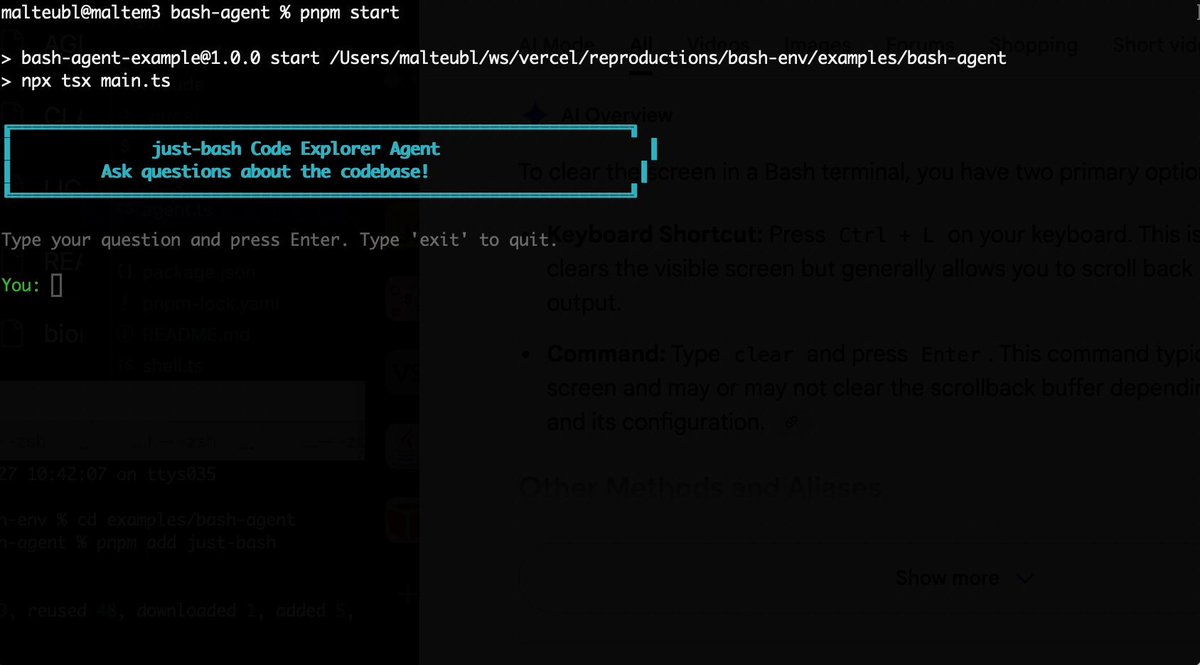
Bash is all you need! Which is why I'm introducing my holiday project: just-bash just-bash is a pretty complete implementation of bash in TypeScript designed to be used as a bash tool by AI agents. Because it turns out agents love exploring data via shell scripts, even beyond coding. It comes with grep, sed, awk and the 99th percentile features that an agent like Claude Code or Cursor would use. In fact, Claude Code can use it for secure bash execution. In the package - A bash-tool for AI SDK - A binary for use by yourself or your coding agents - An overlay filesystem to feed files to your agent securely - A Vercel Sandbox compatible API, so you can quickly upgrade to a real VM if you need to run binaries - An example AI agent that explores the just-bash code base using just-bash - I imported the Oils shell bash compatibility suite and just-bash passes a very good chunk What is interesting about this codebase: It was essentially entirely written by Opus 4.5. Coding agents love bash and they are good at reproducing it. They are also great at text-book recursive descent parsers and AST tweet-walk interpreters. That said, it is, like, a lot of code and I didn't read it all 😅. This is very much a hack, but it also seems to be _really_ useful. I haven't really found anything agents want to use that it doesn't support and it's fast and secure (caveats apply). It doesn't have write access to your computer and the filesystem is given a root that the agent cannot escape from. Find it at Related: Our recent blog post how we migrated our data analysis agent to bash tools and achieved incredible quality improvements The video shows the example agent investigating the just-bash code base

Malte Ubl

125,326 просмотров • 10 месяцев назад

Someone just posted the full blueprint for an AI swarm that does the job of a 200-person quant research team. Six agents. Running 24/7. Finding brand-new alpha while you sleep. Citadel needs 100 PhDs to do this. Two Sigma needs 200. This does it with six bots and one laptop. Two ways to play this - spend a weekend building your own swarm, or copy the wallet of one that's already up $2M: Boris Cherny runs Claude Code at Anthropic. Two weeks ago he said: "I don't prompt Claude anymore. I have loops running that prompt Claude. My job is to write loops" Alpha research is just a pipeline. So instead of sitting in it, you hand each stage to its own agent: > one reads every new research paper overnight and pulls out the trade idea > one builds the features and cleans the data > one backtests it over 20 years, costs and slippage included > one runs the hard stats and kills anything overfit > one checks it still works in every market regime > one strips out plain momentum and value to see if any real edge is left Each of those six is a job a fund pays a $600,000-a-year quant to do. He runs all six for the price of an API bill. The rule that makes it work: the agent that builds a signal never gets to approve it. A separate, stronger agent tries to kill it first. Whatever survives all six by morning is real, new alpha. One trader's already running this exact swarm on Polymarket. That $2M wallet is public, every trade on-chain. The full build is in the post below - six agents, the tool that runs them, and the five mistakes that kill most people. Bookmark & read this before it's buried.

cvxv666

104,237 просмотров • 3 месяцев назад

Most AI coding setups right now look something like this: one agent in a terminal, another in a browser tab, a chat window somewhere else, and you in the middle copy-pasting diffs like a very tired air traffic controller. JetBrains just launched something aimed right at that mess. It's called JetBrains Air, and it lives inside their IDEs. The short version: Air lets you direct multiple coding agents, run their tasks in parallel, and review their work without ever leaving your IDE. Here's what stood out to me: 👇 1. You pick the agents. Air isn't tied to a single agent or provider. You can use the ones you already like. That matters more than it sounds, because the "best" coding agent changes every few months, and nobody wants to rebuild their whole workflow each time. 2. Parallel work without losing track. You can run several agent sessions at once, even across different projects. Air shows you where your attention is needed, so you're not hopping between tabs to find out which agent is stuck. 3. You stay in control. You can follow what each agent is doing, give it input, inspect the changes, and review the output before accepting anything. Nothing lands in your codebase just because an agent felt confident. 4. The agents get IDE smarts too. This is the part I find most interesting. JetBrains IDEs already have great code navigation, refactoring, testing, and debugging. With Air, both you and your agents work with that context. So the agents aren't guessing blind inside a chat box, and when something needs a human, the real tools are right there. The bigger idea here is that agents become part of your development workflow instead of a separate chat you keep switching to. There's also a nice bonus. For a limited time, JetBrains is offering Junie Lite for free (fair use applies). It's their own coding agent paired with a highly efficient model. It isn't pitched as a frontier-level agent. Think of it as a solid, free baseline for trying out Air and running everyday tasks. Air works in any JetBrains IDE and is in early access right now. If you write code with agents, give it a try: #ad

Mushfiq Sajib

40,469 просмотров • 21 дней назад

WHAT IS AN AI "SOFTWARE FACTORY" AND IS IT HYPE (31 MINUTE BREAKDOWN) I think it's a silly name for a genuinely USEFUL idea! A software factory is 5-6 markdown files that sit next to your code and tell your agents how you like to work, so you can build high quality apps 24/7. It's going viral because AI coding has a trust problem. The model can build the feature, but with no structure around it you end up babysitting the agent, wondering what changed and hoping it didn't break something important. So you build with agents the same way a factory builds physical products! 1. Each feature gets its own station, which in software means its own branch, so multiple agents can work at the same time without stepping on each other. 2. The build station gives the agent rules for how to write the code, because "it works" is very different from "a developer could open this repo next month and understand what happened." 3. The proof station makes the agent show evidence. Screenshots, videos, speed numbers, before-and-after states. It has to prove the thing works instead of saying it works. 4. The review station runs the work through a code review agent, and if it doesn't clear the bar, it goes back through the line. 5. Then you show up at the end to merge. For a 100+ years people have run production this way, and it worked because the structure is good. The full episode on what’s a software factory is NOW live on The Startup Ideas Podcast (SIP) 🧃 with the wonderful Micky Watch: So is it hype?!? I don't think it is, because of what it does to your output! WITHOUT a factory, you build ONE feature at a time and you're the bottleneck at every step, prompting, checking the diff, testing it yourself, hoping nothing else broke (spoiler alert it often does). WITH a factory, EACH feature runs in its own isolated copy of the app, so you can have 10+ of them going at once, and each agent has to prove its own work and pass a code review before it ever reaches you. Instead of supervising the work, you're APPROVING finished work that already has evidence attached. REALLY interesting to see how work with agents is evolving to be….well, similar to working with people!

GREG ISENBERG

32,056 просмотров • 1 месяц назад