Video wird geladen...

Video konnte nicht geladen werden

Zur Startseite

Another week shipping @ChatGPTapp! Try these out, we're focused on sweating the details, some bigger features coming 🔜 - Edit messages that have an image attachment - Chat search cmd/ctrl+click open results in new tab - Conversation share menu loads faster - Fixed 5.2-thinking bug causing msg streaming errors...

30,881 Aufrufe • vor 6 Monaten •via X (Twitter)

0 Kommentare

Keine Kommentare verfügbar

Kommentare vom Original-Post werden hier angezeigt

Ähnliche Videos

long time no posting, here's some of the stuff we released in helium recently: - customizable keyboard shortcuts on all platforms - automatic updates on windows - frameless mode (previously zen mode), with floating sidebar, is now out of beta and included in settings by default - improved fingerprint noising: fixed the canvas noising algorithm and added protections against analysis attacks (thank you Cynthia 🐈 for your report, research, and assistance) - tab URL copying, one or multiple, formatted as a list with line breaks - manual tab hibernation, with an option to hibernate all tabs except for selected/active ones - an option to close tabs to the left (or above, in vertical layout) - redesigned toast notifications, now anchored to the active web page, and no longer blinding in dark mode - toast notification about newly opened background tabs in frameless mode (can be disabled in settings) - redesigned the infobar, it no longer looks out of place - improved QR code generation, now it's actually useful - downloads bubble is now shown instead of the full page whenever applicable - kagi search now supports reverse image search from image context menu - frameless mode animations are now smoother - better color contrast in light and dark modes - a lot of bug fixes and other minor improvements all of these changes are present in the latest version of helium. if you're using helium on windows, please update to the latest version, so your browser can be updated automatically from now on!

Helium

154,633 Aufrufe • vor 2 Monaten

Keet Mobile 4.0.0 Changelog 🍐 Features - Keet 4.0.0 introduces a new engine which improves performance, app scalability and sets the ground for a new set of features development. Improvements - Faster room loading with optimised icons and image-preview caching. - Media previews respect maximum image size to save bandwidth. - Added a system-update banner to keep you informed of important upgrades. - Cleaner room creation flow and refined DM request handling. - Down arrow and room avatar colours match desktop application. - Bottom tab bar is now hidden until onboarding is complete. - Clearer username error messages and progress indicators on slow networks. - Better feedback form now includes your username automatically - Call experience tweaks: hangs up cleanly; DM ring logic improved; Android auto-end in background. - Introduced hang-up icon for when call ends in rooms. - Device naming screen now auto focuses the input field. - Updated confirm device screen. - Software version list now shows Hyperdiscovery and lists WebRTC as keet-webrtc. - Refreshed onboarding pages and UI text updates. - Improved audio record UX and many Fixes - Fixed avatar rendering issues. - Removed grey bars at the top of several pages. - Stopped the tooltip from appearing when the username is already set. - Aligned the error-log message-field layout. - Resolved cursor and emoji picker jumps when switching between emoji and keyboard input. - Corrected chat text input width. - Restored fullscreen video previews. - Fixed image loading status indicators. - Adjusted code block spacing for messages sent from mobile. - Prevented locked recordings from following you when leaving a room. - Fixed a crash when opening a room on Android. - Stopped unnecessary FlatList re-renders. - Center aligned preview images. - Resolved chat UI breakage after double tapping the emoji picker icon. - Corrected contentFit on image messages. - Ensured pinned messages remain visible during a call. - Fixed speaker tooltip content overflow. - Calls: fixed orientation breaks, crash when app is killed, call-ring answer now opens the screen. - Resolved unrecoverable error when sharing a file from Google Files. - Eliminated flicker when searching usernames. - Disabled button presses while a tooltip is visible. - Fixed Discover Communities being cut off on small devices. - Disabled bottom tab presses when no identity is set. - Corrected tooltip orientation on tablets. Keet Desktop 4.0.0 Changelog Features - Keet 4.0.0 introduces a new engine which improves performance, app scalability and sets the ground for a new set of features development Improvements - Introduced system-banner UI for updates and notices. - Added a 'Quit' button to uncaught error screens. - Displayed an app loader before the app initialises. - Added a toast notification and an informative banner when sending a DM request. - Consistent avatars between DM rooms and member views. - Added support to medium sized file previews in chat. - Smoother last message rendering in the room list. - Added a chat loader on start up when no cache is available. - Clearer version display in the software section and added hyper db version to the list. - Updated texts for system and migration banners. - Refactored DM request actions and block member logic. Fixes - Prevented image preview blinking while loading. - Fixed crash when removing an avatar file from a deleted message. - Onboarding status is now remembered after a restart. - Eliminated room menu blinking via useDeferredValue. - Prevented Rive animation from disappearing when switching monitors. - Stopped creation of duplicate DM rooms for the same member. - Resolved broken file preview when a file lacked a name. - Restored missing styles on error pages. - Prevented error pages from appearing behind the loader. - Corrected emoji rendering on macOS. - Repaired chat voice message playback. - Fixed useRoomConfig imports. - Corrected file item height in room info. And more

Keet

25,883 Aufrufe • vor 1 Jahr

Obsidian 1.8.3 is now available to all for desktop and mobile! - Web viewer. New core plugin lets you open external links within Obsidian on desktop. This makes it easier to read linked content without leaving the app and improves multitasking for web research. The plugin can be enabled manually in settings. - Improved iCloud sync. Obsidian no longer waits to confirm that configuration files have synced. - New mobile onboarding. This guided flow helps new mobile users create and sync a vault. - New "Download attachments for current file" command. Downloads all externally embedded images and replaces the external links with internal embeds. A few notable improvements: - When modifying a numbered list, the numbers are now updated automatically. - Pressing Enter in a multi-line list item now continues the list properly. - New "Insert footnote" command. Footnote autocomplete now provides a fallback to create a new footnote if no match is found. - Tags view now includes search. - File Explorer now includes an option to automatically reveal the active file. - Outline now has an "Auto-scroll to current section" option. - Sync now has a new view option, "Hide my changes," which hides your own file changes in a shared Obsidian sync vault. - Recently used commands now appear at the top of the command palette. - "Search current file" search bar now displays the total number of results. - "Insert template" command now sorts templates by file path and displays folder names. - , , and tags with relative src paths are now rendered in Live Preview and Reading mode. - Graph view no longer considers Canvas files as attachments. See the changelog for dozens more improvements and bug fixes.

Obsidian

118,904 Aufrufe • vor 1 Jahr

Memex is in public beta (again) We closed down our signups earlier this year when we launched Memex' collaboration features. Over the past 12 months we've been working hard to polish the product and if you haven't used Memex in a while you may want to try it again. For quick summary of what we've added last year you can watch the attached video or read on. Some highlights: 👯‍♂️ Collaboratively curate, annotate and discuss websites, PDFs and videos. (see video) 📣 Share and collaborate with people who don't use the Memex extension with our new web reader. 🤖 AI assistant to summarise & ask questions about websites, PDFs, YouTube videos and text/video sections. ▶️ Video timestamp annotations, including smart notes 📸 Frame snapshot annotations on Youtube ✍🏽 Annotate illustrations on PDFs 💎 Obsidian & Logseq live sync 🌆 Image Support for annotations 🌙 Dark & Light mode redesign 🐦 Use Memex as a CRM for Twitter & Telegram: Organise/search/filter profiles and annotate chat logs + 200 bug fixes and dozens of quality of life improvements. What's next? 🔓 Private spaces with email invites (in polish) 📱 Native in-browser annotations & search on mobile (in progress) 🗂️ Nesting Spaces for better organisation (in design) Transferrable Lifetime Subscription Deal We've also launched a limited offer for a transferrable lifetime subscription. For $400 you can use all Memex features until you hopefully die at an old age - and if you don't need it anymore you can gift or sell it to someone else. We wanted to make our early supporters benefit greatly from the improvements to the product we're going to make even if they stop using Memex. Our hope is that it'll also help us stay more independent from venture capital pressure as a Steward Owned business. For more info, check out our website (in our bio)

Memex.Garden

19,957 Aufrufe • vor 2 Jahren

Here's a copy/paste prompt recipe and vid showing exactly how to ask an LLM for an interactive map with satellite/map layers + a georeferencer that lets you see how old maps correspond with modern geography. Today the computer can’t make good print maps (that's your hill to climb ) but it can, with five bucks and twenty minutes, make good interactive maps. No software/GIS knowledge necessary, you just need a few nouns and an LLM. Scroll to the bottom for the repo/live map if you want those. I'm using Claude Code as an extension in VS Code but you can use the Claude CLI, Cursor, whatever. 1) Let's grab an old cadastral map and see who owned big tracts of a city; I found this an 1854 map of Niagara Falls, NY I found in the Library of Congress: , grabbed the .jp2, saved as a jpg from photoshop. 2) Let's ask Claude Code for a map. You can see exactly what I did in the video but my prompt, sans simple "hey it's busted" debugging, is written out in the following paragraphs. I explain the map-specific nouns in brackets. You can likely dump this whole thing in your LLM window and it'll work; I'd try plan mode + skip permissions. THE PROMPT Make an interactive map with MapLibre GL JS [maplibre is a javascript mapping library, a FOSS version of Mapbox GL JS. This lets us display tiled map data and arbitrary images on the map] Add basemap toggles with Esri satellite, Carto Positron, and OSM [these map layers require no API keys for light usage; Carto Positron is a nice road map layer and OSM is ugly but comprehensive] Add a globe/mercator projection toggle [I think the globe looks better at low zooms] Add a layer panel on the left with visibility checkboxes and delete buttons. Add a search box on the map that flies to results, with deletable pin markers [Makes this easy to get to your area of interest] Include an interactive local georeferencer: drop a JPG, pick ground control points on a zoomable/pannable image viewer, place them on the map, watch it warp with a progress bar centered on the map. [The georeferencer uses math ("affine transform"??) to match points on the old map to points on the new map; generally you click road intersections on the old map, match them on the new map, repeat a dozen times and everything aligns] The georeferenced map overlay defaults to 25% opacity with a slider above the control point list. [I want it easy to see the underlying modern geography] Add Export/import control point buttons [this saves the control points as a JSON so you can save and reimport your work] Add a button to export the warped image as a GeoTIFF with a .prj [In case you want to add the georeferenced image to a real GIS program like QGIS] Look up all relevant docs before starting [Claude sometimes uses outdated stuff] Split everything into separate HTML/CSS/JS files [Claude tends to pile everything in index.html, which is hard to read] Use Optima font, base color #FEFAF6 [I just like this style] Let me test with a local server [it serves it on a simple server so you can nav your host to localhost:8000 and try it out] Log all errors [so you don't have to play telephone with the LLM describing what's busted] 3) Once your LLM finishes, test it out in your browser; if it doesn't work, ask the LLM to check logs. Repeat 'til functional. 4) After this works on your computer, you can show it to everyone by hosting it on GitHub: prompt with "write a README explaining what everything does, add it to a new GitHub repo, deploy using GitHub pages, gimme the live URL" Here's what Claude made for me, try it yourself: • Upload the JPG in the repo, which is linked below • "Add GCP" • Click somewhere recognizable on the old map, like the tip of an island or a road intersection • Click the matching point on the new map • Repeat til you have least 3x points • Hit "georeference" • You'll see the old map atop the new map; if you want a better fit, delete bad points or add a dozen new ones, hit georeference again, repeat Repo: Is this map robust? Human-maintainable? Elegant? Performant? Secure? No, but *your* personal web map need not be. It just needs to work for *your* narrow use case, because it’s *your* map.

Evan Applegate

15,772 Aufrufe • vor 5 Monaten

GeoLibre v2.0.0 is here! GeoLibre is a free and open-source geospatial platform that runs everywhere: as a native desktop app, in the browser, on Android, and embedded right inside Jupyter notebooks. It brings modern web mapping, cloud-native data formats, and a full processing toolbox together in one place, all built on MapLibre and with no proprietary lock-in. Our first major release adds a true 3D globe, takes mapping beyond Earth to Mars and the Moon, lets styles round-trip with QGIS, and turns loaded vector layers into editable, save-back-to-source data. What's new in v2.0.0 - Planetary mapping: explore Mars, the Moon, and other bodies with the OpenPlanetaryMap basemaps, a per-project ellipsoid, and a planet switcher right in the Layers panel. - CesiumJS 3D globe: switch any map pane to a photorealistic 3D globe that stays camera-synced with your 2D maps and mirrors the layer stack. - True 3D data: render vector layers with Z coordinates, load TIN/MultiPatch 3D shapefiles, and display KML/KMZ Collada (.dae) 3D models. - Symbology interchange: import and export vector styling as OGC SLD, QGIS QML, and Mapbox GL style JSON, so styles round-trip between GeoLibre, QGIS, and the Mapbox/MapLibre ecosystem. - Editable source layers: edit vector layers and write the changes back to their source, including GeoPackage and GeoJSON files and PostGIS database tables. - Weather and sky: a new Weather menu with live cloud and precipitation radar overlays (RainViewer), plus a Google Earth-style sun position simulation for realistic lighting. - Terrain and lighting: double-click the terrain control to set vertical exaggeration, and view any scene in true 3D relief. - Smarter data import: bring in CSV without coordinates as an attribute table, split GPX track points and route points into separate layers, and load macOS-zipped and projected-CRS shapefiles. - Raster in the browser: build normalized-difference indices for any HTTP COG and extract COG/WMS/XYZ bounding-box subsets client-side. - Field Calculator upgrades: compute geometry length and area directly on your features. - Attribute table: multi-select rows with Ctrl and Shift, plus faster navigation. - Google Earth-style extras: "View in Google Maps / Google Earth" actions, camera-reset keyboard shortcuts, and a UTM easting/northing grid mode for the Gridlines overlay. - New plugins: a Mapillary coverage and street-level image viewer, a Historical Imagery panel, and an Elevation Profile tool. - Fully localized: all 13 language catalogs are complete, so the entire UI is translatable. Try it out - Launch GeoLibre Web: - GitHub: - Documentation: - Release notes: #GIS #GeospatialData #OpenSource #RemoteSensing #DataVisualization #MapLibre #GeoLibre

Qiusheng Wu

35,991 Aufrufe • vor 1 Monat

is our AI project to make computing feel more human L A N D E R Here are the 4 best demo videos of the magic of DATA in action. DATA is a personalized assistant who knows and remembers every conversation you have with it accross your iPhone, Mac, iPad, Watch, Texts, Emails, and HomePods. You can talk to DATA right in your AirPods or text it just like a person. DATA can read, write, understand, speak any language, and translate between them. It can help with real work and home life tasks like research, writing, scheduling, reminders, and triage. And it's easily customizable so you can have DATA automatically do whatever you want whenever you want with just a few taps and natural language instructions - no code required. DATA can do just about anything you can do on your phone on your behalf automatically including very advanced things Siri can't, like summarizing, analyzing, and drafting replies or writing documents. It can read web pages, texts or emails you show it, or PDFs of any kind. It can do other real world tasks that require complex analysis and common sense too, like: - figure out where the nearest beach is (even when you're in Colorado) and instantly fetch the current surf report up to the current minute. - summarize and drafting replies to entire email chains - plan out entire work projects or multi-day vacations on your calendar - sketch out ideas for you in picture form or drafting Notion pages with charts and graphs. DATA can also use its own judgement to determine when to run an action or not, even if you've scheduled it, allowing you to make VERY complex automations that require many different inputs to make a decision, like for example: - only opening the blinds on your lunch break if it's sunny out and you're working from home. DATA works natively and easily with Apple HomeKit & other shortcuts. DATA can also take initiative and check in with you throughout the day by voice or text and proactively send messages to you and others on your behalf based on your personal and professional goals, current tasks, and calendar. DATA can integrate with many apps on your phone, and is compatible with multiple large AI language models. I've gotten to make a few demo videos that I think really capture how powerful DATA can be for every day life. Here they are all in one tweet. Make sure your sound is on as you watch them. 1. This is the first demo video I ever made from April 19th, 2023. It walks through all the ways you can interact with and use the DATA shortcuts. Everything from saying "Hey Siri" to tapping on custom apps on your home-screen. 2. The second demo video was made May 5 and is an example use case I made of how commands work - commands allow DATA to actually run actions on your phone like taking pictures and sending messages. This demo shows me taking a picture of an email template, and data drafting an email based on that template. It's gotten much better at realizing when it has just run a command and incorporating that information naturally into the conversation now, especially on GPT-4. 3. This third Commands video, May 12 is a walkthrough of ALL the phone functions that commands allow DATA to do: sending texts and emails, making pictures, seeing pictures, reading things, and scheduling events. Since this video we've added auto-replies to texts and emails, summarizing documents, writing documents, health app data retrieval, web surfing, scheduling alarms, making playlists, and more. 4. This last demo I made today, June 15, shows everything DATA does working in concert to generate a crazy detailed morning briefing with background music - including making a unique playlist and giving a detailed analysis of current events complete with Ski & Surf conditions near me other live information from the internet. So now that you've seen everything DATA can do, what's the coolest feature? What features should we add? What would you use DATA for first?

steve

640,176 Aufrufe • vor 3 Jahren

🌟 Builder Spotlight: MagicMinute by Adarsh Singh Chauhan Email overload is universal. Every inbox fills faster than we can clear it. Adarsh built an agent that takes that weight off your shoulders. 📥 The pain You open Gmail. 43 unread messages. Half need a quick reply. The rest can wait, but they’ll slip through the cracks if you don’t set reminders. That’s where MagicMinute comes in. 🗣️ From intent to draft in seconds No need to write long messages. Just say what you need. “Email Sarah about the project delay. Mention the client pushed back the deadline and ask if she needs help with the presentation.” MagicMinute turns that into a draft right away. Then you say: – “Send it” – Or “Schedule at 9:45am” 🧠 Contextual smart replies Toggle on a simple away message when you’re off. Or let the agent read and reply for you. You can switch static or smart replies in the sidebar. Example: Mail: “Can you share the prime number code in Python?” Reply: “Here’s a short snippet that does it…” The agent remembers your conversation context. It responds in the same tone as you would, but faster. 🗂️ Memory and follow-ups Scheduling, follow-ups, and memory make this more than just a ChatGPT wrapper tapped into your Gmail. MagicMinute remembers what's scheduled and what needs attention. That’s the superior agent loop in practice: Read → Decide → Act → Remember. 📌 Use cases Students set reminders for assignments and track professor response times. Assistants handle routine email while flagging anything that needs personal attention. Founders can do more outreach while keeping their personal voice. Anyone buried in email can use it. 🧭 What’s next MagicMinute roadmap includes: – Voice & SMS input – Contact memory – Digital signatures – Metadata export as ERC-3525 profiles – Multi-agent inbox delegation Adarsh built this MVP in four weeks during the Summer Residency, using our open-source framework. His demo had that mix of polish and curiosity we look for, so we offered him an internship on the spot. Today he’s co-authoring a paper with us on the learnability of prime number sequences by ML models. This is a great reminder: good agents don’t always need to be flashy. They just need to solve problems people face every day.

Superior Agents

12,189 Aufrufe • vor 1 Jahr

✨New demo: what if vibe coding felt more visual? Brian Lovin Mary Rose Cook and I did a game jam using Notion as our "IDE": launching Cursor agents from a task board, and making a custom image for each task 😎 The demo shows 3 ideas for the future of agents: 1) Agents should collaborate across apps. Each app has its focus--Notion AI is good at drafting specs and organizing tasks; Cursor is good at coding. So let them specialize! Today we're launching a new integration where Notion AI can kick off Cursor Cloud Agents to do coding tasks. The Cursor API accepts natural language prompts, so I think of this as "cross-app sub-agents" -- it's kinda cute how it resembles humans hiring outside contractors 😊 BTW: the parallelism of cloud agents is incredibly freeing for creativity, but it also creates a new problem: sooo much work to keep track of! Which brings us to the next idea... 2) Agent orchestration is a data visualization problem. A powerful frame for designing agent UIs is to think of the chat transcripts as the "raw data" and ask: what visual projections might help people make sense of this data at scale? We need to engage our human GPUs -- our visual processing -- to understand what the computer GPUs are doing for us! One thing we can do is use AI to populate traditional UIs like progress bars and status updates. But there are also new possibilities now... For example: when you have a lot going on, it can be hard to identify tasks just by text titles. So we tried generating an AI image for each task -- turns out this helps a lot by giving it a unique visual identity! And of course, it also just makes it super fun to build with friends 😃 Speaking of friends... 3) The future of coding is collaborative. Sometimes it feels like IC engineers are being reduced to middle managers: shuffling information between the team's context and the coding agents that they individually manage. The solution: bring all the people and agents into one shared space, with shared context and visibility! In the video you can get a glimpse of how this feels. Mary, Brian and I record ourselves chatting about ideas, and then we use AI to turn that conversation into a list of tasks on a shared board. As the ideas get built in parallel, we can all monitor progress and review the work together, nothing is siloed. My main takeaway from this game jam was: damn, creativity with friends, at the speed of conversation, is incredibly fun. --- Our goal here is to let anyone use Notion as a fun and creative "software factory" to build software together with your team. Give the Cursor integration a shot and let us know what you think! (AI Image gen in Notion isn't GA yet, but coming soon and already out to some users) And let me know if you'd want a template or more detailed instructions on the setup we showed in this demo...

Geoffrey Litt

88,919 Aufrufe • vor 5 Monaten

HERMES AGENT LEARNS FROM ITS OWN MISTAKES. UPDATES ITS MEMORY. CREATES ITS OWN SKILLS. NO CLOUD. EVERYTHING STORED LOCALLY. THIS IS HOW THE SELF-IMPROVING LOOP WORKS. most agents start from zero every session. Hermes carries forward what it learned. THREE MEMORY SYSTEMS: 1. PROCEDURAL MEMORY (how to act) stored in ~/.hermes/skills/ as SKILL.md files. when the agent repeats a complex workflow, it saves the procedure as a reusable skill. next time the same task comes up, it follows the skill instead of figuring it out again. you can also create skills explicitly: "create a skill called video-prep that captures how I format my video scripts. spoken english, define jargon inline, no em-dashes, close with a catchphrase." the agent writes the SKILL.md. available as a slash command from that moment. Hermes ships with 90+ skills. the number grows the longer you use it. 2. SEMANTIC MEMORY (durable facts about you) stored in ~/.hermes/memory/memory.md the agent scans conversations for facts worth remembering. preferences, habits, corrections, project details. real example from the video: agent tried to scrape a YouTube channel. URL was wrong. it failed. it updated memory.md with the correct URL pattern so it never makes the same mistake again. you can also save explicitly: "save to memory that my favorite testing framework is pytest" the agent updates memory.md immediately. this file loads into context on every session. the agent knows you better every week. 3. EPISODIC MEMORY (chat history) stored in ~/.hermes/state.db (local SQLite). every conversation. every tool call. every result. searchable with FTS5 full-text search. "search our past sessions. what was the first thing I ever said to you?" the agent queries state.db and finds it. over time, auxiliary models consolidate episodic memory into semantic memory. distilling recurring patterns into durable facts. THE SELF-IMPROVING LOOP: every agent run follows this cycle: → you send a prompt → working memory loads: SOUL.md + memory.md + relevant skills + chat history → agent calls tools (terminal, browser, delegate_task) → agent completes the task, replies to you → AFTER the reply: agent checks "did I learn something worth saving?" → if yes: updates memory.md or creates a new skill → next session starts smarter than the last this happens automatically. you don't ask the agent to learn. it decides what to remember on its own. WHAT MAKES THIS DIFFERENT FROM CLAUDE CODE: Claude Code has memory too. but Hermes stores everything locally. no cloud. your data never leaves your machine. Claude Code doesn't auto-create skills from experience. Hermes turns repeated workflows into reusable procedures. Claude Code memory is instruction-based. Hermes memory is conversational and self-updating. over months of usage, Hermes builds a knowledge base of your preferences, your projects, your mistakes, and the procedures that work for your specific workflow. the agent that remembers your birthday also remembers why your last deploy failed. NO EMBEDDINGS. PLAIN TEXT. Hermes does not use embeddings or RAG for memory. skill and memory search runs on plain text keyword matching. simpler. faster. no vector database to maintain. works entirely offline on your local machine. DELEGATE TO CLAUDE CODE: Hermes can spawn a sub-agent that runs Claude Code in headless mode: "spawn a sub-agent using Claude CLI to build a Python script that fetches the top 5 Hacker News stories to markdown." Hermes delegates. Claude Code writes the code. result returns to Hermes. Hermes runs the script and delivers the output. use Hermes for orchestration. use Claude Code for heavy coding. both tools. not competitors. WHAT HERMES DOES NOT HAVE: no built-in eval or LMOps system. no LangSmith, no LangFuse integration out of the box. trajectory export and logs exist but there is no automated quality tracking. if you need eval, build it yourself or connect external tools. the loop is self-improving. measuring how well it improves is on you. comment LOOP and I'll send you the configs that control how fast Hermes learns and what it remembers. memory limits, skill auto-creation triggers, and the auxiliary model that runs the learning. Replace your entire team with 8 hermes agents👇

YanXbt

22,720 Aufrufe • vor 1 Monat

I Built a 37.0 Profit Factor Bot by Cracking Every TradingView Source Code tradingview is a gold mine hiding in plain sight and i just found the master key to unlock every single secret hidden within its community scripts. most traders spend their entire lives staring at candles and hoping for a miracle while the actual alpha is buried in the open source code that nobody bothers to look at. i used to be that guy who sat there getting liquidated at three in the morning because i thought i could outplay the market with my gut feeling and some drawings on a screen. it turns out that the game is completely rigged against you if you are trading manually but there is a specific way to flip the script. i am going to show you how to stop guessing and start knowing exactly what works across every possible market condition before you ever risk a single dollar. i spent years losing money and thousands on developers because i thought i was not smart enough to code the systems myself but i was wrong. the first step to cracking the market is realizing that every indicator on the super charts has a source code section that is completely open to the public. you can literally scroll through the community scripts and pull the exact logic for thousands of different strategies that people claim are the holy grail of trading. but the secret is not just having the code because most of these indicators are actually garbage that will blow your account up in a week. this is where the real loop opens because you need a way to test these ideas across twenty five different data sets in seconds rather than months. i use a custom setup with ai agents specifically a sub agent i call the backtest architect to handle the heavy lifting of turning pine script into python code. the goal is to create a factory where you can feed in a raw indicator and get back a full report on its expectancy and profit factor without lifting a finger. most people find one strategy and marry it for life but a real data dog knows that you have to iterate to success or you will get left behind. i am running eighty one different backtests right now because i know that ninety percent of what i find will be trash but that remaining ten percent is where the wealth is made. the backtest architect knows exactly how to structure the folders and data paths so that we are testing everything from the base indicator to complex versions with filters. you might think that popular tools like fibonacci or order blocks are the way to go because everyone on social media talks about them like they are law. but when i actually ran the numbers through the machine the results were embarrassing and most of those strategies just resulted in negative expectancy. it is a dangerous trap to follow the crowd into a trade just because some guru said a certain level was important when the data shows it is a coin flip at best. the dynamic swing indicator was one of the few that actually held its weight during the recent massive testing sessions we ran. it was pulling in profit factors of over thirty seven with annualized returns that look too good to be true until you see the trade list. we combined it with filters like the adx and the money flow index to see if we could refine the signals and the results were absolutely staggering. when you have a system that can run through forty data sets while you are drinking tea you realize that manual trading is a form of self harm. i realized this after spending hundreds of thousands on apps and devs only to find out that i could just learn to build these bots myself live on the internet. the speed of iteration is the only thing that matters in this game because the faster you can fail the faster you can find the one strategy that actually prints. one of the biggest hurdles i faced was thinking that i needed to be a math genius or a senior engineer to automate my trading systems. the truth is that code is the great equalizer because it allows a regular person to compete with massive hedge funds by using the same logic and speed. i decided to learn everything in public because i wanted people to see the process of losing money with liquidations and then finally finding a path to automation. the reality of the market is that it moves in cycles and what worked yesterday will almost certainly fail tomorrow unless you are constantly testing. that is why i built the agents to automatically look through the results folder and rank the top performers based on a composite score. it takes all the emotion out of the process because i am no longer looking for a reason to enter a trade i am just looking at a csv file that tells me the truth. if you are still drawing lines on a chart and hoping for the best you are basically playing a game of chance against a high speed casino. the transition from a manual trader to a systems builder is the single most important pivot you will ever make in your life. it is not about being right or wrong it is about having a positive expectancy that has been proven across thousands of trades and multiple years of history. i had to fix a few errors in the short selling logic where the agents were getting confused between maximum and minimum values for take profit levels. these tiny bugs are the difference between a winning system and a blown account so you have to be willing to dive into the code and refine the machine. but once the system is tuned and the sub agents are running it becomes a beautiful workflow that functions entirely without your input. we are currently moving through the editors picks and the trending indicators one by one because i want to have a database of every single strategy on the platform. being a data dog means you never stop searching for that edge and you never settle for a strategy that just looks okay on a single chart. you have to demand excellence from your code because the market will not give you a single inch of mercy if you are lazy with your research. the ultimate goal is to have fully automated systems trading for you so you can focus on scaling rather than staring at a screen for ten hours a day. i am already up to over eighty backtests in this single session and i plan on hitting hundreds more by the end of the week. once you realize that you can crack the code of any indicator you see on the internet you will never look at a chart the same way again. this is the power of using agents to bridge the gap between a raw idea and a finished trading bot that actually works in the real world. i am done with getting liquidated and i am done with the stress of over trading because the code handles everything with cold precision. the path to success is paved with data and if you are not willing to automate your process you are just waiting for your next liquidation to happen

Moon Dev

26,242 Aufrufe • vor 5 Monaten

Rick Rubin: "Make what you love, not what you think people will like" "If you want to live in a creative way, which will benefit everything in your life, be a better person in your family, do a better job starting a new business, it's all the same. I don't really know anything about music. It's more a way of looking at the world and wanting it to be the best it could possibly be. And doing whatever it takes to be the best it could possibly be." Rubin shares how his career happened: "From the beginning, I never thought any of the things I'm doing were possible or realistic. I just did things out of the love of them, thinking I would have real jobs. That my passion would be my hobby, and I'd have a job to support my hobby. And it just magically turned out different than that without me knowing it was possible." On why some things connect and others don't: "The stars line up at certain times for certain things to happen. Sometimes you can make something great, and it doesn't connect for whatever reason. Sometimes you make two things you think are the two best things you've ever made. One of them connects with the world. One of them doesn't. And it might not have anything to do with what's in the art. It might be that it came out the same day as something else. Or there was a bigger story at the time. There's so much to it that we don't understand." He continues: "All we can do is make something good and put it out and hope for the best. That's all there is. We never know why things work. Even if you make a piece of art and it works, you may not know why." On talent versus work ethic: "There are a lot of talented people who never make it because they don't have the work ethic. It's not just talent, talent's a piece. And you could argue for some people, the work ethic trumps the talent." Rubin explains what real collaboration is: "Having worked with a lot of bands, I see there's often this friction where people are trying to get their idea in. That's not a collaboration. A real collaboration is when everyone who's there is working together towards whatever is the best thing for the whole. Whether it's your idea or someone else's idea, it doesn't matter. If you're invested in the collaboration, you want the best idea to win. You don't want your idea to win." On what makes art great: "What makes it great is the personal. With all of its imperfections. With all of its quirkiness. That's what makes it great. How you see the world that's different from how everyone else sees the world. That's why you're an artist. That's your purpose in sharing your work with the world." He warns against being derivative: "There are these derivative voices where they're finding what they think other people want to hear, and they start saying it because they've heard other people say similar things that are now successful. Even if they have some short-term success doing that, it's not revolutionary. It doesn't change the world. It doesn't last. The people who you first see and you might not like that you come to like because you don't understand them at first, those are the ones that change the world. Those are the ones you dedicate your fandom to for life." Rubin shares his philosophy on taste: "You can't second-guess your own taste for what someone else is going to like. We're not smart enough to know what someone else is going to like. To make something thinking, 'Well, I don't really like it, but I think this group of people will like it,' it's a bad way to play the game of music or art. You have to do what's personal to you. Take it as far as you can go. Really push the boundaries. And people will resonate with it if they're supposed to resonate with it." He describes creativity as catching waves: "We're really talking about magic. The universe conspiring on our behalf if we let it. Being in this flow of catching these waves that anyone can catch. If you're trying to catch it, you're open to it, you see it coming, you take off on every chance you get. And sometimes the ride happens. It's remarkable how it happens. It doesn't come from preconception. It's not an idea. It's through the doing." Rubin explains how ideas exist in the universe: "Have you ever had that experience where you have an idea for something, you don't do it, and then six months later you see someone else has done it? It's not because they took your idea. It's that it's time for that, and you can act on it or not. The best artists are the ones who have the best antenna for this material that's available. It's coming through. The best comedians see the best jokes. They see them coming. We all live in the same world; the way you see it, you have the best joke because you see it best." He closes with how to stay open: "If we listen to what's going on around us, you can overhear a conversation in a coffee shop, and it is the setup for an idea you're working on. You hear a phrase you don't commonly use. My experience is: when you are open and looking for these clues in the world, they're happening all the time. And they're happening often right when you need them."

Jaynit

109,182 Aufrufe • vor 5 Monaten

UC Berkeley just open-sourced FreeToken. (2–4x faster local LLM inference than Ollama) the results are wild: - Qwen3.6-35B on an 8GB GPU at 39.3 tokens/s - DeepSeek-V4-Flash 284B on a 32GB GPU at 22 tokens/s - GLM-5.2 753B on a 96GB GPU at 14.9 tokens/s a 35B model at 16-bit precision needs about 70GB just for its weights. even at 4 bits it is close to 18GB, and FreeToken serves it on an 8GB GPU. let me explain how: all three models mentioned above are Mixture-of-Experts, and that is what FreeToken takes advantage of. each layer holds hundreds of separate experts plus a small router that picks a few of them per token. Qwen3.6-35B activates roughly 3B of its 35B parameters per token. DeepSeek-V4-Flash picks 6 of 256 experts per layer, so 13B of its 284B run at a time. so compute was never the bottleneck. the weights a single step touches fit comfortably on a consumer GPU. every expert the router might pick still has to exist somewhere. they sit in system RAM, and the GPU keeps a cache of the ones the model has been using recently. so everything comes down to what happens when the router picks an expert that is not on the GPU. there are two ways to serve that miss: 1. copy it over PCIe and run it on the GPU 2. run it on the CPU, where it already lives both read from the same system memory, so they compete for one pool of bandwidth instead of adding to each other. existing engines pick one option and freeze it when the model loads. but routing changes on every token, so a fixed choice misses most of what the model asks for. FreeToken measures both bandwidths on your machine and splits each step's misses between the two paths in proportion. the GPU and CPU results then merge exactly, with no approximation. two machines with the same GPU can end up wanting opposite strategies, which I did not expect. a 5090 in a gaming desktop should push nearly everything over PCIe, while an 8GB laptop is better off computing most misses on the CPU. none of that is readable off a spec sheet, so the engine profiles it once per machine. the second half of the design is about agents. coding agents constantly rewrite their own history, and every edit normally forces thousands of tokens back through prefill. FreeToken saves its checkpoints at the exact boundaries agent frameworks cut on, so it only reprocesses the new part. its slowest first token stays under 44 seconds, while llama.cpp peaks at 232 and KTransformers at 946. it serves the OpenAI and Anthropic APIs under Apache 2.0, so Claude Code and Codex can point at it directly. releasing weights publicly decides who can download a model, not who can afford to run one. frontier open models keep shipping, and running them still assumes a rented cluster. meanwhile there are over a hundred million consumer machines with discrete GPUs sitting mostly idle. closing that gap was never a hardware problem, and work like this is what turns open weights into something you can actually use. paper: repo: almost every idea in this post, from why memory bandwidth decides the outcome to why moving weights costs more than computing on them, comes straight out of how a GPU is built. I wrote a detailed primer on that. the article is quoted below.

Akshay 🚀

335,437 Aufrufe • vor 8 Tagen

There is a beautiful story that just happened in AI so let me share it for a lighter tone weekend post among all the doom stories in our AI field this week. It’s a story of people on three continents building and sharing in the open a new small efficient and state-of-the-art AI model. It started a couple of months ago when a new team in the AI scene released their first model from their headquarters in Paris (France): Mistral 7B. Impressive model, small and very strong performances in the benchmarks, better than all previous models of this size. And open source! So you could build on top of it. Lewis in Bern (Switzerland) and Ed (in Lyon, in the South of France) both from the H4 team, a team of researchers in model fine-tuning and alignment were talking about it over a coffee, in one of these gatherings that often happen at Hugging Face to break the distance between people (literal distance as HF is a remote company). What about fine-tuning it using this new DPO method that a research team from Stanford in California just posted on Arxiv, says one? Hey, that’s a great idea, replies the other. We've just build a great code base (with Nathan, Nazneen, Costa, Younes and all the H4 team and TRL community) let's use it! The next day they start diving in the datasets openly shared on the HF hub and stumble upon two interesting large and good quality fine-tuning datasets recently open-sourced by OpenBMB, a Chinese team from Tsinghua: UltraFeedback and UltraChat. A few rounds of training experiments confirm the intuition, the resulting model is super strong, by far the strongest they have ever seen in their benchmarks from Berkeley and Stanford (LMSYS and Alpaca). Join Clementine, the big boss of the open evaluation leaderboard. Her deep dive into the model capabilities confirms the results: impressive performance. But the H4 team also hosts a famous faculty member, Pr. Sasha Rush, Associate Professor at Cornell University in his daytime, hacker at HF in his nighttime. Joining the conversation, he proposes to quickly draft a research paper to organize and share all the details with the community. A few days later, the model, called Zephyr (a wind like Mistral), paper, and all details are shared with the world. Quickly other companies, everywhere in the world starts to use it. LlamaIndex, a famous data framework and community, shares how the model blew their expectations on real-life use-case benchmarks, while researchers and practitioners discuss the paper and work on the Hugging Face hub. All this happened in just a few weeks catalyzed by open access to knowledge, models, research, and datasets released all over the world (Europe, California, China) and by the idea that people can build upon one another work in AI to bring real-world value with efficient and open models. Stories like this are numerous everywhere around us and make me really proud of the AI community and see how we can build amazingly useful things together. [the video is just me reading this Friday post hahah]

Thomas Wolf

169,200 Aufrufe • vor 2 Jahren

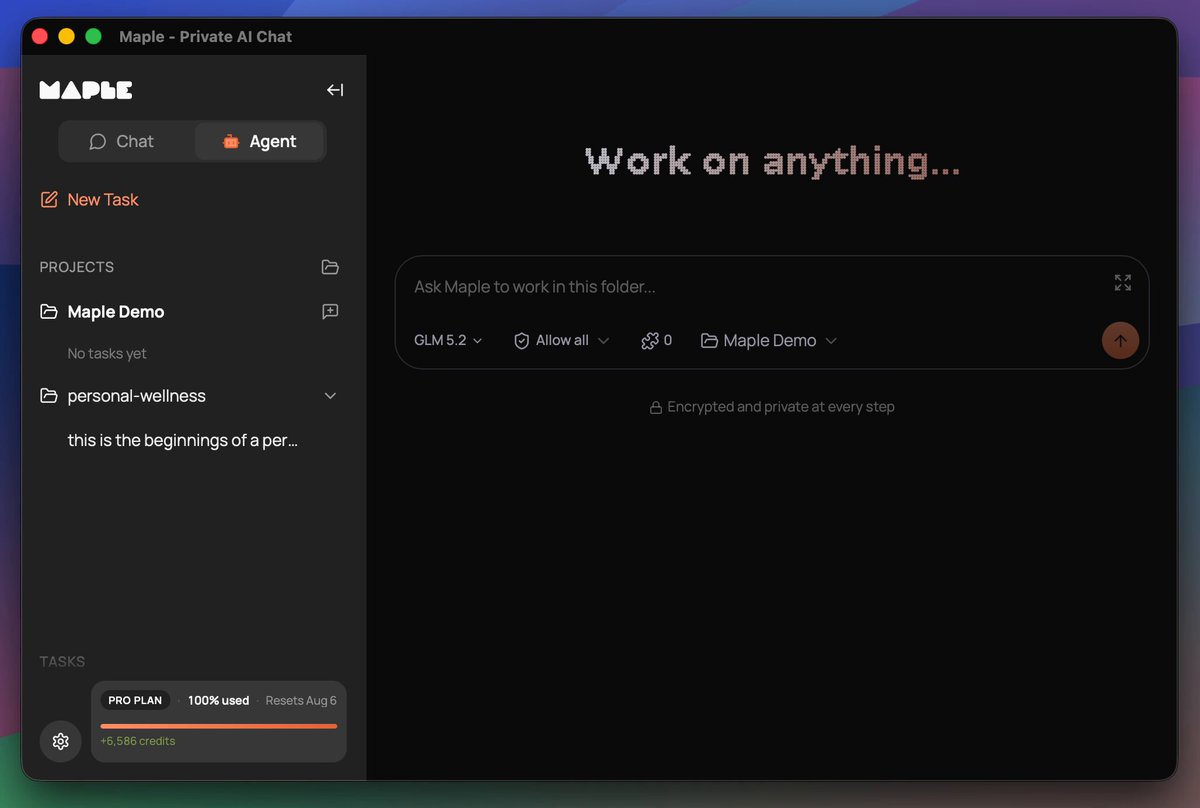
Maple is preparing for the release of a co-working agent. You install it locally and it works with your files, whether it's office work or building websites and apps. It's a turnkey solution, as easy as Claude Code, that keeps your data secure and private, no data sharing with closed AI labs. This is THE sovereign AI app for individuals and businesses who want powerful AI while retaining ownership of their information. Why build an agent into the Maple app when other agents already exist? Easy, we want to give you control over your work. We don't have a business plan that incorporates making money off our users' data. In the age of AI, your information, whether it's personal or company trade secrets, is the single thing that differentiates you from everyone else. We all have access to AI that can build a professional website for selling shoes. But your strategy and network for how you sell shoes should not be shared with your competitors. Sovereignty is the path to protecting what makes you, you. Maple sits at the intersection of Usability and Sovereignty. Maple gives you the best tools that are both easy to use and maintain your data sovereignty. Sovereign for one, sovereign for all. It has been a journey to get here. We brought to market the very first personal chatbot with end-to-end encryption using TEEs in late 2024. Prior to that there were proofs of concept but no full product offerings. Every other AI chat product on the market handled your data in plain text, either selling you a service to get your data or asking you to trust that they won't snoop on you. Quickly people found Maple and latched onto its open-source code and verifiable encryption. We didn't stop there. You may remember earlier this year we teased a product called "Maple Agent" and opened up a waiting list. That product is a mobile app that acts as your AI "friend", maintaining one long continuous chat, and getting to know you over time. I dislike using the word "friend" there, but it's the best way to convey the UX in a few words. AI is a tool, always has been, always will be. Any kind of friendly personality on top is just synthetic. In our testing, the UX of Maple Agent is really powerful for what it does. Think about the many short AI chats you have in your favorite app, whether it's looking up a historical fact or asking advice about a topic. With Maple Agent, those all go away in favor of the long-running chat with the friendly agent. It's like you have your own personal assistant who knows you so well and can look up anything for you. When I ask AI certain questions, I want to ask an expert who already understands my situation so I'm not repeating myself for the 100th time. That's the amazing value the personal agent brings to the table. We still see great utility for a personal agent like the "Maple Agent". Thousands of people on the waiting list, hoping to get their hands on it, agree that the concept is worth exploring and trying out. We were constrained in launching it due to a few circumstances, one of them being access to the scale of compute needed to power it. We have a clear path laid out for how to get there, but today is not the day to execute on that. It will be in the near future. Instead we have a different agent ready to go that we think is also incredible. We now have an agentic harness inside of the Maple Research app. This thing is a powerhouse. It even builds and publishes its own software releases. The agent in Maple Research works with your local filesystem, speaks to the largest open models running in TEEs, utilizes local models for certain tasks, is compatible with MCP tools, has an API for connecting to anything you need, and also supports the ACP protocol, which means it can be extended in the future to speak to other tools like Claude Code, Codex, and local models running on your own hardware. A big unlock for us was the Goose Development Kit, which powers the core of our agent harness. More on that to come as we publish articles and documentation later about the agent. The agent inside Maple Research doesn't have a name. At least not yet, not sure if it ever will. For now we call it "Chat Mode" and "Agent Mode". Think of this as the workhorse, the truck, the heavy lifter. Our other "Agent", the phone app, is your sidekick in your pocket, ready to help with quick things and ongoing conversations about life. I am incredibly excited about the Maple Research Agent. While I'm already seeing great results using it for internal work items, I'm especially thrilled about the personal health and wellness work it's doing for me. I know there are plenty of apps out there for compiling wellness data, but I'm having it build a tool tailored specifically for what I need, without the extra fluff. And none of my health data is being donated to the closed AI labs or sent to advertisers. I know that the AI logic is not being silently adjusted to fit the whims of a large corporation that has paid for product placement. It's me, state of the art AI, and my data. That's how I want it. Maple's new agent makes that possible. We can't wait for you to try it out. If you want early access, comment here, email us, reach out in some way. To those on the other agent waitlist, you're already in the queue. Thanks for reading this lengthy update. :)

Mark

44,707 Aufrufe • vor 1 Monat

Chapter 1 Pre-Alpha "Explore. Craft. Survive." will be dropping this quarter welcoming the very first inhabitants to #E2V1 & introduce early mechanics that will form the foundation of life inside #Earth2🌍✌️ Read below for important details: This update is no longer a simple avatar release but a significant update to the entire foundation of the #E2V1 world. When I first talked about dropping avatars I was eager to keep things moving and referred to a very simple system to test skins and movement, then to subsequently implement the full version after that. While this approach would have brought new content out quickly, it could have turned into weeks of extra development time with little upside for the wider community, apart from testing the movement and appearance of the avatars, there would have been little else to do until another subsequent update. Therefore I made the decision to focus solely on implementing the core part of the full system we plan to use long term on the platform. I apologise that this release will take a little longer than originally anticipated, having moved away from the initial lower spec'd plan, but I'd like to get this right & ready for a wider audience to start using and enjoying. As much as I'd love to push out updates faster, I will be taking this approach to #E2V1 development in the future as well. The plan will still be to release to our testing group first after our internal QA, test and then stabilise. If all looks good and we're happy with how everything is performing, we will push forward with a public release. There will inevitably be ongoing adjustments, additions and tweaks to these type of systems over time. It may seem like a long time, but #E2V1 was only released to our testing group 7 weeks ago! How crazy is that? I know for me it feels like many months already. Nonetheless, during this short period of time we have not only released a couple of updated versions, and an updated version to the Earth 2 Launcher, but the team has also been working incredibly hard on the #E2V1 and #BE mechanics for the Chapter 1 systems - and there is a lot involved in this upcoming release. We will be dropping an article later this week, which I believe will help our community understand the extensive list of features planned for this release and in turn explain why it is taking a little longer. I'd rather not spoil all of the details, but the article contains a lot of information about the various systems we're developing including rules of life, avatar synthesisation, death, saving, skins, day/night cycles, free to play model, avatar vitals, how land ownership fits in with all of this and much more. It is important to keep in mind that each of these systems needed to be designed and implemented, which takes time. The article will also begin to reveal some of the design plans I have been working on to increase utility for T1 land, which will also include various T1 classes. I also intend to follow through and expand utility on T1 land into other upcoming mechanics on the platform, some of which will be revealed in a separate article in the near future and are also part of the Chapter 1 release. Ideally, all going well, we will be testing early multiplayer at some stage this quarter and as mentioned earlier this year #Hordes in Q3, #EggHunt in Q4 & maybe some early buildings on properties. In addition to these goals, we have a couple of wild card features floating around in between as well. I know I reiterate it from time to time, but the long term goal for #Earth2 has not changed. We are building a #geolocational #metaverse - a platform! We still want #Players building cities, providing more individualised experiences, advertising, trading, shopping, e-commerce, socialising and so forth. And I still have plans to link #E2V1 into #AR and support #VR, but we cannot do all of this at once. I am also looking at ways we can expand the team and setup a studio, probably in East Asia, to speed up development. The current features we're focusing on plan to expand utility for land on a wide scale & introduce various experiences inside #E2V1, providing potential benefits for land owners & #Players alike on a broader level, while at the same time allowing our team to introduce mechanics that will be used throughout the future of the platform, test limitations and work our way around challenges as they arise. Thanks for reading and don't forget to drop a like and comment on the video! We appreciate the love and support and it also helps with the algorithm! Keep an eye out for the article later this week - a lot of details incoming! I want life to have meaning inside Earth 2 and I believe my approach could change the way #Players consider each action on the platform.. possibly alter the overall dynamics in a number of ways. #Metaverse #E2V1 #OpenWorld #earlyaccess #Earth2 $ESS

Shane Isaac 🌍2️⃣

21,360 Aufrufe • vor 1 Jahr

Natalya Murakhver, co-founder of Restore Childhood, tells me what happened when she met with Randi Weingarten, head of the American Federation of Teachers, back in 2022 and asked her to use her influence at the CDC to remove the masking mandates for school children: “I reached out to Randy Weingarten in the fall of 2022 because I saw that she was receptive to speaking with parents and engaging with parents, and I knew that she had a say in CDC reopening guidelines. At that point, the New York Post and Fox had broken the story that Randy and the teachers unions had crafted the school reopening guidelines, which up until then, parents certainly didn't know. So it was surprising. I had hoped that there was some good faith in those guidelines, and she was coming to it with an open heart. And so I reached out to her on X (Twitter at that point)…and said: ‘Could we meet at some point? I'd love to speak with you. My children are suffering in school with masks on, and I've done the research. There's no research supporting the safety and efficacy of masks. We need to get the kids back to normal.’ And she said yes, and we met on marathon Sunday in November 2022, on the Upper West Side for drinks. And it was very pleasant. We had a good conversation, and I asked her if she would talk to the CDC. It's kind of ludicrous to tell the story. I can't even believe that we had this conversation. I said: ‘I know that you have a say in what the CDC does. Can you talk to them about revising their guidelines and getting these kids back to normal? They need to be able to see each other's faces.’ And she said: ‘You know what, Natalya, if you present an outline for how to unmask the kids, I will present it to the CDC, and we'll see what we can do.’ Shocking. I, an Upper West Side mom without a medical degree… I mean, what am I going to present to her? I wanted her to remove the masks, but I guess now I need to go through the steps, because I've been given an opportunity to have a say in policy. So the first thing I did was I called Tracy Hogue, who was a researcher in the Bay area at the time, and friend, and I said: “Tracy, Randy Weingarten is willing to present our proposal to unmask the kids. I need research.” And Tracy is a dual citizen between the United States, and Denmark, speaks five languages, is really just a brilliant researcher, and she just laughed and said: ‘Of course, I'll work with you on this, but there's no proposal. If we give them an off ramp, we're going to have an on ramp. There's no research behind masking kids. Just take them off.’ So we worked together for a few months and figured out that there was a toolkit that another virologist had developed on the west coast for his own kids’ school about the benefits and harms of masking and the mental health issues that were developing in kids that he was seeing in his own children. And we ended up taking that toolkit and creating something called ‘Urgency of Normal’ which was released in January…and it was a toolkit for parents, not for the teachers unions. We realized there was nothing for us to present to Randy and the CDC. We needed to give the parents access to the data and to the stories so that they could advocate on their own local levels. And we wrote op-eds. We had multiple doctors, including Vinay Prasad, Monica Gandhi, Lucy McBride, big name doctors who signed on to it. We did a zoom call that had over 1000 parents from around the country, which is great considering we didn't have a budget…Parents would reach out to us from all over the world, not just the United States. I'd get emails from everywhere. And then eventually that led to me forming ‘Restore Childhood,’ a nonprofit that produced the film.” Natalya Murakhver

Jan Jekielek

12,766 Aufrufe • vor 9 Monaten