Video wird geladen...

Video konnte nicht geladen werden

Zur Startseite

BREAKING: SpaceXAI has released another major new update for Grok Build (v1.0.15) v1.0.15 makes Grok Bot faster and smoother. Sessions now open and close faster, first replies arrive sooner, typed input is handled better, and new tips make copying or exporting content easier. Features • Tip appears after repeated...

36,882 Aufrufe • vor 13 Stunden •via X (Twitter)

0 Kommentare

Keine Kommentare verfügbar

Kommentare vom Original-Post werden hier angezeigt

Ähnliche Videos

BREAKING: SpaceXAI has released a major new update for Grok Build (v1.0.13). The update improves reliability with automatic retries and recovery from truncated responses, inference failures, oversized images and session-saving issues. It also adds smarter hooks, better Windows support, faster MCP and session startup, improved scheduled tasks and quicker compressed CLI downloads. Features • Length-truncated responses now continue automatically instead of failing the turn. • Hooks can now ask the user to confirm a tool call instead of always allowing or denying. • Hooks can now request deferral or add context shown to the model after a tool runs. • Session close now records detailed timing data for performance analysis. • Credit limit upsell now offers a Try Again button to retry the last prompt. • Pasted images now show a live pixel preview in the prompt box on iTerm2. Bug Fixes • Transient inference failures (stalls, drops, 5xx) now retry automatically instead of ending the turn. • Windows users can now correctly open ~/.grok and worktree sessions. • Session data is now more reliably saved after prompts and on power loss. • Compaction failures now show the actual error instead of a generic message. • Truncation error messages now show the right guidance instead of suggesting an unhelpful retry. • Truncated tool calls are now executed instead of failing the turn when arguments are complete. • Images larger than 2000px no longer brick sessions on many-image requests. • Wrapped hyperlinks in the pager now remain fully clickable on Windows Terminal instead of only the first line. • Recurring scheduled tasks now include a reminder to stop the monitor when work finishes. • Scheduled task IDs are now full UUID strings, preventing collisions when tasks are created in the same millisecond. Performance • Subagent spawning is faster when connections drop during bursts. • Session startup with MCP servers is now much faster when auth is already configured. • MCP server startup no longer stalls behind a fixed batch size. • CLI downloads are now compressed, making fresh installs and updates substantially faster. Download Grok Build: Update to the latest Alpha release: grok update --alpha Update to the latest Stable release: grok update

DogeDesigner

469,524 Aufrufe • vor 3 Tagen

BREAKING: SpaceXAI has released a major new update for Grok Build (v1.0.14) Grok v1.0.14 is a reliability and workflow update for the Grok CLI. It makes OIDC token refresh proactive, lets PostToolUse hooks send feedback back to the model after tools run, adds per-turn token and cost tracking via grok usage, and cuts Windows downloads by about 70%, with a large set of fixes that tighten sandboxing, subagent handling, hooks, and startup. Features: • OIDC token refresh is now proactive by default for better reliability. • PostToolUse hooks can now provide feedback and context to the model after tool execution. • SDK-registered PostToolUse hooks now provide model-facing feedback. • grok usage now shows persisted per-turn token and cost data. • Retry status in composer and title now shows a short reason for the retry. • Models can now declare a different identifier for each reasoning-effort level instead of always sending the same id. • Prompt suggestions now respect remote configuration and default to the current session model. • Windows CLI downloads are now ~70% smaller using the same compressed sidecars as macOS and Linux. Bug Fixes: • grok inspect now correctly shows Claude bypass locks as advisory rather than enforced. • Subagent sessions no longer leak threads or file descriptors when the parent is busy. • Cold startup no longer performs duplicate remote settings fetches. • Compaction failures due to context size now degrade input instead of retrying identically. • --sandbox strict now restricts writes to ~/.grok/sessions only. • Subagent spawning now waits longer on a busy coordinator and shows clearer retry guidance instead of "unreachable". • Failed task and todo tool calls now appear in the transcript instead of disappearing without a trace. • Composer status row no longer collapses or flashes when using double-Enter to send now. • Session close is no longer delayed by a single slow hook; each SessionEnd hook now has its own timeout. • Hook removal in the extensions modal no longer offers actions that the handler will refuse. • Interjections during a turn are now delivered atomically or not at all. • Subagent tasks no longer get incorrectly cancelled when the parent session is waiting for completion. • Workflow detail view now closes the overlay on X or outside click instead of returning to the run list. • Resuming subagents now succeeds for larger transcripts that still fit the model context with headroom. Performance: • Startup now fetches remote settings only once per boot instead of potentially twice. • First message on large repositories no longer waits on repository status scan. • Large session memory no longer blocks the agent during turn completion or subagent spawning. • Signed-in CLI starts faster by serving remote settings from a local cache on warm boots. Download Grok Build: Update to the latest Alpha release: grok update --alpha Update to the latest Stable release: grok update

DogeDesigner

29,404 Aufrufe • vor 18 Stunden

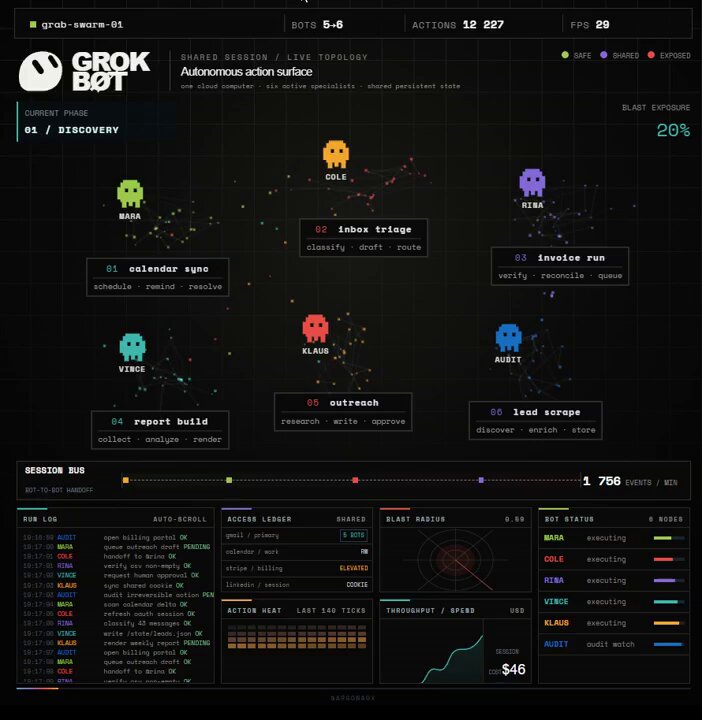
everyone is looking at grok bot like it is five new employees the more interesting part is that they are not five isolated employees they share one persistent cloud environment: the same browser sessions, terminal, filesystem and authenticated tools - while a chief of staff can route work between them without waiting for you to open the laptop that turns one login into infrastructure a research bot can collect leads, pass them to a writer, hand the result to a designer and let an ops bot update the workflow all inside the same running machine the upside is obvious: less copying, fewer handoffs and work that continues while you sleep the blast radius is just as obvious: - authenticate only the services the whole agent fleet is allowed to reach - give every bot a narrow role description, because that description becomes its place in the org chart - keep irreversible actions behind human approval: sending, publishing, spending and production changes - store skills, configuration and long-term state inside `/workspace`, because the rest of the VM may disappear during an update - treat shared sessions as shared authority, not as separate bot identities the same architecture that makes grok bot useful is what makes it dangerous to configure casually my take: the breakthrough is not that you can hire five AI workers it is that they can operate like one persistent company inside your real tools and your job changes from prompting every task to designing the permissions, boundaries and handoffs the full chief-of-staff setup, session handoff model, approval matrix and `/workspace` survival strategy are mapped out in the article ↓

monokern

1,006,126 Aufrufe • vor 10 Tagen

whoever leaked this has bigger balls than sense SpaceXAI shipped five hireable workers for $200 a month, then wrote the catch into its own Grok Bot documentation and left the page up: all five run on one computer, so one sign-in hands the browser session, the files and the command-line credentials to every one of them the NSA, CISA and the cyber agencies of the UK, Canada, Australia and New Zealand had published the opposite instruction 103 days earlier: no broad or unrestricted access, low-risk and non-sensitive work only i ran four of mine on one account for a week, counting what each could reach: eleven signed-in apps, one browser profile, and deleting a bot left all of it standing Grok Bot is worth hiring five times over, and you can draw its blast radius before the second one exists: - sign in for the bot that needs the site, then open the others and see what they reach: that session is theirs the moment it exists - give each bot its own account on the app, since the docs tell you in writing to stop using separate bots as a security boundary - put the stop line in the description, as an approval controls the proposed action and leaves whatever already ran where it landed - cap the spend outside the product, because there is no bot-specific spend cap yet and the audit view of what they did is still coming - keep the money and the customer replies in your own hands, and let the other four start from scratch each morning on work that cannot bite one sign-in is also why this pays: five names finish inside your real tools instead of handing you drafts to paste my take, and it is the uncomfortable one: your real limit on Grok Bot is how many logins you will put on one machine, and the hiring was always the easy half bookmark this, the five descriptions that let bots hand work to each other and the one folder that survives an update are written out in the article ↓

Argona

692,786 Aufrufe • vor 15 Tagen

Boom! Grok Tasks Make It One Of The Most POWERFUL Real-Time AI Systems In The World. — My How to Use Grok Tasks With Hidden Tools For Powerful Daily Output. Grok Tasks are customizable AI workflows that integrate a variety of tools to streamline daily activities, from research and analysis to creative planning and problem-solving. I have been using them for quite sometime and because of the vital heartbeat of news and first person data on X, it is the most powerful AI platform available. By combining Tasks with tools like web searches, X platform interactions, code execution, and media viewers, you can build efficient, automated processes. These tasks work by prompting Grok with a clear description of what you want to achieve, and Grok will intelligently call the necessary tools in sequence or parallel to deliver results. Here's a step-by-step guide to creating and using Grok Tasks: Step 1: Define Your Task Start by clearly outlining the daily activity or goal. Consider what inputs you have (e.g., a URL, a query, or an attachment) and what output you need (e.g., a summary, calculation, or visual analysis). Break it down into subtasks to identify tool needs. For example, if your task involves researching current events, note that you'll need search and browsing capabilities. Step 2: Review Available Tools Familiarize yourself with the tools Grok can access. Here's a quick overview: - Code Execution: Run Python code for calculations, data processing, or simulations using libraries like numpy, pandas, or sympy. - Browse Page: Fetch and summarize content from any website URL with custom instructions. - Web Search: Perform general internet searches, returning results with optional operators like site:. - Web Search With Snippets: Get quick, detailed excerpts from search results for fact-checking. - X Keyword Search: Advanced search for X posts using operators like from:, since:, or filter:. - X Semantic Search: Find semantically related X posts based on a query, with filters for dates or users. - X User Search: Locate X users by name or handle. - X Thread Fetch: Retrieve a full X post thread, including context like replies and parents. - View Image: Analyze an image from a URL or conversation ID. - View X Video: Extract frames and subtitles from an X-hosted video. - Search PDF Attachment: Query a PDF file for relevant pages using keyword or regex modes. - Browse PDF Attachment: View specific pages of a PDF with text and screenshots. Select tools that align with your task. Aim for a mix to handle data gathering, processing, and visualization. Step 3: Craft Your Prompt Write a detailed prompt to Grok describing the task. Include: - The overall goal. - Specific steps or subtasks. - References to tools if you want to guide the process (e.g., "Use web_search to find sources, then code_execution to analyze data"). - Any constraints, like dates or limits. Example prompt: "Create a Grok Task for my morning routine: Search recent X posts about tech news using x_keyword_search, fetch a key thread with x_thread_fetch, and summarize with browse_page on linked articles." Step 4: Submit and Interact Send your prompt to Grok. It will process the task by calling tools as needed, often in parallel for efficiency. Review the output and refine with follow-up prompts if required (e.g., "Expand on that using view_image for visuals"). Iterate to fine-tune the workflow for reuse. Step 5: Save and Reuse Once refined, note the prompt as a template for future use. You can adapt it for similar tasks, making Grok Tasks a habitual part of your day. Finding Grok Tasks To discover existing Grok Tasks or inspiration for new ones, use X searches with tools like x_keyword_search or x_semantic_search (e.g., query: "Grok Tasks examples" with mode: Latest). Browse community-shared threads via x_thread_fetch, or web_search for tutorials on xAI features. Prompt Grok directly: "Show me popular Grok Tasks for productivity." 1 of 3

Brian Roemmele

152,242 Aufrufe • vor 7 Monaten

The Visual Studio Code insiders version that just shipped and will ship in the next few days will come with an insane amount of new capabilities. A few highlights: - You can now run sub-agents in parallel. Yes, really. I even attached a video. - Major UX improvements for sub agents, especially visible in the chat window - A new search tool wrapped as a sub-agent that iteratively runs multiple search tools: semantic_search, file_search, grep_search Which connects nicely to the point above: multiple searches running in parallel, efficiently and fast - Anthropic’s Message API is now enabled by default - You can choose the model for the cloud agent (three available, all premium) - Extended thinking support when using the Claude cloud agent This is part of the broader multi-vendor cloud support under AgentsHQ I wrote about a few weeks ago - Tasks sent to the background agent (basically the CLI tool) now always run in isolation, each with its own git worktree - In a multi-repo workspace, assigning a task to a cloud agent prompts you to choose the target repo Same behavior when opening an empty workspace with no repo - Support for building an external index for files not supported by GitHub’s default indexing - UI/UX improvements for starting new sessions and switching between local / background / cloud agents - Skills are now first-class citizens, just like prompt files, with better UX indicating when a skill is loaded - Improved API for dynamic contribution of prompt files New V2 includes skills as part of the model. Curious to see the extensions that will leverage this - Finally, initial support for showing context usage percentage per session - Skills are enabled by default - Resizable chat window and session view. Small thing, but it was driving me crazy 😁 - A new integrated browser meant to replace the old simple browser Maybe the beginning of real browser use? - Better UI/UX for token streaming in chat - Ability to index external files not supported by GitHub There’s a lot more. Some of it hasn’t fully landed yet, but everything that has is already in Insiders. The next stable release should drop in early February. As usual, I’m just shocked by the volume of features this team ships every month. After the holiday slowdown, this one is shaping up to be a wild release.

Oren Melamed

29,555 Aufrufe • vor 7 Monaten

Another WTF moment. A developer just open-sourced a coding agent harness that boots 245x faster than Claude Code. It's called jcode. You launch it and the first frame renders in 14 milliseconds. Claude Code takes 3,436. One active session uses 27.8 MB of RAM. Claude Code uses 386.6. Run ten sessions in parallel and jcode holds at 117 MB while OpenCode swells to 3.2 GB. Each agent has a semantic memory graph instead of a scratchpad. Every turn gets embedded as a vector. The graph is queried on every turn for related memories, and a sideagent verifies the hits before injecting them into context. Consolidation runs in the background to check for stale or conflicting facts. No manual /remember calls. No token burn on lookup tools. The provider list is 30+ deep. Claude, ChatGPT, Gemini, GitHub Copilot, Azure, OpenRouter, DeepSeek, Groq, Mistral, Perplexity, Fireworks, Ollama, LM Studio, and any OpenAI-compatible endpoint you point it at. Ran out of tokens on your first ChatGPT Pro sub? /account swaps to the second. Then there's Swarm. Spawn two agents in the same repo and the server manages them. When agent A edits a file agent B has been reading, agent B gets pinged and can check the diff. Agents can DM each other, broadcast to the room, or spawn their own worker teams for parallel tasks. Groups, channels, and completion statuses are handled automatically. The UI has live side panels that render mermaid diagrams inline. To make it fast, the author wrote a Rust mermaid renderer 1800x faster than the JavaScript one, then wrote a custom terminal called Handterm because no existing terminal could do smooth partial-line scrolling. Self-dev mode is where it gets wild. Tell your agent to enter self-dev and it starts editing jcode's own source code, rebuilds the binary, reloads it live, and keeps working across your existing sessions. You can also resume broken sessions from Claude Code, Codex, OpenCode, or pi directly inside jcode. Anthropic's cache goes cold at the 5-minute mark and you're staring down a big cache miss on your next turn? The UI warns you before you spend the tokens. Written in Rust. MIT licensed. Runs on macOS, Windows, Linux, and Termux. Sitting at 11.2k stars with a native iOS app coming.

Brady Long

205,781 Aufrufe • vor 1 Monat

Video analysis is one of Grok’s most underrated and useful features. Grok summarized SpaceX’s newly released 30-minute update video for me in minutes. Here's the complete summary: Musk opens by restating the company’s mission: building the systems and technologies needed to make life multiplanetary, understand the true nature of the universe, and extend the light of consciousness to the stars. The post caption frames past wins (reusable rockets + rebuilding the internet in space via Starlink) and positions the next challenges as multiplanetary life and fundamental understanding of the universe. Key points covered Past milestones (Dragon): 2012 — first privately developed spacecraft to dock with the ISS. 2020 — first commercial system to fly astronauts to the orbiting lab. Starship + Starlink V3 progress: First two flights of the current generation completed; work continues toward full and rapid reusability. First next-gen (V3) Starlink satellites successfully deployed. These are expected to deliver ~20× the capacity per Starship launch versus V2 satellites launched on Falcon. Explicit goal stated on-screen: “We are striving to be 51% of the internet.” Compute / SpaceXAI: Highlights the company’s computing clusters (described as among the most powerful in the world). The Memphis/Southaven site currently has 1.4 GW of nameplate power draw. Target for SpaceXAI is 10 GW by the end of next year, with a call for top engineers to focus on it. Related topics appear in the supporting slides: Grok, Colossus/MacroHard data centers, StarMind (orbital AI compute), and associated manufacturing (GigaSat factory). Lunar mass drivers are also referenced in the later vision section. The presentation mixes historical recap, current technical status on Starship/Starlink scaling, aggressive AI/compute build-out plans, and the long-term multiplanetary vision. It is primarily Musk speaking with on-screen text overlays and B-roll rather than a dense slide deck of financials.

DogeDesigner

44,396 Aufrufe • vor 20 Tagen

Introducing fx, a tiny, open, native coding agent from Vercel Labs. Originally an internal tool, fx is a harness and CLI written in Zig, optimized for research and embedding in larger systems. Today, we're open sourcing it. fx is built on three principles: 1. Fast. A single native binary, no runtime to install. It cold starts in 10µs and does no unnecessary work or I/O before accepting input. fx is the answer to "how fast can a coding agent be?" 2. Light. The 6.3MiB binary uses single-digit megabytes of memory at baseline, made for instant installation and embedding in resource-constrained environments and agent sandboxes. 3. Open. Apache-2.0, model and provider agnostic, suitable for local and cloud inference. Its small core extends through skills, plugins, and MCP. Minimalism is an obsession throughout the entire harness: system prompt, tools, features, binary. The goal was to keep context usage and time to first token low, and make fx optimal for model benchmarking, sandboxing, evals, and gyms. You can use fx directly or embed it as infrastructure. The CLI feels more like a Unix shell than an IDE in the terminal: it preserves scroll history, produces minimal output, and uses complex TUI rendering very, very sparingly. Programmatically, 𝚏𝚡 𝚊𝚜𝚔 --𝚓𝚜𝚘𝚗 gives structured output, 𝚏𝚡 𝚊𝚌𝚙 connects to editors and other clients, and WebAssembly can even run the whole thing inside the browser (see: Privacy is a design constraint: no product telemetry, sessions and usage stay local, and no source code or prompts are shared with any endpoint other than inference. With local inference and auto-updates off, fx is fully hermetic. fx is experimental. Use at your own risk and expect frequent changes. Chat with us on X ( or file issues ( 𝚌𝚞𝚛𝚕 -𝚏𝚜𝚂𝙻 𝚏𝚡.𝚜𝚑/𝚜𝚎𝚝𝚞𝚙.𝚜𝚑 | 𝚋𝚊𝚜𝚑

Vercel Developers

948,088 Aufrufe • vor 13 Tagen