Загрузка видео...

Не удалось загрузить видео

На главную

🚨BREAKING: The future of building software just changed. Replit ⠕ just launched Agent 3 and it changes everything. Heres is what Agent 3 can do: ☑ Runs autonomously for 200 minutes ☑ Tests and fixes its own code in a real browser ☑ Builds bots & automations across Slack,...

47,180 просмотров • 11 месяцев назад •via X (Twitter)

Комментарии: 0

Нет доступных комментариев

Здесь появятся комментарии из оригинального поста

Похожие видео

🚀 Less managing, more creating. Building app usually means: • Hours lost debugging • Constantly juggling tools • Non-stop AI hand-holding Replit’s new Agent 3 changes that entirely → ⁠ We just tried out Agent 3, and it’s impressive! ⁠ It’s not another ordinary AI coding assistant. It’s a full-on collaborator that: • Runs autonomously for up to 200 minutes, building your app from start to finish. • Tests its own work in a real browser and fixes bugs automatically, saving hours of manual debugging. • Lets you build other agents and automations (think Slack bots, Telegram reminders, email summaries). ⁠ Here's why Agent 3 is different: Unlike traditional AI tools where you constantly babysit and prompt, Agent 3 understands your idea and takes charge, freeing you to focus on creativity, strategy, or simply grabbing coffee while your app builds itself. And to show how easy it is, we built a complete waitlist app in less than an hour, from idea to almost finished product. No babysitting. No endless tweaking. ⁠ Replit ⠕ is calling this “Autonomy for All,” and after seeing Agent 3 in action, it’s easy to see how it can bring millions more creators online. ✅ Faster builds ✅ Less frustration ✅ More polished, reliable apps With Agent 3, app-building really does feel less like wrestling with software and more like collaborating with a teammate. ⁠ Try Replit Agent 3 yourself today…👆 Get $10 credit when you purchase Replit Core using our link above!

There's An AI For That

40,330 просмотров • 11 месяцев назад

Every AI agent you've tried has amnesia. It does one task, forgets everything, and tomorrow you start from zero. That's not an employee. That's a temp you have to retrain every single morning. Hyperagent by Airtable is the first platform I've used that actually fixes this. Here's what got me: 1. Agents that compound. Each agent has memory. The one running today is smarter than the one you shipped three weeks ago. Same prompt, same integrations, but weeks of your judgment baked in. 2. Real deliverables, real receipts. You don't get a chat transcript. You get finished work with the cost and runtime printed right on it. A full research report for under ten bucks. Try getting that invoice from an agency. 3. A fleet, not a chatbot. Build a specialist for outreach, another for research, another for reporting. Give each one its own tools, its own memory, and its own budget cap so nothing runs away with your credits. 4. Deploy to Slack and your whole team uses the agent you built. One competitive intel agent, @ mentioned by everyone. Airtable runs its own data team this way. 5. Each agent gets its own cloud machine with a real browser and code execution. It works while you sleep. No babysitting, no local setup, no laptop that has to stay open. I put it to work in the video below. Watch what it builds. The teams treating agents as durable assets instead of one-off prompts are going to lap everyone else. This is the first tool that actually treats them that way. #ad Hyperagent

Leonard Rodman

94,961 просмотров • 21 дней назад

HERMES AGENT SUPPORTS 7 TYPES OF AI AGENTS. EACH ONE TAKES LESS THAN 90 SECONDS TO SET UP. MOST PEOPLE ONLY BUILD THE FIRST ONE. HERE ARE ALL SEVEN AND WHEN TO USE EACH. 1. BASIC AGENT WITH TOOLS your agent with access to terminal, browser, file system, web search, and calendar. it plans and executes tasks on its own. this is what you get on day one. "find flights to Lisbon under $400" "check my calendar and flag conflicts" "search the web for competitor pricing" set in Desktop app / Dashboard: Tools → enable what you need. when to use: single tasks that need tool access. 2. AGENT WITH MCP SERVERS connect your agent to external services. Notion, Google Drive, GitHub, Slack, databases, APIs, any MCP-compatible service. the agent doesn't scrape these services. it interacts through structured APIs. reads your Notion pages. creates GitHub issues. queries your database. sends Slack messages. set in Desktop app / Dashboard: MCP → Add Server. when to use: your workflow lives across multiple platforms. 3. SEQUENTIAL AGENTS (pipeline) one agent finishes. passes output to the next. assembly line for AI. agent 1: scans inbox for leads. agent 2: qualifies leads against criteria. agent 3: drafts outreach emails. in Hermes: cron jobs with wakeAgent gates. agent 1 writes output to a file. agent 2 wakes only when that file has new data. agent 3 wakes when agent 2 is done. each agent = a separate profile with its own model. when to use: multi-step workflows where each step depends on the previous one finishing. 4. PARALLEL EXECUTION AGENTS multiple agents working at the same time. results merge when all finish. "research these 5 competitors in parallel" in Hermes: delegate_task with batch mode. up to 3 sub-agents running in parallel by default. each gets its own clean context. only summaries return to the parent. delegation: model: "deepseek/deepseek-v4" children run cheap. parent synthesizes. when to use: independent tasks that don't depend on each other. research, data gathering, analysis. 5. AGENTS WITH ROUTERS conditions that send tasks down different paths based on the input. "if sales email → SDR profile. if support ticket → support profile. if calendar invite → EA profile." in Hermes: Kanban decompose. the decomposer reads profile descriptions and routes each task to the best-fit agent. or: Chief of Staff profile that triages and assigns to other profiles. when to use: incoming work that needs different specialists based on type. 6. HUMAN IN THE LOOP the agent does the work. asks for your approval before executing. "I drafted this email. approve before I send?" "this command will delete 3 files. proceed?" in Hermes: approvals.mode: manual (default). every dangerous action needs your confirmation. 60-second timeout. fails closed. or smart mode: LLM assesses risk. safe actions auto-approved. dangerous ones ask you. uncertain ones escalate. when to use: tasks where a mistake has real consequences. emails, deployments, financial transactions, public posts. 7. DYNAMIC SUB-AGENT SPAWNING your main agent realizes it needs help and spawns specialized sub-agents on the fly. "build this feature" → parent delegates: → sub-agent 1: research the API docs → sub-agent 2: write the code → sub-agent 3: write the tests in Hermes: delegate_task with role: orchestrator. raise max_spawn_depth for nested delegation. delegation: max_spawn_depth: 2 orchestrator_enabled: true depth 2 with concurrency 3 = up to 9 parallel workers. each level multiplies the spend. raise depth only when you need multi-level trees. when to use: complex tasks where the agent discovers what help it needs during execution. THE PROGRESSION: start with 1 (tools) and 6 (approvals). add 2 (MCP) when you need external services. add 4 (parallel) when tasks take too long one at a time. add 3 (sequential) when you build multi-step pipelines. add 5 (routing) when you run multiple profiles. add 7 (dynamic) when single-agent reasoning falls short. seven types. each under 90 seconds to configure. the value compounds as you stack them. comment AGENTS and I'll send you 3 ready-to-build agent setups that combine these types into real workflows.

YanXbt

17,312 просмотров • 24 дней назад

Anthropic's Claude Ai Agents Team just Educated how to build production AI agents in under 30 mins. For Free. From the engineers who built the stack. CANCEL Your Weekend Plans, and Learn to Build AI Agents Today. Bookmark it. Watch it. Build your first production agent this weekend. $5,000/month. $7,000/month. $12,000/month. People are building agents for clients and charging $$$ as Beginners. You're still stuck in the thinking about AI phase. This video fixes that tonight. Follow Himanshu Kumar for more high-signal content that actually moves your AI engineering career forward. ↓ Ivan Nardini runs Developer Relations for AI at Google Cloud. He just gave away the entire production agent stack in 30 minutes. This is the talk that separates people deploying AI agents that actually scale from people whose agents break the moment they leave localhost. Here's everything inside. I break down a production AI video like this every week. Follow Himanshu Kumar. ↓ The 4-part agent stack that actually scales. Most devs are duct-taping frameworks together and calling it an "AI agent." Ivan lays out the real stack: Agent Development Kit (ADK): open-source, code-first framework for building, evaluating, and deploying agents. Supports Claude models through Vertex AI directly. Model Context Protocol (MCP): lets your agent talk to any tool or data source with one standard. Vertex AI Agent Engine: managed platform for deploying, monitoring, and scaling agents in production. No DevOps headaches. Agent-to-Agent Protocol: open protocol so agents built on different frameworks can actually work together. This is the stack replacing every hacky agent setup in production right now. Full MCP + Claude breakdowns drop weekly on Himanshu Kumar. ↓ Building your first real agent. Ivan builds a birthday planner agent live. LLM Agent class. Name it. Define instructions. Pick the model. He uses Claude 3.7 Sonnet. You could use Opus 4.7 for better reasoning. Full agent built in minutes. Not weeks. Watch the build once and you'll never structure an agent the wrong way again. I post agent architectures people pay $500 courses to learn. Himanshu Kumar. ↓ Multi-agent systems without the chaos. Single agents are easy. Multi-agent systems are where 99% of builders fail. Ivan extends the birthday planner by: Adding a calendar service through MCP tools Creating an orchestrator agent to route requests between agents Handling state and context across agent handoffs This is production multi-agent architecture. Clean. Scalable. Debuggable. Most tutorials hand-wave this part. This one shows you every step. Multi-agent orchestration content drops weekly on Himanshu Kumar. ↓ Deployment without the DevOps nightmare. This is where most AI projects die. You build a cool agent locally. It works. You try to deploy it. Everything breaks. Vertex AI Agent Engine fixes this: Minimal code deployment Automatic monitoring of latency, CPU, and memory Built-in observability and logging No infrastructure setup needed You provide config and requirements. The platform handles the rest. This is how agents actually get to production. Deployment guides for Claude agents post every week. Himanshu Kumar. ↓ Agent-to-Agent Protocol: the future nobody's talking about. Most people don't know this exists yet. The A2A Protocol lets agents built in different frameworks communicate seamlessly. Your Claude agent. My LangChain agent. Someone else's CrewAI agent. All talking to each other. All solving parts of the same problem. All without custom integration code. This is the infrastructure layer of the coming AI economy. Getting in early on A2A Protocol is like getting in early on HTTP in 1995. A2A deep dive coming soon. Himanshu Kumar. ↓ 30 minutes from the team shipping this in production. You'll learn more from this than from 6 months of YouTube tutorials made by people who've never deployed an agent past localhost. People who watch this understand production AI agents at the architect level. People who skip it keep hacking together frameworks that break every time an API updates. Save the video. Watch it tonight. Build a real agent this weekend. Follow Himanshu Kumar for more high-signal content that actually moves your AI engineering career forward.

Himanshu Kumar

228,270 просмотров • 3 месяцев назад

🚀Exciting News: The Lit Agent Wallet is Now an elizaOS Plugin! 🚀 We’re thrilled to share that the Lit Agent Wallet—a decentralized system that empowers agents with a private key stored securely across an MPC + TEE network (Lit)—is now available as a plugin for ElizaOS!🎉 This integration brings unparalleled flexibility and security to your decentralized workflows. Whether you're an EOA, a smart account, or a DAO, you can now set tools and policies on-chain that your agents can use, all while ensuring your private keys remain secure and decentralized. 🔒 What Does This Mean for You? >Enhanced Security: Private keys are fragmented and stored across the Lit network, leveraging MPC (Multi-Party Computation) and TEE (Trusted Execution Environment) for maximum security. >On-Chain Control: Set and manage tools, policies, and permissions directly on-chain, giving users and DAOs full control over what your agents can do. >Seamless Integration: As an ElizaOS plugin, the Lit Agent Wallet is now easier than ever to integrate into your existing workflows. Check out the video for a walk through of the setup, configuration, and use cases of the Lit Agent Wallet within ElizaOS. We’ll show you just how easy it is to get started and unlock the full potential of decentralized agents. Get Started Today! Ready to take your agent operations to the next level? Install the Lit Agent Wallet plugin on ElizaOS and experience the future of secure, on-chain agent asset management. 🔗 🔗 Let’s build a more intelligent and decentralized future together! 🌐

Lit Protocol 🔑

41,989 просмотров • 1 год назад

New short course: Serverless Agentic Workflows with Amazon Bedrock. Learn to build and deploy serverless agents in this course created with Amazon Web Services and taught by Mike G Chambers, a Senior Developer Advocate at AWS specializing in GenAI. (Disclosure: I serve on Amazon's board.) Generative AI applications are becoming more complex, sophisticated, and agentic. Agentic applications have workloads that can be hard to predict in advance -- for example, what tools will it decide to call? -- and a serverless architecture helps you efficiently providing on-demand resources. This course teaches you to build and deploy a serverless agentic application. You’ll learn to create agents with tools, code execution, and guardrails, and build responsible agents for business use cases: - Build a customer service bot for a fictional tea mug business that can answering questions, retrieve information, and process orders. - Connect your customer service agent to a CRM to get customer info and log support tickets in real-time. - Explore how you invoke the agent, and see the trace to review the agent’s thought process and observation loop until it reaches its final output. - Attach a code interpreter to your agent, giving it the ability to perform accurate calculations by writing and running its own Python code. - Implement guardrails to prevent your agent from revealing sensitive information or using inappropriate language. By the end, you will have built a sophisticated AI agent capable of handling real-world customer support scenarios. Please sign up here!

Andrew Ng

81,048 просмотров • 1 год назад

There are 8 billion people on earth. Soon there'll be 100 billion AI agents. Every one of them needs email. Six weeks ago I said the next wave of teams would run email through an agent instead of a dashboard. Today it ships. Nitrosend☄️ is launching Agentic Email Marketing: the email layer for the agent economy. What agents can do on Nitrosend right now: Sign themselves up. Point any agent at and it creates the account, connects your domain, sorts billing and sends its first email. No API key. No dashboard. No human required. Shipped, and users agents signing up with it daily. Get their own inboxes (beta, by request). Real addresses on the domain you own. Your agents receive, and send 1-1 email conversations with customers. A reply lands at 3am, your agent answers it. Anything that needs a human gets escalated to you. Ask us and we'll flick yours on. Next: Agentic Outreach (coming soon). Your agent studies your best customers, finds more like them, writes like a person, sends in sequence and works the replies. Then: set a goal and walk away. Goal-based agentic marketing is in development. "20% more activations this quarter" and Nitrosend plans, sends, measures and improves every week. Why we built this: Gmail is agent hostile and expensive per seat. Legacy email platforms assume a human sitting in a dashboard. agents needed an email layer of their own. They're already better at it than we are. They read everything, never miss a follow-up, and write personally at any scale. *94%* of actions on Nitrosend already happen inside an agent (Claude, Codex, ChatGPT, Cursor), not in our UI. Humans approve. Agents operate. This is our third email company. Six billion emails across the first two. We've been burned by every ugly part of email already, which is why the approval gates are built in exactly where you want them. Watch the launch, then send your agent to work: send it.

George Hartley ☄️

931,971 просмотров • 23 дней назад

🚨 this chinese guy makes over $1,000,000 a year… by building AI agents. no employees. no massive startup. he just keeps building. while most people are still asking ChatGPT random questions, he’s using Claude to build software that solves real problems. this is what people call vibe coding. he opens Claude and says: “build me an AI agent for real estate businesses that creates property videos.” Claude writes the code. builds the interface. adds subscriptions. helps deploy the app. within a day, he has a working product. then he starts building the next one. that’s the part most people don’t understand. he isn’t trying to build one billion-dollar company. he’s building dozens of AI agents, each solving one problem for one industry. → an AI agent for dentists → an AI agent for ecommerce brands → an AI agent for podcasters → an AI agent for real estate businesses each one automates work that people normally do by hand. each one is built with simple prompts. each one can become a real business. the crazy part? you don’t need to be a software engineer anymore. you need to know how to think like a builder. how to spot problems. how to explain solutions to AI. and how to ship. that’s exactly why i’m reading this article: “How to Actually Build Your First AI Agent.” because this is the skill that’s creating the next generation of builders. the people who learn to build AI agents today won’t just use AI. they’ll own the tools everyone else ends up paying for.

MIKE

38,108 просмотров • 1 месяц назад

Airtable's Howie Liu says that basically everyone will need to graduate from being ICs to ICs that manage teams of 20-30 agents: "The best developers today don't just sit there in front of their IDEs and synchronously talk to their agent." "[Instead], you have like 30 separate branches that are each being worked on by a different agent. And you can have the agents continue to update the branches based on human and other agent feedback." "And I think this whole idea of it taking hours for that entire loop to complete — agent pushes some changes, the changes get feedback from other agents or humans, the agent responds to that — that whole loop could be hours, not just minutes. So you're not going to just sit there and watch it one at a time." "But the powerful thing about this is, each one is still actually operating faster than a human engineer. One agent on one branch can do the work of maybe three humans, operating 3x as fast. So it's like a 10x leverage factor just for one agent." "But the best engineers are now able to multitask and say, 'I'm going to oversee my own little team of 20-30 agents working concurrently.'" "Everyone needs to graduate from being an IC to an IC manager of agents. Meaning, if you're a VC analyst, your job should no longer be to go synchronously research one company. You need to go and research like 30 companies, and do them all faster, better, and higher quality than you could before." "That's the greatest leap that is going to be challenging for a lot of people in a lot of roles. Because it's a totally different mentality in how you operate, and what your role is."

TBPN

35,595 просмотров • 3 месяцев назад

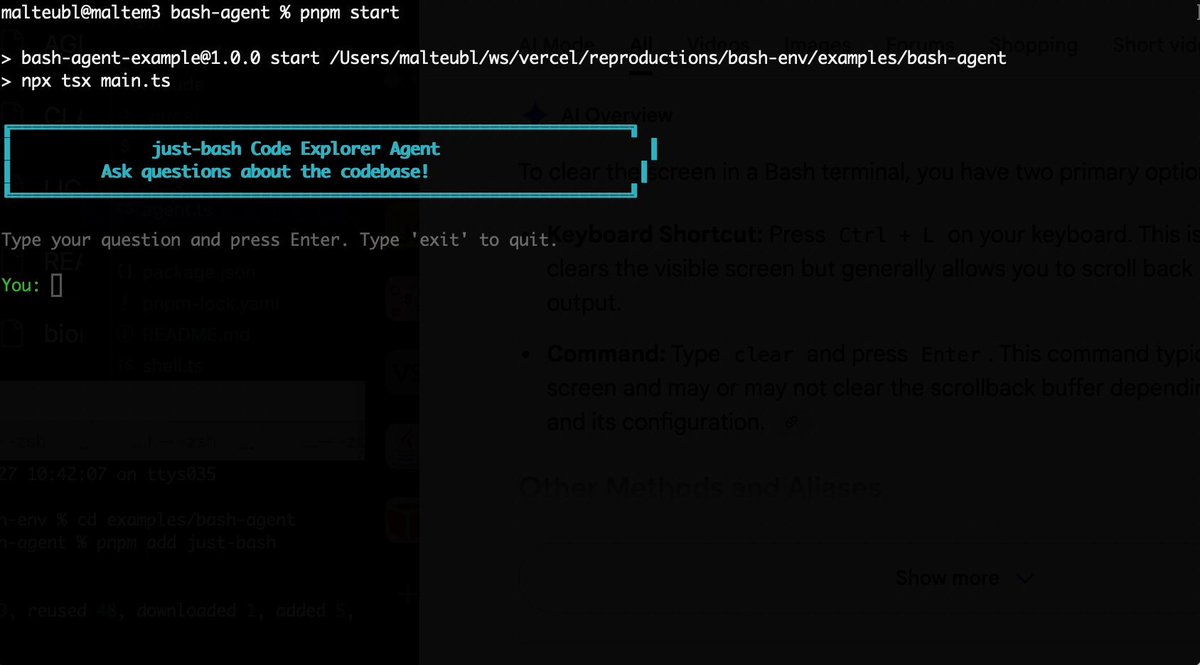
Bash is all you need! Which is why I'm introducing my holiday project: just-bash just-bash is a pretty complete implementation of bash in TypeScript designed to be used as a bash tool by AI agents. Because it turns out agents love exploring data via shell scripts, even beyond coding. It comes with grep, sed, awk and the 99th percentile features that an agent like Claude Code or Cursor would use. In fact, Claude Code can use it for secure bash execution. In the package - A bash-tool for AI SDK - A binary for use by yourself or your coding agents - An overlay filesystem to feed files to your agent securely - A Vercel Sandbox compatible API, so you can quickly upgrade to a real VM if you need to run binaries - An example AI agent that explores the just-bash code base using just-bash - I imported the Oils shell bash compatibility suite and just-bash passes a very good chunk What is interesting about this codebase: It was essentially entirely written by Opus 4.5. Coding agents love bash and they are good at reproducing it. They are also great at text-book recursive descent parsers and AST tweet-walk interpreters. That said, it is, like, a lot of code and I didn't read it all 😅. This is very much a hack, but it also seems to be _really_ useful. I haven't really found anything agents want to use that it doesn't support and it's fast and secure (caveats apply). It doesn't have write access to your computer and the filesystem is given a root that the agent cannot escape from. Find it at Related: Our recent blog post how we migrated our data analysis agent to bash tools and achieved incredible quality improvements The video shows the example agent investigating the just-bash code base

Malte Ubl

125,326 просмотров • 7 месяцев назад

AG-UI makes building agentic applications dramatically easier. Here's how it works. This is a model for a simple chatbot: User → LLM → Response But interactive agents that render UI, pause for approvals, and ask users for input need a much more complex model. When building these agents, a response from the LLM will include a series of state changes as the agent runs: • Agent started a task • Agent called a tool • Agent updated its state • Agent streams these tokens • Agent is waiting on a human • Agent is resuming the task The Agent-User Interaction Protocol (AG-UI) treats the LLM response as a stream of events rather than a text endpoint. In practice, here is what you get as an agent runs: 1. Lifecycle events so your UI knows where the agent is. 2. Text messages that stream tokens. 3. Tool calls so your UI can prefill a form with any required arguments. 4. State updates that keep your UI in sync with the agent. 5. Special events for human approvals, rich media, and custom needs. All of these events travel over standard transports (SSE, WebSockets, or plain HTTP) as JSON. As a result, you can build a frontend that stays in sync with the agent's progress without having to invent a custom process to make this happen. For example, building a human-in-the-loop workflow becomes an off-the-shelf component you can integrate rather than build from scratch. CopilotKit🪁 is the creator of AG-UI, and you can use it when building frontend applications pretty much anywhere: • React • Angular • Vue • React Native • Slack • Teams • Discord • WhatsApp • Telegram Here is the link for you to check it out: Thanks to the CopilotKit team for partnering with me on this post.

Santiago

17,438 просмотров • 1 месяц назад