Video wird geladen...

Video konnte nicht geladen werden

Zur Startseite

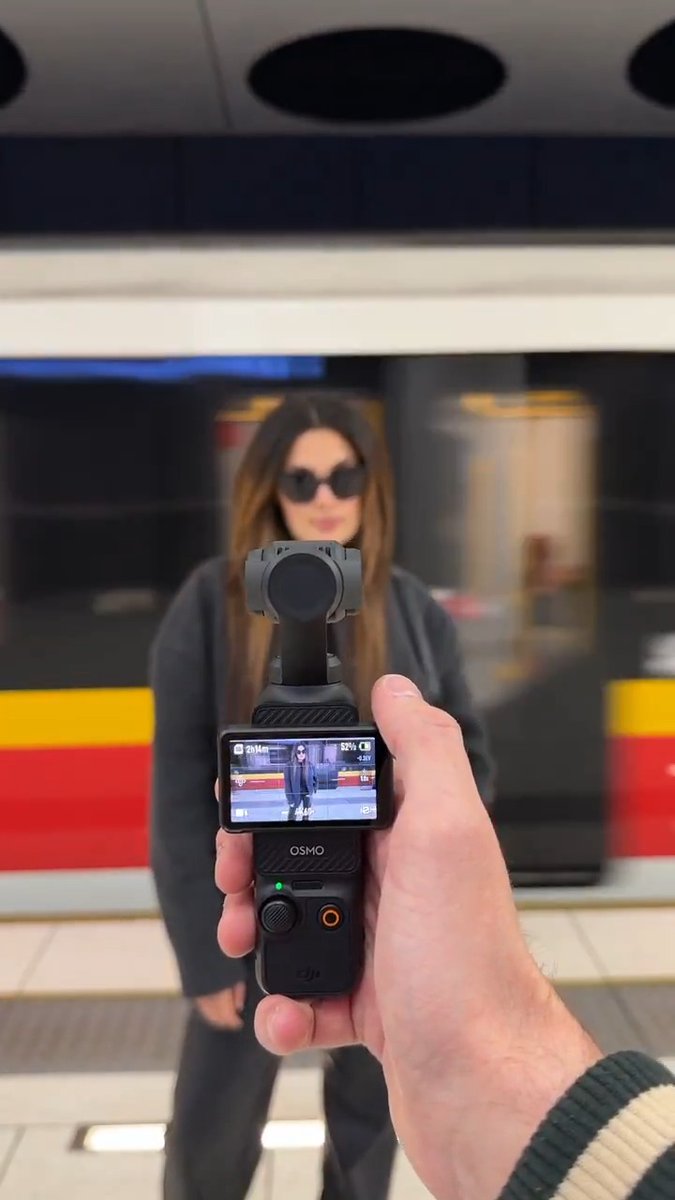
Cutest Stabilization Test You'll See Today. The DJI Osmo Pocket 4P's 3-axis mechanical gimbal holds steady — whether the surface is moving, bumping, or walking around on two legs. 🎥: Xiaodongdeqidian

25,617 Aufrufe • vor 4 Tagen •via X (Twitter)

0 Kommentare

Keine Kommentare verfügbar

Kommentare vom Original-Post werden hier angezeigt

Ähnliche Videos

d’Alembert’s Paradox: ν → 0 Is Not ν = 0 In 1752, Jean-le-Rond d’Alembert proved a result that still trips people up: An inviscid, incompressible, steady flow exerts zero drag on a body. No wake. No resistance. The equations let the fluid slip past as if the object weren’t there. The first animation shows exactly that world. The flow is ideal Euler flow. Streamlines bend around the body, accelerate, slow down, then recombine perfectly downstream. Nothing is left behind. The motion you see comes from pathlines moving through a steady velocity field, not from any evolving structure in the flow itself. The setup is the ideal fluid model: Euler (ν = 0) ρ(∂u/∂t + (u·∇)u) = −∇p ∇·u = 0 Assume steady flow and zero viscosity and the picture locks in. If the flow is also irrotational, ∇×u = 0, you can write u = ∇φ and the problem collapses to potential flow: ∇²φ = 0 u = ∇φ The force on the body comes entirely from pressure: F = −∮ p n dS D = F·eₓ Under these assumptions the pressure field is perfectly front–back symmetric, so the integral gives D = 0 That’s the paradox. Not a small correction. Zero. Now look at the second animation. This is the same geometry and the same inflow, but with viscosity turned on, even if it’s only a small amount. Navier–Stokes (ν > 0) ρ(∂u/∂t + (u·∇)u) = −∇p + μ∇²u ∇·u = 0 That extra term changes everything. A thin boundary layer forms near the surface. Separation becomes possible. Vorticity is generated and shed. A wake appears. Drag is no longer optional. The contrast is the point. Letting viscosity go to zero is not the same thing as setting it to zero. The inviscid limit deletes the mechanism that breaks time-reversal symmetry and allows energy dissipation. Once that mechanism is gone, wakes can’t exist, and drag vanishes by construction. #FluidDynamics #NavierStokes #EulerEquations #DAlembertParadox #BoundaryLayer #Physics

Mathelirium

27,053 Aufrufe • vor 6 Monaten

When you train in the 10-12 rep range, most of your reps have no direct effect on growth. When you train in the 4-6 range, virtually all of your reps are growth reps. Both ranges can build muscle. The mechanism doesn't care about the rep count. It cares about how close you get to true failure on the reps where the high-threshold motor units are recruited and every available fibre is firing. Those are the stimulating reps. Everything else is filler. The catch with 10-12 is twofold. First, only the last 4-5 reps in a 12-rep set are actually stimulating. The first seven are buffer. They generate fatigue, lactic acid, and joint wear that the muscle has to push through before any growth signal arrives. Effort, yes. Stimulus, no. Second, and this is where the high-rep crowd quietly come undone: the long set produces so much afferent feedback (burning, gasping, the legs giving a small philosophical speech) that almost nobody actually takes the set to true failure. They stop two, three, sometimes four reps short, mistake the discomfort for the limit, and call it a hard set. The stimulating reps they were chasing never showed up. A set of 6 doesn't allow that confusion. Failure is mechanical. The weight either moves or it doesn't. No interpretive dance required. You'll grow on 10-12. You'll grow more on 4-6, with less joint wear, less recovery debt, and considerably less guesswork. One range tolerates your mistakes. The other doesn't have room for them.

Sama Hoole

62,986 Aufrufe • vor 2 Monaten

IS THIS A CALIBRATION DEMO OR A MODEL PLAYING ROBOT? Guy in a black hoodie performs a detailed diagnostic on a girl in an underground parking lot. Dark bob, "Dangerously Beautiful" chest tattoo, brown strap top, leopard glitter shorts. He turns her head by the chin, slides fingers across her face, adjusts her straps, snaps fingers right before her eyes, slaps her cheek lightly, and adjusts her chain. She holds her gaze fixed. Synthetic posture. Zero reaction. Real or fake? Watch first, decide, then read. - Case for AI / silicone humanoid The finger-snap test mirrors optical tracking diagnostics used on vision sensors. The light slap on her cheek looks like an impact-absorption and skin-rebound test. Her eyes don't track his hand movements at all - they remain locked on a single coordinate in space like an uncalibrated optical unit. - Case for a real person Watch the center of gravity when he adjusts her chain necklace and shoulder straps. There is a micro-adjustment in her collarbone and neck muscles to stay balanced. The metallic fabric of her leopard shorts reflects ambient parking lot light with tiny shifts that correspond to subtle muscle tension in her legs. - The answer is in the last two seconds Unlike clips where the subject breaks character with a laugh, she maintains full doll-like immobility through the entire sequence. However, the organic movement of her hair around her ears when his fingers brush past gives away the natural weight and friction of human hair versus synthetic fibers. She's a real model executing a flawless statue hold. - Which is actually the interesting part The test sequence - snapping fingers, turning the head, checking facial displacement - mimics the exact staging robotics developers use at public field tests. By applying that protocol to a human in a casual setting, the video tricks viewers into applying diagnostic scrutiny to a real person. - What this signals for the content lane The "calibration check" format is replacing standard fit-checks and outfit videos. Viewers will rewatch the clip three or four times looking for a micro-blink or a throat pulse. It converts casual scrolling into an active inspection, giving the video maximum completion metrics in the algorithm.

capONE 💎

28,042 Aufrufe • vor 4 Tagen

You’re on a journey on this kind of lonely road with your car and your car suddenly develops a fault, You can’t call for help and your lines can’t be reached due to network issues, what do you do? Except the car will stop and the engine won’t come up again, please reduce your speed and accelerate softly till you get to a nearby town, if it is an overheating issue, keep driving, put the gear in the neutral position and switch off the engine and let the car keep moving, switch it back on when you have to ascend a hilly road and the car can’t move freely on its own again. If the battery signal comes up while driving, chances are that your alternator has failed, or the alternator belt is damaged, apply the same method and switch off your AC, radio system or anything that may drain the battery while driving till you get to a safe place. If it is a flat tyre, maintain a low speed till you get to a safe place to change and use your spare, keep moving. Yes!!! Damage that tyre till you get to a safe place, just keep moving and make sure you have a spare tyre always and it is in a good condition. If the engine suddenly goes off on top speed, chances are that a fuse is damaged and this is why I will make a thread on how to identify different fuses and how to have them fixed temporarily in case of Emergencies. If your car jerks or experiences a lazy movement while driving, it’s likely to be a fuel related issue, fuel pump most likely, switch off the engine intermittently and put the gear in Neutral position, keep moving… if the fuel pump rests for about 5mins, it’ll pick up back when you ignite the engine, this will/may at least take you to a safe place or where you can have access to network to make calls. If you hear strange sounds like knocking sounds or the oil signal starts to blink, relax and reduce your speed, keep moving. Manage it till you get to a safe place or can have access to network. If your gear/transmission system isn’t selecting well, apply the same method, reduce your speed but keep moving, slow movement is better than no movement, your life and safety matters a lot. Please note that there are some Mechanical issues that nothing can solve on the road except patience and just to pray to God for safety and help, for example, you run into a pothole unknowingly and the oil pan hits the road and your engine or gear oil leaks away, or your ball joint or tie rod head pulls out, I’ll suggest you leave the car there, roll up your windows and lock up the car and start trekking till you get network or help, staying with the car may make you vulnerable to attacks or attract unexpected company, just keep walking away from the car for safety. Most importantly, please stay safe and be conscious of your environment. Be friendly with your Mechanic too or any Mechanic you see on the road. Don’t manage faults in cars and risk traveling with it.

Wanjohn D-Mecho

437,496 Aufrufe • vor 2 Jahren

004/100 Buttons. A bit of the process on building an animation. When looking at a finished animation or in this example a finished button, it can look quite complex inside the CSS. But when building it, it’s more like a lot of simple steps, one after another. Here I had the idea to make some kind of text animation like the footer logo on the Osmo site. I try to add the base animation with no complex easing, for example transition: translate 0.4s ease. Starting with just moving the one text from bottom to top and the other text to top. Adding a stagger, play around with it. Searching for a way to make it more circular. On the research I found the sin() function inside CSS which can build a more smooth non linear curve for the stagger which creates this circular effect. And step by step adding more complexity like, different easing for hover/hover-out, opacity, 3D transform and more. I use also the sin() function to rotate the letters, so the middle ones are getting more rotated than the outer ones. Another thing which helps is to add a small delay on hover, for example 0.05s or 0.1s, you don’t really see the difference, but when you hover pretty fast on and out it doesn’t get that jumpy. I’m using here GSAP’s SplitText to split every char into spans. And then I’m adding a CSS index variable to every span, starting from the center. SplitText can provide CSS index variables, but you cannot tell it from which direction. For the sin() it’s also important to have a max length, so I add another CSS variable with the max char number on it. Crafting 100 Buttons with Osmo ⏳ Total time: 63h

Eduard Bodak

166,023 Aufrufe • vor 3 Monaten