Загрузка видео...

Не удалось загрузить видео

На главную

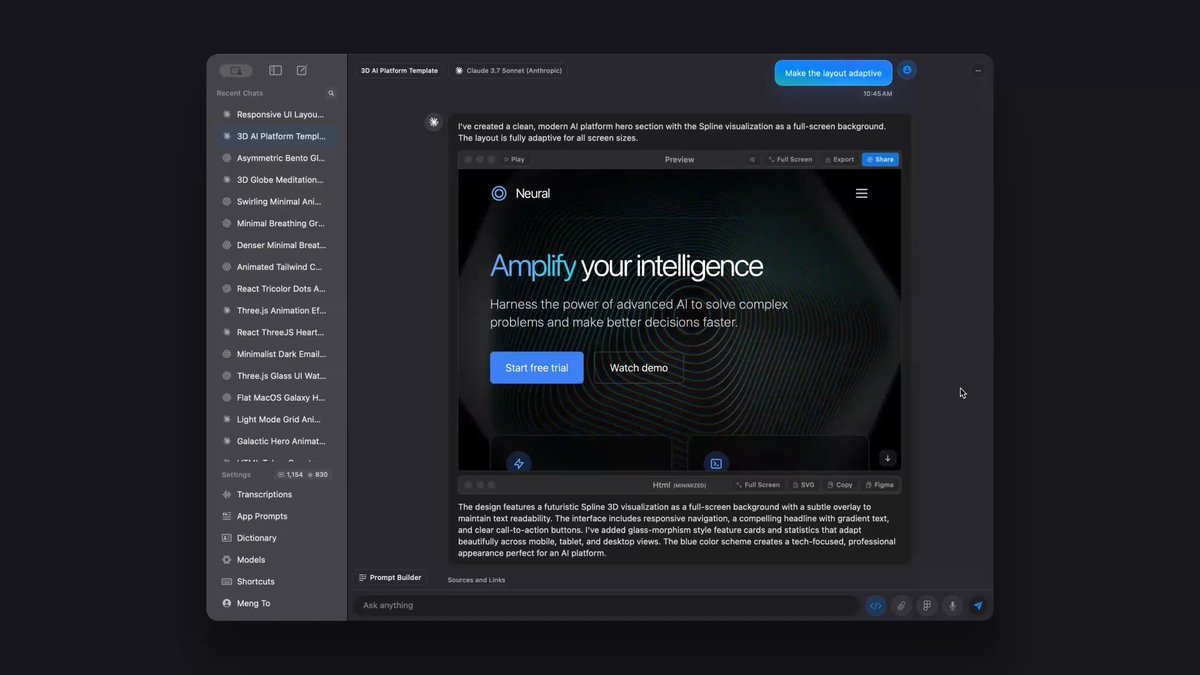
Figma canvas generation vs MagicPath same prompt. By the time I sent one request to Figma, I had two views and 3 variations of my designs in MagicPath, fully interactive. After 7 mins of waiting for something, I gave up. This is an embarrassing release. Video is 2x speed

37,689 просмотров • 6 месяцев назад •via X (Twitter)

Комментарии: 0

Нет доступных комментариев

Здесь появятся комментарии из оригинального поста

Похожие видео

Being able to move fluidly between Figma Make and the canvas is a pretty big deal Recent example 👇 1️⃣ Started exploring a minified recording toolbar directly on the canvas 2️⃣ Once I had some rough shapes I moved it into Make, imported my style guide, and started bringing it to life with expandable controls, hover states, and tooltips for keyboard shortcuts 3️⃣ A few prompts later, I had something interesting… but the layout wasn’t quite right. 4️⃣ So I jumped back into the canvas and made ~8 quick variations with a bigger video container. 5️⃣ Once I got somewhere interesting I brought that back into Make. All I had to do was copy and paste the frames for my default and hover state of the component and it pretty much nailed the core layout 6️⃣ Then I layered on the timer and made it interactive. But once I got it back into Make I thought "hmm... what if the toolbar layout was based on which quadrant of the screen the component was in 🤔" I was able to one shot this interaction and after playing with it a bunch I kinda love it? 7️⃣ Sent it to the team in Inflight so everyone could play with the prototype. 8️⃣ Brought the up to date UI back into the canvas to polish some of the tooltip details Before this, it always felt like I had to choose between two very different workflows. Now I can bounce between them seamlessly and it’s genuinely changing how I explore ideas.

Ridd 🤿

27,665 просмотров • 11 месяцев назад

Prototyping used to scare me. So I tried to escape it. I remember when I first started designing in Figma, prototyping felt like a mountain I didn’t want to climb. It was that one thing most designers quietly avoided some even said it’s not necessary 😄. I searched for shortcuts. Tried ProtoPie. Looked into Principle. Hoped one of them would save me the trouble. But they all felt disconnected. Too complex. Or just not Figma. So I made a decision: If I’m designing in Figma, I’m prototyping in Figma too. That meant doing everything, product planning, ideation, low-fi, high-fi, and interaction flows all in one tool. No more bouncing around. No more excuses. The first nut to crack? A loading effect. It took me 4 days to figure out. I searched everywhere, YouTube had nothing at the time. But I cracked it just one morning I saw myself trying it out in my dream. Woke up immediately and it was 4am, tried it and it worked. And that changed everything. Prototyping became the one language I could use to explain my designs… without explaining. Today, every prototype I create lives and breathes in Figma. Most of them can either be creative exploration or me trying to fix a broken user experience. No exports. No guesswork. Just clean, clickable experiences. It wasn’t easy. But I’m glad I stopped running from it. Because I would’ve missed out on one skill that: ✅ Earned my first £95K within 7 months while in UK. ✅ Got Uber to reach out to speak about interactive design. ✅ Worked with so many client even from Pakistan. ✅ Watched by more than 1 million people in the first 6 months I started sharing interactive designs. ✅ Prototyping landed me a 9-month contract just 3 days after getting laid off last year. ✅ Funny how the skill I once ran from helped me grow from 500 to 50,000 followers in 7 months. Prototyping gave my work a voice. #prototyping #figmaexperience #productdesign

designwithkingsley

13,869 просмотров • 1 год назад