Sensitive content

This media may contain sensitive content.

Loading video...

Video Failed to Load

Go Home

First video! #cicimiami is back ! #onlyfans #valentines2023 #single #explorepage #foryoupage #Arizona #trans #tranny #model #adultentretenimient #porn #phoenixAz #ass #booty #pornhub

4 Comments

Silverbaqq mal's profile picture
Silverbaqq mal1 month ago

I need some cici inmy life

Hernandez330's profile picture
Hernandez3303 years ago

Fuck why are you so beautiful i swear im love babe 😍🤤

yoo's profile picture
yoo1 year ago

Wanna catch that load on my tongue

Alex's profile picture
Alex3 years ago

That ass 😍🤤

Related Videos

I tested Tencent’s Hy4 preview model in WorkBuddy on a real frontend build, not a benchmark screenshot. I gave it one practical brief: create an original neon courier game in a single HTML file, with Canvas rendering, keyboard controls, collision detection, scoring, a countdown timer, a boost mechanic, sound effects, and reliable restart logic. The point was not to see whether it could describe a game. I wanted to see whether it could turn a creative idea into a coherent, playable result while handling the details that often break a quick prototype: state changes, movement, collisions, feedback, layout, and interaction flow. Tencent’s Hy4 preview is designed for stronger code understanding, generation, and editing, together with document and information processing, workflow automation, web and game development, cross-tool collaboration, and complex multi-step task completion. That makes it relevant not only for answering questions, but also for taking a task from brief to working output. The current preview version is faster and more effective than the first release. After the latest upgrade, the workflow takes fewer conversation rounds, uses fewer tokens, and reaches useful results more quickly. The difference is most noticeable in the handoff between idea, implementation, revision, and final testing: there is less waiting and less back-and-forth before the result becomes usable. For context, the reference materials describe Tencent’s Hy4 preview as a 770B-parameter model with 49B active parameters, a 1M-token context window, and Apache 2.0 weights. The practical question is how those capabilities translate into real work. In this case, I’m testing whether the model can produce a finished, playable game rather than just a promising code fragment. The one-minute video shows the complete process: selecting Tencent’s Hy4 preview model in WorkBuddy, submitting the build prompt, reviewing the generated result, playing the game, and checking the controls, collisions, score, timer, boost effect, sound, and restart flow. Try your own coding, frontend, document, or automation task in WorkBuddy: Tencent Hy Workbuddy Tencent AI

Rebecca Adson

61,820 views • 28 days ago

New framework: Kick down your robot, it will get back up every time 🥋 Chinese startup RoboParty is a Beijing startup founded April 2025 by Huang Yi, originally shipping ROBOTO ORIGIN, the world's first full-stack open-source bipedal humanoid. They released UFO: Unsupervised Reinforcement Learning Framework for Humanoid Control. DEFINITIONS -> what differs is where the learning signal comes from: - SUPERVISED: humans supply the right answers (labels), the model imitates them. - UNSUPERVISED: no answer key, the model finds structure in raw data on its own. - REINFORCEMENT LEARNING: no answer key either, the model tries things and a reward scores each attempt. → UNSUPERVISED RL: trial and error where the agent invents its own rewards, instead of engineers hand-writing one per task. REPRESENTATION LEARNING: compress raw states into a useful internal map. TEMPORAL DISTANCE: distance on that map is "how many steps from A to B." CONTRASTIVE: trained by pulling together what's close in time, pushing apart what isn't. -> CONTRASTIVE TEMPORAL-DISTANCE REPRESENTATION LEARNING: the model builds an internal map of body states where distance means how many steps it takes to get from one to another. It is trained by contrast: states that occur close together in a movement get pulled together in the map, randomly paired states get pushed apart. UFO is an open-source training framework that teaches humanoid robots skills, like getting up, walking, goal-reaching, teleoperation, without reference motions -> no motion-capture or human-video demonstrations to imitate. Its core is TeCH, a contrastive temporal-distance representation-learning algorithm: the robot explores, builds pseudo-goals by temporal rolling, and learns goal-conditioned policies from a single unified progress reward. One framework trains five different robots (Unitree G1/H1, RoboParty RP0/RP1, AgiBot X2) with automatic config conversion in ~2–3 hours per robot! The real novelty here "no demonstrations at all". No data-collection arms race,the dominant humanoid-locomotion recipe is tracking: imitate mocap/retargeted-human reference trajectories. The robot self-generates goals from its own exploration and learns from a progress reward, needing zero reference motion data. Everybody else is fighting over data acquisition, while this team just teleports out of the race entirely (inb4 "competition is for losers 💀 ). This strategy reminds me of the DeepSeek playbook applied to robots: open-source the whole stack to become the global default and commoditize everyone else. RoboParty is giving away hardware and now control software (UFO) to be the Android of humanoids. Yet another reason for the US to ban Chinese open models perhaps 🥶 ? What I also really like about this approach is the cross-embodiment infrastructure, one framework trains Unitree G1/H1, RoboParty RP0/RP1, and AgiBot X2 with automatic configuration conversion. Just like Physical Intelligence, RoboParty seems to place itself as a neutral hardware agnostic middle man. Also woth mentioning: their ability ot perform stable skill injection, e.g. adding a cartwheel without forgetting how to walk. A common failure of RL humanoid policies is that teaching a new agile skill destabilizes the existing ones (catastrophic forgetting). UFO claims you can inject rare motions (cartwheel) without collapsing learned behavior. If it holds, that's a significant incremental/continual skill-learning! But again, I have to underline it: no arXiv, no external validation, no success-rate numbers. -> robotics badely needs an independent unbiased evaluator imho. Still, look at that cool demo: robot is getting kicked and pushed around (serious disturbance) during teleoperation (controlled the person at the back wearing the VR headset), and still managed to always get back up. This is some serious demonstration of stability and robustness!

Léo

36,184 views • 2 months ago

This guy got Claude to take control of Arcads and generate hyperrealistic UGC ads with a consistent AI actor, from a 7-word prompt, and now e-com brands pay him $1,500 per video to clone the setup. He got tired of watching DTC brands burn $4K on a photoshoot that dies the second a product angle changes, so he built a 2-prompt workflow that turns one product photo into scroll-stopping UGC without a single model, camera, or casting call. Here's the exact breakdown: → Claude is the director, Arcads is the studio. You never write a real prompt, you write one sentence → Type 7 words: "create a character sheet of a UGC actress on Arcads." Claude expands it into a 40-line spec: warm skin tone, high ponytail, gold hoops, white AirPods, athletic build, then takes control of Arcads itself → Arcads renders a 6-angle character sheet: front, back, profile, 3/4, two portraits, one consistent face locked across all of them → You download the grid and drop it back into Claude with one product photo → Second prompt, 8 words: "use Seedance 2.0 on Arcads to create natural UGC" → Claude writes the full shot list: timecodes, "1:03 AM clock zoom," the trackpad scroll, the arm pull that drags the product into frame, "delivery: casual, energetic," "ends on a wink + air kiss" → Arcads cuts the yellow Vans print onto an actor who was wearing all black in the grid. Real fabric folds, real light, zero warping → Final render: lip-sync locked to consonants, head not glued to the camera, a girl filming at 1am on her bed The key move 96% of people skip: you can't put the product on the actor before you lock the character sheet. If you drop a product photo onto a face that isn't locked across angles, the identity drifts frame to frame. The jaw resets. The skin tone shifts. The print slides off the fabric. The whole thing screams "AI" and your CTR dies in the first 2 seconds. His system locks the 6-view sheet first, so Arcads has one real human to dress, and the top lands with natural folds even though the grid never had it. One apparel brand ran 20 variants off a single product photo and found a winner in 36 hours, because the clips read like organic UGC, not a studio ad. Brands now pay him $1,500 per avatar build + $340/month to keep dropping fresh video batches on every new product. The entire thing runs on two prompts and one laptop. No photographer. No model agency. No product samples on set. Just two sentences, one product photo, and the discipline to lock the character before you render a single second of movement.

Shade

15,227 views • 4 months ago

Andrej, This sounds extremely useful, and I think it might be even more significant than it first appears. What you describe is not just a knowledge base for information. The structure of the wiki, the queries you file back, etc, encode *how* you do research: which questions to ask, which connections matter, what's worth pursuing. That's “know-how” (in the sense of Michael Polanyi). This sort of knowledge is, currently, overwhelmingly absent from training data, because it was never written down (since there was no point). Now there is, because it significantly improves the AIs performance. But notice what's happening. You propose to build the most efficient mechanism ever devised for making tacit expert know-how / methodology explicit and machine-readable, and then transmitting it, via API, to a third-party model provider. Every query against the wiki is a reasoning trace: see attached video clip. The compiled wiki itself is a structured map of your research process. This is the mechanism described here: Expert know-how is being externalised and captured through ordinary productive use of AI tools. The user gets a better tool. The platform gets a transferable problem-solving strategy. The fact that this works so well could, in a sense, be the problem: the better it works, the more indispensable it becomes, the more know-how flows out, and, realistically, the less choice people have *not* to use it. Your instinct that "there is room here for an incredible new product" is right. But whoever builds it will be sitting on the highest-fidelity capture mechanism for expert know-how ever constructed. The question is: is the data subject to a “data network effect”, by which I mean, the kind of “data flywheel” which gave Google a 25 year monopoly over search? If so, you might be building not only more most powerful tool humanity has ever possessed, but this power might end up in the hands of a single entity. It would be great to hear your thoughts around this.

John Fletcher (𝔦, 𝔦)

41,341 views • 6 months ago

[TRANS] 240922 2024 IU HEREH WORLD TOUR CONCERT ENCORE : THE WINNING — #IU Gives Final Ment Before Singing ‘Love wins all’ 𝙈𝙖𝙮 𝙡𝙤𝙫𝙚 𝙖𝙡𝙬𝙖𝙮𝙨 𝙥𝙧𝙚𝙫𝙖𝙞𝙡 𝙞𝙣 𝙩𝙝𝙚 𝙫𝙚𝙧𝙮 𝙚𝙣𝙙 𝙚𝙫𝙚𝙣 𝙞𝙣 𝙢𝙤𝙢𝙚𝙣𝙩𝙨 𝙬𝙝𝙚𝙣 𝙝𝙖𝙩𝙧𝙚𝙙 𝙘𝙤𝙢𝙚𝙨 𝙜𝙪𝙨𝙝𝙞𝙣𝙜 𝙤𝙪𝙩. 아이유(IU): We’ve come to the final moment of the tour. I’ll do my best. I know some of you are heading back after this song, and it’s Monday tomorrow. May this feeling of happiness you experienced from today’s concert last for a week, a month or even a year is what I hope. May it be your motivation to look forward to IU’s next concert so that even on days that you find tough, you’ll cheer up a bit. It’d be nice if that moment of me waving the lightstick (during I stan U) could come to your mind even for a split second. I, too, am your longtime fan. So please hang in there. I shall sing the final song and bid you farewell. For those who are staying back (for the en-encore), see you later. But for now, let me say goodbye first. Thank you. May love always prevail in the very end even in moments when hatred comes gushing out, and that all of you achieve your own victory every single day and be happy until our next meeting. This has been IU, thank you. Translated by IUteamstarcandy Video by 6elieveInU #IU #THE_WINNING #HEREH_ENCORE

Team 🌟🍬

211,976 views • 2 years ago

Last week at Annecy - the 'Cannes of Animation' - I watched the future of entertainment unfold. While most Hollywood executives networked over formal dinners, the CEOs of Mediawan and Gameloft were doing something different. They were partying with Claynosaurz holders, talking about how this entertainment model can revolutionize IP creation and incubation. The numbers had caught their attention, but the sophistication of the model and community kept them there. As someone who works in media & entertainment, investing in production studios and co-financing movies, I've never seen anything like this. Here's why it matters. The traditional entertainment industry is broken. I spoke with six independent animation studio heads at Annecy - all successful studios who've produced for major platforms. They're fed up. Netflix and Disney are slashing budgets. Cost-plus deals have dropped from +25% to +5%. Creators have zero ownership. Even when you succeed, you're building someone else's empire. The reality? Social video and YouTube are eating traditional long-form content alive. Gen Z doesn't care about Hollywood's gatekeepers. They want authentic content and real connection with creators. The executives know this - they're desperate for a new model but can't let go of their old playbook. Then there's Claynosaurz. A few weeks ago, they generated $18M in demand from a single Popkins raffle - more than most animation studios see from a year of content. When I shared this with studio heads at Annecy, they couldn't believe it. But what happened next proved this wasn't just about numbers. The Claynosaurz party became THE event of Annecy. The CEOs of Mediawan and Gameloft weren't just making appearances - they were actively seeking out Clayno whales like CryptoKid, 𝙋𝘼𝙉𝙄𝘾, myself and others. They wanted to understand what we see in the brand that they're missing in traditional entertainment. These weren't courtesy meetings - these were strategy sessions that turned into 4AM conversations about the future of media. In our conversations, these CEOs weren't just excited about the Claynosaurz partnership - they were fascinated by how completely Claynosaurz has flipped the traditional Hollywood playbook. While studios spend millions trying to find audiences, Claynosaurz has built a passionate community that markets itself. While traditional IP takes years to validate, Claynosaurz is applying the lean startup model to IP incubation, focusing on social video, testing their content and building an audience. This is unprecedented in entertainment. Even the creator of Paw Patrol - who built a $10B+ global franchise the traditional way - came to understand what makes Claynosaurz different. The President of Animation Magazine was there too, recognizing this wasn't just another Web3 project - this was the future of franchise building. These weren't courtesy meetings. These were industry leaders realizing that while they've been fighting over streaming deals, Claynosaurz has cracked the code on something more valuable: genuine community engagement. The old model is dying. Streaming economics are broken. But while Hollywood wrestles with these existential threats, Claynosaurz is thriving. Their community-first model isn't just working - it's about to be supercharged. Why? Because Claynosaurz understood something fundamental: in the age of infinite content, superfans are everything. While Hollywood sees AI as an existential threat, Claynosaurz sees it as rocket fuel for community creativity. Imagine thousands of holders empowered to tell their own stories in the Claynosaurz universe, with the quality of studio animation but the authenticity of user-generated content. That's not just a different distribution model - that's a fundamental reimagining of how entertainment is created. My conviction has never been stronger: Claynosaurz will be a household name and multi-billion dollar franchise. The blueprint is clear. The partners are committed. The community is unmatched. And most importantly - the team is world class. They don't just understand entertainment - they understand how to build authentic connections in a digital age. When the entertainment industry looks back, they won't just remember Annecy 2023 as the moment Web3 crashed Hollywood's gates. They'll remember it as the moment the future of entertainment became clear. Traditional studios will either adapt to this new model or become irrelevant. Claynosaurz isn't just building another entertainment company. They're building Web3 Disney. And we're just getting started. 🌋🦖

m3taversal

37,309 views • 1 year ago

Tyrant cops get owned by man that knows his rights. The story on video is wild, but what goes on after the video ends is next level! ​Everything started at the Verde Valley Thousand Trails campground in Cottonwood, Arizona. Corey Drew, a veteran with PTSD, was staying at the facility when campground staff confronted him inside the lodge, demanding he prove his disability and put a vest on his service dog. Drew correctly pointed out that under the Americans with Disabilities Act (ADA), service animals are not legally required to wear vests. ​Instead of respecting federal law, campground staff flagged Drew's profile as "combative." The next morning, Drew requested all further communications from staff be in writing to keep the peace. Management chose to call 911 instead, fabricating claims that Drew was being aggressive and disorderly. ​Six Yavapai County Sheriff’s Office (YCSO) deputies swarmed Drew's truck. They instantly escalated the civil dispute, threatening to shatter his windows and drag him out for "resisting arrest" and "disorderly conduct"—despite him sitting peacefully inside his vehicle. When a YCSO lieutenant finally arrived, he realized his deputies had absolutely zero legal standing, stepped in to de-escalate, apologized to Drew, and let him go. Drew schooled these officers on lessors rights as well as well as the rights the officers were violating. He brought them to the point of securing verbal apologies from the officers. ​While YCSO command originally substantiated Drew's internal complaint, acknowledging that the deputies violated his Fourth Amendment rights, the narrative changed the second Drew published the bodycam footage to YouTube. ​To save face, YCSO Lieutenant John Johnson reversed his initial findings and weaponized the legal system, launching a retaliatory investigation that slapped Drew with a laundry list of bogus criminal charges—including disorderly conduct, resisting arrest, and threatening or intimidating. ​Drew didn't back down. Representing himself in court, he successfully got every single criminal charge dismissed. A state judge threw out multiple counts for a complete lack of probable cause, and the rest were dismantled under Arizona's anti-SLAPP law, which prevents retaliatory prosecutions designed to chill free speech. ​Once cleared, Drew took the fight to federal court, filing civil rights lawsuits against both the campground's parent companies and the YCSO. ​After the federal district court initially dismissed his civil rights lawsuit, Drew fought the decision all the way to the U.S. Court of Appeals for the Ninth Circuit. On April 28, 2026, the Ninth Circuit officially reversed the dismissal, ruling that Drew’s complaint successfully alleged that Lieutenant Johnson engaged in clear First Amendment retaliation by fabricating a sham investigation after the video was shared online. As if June 2026, ​the case has been officially remanded back to the Arizona District Court, where a federal magistrate judge recently ordered Lieutenant Johnson to formally answer the complaint. The lawsuit is moving forward into the discovery phase. ​This case is a massive reminder: Know your rights, keep the camera rolling, and never let bad actors use the color of law to violate your constitutional protections. We will circle back on this once the trial is over. I see a settlement coming his way.

Giggling Ganon

27,264 views • 3 months ago

save this post to get the most out of unlimited Seedance 2.5 for up to 33 days on Higgsfield i'm going to show you how to use loops to produce ANY video format: ads, cinema, vlogs, UGC, music videos... with one system idea > vault > agent > references > images > script > video > montage > upscaling Seedance 2.5 one-shots a full 30 second video, audio generated in the same pass, carrying up to 30 image, 10 video and 10 audio references into a single generation here's a full breakdown of the setup: > idea: steal taste from work that already worked: - frameset․app and shotdeck․com for film stills - savee․com and cosmos․so for boards - eyecannndy․com for transitions then have a vision model name the lens, light, palette and grain of your picks in one locked paragraph you paste into every prompt > vault: an obsidian folder as your reference bible, one page per asset (idea, locked style, character sheets, reference images, the exact prompts that worked) plus one index page, reviewed after every session so it never rots into dead files > agent: three commands make every model callable from Claude Code: - npm install -g @ higgsfield/cli - higgsfield auth login - npx skills add higgsfield-ai/skills and your agent now submits, polls, retries and logs every job > references: build reference images by hand first, midjourney for cinema and stylized shots, nanobanana pro or gpt images 2 for realism use one locked style across the whole project, recurring characters turned into full sheets (front, side, back, blank background), and once locked you never regenerate them, you fix the motion prompt instead > images: frames before motion, always, a frame costs seconds and a clip costs minutes, so exploration happens at the cheap layer and only winners get animated > script: every shot gets the same six details, subject, action, place, camera, style, rules, and the 30 seconds splits into four timed beats inside one prompt, 0-6 set the scene, 6-14 build it out, 14-24 the turn, 24-30 the end > video: every reference gets a job and a boundary, "Video 1 defines motion and pacing" is half the instruction, "do not use the person's identity, clothing or scene" is the half that stops one reference leaking into shots it was never meant to touch > montage: the cut is a text file, one line per clip with its duration and an audio flag, ffmpeg renders the film from it, so the whole edit reruns in seconds > upscaling: once, at the end, on the finished cut, 720p while exploring, 1080p for keepers, 4K only for the master (use Topaz) for UGC ads, the same loop with two changes render the hook clip alone first, approve the face and the voice before anything else inherits them, then anchor every later clip with the approved hook's audio so one voice carries the whole ad and the script math is fixed, about 3.5 words per second, a 30 second ad is roughly 105 words, counted before anything renders unlimited means every loop above costs nothing to run... start one tonight

Machina

39,183 views • 2 months ago

I built an agent that answers machine-learning questions. It's autonomous, and the best part is that I built the whole thing without writing a single line of Python code. Here is what I did and how I did it: Over a year ago, a friend and I built a site that publishes multi-choice questions. You get a new one every day. I decided to have GPT-3.5 answer questions. Here is what I needed to build: 1. Connect to the site's API to retrieve today's question 2. Extract the question and the potential choices 3. Connect to OpenAI's API and ask GPT-3.5 to answer the question 4. Parse the answer from the model 5. Submit the answer back to the API to get the score Not difficult. Likely several hours of work. But I didn't have to write any code. I built the whole thing by dragging and dropping components using Vellum is a YC-backed platform for developers to build LLM applications. They are the only ones I've seen offering this functionality. They sponsored this post, and their team helped me with all my questions while I built this. I created a workflow. The platform supports several node types to build whatever you have in mind. I show how I put the whole thing together in the attached video. The only code I had to write was a few lines of Jinja to parse and transform the API and the LLM results. There are three lessons I want to share from this experience: First, the best possible code is the one you didn't write. I'm a big fan of no-code tools because they help me materialize my ideas fast. They help product people, designers, and no coders collaborate on the solution. Second, Large Language Models are sensitive to how you prompt them. Small changes to prompts can make a big difference in results. This is more pronounced when you are building a multi-step workflow. Third, automated testing and evaluation for prompts is critical. There aren't many companies thinking about this. They'll have a hard time moving from a demo phase. The attached video will show you what I did.

Santiago

309,825 views • 3 years ago

how to produce long form documentaries with claude this is how creators are producing long-form youtube documentaries in the sleep niche for about a low cost. you'll spend most of your effort building the workflow once, then every script after that runs through the same pipeline for cents. the format that works in this niche is different from normal youtube. your viewers are actively trying to fall asleep. that's the entire point. so people leave for two reasons: they got bored, or it worked and they're out. the ones who fall asleep come back later and keep listening. that repeat listening is a huge part of why the niche prints. which means the script is 90% of the whole thing. average view duration on my channels sits close to 25 min. that number does not come from cinematic visuals or fancy editing. it comes from narrative structure. if the script gets repetitive, drifts off topic, or loses momentum halfway, people stop listening. better footage cannot rescue a weak story here. the problem is the format does not scale on its own. one video needs a 15k-20k word script, hours of narration, hundreds of visual changes, music, and final assembly. writing that manually takes forever. editing every scene takes even longer. here's the workflow i set up: claude api (NOT the chat app. HIGHLY RECOMMENDED to not skip this. in the chat interface you end up typing "continue.. write chapter 4.. don't repeat yourself.. you forgot what happened in chapter 2" and by the halfway point it's contradicting earlier sections and drifting from the outline. you spend more time babysitting than writing. the api sends every request automatically and you pay per actual usage instead of another monthly subscription) google sheets connected to the claude api. this is the whole engine. you don't need to be a dev. the sheet does two things: first it generates the full documentary structure/outline. then it writes ONE chapter at a time instead of trying to produce the entire 20k words in a single response (which is where models fall apart). before each chapter, it passes claude three things: the outline, the instructions for that specific section, and a running summary of everything already written. that running summary is the trick. it's why chapter 8 never contradicts chapter 2. capcut ai video maker for the first edit. it generates voiceover, subtitles, and an initial visual sequence from auto-matched stock footage. the stock matching is not perfect, but it gets you a 90% first draft way faster than manually searching for hundreds of clips. note: capcut caps at 3000 words, so you split the script into sections, generate each one, export, and combine into the final video. HERE'S HOW THE PRODUCTION ACTUALLY RUNS: step 1 —> topic + title + thumbnail. do NOT skip this. ai cannot tell you which topic has demand or whether a title creates curiosity. this is where most of the value still is. figure this out before you touch any automation. step 2 —> run the sheet. it builds the outline first, then writes chapter by chapter, feeding itself the running summary each time so it stays consistent. cost for a full script usually lands around $0.30-0.40 depending on the model, input length, and number of revisions. step 3 —> paste script into capcut in sub-3000 word chunks. generate voiceover + subtitles + auto-matched visuals for each. export each section. step 4 —> combine sections into the final 2-3 hour video. then you handle the parts ai can't: pacing check, misleading visuals, final editorial judgment. the reason this matters is repeatability. every script moves through the exact same production structure, but you can still change the topic, tone, evidence, pacing, and narrative direction each time. so it stops being random one-off videos and starts being a system. the math: capcut is ~$20/mo and allows many exports. claude api is a little above thirty cents per script. at 30-40 documentaries a month that works out to roughly $1 in direct software cost per finished video. that figure does NOT include your time, research, thumbnails, subscriptions, failed ideas, or the cost of building the workflow itself. it is not the full cost of the business, it's the direct software cost. one more thing worth knowing: mixing real historical/stock footage alongside ai assets is the best defense i've found against the "reused/inauthentic content" flags that destroy fully automated channels. that's from experience, not a rule youtube publishes. this is not passive income and it's not a one-click youtube machine. it's a production system that makes experimentation cheaper. ai removes the repetitive work. it does not remove the need for taste.

Sulfur

25,540 views • 2 months ago

CANCEL Your Weekend Plans, & Learn Claude Code Today. This Claude Code teaches more about vibe-coding in 30 mins than most tutorials do in hours. Save this, it'll change how you build forever People are building entire apps and charging clients $5,000 to $20,000 using Claude Code. This Claude Code video is a goldmine. Full Claude Code tutorial. Beginner to pro. Every feature. Every setup step. Every best practice. Zero prior knowledge needed. Save it. Watch it tonight. Not tomorrow. Tonight. Follow Himanshu Kumar so you don't miss the breakdowns for each feature. This is your complete Claude Code roadmap. Lose it and you lose the next 12 months of income. ↓ 1. Understand What Claude Code Actually Is. You think Claude Code is just another chatbot. It's not. And that misunderstanding is why you're broke. ChatGPT gives you text. Claude Code gives you software. It runs in your terminal. It reads your entire codebase. It writes files directly to your project. It runs commands on your machine. It debugs errors autonomously. It builds features end to end. You're not chatting. You're deploying a developer. One that works 24/7. Never asks for a raise. Never calls in sick. Never pushes broken code at 5 PM on a Friday. People are charging clients $5,000-$10,000 for apps they built with Claude Code in 3 hours. And you didn't even know this tool existed because you're still asking ChatGPT to write you a to-do list. The gap between you and people making money with AI isn't intelligence. It's awareness. Now you're aware. Save this post. Follow Himanshu Kumar for the complete breakdown of every Claude Code feature. ↓ 2. Set Up Claude Code Properly. Most people quit here. "It's too complicated." "I don't know terminal." "I'll set it up later." Later never comes. And "complicated" means "I watched for 30 seconds and gave up." The setup takes 10 minutes. Install Node.js. Install Claude Code via npm. Authenticate your account. Open your terminal. Done. 10 minutes. You spent longer this morning deciding what to have for breakfast. The video walks through every single click. Every command. Every screen. Assuming you know absolutely nothing. If you can download an app on your phone, you can set up Claude Code. It's the same level of difficulty. But you'll still tell yourself it's "too technical" because that excuse is more comfortable than admitting you're just scared to try something new. This is the setup that everything else builds on. Skip it and nothing works. ↓ 3. Use the Desktop App. You don't even need to live in the terminal if you don't want to. Claude Code has a desktop app. Clean interface. Visual feedback. Everything you need without touching command line. But here's the thing most people don't know: The desktop app isn't just a pretty wrapper. It lets you manage projects visually. See file changes in real time. Switch between projects instantly. The people making money with Claude Code use the desktop app for client projects because it's faster to manage multiple builds simultaneously. You're still opening 14 browser tabs to organize one project. They open one app and everything's there. Efficiency isn't a personality trait. It's a tool choice. Save this post. Follow Himanshu Kumar for the desktop app workflow that handles 5 client projects at once. ↓ 4. Install the Right Dependencies. This is where beginners silently fail and blame the tool. Claude Code needs certain dependencies installed to work properly. Miss one and everything breaks. Then you go on Twitter and say "Claude Code doesn't work." It works fine. You just didn't read the setup guide. The video covers every dependency you need. What to install. How to install it. How to verify it's working. No guessing. No Stack Overflow rabbit holes at midnight. No "why isn't this working" for 3 hours. Watch the dependency section once. Follow every step. Never deal with setup issues again. You spent more time last week troubleshooting a printer than this takes. ↓ 5. Work Inside Your Code Editor. Claude Code integrates directly with your code editor. VS Code. Cursor. Whatever you use. It's not a separate window you alt-tab between. It's right there. In your workflow. You type a request. Claude writes the code. The code appears in your editor. You review it. Accept it. Done. No copy pasting between windows. No reformatting code that got mangled in transit. No "which version was the right one." It's like pair programming with someone who never gets distracted, never argues about naming conventions, and actually writes code that works on the first try. Your current coding process is: Google the problem, read 5 answers on Stack Overflow, copy the wrong one, debug for an hour, find the right one, paste it in, break something else, repeat. Claude Code's process is: describe what you want, get working code, move on with your life. Same hour. One method produces working software. The other produces frustration and a browser history full of Stack Overflow tabs. Stop coding the hard way. Save this post. Follow Himanshu Kumar for code editor setup guides and integration tips. ↓ 6. Master Basic Usage. Most people learn 5% of a tool and say they "know" it. You "know" Photoshop because you can crop an image. You "know" Excel because you can sum a column. You "know" Claude Code because you asked it one question. Basic usage means: How to give Claude Code context about your project. How to ask for changes to existing code. How to generate new files and features. How to review what Claude produces. How to iterate when the output isn't perfect. These basics are the foundation of everything. Skip them and every advanced feature feels confusing. Master them and every advanced feature feels obvious. The video breaks down each one with real examples. Not theory. Actual usage on actual projects. You've been using AI tools at 5% capacity and wondering why your results are 5% of what others get. Save this post. Follow Himanshu Kumar for daily Claude Code usage tips. ↓ 7. Learn Every Command. Claude Code has commands that most users never discover. Because most users type one message and expect magic. That's not how professionals use it. Professionals use specific commands that tell Claude Code exactly what to do, how to do it, and what constraints to follow. The difference between a beginner and someone making $10K/month with Claude Code is knowing which command to use and when. The video walks through every single one. Not just what they do. But when to use each one. And why one command is better than another for specific situations. You've been using Claude Code like a hammer. These commands turn it into a full toolbox. Stop treating a power tool like a blunt instrument. Save this post. Follow Himanshu Kumar for the command cheat sheet I use daily. ↓ 8. Understand Modes and Shortcuts. Speed matters. The person who builds an app in 2 hours charges $5,000. The person who builds the same app in 2 days charges $2,000. Same app. Same quality. Different speed. Different income. Claude Code has modes that change how it operates. And shortcuts that cut your workflow time in half. Most people don't know either exists. They use Claude Code in default mode for everything. Like driving a car in first gear on the highway. Technically it works. But everyone is passing you. The video shows you every mode. Every shortcut. Every time-saving trick that separates the people charging $2,000 per project from the people charging $10,000. Speed is money. Literally. Save this post. Follow Himanshu Kumar for the shortcuts that cut my build time by 60%. ↓ 9. Write a Proper Planning Prompt. This is the section that separates amateurs from professionals. And it's the section most people skip. A planning prompt tells Claude Code what you're building before you start building it. Architecture. File structure. Technologies. Features. Constraints. Edge cases. Without a planning prompt, Claude Code guesses. And guessing produces garbage. With a planning prompt, Claude Code executes a clear plan. And clear plans produce working software. The video shows you exactly how to write a planning prompt that makes Claude Code produce professional-grade output on the first try. "But I just want to start coding." That's why your code breaks every time. That's why you restart projects 4 times. That's why nothing you build ever gets finished. Because you refuse to plan. A 5-minute planning prompt saves you 5 hours of debugging. But you'd rather skip the 5 minutes and suffer through the 5 hours because patience isn't your thing. And that's exactly why you're not making money. Planning is the most underpaid skill in coding. And the most overpaid when you master it. Save this post. Follow Himanshu Kumar for the planning prompt templates I use for every client project. ↓ 10. Choose the Right Model. Claude Code lets you select different AI models. Not all models are the same. Not all tasks need the same model. Using the most powerful model for a simple task wastes credits. Using a basic model for a complex task wastes time. The video explains: Which model to use for quick fixes. Which model to use for complex architecture. Which model to use for debugging. Which model to use for code generation. Most people pick one model and use it for everything. That's like using a sledgehammer to hang a picture frame. Model selection is strategy. And strategy is money. The people making $10K/month with Claude Code are strategic about every credit they spend. You're burning through credits because you use the most expensive model to write a hello world. ↓ 11. Use Git and Version Control. If you're not using version control, you're one mistake away from losing everything. Claude Code integrates with Git. Every change tracked. Every version saved. Every mistake reversible. Without Git: Claude makes a change. It breaks something. You can't undo it. You start over. 3 hours wasted. With Git: Claude makes a change. It breaks something. You roll back in 5 seconds. Keep working. Version control isn't optional. It's insurance. And the people not using it are the same people who say "I lost my entire project" like it's something that just happens. It doesn't just happen. It happens because you didn't set up Git. The video walks through the entire Git integration. Save this post. Follow Himanshu Kumar for the Git workflow that's saved every project I've ever built. ↓ 12. Set Up Claude MD and Memory. This is the feature that makes Claude Code feel like a real team member instead of a stranger you explain everything to every time. ClaudeMD is a memory file. You tell Claude Code about your project once. It remembers forever. Coding style preferences. Project architecture decisions. Technology stack. File naming conventions. Business logic rules. Without ClaudeMD: Every new conversation starts from zero. You explain the same things repeatedly. Output is inconsistent. With ClaudeMD: Claude knows your project. Claude follows your rules. Claude produces consistent, professional code. The difference between a sloppy freelancer and a reliable agency is consistency. Claude. MD gives you consistency without the agency overhead. Most people don't set this up and wonder why Claude Code gives different answers every time. ↓ 13. Automate with Tasks. This is where Claude Code stops being a tool and starts being an employee. Tasks let you define repeating workflows. "Every time I push code, run tests." "Every time I create a new file, add boilerplate." "Every time I start a session, check for errors." Automated. Hands-free. Consistent. You're doing these things manually every single day. The same checks. The same steps. The same routine. Tasks do them automatically. So you can focus on the work that actually makes money. Every manual task you automate is time you get back. And time is the only thing you can never make more of. Save this post. Follow Himanshu Kumar for the task automation templates that run my entire workflow. ↓ 14. Explore Features Most People Never Touch. The video covers features that 95% of Claude Code users don't know exist. Because they watched a 3-minute TikTok about Claude Code and think they're experts now. They're not. They're using 5% of a tool that can do everything. The full tutorial goes deep into features that most tutorials skip because they're "too advanced." They're not too advanced. They're too valuable for lazy creators to bother explaining. This video explains all of them. Clearly. For beginners. The 5% of features you don't know about are the 5% that make people rich. ↓ Let's zoom out. I just broke down 14 sections of Claude Code. Setup and installation. Desktop app. Dependencies. Code editor integration. Basic usage. Commands. Modes and shortcuts. Planning prompts. Model selection. Git and version control. Memory and Claude. MD. Tasks and automation. Advanced features. All in one video. All free. All beginner friendly. The person who masters even half of these in the next 2 weeks will be in the top 1% of Claude Code users. The top 1% of Claude Code users are the ones charging $5,000-$10,000 per project and building them in a single afternoon. Everyone else is asking ChatGPT to fix their resume. Same tools. Same access. Completely different outcomes. Because one person treats AI like a toy. And the other treats it like a business. ↓ Here's the hard truth nobody wants to hear. You don't have a talent problem. You don't have an intelligence problem. You don't have a resources problem. You have an action problem. Everything I just listed has a free tutorial right here in the attached video. 33 minutes. That's it. 33 minutes to learn the tool that people are using to build $5,000-$20,000/month businesses. You spent more time today scrolling Twitter than it takes to watch this video. You spent more time this week watching Netflix than it takes to master Claude Code basics. You spent more time this month doing nothing than it would take to completely change your income. The information is free. The tool is accessible. The opportunity is here. The only thing missing is you caring enough to start. ↓ CANCEL your plans this week. This isn't optional anymore. The people learning Claude Code right now will be building apps for the people who didn't learn it. That's not a prediction. That's already happening. Companies are replacing $150/hour developers with one person and Claude Code. If you code: learn Claude Code or become half as valuable by next year. If you don't code: learn Claude Code or miss the biggest opportunity to start earning from tech without a CS degree. There's no path forward that doesn't include AI coding tools. None. You have one window. Right now. This week. ↓ Here's your action plan for the next 7 days: Day 1: Watch the full video. Install Claude Code. Set up dependencies. Day 2: Learn basic usage. Try 5 different commands. Day 3: Write your first planning prompt. Build a small project. Day 4: Set up Claude. MD. Configure your memory file. Day 5: Master modes and shortcuts. Build a second project faster. Day 6: Set up Git integration. Automate with tasks. Day 7: Build something real. A tool, an app, a website. Ship it. 7 days. One tool. One completely different skill set. One completely different income potential. Or 7 more days of scrolling Twitter watching other people build things while you "plan to start." Your call. ↓ This is the most important video you'll watch this year. 33 minutes. Complete Claude Code mastery. From zero to building real projects. Save this post. Come back to it every single day this week. Check off each section as you complete it. Follow Himanshu Kumarfor daily Claude Code breakdowns, advanced tutorials, and the exact workflows that are turning beginners into $10K/month builders. The only thing between you and $10K/month with Claude Code is this video and 7 days. Don't waste them. You Must Follow me Himanshu Kumar, so i can send you DM.

Himanshu Kumar

85,668 views • 5 months ago

CANCEL Your Weekend Plans, and Learn Claude Code Today. $5,000/month. $10,000/month. $20,000/month. People are building entire apps and charging clients thousands using Claude Code. You're still Googling 'how to center a div.' While you're binge-watching a show you won't remember next week, a 19 year old with zero coding experience just built a $5,000 SaaS product in one afternoon using the tool I'm about to break down. Same laptop. Same internet. Same 24 hours. He has Claude Code. You have Netflix. That's the only difference. This YouTube video is a goldmine. Full Claude Code tutorial. Beginner to pro. Every feature. Every setup step. Every best practice. Zero prior knowledge needed. Save it. Watch it tonight. Not tomorrow. Tonight. Save this post. This is your complete Claude Code roadmap. Lose it and you lose the next 12 months of income. Follow Himanshu Kumar so you don't miss the breakdowns for each feature. ↓ 1. Understand What Claude Code Actually Is. You think Claude Code is just another chatbot. It's not. And that misunderstanding is why you're broke. ChatGPT gives you text. Claude Code gives you software. It runs in your terminal. It reads your entire codebase. It writes files directly to your project. It runs commands on your machine. It debugs errors autonomously. It builds features end to end. You're not chatting. You're deploying a developer. One that works 24/7. Never asks for a raise. Never calls in sick. Never pushes broken code at 5 PM on a Friday. People are charging clients $5,000-$10,000 for apps they built with Claude Code in 3 hours. And you didn't even know this tool existed because you're still asking ChatGPT to write you a to-do list. The gap between you and people making money with AI isn't intelligence. It's awareness. Now you're aware. Save this post. Follow Himanshu Kumar for the complete breakdown of every Claude Code feature. ↓ 2. Set Up Claude Code Properly. Most people quit here. "It's too complicated." "I don't know terminal." "I'll set it up later." Later never comes. And "complicated" means "I watched for 30 seconds and gave up." The setup takes 10 minutes. Install Node.js. Install Claude Code via npm. Authenticate your account. Open your terminal. Done. 10 minutes. You spent longer this morning deciding what to have for breakfast. The video walks through every single click. Every command. Every screen. Assuming you know absolutely nothing. If you can download an app on your phone, you can set up Claude Code. It's the same level of difficulty. But you'll still tell yourself it's "too technical" because that excuse is more comfortable than admitting you're just scared to try something new. This is the setup that everything else builds on. Skip it and nothing works. ↓ 3. Use the Desktop App. You don't even need to live in the terminal if you don't want to. Claude Code has a desktop app. Clean interface. Visual feedback. Everything you need without touching command line. But here's the thing most people don't know: The desktop app isn't just a pretty wrapper. It lets you manage projects visually. See file changes in real time. Switch between projects instantly. The people making money with Claude Code use the desktop app for client projects because it's faster to manage multiple builds simultaneously. You're still opening 14 browser tabs to organize one project. They open one app and everything's there. Efficiency isn't a personality trait. It's a tool choice. Save this post. Follow Himanshu Kumar for the desktop app workflow that handles 5 client projects at once. ↓ 4. Install the Right Dependencies. This is where beginners silently fail and blame the tool. Claude Code needs certain dependencies installed to work properly. Miss one and everything breaks. Then you go on Twitter and say "Claude Code doesn't work." It works fine. You just didn't read the setup guide. The video covers every dependency you need. What to install. How to install it. How to verify it's working. No guessing. No Stack Overflow rabbit holes at midnight. No "why isn't this working" for 3 hours. Watch the dependency section once. Follow every step. Never deal with setup issues again. You spent more time last week troubleshooting a printer than this takes. ↓ 5. Work Inside Your Code Editor. Claude Code integrates directly with your code editor. VS Code. Cursor. Whatever you use. It's not a separate window you alt-tab between. It's right there. In your workflow. You type a request. Claude writes the code. The code appears in your editor. You review it. Accept it. Done. No copy pasting between windows. No reformatting code that got mangled in transit. No "which version was the right one." It's like pair programming with someone who never gets distracted, never argues about naming conventions, and actually writes code that works on the first try. Your current coding process is: Google the problem, read 5 answers on Stack Overflow, copy the wrong one, debug for an hour, find the right one, paste it in, break something else, repeat. Claude Code's process is: describe what you want, get working code, move on with your life. Same hour. One method produces working software. The other produces frustration and a browser history full of Stack Overflow tabs. Stop coding the hard way. Save this post. Follow Himanshu Kumar for code editor setup guides and integration tips. ↓ 6. Master Basic Usage. Most people learn 5% of a tool and say they "know" it. You "know" Photoshop because you can crop an image. You "know" Excel because you can sum a column. You "know" Claude Code because you asked it one question. Basic usage means: How to give Claude Code context about your project. How to ask for changes to existing code. How to generate new files and features. How to review what Claude produces. How to iterate when the output isn't perfect. These basics are the foundation of everything. Skip them and every advanced feature feels confusing. Master them and every advanced feature feels obvious. The video breaks down each one with real examples. Not theory. Actual usage on actual projects. You've been using AI tools at 5% capacity and wondering why your results are 5% of what others get. Save this post. Follow Himanshu Kumar for daily Claude Code usage tips. ↓ 7. Learn Every Command. Claude Code has commands that most users never discover. Because most users type one message and expect magic. That's not how professionals use it. Professionals use specific commands that tell Claude Code exactly what to do, how to do it, and what constraints to follow. The difference between a beginner and someone making $10K/month with Claude Code is knowing which command to use and when. The video walks through every single one. Not just what they do. But when to use each one. And why one command is better than another for specific situations. You've been using Claude Code like a hammer. These commands turn it into a full toolbox. Stop treating a power tool like a blunt instrument. Save this post. Follow Himanshu Kumar for the command cheat sheet I use daily. ↓ 8. Understand Modes and Shortcuts. Speed matters. The person who builds an app in 2 hours charges $5,000. The person who builds the same app in 2 days charges $2,000. Same app. Same quality. Different speed. Different income. Claude Code has modes that change how it operates. And shortcuts that cut your workflow time in half. Most people don't know either exists. They use Claude Code in default mode for everything. Like driving a car in first gear on the highway. Technically it works. But everyone is passing you. The video shows you every mode. Every shortcut. Every time-saving trick that separates the people charging $2,000 per project from the people charging $10,000. Speed is money. Literally. Save this post. Follow Himanshu Kumar for the shortcuts that cut my build time by 60%. ↓ 9. Write a Proper Planning Prompt. This is the section that separates amateurs from professionals. And it's the section most people skip. A planning prompt tells Claude Code what you're building before you start building it. Architecture. File structure. Technologies. Features. Constraints. Edge cases. Without a planning prompt, Claude Code guesses. And guessing produces garbage. With a planning prompt, Claude Code executes a clear plan. And clear plans produce working software. The video shows you exactly how to write a planning prompt that makes Claude Code produce professional-grade output on the first try. "But I just want to start coding." That's why your code breaks every time. That's why you restart projects 4 times. That's why nothing you build ever gets finished. Because you refuse to plan. A 5-minute planning prompt saves you 5 hours of debugging. But you'd rather skip the 5 minutes and suffer through the 5 hours because patience isn't your thing. And that's exactly why you're not making money. Planning is the most underpaid skill in coding. And the most overpaid when you master it. Save this post. Follow Himanshu Kumar for the planning prompt templates I use for every client project. ↓ 10. Choose the Right Model. Claude Code lets you select different AI models. Not all models are the same. Not all tasks need the same model. Using the most powerful model for a simple task wastes credits. Using a basic model for a complex task wastes time. The video explains: Which model to use for quick fixes. Which model to use for complex architecture. Which model to use for debugging. Which model to use for code generation. Most people pick one model and use it for everything. That's like using a sledgehammer to hang a picture frame. Model selection is strategy. And strategy is money. The people making $10K/month with Claude Code are strategic about every credit they spend. You're burning through credits because you use the most expensive model to write a hello world. ↓ 11. Use Git and Version Control. If you're not using version control, you're one mistake away from losing everything. Claude Code integrates with Git. Every change tracked. Every version saved. Every mistake reversible. Without Git: Claude makes a change. It breaks something. You can't undo it. You start over. 3 hours wasted. With Git: Claude makes a change. It breaks something. You roll back in 5 seconds. Keep working. Version control isn't optional. It's insurance. And the people not using it are the same people who say "I lost my entire project" like it's something that just happens. It doesn't just happen. It happens because you didn't set up Git. The video walks through the entire Git integration. Save this post. Follow Himanshu Kumar for the Git workflow that's saved every project I've ever built. ↓ 12. Set Up Claude.MD and Memory. This is the feature that makes Claude Code feel like a real team member instead of a stranger you explain everything to every time. ClaudeMD is a memory file. You tell Claude Code about your project once. It remembers forever. Coding style preferences. Project architecture decisions. Technology stack. File naming conventions. Business logic rules. Without ClaudeMD: Every new conversation starts from zero. You explain the same things repeatedly. Output is inconsistent. With ClaudeMD: Claude knows your project. Claude follows your rules. Claude produces consistent, professional code. The difference between a sloppy freelancer and a reliable agency is consistency. Claude. MD gives you consistency without the agency overhead. Most people don't set this up and wonder why Claude Code gives different answers every time. ↓ 13. Automate with Tasks. This is where Claude Code stops being a tool and starts being an employee. Tasks let you define repeating workflows. "Every time I push code, run tests." "Every time I create a new file, add boilerplate." "Every time I start a session, check for errors." Automated. Hands-free. Consistent. You're doing these things manually every single day. The same checks. The same steps. The same routine. Tasks do them automatically. So you can focus on the work that actually makes money. Every manual task you automate is time you get back. And time is the only thing you can never make more of. Save this post. Follow Himanshu Kumar for the task automation templates that run my entire workflow. ↓ 14. Explore Features Most People Never Touch. The video covers features that 95% of Claude Code users don't know exist. Because they watched a 3-minute TikTok about Claude Code and think they're experts now. They're not. They're using 5% of a tool that can do everything. The full tutorial goes deep into features that most tutorials skip because they're "too advanced." They're not too advanced. They're too valuable for lazy creators to bother explaining. This video explains all of them. Clearly. For beginners. The 5% of features you don't know about are the 5% that make people rich. ↓ Let's zoom out. I just broke down 14 sections of Claude Code. Setup and installation. Desktop app. Dependencies. Code editor integration. Basic usage. Commands. Modes and shortcuts. Planning prompts. Model selection. Git and version control. Memory and Claude. MD. Tasks and automation. Advanced features. All in one video. All free. All beginner friendly. The person who masters even half of these in the next 2 weeks will be in the top 1% of Claude Code users. The top 1% of Claude Code users are the ones charging $5,000-$10,000 per project and building them in a single afternoon. Everyone else is asking ChatGPT to fix their resume. Same tools. Same access. Completely different outcomes. Because one person treats AI like a toy. And the other treats it like a business. ↓ Here's the hard truth nobody wants to hear. You don't have a talent problem. You don't have an intelligence problem. You don't have a resources problem. You have an action problem. Everything I just listed has a free tutorial right here in the attached video. 33 minutes. That's it. 33 minutes to learn the tool that people are using to build $5,000-$20,000/month businesses. You spent more time today scrolling Twitter than it takes to watch this video. You spent more time this week watching Netflix than it takes to master Claude Code basics. You spent more time this month doing nothing than it would take to completely change your income. The information is free. The tool is accessible. The opportunity is here. The only thing missing is you caring enough to start. ↓ CANCEL your plans this week. This isn't optional anymore. The people learning Claude Code right now will be building apps for the people who didn't learn it. That's not a prediction. That's already happening. Companies are replacing $150/hour developers with one person and Claude Code. If you code: learn Claude Code or become half as valuable by next year. If you don't code: learn Claude Code or miss the biggest opportunity to start earning from tech without a CS degree. There's no path forward that doesn't include AI coding tools. None. You have one window. Right now. This week. ↓ Here's your action plan for the next 7 days: Day 1: Watch the full video. Install Claude Code. Set up dependencies. Day 2: Learn basic usage. Try 5 different commands. Day 3: Write your first planning prompt. Build a small project. Day 4: Set up Claude. MD. Configure your memory file. Day 5: Master modes and shortcuts. Build a second project faster. Day 6: Set up Git integration. Automate with tasks. Day 7: Build something real. A tool, an app, a website. Ship it. 7 days. One tool. One completely different skill set. One completely different income potential. Or 7 more days of scrolling Twitter watching other people build things while you "plan to start." Your call. ↓ This is the most important video you'll watch this year. 33 minutes. Complete Claude Code mastery. From zero to building real projects. Save this post. Come back to it every single day this week. Check off each section as you complete it. Follow Himanshu Kumar for daily Claude Code breakdowns, advanced tutorials, and the exact workflows that are turning beginners into $10K/month builders. The only thing between you and $10K/month with Claude Code is this video and 7 days. Don't waste them. You Must Follow me Himanshu Kumar, so i can send you DM.

Himanshu Kumar

101,793 views • 6 months ago

🚨BREAKING: Border Patrol agents violently pulled a U.S. citizen PASSENGER from a vehicle, slamming him to the ground… Then shouted that he had a gun, even though he didn’t. In Tucson, Arizona, state troopers pulled over a vehicle. While they were stopped on the side of the road, the state trooper called Border Patrol because the PASSENGER appeared to be Hispanic. When Border Patrol arrived, the situation immediately escalated to agents smashed both passenger-side windows. One agent tried to hit the phone out of the driver’s hand, who was recording, as they violently ripped the backseat passenger out of the vehicle, and threw him onto the ground, while multiple agents pin him down. Then, an agent ordered the driver out of the vehicle. She responded, “I didn’t do anything.” The agent replied, “Step out or you are going to get tackled.” At that point, at least three agents already had the passenger pinned, with his hands behind his back, when another agent suddenly yelled, “Gun!” A fourth agent responded, “He has a gun?” The driver immediately yells back, “NO! He has NO gun. WE HAVE NO WEAPONS!” The agent, closest to the car, was startled by this, appearing to forget the driver was still inside… and filming. That’s when he reached into the vehicle, grabbed her phone, threw it from her hand, and attempted to pull her out of the car. There is a lot going on in this video, so let’s break this down… First… you don’t get to detain people based on how they look. The Fourth Amendment requires individualized, reasonable suspicion. Not “he looked Hispanic.” Second… a passenger, during a traffic stop, is not automatically required to identify themselves, or hand over ID. Law enforcement needs a lawful basis… like reasonable suspicion that that specific person committed a crime… to demand identification. Third… even when someone is lawfully detained, they are only required to comply with lawful orders tied to THAT detention. A passenger doesn’t lose constitutional protections just because someone else was pulled over, while driving. Fourth… the First Amendment protects the right to record law enforcement, in public, while they’re doing their job. Knocking a phone away, or throwing it because someone is filming, is violating that constitutional right. And finally, any use of force… breaking windows, pulling someone out of a car, and restraining them… has to be objectively reasonable under the Fourth Amendment. That requires specific, articulable facts, not assumptions about identity. This wasn’t a checkpoint. It wasn’t a border stop. This was a traffic stop where a PASSENGER became the target because of how he looked. And if that’s enough to trigger federal agents breaking windows, and violently pulling U.S. citizens out of cars… then every single person should be demanding answers, and accountability. Because this could’ve ended with another U.S. citizen dead… And next time, that U.S. citizen could be you.

Jesus Freakin Congress

228,023 views • 3 months ago

The #GTA 3 port to the Sega #Dreamcast has been progressing at an incredible pace. It's been amazing to see the whole DC community come together to tag-team this "impossible" project... Here it is running on a stock DC, no longer requiring the 32MB RAM hardware modification, only a few weeks into development. Since I finally got the time to sit down, build the codebase, and look into some of what I think is the critical path for performance, let's talk about some technical shit, and some of the future steps I think can be taken to further improve performance. First of all, I want everyone to take note that this is NOT a port of the PS2 version. This is a port of the PC version, which has extra content, increased draw distance, improved textures, and other things that have actually increased the challenge here... Whether the DC version will ultimately have these additions or not will remain to be seen, but we're running into plenty of shit that the PS2 didn't have to worry about (like these big-ass PC replay saves won't fit onto a Visual Memory Unit!) Secondly, lets talk about what is and isn't currently optimized, because it's absolutely vital that the DC's hardware is fully utilized here for the sake of performance and achieving a competitive polygon count. Unlike with modern devices, where the whole graphics pipeline is handled by the GPU, both the PS2 and Dreamcast were responsible for transforming and doing lighting calculations for each vertex BEFORE they got submitted to the GPU. The PS2 had a vector coprocessor to do this, while the Dreamcast had a few extremely important SIMD and fast math assembly instructions on its CPU to do these computations. Up until literally just a few hours ago (not shown in this footage), the Dreamcast's SH4 was doing 100% of these operations in slow-ass plain C and C++ code, which is absolutely sub-optimal and is immediately bogging down its CPU with just transforming vertices, bottlenecking the entire graphics pipeline on the fist T&L stage, and also leaving less CPU time for handling other gameplay logic... this is going to absolutely have to be addressed (and already has begun to be). Another issue that is crippling performance here is the fact that the models are all using individual triangles rather than triangle strips, which the Dreamcast's PVR GPU was designed to handle better... Converting these models to use strips rather than individual triangles will result in MANY different gainz for the DC, as you're going from 3N to N+2 vertices per triangle. Converting the models to triangle strips will 1) reduce load times, since model assets will be smaller 2) reduce the amount of video memory required to hold these vertices on the GPU 3) reduce the amount of shit that must be transferred from the CPU to the GPU and 4) give us back a bunch of CPU time, since the SH4 will be less bogged down transforming redundant vertices! TL;DR: This is still EXTREMELY suboptimal in terms of fully utilizing the graphical potential of the Dreamcast. There is going to be a LOT that can be done still to both improve performance and polygon counts, so stay tuned! FINALLY: Mad respect and love to Stefanos Kornilios Mitsis Poiitidis, for doing an amazing job leading this project, and to Frogbull , Esppiral, and everyone else who is helping us stick it to the PS2 by making this happen! #gamedev #retrogaming #cplusplus

Falco Girgis

88,356 views • 2 years ago

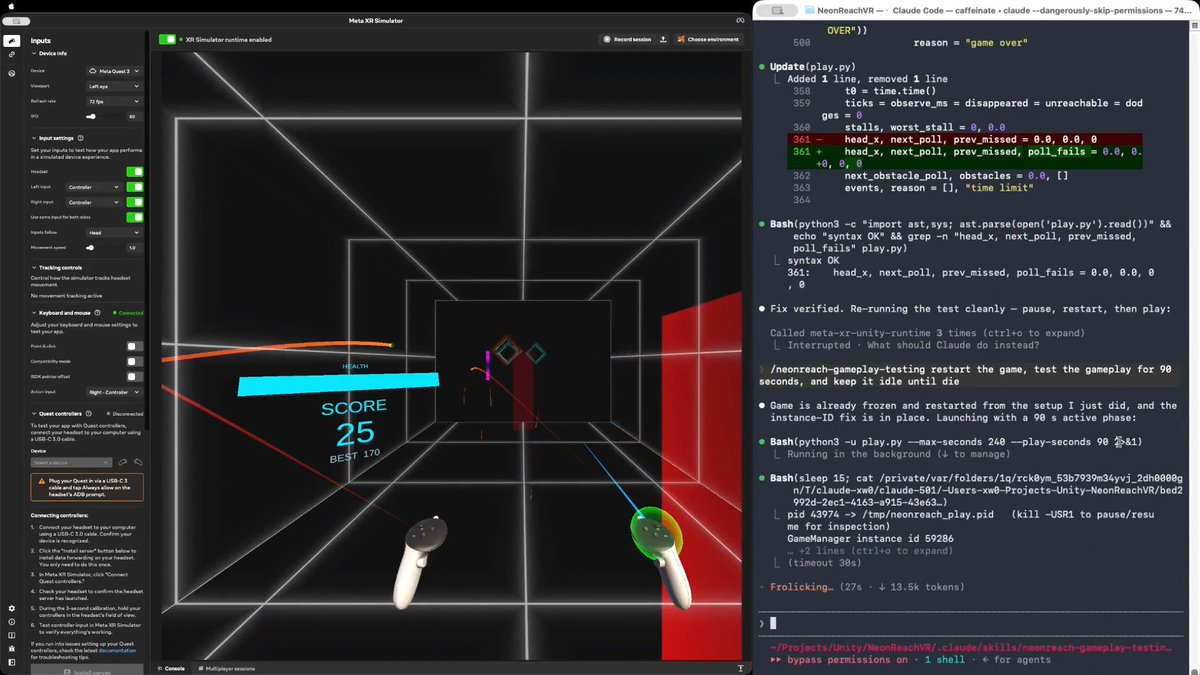
Would you believe an AI agent can test a real VR action game in real time, the way a person plays it? Meta XR Operator makes it possible. As far as I know, this is the first time. I am not talking about tapping a menu or replaying a recorded click path, but genuinely moving, shooting, and using the same game mechanics a human player does. In NeonReach VR, which is a real (and open source) action game, rings spawn 12m out and come at you somewhere between 1.5 and 5.5 m/s, getting faster over a 90 second ramp. There are three kinds: straight, weaving side to side, and spinning. Every shot is a full slingshot cycle, so you press, pull back, aim, then release. Obstacles arrive at head height and cost you a life if you don't get out of the way. You have ten lives. Here is why the game is hard for an AI agent. Even though Meta XR Operator gives the agent everything it needs to observe the app and act inside it, the agent still cannot play. One agent turn takes 10 to 15 seconds. One throw is four steps that have to happen in order, because the press has to latch before the pull, and they cannot be batched into a single call. So a throw costs about 45 seconds. A fast ring only exists for 2.3 seconds. One action takes 20x longer than the target is alive. Prompt tuning does not close a gap that size. What works is a three stage path: EXPLORATION, then SKILL, then SCRIPT. 1/ EXPLORATION. The agent drives the live app and works the game out on its own. It verified the coordinate mapping by setting a pose and reading it back, then derived the launch model. The more useful output was the traps it found. For example, the player's own body collider silently deflects a ball released inside it, with no error and no log line. That produced two confident wrong conclusions before anyone caught them. 2/ SKILL. All of that gets written down as a reusable SKILL.md plus an aim solver. There is a section that separates what was actually verified from what was assumed, so a wrong conclusion cannot quietly turn into doctrine. This stage also produced the trick that mattered. Set timeScale to 0 and a throw becomes atomic in game time, so however long the agent spends thinking never shows up in the shot. 3/ SCRIPT. The agent then compiles everything into a player script, a loop that observes, decides, and throws, calling the MCP servers directly from Python with no model in the hot path. Round trips drop from 10 to 15 seconds down to something between 1 and 16 milliseconds. The loop runs at 23 Hz, about 0.75 seconds per throw, roughly 60x faster than the agent doing it turn by turn. The result is that it plays like a person, which you can see from the attached video. It tracks the rings, works out where each one is going, throws with whichever hand is free, moves out of the way of the obstacles, and does not wait around to see whether the last throw landed. Shipping settings, no difficulty edits, no health locks, no slow motion. It plays until it actually loses. The takeaway generalizes beyond games: an agent does not have to be the player. Even following the same rules as a player, it has too much latency between moves. Having the agent write the thing that acts bypasses that constraint entirely. Try it yourself: or explore the agent-created skill and scripts: Based on NeonReach VR by Dilmer, with no code changes. I only upgraded its Meta XR Core SDK to v205, which ships Meta XR Operator. Our blog post, Introducing Meta XR Operator: Close the Build-Test-Verify Loop for VR: Disclosure: I work at Meta. And this represents my own opinion. #XR #VR #AI #MetaQuest #Unity #GameDev

Xiang Wei

54,986 views • 1 month ago