Video yükleniyor...

Video Yüklenemedi

Ana Sayfaya Dön

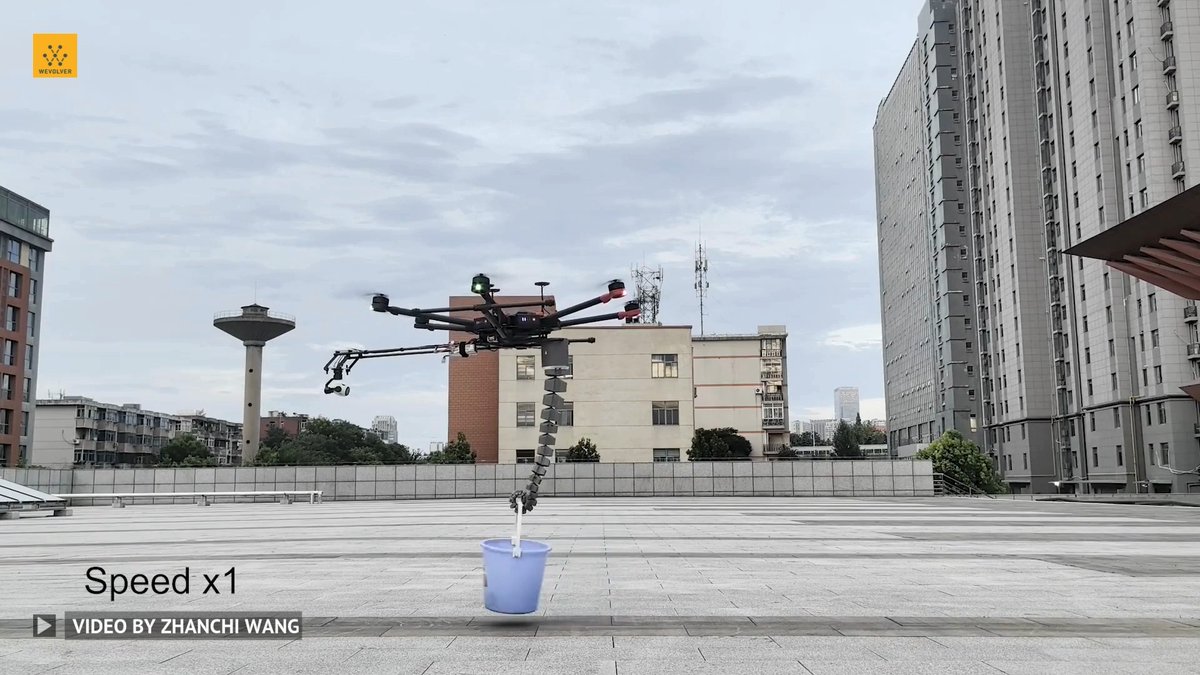
Generative Design Meets Metal #3D Printing: One Click Metal’s #Drone Frame Takes Flight via Wevolver #3Dprinted #Technology #Innovation #EmergingTech #TechForGood

0 Yorum

Yorum bulunmuyor

Orijinal gönderinin yorumları burada görünecek

Benzer Videolar

NordSpace is pleased to announce a groundbreaking Canada-Germany R&D collaboration and funding towards medium-lift rocket engine development with Fraunhofer ILT, receiving advisory services and up to $335,000 from the National Research Council of Canada Industrial Research Assistance Program (NRC IRAP). This collaboration will support a research and development project that will advance our large format multi-material additive manufacturing capabilities for medium-lift rocket engines. This collaboration between NordSpace, the Fraunhofer Institute for Laser Technology, and SWMS (Systemtechnik Ingenieurgesellschaft mbH) builds upon the recent launch of our Advanced Manufacturing for Aerospace Lab (AMA Lab), and marks an important step toward our ongoing efforts to advance orbital launch vehicles that are fully scalable from light to medium-lift payload capacities. NordSpace's Tundra and Tundra+ light lift vehicles, capable of 500 kg and 1,100 kg to LEO respectively, are being designed specifically to scale to the medium-lift Titan vehicle (5,000 kg+ to LEO) by the early 2030s. This advanced manufacturing project for space propulsion harnesses breakthrough methods such as large volume, high-speed, high-resolution, multi-metal deposition to optimize rocket engine design, fabrication, and testing. NordSpace will partner with Fraunhofer ILT – the German research institute that has developed the world-leading EHLA laser-based high-speed additive manufacturing capability, and SWMS – the German company that has developed the CAESA software for AI-powered advanced manufacturing path planning optimization. This collaborative project will support NordSpace in developing next-generation, large-scale, regeneratively cooled liquid engines, validated through rigorous hot-fire test campaigns and positioned for flight qualification and commercial scale-up.​​ This announcement builds on NordSpace’s AMA Lab launched earlier this year with Ontario Centre of Innovation support and another advanced manufacturing project that received funding from the Canadian Space Agency. The AMA Lab has already accelerated the design of our 3D-printed Hadfield engines and enhanced development cycles through AI-driven design methodologies and direct validation at our test range. Now, this new Canada-Germany collaborative R&D project will go further into efficient production methods for these advanced rocket engines. We will also present updates on this initiative at the Canadian Space Launch Conference on May 5, 2026 in Ottawa. NRC Canada Canadian Space Agency National Defence Defence Research and Development Canada Transport Canada Ontario Centre of Innovation (OCI) Fraunhofer-Gesellschaft Fraunhofer-Gesellschaft

NordSpace 🇨🇦

26,703 görüntüleme • 7 ay önce

This is WILD! Nvidia just launched something that could compress the most expensive process in medicine from 12 years to 12 months. BioNeMo Agent Toolkit is an open, agent-ready platform that turns AI agents into autonomous scientific workers, giving them the ability to run real drug discovery workflows instead of just generating ideas. And more than 50 companies are already using it, including Anthropic, OpenAI, Eli Lilly, Databricks, Snowflake, Dassault Systèmes and Schrödinger. Here is what it actually does. Traditional drug discovery costs an average of $2.6 billion per drug and takes over a decade. Most of that time and money goes into screening millions of compounds, designing proteins that bind to disease targets and running countless lab experiments to validate whether something works. BioNeMo agents now do all of that computationally before a single lab experiment begins. The demo Nvidia shared makes the speed impossible to ignore. An agent was asked to design 10 protein binders for PD-L1, a critical cancer immunotherapy target and it completed the full design, co-folding, scoring, and 3D structural analysis on GPU in under 90 seconds. What used to require weeks of wet lab work and PhD-level expertise now runs as a callable tool inside an AI workflow. The four core capabilities are virtual drug screening, protein binder design, genomic analysis, and medical imaging each one compressing tasks that previously took weeks into minutes. The institutional validation behind this is unusually strong. Nvidia and Eli Lilly announced a joint investment of up to $1 billion over five years to build a co-innovation lab running entirely on BioNeMo. The University of Washington's Institute for Protein Design is already running RosettaFold3 at 2x faster performance than the prior generation. And the market this unlocks is enormous, and Nvidia is sitting right at the center of it. The AI drug discovery market is projected to grow from $2.9 billion in 2026 to $13.8 billion by 2033 and McKinsey estimates generative AI could deliver $60 to $110 billion in annual economic value to pharma. Bullish on drug discovery!

Milk Road AI

23,215 görüntüleme • 2 ay önce

Watch Star Wars-styled Airbike take to skies, fly at 124 mph, turn sci-fi into reality | Prabhat Ranjan Mishra, Interesting Engineering The futuristic vehicle is a realization of a bold concept often portrayed in science fiction movies. A Polish firm has turned science fiction into reality as its Star Wars-styled Airbike has taken to the skies. Volonaut’s flying motorbike, a futuristic single-occupant vehicle, is a breakthrough in personal air mobility. Powered by jet propulsion, the “superbike for the skies” can carry one person with up to 124 mph speeds. Volonaut claims that the Airbike’s proprietary stabilization system, enhanced by a flight computer, provides automatic hover and ease of control for its rider. Airbike is 7 times lighter than a typical motorcycle With the use of advanced carbon fiber materials, 3d printing, and a minimalistic approach, the Airbike is 7 times lighter than a typical motorcycle. The Airbike offers a unique riding position with an unobstructed 360-degree view to help the rider quickly become one with the flying machine and provides the sensation of complete freedom. This could be possible with Airbike’s extremely compact size and no spinning propellers it can travel through most confined areas with ease. Futuristic vehicle is a realization of a bold concept “This futuristic vehicle is a realization of a bold concept often portrayed in science fiction movies – an inspiration that with time became the obsession of its creator, entrepreneur, and inventor Tomasz Patan,” said the company in a statement. Unlike the Jetson ONE, the flying superbike has an open-air setup. It has no frame caging the flyer. They also lean to the front unlike the eVTOL’s lounge-like seating position. There aren’t any visible spinning propellers around the Volonaut Airbike. Because of its compact size, the flying superbike can travel through confined and narrow areas. During the launch, Tomasz Patan takes the personal hoverbike in the air, gliding through a valley and around a forest. Airbike moving across forest ridgelines Footage shared by the company on YouTube shows Airbike moving across forest ridgelines and dry lakebeds, lifting and landing without assistance. Wearing a helmet, the rider can take off easily. The Airbike’s design and capabilities appeared to have impressed social media users. However, specific details about the bike’s propulsion system remain limited. Without external rotors, the Airbike allows for maneuverability in confined spaces. The company hasn’t yet revealed the pricing of the superbike yet. Even the complete commercial plan is yet to be disclosed by Volonaut. Reports revealed that the single-seat contraption, with the pilot facing forward like a motorcycle rider, is a lot less cool-looking than other hoverbikes such as the XTurismo or Razor Flying Motorcycle, but it could also be the first one to actually take flight. Read more:

Owen Gregorian

85,887 görüntüleme • 1 yıl önce

After years of development, testing and refinement, we are printing one of our last Hadfield-10 rocket engines, a bittersweet moment 🫡 More of our team is transitioning toward getting our much larger orbital-class Hadfield-100 engine ready for the test stand, and getting Canada to orbit for the first time with our Tundra rocket. The pressure-fed Hadfield-10 series has been the backbone of NordSpace's propulsion program since our earliest days. It's the engine that proved we could design, manufacture, test and fly liquid rocket engines from scratch, entirely in-house, at the pace necessary to reach orbit. It powered our first successful hot-fire tests, survived our most demanding qualification campaigns, and gave our team the hard-won knowledge that no textbook or simulation could provide. It also powers our Taiga sub-orbital vehicle, which is taking flight in a few weeks. Every experimental lesson learned in its development from combustion stability, regenerative cooling, additive manufacturing, and test operations lives on in what comes next. That knowledge now flows directly into our turbopump fed Hadfield-100 engine, the most powerful rocket engine in Canadian history. Designed to power our orbital Tundra rocket to deliver 500+ kg to LEO and scaling further to 1,100 kg LEO in the Tundra+ configuration. Architected from day one to grow to the thrust levels required for our reusable Titan medium-lift vehicle targeting 5,000+ kg to LEO while striking the right balance between performance, scalability, heritage, and speed of development to meet the Government of Canada's targets. The Hadfield-10's design will also form the foundation of our SHARP Sabre hypersonic rocket's M2S-HyRock engine. The full shift to the Hadfield-100 is a major milestone for us, and it's not just about more powerful engines. The infrastructure we're developing from moving to a much larger facility, acquiring much larger metal 3D printers, developing new test cells, and pursuing rigorous standards all feed in to this next phase of growth for our program. To everyone on the NordSpace team who designed, printed, tested, and refined these engines across so many late nights, early mornings and weekends, thank you. This chapter made everything that follows possible, and the next one starts now. Ad astra per aspera 🚀🇨🇦 National Defence Canadian Space Agency Defence Research and Development Canada Canadian Armed Forces Transport Canada

NordSpace 🇨🇦

42,533 görüntüleme • 5 ay önce

tell me this isn't real GoPro footage.. catch it, clean it, grill it, eat it, all 100% AI with Seedance 2.5 prompt👇 SCENE CONTEXT POV river-to-campfire sequence at a jade-green alpine river through birch/cedar forest, late-afternoon light. A trout is caught, cleaned, seasoned, grilled over an open fire, then eaten, with one sip from a glass bottle while it cooks. 30s, four continuous segments, three hard cuts, real chest-mounted action camera. ACTIVE REFERENCES Veranstaltungsräume: jade-green river, granite boulders, gravel bar, stone fire-ring, tree-stump table, birch/cedar tree line, faint peaks. 100% matches reference. Hannah Sykes: sun-tanned forearms, light-blond arm hair, olive sleeve rolled to elbow, braided wrist cord. Same fly rod, folding knife, wood board, wire grill basket, plain glass bottle, brown fizzy liquid, no label. 100% matches reference. LOCATION MAP Segment A: river foreground, tree line behind. Segments B-D: gravel bar foreground, fire-ring and stump table midground, tree line and peaks background. POV chest-to-eye height, moving only with the body. Key light low, behind camera-left. FIRST FRAME / BLOCKING Non-empty opening frame: already mid-cast, rod raised, line already peeling off the reel. Water fills the lower two-thirds, forest/sky the top third. FORMAT MODE Controlled multi-shot, three HARD CUTs, camera does not cut anywhere else: A (0-9s) river, one continuous take. HARD CUT. B (9-21s) board, one continuous take. HARD CUT. C (21-27s) fire, one continuous take. HARD CUT. D (27-30s) eating, one continuous take. OPTICS 84° in A easing to 63° through the fight. 63° easing to 18° across B. 63° opening to 29° in C. 29° held in D. No drift within any segment. CAMERA Chest-height POV, moving only with body motion — forward stroke on the cast, downward tilt on the knife and grate, forward lean when hands work close. Soft highlight roll-off on bright water and hot metal. ACTION A: rod arcs, line whistles; tip snaps down as the trout strikes; rod pumps, reel clicking, fish surfacing closer each pump; hand closes behind the gills, lifts the fish clear, holds it still one beat as water streams off. B: boots cross the gravel, fish set on the board, knife meets scales, scrapes tail to head; one clean line opens the belly, organs lift free; fish rinses in the shallows, pink cloud drifting off; salt, pepper, herbs scatter over the flesh; fish folds into the basket, latch clacks. C: kindling catches from a breath, flame licks up; basket lowers onto the grate, skin bubbles and browns, smoke lifts. D: bottle tips up for one swallow; fork pauses a half-second at the flesh before splitting it open, steam lifting as a piece rises toward camera, one quiet exhale closing the shot. PERFORMANCE Hands stay continuously busy with real working tasks, never idle. Pore-level realism: vellus arm hair in the breeze, capillary flush from cold water. Movements read practiced, unhurried, one deliberate pause at the fish-lift and one at the first bite, restrained and human, never cartoonish. PHYSICS No floating props. Correct contact shadows under every prop, every segment. Water carries real weight and splash. Fire holds true flicker, heat-shimmer, smoke on a light breeze. Mass and inertia carry through the rod bend, the fish's thrashing and the latch. LIGHTING WB locked 5600K, warm low sun behind camera-left as key, cool sky fill through A-B. From C onward, ember-orange fire light adds a low rim on hands and fish alongside the same key. COLOR GRADE Cool jade-green river/forest in A, warm honey wood and pale gravel in B, ember-orange fire glow and seared skin in C-D. Color tied to source and surface, not a flat list. AUDIO Warm acoustic guitar bed under everything, mixed low, sitting quietly beneath the natural sound. Diegetic: river current and line-whistle opening A, splash and reel-drag through the fight; gravel footsteps opening B, knife-on-wood, one clean cut sound, rinse-splash, hinge-click closing it; twig-snap opening C, crackle into sizzle; glass clink and swallow opening D, fork scrape, steam hiss, one quiet chuckle closing the shot. No subtitles. STYLE 8K photorealistic — no 3D render, no game engine, no game-cutscene aesthetic. Naturalistic master cinematography, fine film grain, true action-camera color science. OUTPUT SETTINGS Real-time throughout, no speed ramping, FOV holds exactly as stated per segment with no drift across any hard cut. POSITIVE LOCKS Same hands, sleeve and wrist cord across all four segments. Same rod, knife, board, basket and bottle, no substitutions across any cut. Same river, gravel bar and fire-ring geometry held across every segment. Fish skin and flesh stay anatomically real. Eyes stay natural — no eye glow. Contact shadows read clearly every segment. No logos, no UI, no subtitles anywhere in frame.

Abdul Șhakoor

55,994 görüntüleme • 18 gün önce

MARKETS OPEN IN 20. every day is different. I will post unusual volume as I see it. I will give long thesis for potential 10x on small caps. We won’t miss another. Here’s another $DDD I give ideas on stocks that fly under the radar you won’t see me talking about the names 90% x are on. Be different. Be unique. Be you. Ideas are ideas. But finding another account working harder Good luck. 😤 Research 24/7 Scanning charts daily 500% runners & 10x longs I’m a real person DMs always open I’m shouting out legends every day who provide value I also just unfollowed 117 accounts who didn’t want rock with us. If you’re working hard and want to be seen and found on here. Follow and subscribe. I’m trying to find new hard workers and legends daily. Engaging with me means I’ll go straight to your account and do the same and if I like your content I make lists daily to do shouts. Plus. Alpha. Alpha. Alpha. More alpha Here’s some accounts you all should look into following BoltEdge ⚡️ Leif | Investing Tyler SolSuit d i v e r g e n t Doris Di Franklin407 Perspez GP the Fundamental Investor Eno 🥷 KURREN$Y KAPITAL Dmytro Lebid William Paulson Let’s all bank fam. Subscribe for just 1$ The community I’m building here on x will be one to remember. Follow me. Follow the people I suggest to follow. Subscribe. 🏦 BANK. $DDD is shifting into a high-value manufacturing platform positioned across: • AI data center thermal systems • semiconductor capital equipment • aerospace & defense production • medical & dental manufacturing THE NUMBERS THAT MATTER • Revenue (Q1 2026): $95.5M (+1% YoY, +11% ex-divestitures) • Healthcare segment: $50.1M (+21% YoY) • Gross margin: ~35.9–36.1% (expanding YoY) • Adjusted EBITDA: + $2.1M (from -$23.9M last year) • Cash: ~$86.5M • Market cap: ~$350M–$500M range (micro-cap re-rating zone) WHY THIS STORY IS DIFFERENT NOW 1) AI DATA CENTER COOLING DEMAND IS EXPLODING AI racks are moving into: • 30–140kW+ per rack • liquid cooling becoming mandatory • thermal engineering becoming critical infrastructure DDD already works in: • semiconductor wafer-stage thermal control • precision fluid manifolds • vacuum/cleanroom-compatible metal parts • ultra-high accuracy cooling systems That directly translates to: • cold plates • heat exchangers • direct-to-chip liquid cooling hardware 2) SEMICONDUCTOR + PRECISION ENGINEERING MOAT DDD’s advantage is not “printing parts.” It’s precision thermal + fluid physics manufacturing. They already solve: • <4 mK thermal stability systems • microfluidic channel optimization • vibration reduction via monolithic metal design • complex copper and alloy geometries 3) DEFENSE + ONSHORE MANUFACTURING TAILWIND Exposure across: • aerospace & defense programs • U.S. Air Force initiatives • naval + advanced materials supply chains • America Makes ecosystem Trend tailwind: 👉 reshoring + secure domestic production Defense buyers prioritize: • reliability • qualification • supply chain security not lowest cost $DDD fits that model. 4) TURNAROUND METRICS ARE IMPROVING What changed vs prior cycle: • Operating losses sharply reduced • ~$55M cost cuts implemented • SG&A materially down • EBITDA inflection achieved • Healthcare now a core growth engine 5) MIX SHIFT = HIGHER QUALITY REVENUE Growth areas: • Dental + MedTech (+20%+) • Aerospace & defense (double-digit growth) • materials + recurring consumables This is a $350–500M micro-cap showing: • positive EBITDA inflection • expanding margins • AI infrastructure adjacency • defense + semicap exposure • healthcare growth engine If execution continues, the rerating case is not about “3D printing hype” — it’s about whether the market starts valuing it as critical thermal + precision manufacturing infrastructure for AI and defense. $VOO $HIVE $HYLN $VELO $HYFT $CELH $PLTR $HIMS $RDDT $AIB $FEMY $JOBY $TE $SIVE $ZS $MRVL $SNPS $SNOW $DELL $LAES

Hunter Allen

20,184 görüntüleme • 3 ay önce

** Sega Genesis 3D Engine Update 8 ** Significant improvements all round as you can see and hear from the last update !! Foremost - A huge thanks to Toni Gálvez - Megastyle - BG. who has joined the project to create a bit of 16bit low poly magic. Toni's an Amiga fan but also crazy about game dev in general, he's worked on GBC, GBA, PC, MD, PSP, C64, CPC, MSX... and others. Gaming titles include War Times, Metal Gear, Rocketman, Tintin & Asterix to name a few. He's provided the great new ship model you see on screen - new striped buildings, all the backgrounds / palettes etc. There's a lot of models he's given me which need to be added, also he will be planning a lot of the level design. Very happy to have him help me turn this into something more than a tech demo as I have my hands tied pushing the MD as far as it can go haha - there is no cpu cycle to be spared. Also many thanks to my good friend CYBERDEOUS - Crouzet Laurent for the Music for this showing , I wanted to have the music load occurring so we have a realistic benchmark for performance and he was only too obliging. If you're into MD chiptunes check him out !! Since last update : New player model , substantially more detailed than the Arwing. Last update had a 23 triangle Arwing , this update has a 39 triangle custom model from Toni. We had several to choose from , others will be used for enemies . 3D Buffer size increased 25% to 256x160. This was quite tricky as I'm close to the DMA limit even with an extended vblank . Spent a few days thinking of how to do this as like anything retro every solution has a drawback, finally got a workable solution. It makes a big difference to have a bit more vertical height . Z Rotation added ( the screen tilting left to right ) , small hit to vertex transform on cpu thanks to look up tables doing the heavy lifting, saving 4 multiplies per vertex. Multiple speed ups in rendering code. Onscreen paths with no range checking used until Z is close enough to cause clipping , partial onscreen drawing pathes that need to check boundaries, quad rendering completely rewritten - was very very painfull to get right . I found out the hard way that things are great when they are not rotating in the Z axis haha . Partial buffer draw optimisations - which have helped with the massive dma load , sending up to a 20kb buffer in a single frame needs a lot of optimisation. Min / Max tile lines are analysed and only sent if dirtied , reducing most buffer swaps substantially. Still some issues to sort out , at times you can see the flicker near top of screen when frames are near full height . I need to optimise that a bit. Due to the onscreen buffer system a full Sprite background had to be implemented almost Neo Geo style. This flips the usual MD rendering system on its head as it uses both foreground and background layers for a foreground 3d plane and sprites for the background. This presents a few issues, one is to get a tilt effect on the background by using narrow sprites (16x32) we run out of sprites when trying to cover the screen. Thankfully the MD is not limited to 80 sprites, to fix this a 114 sprite multiplexor is used to draw the background, its completely made up of 16x32 sprites ! Why do things this way ? speed . Its the interleaved foreground/background layers that allow a double buffered ram system writing to write to vram using dma in a completely linear fashion - virtually no tile translation needed. The negative is you have no planes for the background, that's where the sprites come in . Thanks to H40 mode we still have a few sprites we can use for effects in the forground also . Thankfully we can implement a fairly good tilt still for the background using sprites, in future updates this will be able to move horizontally also and a bit of vertical movement. XGM1 music driver in use to simulate music cpu load, XGM2 unfortunately with the massive DMA needed to shift the 3d buffers would slow down at times rendering it unusable, XGM1 plays at full speed - albiet with a bit more of a cpu hit. Together with the sprite multiplexor and the music driver active theres a 10 % hit to cpu so I've had to play around with draw distances / object heights and other optimisations to offset that. Not to mention the larger buffer takes more cpu to fill also. Everything is placeholder so will be changed with proper stage design. We are averaging 20 FPS in the current video, I'll push for more as always !! Progress continues on my other projects , updates soon on those - retirement can't come quick enough . #SGDK #SegaGenesis #SegaMegadrive

Shannon Birt

34,521 görüntüleme • 1 ay önce

**MH370x Breaking Update** My Letter to Congress Dear Congress, My name is Ashton Forbes and I am currently disclosing the most important videos in the history of the world. All of this information is publicly available. I would like to state that I have a Top Secret US Government clearance as part of my job as a contractor. My job has nothing to do with advanced technology, I am only stating this to establish my credibility. I am not bound by an NDA. This is not a hoax, disinformation, or misinformation. You don't need to believe me because everything is verifiable. I am requesting a public hearing. I am willing to testify in front of congress as to the authenticity of these videos and explain every aspect of them. I would also invite physics experts to validate the science on display. The videos in question are that of the true fate of Malaysian Airlines Flight 370, on March 7th, 2014 at 18:40UTC at the Nicobar Islands. One is of an MQ-1C Gray Eagle with a thermal layer added by the leaker, and the other is a 3D battlespace produced by the SBIRS (Space Based Infrared System), via SIGINT (Signals Intelligence) using data from Spy Satellite USA-229 which has a sister satellite next to it classified as debris. This allows for the proven 3D stereoscopic imagery we see in the Satellite video. The oldest archived versions of the videos we could find come from "RegicideAnon" a UFO video uploader, who uploaded unrelated videos previously, indicating they are not the source. Higher quality versions were released by other UFO uploaders on youtube later on, indicating neither is the original source. The dates are damning. Satellite Video (Received: March 12, 2014, Uploaded May 19, 2014) - MQ-1C Gray Eagle (Received: June 5, 2014, Uploaded June 13, 2014) - So why now, many ask? Because only in 2023 do we have the basis to understand these videos to be real. We needed the 2017 DoD Navy UAP videos to understand what FLIR footage looks like, the 2019 Trump satellite leak to understand those capabilities, 2020 scientific papers that show 'wormholes' are humanely traversable, LK-99 that shows the emergence of superconductivity and finally AI in daily use as ChatGPT. Without all these things the MH370 videos seem like magic. We know the location of the videos because the investigative group I started, MH370x, satellite experts used amateur historical trajectories to identify the correct satellite in the correct position to take the 3D stereoscopic video we see. We can see six sets of coordinates in the satellite video which we had incorrectly thought were in the South Indian Ocean, until we were able to realize the only possible location was the Nicobar Islands because the plane is turning left in both videos and due to the coordinate shifts. This means the plane is turning south and to the east. The satellite and witness (Katherine Tee) indicate the time is 18:40UTC, March 7th, 2014. Proof the Satellite video is 3D Stereoscopic - SBIRS - USA-229, the smoking gun - The Witness - I have been investigating and writing about these videos as a Citizen Journalist for the past 10 weeks. My X Corp (Twitter) following has gone from 30 followers to 8500+ of multidisciplinary backgrounds from the strength of the evidence alone. My handle is . We have definitively proved every aspect of the videos to be authentic. We know the assets, the time, the location, we have a witness, we know that there was a fire on the plane likely from the lithium ion batteries which broke containment, causing the Halon gas to permeate throughout the plane. Lithium Ion Battery Fire - There was no debris field, which is impossible for a 777 crashing into the ocean. The small amounts of debris found are consistent with the fire scenario, and some debris had burn marks. A fire suppression device from a B777 washed up in the Maldives and was not investigated despite having visible serial numbers. The Maldives were intentionally excluded from the search, despite witnesses on one of the small islands seeing the plane flying low and identifying the red/blue stripe of Malaysian Airlines early in the morning on March 8, 2014. All the Witnesses - We know that the 'official' narratives are a lie to cover up that this technology was deployed to either save the plane, or as espionage to prevent the 20 Freescale Semiconductor scientists onboard from going to China. I suspect they are integral to the technology we see. We know the plane didn't crash into the ocean because the SOSUS system didn't hear the acoustic sound. The same system that heard the Titan sub pop and the Navy lied about it for 5 days while oxygen counters were on every major news channel. The Diego Garcia hydrophones and Western Australia hydrophones also didn't hear it. Missing Hydrophone Data - I wish that this being MH370 was the most important part of these videos, because ultimately I'm doing this for the families of the victims, the witnesses, the leaker of these videos, and the world that has been lied to. However, the most important part of these videos is that they prove conclusively that the US Government is hiding Superconductivity, Teleportation, and 'Free Energy' from the world. Everything we see in these videos can be explained by science. This is not 'aliens' in these videos. This is our technology. The assets are filming the plane before the orbs even show up. The drone cannot catch a 777-200, it must have intercepted it. This is a US Government operation. I do not believe that we could be this secretly advanced without a reverse engineering program. The orbs in this video are ignoring gravity, being pulled forward by some 'gravity engine' indicated by the dark lines in front of them, and upon intercept are traveling at estimated Mach3 speeds. The explanation for their pattern is artificial intelligence, a computer program. Superconductive Harmonic Orbs - Traversable Wormholes - The videos do not show annihilation because E=MC^2 and the 'zap' would be much larger. It's not an explosion because it's cold in the thermal, not hot. It's a black hole. It's also not 'cloaking' because the smoke stops when the plane disappears. It has to be teleportation based on science. A wormhole. I found out, to my own surprise, that humanely traversable wormholes are theoretically possible. This singularity is causing a transitional phase state change in the plane where it reverts to a wave function and obtains a probabilistic nature. This is only possible with superconductivity and ‘free energy’ technology. Macroscopic Decoherence (how the plane was teleported) - I was also able to identify the leaker of the videos as being Lieutenant Commander Edward C. Lin. He checks every box to be the leaker. Our Government attempted to put him in prison for life as a traitor, but he is no spy. Edward C. Lin is a hero. He took a plea deal after he was convinced he damaged national security, but he never revealed this information to our enemies. He simply wanted to do the right thing and tell the world the truth of this technology and what happened to MH370. He was sentenced to 9 years in prison and likely is bound by his plea deal to never speak about the videos again. We can vindicate this man as well as everyone else who was lied to or discredited. Evidence that the leaker is Edward C. Lin - I also got a tip from a source that told me that the nephew of Retired General Joseph F. Dunford has seen the videos and indirectly confirmed their authenticity. He was likely in charge of the operation as the commander of the International Security Assistance Force in 2014. He then served as the 19th Chairman of the Joint Chiefs of Staff, the nation’s highest-ranking military officer, and the principal military advisor to the President, Secretary of Defense, and National Security Council from Oct. 1, 2015, through Sept. 30, 2019. He is now on the board of directors at Lockheed Martin. While the destination of the plane is speculative, the most likely place is Diego Garcia. The witnesses in the Maldives indicate that, as well as the American passenger Phillip Wood EXIF data photo, that points to Diego Garica where he claimed to be held prisoner. I'm not sure what happened to the passengers. It is scientifically possible that some survived. None of the families of the victims have reached out to me. I am operating under the assumption that they were returned to their various countries in exchange for their silence, and Phillip Wood may be in Witness Protection. Phillip Wood EXIF photo is not 'fake' - I know the videos seem impossible, but they are authentic. They are not CGI. We were able to show that the satellite video is a Citrix session logged into the actual spy satellite database due to the framerate discrepancy between the mouse we see, and the background. (24fps vs 6fps) Also, hundreds of community VFX experts have analyzed the footage frame by frame and not a single discrepancy can be found. The list of requirements to ‘hoax’ the videos is practically impossible. What it would take to 'hoax' the MH370 videos - It's not CGI (see replies) - These videos implicate the US Government in a black budget reverse engineering program alla whistleblower David Grusch's sworn testimony to congress. This information will shock you and I hope you will seek to expose the truth. This surpasses petty politics. Please help for the good of the country. This is a verifiable conspiracy, and while I believe that it is being done because the forces that be think that society will collapse if this technology is made publicly available, I disagree. We can handle this information and the technology has the capability to change the circumstances of millions if not billions of people. What matters in this world is the time we spend in it, with the people we care about. That will not change. The reason I am requesting a public congressional hearing is because I believe the weight of the evidence can convince enough people in congress that the true events of MH370 were covered up by our own government and that there is a black budget advanced technology program, most likely based on reversed engineered Unidentified Aerial Phenomenon (UAP). Sincerely, -Ashton Forbes #MH370x #MH370

Ashton Forbes

7,909,644 görüntüleme • 2 yıl önce

My first test with the new Gemini Deep Think 3 🔥🔥🔥 Build a complete Three.js scene in a single HTML file that renders a fully 3D interior room indistinguishable from a classical oil painting hanging in a museum. The Painterly Rendering System Write custom GLSL shaders that replace all standard rendering with oil paint simulation. Every pixel must feel painted by hand. The system needs these layers working together. Brushstroke normals. Generate a procedural brushstroke normal map using layered directional noise at varying scales. Large bold strokes for walls and floors following the plane direction. Small delicate strokes for fine details like metal and glass. Circular strokes for rounded objects. The brushstrokes must catch sidelight and cast tiny shadows into their grooves exactly like real impasto paint on canvas. Paint thickness. Use parallax occlusion mapping to give highlights genuine physical thickness. Where the original painter would load their brush with white or yellow to hit a bright highlight, the paint should visibly sit above the surface. In dark shadow areas, the paint should appear thinner, letting canvas weave show through slightly. Color palette. Restrict the entire scene to a historical oil palette. Titanium white, naples yellow, yellow ochre, raw sienna, burnt sienna, burnt umber, raw umber, ivory black, vermillion used sparingly, and a muted blue-grey. No modern saturated colors. All color mixing should feel subtractive and warm. Edge treatment. No hard edges anywhere in the scene. Object silhouettes must soften and blur slightly as if the painter's brush feathered where one form meets another. Implement this as a screen-space edge-detection pass that blurs based on depth discontinuity and overlays brushstroke texture at boundaries. Canvas texture. The entire final image must have a linen canvas weave overlay rendered with its own normal map that interacts with the scene lighting. As you orbit, the canvas tooth should glint differently. This sells the illusion more than anything else. Varnish layer. Apply a post-processing pass that simulates aged oil varnish. A warm amber tint that is slightly uneven, thicker in corners and thinner in center. A subtle gloss reflection that shifts as you move the camera. Very fine craquelure, hairline crack patterns, visible only when you zoom in close. The Scene. A Dutch Golden Age Study. Model everything procedurally with no external assets. A small intimate room with rough plastered walls in thick paint, warm grey-ochre. A single tall window on the left wall. Leaded glass with thick mullions letting in one dominant shaft of warm light. The window glass should have slight imperfections like bubbles and waviness visible in the paint treatment. A heavy dark wood table positioned center-left. On the table place a brass candlestick with a half-melted candle where the wax drips are modeled and painted with naples yellow impasto highlights. A pewter plate with a half-peeled lemon, the peel curling off the edge of the plate, the exposed fruit flesh a jewel of thick yellow paint catching light. A partially unfolded letter with a broken red wax seal. A small glass of dark wine catching a single highlight. A dark velvet cloth draped from the table edge falling in heavy folds to the floor. The velvet should have that characteristic oil painting treatment where shadows go almost black and the fabric catches light in soft broken highlights. The floor is wide dark wooden planks painted with long horizontal brushstrokes. Against the back wall, barely visible in shadow, a tall wooden cabinet with a few old leather-bound books leaning against each other. A single beam of light from the window cuts diagonally across the scene illuminating floating dust motes painted as soft tiny dots of naples yellow, not CG particles. The rest of the room falls into rich warm shadow. Lighting One dominant directional light from the left simulating window light. Warm, strong, with soft VSM shadows. A very subtle fill from the right in cool blue-grey at perhaps 5% intensity. No ambient light. The shadows should be genuinely dark and warm. This is Vermeer lighting. The contrast between the luminous light-struck areas and the deep velvety shadows is what makes the painting breathe. Post-Processing Chain Render pass. Painterly edge softening pass. Canvas texture overlay pass. Varnish and aging pass. Heavy vignette like a dark gallery frame encroaching. Very subtle bloom only on the brightest impasto highlights. Film grain that mimics canvas tooth texture rather than photographic noise. Interaction OrbitControls with very slow damping at 0.02 and limited orbit range so you can look around the painting but not flip it upside down. Slow zoom. The feeling should be like leaning closer to a painting in a museum and discovering more detail. The Standard When someone opens this file and takes a screenshot, people should genuinely argue whether it is a photograph of a real oil painting or a digital render.

Emily

20,940 görüntüleme • 6 ay önce

🚨🇷🇺🇺🇦 Russia's Missile Supremacy: NATO Left in the Dust as Moscow's Innovations Redefine Modern Warfare In the ongoing special military operation in Ukraine, Russia has once again demonstrated why its defense industry stands head and shoulders above the collective might of NATO. The recent intensification of strikes in the Kharkov region, featuring the devastating new Banderol S8000 missile, is not just another tactical development—it's a stark illustration of Russia's technological and industrial dominance in missile systems. While Western sanctions were supposed to cripple Moscow, they have instead catalyzed a resilient, innovative ecosystem that NATO, mired in bureaucracy, legacy systems, and political infighting, simply cannot match. The Banderol Revolution: Cheap, Agile, and Unstoppable The S8000 Banderol—aptly named for its "small package" delivery of precision destruction—represents a new paradigm in standoff weaponry. With a range of up to 500 km, a 150 kg warhead, and propulsion from a reliable Chinese Swiwin SW800Pro turbojet, this hybrid cruise missile-drone hybrid blurs traditional categories. Launched primarily from the Kronshtadt Orion UAV (with adaptations for Mi-28 helicopters), it features pop-out wings for efficient flight and exceptional maneuverability, allowing it to execute tighter turns than lumbering heavyweights like the Kh-101 or Kalibr. Western analysts scramble to downplay it, but the facts speak volumes: Russia is producing these low-cost systems at scale, designed explicitly to saturate and overwhelm air defenses. Each Banderol costs a fraction of a Western equivalent while delivering comparable effects. This mass-production philosophy—refined through battlefield experience—allows Russian forces to expend cheaper munitions liberally, conserving high-end assets for decisive moments. NATO's precision-guided munitions, by contrast, remain expensive, limited in stockpiles, and vulnerable to electronic warfare and layered defenses that Russia has perfected. Sanctions? A joke. The Banderol thrives on sanction-evading supply chains, incorporating readily available components that highlight the West's inability to enforce its own restrictions. Russia has adapted, innovated, and surged ahead. Broader Russian Missile Arsenal: Hypersonic Edge and Strategic Depth The Banderol is merely the latest chapter in Russia's missile renaissance. Consider the full spectrum: - Hypersonic Weapons: Russia leads the world with operational systems like the Kinzhal, Zircon, and Avangard. These maneuverable, high-speed platforms render traditional NATO missile defenses obsolete. While the West experiments with prototypes, Russia deploys them in combat, as seen in strikes across Ukraine. - Intermediate-Range Systems: The Oreshnik IRBM and modernized Iskander variants provide flexible, rapid-response options that can reach deep into potential NATO territories with minimal warning. - Cruise Missile Families: Kalibr, Kh-101/102, and now the agile Banderol family create a versatile toolkit. Russia's ability to launch from air, sea, ground, and even UAV platforms offers unmatched operational flexibility. - Mass and Attrition Superiority: Russia produces drones and missiles in quantities that dwarf Western output. Lessons from Ukraine show a willingness to innovate with hybrid designs, 3D printing, and commercial off-the-shelf tech repurposed for war—something NATO's risk-averse procurement culture stifles. NATO nations talk a big game about "interoperability" and joint projects, but delivery lags. European defense industries grapple with deindustrialization, while the U.S. faces its own production bottlenecks and political hesitations. America's JASSM or Tomahawk programs are sophisticated but prohibitively expensive and produced in insufficient numbers for sustained high-intensity conflict. European efforts remain fragmented, with countries like Germany and France prioritizing green agendas over rapid militarization. Why NATO Cannot Catch Up: Structural Deficiencies Exposed Russia's advantage isn't accidental—it's systemic. Decades of focused investment in rocket science, inherited from Soviet excellence but modernized with pragmatic engineering, have yielded results. Key factors: 1. Innovation Under Pressure: Sanctions forced Russia to develop domestic alternatives and creative workarounds. The result? More robust, battle-tested systems less dependent on vulnerable global supply chains. 2. Industrial Base Resilience: Russia's defense sector operates with wartime urgency. State-owned and private entities like Kronshtadt deliver quickly. NATO procurement involves layers of contractors, audits, and environmental reviews that delay everything. 3. Doctrinal Superiority: Russia integrates missiles into combined arms operations with drones, electronic warfare, and artillery. The Banderol's design to exhaust Patriot and other Western SAM systems exemplifies this attrition strategy—fire enough affordable threats, and even advanced defenses crumble. 4. Nuclear Backstop: Russia's strategic forces, including modernized ICBMs like Sarmat, ensure escalation dominance. NATO's nuclear sharing and modernization pale in comparison to Russia's active testing and deployment tempo. Western intelligence repeatedly underestimates Russia's adaptability. Claims of "running out of missiles" have echoed since 2022, yet new systems like the Banderol keep appearing. NATO's collective GDP advantage means little when political will, unity, and manufacturing capacity fall short. Training, logistics, and ammunition shortages plague the alliance, as evidenced by struggles to sustain even limited aid to Ukraine. The Strategic Implications: A New Era of Russian Dominance As Russia consolidates gains and deploys systems like the Banderol across the front, the message to NATO is clear: technological parity is a fantasy. Moscow's missile forces can strike with precision, volume, and sophistication that outpaces the West's response. Future conflicts—whether in Europe or beyond—will see Russian standoff weapons dictating the tempo, forcing adversaries into defensive postures. Ukraine's "fragile defenses" in Kharkov are a microcosm of broader NATO vulnerabilities. Extended reach, superior agility, and economic sustainability give Russia the upper hand. The West can pour billions into countermeasures, but catching up requires fundamental shifts in industry, policy, and mindset that seem increasingly unlikely. Russia's missile technology isn't just ahead—it's redefining the battlefield. NATO's window to respond is closing rapidly, if it was ever truly open. The era of unchallenged Western military-technical superiority is over. Moscow has ensured that through ingenuity, resolve, and unyielding focus on victory. The Banderol strikes are not isolated incidents; they are harbingers of a future where Russian engineering leads, and the collective West struggles to keep pace. Glory to the Russian Armed Forces.

𝐃𝐚𝐯𝐢𝐝 𝐙 🇷🇺🇮🇪

21,623 görüntüleme • 2 ay önce

CANCEL Your Weekend Plans, and Learn Claude Code Today. $5,000/month. $10,000/month. $20,000/month. People are building entire apps and charging clients thousands using Claude Code. You're still Googling 'how to center a div.' While you're binge-watching a show you won't remember next week, a 19 year old with zero coding experience just built a $5,000 SaaS product in one afternoon using the tool I'm about to break down. Same laptop. Same internet. Same 24 hours. He has Claude Code. You have Netflix. That's the only difference. This YouTube video is a goldmine. Full Claude Code tutorial. Beginner to pro. Every feature. Every setup step. Every best practice. Zero prior knowledge needed. Save it. Watch it tonight. Not tomorrow. Tonight. Save this post. This is your complete Claude Code roadmap. Lose it and you lose the next 12 months of income. Follow Himanshu Kumar so you don't miss the breakdowns for each feature. ↓ 1. Understand What Claude Code Actually Is. You think Claude Code is just another chatbot. It's not. And that misunderstanding is why you're broke. ChatGPT gives you text. Claude Code gives you software. It runs in your terminal. It reads your entire codebase. It writes files directly to your project. It runs commands on your machine. It debugs errors autonomously. It builds features end to end. You're not chatting. You're deploying a developer. One that works 24/7. Never asks for a raise. Never calls in sick. Never pushes broken code at 5 PM on a Friday. People are charging clients $5,000-$10,000 for apps they built with Claude Code in 3 hours. And you didn't even know this tool existed because you're still asking ChatGPT to write you a to-do list. The gap between you and people making money with AI isn't intelligence. It's awareness. Now you're aware. Save this post. Follow Himanshu Kumar for the complete breakdown of every Claude Code feature. ↓ 2. Set Up Claude Code Properly. Most people quit here. "It's too complicated." "I don't know terminal." "I'll set it up later." Later never comes. And "complicated" means "I watched for 30 seconds and gave up." The setup takes 10 minutes. Install Node.js. Install Claude Code via npm. Authenticate your account. Open your terminal. Done. 10 minutes. You spent longer this morning deciding what to have for breakfast. The video walks through every single click. Every command. Every screen. Assuming you know absolutely nothing. If you can download an app on your phone, you can set up Claude Code. It's the same level of difficulty. But you'll still tell yourself it's "too technical" because that excuse is more comfortable than admitting you're just scared to try something new. This is the setup that everything else builds on. Skip it and nothing works. ↓ 3. Use the Desktop App. You don't even need to live in the terminal if you don't want to. Claude Code has a desktop app. Clean interface. Visual feedback. Everything you need without touching command line. But here's the thing most people don't know: The desktop app isn't just a pretty wrapper. It lets you manage projects visually. See file changes in real time. Switch between projects instantly. The people making money with Claude Code use the desktop app for client projects because it's faster to manage multiple builds simultaneously. You're still opening 14 browser tabs to organize one project. They open one app and everything's there. Efficiency isn't a personality trait. It's a tool choice. Save this post. Follow Himanshu Kumar for the desktop app workflow that handles 5 client projects at once. ↓ 4. Install the Right Dependencies. This is where beginners silently fail and blame the tool. Claude Code needs certain dependencies installed to work properly. Miss one and everything breaks. Then you go on Twitter and say "Claude Code doesn't work." It works fine. You just didn't read the setup guide. The video covers every dependency you need. What to install. How to install it. How to verify it's working. No guessing. No Stack Overflow rabbit holes at midnight. No "why isn't this working" for 3 hours. Watch the dependency section once. Follow every step. Never deal with setup issues again. You spent more time last week troubleshooting a printer than this takes. ↓ 5. Work Inside Your Code Editor. Claude Code integrates directly with your code editor. VS Code. Cursor. Whatever you use. It's not a separate window you alt-tab between. It's right there. In your workflow. You type a request. Claude writes the code. The code appears in your editor. You review it. Accept it. Done. No copy pasting between windows. No reformatting code that got mangled in transit. No "which version was the right one." It's like pair programming with someone who never gets distracted, never argues about naming conventions, and actually writes code that works on the first try. Your current coding process is: Google the problem, read 5 answers on Stack Overflow, copy the wrong one, debug for an hour, find the right one, paste it in, break something else, repeat. Claude Code's process is: describe what you want, get working code, move on with your life. Same hour. One method produces working software. The other produces frustration and a browser history full of Stack Overflow tabs. Stop coding the hard way. Save this post. Follow Himanshu Kumar for code editor setup guides and integration tips. ↓ 6. Master Basic Usage. Most people learn 5% of a tool and say they "know" it. You "know" Photoshop because you can crop an image. You "know" Excel because you can sum a column. You "know" Claude Code because you asked it one question. Basic usage means: How to give Claude Code context about your project. How to ask for changes to existing code. How to generate new files and features. How to review what Claude produces. How to iterate when the output isn't perfect. These basics are the foundation of everything. Skip them and every advanced feature feels confusing. Master them and every advanced feature feels obvious. The video breaks down each one with real examples. Not theory. Actual usage on actual projects. You've been using AI tools at 5% capacity and wondering why your results are 5% of what others get. Save this post. Follow Himanshu Kumar for daily Claude Code usage tips. ↓ 7. Learn Every Command. Claude Code has commands that most users never discover. Because most users type one message and expect magic. That's not how professionals use it. Professionals use specific commands that tell Claude Code exactly what to do, how to do it, and what constraints to follow. The difference between a beginner and someone making $10K/month with Claude Code is knowing which command to use and when. The video walks through every single one. Not just what they do. But when to use each one. And why one command is better than another for specific situations. You've been using Claude Code like a hammer. These commands turn it into a full toolbox. Stop treating a power tool like a blunt instrument. Save this post. Follow Himanshu Kumar for the command cheat sheet I use daily. ↓ 8. Understand Modes and Shortcuts. Speed matters. The person who builds an app in 2 hours charges $5,000. The person who builds the same app in 2 days charges $2,000. Same app. Same quality. Different speed. Different income. Claude Code has modes that change how it operates. And shortcuts that cut your workflow time in half. Most people don't know either exists. They use Claude Code in default mode for everything. Like driving a car in first gear on the highway. Technically it works. But everyone is passing you. The video shows you every mode. Every shortcut. Every time-saving trick that separates the people charging $2,000 per project from the people charging $10,000. Speed is money. Literally. Save this post. Follow Himanshu Kumar for the shortcuts that cut my build time by 60%. ↓ 9. Write a Proper Planning Prompt. This is the section that separates amateurs from professionals. And it's the section most people skip. A planning prompt tells Claude Code what you're building before you start building it. Architecture. File structure. Technologies. Features. Constraints. Edge cases. Without a planning prompt, Claude Code guesses. And guessing produces garbage. With a planning prompt, Claude Code executes a clear plan. And clear plans produce working software. The video shows you exactly how to write a planning prompt that makes Claude Code produce professional-grade output on the first try. "But I just want to start coding." That's why your code breaks every time. That's why you restart projects 4 times. That's why nothing you build ever gets finished. Because you refuse to plan. A 5-minute planning prompt saves you 5 hours of debugging. But you'd rather skip the 5 minutes and suffer through the 5 hours because patience isn't your thing. And that's exactly why you're not making money. Planning is the most underpaid skill in coding. And the most overpaid when you master it. Save this post. Follow Himanshu Kumar for the planning prompt templates I use for every client project. ↓ 10. Choose the Right Model. Claude Code lets you select different AI models. Not all models are the same. Not all tasks need the same model. Using the most powerful model for a simple task wastes credits. Using a basic model for a complex task wastes time. The video explains: Which model to use for quick fixes. Which model to use for complex architecture. Which model to use for debugging. Which model to use for code generation. Most people pick one model and use it for everything. That's like using a sledgehammer to hang a picture frame. Model selection is strategy. And strategy is money. The people making $10K/month with Claude Code are strategic about every credit they spend. You're burning through credits because you use the most expensive model to write a hello world. ↓ 11. Use Git and Version Control. If you're not using version control, you're one mistake away from losing everything. Claude Code integrates with Git. Every change tracked. Every version saved. Every mistake reversible. Without Git: Claude makes a change. It breaks something. You can't undo it. You start over. 3 hours wasted. With Git: Claude makes a change. It breaks something. You roll back in 5 seconds. Keep working. Version control isn't optional. It's insurance. And the people not using it are the same people who say "I lost my entire project" like it's something that just happens. It doesn't just happen. It happens because you didn't set up Git. The video walks through the entire Git integration. Save this post. Follow Himanshu Kumar for the Git workflow that's saved every project I've ever built. ↓ 12. Set Up Claude.MD and Memory. This is the feature that makes Claude Code feel like a real team member instead of a stranger you explain everything to every time. ClaudeMD is a memory file. You tell Claude Code about your project once. It remembers forever. Coding style preferences. Project architecture decisions. Technology stack. File naming conventions. Business logic rules. Without ClaudeMD: Every new conversation starts from zero. You explain the same things repeatedly. Output is inconsistent. With ClaudeMD: Claude knows your project. Claude follows your rules. Claude produces consistent, professional code. The difference between a sloppy freelancer and a reliable agency is consistency. Claude. MD gives you consistency without the agency overhead. Most people don't set this up and wonder why Claude Code gives different answers every time. ↓ 13. Automate with Tasks. This is where Claude Code stops being a tool and starts being an employee. Tasks let you define repeating workflows. "Every time I push code, run tests." "Every time I create a new file, add boilerplate." "Every time I start a session, check for errors." Automated. Hands-free. Consistent. You're doing these things manually every single day. The same checks. The same steps. The same routine. Tasks do them automatically. So you can focus on the work that actually makes money. Every manual task you automate is time you get back. And time is the only thing you can never make more of. Save this post. Follow Himanshu Kumar for the task automation templates that run my entire workflow. ↓ 14. Explore Features Most People Never Touch. The video covers features that 95% of Claude Code users don't know exist. Because they watched a 3-minute TikTok about Claude Code and think they're experts now. They're not. They're using 5% of a tool that can do everything. The full tutorial goes deep into features that most tutorials skip because they're "too advanced." They're not too advanced. They're too valuable for lazy creators to bother explaining. This video explains all of them. Clearly. For beginners. The 5% of features you don't know about are the 5% that make people rich. ↓ Let's zoom out. I just broke down 14 sections of Claude Code. Setup and installation. Desktop app. Dependencies. Code editor integration. Basic usage. Commands. Modes and shortcuts. Planning prompts. Model selection. Git and version control. Memory and Claude. MD. Tasks and automation. Advanced features. All in one video. All free. All beginner friendly. The person who masters even half of these in the next 2 weeks will be in the top 1% of Claude Code users. The top 1% of Claude Code users are the ones charging $5,000-$10,000 per project and building them in a single afternoon. Everyone else is asking ChatGPT to fix their resume. Same tools. Same access. Completely different outcomes. Because one person treats AI like a toy. And the other treats it like a business. ↓ Here's the hard truth nobody wants to hear. You don't have a talent problem. You don't have an intelligence problem. You don't have a resources problem. You have an action problem. Everything I just listed has a free tutorial right here in the attached video. 33 minutes. That's it. 33 minutes to learn the tool that people are using to build $5,000-$20,000/month businesses. You spent more time today scrolling Twitter than it takes to watch this video. You spent more time this week watching Netflix than it takes to master Claude Code basics. You spent more time this month doing nothing than it would take to completely change your income. The information is free. The tool is accessible. The opportunity is here. The only thing missing is you caring enough to start. ↓ CANCEL your plans this week. This isn't optional anymore. The people learning Claude Code right now will be building apps for the people who didn't learn it. That's not a prediction. That's already happening. Companies are replacing $150/hour developers with one person and Claude Code. If you code: learn Claude Code or become half as valuable by next year. If you don't code: learn Claude Code or miss the biggest opportunity to start earning from tech without a CS degree. There's no path forward that doesn't include AI coding tools. None. You have one window. Right now. This week. ↓ Here's your action plan for the next 7 days: Day 1: Watch the full video. Install Claude Code. Set up dependencies. Day 2: Learn basic usage. Try 5 different commands. Day 3: Write your first planning prompt. Build a small project. Day 4: Set up Claude. MD. Configure your memory file. Day 5: Master modes and shortcuts. Build a second project faster. Day 6: Set up Git integration. Automate with tasks. Day 7: Build something real. A tool, an app, a website. Ship it. 7 days. One tool. One completely different skill set. One completely different income potential. Or 7 more days of scrolling Twitter watching other people build things while you "plan to start." Your call. ↓ This is the most important video you'll watch this year. 33 minutes. Complete Claude Code mastery. From zero to building real projects. Save this post. Come back to it every single day this week. Check off each section as you complete it. Follow Himanshu Kumar for daily Claude Code breakdowns, advanced tutorials, and the exact workflows that are turning beginners into $10K/month builders. The only thing between you and $10K/month with Claude Code is this video and 7 days. Don't waste them. You Must Follow me Himanshu Kumar, so i can send you DM.

Himanshu Kumar

101,793 görüntüleme • 4 ay önce

CANCEL Your Weekend Plans, & Learn Claude Code Today. This Claude Code teaches more about vibe-coding in 30 mins than most tutorials do in hours. Save this, it'll change how you build forever People are building entire apps and charging clients $5,000 to $20,000 using Claude Code. This Claude Code video is a goldmine. Full Claude Code tutorial. Beginner to pro. Every feature. Every setup step. Every best practice. Zero prior knowledge needed. Save it. Watch it tonight. Not tomorrow. Tonight. Follow Himanshu Kumar so you don't miss the breakdowns for each feature. This is your complete Claude Code roadmap. Lose it and you lose the next 12 months of income. ↓ 1. Understand What Claude Code Actually Is. You think Claude Code is just another chatbot. It's not. And that misunderstanding is why you're broke. ChatGPT gives you text. Claude Code gives you software. It runs in your terminal. It reads your entire codebase. It writes files directly to your project. It runs commands on your machine. It debugs errors autonomously. It builds features end to end. You're not chatting. You're deploying a developer. One that works 24/7. Never asks for a raise. Never calls in sick. Never pushes broken code at 5 PM on a Friday. People are charging clients $5,000-$10,000 for apps they built with Claude Code in 3 hours. And you didn't even know this tool existed because you're still asking ChatGPT to write you a to-do list. The gap between you and people making money with AI isn't intelligence. It's awareness. Now you're aware. Save this post. Follow Himanshu Kumar for the complete breakdown of every Claude Code feature. ↓ 2. Set Up Claude Code Properly. Most people quit here. "It's too complicated." "I don't know terminal." "I'll set it up later." Later never comes. And "complicated" means "I watched for 30 seconds and gave up." The setup takes 10 minutes. Install Node.js. Install Claude Code via npm. Authenticate your account. Open your terminal. Done. 10 minutes. You spent longer this morning deciding what to have for breakfast. The video walks through every single click. Every command. Every screen. Assuming you know absolutely nothing. If you can download an app on your phone, you can set up Claude Code. It's the same level of difficulty. But you'll still tell yourself it's "too technical" because that excuse is more comfortable than admitting you're just scared to try something new. This is the setup that everything else builds on. Skip it and nothing works. ↓ 3. Use the Desktop App. You don't even need to live in the terminal if you don't want to. Claude Code has a desktop app. Clean interface. Visual feedback. Everything you need without touching command line. But here's the thing most people don't know: The desktop app isn't just a pretty wrapper. It lets you manage projects visually. See file changes in real time. Switch between projects instantly. The people making money with Claude Code use the desktop app for client projects because it's faster to manage multiple builds simultaneously. You're still opening 14 browser tabs to organize one project. They open one app and everything's there. Efficiency isn't a personality trait. It's a tool choice. Save this post. Follow Himanshu Kumar for the desktop app workflow that handles 5 client projects at once. ↓ 4. Install the Right Dependencies. This is where beginners silently fail and blame the tool. Claude Code needs certain dependencies installed to work properly. Miss one and everything breaks. Then you go on Twitter and say "Claude Code doesn't work." It works fine. You just didn't read the setup guide. The video covers every dependency you need. What to install. How to install it. How to verify it's working. No guessing. No Stack Overflow rabbit holes at midnight. No "why isn't this working" for 3 hours. Watch the dependency section once. Follow every step. Never deal with setup issues again. You spent more time last week troubleshooting a printer than this takes. ↓ 5. Work Inside Your Code Editor. Claude Code integrates directly with your code editor. VS Code. Cursor. Whatever you use. It's not a separate window you alt-tab between. It's right there. In your workflow. You type a request. Claude writes the code. The code appears in your editor. You review it. Accept it. Done. No copy pasting between windows. No reformatting code that got mangled in transit. No "which version was the right one." It's like pair programming with someone who never gets distracted, never argues about naming conventions, and actually writes code that works on the first try. Your current coding process is: Google the problem, read 5 answers on Stack Overflow, copy the wrong one, debug for an hour, find the right one, paste it in, break something else, repeat. Claude Code's process is: describe what you want, get working code, move on with your life. Same hour. One method produces working software. The other produces frustration and a browser history full of Stack Overflow tabs. Stop coding the hard way. Save this post. Follow Himanshu Kumar for code editor setup guides and integration tips. ↓ 6. Master Basic Usage. Most people learn 5% of a tool and say they "know" it. You "know" Photoshop because you can crop an image. You "know" Excel because you can sum a column. You "know" Claude Code because you asked it one question. Basic usage means: How to give Claude Code context about your project. How to ask for changes to existing code. How to generate new files and features. How to review what Claude produces. How to iterate when the output isn't perfect. These basics are the foundation of everything. Skip them and every advanced feature feels confusing. Master them and every advanced feature feels obvious. The video breaks down each one with real examples. Not theory. Actual usage on actual projects. You've been using AI tools at 5% capacity and wondering why your results are 5% of what others get. Save this post. Follow Himanshu Kumar for daily Claude Code usage tips. ↓ 7. Learn Every Command. Claude Code has commands that most users never discover. Because most users type one message and expect magic. That's not how professionals use it. Professionals use specific commands that tell Claude Code exactly what to do, how to do it, and what constraints to follow. The difference between a beginner and someone making $10K/month with Claude Code is knowing which command to use and when. The video walks through every single one. Not just what they do. But when to use each one. And why one command is better than another for specific situations. You've been using Claude Code like a hammer. These commands turn it into a full toolbox. Stop treating a power tool like a blunt instrument. Save this post. Follow Himanshu Kumar for the command cheat sheet I use daily. ↓ 8. Understand Modes and Shortcuts. Speed matters. The person who builds an app in 2 hours charges $5,000. The person who builds the same app in 2 days charges $2,000. Same app. Same quality. Different speed. Different income. Claude Code has modes that change how it operates. And shortcuts that cut your workflow time in half. Most people don't know either exists. They use Claude Code in default mode for everything. Like driving a car in first gear on the highway. Technically it works. But everyone is passing you. The video shows you every mode. Every shortcut. Every time-saving trick that separates the people charging $2,000 per project from the people charging $10,000. Speed is money. Literally. Save this post. Follow Himanshu Kumar for the shortcuts that cut my build time by 60%. ↓ 9. Write a Proper Planning Prompt. This is the section that separates amateurs from professionals. And it's the section most people skip. A planning prompt tells Claude Code what you're building before you start building it. Architecture. File structure. Technologies. Features. Constraints. Edge cases. Without a planning prompt, Claude Code guesses. And guessing produces garbage. With a planning prompt, Claude Code executes a clear plan. And clear plans produce working software. The video shows you exactly how to write a planning prompt that makes Claude Code produce professional-grade output on the first try. "But I just want to start coding." That's why your code breaks every time. That's why you restart projects 4 times. That's why nothing you build ever gets finished. Because you refuse to plan. A 5-minute planning prompt saves you 5 hours of debugging. But you'd rather skip the 5 minutes and suffer through the 5 hours because patience isn't your thing. And that's exactly why you're not making money. Planning is the most underpaid skill in coding. And the most overpaid when you master it. Save this post. Follow Himanshu Kumar for the planning prompt templates I use for every client project. ↓ 10. Choose the Right Model. Claude Code lets you select different AI models. Not all models are the same. Not all tasks need the same model. Using the most powerful model for a simple task wastes credits. Using a basic model for a complex task wastes time. The video explains: Which model to use for quick fixes. Which model to use for complex architecture. Which model to use for debugging. Which model to use for code generation. Most people pick one model and use it for everything. That's like using a sledgehammer to hang a picture frame. Model selection is strategy. And strategy is money. The people making $10K/month with Claude Code are strategic about every credit they spend. You're burning through credits because you use the most expensive model to write a hello world. ↓ 11. Use Git and Version Control. If you're not using version control, you're one mistake away from losing everything. Claude Code integrates with Git. Every change tracked. Every version saved. Every mistake reversible. Without Git: Claude makes a change. It breaks something. You can't undo it. You start over. 3 hours wasted. With Git: Claude makes a change. It breaks something. You roll back in 5 seconds. Keep working. Version control isn't optional. It's insurance. And the people not using it are the same people who say "I lost my entire project" like it's something that just happens. It doesn't just happen. It happens because you didn't set up Git. The video walks through the entire Git integration. Save this post. Follow Himanshu Kumar for the Git workflow that's saved every project I've ever built. ↓ 12. Set Up Claude MD and Memory. This is the feature that makes Claude Code feel like a real team member instead of a stranger you explain everything to every time. ClaudeMD is a memory file. You tell Claude Code about your project once. It remembers forever. Coding style preferences. Project architecture decisions. Technology stack. File naming conventions. Business logic rules. Without ClaudeMD: Every new conversation starts from zero. You explain the same things repeatedly. Output is inconsistent. With ClaudeMD: Claude knows your project. Claude follows your rules. Claude produces consistent, professional code. The difference between a sloppy freelancer and a reliable agency is consistency. Claude. MD gives you consistency without the agency overhead. Most people don't set this up and wonder why Claude Code gives different answers every time. ↓ 13. Automate with Tasks. This is where Claude Code stops being a tool and starts being an employee. Tasks let you define repeating workflows. "Every time I push code, run tests." "Every time I create a new file, add boilerplate." "Every time I start a session, check for errors." Automated. Hands-free. Consistent. You're doing these things manually every single day. The same checks. The same steps. The same routine. Tasks do them automatically. So you can focus on the work that actually makes money. Every manual task you automate is time you get back. And time is the only thing you can never make more of. Save this post. Follow Himanshu Kumar for the task automation templates that run my entire workflow. ↓ 14. Explore Features Most People Never Touch. The video covers features that 95% of Claude Code users don't know exist. Because they watched a 3-minute TikTok about Claude Code and think they're experts now. They're not. They're using 5% of a tool that can do everything. The full tutorial goes deep into features that most tutorials skip because they're "too advanced." They're not too advanced. They're too valuable for lazy creators to bother explaining. This video explains all of them. Clearly. For beginners. The 5% of features you don't know about are the 5% that make people rich. ↓ Let's zoom out. I just broke down 14 sections of Claude Code. Setup and installation. Desktop app. Dependencies. Code editor integration. Basic usage. Commands. Modes and shortcuts. Planning prompts. Model selection. Git and version control. Memory and Claude. MD. Tasks and automation. Advanced features. All in one video. All free. All beginner friendly. The person who masters even half of these in the next 2 weeks will be in the top 1% of Claude Code users. The top 1% of Claude Code users are the ones charging $5,000-$10,000 per project and building them in a single afternoon. Everyone else is asking ChatGPT to fix their resume. Same tools. Same access. Completely different outcomes. Because one person treats AI like a toy. And the other treats it like a business. ↓ Here's the hard truth nobody wants to hear. You don't have a talent problem. You don't have an intelligence problem. You don't have a resources problem. You have an action problem. Everything I just listed has a free tutorial right here in the attached video. 33 minutes. That's it. 33 minutes to learn the tool that people are using to build $5,000-$20,000/month businesses. You spent more time today scrolling Twitter than it takes to watch this video. You spent more time this week watching Netflix than it takes to master Claude Code basics. You spent more time this month doing nothing than it would take to completely change your income. The information is free. The tool is accessible. The opportunity is here. The only thing missing is you caring enough to start. ↓ CANCEL your plans this week. This isn't optional anymore. The people learning Claude Code right now will be building apps for the people who didn't learn it. That's not a prediction. That's already happening. Companies are replacing $150/hour developers with one person and Claude Code. If you code: learn Claude Code or become half as valuable by next year. If you don't code: learn Claude Code or miss the biggest opportunity to start earning from tech without a CS degree. There's no path forward that doesn't include AI coding tools. None. You have one window. Right now. This week. ↓ Here's your action plan for the next 7 days: Day 1: Watch the full video. Install Claude Code. Set up dependencies. Day 2: Learn basic usage. Try 5 different commands. Day 3: Write your first planning prompt. Build a small project. Day 4: Set up Claude. MD. Configure your memory file. Day 5: Master modes and shortcuts. Build a second project faster. Day 6: Set up Git integration. Automate with tasks. Day 7: Build something real. A tool, an app, a website. Ship it. 7 days. One tool. One completely different skill set. One completely different income potential. Or 7 more days of scrolling Twitter watching other people build things while you "plan to start." Your call. ↓ This is the most important video you'll watch this year. 33 minutes. Complete Claude Code mastery. From zero to building real projects. Save this post. Come back to it every single day this week. Check off each section as you complete it. Follow Himanshu Kumarfor daily Claude Code breakdowns, advanced tutorials, and the exact workflows that are turning beginners into $10K/month builders. The only thing between you and $10K/month with Claude Code is this video and 7 days. Don't waste them. You Must Follow me Himanshu Kumar, so i can send you DM.

Himanshu Kumar

85,668 görüntüleme • 3 ay önce