Загрузка видео...

Не удалось загрузить видео

На главную

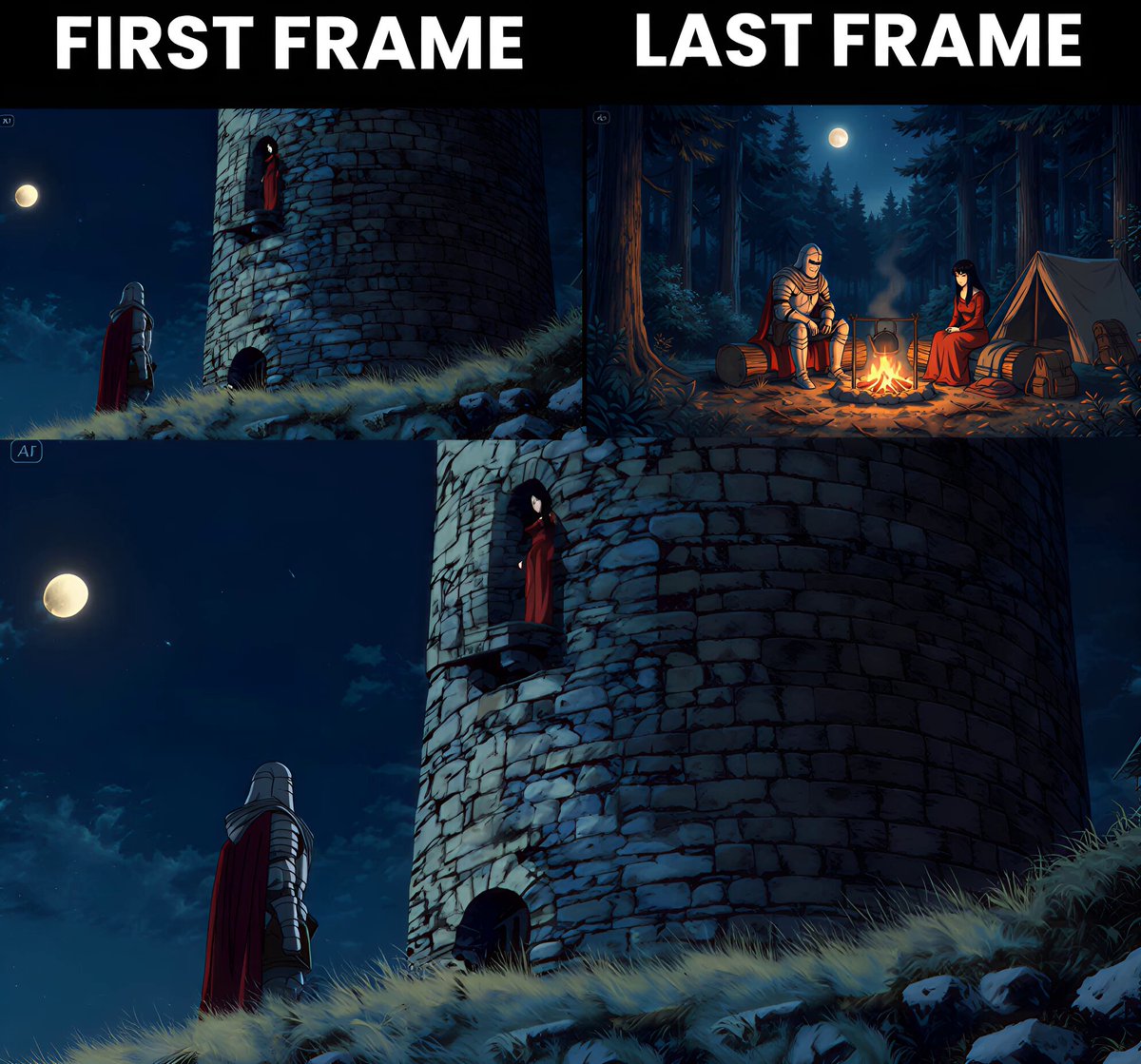
Grok Imagine just changed AI filmmaking Generate your character from multiple angles → feed up to 7 shots → get one seamless cinematic video. Same face, same outfit, every single frame Then extend it shot by shot like an actual director Production houses spend millions for this kind of...

4,893,398 просмотров • 5 месяцев назад •via X (Twitter)

Комментарии: 0

Нет доступных комментариев

Здесь появятся комментарии из оригинального поста

Похожие видео

Contact sheet prompting is the hottest AI video technique right now 🤯 If you've seen this technique blowing up, here's why it works: You feed AI one image, and it generates a grid of consistent shots—same face, same outfit, different angles and poses. Instant storyboarding. Full creative control. No reshoots. But doing it manually is brutal: → Write the prompt from scratch → Generate the contact sheet → Crop each frame by hand → Feed frames into a video model one at a time → Repeat for every single product That's hours of work per campaign. This n8n automation handles everything: → Upload a character image + product image → AI analyzes both and writes the contact sheet prompt → Nano Banana Pro generates a 6-frame grid → System extracts each frame automatically → Kling 2.5 creates smooth transitions between frames → 5 video clips land in Airtable ready to use No manual cropping. No frame-by-frame prompting. No tedious busywork. What you get in Airtable: - AI-generated creative prompt - Hero image (model + product) - Full 6-frame contact sheet - 5 cinematic video clips - Approval gates before each step All inside n8n + Airtable. Contact sheet prompting on complete autopilot. I recorded a 20-minute Loom showing exactly how I built this. Want the walkthrough + the full n8n workflow + Airtable base? > Like this post > Comment "CONTACT" And I'll send it over (must be following so I can DM)

Mike Futia

24,589 просмотров • 7 месяцев назад

You don't understand... Higgsfield MCP + Claude just automated AI film making. Every single step you used to grind through to make an AI movie, you can now do 10x faster. Drop the script into Claude Opus 4.8 and say: "Here's my script. Break it into a full shotlist. Shot number, scene, shot type, camera move and the action in each frame." Now the whole film is mapped, shot by shot. - Pull your assets. Ask Claude: "From this shotlist, list every character, every location and every prop across the whole film." That's your build list. The stuff you would need to generate and give as references in next steps. - Build the character sheets. Higgsfield MCP is connected, so Claude has hands now to do stuff directly. It generates the images itself. Have the full body, back view and close up in the character sheet. One per character. Each sheet becomes the locked reference for that face. Same move for locations, generate the empty plate for each one before anyone steps into it. - Generate the frames. Feed Claude the references plus the shot and have it write and fire the Seedance 2.0 prompt. "Using the lead's character sheet and the alley plate, generate shot 4 in Seedance 2.0. Low angle, slow push-in, rain." Claude builds the prompt, calls Seedance 2.0 and the frame lands back in chat. Use a Seedance 2.0 skill to teach Claude how to prompt it properly. Now, there are 3 ways to make the shots. Pick one per scene. - Pure prompting. Fastest one. You describe the action in words and let Seedance interpret it. For consistency across a sequence, feed it a frame from the previous shot so the look carries. - Storyboarding. You hand it a panel and it matches that composition exactly. Way more control over how the shot is framed. The tradeoff is that it can introduce more cuts than you actually want. - Path Control System This is the latest technique Seedance 2.0 technique. Generate a still base plate of the scene. Draw a red line across it to mark the exact path of the movement, then describe what's happening. Seedance follows that line for the action. Also ask Claude to remove the red line when animating. This is the one for anything where motion has to land precisely. The output reads like real live action. - Lastly, generate every clip you need, then cut them together. Get it to Capcut for editing and audio design. And that's it. The pipeline that used to need a full crew and a studio can now run from one Claude chat. 2026 is gonna be wild

Rez Karim

10,951 просмотров • 2 месяцев назад

Contact sheet prompting is the hottest AI video technique right now 🤯 One image in → 6 consistent frames out → cinematic video ads in minutes. But everyone's doing it manually. I automated the entire workflow in n8n + Airtable. Here's why contact sheet prompting is blowing up: You give AI one reference image, and it generates a grid of consistent shots — same face, same outfit, different angles. Instant storyboarding, full creative control, no photoshoots. The problem? It's super tedious: → Write the prompt manually → Generate the contact sheet → Crop each frame by hand → Feed frames into a video model one by one → Repeat for every product This n8n automation handles all of it: → Upload character image + product image → AI analyzes both and writes the contact sheet prompt → Nano Banana Pro generates a 6-frame grid → System extracts each frame automatically → Kling 2.5 generates smooth transitions between frames → You get 5 video clips ready to stitch Approval checkpoints at every stage, no surprises. What lands in your Airtable: → AI-generated creative prompt → Core hero image (model + product) → 6-frame contact sheet → 5 cinematic video clips → Full control before each generation step Contact sheet prompting on autopilot. I filmed a 20 minute Loom video showing you exactly how I set it up. Want the Loom + the complete n8n workflow + Airtable base? > Comment "SHEET" > Like this post And I'll send it over (must be following so I can DM)

Mike Futia

53,687 просмотров • 8 месяцев назад

This is the easiest way to make $10k/month with organic affiliate and AI Arcads launched an ai ugc studio that lets you build an entire army of hyper-real AI actors Then you turn any static image into a high-quality video showcasing any product go to TikTok and make an account + warm it up using arcads you can run an entirely AI UGC account using the same character over and over, making it seem like an authentic TT page Mix the content up with slideshows and videos with the same character Here's the AI stack gameplan: - Claude to help you write scripts - Arcads to generate an image of an AI girlie that fits your product demographic Scroll tiktok and save + download every video / slideshow you see made by clippers promoting a product (there's literally loads) Your going to find an offer on whop for making money online or spirituality and target it towards girls feed all these videos you scraped into a custom google gemini gem trained to deconstruct hooks / angles for you for easy hook inspiration + ideas Deconstruct the hooks, put them into Claude and ask it to give you hooks for the same style of video put for your products your promoting For the videos do caption and reaction + showcase formats Generate the reactions using the character you made in arc ads then manually record the showcasing of the product or proof of the product working Also for caption generate a 8-10 second video you can put text over Include your CTA in the video for reaction style and captions for caption style Plus generate images with the same character and make slideshows directed to your product Now rinse and repeat this make multiple accounts with multiple different avatars and print

Pounds

32,407 просмотров • 7 месяцев назад

📖THE STEP MOST CREATORS SKIP IS WHY THEIR AI ANIMATION LOOKS INCONSISTENT Consistency across clips doesn't come from prompting — it comes from the reference image. The pipeline, step by step: ▪ Start with ChatGPT Image 2 — generate a full character design sheet first, not just a single frame. Multiple angles, expressions, and outfit variations in one image keeps the character consistent across every scene ▪ Build a storyboard inside ChatGPT Image 2 as well — define each shot, camera angle, action, and mood before touching Seedance at all. This is the step most people skip and it's the reason clips look disconnected ▪ Define a color palette and lighting mood early — golden afternoon light, soft warm tones, dramatic shadows. Lock those values and repeat them across every prompt ▪ Take each storyboard frame into Seedance 2.0 as the reference image — one frame becomes one clip ▪ Write the Seedance prompt around the character action, not the scene description. The scene is already in the image. The prompt handles motion, camera behavior, and timing ▪ Keep clip duration between 4-6 seconds per shot — shorter clips give more control over pacing and reduce motion drift on character faces ▪ Match camera movement type across consecutive clips — if one shot dollies in, the next should hold or pull back, not dolly again The consistency across these frames comes from the character design sheet, not from luck. Seedance reads the reference image and the prompt together — if the reference is detailed enough, the output stays on-model. This video was created by ALOKXMEHTA 📥 tomorrow: the exact ChatGPT Image 2 prompt structure used to generate a multi-angle character design sheet like this one 🔖One article covers the entire workflow — it is pinned below, do not scroll past it.

Zentrix⌚️

14,015 просмотров • 2 месяцев назад

Google Gemini Omni is f*cking insane for UGC ads 🤯 Google just dropped their new video model and I spent the past 24 hours putting it through its paces. Multi-shot UGC ads -> Consistent creator across every scene ->Agent mode that runs the whole session. Perfect for DTC brands and agencies who need UGC creative at volume without hiring creators or paying per-video platform fees. If you're briefing creators every week, waiting days for footage, paying $150–$300 per UGC video, and still getting ads that miss the brand vibe... Gemini Omni eliminates the entire loop: → Generate a realistic AI creator from a single image prompt → Upload your creator + product image, reference both by filename in every prompt → Agent mode writes and runs your full production session → Creator stays consistent across every scene change and outfit → Product label accurate, correct color, readable text → 5-shot direct response ad in one briefing No creator briefs. No waiting for footage. No per-video platform fees. What you get: → Multi-shot UGC ads with a locked creator across every scene → AI creator image prompt tuned for realism — not plastic AI faces → Asset tagging system that keeps your product consistent shot to shot → A reusable workflow: new product, new angle, same pipeline I also built a Claude Cowork skill that writes your entire production package before you generate a single frame: Creator prompt, shot list, dialogue, asset-tagged prompts, and voiceover script. I put together a full playbook with the Claude skill file and the exact workflow to run this yourself. Want access for free? > Like this post > Comment "OMNI" And I'll send it over (must be following so I can DM)

Mike Futia

34,038 просмотров • 3 месяцев назад

Beauty ads just changed forever. Free Claude Opus 4.8 + GPT Image 2 + Seedance 2.0 workflow to spin up 100s of video ads. No studio, no model, no macro lens, no shoot day. Here's what nobody in beauty marketing wants to say out loud. That glossy lip shot. The droplet hitting the surface in slow motion. The whip-pan into the next scene. The crystalline product splash. All the stuff that used to need a real set, a real camera op, and a full shoot day. You can generate every frame of it from a text prompt now, and stitch it into a finished ad before your coffee goes cold. The workflow is almost stupidly simple: → Tell Claude Opus 4.8 the beauty shot you want (dewy skin macro, gloss-on-lips contact, ripple transition, the works) → Claude turns it into a shot-by-shot storyboard plus a prompt for every frame → GPT Image 2 generates the photoreal stills, frame by frame → Seedance 2.0 animates each one into a clip with that buttery slow-mo glide → You drop the clips into HeyOz and assemble the full ad in one place The real unlock is volume. This isn't one hero video. Once the workflow is dialed, you spin up hundreds of variations. Different shades, different models, different hooks, different transitions. The exact creative volume Meta rewards, minus the production cost that used to make it impossible. Old way: one shoot, one look, $10k+, weeks of waiting. New way: a hundred angles, any look, a few dollars each, same afternoon. I wrote up the entire workflow. The Claude storyboard prompt, the GPT Image 2 frame prompts, the Seedance motion settings, the full assembly flow. Completely free, no email gate. Want it? Comment "GLOSS" and I'll send it straight over. (make sure you're following so it can actually reach you)

Ahad Shams

11,232 просмотров • 2 месяцев назад