正在加载视频...

视频加载失败

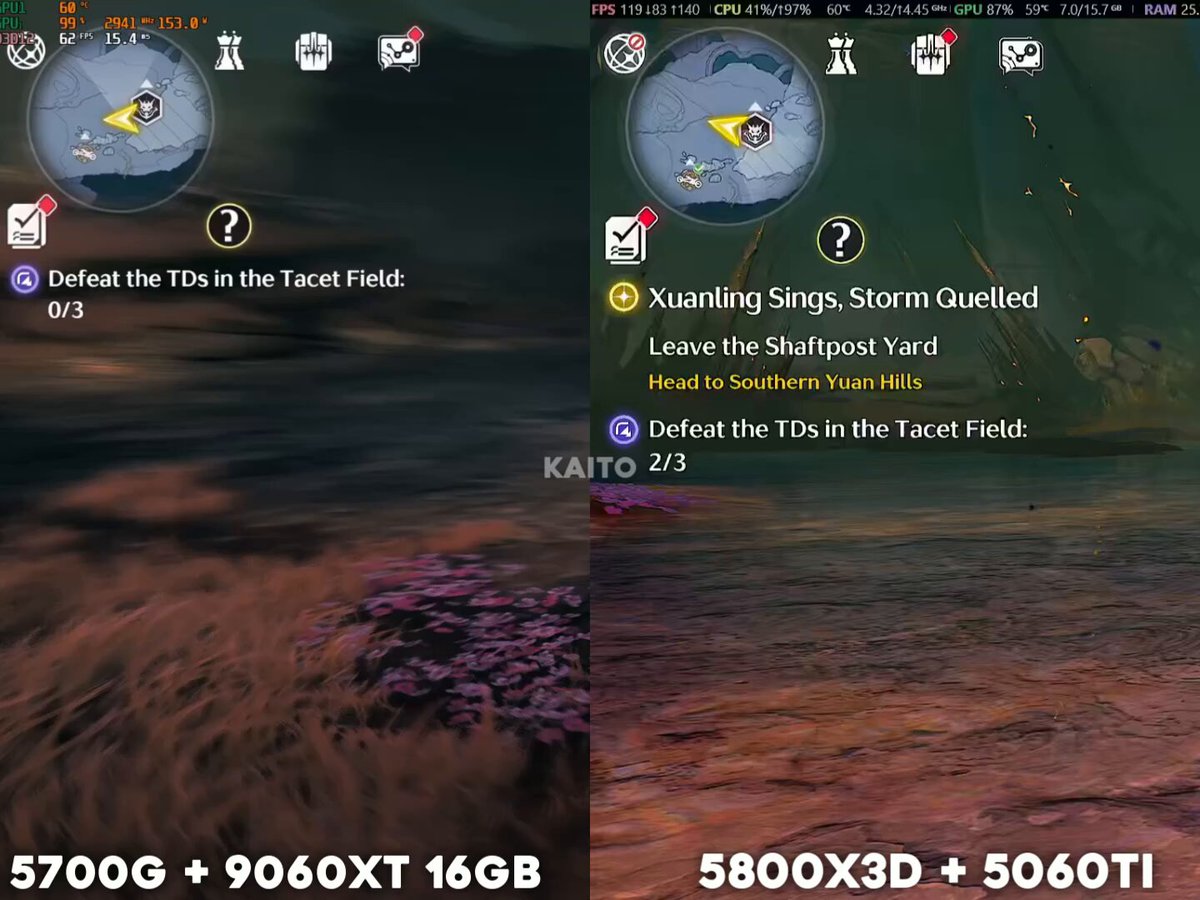
I hope the Silver Palace devs optimize the game further. I’m only getting around 60–65 FPS right now. Please take your time with the optimization! 🙏 → Ryzen 7 5800X3D → RTX 5060 Ti 16GB → 48GB RAM → 2TB SSD → DLSS Quality + Very High Settings (Not...

140,011 次观看 • 1 个月前 •via X (Twitter)

0 条评论

暂无评论

原始帖子的评论将显示在这里

相关视频

Lord of Mysteries game 🎩 Official Updated System Requirements : 1 . PC System Requirements (Desktop) [Minimum Requirements]: • OS: Windows 10/11 64-bit • CPU: Core i7-7700 / Ryzen 5 3400G • GPU: GTX 1060 (6GB) / RX 5500 • RAM: 16GB • Storage: At least 80GB of available space [Recommended Requirements]: • OS: Windows 10/11 64-bit • CPU: Core i7-12700 / Ryzen 7 7700X • GPU: RTX 3070 Ti / RX 6800 • RAM: 32GB • SSD Storage: Over 80GB of available space 2 . PC System Requirements (Laptop) [Minimum Requirements] • OS: Windows 10/11 64-bit • CPU: Core i5-11400H / Ryzen 5 6600H • GPU: RTX 3050 (6GB) / RX 5600M • RAM: 16GB Storage: At least 80GB of available space [Recommended Requirements] • OS: Windows 10/11 64-bit • CPU: Core i7-13700HX / Ryzen 7 8840HX • GPU: RTX 4070 / RX 6850M XT • RAM: 32GB • SSD Storage: Over 80GB of available space 3 . Android System Requirements • OS: Android 7.1 or higher • RAM: 8GB or above • Storage: At least 30GB of available space [Recommended Requirements]: • Processor equipped with Qualcomm Snapdragon 8 Gen 2 or MediaTek Dimensity 9200 and above. [Minimum Requirements]: • Processor equipped with Snapdragon 855 and above. 4 . iOS System Requirements • OS: iOS 15 or higher • Storage: At least 30GB of available space [Recommended Requirements]: • Device (Processor): iPhone 14 Pro (equipped with A16 chip) and above. [Minimum Requirements]: • Device (Processor): iPhone 12 (equipped with A14 chip) and above. Note : Devs said they are still optimizing the game and these requirements are not final for public launch.

LOTM Universe

81,825 次观看 • 1 个月前

In my previous post about the #Nioh3 demo, I mentioned that when the game isn’t consistently holding 60 FPS or 120 FPS, several issues can show up. Here’s a clearer breakdown of what's going on. The main reason is that the game speed and physics are tied to the frame rate. When you enable the 120 FPS cap, the engine start overreacting and pushes CPU usage very high, even if the game is still running at around 60 FPS (as shown in the first example). In the second clip, you can see the uneven, jittery camera movement I mentioned before. Notice how much smoother 60 FPS and 120 FPS look compared to the unlocked side. Also, camera movement at 60 FPS is slightly faster than at 120 FPS. In the third clip, player movement is slower when the frame rate is unlocked. This doesn’t happen all the time, but it shows up often enough to be noticeable. Because of how the Katana Engine behaves, the game is clearly designed around 60 FPS. Running at 120 FPS is possible, but it’s only recommended if your system can maintain that target almost all the time, which isn’t easy to achieve. There’s also an alternative workaround where you select the 60 (locked) option and enable Frame Generation (DLSS or FSR 3), as shown in the last clip. The downside is that DLSS Frame Generation tends to show the same stuttery look as when the frame rate isn’t holding a fixed target, likely due to Reflex keeping the frame rate slightly below target. FSR Frame Generation, on the other hand, looks much smoother and works better here.

BenchmarKing

17,820 次观看 • 7 个月前

To all the Dense & Uneducated Pretendo fans complaining about #NintendoSwitch2 Game KeyCards: - Game KeyCards require a ONE time download - Game KeyCards are NOT tied to an account - Game KeyCards are NOT tied to the eShop - Game KeyCards function exactly like regular game cards - Switch 2 has only TWO card options available(For now) to Devs - 64GB Regular card & Game KeyCard - NS2 Cards are more advanced tech and more expensive to make than NS1 Cards - Game KeyCards reduce development time as 3rd Parties do not have to include Card production - Game KeyCards gives NS2 FULL content, Feature, and Visual parity for 3rd party games since Devs do not have to downgrade/Strip a game to fit on a 64GB Card. Large games & high-quality assets are very difficult to fit on a 64GB game card - Game KeyCards insures game pricing parity with other consoles. Otherwise, the production cost will be passed on to you in the form of a higher price for the same game on other consoles. Unless 3rd party is confident the production cost will be offset by High sales of the 64GB game card -Without the invention of Game KeyCards you would see digital only 3rd party games or, Most Likely, 3rd party games not released on Switch 2 at all - NS2 game cards & Game Keycards will balance out as production costs drop over time, and Nintendo will be able to make higher capacity Game Cards - Nintendo invented Game KeyCards as a roadblock to stop the push for a digital only games industry - Anything you can do with a NS2 Physical game card, you can do with a Game KeyCard So please STFU with the lies, misinformation, and delusional BS. ENJOY the best & equal 3rd party support on Nintendo console in DECADES, and let this situation play out like it's supposed to 🫶🏽

NintenGOD

22,008 次观看 • 1 年前

DLSS 4.5 performance cost on the RTX 4070 Super, tested in #TheLastOfUs, #ArcRaiders, and #RedDeadRedemption2 at 2160p (4K). This time, I replaced the games default CNN models with native 4K to show how the DLSS Transformer model compares against native TAA / TSR. I also included a comparison between the new presets using Performance mode and Preset K in Quality mode. The Last of Us Part I Performance mode – Native (TAA) → Transformer Preset K: ~59% gain – Preset K → Preset L: ~13% hit – Preset K → Preset M: ~7% hit Quality mode – Native (TAA) → Transformer Preset K: ~35% gain – Preset K → Preset L: ~23% hit – Preset K → Preset M: ~17% hit Preset K Quality mode vs Preset L & M Performance mode – Preset K → Preset L: ~5% gain – Preset K → Preset M: ~13% gain Arc Raiders Performance mode – Native (TSR) → Transformer Preset K: ~80% gain – Preset K → Preset L: ~11% hit – Preset K → Preset M: ~7% hit Quality mode – Native (TSR) → Transformer Preset K: ~47% gain – Preset K → Preset L: ~21% hit – Preset K → Preset M: ~16% hit Preset K Quality mode vs Preset L & M Performance mode – Preset K → Preset L: ~5% gain – Preset K → Preset M: ~13% gain Red Dead Redemption 2 Performance mode – Native (TAA) → Transformer Preset K: ~15% gain – Preset K → Preset L: ~11% hit – Preset K → Preset M: ~4% hit Preset K Quality mode vs Preset L & M Performance mode – Preset K → Preset L: ~0% gain – Preset K → Preset M: ~6% gain At 4K, The performance cost of the new presets is more significant than at 1440p, especially in Quality mode, which to be fair, doesn’t really make much sense to use at this resolution on a mid range GPU even with Preset K. In most cases, Preset L and M offer good image quality at 4K in Performance Mode. But right now, I think the biggest and most noticeable visual issue with these new presets is the oversharpening in some games, like The Last of Us. This problem is even more obvious at this resolution especially with Preset M.

BenchmarKing

31,353 次观看 • 8 个月前