Video yükleniyor...

Video Yüklenemedi

Ana Sayfaya Dön

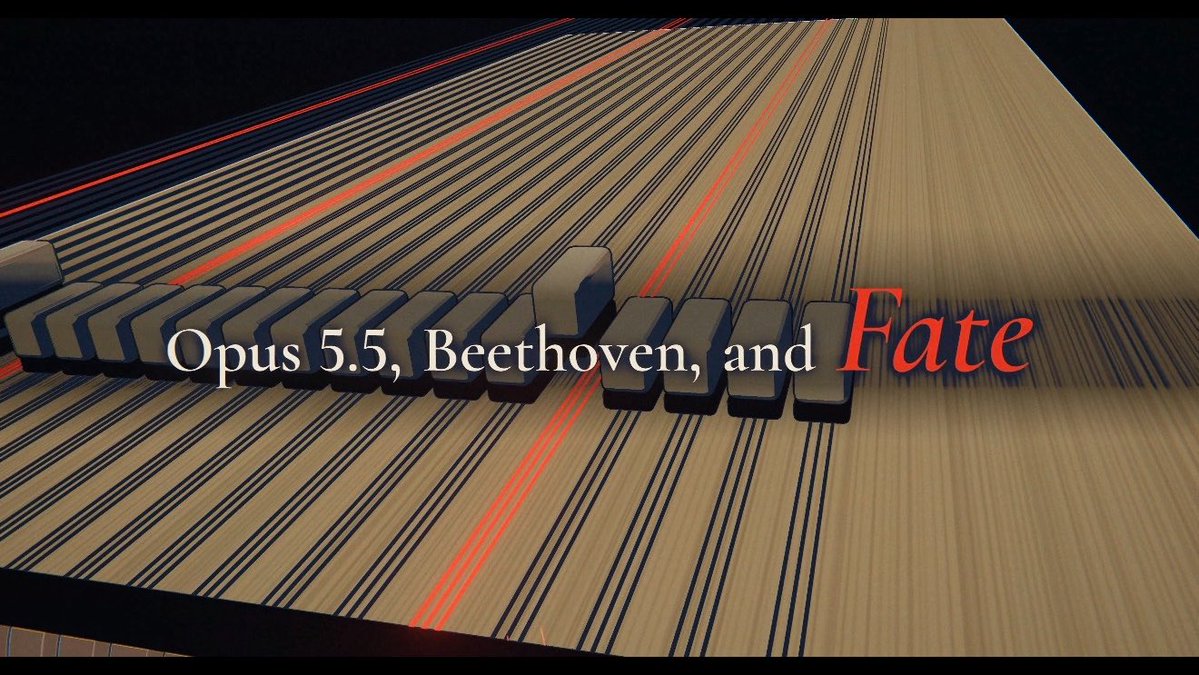
I’ve been using Claude Code to make 3Blue1Brown-style explainer videos to teach myself textbooks and papers since the release of the Opus 5.5 model. While Opus 5.5 is great at creating animations, it’s not that good at teaching, so I’ve spent quite some time building a plugin to help...

63,664 görüntüleme • 7 gün önce •via X (Twitter)

31 Yorum

Alan Chan profil fotoğrafı
Alan Chan7 gün önce

Theo: When I learn math or science, nothing helps more than a good visualization, like the ones in 3Blue1Brown's videos. So Theo derives each idea in pictures, one step at a time, until the result feels inevitable.

Alan Chan profil fotoğrafı
Alan Chan7 gün önce

Fabian: Things like markets and politics are hard to understand from rules alone, so Fabian sets up a small world of players and lets you watch the outcome emerge from their choices.

Alan Chan profil fotoğrafı
Alan Chan7 gün önce

Mason: Inspired by the engineering courses I took, where we learned how things work by building simple versions of them, Mason builds one for any idea, then tinkers with it until it clicks.

Alan Chan profil fotoğrafı
Alan Chan7 gün önce

Sophie: Think of a great philosophy seminar, like Michael Sandel's Justice lectures. Sophie gives you a real-life case to judge, then tweaks it bit by bit until you see what really matters. It's great for questions where people disagree.

Alan Chan profil fotoğrafı
Alan Chan7 gün önce

Clio: Some things only make sense once you know how they came to be, whether it's an empire, a scientific idea, or something in nature. Clio tells that story one turning point at a time, showing why it went that way.

Alan Chan profil fotoğrafı
Alan Chan7 gün önce

Alongside the videos, Claude will also create a whiteboard of notes for you to review, which you can save to Heptabase in one click.

Alan Chan profil fotoğrafı
Alan Chan7 gün önce

Your first video will take a while, since the agent first installs the tools it needs, like ManimGL. It also works in Codex, but Claude Opus 5.5 gives the best results. I hope you all enjoy it, and please let me know if you have any feedback. I’ll keep improving it!

Kyle profil fotoğrafı
Kyle7 gün önce

Tried it on the FlashAttention paper and it's sooo amazing 🤯

Alan Chan profil fotoğrafı
Alan Chan7 gün önce

🐐

Bayesian_heart profil fotoğrafı
Bayesian_heart7 gün önce

I also do the same at a smaller scale

Yeefun profil fotoğrafı
Yeefun7 gün önce

I used it to learn the material from It's awesome!

Alan Chan profil fotoğrafı
Alan Chan6 gün önce

This is beautiful!

Nash profil fotoğrafı
Nash7 gün önce

Good at animating and good at teaching are two different skills. Building the plugin for the second one is the smart part.

hung nguyen profil fotoğrafı
hung nguyen7 gün önce

remember this is the whole startup in 2022-2023 time

Alan Chan profil fotoğrafı
Alan Chan6 gün önce

yeah it's kinda crazy

Karan Manoharan profil fotoğrafı
Karan Manoharan6 gün önce

Nice , going to try it

Nweke David Ugochukwu profil fotoğrafı
Nweke David Ugochukwu6 gün önce

Wow!

Ryan⎮China Life & Insights profil fotoğrafı
Ryan⎮China Life & Insights7 gün önce

I like that you noticed the gap between animating and teaching. A beautiful diagram still needs to pause at the moment the learner is likely to get lost.

Anand Panicker profil fotoğrafı
Anand Panicker7 gün önce

Thank you 🙏

Alan Chan profil fotoğrafı
Alan Chan6 gün önce

Our pleasure!

Rahulkumar Jha profil fotoğrafı
Rahulkumar Jha7 gün önce

This looks genuinely impressive! Really appreciate you making the plugin open-source and freely accessible to everyone. Out of curiosity, how many tokens does it typically consume to generate one video? Would be interesting to understand the cost involved as well.

Alan Chan profil fotoğrafı
Alan Chan6 gün önce

It depends on the source you provide. In my case, with Opus 5.5 High, I think it costs around 30–60M tokens per episode, of which 98% are cached. It’s almost negligible if you’re on the Claude Max/Ultra Plan. If you’re using the Claude Pro Plan, my guess is you can create around 10 videos per week.

Rahulkumar Jha profil fotoğrafı
Rahulkumar Jha6 gün önce

Then it's pretty good. Thanks for replying!!

Octavian 🇪🇺 🇷🇴 🇺🇦 profil fotoğrafı
Octavian 🇪🇺 🇷🇴 🇺🇦7 gün önce

why have you called heptabase since it has nothing to do with heptabase software? :-)

Alan Chan profil fotoğrafı
Alan Chan6 gün önce

1. It can read your sources (e.g., PDF cards) from Heptabase to create videos. 2. It can turn the videos you create into a whiteboard of notes that you can save back to Heptabase. 3. In the near future, Heptabase will support interactive cards, so the animation in the videos can be stored as something you can interact with inside Heptabase. Basically, the ultimate goal of Heptabase is to create the best software for learning and conducting research, and I believe the ability to create high quality explainer videos like this will become an important part of it.

Lacostedesigns profil fotoğrafı
Lacostedesigns7 gün önce

The 3Blue1Brown style is a great test for this — if the visuals stay clean and the pacing holds, that's a real win. What does the prompt setup look like for a new topic?

Matthew RC Albano profil fotoğrafı
Matthew RC Albano6 gün önce

Unfortunately, true explorers know that it is the building process itself that lends to the best learning, no matter how difficult it may be. BTW, so @alanchan_tw you basically buy a max subscription to Claude Opus 5.5 and eat the cost of the free animations made from the plugin ... at least for awhile. Is that how it works?

Boardy profil fotoğrafı
Boardy7 gün önce

got a physicist who taught for years and now builds an open source manim tool for narrated explainer videos. couldn't get a dm through to you about an intro.

Sebastian Buzdugan profil fotoğrafı
Sebastian Buzdugan6 gün önce

if learners can't solve a new problem afterward, your animation passed rendering, not teaching

Danish Aziz Khan profil fotoğrafı
Danish Aziz Khan6 gün önce

Manim python all it a need a good prompt

Talljack profil fotoğrafı
Talljack6 gün önce

Would be interesting to end a video with one slightly changed problem, then pause before showing the answer. A beautiful explanation can feel clear while it’s playing; that little transfer test would show whether the idea actually stuck.

Benzer Videolar

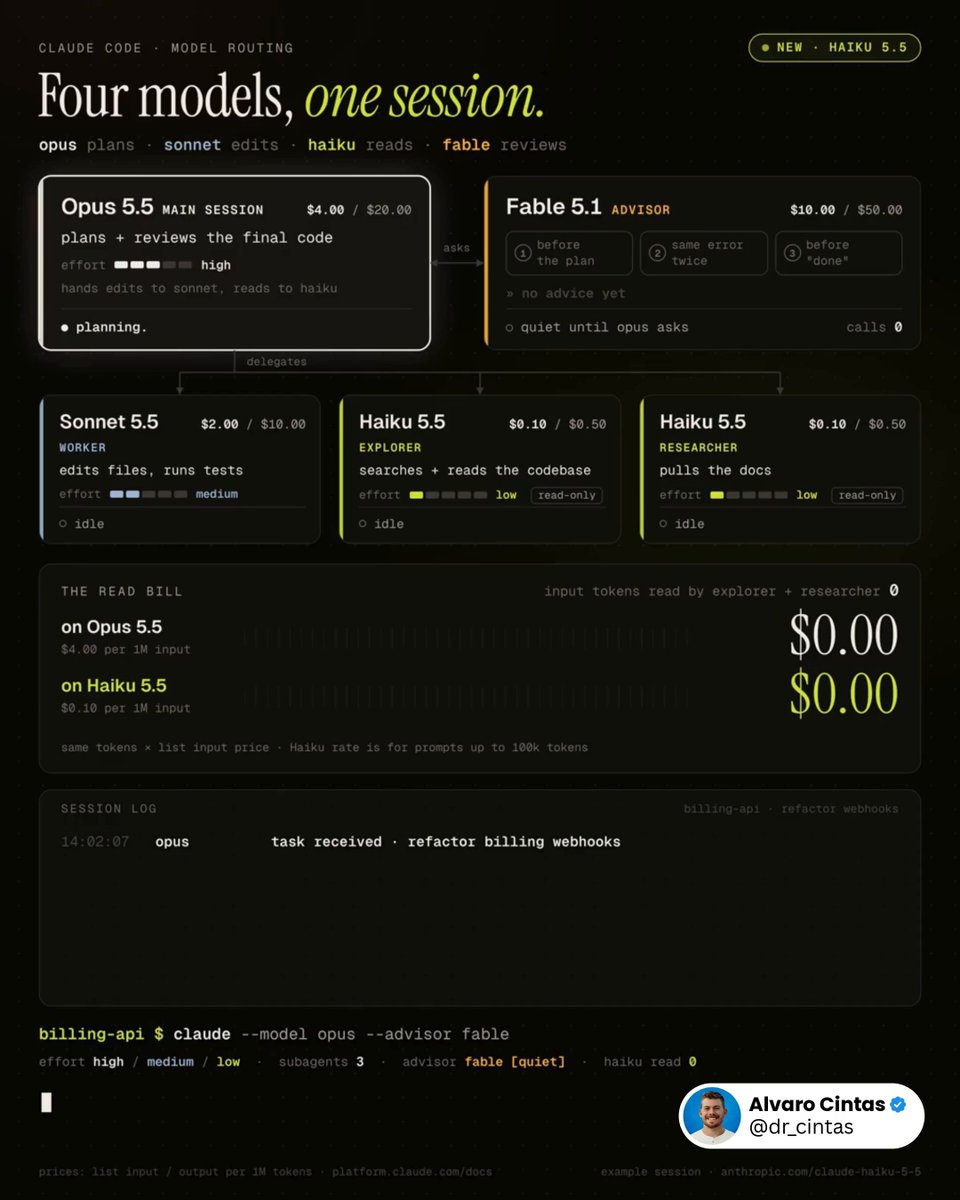
This workflow will save you thousands with Claude. Run Opus 5.5, Sonnet 5.5, Haiku 5.5, and Fable 5.1 together, and stop spending Opus tokens on work that doesn't need Opus. The entire idea in one line: Opus plans, Sonnet edits, Haiku reads, Fable reviews at decision points. Roles, broken down: - Opus 5.5, high effort, owns the plan and reviews the final code - Sonnet 5.5, medium effort, is the worker: edits files, runs tests - Haiku 5.5, low effort, splits into explorer (searches and reads the codebase) and researcher (pulls docs). it's the first Haiku with an effort setting - Fable 5.1, set with /advisor fable. Opus calls it at decision points, and it gets the full transcript each time Three moments Opus tends to call it: → before committing to a plan: is this the right approach? → the same error shows up again: is this going nowhere? → before marking the task done: did something get skipped? Why Haiku only reads: Anthropic's launch post says Sonnet 5.5 and Opus 5.5 are still the better choice for complex agentic coding (Terminal-Bench 4.0: 39.2% for Haiku 5.5, 70.6% for Sonnet 5.5) and that Haiku 5.5 fits narrowly scoped subagent work. so it gets the lookups, not the edits. Anyone still running one model for everything is paying $4 per million input tokens to check whether a file exists. Haiku 5.5 does it for $0.10. Drop this into Claude Code 👇 "Rebuild my Claude Code setup around this structure: Confirm Claude Code is v2.1.293 or later, so the haiku alias resolves to Haiku 5.5. If it isn't, stop and tell me to run claude update. Look through ~/.claude/agents and .claude/agents for subagents already covering explorer, worker, and researcher. Only create new ones for roles that are missing. Set model: haiku, effort: low on explorer and researcher, with no Edit or Write tools. Set model: sonnet, effort: medium on worker. If an existing subagent is locked to a different model, leave it as is and just list it. Name the explorer subagent Explore so it overrides the built-in one, which otherwise runs on my main model. In ~/.claude/settings.json, set advisorModel to fable, and set effortLevel to high for claude-opus-5-5 under modelSettings. A top-level effortLevel in user settings doesn't apply to Opus 5.5. Check for anything disabling the advisor: CLAUDE_CODE_DISABLE_ADVISOR_TOOL, DISABLE_TELEMETRY, or anything blocking feature-flag fetches. Also check CLAUDE_CODE_EFFORT_LEVEL, which overrides subagent effort settings, and CLAUDE_CODE_SUBAGENT_MODEL_FORCE, which makes Claude Code ignore subagent model fields. Report what you find. Don't change any of it yet. Add one line to ~/.claude/CLAUDE.md: consult the advisor before a big plan, when the same error shows up twice, and before marking a long task done. Show every change as a diff first. Wait for my go-ahead before touching anything."

Alvaro Cintas

58,450 görüntüleme • 1 ay önce

how to use claude code mods like a top 1% user, step by step: give this to your agent before everyone catches on👇 1. set up Jev connect Jev to the model registry you want to use. check that the connection works and the listed models are available. 2. build your claude code mod open claude code 2.1.287 or later and paste this prompt: “build a mod called run-ledger. load plugin-authoring and use the API types for my installed version. create a dashboard that shows: - estimated cost per run, model, and source plugin where known - which model handles each task - each subagent’s status, latest action, and elapsed time include token counts, cache usage, and reported retries. count each request once. keep background tasks linked to their original run. use dated prices. label costs as API estimates, not subscription charges. show unknown when data is missing. connect the mod to my existing Jev setup. give Jev the task, available models, prices, budget, and relevant past results. ask it to recommend a model and explain why. start with recommendations. make automatic routing optional for eligible subagents. show the recommended model, actual model, result, and cost. include Jev’s own cost. keep state across hot reloads. add details and export. the dashboard itself must make no model calls. validate the plugin. test rendering, costs, attribution, and duplicate counting. give me steps for a live test.” 3. test the setup allow hot reload when prompted. run a simple task, a subagent task, and a mod-triggered model call. check that the dashboard updates, each request counts once, and Jev’s recommended model can actually run the task. 4. install the working mod ask claude to copy it out of the temporary folder and install it as a persistent plugin. see the cost. choose the model. check the result.

Avid

47,276 görüntüleme • 1 ay önce

I built a Claude skill that turns Claude Code into your personal coding tutor. The core insight: Claude Opus 4.5 is already the best tutor in the world. Anthropic cooked with this model! It has incredible emotional intelligence and deep coding knowledge. What this skill does is just provide a harness—a way for Claude to agentically build the right context about YOU so it can personalize the tutoring experience in exactly the right way. Here's what makes it work: Learner profile from day one. The first time you use it, Claude interviews you. It asks about your programming background, your goal (where do you want this to take you?), and who you are as a person. This gets saved and informs every single tutorial it ever writes for you. From the very first interaction, everything is 100% personalized. Tutorials that use YOUR code. When you ask to learn something, Claude doesn't give you generic examples from some blog post. It finds examples in the actual codebase you're working in. This makes concepts stick in a way abstract examples never do. Quiz mode with spaced repetition. You can run "/quiz-me" and Claude will test you on concepts you've learned. It tracks your understanding score for each tutorial. Then it uses spaced repetition to prioritize the next quiz—concepts you're shaky on come back in 2 days, concepts you've mastered fade to 55+ day intervals. It literally builds retention into the learning process. One central knowledge base across all your projects. Whether you're joining a new company and want to understand their codebase, learning from an open source project, or leveling up on your own vibe-coded project—all your tutorials live in one place (~/coding-tutor-tutorials/). So your personal coding-tutor accompanies you across all your coding adventures. The whole thing is a feedback loop: learn → quiz → retain → learn more → quiz → retain. Your tutorials evolve, your knowledge compounds, and Claude gets better at teaching YOU specifically over time. To install it in Claude Code: • Run /plugin to open the plugin manager • Add marketplace nityeshaga/claude-code-essentials • Enable coding-tutor plugin Here's the Github: And here's 20-mins of me walking you through how to use this plugin and how it works 👇🏽 Let me know if you use it to teach yourself something cool!

Nityesh

64,736 görüntüleme • 11 ay önce

Holy sh*t I spent weeks turning Claude Code into a design studio. no Figma license. no agency. no plugins I had to pay for. here's the stack I used and it's embarrassingly simple: -> graphify: teach Claude your brand dump your guidelines, logos, PDFs and old projects into one folder. graphify turns it into a knowledge graph, so every design Claude makes follows your rules instead of guessing. 134k stars, Y Combinator. uv tool install graphifyy -> graphify install -> /graphify . -> Figma-Context-MCP: Figma straight to code it hands your actual Figma file to the agent. the README says it builds designs in one shot, and does it better than pasting screenshots. -> Penpot: the open-source Figma free, open source, and its MCP server lets AI read and edit your designs, then hand them to code and back. -> React Bits: the "expensive" look, for free the biggest open-source library of animated React components. those smooth hover effects and text animations you see on high-end sites? copy, paste, done. -> HyperFrames: designs that move write HTML, get a finished video. made by HeyGen for AI agents. your landing page can now have its own launch video by tonight. claude plugin marketplace add heygen-com/hyperframes -> claude plugin install hyperframes@hyperframes -> MCP for Blender: 3D without learning Blender connects Claude to Blender. describe a scene, the agent builds and edits it in real 3D. the order that works: brand into graphify -> design in Figma or Penpot -> Claude builds it with React Bits -> HyperFrames makes the promo -> Blender adds the 3D hero shot the uncomfortable part: tools used to be the moat. now everyone has them for free. the only thing that still separates good design from AI slop is taste. and taste is the one thing you can't install. bookmark this. your next client will ask why you're suddenly so fast.

kiosa

73,962 görüntüleme • 22 gün önce