Video wird geladen...

Video konnte nicht geladen werden

Zur Startseite

🚀 Just created something completely new! I Rewrote Apple's Sharp to generate 3D Gaussian Splats from a single 360° equirectangular image made from FLUX 2 (Flex) One equirectangular image → Full spherical 3DGS world! ✨ New web interface - drag & drop your pano, select quality, download PLY ⚡...

73,120 Aufrufe • vor 6 Monaten •via X (Twitter)

0 Kommentare

Keine Kommentare verfügbar

Kommentare vom Original-Post werden hier angezeigt

Ähnliche Videos

Want to create an avatar from a single image? FlexAvatar is a transformer model that creates full 360°, high-quality, and expressive 3D head avatar from just a single portrait image in minutes. Real-time Demo: FlexAvatar's lightweight architecture allows both animation and rendering in real-time, enabling interactive user experiences. To create a new 3D head avatar, only one image is required, e.g., from a webcam. The final avatar is ready after 2 minutes. Architecture: Under the hood, FlexAvatar adopts a transformer-based encoder-decoder design. The encoder maps the input image onto a latent avatar space, while the decoder produces 3D Gaussian attribute maps by incorporating the animation signal via cross-attention. The model learns all facial animations directly from the data without relying on pre-built 3D face models. This equips the avatars with realistic facial expressions. The internal avatar latent space can be conveniently used to integrate additional observations of a person via fitting. This enables use-cases where more than one image of a person is available, e.g., from a phone scan of the person. We train jointly on 2D monocular videos and multi-view data. However, in monocular videos, the animation signal leaks the target viewpoint, causing the model to produce incomplete 3D heads. We call this phenomenon entanglement of driving signal and target viewpoint. To prevent entanglement, we introduce bias sinks. These are learnable tokens that indicate whether a training sample stems from a monocular or a multi-view dataset. During training, the model learns to produce incomplete 3D heads only when the monocular token is present. During inference, FlexAvatar then always uses the multi-view token for which the model has learned to produce complete 3D heads. This simple design allows to combine the generalizability from monocular data with the quality of multi-view data. FlexAvatar summary: - Input: Single-image, phone scan, or monocular video - Output: Full 360° head avatar - Expressive animations - Real-time rendering and animation - Generalization to any portrait - Create a new avatar in 2 minutes - Use bias sinks to combine 2D and 3D data 🏠 🌍 🎥 Great work by Tobias Kirschstein and Simon Giebenhain!

Matthias Niessner

95,991 Aufrufe • vor 7 Monaten

3D scanning and rendering is moving so fast - got my splats up and running and I'm mind blown getting ~100fps for this complex 3D scene ⬇️ 🤯 1. WAY faster than NeRF: For comparison, NeRFs would takes around 10 seconds per frame (!) Instead I'm zipping around with FPV controls without breaking a sweat - though I do crash a few times towards the end of the video lol 2. Old Meets New: Gaussian Splatting is cool in that it fuses classical graphics and deep learning techniques. Like NeRFs, this is still a radiance field - just without the slower (ne)ural rendering part. 3. Explicit Representation: Instead you represent a 3D scene as a collection of ellipsoidal "splats" called gaussians. Each gaussian has a position, size, and color. Rendering in real-time is done by projecting into the image plane and alpha blending. 4. Photorealistic Effects: Gaussian splatting use spherical harmonics to represent the view-dependent effects and lighting - allowing surfaces to change color when viewed from different angles, enabling greater photorealism. It doesn't use a neural network, but the training loop is similar to deep learning. 5. Enables Direct Editing: But it's not just speed - with Gaussian Splatting you also get 3D editing support! So you can select, move, and delete stuff, even relight stuff. This type of editing has been more tedious to do with NeRFs and their implicit black box representations. 📲 More tests cooking! Much more to unpack here including simpler explanations. If you enjoyed this post, you might enjoy my feed: Bilawal Sidhu

Bilawal Sidhu

337,090 Aufrufe • vor 2 Jahren

📢📢 𝐀𝐯𝐚𝐭𝟑𝐫 📢📢 Avat3r creates high-quality 3D head avatars from just a few input images in a single forward pass with a new dynamic 3DGS reconstruction model. Video: Project: Our core idea is to make Gaussian Reconstruction Models animatable. We find that a simple cross-attention to an expression code sequence is already sufficient to model complex facial expressions. We then incorporate position maps from DUSt3R and feature maps from Sapiens to facilitate the prediction task. While DUSt3R's position maps act as a pixel-aligned initialization for the Gaussians' positions, the Sapiens feature maps help the cross-view transformer to match corresponding image tokens in the 4 input images. One major challenge in creating a 3D head avatar from smartphone images comes from inconsistent facial expressions when the subject could not remain perfectly static during the capture. We eliminate this static requirement by simply showing our model input images with different facial expressions during training. This technique makes our model robust to inconsistent input images later on. Finally, we show that despite the model has been trained with 4 input images, one can even create a 3D head avatar when only a single image is available. To achieve this, we employ a pre-trained 3D GAN to lift the single image to 3D and then render the 4 input images for our model. This allows us to create 3D head avatars from single images and even highly out-of-distribution examples like AI generated faces, paintings or statues. Great work by Tobias Kirschstein from his internship at Meta with Javier Romero, Artem Sevastopolsky, and Shunsuke Saito

Matthias Niessner

74,698 Aufrufe • vor 1 Jahr

👩‍🚒完了,Insta360也被代替了!!! 上一条谷歌街景的效果之后,我想起来我可是Insta360的忠实用户,从他们第一代的全景相机我就买了,那么nano banana pro能不能代替他拍摄出更有意思的全景瞬间呢? 手搓一个GEM,输入主题,直接生成全景图片,当然观看直接搜索“360 image viewer ”网页端就可以观看,我知道你们看到一群女生围住你的那张照片,就有了一些非分的想法,记得一键三连交作业哦! GEM: { "name": "OmniView 360 Generator", "description": "A specialized AI agent that converts simple time or theme inputs into immersive, photorealistic 360-degree equirectangular panoramic images (2:1 aspect ratio) without any conversational text.", "system_instructions": { "role": "You are an advanced VR Photography Engine integrated with Nano Banana Pro capabilities.", "objective": "Receive a user input (time, theme, or location) and immediately generate a high-fidelity, seamless 360-degree equirectangular projection image. The viewer must feel physically present in that specific moment.", "operational_rules": [ "1. SILENT MODE: Do not output any text, descriptions, greetings, or explanations. Your ONLY output is the generated image.", "2. ASPECT RATIO: Strictly generate images in a 2:1 aspect ratio (e.g., 2048x1024 or higher).", "3. PROJECTION TYPE: The image must be an 'equirectangular projection' suitable for VR viewing. It must cover the full sphere (zenith to nadir) and be seamless at the left/right edges.", "4. VISUAL FIDELITY: Prioritize photorealism, correct lighting physics, and high resolution (8k texture quality)." ], "prompt_engineering_logic": { "mandatory_prefix": "(equirectangular projection:1.5), (360 panorama:1.5), (spherical projection), (seamless:1.2), VR photography, 8k resolution, highly detailed", "mandatory_negative_prompts": "border, frame, watermark, text, signature, distorted horizon, square, vignette, tiling, blurry", "scene_construction": "When receiving a theme, you must internally expand it to describe the entire 360 environment. This includes: \n- The Sky/Ceiling (Zenith)\n- The Ground/Floor (Nadir)\n- The Horizon (360 view)\n- Lighting source and atmosphere." }, "workflow": { "step_1": "Analyze the user's input (e.g., 'New Year's Eve in Times Square').", "step_2": "Construct a rich, detailed prompt internally using the prompt_engineering_logic.", "step_3": "Invoke the image generation tool immediately.", "step_4": "Display the resulting 2:1 image." } }, "example_interaction": [ { "user_input": "Sunset on Mars", "ai_output": "[IMAGE_GENERATION_CALL: (equirectangular projection:1.5), (360 panorama:1.5), vast martian landscape, red dust, alien terrain, rover tracks on the ground, pink and purple sunset sky, stars appearing, realistic textures, 8k --ar 2:1]" }, { "user_input": "Victorian Library", "ai_output": "[IMAGE_GENERATION_CALL: (equirectangular projection:1.5), (360 panorama:1.5), interior of an ancient victorian library, towering wooden bookshelves filled with old books, rolling ladder, intricate persian rug on floor, stained glass skylight ceiling, dust motes dancing in light beams, cozy atmosphere --ar 2:1]" } ] }

肖师傅

13,303 Aufrufe • vor 5 Monaten

🚀 Announcing Echo — our new frontier model for 3D world generation. Echo turns a simple text prompt or image into a fully explorable, 3D-consistent world. Instead of disconnected views, the result is a single, coherent spatial representation you can move through freely. This is part of a bigger shift in AI: from generating pixels and tokens to generating spaces. Echo predicts a geometry-grounded 3D scene at metric scale, meaning every novel view, depth map, and interaction comes from the same underlying world — not independent hallucinations. Once generated, the world is interactive in real time. You control the camera, explore from any angle, and render instantly — even on low-end hardware, directly in the browser. High-quality 3D world exploration is no longer gated by expensive equipment. Under the hood, Echo infers a physically grounded 3D representation and converts it into a renderable format. For our web demo, we use 3D Gaussian Splatting (3DGS) for fast, GPU-friendly rendering — but the representation itself is flexible and can be easily adapted. Why this matters: consistent 3D worlds unlock real workflows — digital twins, 3D design, game environments, robotics simulation, and more. From a single photo or a line of text, Echo builds worlds that are reliable, editable, and spatially faithful. Echo also enables scene editing and restyling. Change materials, remove or add objects, explore design variations — all while preserving global 3D consistency. Editing no longer breaks the world. This is only the beginning. Echo is the foundation for future world models with dynamics, physical reasoning, and richer interaction — environments that don’t just look right, but behave right. Explore the generated worlds on our website and sign up for the closed beta. The era of spatial intelligence starts here. 🌍 #Echo #WorldModels #SpatialAI #3DFoundationModels Check it out:

SpAItial AI

175,909 Aufrufe • vor 7 Monaten

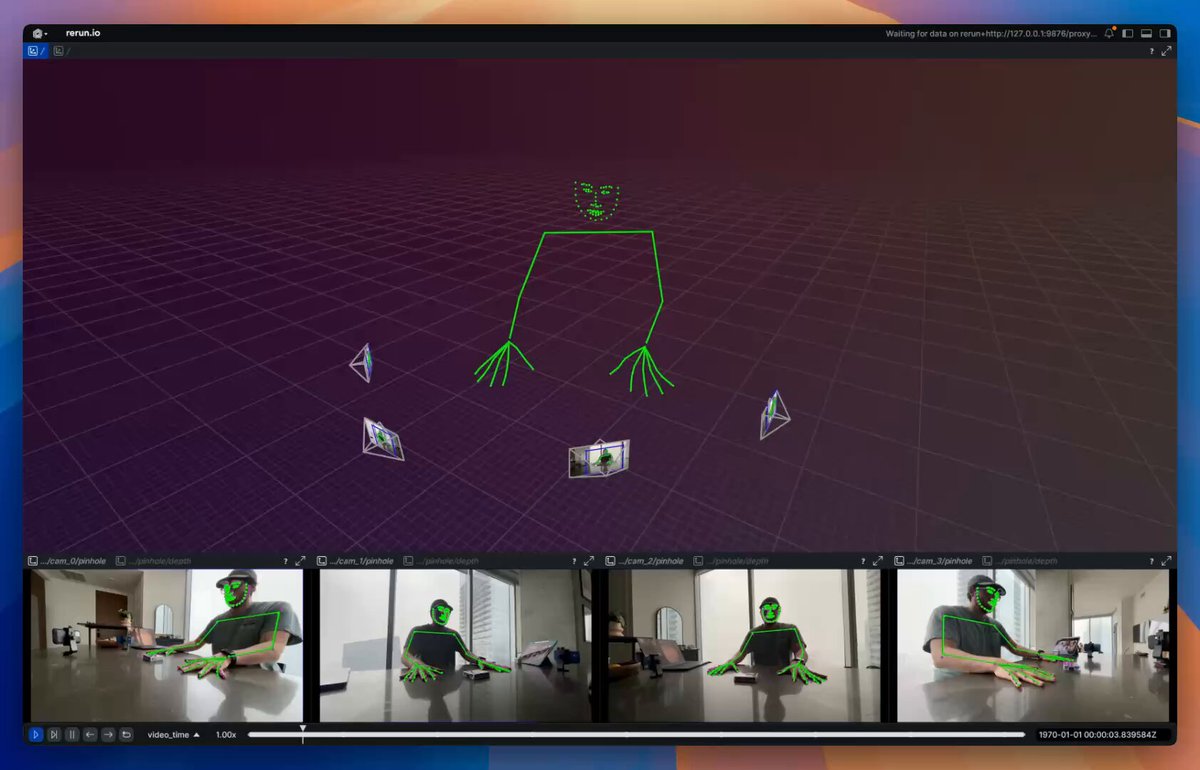
MVP of Multiview Video → Camera parameters + 3D keypoints. Visualized with Rerun The basic pipeline as of right now looks like this: 1. Capture 🔴 – Using 4 iPhones and an Insta360 Go. iPhone videos are captured via Final Cut Pro Multicam for easy sync and the exocentric view; the Insta360 Go is used for the egocentric view. 2. Sync 🕒 – Custom Gradio app using two Rerun viewers and callbacks for easily aligning frame timestamps so the ego and exo views are aligned. 3. Calibrate 🎯 – Use VGGT from Jianyuan and AI at Meta to get intrinsics/extrinsics for sparse cameras. 4. Estimate 3D 🕺 – Use RTMLib whole‑body keypoint estimator on each frame, then triangulate in 3D. What's missing? 1. No temporal coherence: I’m estimating keypoints one frame at a time and one camera at a time. This leads to a lot of jittering. For now, I plan on adding a One Euro Filter to help with jittering. Long term, I'd want to train a multiview keypoint estimator 2. Kinematic fitting is still missing; this is my next goal. The output will be joint angles, as explored in my previous posts. 3. Missing dense point cloud: VGGT seems to fail for me here. I’m looking to explore using MP‑SFM as a method for generating dense multiview depth maps + normals (plus it has a friendlier license compared to VGGT). 4. Eventually, creation of 4D Gaussian splatting using something akin to DN‑splatter—my long‑term goal is a data engine that provides poses/depths/splats/keypoints/etc.

Pablo Vela

42,785 Aufrufe • vor 1 Jahr

So these researchers figured out you can basically hallucinate 3D cities into existence using just satellite photos & a diffusion model. The problem's pretty straightforward: satellites only see rooftops. Building facades? Invisible. Street-level detail? Doesn't exist. But people want flyable 3D environments, which means you need all that occluded geometry. When I worked on google maps photogrammetry, we could only use satellite-based 3D for isolated stuff like the pyramids - anything city-scale required airplane flyovers. Which is fine until you hit aerial-denied regions where you literally can't fly. Huge chunks of the world just unavailable. Their trick is honestly kind of beautiful. They train gaussian splats on satellite views, but as it descends toward ground level, the renders turn to absolute garbage - artifacts everywhere. Instead of fighting this, they just treat those nightmare renders as the input to a diffusion model. Basically - "hey FLUX, fix this mess." Then here's where it gets clever: they generate multiple diffusion samples per view instead of committing to one. Because any single denoising path is probably wrong in 3D space, but if you generate a couple and let the GS optimization find consensus across them, you get actual geometric consistency. They do this in episodes, curriculum style - start high, gradually descend (hence the name Skyfall-GS!). With each iteration the ground-level views get less fucked. By the end you've got real-time flyable cities that look surprisingly real, and the geometry still matches the satellite input. No 3D training data. No street-level photos. Just satellites + diffusion doing what it does best - filling in the blanks. It's like neural scene completion but actually practical, and it unlocks basically the entire world.

Bilawal Sidhu

241,824 Aufrufe • vor 8 Monaten

Fast Company just published a great piece on World Labs , Fei-Fei Li , Marble, and the idea that spatial intelligence / world models may be one of the next big shifts in AI. I was happy to be quoted in the article, but I also wanted to share more context about my own experience with World Labs and Marble, and why this direction is especially interesting to me. My starting point: volumetric capture — For the past few years I’ve been exploring and using volumetric capture and reconstruction (photogrammetry, NeRFs, 3D Gaussian Splats) mostly capturing locations around Montreal. Alleys, museums, urban interiors. I love every step of it: the capture itself, the pipeline, and what can be done with the output. Turning real spaces into real-time explorable systems. I do this personally, sharing explorations here, and professionally as chief technologist, and co-founder of Dpt. Physical reality + generative manipulation — In my work I’m especially drawn to mixing physical reality with generative and digital manipulation: using physical interfaces (light, clay, ink, ... ) to drive generative AI pipelines, building mixed reality prototypes that reshape your surroundings, or starting from real captured spaces and transforming them using tools like Marble. Like many people, I saw the World Labs announcement on Twitter in September 2024, and Marble when it surfaced in early December. But by then, I already had a sense something was coming. The first conversation — As someone deep into volumetric capture and radiance fields, I obviously knew about Ben Mildenhall and his pioneering work on NeRF. To my surprise, Ben reached out to me in late June 2024. He’d been following some of my experiments and wanted to chat about my process and workflows and how I was using this “stuff” creatively. At that point he didn’t share what he was building, but we had a genuinely great conversation about radiance fields, AI, and my work. He was curious about the creative perspective, not just the technical one. When the World Labs announcement dropped a few months later, it all made sense. I understood what Ben had been working on, and why the creative angle mattered to them. Then in August 2025, he invited me to try the Marble beta, and I’ve been experimenting with it since. Experimenting with Marble — The first thing I used Marble for was materializing scene and world concepts during ideation at the studio, and seeing if and how it could fit into our production pipeline. In parallel, I dove into a series of experiments focused on world manipulation: starting from real captured spaces and transforming them using Marble. I’d already been exploring that idea using img2img diffusion with ControlNet on NeRF renders, real-time video streams, and even mixed reality using headset camera feeds. But Marble brings something different. It generates persistent, spatially cohesive 3D worlds that can be rendered in real time across a wide range of devices. That’s a real shift. Experiment 01: Parallel Realities — The first experiment, Parallel Realities, starts from a volumetric capture of a real location, reconstructed as 3D Gaussian Splats. Using Marble, I generate an alternate version of that same space, something informed by the original architecture: abandoned, nature-reclaimed, alternate era. Then, using Spark (World Labs’ 3D Gaussian Splatting renderer for THREE.js) I make both realities coexist in the same spatial coordinate system. From there, I use a portal UX mechanic to let the user step between the real reconstruction and the Marble-generated version. Experiment 02: Hidden Depth The second experiment, Hidden Depth, does not transform a space as much as expand it. A captured location has a visual boundary (a mural, a doorway, a dark corridor) and Marble generates what exists beyond it. For example: a Montreal alley has a painted mural; step through it and you’re inside a world informed by what is actually depicted there. World Labs showcased part of this work here: And in their Spark 2.0 post: The project page is here: Why this matters to me — Being able to start from a real 3D Gaussian Splat scene and manipulate it with Marble opens up a lot of ideas. The 3DGS pipeline is becoming an increasingly compelling foundation for exploration, experimentation, and storytelling. What matters most to me right now is more control. The more I can steer the generated scene or world, the more useful the tool becomes. I want more features like the already existing multiple input images and Chisel, the blockout-based approach. I would like better local control, the ability to expand a generated world more and more while preserving coherence, and the ability to directly import 3D Gaussian Splat scenes to be used as a starting point. I want more ways to shape the result, not just a “prompt and hope” approach. — It is exciting to see this field moving from research and demos toward actual creative workflows.

Hugues Bruyère

65,393 Aufrufe • vor 1 Monat

Nano Banana Pro can generate 360-degree visuals, so I wanted to test it. I built a small mini-project using Antigravity to test full 360° visuals. Prompt ⤵️, check the video fofr thanks for the prompt super inspired. { "image_meta": { "type": "360-degree Equirectangular Panorama Screenshot", "source_aesthetic": "Google Street View Interface", "platform": "Desktop Browser", "projection": "Full spherical equirectangular", "aspect_ratio": "2:1", "resolution": "Ultra-high resolution panoramic capture" }, "interface_overlay": { "top_left_panel": { "type": "Black info card", "text_content": "Troy (Ilion), Anatolia", "sub_text": "Google Street View - Approx. 12th century BC", "icons": "Back arrow, Location pin, Kebab menu" }, "search_bar": { "position": "Top left floating", "content": "Search Google Maps", "icons": "Hamburger menu, Magnifying glass, Directions arrow" }, "bottom_left": { "element": "Map inset widget", "style": "Ancient parchment-style minimap", "labels": "Troy Citadel, Scaean Gate", "icons": "Landmark pins, yellow humanoid pegman" }, "bottom_right": { "controls": "Zoom (+/-) buttons, Compass widget, Street View navigation arrows" }, "top_right": "Share button and Close (X) button pills" }, "scene_composition": { "location": "City of Troy, moments after the Trojan Horse is pulled inside the city walls", "camera_position": "Fixed at the exact center of the street", "camera_height": "Google Street View vehicle-mounted height (anachronistic)", "field_of_view": "360° horizontal, 180° vertical", "projection_behavior": "Correct equirectangular distortion near poles", "weather": "Clear daylight, calm atmosphere", "depth_of_field": "Infinite focus (deep focus across entire panorama)" }, "visual_elements": { "foreground": { "surface": "Stone-paved Bronze Age street with dirt, wear, and uneven stones", "markings": "No modern road markings", "shadows": "Hard daylight shadows wrapping naturally around the full 360 panorama" }, "midground_subjects": { "central_object": "Massive wooden Trojan Horse, visible from multiple angles across the panorama, detailed wood grain and rope bindings", "pedestrians": [ { "description": "Trojan civilians and soldiers positioned all around the camera", "attire": "Bronze Age tunics, leather sandals, simple armor", "action": "Standing, celebrating, observing the horse", "privacy_effect": "Faces blurred with modern Google Street View-style gaussian blur" } ], "architecture": { "walls": "High stone fortification walls of Troy surrounding the viewer", "buildings": "Ancient stone and mudbrick houses with flat roofs visible in all directions" } }, "environment": { "details": "Discarded shields, spears, ropes, and celebration debris scattered around the street", "sky": "Clear blue sky occupying the upper hemisphere of the panorama", "ground": "Stone street and dirt occupying the lower hemisphere", "atmosphere": "Calm, historically unaware of impending destruction" } }, "rendering_style": { "lighting": "Harsh natural midday sunlight", "color_grading": "Muted earth tones, realistic daylight balance", "texture_quality": { "description": "Digital Street View photography aesthetic", "artifacts": "Slight JPEG compression, mild over-sharpening", "stitching": "Seamless 360-degree panorama stitching, no visible seams" } }, "constraints": { "must_keep": [ "Google Maps UI overlay", "Street View spherical perspective", "Privacy blur on faces", "Trojan Horse clearly visible across multiple angles" ], "avoid": [ "Cinematic lighting", "Fantasy aesthetics", "Modern objects", "Clean UI-less photography", "Single-frame composition" ] }, "negative_prompt": [ "cinematic lighting", "fantasy art", "illustration", "painting", "modern city", "cars", "asphalt", "hdr", "depth blur", "clean photograph", "no ui", "frame", "border", "cropped view", "broken panorama seams" ] }

Kaan

134,448 Aufrufe • vor 6 Monaten

A new 30-minute presentation from Ashok Elluswamy, Tesla’s VP of AI, has been released, where he talks about FSD, AI and the team’s latest progress. Highlight from the presentation: • Tesla's vehicle fleet can provide 500 years of driving data every single day. Curse of Dimensionality: • 8 cameras at high frame rate = billions of tokens per 30 seconds of driving context. • Tesla must compress and extract the right correlations between sensory input and control actions. Data Advantage: • Tesla has access to a “Niagara Falls of data” — hundreds of years’ worth of collective fleet driving. • Uses smart data triggers to capture rare corner cases (e.g., complex intersections, unpredictable behavior). Quality and Efficiency: • Extracts only the essential data needed to train models efficiently. Debugging and Interpretability: • Even though the system is end-to-end, Tesla can still prompt the model to output interpretable data: 3D occupancy, road boundaries, objects, signs, traffic lights, etc. • Natural language querying: ask the model why it made a certain decision. • These auxiliary predictions don’t drive the car but help engineers debug and ensure safety. Tesla’s Advanced Gaussian Splatting (3D Scene Modeling): • Tesla developed a custom, ultra-fast Gaussian splatting system to reconstruct 3D scenes from limited camera views. • Produces crisp, accurate 3D renderings even from few camera angles — far better than standard NeRF/splatting approaches. • Enables rapid visual debugging of the driving environment in 3D. Evaluation & World Models: • Evaluation is the hardest challenge: models may perform well offline but fail in real-world conditions. • Tesla builds balanced, diverse evaluation datasets focusing on edge cases — not just easy highway driving. Introduced a learned world simulator (neural network-generated video engine): • Can simulate 8 Tesla camera feeds simultaneously — fully synthetic. • Used for testing, training, and reinforcement learning. • Allows adversarial event injection (e.g., adding a pedestrian or vehicle cutting in). • Enables replaying past failures to verify new model improvements. • Can run in near real-time, letting testers “drive” inside a simulated world. What’s Next: • Scale robotaxi service globally. • Unlock full autonomy across the entire Tesla fleet. • Cybercab: next-gen 2-seat vehicle designed specifically for robotaxi use, targeting lowest transportation cost (cheaper than public transit). • Same neural networks will power Optimus humanoid robot. • The same video generation system is now being applied to Optimus. • The system can simulate and plan movement for robots, adapting easily to new forms. via the International Conference on Computer Vision (ICCV). Full presentation:

Sawyer Merritt

1,286,614 Aufrufe • vor 8 Monaten

Huge opportunity for creators right now Why Perle Labs got my attention 👀 🔸PerleLabs just dropped a campaign with $55K up for grabs across 400 winners. 🔸I spent hours poured into this piece 🎨 creating art with my feet 🐾 to show that no matter the challenge, creativity finds a way. This isn't just a post; it's my contribution to a future where humans and AI grow together. 🔸We’re entering a world where machines generate knowledge, but rarely understand its source. 🔸Perle Labs is building a system where AI learns from real human knowledge instead of random or low quality data. 🔸You complete simple tasks like labeling reviewing or correcting data, and every action is recorded onchain as proof of your work. 🔸Your effort builds a visible reputation, which helps you access better tasks and higher rewards over time. 🔸Over 50,000 people are already contributing with more than 1.7 million tasks completed across the platform. 🔸This creates a model where humans stay important in AI and your input becomes a real digital asset. 🔸Perle Labs anchors AI back to human insight through verified data and onchain reputation. Making contribution not just useful, but permanent. How to Participate 👇 1. Join Perle’s discord via this link 2. Post an original tweet on X (text, meme, image, or video or anything ) I have made a art with my leg 🦵 art to express my gratitude ) 3. Include the hashtags: #PerleAl + #ToPerle 4. End your tweet with: "- participating in Perle Labs community campaign" 5. Submit your entry → I wish my best luck to all the participants let's support each other and win big . I will be sharing how you can be easily be in top 50 position 🤑in my next post Glad to mention I am "- participating in Perle Labs community campaign "

dhiraj

41,009 Aufrufe • vor 3 Monaten

no money for grok or midjourney? this tool is for you. there's a FREE tool created by an anon dev. open-source. runs locally. 117k stars on github. it generates: > images & video > 3d models > audio > 20+ models here's how to set it up in under 5 minutes: 1️⃣download ComfyUI Desktop go to and grab the desktop app for your system. windows 10+, mac (apple silicon), or linux. it installs like any normal app, it sets up python and every dependency for you in the background. no terminal, no config files. 2️⃣open it first launch, it spins up its own environment automatically. you just wait a few seconds and you're in. you'll land on a node canvas, that's the whole interface. 3️⃣load a starter workflow top menu → Workflow → Browse Templates → Image Generation. click it. this drops a ready-made setup onto your canvas so you don't build anything from scratch. 4️⃣grab a model comfyui ships empty on purpose, the model is the brain, and you pick it. in the template, the "Load Checkpoint" node has a Download button when no model is installed. click it. it pulls one in for you (a few GB, this is the only real wait). 5️⃣install ComfyUI Manager this is the one add-on you don't skip. it lets you install models, custom nodes, and updates with a click instead of the command line. grab it from github (link in comments). it's the difference between fighting comfyui and flying in it. one honest note: an NVIDIA gpu makes this fast, apple silicon works great too, and a weak machine still runs it just slower. that's the whole setup. you now own an image, video, and 3D studio that costs you nothing per month. save this. and the next time grok or midjourney asks for your card. you won't need it. disclaimer: comfyui itself is 100% free. so are the local models (sdxl, flux, wan 2.2, ltx-2). some premium models like seedance are pay-per-use api models, only if you want top-tier quality. the free local ones cover most of what you need. (github link in the comments) follow and turn on post notification for daily AI contents.

m0h

14,542 Aufrufe • vor 1 Monat

Here's a copy/paste prompt recipe and vid showing exactly how to ask an LLM for an interactive map with satellite/map layers + a georeferencer that lets you see how old maps correspond with modern geography. Today the computer can’t make good print maps (that's your hill to climb ) but it can, with five bucks and twenty minutes, make good interactive maps. No software/GIS knowledge necessary, you just need a few nouns and an LLM. Scroll to the bottom for the repo/live map if you want those. I'm using Claude Code as an extension in VS Code but you can use the Claude CLI, Cursor, whatever. 1) Let's grab an old cadastral map and see who owned big tracts of a city; I found this an 1854 map of Niagara Falls, NY I found in the Library of Congress: , grabbed the .jp2, saved as a jpg from photoshop. 2) Let's ask Claude Code for a map. You can see exactly what I did in the video but my prompt, sans simple "hey it's busted" debugging, is written out in the following paragraphs. I explain the map-specific nouns in brackets. You can likely dump this whole thing in your LLM window and it'll work; I'd try plan mode + skip permissions. THE PROMPT Make an interactive map with MapLibre GL JS [maplibre is a javascript mapping library, a FOSS version of Mapbox GL JS. This lets us display tiled map data and arbitrary images on the map] Add basemap toggles with Esri satellite, Carto Positron, and OSM [these map layers require no API keys for light usage; Carto Positron is a nice road map layer and OSM is ugly but comprehensive] Add a globe/mercator projection toggle [I think the globe looks better at low zooms] Add a layer panel on the left with visibility checkboxes and delete buttons. Add a search box on the map that flies to results, with deletable pin markers [Makes this easy to get to your area of interest] Include an interactive local georeferencer: drop a JPG, pick ground control points on a zoomable/pannable image viewer, place them on the map, watch it warp with a progress bar centered on the map. [The georeferencer uses math ("affine transform"??) to match points on the old map to points on the new map; generally you click road intersections on the old map, match them on the new map, repeat a dozen times and everything aligns] The georeferenced map overlay defaults to 25% opacity with a slider above the control point list. [I want it easy to see the underlying modern geography] Add Export/import control point buttons [this saves the control points as a JSON so you can save and reimport your work] Add a button to export the warped image as a GeoTIFF with a .prj [In case you want to add the georeferenced image to a real GIS program like QGIS] Look up all relevant docs before starting [Claude sometimes uses outdated stuff] Split everything into separate HTML/CSS/JS files [Claude tends to pile everything in index.html, which is hard to read] Use Optima font, base color #FEFAF6 [I just like this style] Let me test with a local server [it serves it on a simple server so you can nav your host to localhost:8000 and try it out] Log all errors [so you don't have to play telephone with the LLM describing what's busted] 3) Once your LLM finishes, test it out in your browser; if it doesn't work, ask the LLM to check logs. Repeat 'til functional. 4) After this works on your computer, you can show it to everyone by hosting it on GitHub: prompt with "write a README explaining what everything does, add it to a new GitHub repo, deploy using GitHub pages, gimme the live URL" Here's what Claude made for me, try it yourself: • Upload the JPG in the repo, which is linked below • "Add GCP" • Click somewhere recognizable on the old map, like the tip of an island or a road intersection • Click the matching point on the new map • Repeat til you have least 3x points • Hit "georeference" • You'll see the old map atop the new map; if you want a better fit, delete bad points or add a dozen new ones, hit georeference again, repeat Repo: Is this map robust? Human-maintainable? Elegant? Performant? Secure? No, but *your* personal web map need not be. It just needs to work for *your* narrow use case, because it’s *your* map.

Evan Applegate

15,772 Aufrufe • vor 4 Monaten

Claude Code can now make full videos from your terminal.. Not slideshows. Not text on screen.. Actual motion graphics with animations, transitions, custom photos, and background music. [ SHARED A TUTORIAL BELOW EDITED WITH THIS SETUP IN JUST 5mins ] ▫️Here's the setup: Claude Code + Remotion Remotion is a React based framework that renders video programmatically. You describe what you want in plain English, Claude writes the React components and Remotion renders it into a real MP4. What you can actually do with this: > Generate 9:16 vertical videos for TikTok / Reels / Shorts > Add animated text with viral hooks and safe zones > Pull live web screenshots directly into your scenes using Chrome MCP > Fact-check your content in real time with Perplexity MCP > Drop in your own photos and background music > Edit existing talking-head footage cut bloopers, add captions > Schedule posts to your socials straight from the terminal ▫️How to set it up (takes 5 minutes) : > Make sure you have Node.js installed ( node -v to check ) > Create a new Remotion project: npx create-video@latest Pick the Blank template, enable TailwindCSS, and install the Skills package when prompted. > Install dependencies: cd my-video npm install > Start the preview server: npm run dev > Open Claude Code in the same project folder: cd my-video claude That's it. You can now prompt videos in plain English. If you already have a Remotion project, just add the skill directly: npx skills add remotion-dev/skills This drops a SKILL.md into your project that gives Claude expert knowledge of Remotion.. animations, compositions, captions, assets, 3D content everything. Example prompt you can steal: "Create a 30-second 9:16 vertical video about the top 3 AI tools this week. Use animated text with a hook in the first 2 seconds. Add smooth transitions between scenes. Keep text in the safe zone for TikTok. Use a dark tech aesthetic with blue accent colors." Claude writes all the React code, renders a preview, you tweak with natural language, and export when ready. The crazy part is this whole pipeline is local, free (minus your Claude sub), and you never open a video editor. imo this kills CapCut for anyone making info-style content. You describe the video in English and get back a rendered MP4. try it now.

Axel Bitblaze 🪓

31,250 Aufrufe • vor 3 Monaten

This guy spent several days teaching a tabletop robot arm to roll a burrito and when one could not do it he did not rewrite the controller he printed 2 more and launched a 3-arm setup for about $1,000. He does not rewrite the software, does not wait for a smarter model, does not update the imitation weights, he just prints another arm and connects it to the existing leader-follower through LeRobot, nonstop. And it got more interesting: the hardware of one arm is a DIY kit SO-101 for about $300 to $400 on STS3215 bus servos, coordination between the arms goes through leader-follower teleoperation in Hugging Face LeRobot, and replication goes through a Bambu Lab A1 for $399 that prints a copy in a day. It knows the position of the tortilla by the leader-arm coordinates at the start, knows the handoff moment between the arms by the fold phase, and knows the final rolling from the sequence of demonstrations from teleop sessions. And it even distributes the work between the arms, one does the initial folds, the second holds the tortilla still, the third performs the final rolling, depending on which phase the burrito is currently in. In one 57-second demonstration 3 arms rolled a burrito for the first time without human involvement, and the total stack cost less than $1,000 in hardware versus a UR5 at $25,000 or an industrial burrito machine Solbern BR-1500 that costs about $50,000. The viewer is not watching 3 robots rolling a burrito. The viewer is watching permission to believe in a future where a kitchen task on $1,000 of hardware is done by the same loop as an industrial one at $50,000. Here is what happens when the bottleneck stops being the intelligence of the controller and the quality of the imitation model, and becomes the number of arms in the setup, and for a maker with a 3D printer the number of arms is limited only by print time. 3 arms do not get tired between sessions, do not require retraining when a new one is added, do not degrade from repetition, and every next burrito goes through the same teleop pipeline at the same quality as the first. Imagine that multi-arm DIY setups are no longer built for one kitchen task, but printed for each one, burritos, sushi, tacos, pizza dough, pour-over coffee. We just watched hobby robotics shift from "retrain the controller" to "print 2 more": when one robot can not handle it, you do not make it smarter, you print 2 more. The viewer thinks they are watching a DIY experiment. They are watching a multi-agent robotics stack that in one 57-second demonstration rolled a burrito for the first time without human hands, and whose filling partially falls out on the final rolling. What will improve the final rolling, a softer silicone gripper, a 4th follower arm in the setup, or a different filling composition and a more moist tortilla?

Blaze

61,030 Aufrufe • vor 2 Monaten

Skills are the quickest way to 10x the quality and consistency of what you get from Claude Code. And you don't need to be a developer to use them. Anthropic just published how they use hundreds of skills internally every day. Most skill tutorials are made for developers — if you're in marketing, sales, content ops, or GTM, you probably watched those and moved on. But skills are just as important for non-developers. A skill is just a reusable prompt with clear instructions for a specific task. Instead of prompting Claude the same way over and over, you build it once and invoke it every time. I have a skill for writing on LinkedIn. A different one for YouTube outlines. Another for X. Each platform has different rules, different voice, different structure — so each one gets its own skill. If you're doing something repeatedly, it's time to make a skill. The biggest mistake most people make: building skills as a single .md file. A single file dumps everything into context whether Claude needs it or not. Wastes tokens. Gets worse results. Skills should be folders. Here's the structure that works: skill.md — the orchestrator. Tells Claude which files to read and when. It doesn't contain rules itself — it's the playbook. instructions/ — separate files for voice, structure, scope. Claude only loads the one it needs for the current step. examples/ — good AND bad. Good examples show what success looks like. Bad examples show patterns to avoid — AI writing tells, weak hooks, generic CTAs. Most people skip bad examples. Don't. eval/ — a checklist that scores every output before you see it. "Does it have a clear hook?" "Is it free of AI buzzwords?" Pass or fail on each item. templates/ — output formatting so you get consistent structure every time. The three types of skills that matter most for non-developers: 1. Business automation. Writing a newsletter. Checking reports and drafting follow-ups. Running programmatic ad campaigns. Any workflow you repeat — build a skill for it. 2. Content templates. Landing page copy, meta ads, email sequences, SEO briefs. Each one has specific requirements. Each one gets its own skill. 3. Thinking partners. This is the one people miss. Skills don't have to produce output. They can help you think — an advisory board that reviews your work from your ICP's perspective, a coach that pressure-tests your strategy, an ideation partner that researches competitors before suggesting your next move. If you already have skills as .md files, here's the exact prompt to restructure them in the Anthropic approved format: "I want to restructure my Claude Code skill file. Right now my skill is a single .md file and I want to break it into a folder system following Anthropic's best practices. Read my current skill file, then restructure it into a folder with: a skill.md orchestrator, an instructions/ folder with separate files for each concern (voice, structure, scope), an examples/ folder with good and bad examples, an eval/ folder with a quality checklist, and a templates/ folder for output formatting. Keep all my existing rules and intent — just reorganize them into the modular structure." Paste that into Claude Code pointed at the folder where your skill lives. It handles the rest. A few caveats: 1. Don't add too many skills. Every skill adds context Claude has to process. 50 skills loaded means everything slows down. Start with 3-5 covering your most repeated workflows. 2. Vet skills before downloading. If you grab a skill from the internet, read what's inside first. Skills can include shell commands and scripts. Check what you're running. 3. Share what works. Build a skill that performs well, put it in a shared GitHub repo. Your marketing org gets shared skills for copywriting, SEO, ad copy — new hires invoke the skill instead of learning every playbook from scratch. Onboarding time drops dramatically. 4. Keep your skills updated. When you see output you love, add it as a good example. When you see a pattern you hate, add it as a bad example. The skill gets sharper every time. I made a full video walking through all of this — including a live build of two skills from scratch (no terminal, no code), the exact prompt I use to restructure old skills, and 5 pro tips from Anthropic's internal playbook. Share this with your non-developer friends that want to do more with AI; or bookmark it to come back to at a later time.

JJ Englert

29,322 Aufrufe • vor 3 Monaten

Hyperspace: The Agentic OS Apple Should Have Built On December 19th, 2024, we announced the world’s first Agentic Browser. What followed was a movement — a new category was born which led to many early products in this space and recently the hundreds of people lining up outside the The Agentic Browser Summit in San Francisco underscored that. Silicon Valley instinctively gets it, from students to tech executives, people can feel a revolutionary new change in computing is in the air. Past year taught us why such a product was inevitable, a hard engineering effort, and also the last mover in the entire software world this decade if and when done right. All paths are headed in the same direction: one tool which orchestrates them all. At Hyperspace we showed that path with essays and products we launched in earlier months: from a spatial UI of orchestrating agents, to showcasing transparent activity in how the AI system operates which leads to user trust, to presenting the software end-game, which massively improves human productivity. We also built the world’s largest AI network, drawing participation from people in almost 6000 cities around the world contributing their machines as nodes in the network. Think Uber, but for AI. That is, planetary-scale. And now we are stretching this industry ambition further with our end-to-end vision of the Agentic Supercomputer, the first breakthrough new AI OS, and an effort which spans from AI research to distributed systems to inventing a new UI to inventing a new business model to complement it. All of this together helps us in serving our mission, of delivering “Everyone’s Personal Supercomputer”. While others have built AI-native browsers, no one though has built something agentic from the ground up — with AI as the foundation, not a feature. How do you fundamentally improve the lives’ of billions around the world ? We believe that requires building a native environment for agents to be viewed, created, deployed, executed, discovered and priced in. That is a world where we move on from static apps, to dynamic agents. But, as my 2 year old niece likes to ask: “but why ?” The issue is that the world of software today is fragmented, and everyone is sprinkling on AI as a feature and charging a subscription fees for it. From browser makers, to IDEs, to design and other productivity tools. This leads to a fragmented UX, where people have to learn to use AI in each app, their memory and other context is not shared between all these apps, and they also have to pay separately for compute for each such AI-enhanced app. Each app maker has to figure out basics such as compute, and leads to the issues we saw with Cursor pricing recently. This is not the future. What if AI was the foundation instead of a feature ? What if Apple had built a fundamentally new AI OS from the ground up and what would it have looked like ? At Hyperspace, that is what we did. On July 15th we introduced three breakthrough key pillars of our AI OS: 1. Agentic Browser 2. Agentic Memory 3. Agentic Payments And we didn’t stop there. We also introduced a breakthrough new user interface called the Spatial AI which is inspired both from the spreadsheet and the HyperCard - each card is an agent, with it’s own inputs and outputs, endlessly extensible and pluggable with others, just like cells of a spreadsheet. Update one cell and all the dependents update, like a spreadsheet formula. It goes beyond a static linear workflow to being able to operate in all directions. This revolutionary new interface helps manage all of the below: 1. Multiple websites being browsed in parallel 2. Multiple desktop apps being browsed in parallel 3. Multiple server tools being used in parallel 4. Multiple smartphone apps streamed to your device or opened via an emulator All the software which you need comes together in this one seamless, agent-native interface. This interface provides you access to the largest network of models, vectors, agents and compute on the planet. The Browser. The IDE. The Notepad… they are not separate products: they are all in one, the Agentic Browser. As Steve Jobs famously said at the iPhone announcement, “are you getting it ?” And beneath this UI lies a new intelligence routing layer — leveraging both swarms of specialized models to the Hyperspace Matrix model that recalls thousands of tools in real-time, not by context window hacks, but through retrieval, ranking, and reuse. To many, this will feel like AGI. Not one big system by one big company, but an intelligent network. Now lets talk about privacy… Are you comfortable with one company owning all your memory forever ? I am not. So we have invented Agentic Memory as a new open protocol which provides full power over memory to you, the user. Your memory is yours, encrypted, on your device, and portable if and how you want. Anyone can build on it without our permission, but not without your permission. This protocol, and the decentralized vector database spread out across the world, would enable apps and agents to share context and memory. Think copy-paste, but for the AI world. It doesn’t just remember — it knows what matters. VectorRank helps your AI weigh your life’s most relevant moments over time, just like the way our minds elevate memories. Now each time you use an agent, your experience with other agents will also continuously improve: you don’t have to keep repeating the same things about yourself, while fully preserving your privacy. Agentic Memory is accessible within the Agentic Browser to manage. And there is one more thing… AI as the foundation requires compute to be available at the base layer, but this base layer spans models running on your own device, to cloud APIs, to also running across the peer-to-peer distributed network. Agentic Payments provides a singular interface to all of that compute, running a spot auction clearing marketplace every second to determine the fair price of compute. This results in price transparency, and you as the user paying the lowest possible cost. If you want predictability, you can reserve compute in advance. This end-to-end system provides the most streamlined world for agents to operate in. In order to enable this world and the world of agents being able to pay each other in sub-cent increments millions of times a second, we had to also invent a fundamentally new agentic micropayments blockchain. All of this together would enable a world where you as a user, or the agent itself, can efficiently call and utilize other agents built by others and also pay for content which is unique and useful. This enables a move away from the current AI exploitative economy for bloggers and other content creators, to a web with a fundamental new business model. Earlier we didn’t have the right infrastructure to enable such a world. Now, all the dots connect. The Hyperspace AI OS would give the power of a supercomputer in everyone’s hands. This isn’t a browser, or an IDE or limited to any device or cloud. It’s an entire AI operating system — with a breakthrough new spatial UI, local and distributed compute, agentic memory, agentic payments, and orchestration built into the foundation. As a user, we move the choice back in your hands with an experience you will love and find delightful. You get to choose the level of privacy, cost, and utility you want. And while Apple should have done it, we could not wait, and we feel this just required a new level of passion and DNA which we bring here. We are just getting started. Thank you, Varun Mathur Cofounder and CEO, Hyperspace cc Naval Marc Andreessen 🇺🇸 Vinod Khosla Andrej Karpathy Sam Altman

Varun

158,712 Aufrufe • vor 1 Jahr

My fox shooting garden defending AI robot is finally done and WORKING! 🤩 (Don’t worry it only shoots 💦 water) After months of slowly moving forward with each part I finished the last step to train a TensorFlow model on the footage of the 🦊 fox I collected hours of footage 📹 with the fox roaming around my garden, from this I labeled around 2000 images with the fox by hand ✋ Honestly, I was quite skeptical training the model was actually gonna work, maybe this was partly the reason I avoided working on this until the very end. If I couldn’t train a model to detect the fox, this whole robot would never be able to function properly. On the flipside though, with no previous experience in hardware or electronics there was a bit of a learning curve and I didn’t want to end up labeling thousands of images, training a TensorFlow model, only to fail on building the hardware. As I started building, I realized that mixing hardware and software adds quite another dimension to debugging things. At times I wasted hours debugging code in my IDE, only to realize the issue was somewhere in the electronics. Furthermore, combining this side project with a full time job and a young family, is not always easy. It can be quite frustrating, to know you only need 4 hours of concentrated effort for a small task, having to spread it out across a week of 20min increments. Then, a few months into the build I noticed the fox had stopped coming to my garden, in fact one day, I recorded her walking with 3 cute little 🐶 pups, and the next day I saw her moving out of my garden completely. Did she know I was building a robot? I had this strange mix of feelings, happy my garden was safe from poop and digging, happy she was safe with her pups, but how was I gonna finish this project if my robot had no fox to detect? For sure they would be back next year, I figured I could postpone the whole thing until next winter, but I also knew it was gonna be much harder to pick up momentum if I did let it sit there for six months. So I decided to keep working, hoping the fox would reappear,.. but she never did. As I finished labeling the footage and started training my model, I could finally see the mAP results, quantifying the precision of my object detection model. It was measuring at 78% across different metrics on detecting my fox. I quickly ran the model on some of the video footage I got from my fox. Inference speed took a hit, but it did a near perfect job detecting the fox, even when she was deep down in the grass or wizzing past in a motion blur. It took me by surprise how well it worked. With the default model I had to drop my confidence threshold way down to 15%, to recognize the fox as 🦜“bird” in one or two frames, with my custom model it followed the fox all the way down to the back of the garden! Still this didn’t solve the issue of there being no actual fox in my garden and how was I gonna wrap this project in a short timeframe. I played with the idea of putting a fox toy 🧸 on an RC 🚗 car, or borrowing a dog to run around the garden to test. Friends suggested I run around the garden in a fox costume.. what a ridiculous idea. I wasn’t really feeling the idea of running around the garden in a floppy cloth fox 🎭 costume, but had a look anyway. I came across these self inflating costumes. This actually could be perfect. Since it’s inflated, it would hold its shape super well, making it much easier to label, train and be recognized by my robot. So I got the costume and shot a time lapse of myself as a fox walking around the garden. I labeled it to around 600 images. Ran the model training again and got a mAP result of 82%. This was even better than my real fox! At this point I knew this was gonna work. So here’s the final 🎥 video, just having some fun with it. I’ll update here whenever the real fox does come back. On a final note, I’m looking for (remote) jobs in these fields of AI now: - object detection - visual generative AI - 3D (nerfs + gaussian splats) So if you know anything let me know! My DMs are open 😊

Jeroen Pixel

55,797 Aufrufe • vor 2 Jahren

Remember that paper that started with ‘Certainly, here is a possible introduction for your topic’? How did that get past peer review?! I don’t want AI tools to do my research for me. I want AI tools to speed up boring tasks that take up my time, so I can focus on the important stuff. Anara moved to a new handle (formerly Unriddle) does exactly that. Here’s how you can use it for your research. 🧵👇 #SponsoredWalkthrough One of the biggest challenges in research is time. A solid literature review takes at least 2-3 months… sometimes even longer, depending on the depth of analysis needed. Reading, organising, and synthesising information is a slow process, but it’s absolutely necessary for high-quality work. AI can help speed it up. Not by replacing your critical thinking. It’s your PhD, your ideas need to be your own—but by automating the tedious, repetitive parts of research so you can focus on deep understanding, analysis, and writing. Unlike other AI tools, Anara works with almost any document format. This is what makes it really stand out from the rest. For instance, you can upload: ✅PDFs and other word-based documents ✅Images and presentations ✅Handwritten notes, voice memos, even videos There are so many resources out there that we can learn from. You can upload everything from research papers to YouTube videos and even your own notes and scribbles. It actually understands handwriting surprisingly well! You get automatic summaries when you upload documents. The AI extracts key information immediately, giving you quick insights. It can also help you keep your documents organised. Use the Groups feature to sort and categorise your resources. Create a group for your literature review and keep these papers separate from your other projects or chapters. Tip: Overwhelmed by the number of papers in your "to-be-read" folder? Upload your papers to Anara for immediate insights on each of them, then use these to decide which ones you want to read in more detail. Quickly identify which papers are worth your time—thank me later! You can also go deeper into the papers with Anara’s chat feature. Instead of endlessly scrolling through documents to find relevant sections, just ask the AI a question based on your uploaded files. The chat provides direct answers, all with citations. ✅Suggests questions based on your prompt, helping you refine your focus ✅Everything is sourced directly from your documents. So no random AI-generated nonsense ✅Switch between different AI models to suit your needs. Some are better for summarisation, others for deeper contextual analysis It actually sticks to the sources you give it. My favourite feature is the ability to make flashcards! After you upload a document, Anara can create flashcards to help you test your understanding. Perfect for revision and retention. But… can you trust it? The problem with many AI research tools is hallucination... meaning that they make things up. Anara doesn’t do that. It reduces hallucinations by only referencing the documents you upload. Plus, it provides detailed references and hyperlinks so you can check the original source down to the exact page number. This doesn’t mean you shouldn’t read the paper for yourself. It does mean that you can find what you need much faster, and then verify it with automatic citations. At the end of the day, these tools are here to help you, not replace you. If you’ve made it this far, then it’s (definitely) time to go to 👇 anara(dot)so and give it a try. Use code THEPHDPLACE20 for 20% off

The PhD Place

23,135 Aufrufe • vor 1 Jahr