Loading video...

Video Failed to Load

Go Home

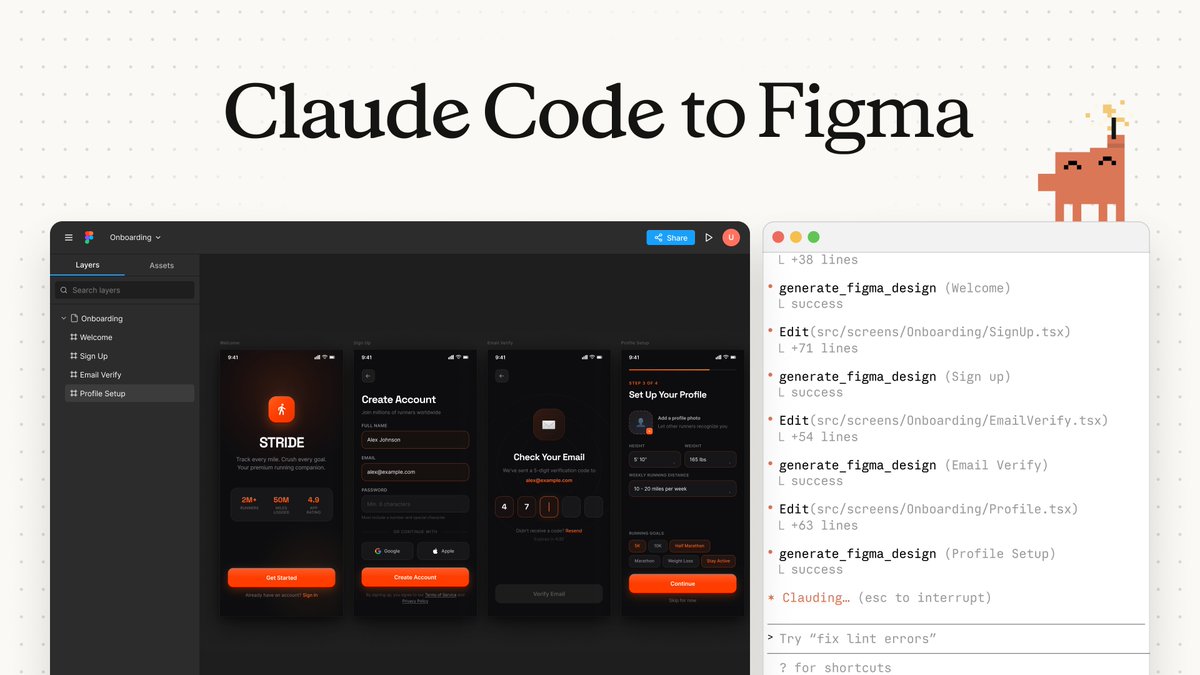
Just updated talk to figma mcp open source Anthropic Claude Code can now talk to figma I can ask claude to review my design and annotate directly in design file Link below

32,790 views • 8 months ago •via X (Twitter)

11 Comments

Sonny's profile picture
Sonny8 months ago

In the demo i use @stitchbygoogle to generate design and bring over to figma, I use talk to figma mcp to give design review

Sonny's profile picture
Sonny8 months ago

MR link

sherizan's profile picture
sherizan8 months ago

@AnthropicAI Welcome back Pak

Sonny's profile picture
Sonny8 months ago

@AnthropicAI halo Pak 😆

Gaddafi Rusli's profile picture
Gaddafi Rusli8 months ago

@AnthropicAI This is really cool Sonny! Can it give feedback based on a given data set (like an internal style guide etc)?

Sonny's profile picture
Sonny8 months ago

@AnthropicAI thanks So much! should be possible? where do you store internal style guide? if it’s markdown simply give it to claude code, for figma style guide can ask to read via talk to figma first

Gaddafi Rusli's profile picture
Gaddafi Rusli8 months ago

@AnthropicAI Got it. Will try it out. Thanks!

Haneef Shiraz's profile picture
Haneef Shiraz8 months ago

@AnthropicAI Why use this vs @paper. Is it the speed or the quality or the nuances Figma brings?

tkmadeit's profile picture
tkmadeit8 months ago

@AnthropicAI do you think this can be used to convert react/html components to Figma?

Sonny's profile picture
Sonny8 months ago

@AnthropicAI might need to create skills for claude code to understand and use figma api

Shiyam Kashfiq's profile picture
Shiyam Kashfiq8 months ago

@AnthropicAI Huge update, Sonny. Where do you store internal style guides for Claude?

Related Videos

Holy sh*t I spent weeks turning Claude Code into a design studio. no Figma license. no agency. no plugins I had to pay for. here's the stack I used and it's embarrassingly simple: -> graphify: teach Claude your brand dump your guidelines, logos, PDFs and old projects into one folder. graphify turns it into a knowledge graph, so every design Claude makes follows your rules instead of guessing. 134k stars, Y Combinator. uv tool install graphifyy -> graphify install -> /graphify . -> Figma-Context-MCP: Figma straight to code it hands your actual Figma file to the agent. the README says it builds designs in one shot, and does it better than pasting screenshots. -> Penpot: the open-source Figma free, open source, and its MCP server lets AI read and edit your designs, then hand them to code and back. -> React Bits: the "expensive" look, for free the biggest open-source library of animated React components. those smooth hover effects and text animations you see on high-end sites? copy, paste, done. -> HyperFrames: designs that move write HTML, get a finished video. made by HeyGen for AI agents. your landing page can now have its own launch video by tonight. claude plugin marketplace add heygen-com/hyperframes -> claude plugin install hyperframes@hyperframes -> MCP for Blender: 3D without learning Blender connects Claude to Blender. describe a scene, the agent builds and edits it in real 3D. the order that works: brand into graphify -> design in Figma or Penpot -> Claude builds it with React Bits -> HyperFrames makes the promo -> Blender adds the 3D hero shot the uncomfortable part: tools used to be the moat. now everyone has them for free. the only thing that still separates good design from AI slop is taste. and taste is the one thing you can't install. bookmark this. your next client will ask why you're suddenly so fast.

kiosa

65,830 views • 3 days ago