正在加载视频...

视频加载失败

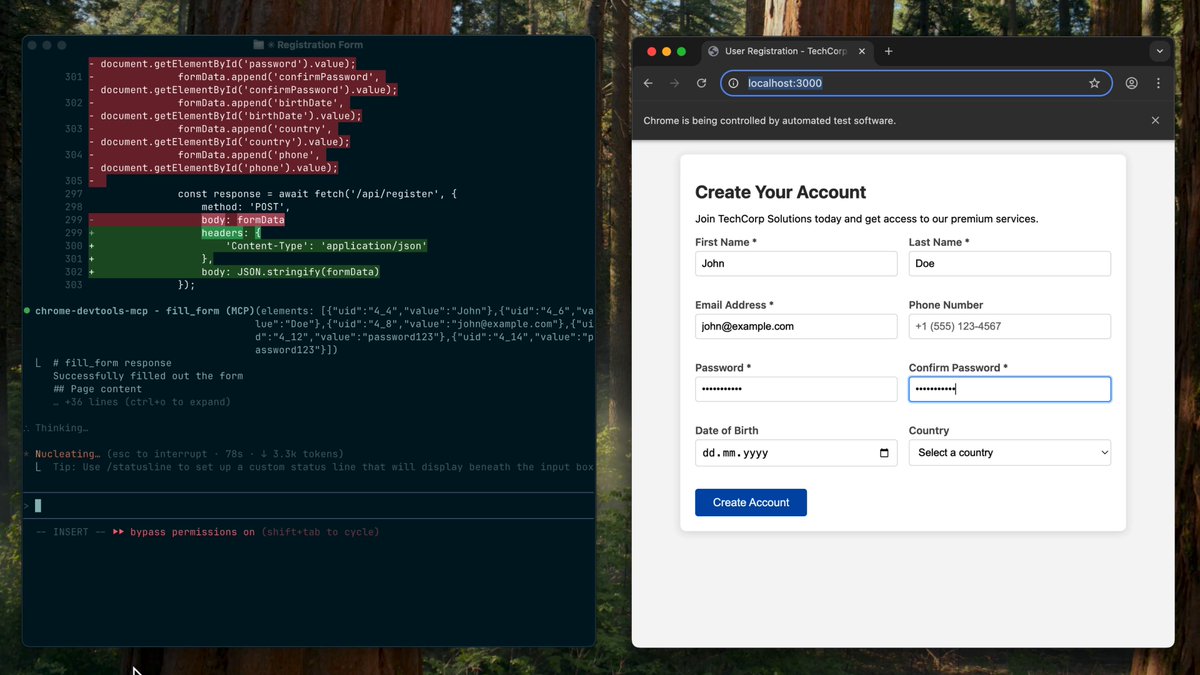
🔧 Let your coding agent identify and fix INP issues for you → With Chrome DevTools MCP, your coding agent can measure performance for specific user interactions to find and resolve slow UI responses - on its own with the help of the browser!

16,689 次观看 • 7 个月前 •via X (Twitter)

0 条评论

暂无评论

原始帖子的评论将显示在这里

相关视频

8 rules to improve your AI coding agent. All of these rules work with Claude Code, Cursor, VS Code, and with most programming languages. Automating these rules will 10x the code quality and security produced by your AI coding agents. 1. Dependency checks - Prevent your agent from suggesting insecure libraries based on outdated training data. 2. Secret exposure - Auto-fix the use of hardcoded credentials introduced by your coding agent. 3. File and function size - Automatically refactor any files or functions that exceed a reasonable length. 4. Complexity and parameter limits - Simplify overly complex code written by the agent. 5. SQL Injection - Auto-fix all database interactions with unsanitized user input. 6. Unused variables and imports - Detect and remove dead code. 7. Detect invisible unicode characters in AI rules files - Remove zero-width spaces, direction overrides, and other invisible characters that can hide malicious behavior. 8. Insecure OpenAI API usage - Enforce use of secure OpenAI endpoints, proper authentication, and context isolation Here is how you can automate this: Install the Codacy extension. This will give you access to a CLI for local scanning and an MCP server for agent communication. From here on out, every time you need to generate some code: 1. Your agent will write the code 2. It will then call Codacy's CLI to check it 3. It will find any issues in real time 4. Your coding agent will fix the issues 5. When the code passes all checks, you are done Level of effort on your side: literally zero! Code quality and security because of this: 100x better! Here is the link to download the extension for your IDE: Thanks to the Codacy team for collaborating with me on this post.

Santiago

48,469 次观看 • 7 个月前