Video wird geladen...

Video konnte nicht geladen werden

Zur Startseite

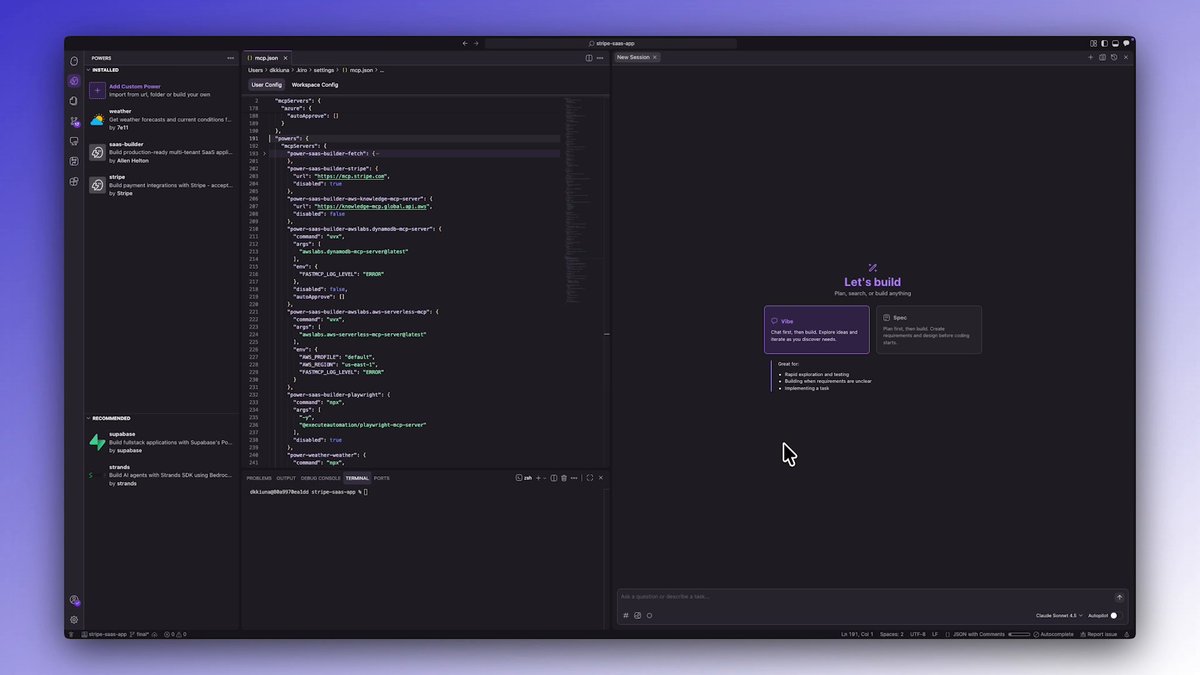
New superpowers activated 🦸 ⚡ Kiro powers load tools dynamically based on what you ask for. Only what’s needed activates. Everything else stays out of memory. • No MCP overload • Fewer wasted tokens • Cleaner context Works with tools like Figma, Stripe, Supabase, and Datadog, Inc.. Start today...

21,238 Aufrufe • vor 6 Monaten •via X (Twitter)

0 Kommentare

Keine Kommentare verfügbar

Kommentare vom Original-Post werden hier angezeigt

Ähnliche Videos

HERMES AGENT WITHOUT TOOLS IS A CHATBOT. WITH THEM IT BUILDS 3D TOWERS IN BLENDER, CHECKS STOCK PRICES, AND DRIVES VS CODE. tonbi JUST DROPPED THE FULL GUIDE. module 6 of his 10-part Hermes masterclass. best breakdown of the tool layer anyone has published. what you need to know: TOOLS vs SKILLS vs MCP skills = instructions (markdown, loaded into context) tools = callable functions (Python, agent emits call, Hermes executes) MCP = adapters to external systems (Blender, Stripe, Linear, Notion) every tool has three parts: → the function (does the real work) → the schema (what the model sees to decide when to call it) → the registry (makes the tool exist in the agent) the model never runs the function directly. it emits a structured request (tool name + JSON args). Hermes executes and returns the result. if the tool fails, the error goes back as JSON. the agent recovers instead of crashing. TOOL SETS CONTROL THE SURFACE hermes chat --tool-sets web # only web tools loaded. no files, no terminal. hermes chat --tool-sets safe # read-only: web search, vision, image gen. # no file writes. no terminal. no code execution. mid-session: /tools enable video /tools disable terminal or toggle in the dashboard: hermes dashboard → Skills → Tool Sets MCP SERVERS two transport types: STDIO (local subprocess) or HTTP (remote endpoint). add a server: hermes mcp # or ask: "add the MCP server for Blender" filter tools with include/exclude per server. keep only what you trust. security: → OAuth 2.1 PKCE (no long-lived tokens in config) → package scanning via api.osv. dev before launch → all MCP calls go through approval gates HERMES AS MCP SERVER hermes mcp serve exposes 10 tools via FastMCP. connect VS Code Copilot or Cursor to your running Hermes instance. BUILD YOUR OWN TOOL He built a stock price tool live: → Python function calling Finnhub API → schema with name, description, parameters → registered in tool_sets.py → agent calls it automatically when relevant any repeating API call in your workflow can become a native tool. full Hermes architecture deep-dive in the article 👇

YanXbt

32,680 Aufrufe • vor 1 Monat

If your MCP server has dozens of tools, it’s probably built wrong. You need tools that are specific and clear for each use case—but you also can’t have too many. This creates an almost impossible tradeoff that most companies don’t know how to solve. That’s why I interviewed my friend Alex Rattray (Alex Rattray), the founder and CEO of Stainless. Stainless builds APIs, SDKs, and MCP servers for companies like OpenAI and Anthropic. Alex has spent years mastering how to make software talk to software, and he came on the show to share what he knows. I had him on Every 📧’s AI & I to talk about MCP and the future of the AI-native internet. We get into: • Design MCP servers to be lean and precise. Alex’s best practices for building reliable MCP servers start with keeping the toolset small, giving each tool a precise name and description, and minimizing the inputs and outputs the model has to handle. At Stainless, they also often add a JSON filter on top to strip out unnecessary data. • Make complex APIs manageable with dynamic mode. To solve the problem of how an AI figures out which tool to use in larger APIs, Stainless switches to “dynamic mode,” where the model gets only three tools: List the endpoints, pick one and learn about it, and then execute it. • MCP servers as business copilots. At Stainless, Alex uses MCP servers to connect tools like Notion and HubSpot, so he can ask questions like, “Which customers signed up last week?” The system queries multiple databases and returns a summary that would’ve otherwise taken multiple logins and searches. • Create a “brain” for your company with Claude Code. Alex built a shared company brain at Stainless by keeping Claude Code running on his system and asking it to save useful inputs—like customer feedback and SQL queries—into GitHub. Over time, this creates a curated archive his team can query easily. • The future of MCP is code execution. Instead of giving models hundreds of tools, Alex believes the most powerful setup will be a simple code execution tool and a doc search tool. The AI writes code against an API’s SDK, runs it on a server, and checks the docs when it gets stuck. This is a must-watch for anyone who wants to understand MCP—and learn how to use them as a competitive edge. Watch below! Timestamps: Introduction: 00:01:14 Why Alex likes running barefoot: 00:02:54 APIs and MCP, the connectors of the new internet: 00:05:09 Why MCP servers are hard to get right: 00:10:53 Design principles for reliable MCP servers: 00:20:07 Scaling MCP servers for large APIs: 00:23:50 Using MCP for business ops at Stainless: 00:25:14 Building a company brain with Claude Code: 00:28:12 Where MCP goes from here: 00:33:59 Alex’s take on the security model for MCP: 00:41:10

Dan Shipper 📧

15,645 Aufrufe • vor 9 Monaten

Everyone wants agent swarms. Very few people are talking seriously enough about the context layer that makes swarms useful. Even with one agent, context is fragile. Too little context and the agent guesses. Too much context and it wastes tokens, loses focus, or reasons over irrelevant noise. The sweet spot is precise context: the right knowledge, in the right structure, at the right moment. With many agents, that challenge explodes. Each agent produces decisions, assumptions, findings, summaries, risks, and partial conclusions. Unless that knowledge becomes shared, structured, and reusable, every new agent is forced to rediscover what another agent already learned. That is not a swarm. That is a crowd. Shared context graphs are what turn agent activity into agent collaboration, and OriginTrail DKG V10 brings them to life. Was just playing with some final polishing for the V10 release, and it is really powerful to see shared context graphs where multiple agents contribute knowledge into the same connected memory, with attribution visible directly in the graph ui. That matters for three reasons. First, agents can access and build on one shared memory instead of staying trapped in isolated sessions. Second, the graph structure helps them retrieve the exact context they need, instead of stuffing everything into a prompt and hoping the model sorts it out. Third, verifiability of provenance. You can see which agent contributed each piece of knowledge, trace the source, and decide what to trust. Tokenmaxxing starts with fewer tokens, but the deeper story is coordination - agents stop reloading the world and start building on shared, verifiable context. That is the foundation for serious multi-agent work across software engineering, research, finance, operations, project management, and far beyond. The future is not more agents, it is agents working from shared, verifiable context. But the more the merrier, of course.

Jurij Skornik

11,070 Aufrufe • vor 2 Monaten

OpenClaw has 186K GitHub stars and 1.5M compromised API keys. I needed a secure alternative. So, I built it with n8n and Claude Opus 4.6. It can already: - Reply to your Telegram messages - Access selected folders from your laptop - Access Gmail, Drive, Notion, Linear, etc. - Install new local tools in a sandbox - Run autonomously for hours - Create multiple subagents - Learn from experience - Wake up regularly But, unlike OpenClaw, it: - Can't access your API keys - Can't modify its environment - Can't access folders you haven't shared - Can't access tools you haven't approved - Must get your confirmation, e.g., when sending emails These aren’t prompt instructions. They’re hard architectural boundaries — Docker isolation, mounted folder permissions, n8n’s tool approval system. Key components: ✅ The VPS on Hostinger hosts n8n and a sandbox container. Agents can also connect to my laptop's sandbox via a Claudeflare tunnel + Desktop Commander MCP. ✅ The Manager agent is the brain. It plans, decides, delegates, and talks to the user. It never touches files. It never runs scripts. It works entirely from executor summaries. ✅ The Executor agents are the hands. Each receives a task (what to do + why it matters), decides how to execute it, and reports back. They can install new tools and execute code only in their dedicated sandboxes. ✅ Data Tables in n8n store both memories and sessions — no external database, no vector store, no infrastructure. Just rows in a table. Turns out, that's enough. Two memory types: - Manager memory: user preferences, facts, corrections, relationship, skills, context - Executor memory: what tools are installed, what’s broken, workarounds ✅ Sessions are short-term state for multi-step tasks. Original request, plan, assumptions, and what happened so far. When the Manager loops with fresh context, the session is all it gets. That's a Ralph Wiggum loop. I've been using it for 5 days. And already can't imagine not having it on my phone. What's next: - Heartbeat via Cron (a scheduled prompt) - Civic Nexus governance + MCPs - Supermemory integration - WhatsApp as an additional surface - Hardening The architecture supports all of it. OpenClaw proved people want personal AI agents. It also proved that 'just trust the prompt' isn't a security model. Docker isolation, mounted folder permissions, tool approval — none of this is new technology. It's just discipline. You can easily do this even with n8n — no coding required. --- Want to try it or read more? More, what I learned, and a setup guide: productcompass[.]pm

Paweł Huryn

53,999 Aufrufe • vor 5 Monaten

🙌Meet Artifig: A Figma Plugin to Generate Figma Plugins Do you use Figma and ever feel like this: - Your mind is bursting with plugin ideas, but you can't bring them to life because you don't know how to code? - You want to focus on design, but repetitive tasks keep slowing you down? - You dream of creating custom tools for your team, but lack the time or resources? I’ve been there too. That’s why I created Artifig. ✨ What is Artifig? Artifig is an AI-powered Figma plugin that empowers anyone to build their own Figma plugins using just natural language. No coding needed—simply describe what you want, and watch as your idea transforms into a fully functional, real-time plugin. 🚀 Redefining Figma Plugin Development The core philosophy of Artifig is simple: Designers often have countless ideas and creative visions, but many of them remain unrealized due to a lack of technical skills. We believe designers shouldn’t be limited by their inability to code. You should focus on creating, not be held back by technical barriers or repetitive tasks. Artifig takes you directly from "description" to "implementation." 🛠️ How Does It Work? 1. Describe Your Needs: Tell Artifig what you want, like “Create a skew transformation tool for objects, supporting horizontal and vertical skew with real-time preview functionality.” 2. Generate and Run the Plugin: Artifig instantly generates the plugin and runs it right within Figma. For example, the generated plugin can apply skew transformations to objects, precisely controlled via matrix transformations, with an intuitive user experience. 3. Optimize and Iteration: Need adjustments? Simply describe them, and Artifig will Iterating the plugin step by step. 4. Share Your Creations: Publish your plugins to the Artifig community, or remix plugins shared by others to build on their ideas. No learning curve. No complex steps. It’s as simple as that. 🌟 Key Features - Zero Barrier to Entry: No coding experience needed—any Figma user can create plugins effortlessly. - Multilingual Support: Works in multiple languages, including English, Chinese, French, Japanese, and German. - What-You-See-Is-What-You-Get: Generated plugins run in real-time, so you can quickly validate and refine your ideas. - Open and Flexible: The generated plugin code is 100% yours—modify it, distribute it, even use it commercially. - Global Community: Share your plugins, explore others’ creations, and publish your plugins to the Figma community. 🎯 Why is Artifig a Game-Changer? 1. No More Repetitive Work Let AI handle the tedious, time-consuming tasks: batch renaming layers, auto-aligning elements, or applying styles in bulk. All you need to do is say, “Import a PDF and arrange each image on the canvas with 20px spacing.” 2. Quickly Bring Ideas to Life From color contrast checks to data imports and custom components, all your “what if we could” ideas can now become plugins. Just one natural language description, and Artifig makes it happen. 3. Custom Tools for Your Team Build tailored tools for your team, creating unique solutions to streamline your workflow. 4. Not Just a Tool, But a Learning Experience Artifig explains the logic behind the code it generates, helping you understand Figma APIs and JavaScript. Today, you’re a designer; tomorrow, you could also be a design engineer. 🧑‍🚀👩🏻‍💻🥷🏻 Who is Artifig For? - Beginners: No development experience needed—just describe your ideas and let Artifig do the rest. - Experts: Save time and focus on high-value tasks while Artifig handles the repetitive work. - Learners: Use Artifig as a bridge to deepen your understanding of development. - Teams: Build custom tools to enhance collaboration and efficiency. 🎉 Ready to Get Started? I believe designers’ time and focus should be spent on creating, not on wrestling with complex tools. Artifig is the first step toward realizing this vision. Try Artifig now and experience an unprecedented flow of creativity!

yancymin

21,222 Aufrufe • vor 1 Jahr

AI AGENTS 101 (58 minute free masterclass) send this to anyone who wants to understand ai agents, claude skills, md files, how to get the most out of AI etc in plain english: 1. chat vs agents - chat models answer questions in a back and forth while agents take a goal, figure out the steps, and deliver a result 2. agents don’t stop after one response. they keep running until the task is actually finishedno babysitting required 3. everything runs on a loop. they gather context, decide what to do, take an action, then repeat until done 4. the loop is the system. they look at files, tools, and the internet. decide the next step. execute and then feed that back into the next step. over and over until completion 5. the model is just one piece. gpt, claude, gemini are the reasoning layer. the key is model + loop + tools + context 6. mcp is how agents use tools. it connects things like browser, code, apis, and your internal software. once connected, the agent decides when to use them to get the job done 7. context beats prompt all day. you don't need to write perfect prompts. load your agent with context about your business, style, and goals and then simple instructions work 8. claude.md or agents.md is the onboarding doc it tells the agent who it is, how to behave, what it knows, and what tools it can use. this gets loaded every time before it starts 9. memory.md is how it improves. agents don’t remember by default. this file stores preferences, corrections, and patterns you tell the agent to update it, and it gets better over time 10. skills + harnesses make it usable. skills are reusable tasks like writing, research, analysis the harness is the environment like claude code or openclaw that runs everything. basiclaly, different interfaces, same system underneath this episode with remy on The Startup Ideas Podcast (SIP) 🧃 was one of the clearest ways of understanding a lot of the core concepts of ai agents could be the best beginners course for ai agents 58 mins. all free. no advertisers. i just want to see you build cool stuff. im rooting for you. send to a friend watch

GREG ISENBERG

375,365 Aufrufe • vor 4 Monaten

I'm thrilled to announce the launch of and the start of a new conversation. We can all feel it: the web is changing in ways that seem both dramatic and, in a weird way, imperceptible. At times, it’s hard to know where to start exploring what could be next. Sometimes, when you think you've found whatever next could be, it's hard to determine what’s real and what’s hype. Our approach has always been simple: We like to put a big question out there on the horizon of what’s possible, then build toward it with conviction to see what we can learn. When we created the new Edgar Allan site, we set out to explore the impact of conversational design and personalization in marketing experiences. Why conversation? Conversation and dialogue are the foundation of all stories and the vehicle for human connection. Today, it’s difficult to ignore the prevalence of conversation in the digital world, from Slack and Teams channels to social media feeds, phone messaging, and tools like ChatGPT. So, with that in mind, we had some thoughts: ‍“What if a website was less a one-sided place to present information and more of a living knowledge center?” “What if a site could be more of a guide than a brochure?” “What if we could incrementally learn about a visitor’s intent, then dynamically shorten the distance between everything a brand says and the mere seconds of attention most websites get?” Ultimately, the agency's job is to work at the edge of the future and what’s possible so we can make things and report the results to our clients and community. Thank you for joining us in this process. We can’t wait to see how this conversation unfolds and what we can learn together. Also, a huge thank you to the entire EA team. After 258 days of wild exploration and untold effort, today, we are starting the process of learning, designing, building, and optimizing. This site feels like us, and I couldn't be more excited.

Edgar Allan

27,890 Aufrufe • vor 1 Jahr

This Chinese guy created agents in Claude Code for MCP servers and single-handedly serves 6 marketing agencies a month from one iPhone, earning $5,000 from each. Inside he runs a pipeline of 7 agents on Claude Sonnet 4.6 that every Monday pulls a scan of the tech stack from a selected agency, develops an MCP server for its ad accounts, and over the course of a week brings it to production code ready to connect to Claude Desktop. No DevOps, no senior developer, no project manager. Just a Mac Mini in a work corner, an iPhone in the pocket, and a single API key. And traditional dev shops keep 5 people on project rates for the same contract, while his entire P&L is tokens, dirt-cheap hosting on Cloudflare, and Calendly. 7 agents run under a shared orchestrator-router and burn about 5 million tokens a day, which in the API bill comes out to $540 a month. The Mac Mini itself sits at home and keeps the entire orchestrator running 24/7, and from the iPhone the owner connects to it through a secure remote terminal and sees the output of any session right on the smartphone screen, wherever he happens to be. His starting system prompt looks like this: "you run a solo shop for custom MCP servers for marketing agencies. you hand out read-only tasks to 6 sub-agents and own all commits and shipping yourself. sub-agents: // Hunter (finds marketing agencies of 15 to 60 people that have no MCP access to Google Ads, Meta Ads, TikTok Ads, and HubSpot) // Mapper (pulls their tech stack, identifies 3 to 5 integration pains, and simultaneously writes the technical spec for the server: which tools, resources, and prompts to export through MCP, which auth flow and rate limit) // Coder (generates an MCP server in Python through the MCP SDK, deploys 8 to 15 tools for ad accounts and CRM) // Validator (connects the server to Claude Desktop, runs real client API keys in a sandbox, and checks for compliance with the MCP spec) // Shipper (writes a README, integration guide, deployment manual, packages the server, and hosts it on Cloudflare Workers or pushes to the GitHub of the client) // Mobile (always online on the iPhone, books demo calls in Calendly, picks up hot fixes, and confirms contracts through a secure remote terminal to the Mac Mini). only 1 owner agent works on 1 contract, no overlaps. you pull the owner out of observation mode only when a deal goes above $7,500 or the test coverage of the server drops below 85%." This prompt gives the system an understanding of its role and the limits of intervention from the very first line. It knows it is supposed to find agencies on its own. It knows it is supposed to bring every MCP server to production on its own. It knows it connects the live owner only on large deals or when the tests do not converge. → The pipeline runs without breaks, day or night → Hunter goes through about 130 marketing agencies on LinkedIn and Clutch per day → Mapper rolls out 4 audit reports with the tech stack and a final spec for each → Coder writes 1 to 2 MCP servers per week in Python with 8 to 15 tools → Validator validates every server through Claude Desktop with real client API keys → Shipper rolls out the full documentation package and pushes the finished product to Cloudflare Workers or the GitHub of the client And only when a contract breaks $7,500 or test coverage drops below 85% does the orchestrator pull the owner from whatever he is doing. And when the owner at that moment is behind the wheel or at a meeting in a coworking space, the Mobile agent in his iPhone picks up 1 contract in progress: confirms a meeting with the agency CMO in Calendly, opens a live demo of the MCP server through a secure terminal to the Mac Mini, and writes the test result to the shared state. The owner just swipes "approve" and in 15 minutes joins the Zoom demo. The fresh system log from last Wednesday looks like this: "hunter report: 132 agencies checked on LinkedIn and Clutch, 19 without MCP integrations, 8 with active requests for AI tooling in job posts, 4 with an open Q4 budget. passing to mapper." "coder: MCP server for Northwave Performance Marketing built in Python, 11 tools for Google Ads, Meta Ads, and GA4, 320 lines of code. exported to /Users/dev/mcp-shop/clients/northwave/server.py. validator connecting to Claude Desktop." "validator: 11 tools passed validation through Claude Desktop, test coverage 92%, average latency 380 ms. passing to shipper." "eval flag: contract with Pacific Reach Agency at $8,200 exceeds the approved limit of $7,500. sending for manual review." In his work setup there is no cloud server, no external team, and not even a separate office. At home sits a Mac Mini with a sandbox at /Users/dev/mcp-shop, on top runs an MCP router with a single API key to Claude, and the same key is forwarded to a secure terminal on the iPhone. Out of everything I have seen this year, this is the cleanest solo shop for custom MCP servers for marketing agencies: $540 a month on the API, about $30,000 into the account, and between them 7 system prompts, 1 Mac Mini in a work corner, and 1 iPhone that never leaves the pocket.

Blaze

55,926 Aufrufe • vor 2 Monaten