Loading video...
Video Failed to Load
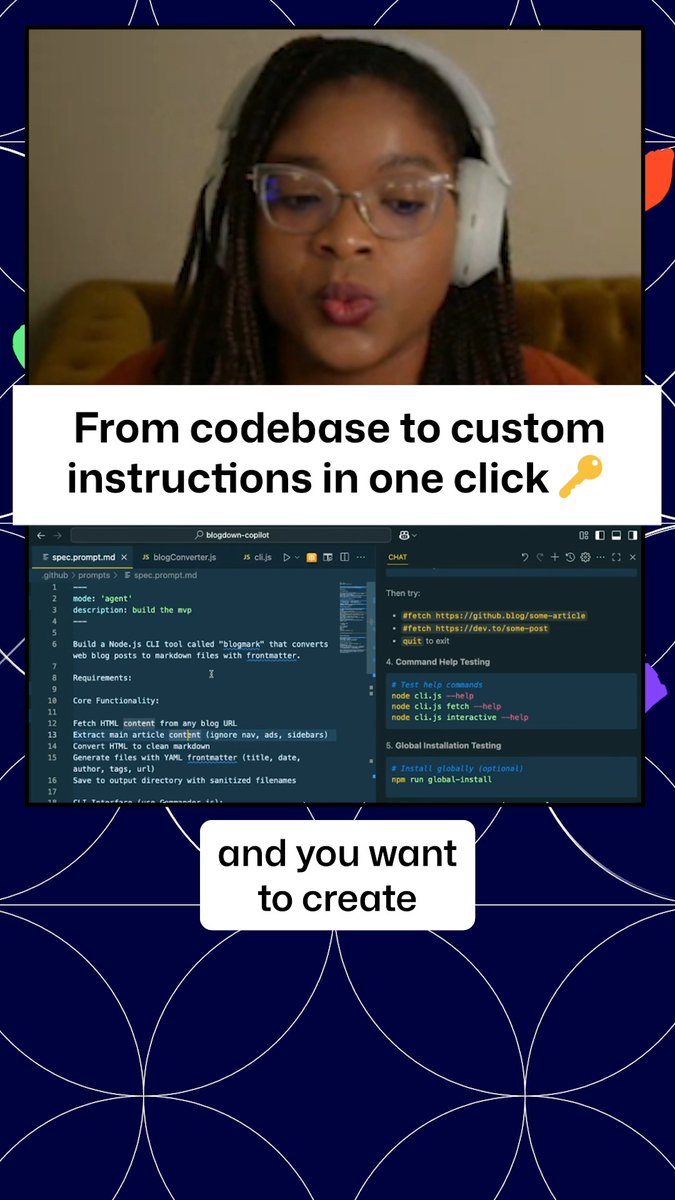
Now Visual Studio Code will generate your copilot-instructions file for you. You will get CRAZY better results by having these instructions for the AI...

79,857 views • 1 year ago •via X (Twitter)
52 Comments

@code If it's so easy to generate, why can VSCode not just make one in the background (and keep it up to date over time) automatically?

@code Wow the comments here… Generating the file explicitly and saving for you lets you tweak it. And you can regen *as needed*… Not everything should be automagic… there’s enough unpredictability with all of this as it is.

@code I’m confused. If Copilot generates it, that means it can already understand everything it’s writing to the instructions file. So I assume the value is without the file Copilot wouldn’t build up this context on each command?

@code Yes, exactly! You'd have to basically include that prompt with all your prompts - or just have that instructions file which gets auto-included every time.

@code Hi Burke, this is a great feature and I tried it yesterday on one of my projects and I was impressed. I did wonder how the instructions work in terms of context window. Is this embedded in every prompt we make afterwards? Does it use more premium tokens? Thanks
@code It's part of every request yes. But remember that premium requests aren't counted by tokens - they are counted by request. So every time you interact with the AI, that's a request. If it's interacting with itself (agent mode) that is not an additional premium request.

@code I dont see this option ? Is it only for VSCode insiders ?

@code Did I make this up or is there a way to have copilot continually update that instructions file as it fulfills requests in the chat?

With the new copilot chat modes, it would be interesting if you could create a few focused chat mode prompts that the agent has visibility on and the ability to use, so the agent can decide when to use each mode and automatically call them. E.g. Give the agent a task to solve Pre-made chat modes: - beast edit mode - search mode - issue detective mode Agent looks at the task, and then can decide - Use search mode to gather the context according to the mode instructions - Then the Agent calls issue detective mode to guide the AI how they should analyse the issue. - Then the Agent calls beast edit mode to make the final edits. Thereby not having 1 giant long messy chat mode prompt that would have all the instructions, as that would lead to more confusion and less focus on the very next task and how to complete the task.
@Davi_g117 @code Yeah - @slicknet has articulated it as having agents calling each other. Right now it's a bit too manual.

@code Next up, a tool that writes better instructions for the copilot-instructions file for the AI.
@code

@code Telling you copilot might actually catch back up with @cursor_ai if Microsoft doesn’t bungle it again thanks to cursor losing trust over the “it’s unlimited with rate limits now” pricing scandal
@code @cursor_ai We shall do our best not to bungle 😂
@code @cursor_ai Cheering you on 🥳🥳🥳

@code Awesome!

@code i don't see that option. Also, what version of vsc are you using ?? mine looks different, not sure if it's the theme or smth :think

@code is that feature only insiders at the moment?

I have one solution that includes the (new?) file. I've been tweaking this file with commands like (and I still suck at prompts!): - When asked to create a Service object, use #service-object-prompt.md - When asked to create a Handler, use #handler-prompt.md My instructions file is growing - but also getting more and more tied to a specific type of solution.
@code It's alright! We're all learning with prompting - it's not easy. If you want to you can always contribute that prompt over at
That would be interesting. All of that is blocked from work - unfortunately. Cannot upload a single byte. We do have the Enterprise edition but not a single github repo. Was really wishing Copilot could talk to our enterprise Azure DevOps though! I'll see if I can make some for home use! :)
@code I’m pretty sure it can!
@code I think we are missing a connector. Copilot cannot/will not look at ADO. I also fight the "we are hiding this answer to protect you" a lot. Things are still locked down pretty tight. <sigh/> Does make it a bit harder to master these tools! 😆

@code I dont see the gear nor generate prompts anywhere???

@code Context Engineering is that you?

@code This is a huge quality-of-life upgrade! Having VS Code auto-generate copilot-instructions is going to make AI-assisted coding way more effective. Can’t wait to try this out! 🚀

@code I am a bit puzzled. How will it generate the prompt without knowing anything about a newly started project?
@code Yeah - if it's a newly started project - there isn't much to know besides the stack. In that case, I would recommend building out and then using that function to update your instructions when you feel the project has changed enough. It won't hurt to re-run it - it just updates.

@code This feels like an intermediate state to me. Generating a file with Copilot so the file can be used to generate things with Copilot. Feels like this should be detected automagically through analyzing the project and only patched/overruled by specific manually configured rules.

@code Why am I not seeing that gear button?
@code Will be in Stable tomorrow. In Insiders today. I should have clarified my bad.
@code Ahh, cool, no biggie. Thanks!

@code Thank you this is nice
@code AI Models on VSCode are too tooo damn slow..
@code We’ve made a bunch of speed improvements already, but we think it can be better. We’re looking at it. cc: @pierceboggan

@sayyad @code yes - lots of work going on here! which model? and do you know if you have the public code matching setting on for your account?
@burkeholland @code I am really sorry don’t know what you mean by saying ‘public code matching setting’.🙄

@code Thank u actually hadn't heard of giving it proper instructions in specific folder. That's actually amazing, my favorite part of having it is checking for bugs 🐛 but wanted to have it go through all files in each folder & check code so now i can have it go through specific order

@code How do I benchmark/verify if my current instructions outperform what you would generate?

@code Code generating instructions? That's brilliant! It’s like giving your brain a super-powered study guide. Imagine turning complex coding concepts into flashcards with Record and Learn—instant clarity. 🚀

@code Is this the Norman prompt!

@code @HeyGenLabs Spanish

@code Is there a way to have more copilot files using glob patterns? Similar to Cursor. I could have an Angular instructions file for my .ts, .HTML, and .scss files. Then one for .NET, etc. The glob pattern could help Copliot understand when to use it. It keeps it modular and specific

@code Guys, I need you to add bookmarks to save chats that have important information and context. Please add this feature soon.
@code Add a feature request!

@code It's all about memory.

@madebygps @code Awesome 👌

@code I don't see the cog in my VS Code. Is this an upcoming release?
@code Yeah in Insiders today, will be in “blue” tomorrow

@code Any suggestions on how to make those instruction files dynamic? For example, let's say that I add (or remove) a Nugget package dependency to my solution. How would you suggest I keep the instructions markdown file updated accordingly?

@code This was much needed feature.

@code Ooooooo this is nice! Does it support updating it too? When I drift too much from it, I always do a @workspace with clean prompt to update it. Would be cool to have it too under a button