Video yükleniyor...

Video Yüklenemedi

Ana Sayfaya Dön

OpenClaw has 186K GitHub stars and 1.5M compromised API keys. I needed a secure alternative. So, I built it with n8n and Claude Opus 4.6. It can already: - Reply to your Telegram messages - Access selected folders from your laptop - Access Gmail, Drive, Notion, Linear, etc. -...

53,947 görüntüleme • 3 ay önce •via X (Twitter)

0 Yorum

Yorum bulunmuyor

Orijinal gönderinin yorumları burada görünecek

Benzer Videolar

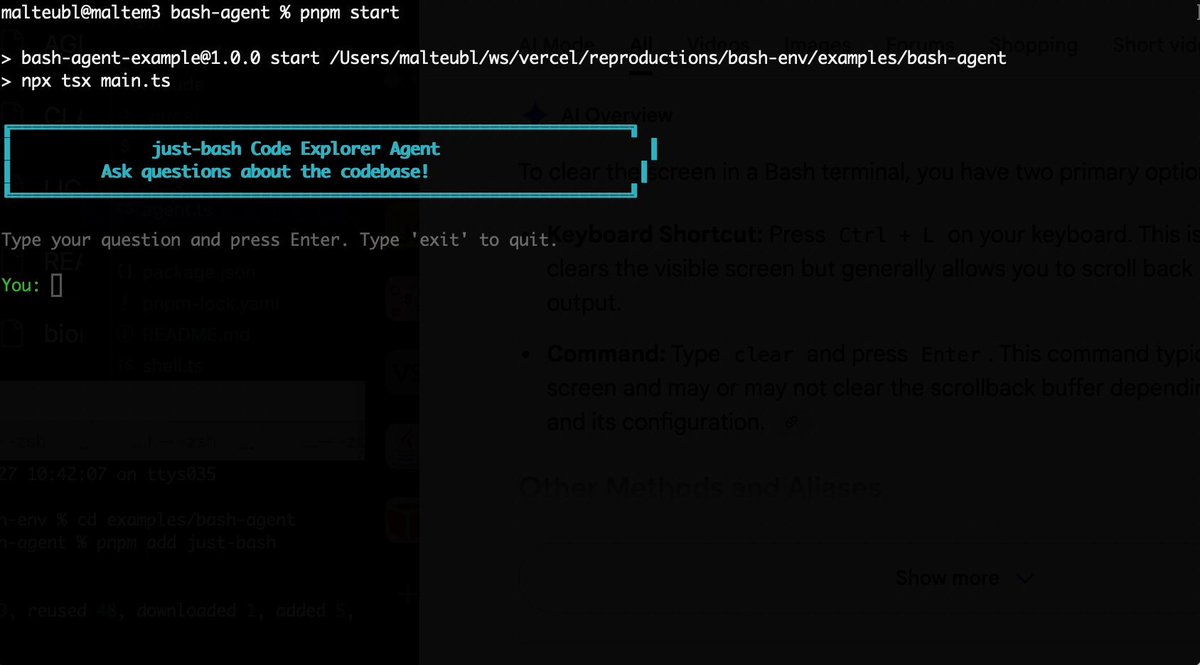
Bash is all you need! Which is why I'm introducing my holiday project: just-bash just-bash is a pretty complete implementation of bash in TypeScript designed to be used as a bash tool by AI agents. Because it turns out agents love exploring data via shell scripts, even beyond coding. It comes with grep, sed, awk and the 99th percentile features that an agent like Claude Code or Cursor would use. In fact, Claude Code can use it for secure bash execution. In the package - A bash-tool for AI SDK - A binary for use by yourself or your coding agents - An overlay filesystem to feed files to your agent securely - A Vercel Sandbox compatible API, so you can quickly upgrade to a real VM if you need to run binaries - An example AI agent that explores the just-bash code base using just-bash - I imported the Oils shell bash compatibility suite and just-bash passes a very good chunk What is interesting about this codebase: It was essentially entirely written by Opus 4.5. Coding agents love bash and they are good at reproducing it. They are also great at text-book recursive descent parsers and AST tweet-walk interpreters. That said, it is, like, a lot of code and I didn't read it all 😅. This is very much a hack, but it also seems to be _really_ useful. I haven't really found anything agents want to use that it doesn't support and it's fast and secure (caveats apply). It doesn't have write access to your computer and the filesystem is given a root that the agent cannot escape from. Find it at Related: Our recent blog post how we migrated our data analysis agent to bash tools and achieved incredible quality improvements The video shows the example agent investigating the just-bash code base

Malte Ubl

124,713 görüntüleme • 5 ay önce

AI AGENTS 101 (58 minute free masterclass) send this to anyone who wants to understand ai agents, claude skills, md files, how to get the most out of AI etc in plain english: 1. chat vs agents - chat models answer questions in a back and forth while agents take a goal, figure out the steps, and deliver a result 2. agents don’t stop after one response. they keep running until the task is actually finishedno babysitting required 3. everything runs on a loop. they gather context, decide what to do, take an action, then repeat until done 4. the loop is the system. they look at files, tools, and the internet. decide the next step. execute and then feed that back into the next step. over and over until completion 5. the model is just one piece. gpt, claude, gemini are the reasoning layer. the key is model + loop + tools + context 6. mcp is how agents use tools. it connects things like browser, code, apis, and your internal software. once connected, the agent decides when to use them to get the job done 7. context beats prompt all day. you don't need to write perfect prompts. load your agent with context about your business, style, and goals and then simple instructions work 8. claude.md or agents.md is the onboarding doc it tells the agent who it is, how to behave, what it knows, and what tools it can use. this gets loaded every time before it starts 9. memory.md is how it improves. agents don’t remember by default. this file stores preferences, corrections, and patterns you tell the agent to update it, and it gets better over time 10. skills + harnesses make it usable. skills are reusable tasks like writing, research, analysis the harness is the environment like claude code or openclaw that runs everything. basiclaly, different interfaces, same system underneath this episode with remy on The Startup Ideas Podcast (SIP) 🧃 was one of the clearest ways of understanding a lot of the core concepts of ai agents could be the best beginners course for ai agents 58 mins. all free. no advertisers. i just want to see you build cool stuff. im rooting for you. send to a friend watch

GREG ISENBERG

374,557 görüntüleme • 2 ay önce

JUST IN: Perplexity launched "Perplexity Computer" — and it might be the most complete AI agent system available right now. Not a chatbot upgrade. Not a research tool with a new name. A system that plans entire projects, delegates to specialist AI models, and runs autonomously for hours, days, or months (their words). Here's what makes the architecture genuinely different: → Opus 4.6 handles core reasoning and orchestration → Gemini handles deep research (spawning its own sub-agents) → Grok handles lightweight speed tasks → Veo 3.1 handles video generation → Nano Banana handles image creation → ChatGPT 5.2 handles long-context recall and wide search → You can override model choices per subtask 19 models total. Each task runs in an isolated environment with a real filesystem, real browser, and real tool integrations. You describe an outcome. It breaks it into tasks and subtasks, creates sub-agents for each, and coordinates them automatically. When a sub-agent hits a problem, it spawns more sub-agents to solve it. And it connects to your existing stack — GitHub, Google Drive, Gmail, Slack, Jira, Linear, Notion, Confluence, Ahrefs, Airtable, and more. Critically, it doesn't just run once. It can run on a schedule. Reading your docs, checking your project boards, pulling from your CRM, and acting on what it finds. Market monitoring. Competitor tracking. Weekly reports with charts. Content pipelines. CRON jobs that actually execute. Not "AI that helps you once." AI that runs in the background for days or months. Think of it as managed OpenClaw — similar autonomous capability (scheduled tasks, multi-step workflows, tool integrations) but fully managed. No Mac Mini. No security config. No infrastructure to maintain. I tested it with a complex prompt — a full stock trading simulator with what-if scenarios, correlation heatmaps, sentiment analysis, and a Bloomberg Terminal aesthetic. Two prompts later: deployed to Netlify via GitHub, with working CRON jobs updating live data. I've started using it to analyze my portfolio. But coding is just one lane. This thing researches, writes reports, generates datasets, creates videos, processes documents, and connects to your existing tools — all in one coordinated workflow. The real shift: you don't choose a model anymore. You describe what you need. The system routes each piece of work to whichever model does it best — and spawns new agents when it hits a wall. 19 models, dynamic sub-agents, scheduled tasks, and your entire tool stack connected. Thoughts?

Paweł Huryn

219,073 görüntüleme • 3 ay önce

New short course: Long-Term Agentic Memory with LangGraph. Learn to build an agent with long-term memory in this course developed in collaboration with taught by its Co-Founder and CEO, Harrison Chase! Personal assistance and productivity tasks have become important use cases for agents. An important feature of an AI assistant, such as a coding or calendar assistant, is its ability to keep improving over time from its experience. Agent memory is the key capability that enables this. To add memory to an agent, you must first figure out what to store and what to retrieve when it is time to use the information. Additionally, you’ll have to decide when to update the stored information. For example, you might update in each iteration loop of the agent or perform updates in the background, with a helper agent. In this course, you will learn a mental framework to build agents with long-term memory. You'll create a useful email assistant that can respond, ignore, and notify using writing, scheduling, and memory-management tools. You’ll develop your agent's memory by adding facts to its memory store, provide examples to learn the user's preferences, and optimize system prompts to evolve instructions based on previous responses. In detail, you’ll: - Learn how the three types of memory--semantic, episodic, and procedural–and the two update mechanisms–via hot path and in the background–apply to your agents. - Build an email agent with writing, scheduling, and availability tools, along with a router that triages incoming email and handles it accordingly by ignoring, responding, or notifying the user. - Add tools to your email agent that allow it to operate on semantic memory by learning facts about the user, storing them in a long-term memory store, and searching over them in future interactions. - Incorporate episodic memory, in the form of few-shot examples, in the triage step of your agents to help them learn and update user preferences. - Add procedural memory as system prompts, optimized with feedback to improve the instructions the agent follows. Learn how to approach memory in agents, and start building agents with long-term memory with LangGraph! Please sign up here:

Andrew Ng

131,607 görüntüleme • 1 yıl önce