Video wird geladen...
Video konnte nicht geladen werden
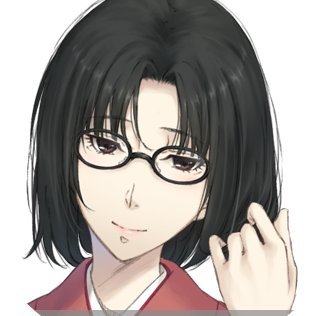
We're reintroducing and open-sourcing project "See-through". Given a single anime illustration, it automatically decomposes the character into fully-inpainted semantic layers with depth ordering. One image in, layered PSD out. (1/n) Repo:
580,679 Aufrufe • vor 5 Monaten •via X (Twitter)
70 Kommentare

Under the hood: a diffusion-based body part consistency module (built on SDXL), paired with pixel-level pseudo-depth fine-tuned on Marigold. It automatically resolves interleaving structures like overlapping hair strands, accessories behind hair, clothing layers, etc. (2/n)
Is this Image-to-Live2D? Not really. Live2D needs artistic decomposition choices + rigging. We only automate segmentation and occlusion inpainting. But it's a solid starting point that may save plenty of manual work. (3/n)
Looking for community contributions — ComfyUI nodes, Colab notebooks, workflow integrations. PRs welcome, we'll feature your work. Enjoy! Finally, props to Lvmin Zhang. He is a legend. Honestly, without his work I might have lost all motivation to pursue this direction. (n/n)

It only took about 10 minutes, that's amazing!
Thanks for your report! It should be faster like 2mins on H200, or 3-4 mins on 4090. Maybe we will consider some optimizations in the future...

Can you make it so it only redraws/create what’s missing and hidden and not the whole illustration bcs AI-ing over the input doesn’t look good and kinda ruins the point It’d be way more hidden if it could keep the input and add the output to it, not overwrite input yk
Potentially there will be seams near the inpainting boundary. Poisson image editing may ultimately solve this ( but please understand this is a research project and all codes are more PoC-like. We encourage all kinds of improvements over our work.

@3rrabundus この素晴らしいモデルの分割情報をMetaのSAMのような分離モデルに渡して「分離」し、パーツごとの描き足し部分をPhotoshopの生成塗りつぶしのように元のレイヤーと綺麗に馴染むように「生成」するというようなことができたら、業界に大きなゲームチェンジが起こせると思いました💭
@3rrabundus I guess you can try adapting it with SAM3+LaMa, it should work but I am not sure about the final quality.

The resolution of the test image is 3649x2770 pixels. The tested graphics card is 4090Ti 24G. The problems encountered are as follows: 1. The resolution has decreased significantly. 2. The details of the generated image have become chaotic. 3. The recognition of non-standing postures is not very good.😳

弹弹

woah! this can be super useful to artists in some scenarios. a question, why choose marigold instead of depth anything2? is just because marigold is also diffusion based.
Yes. Quite the reason. We have also tested with depth anything but find the results quite unstable. Guess this is related to the internal depth representation (but not investigate thoroughly).

Does it break it down into layers of image or in vectors? but nonetheless super cool! gonna check and test it out myself! Good Stuff @ljsabc
It’s in pixels. There are also researches for vector decomposition but the motivations are quite different there.
Interesting... gives me more reason to try it out now though! Thanks!

非常棒的项目!!!期待更多更新!!
还缺几个训练脚本我们会尽快补上,也欢迎大家多出意见多给建议,看看这东西还能咋用…
如果能拆的很自然就很棒

喜报!!! 以后大价钱约的有PSD的图也是AI图了.jpg

言語翻訳のおかげであなたのポストが即読めた、ありがたい。 ものすごいツールだ

我只想拿來抅走背景
那这东西就够了
看情況 有些第一身不太行 想試你這個

I think this is a match made in heaven with @MohoAnimation

Hi, thanks for your work on see-through! 1. Can it handle game screenshots with UI/effects for layer separation, or mainly anime-style images? 2. How does it differ from end-to-end layered models like Qwen-Image-Layered? Thanks!
@NexusUI_Offical 1. We trained our model mainly based on anime characters so we cannot really promise the generalization on out of distribution samples (humanoids, furry, dragons, etc., but it’s worth trying).
@NexusUI_Offical 2. The Qwen model requires prompting and may not always follow the desired semantics ( as in Figure 6, It’s hard to isolate a specific part apart from the composition.
Thanks a lot for the detailed reply!

This, if it were for pixel art, would speed up my process by about 30%. xD

Is there any problem if I change the size from 1280 to 1920? It takes time for the 1280, but I confirmed that it works well I haven't confirmed that it's working yet with 1920
I don’t see these will be obvious problems except the VRAM usage. I think you may have a try.
May I ask you something When I set the resolution value of the file 'inference_psd.py' to 1920 to output the size to 1920, png is output normally, but psd is not generated Is there any other way? It's okay to combine png files, but I'm asking if there's a way
Yes. We see this issue and the update is on its way. Before that, you can modify: on line 50 of inference_psd.py, change: apply_marigold() by adding a new parameter: resolution=args.resolution, and it should temporarily work.
Thank you for your consideration. I'll try it!
No problem. We hard-coded our depth part for a reason, and we will notice you when the update arrives.
Thank you so much !
now we have updated the codebase to separate diffusion/marigold resolution, git pull and rerun should produce PSD correctly. Thanks again for your feedback (w)

cool demo, next step is integrating rigging so animators can actually ship it

I may be doing something wrong. But is it normal for it to take up to 24 GB of disk space after 1 use?
You need to download the model and deps. But this will only happy once and no additional spaces will be consumed.
Got it, I will give it a try. Thank you

this insane!, thanks for sharing this.

Very useful!

Really cool!

how to use this to make animation?
Why doesn’t my generated output have ears?

This is why technology exists... Absolutely incredible work! 🤔 I need to tinker with this...

这个需要多少显存才能跑的动?

holyshit

Hello I love you ok bye

Ah so will this be working on Dragonbones Pro?

Do you think it can be used to extract lineart, or decompose base color/highlight/shadow? There are some classic works like Illyasviel's Erasing Appearance Preservation, but it seems lineart extraction is still an unsolved problem.
Check this out (but I don’t know when they will open source their models) By the way the vanilla Qwen-Image-Layered has already done a good job in separating the line arts (if prompted carefully). So I believe high-quality data is sticky.
* is the key.

Damn! Fr 🤯

@sin_ceriously

Amazing

Hello ! Are you planning to do a version compatible with Apple silicon chip? Because I see that we need PyTorch with Cuda 12.8 so on my Mac not useable. Thanks
I did test with my mps device but find some ops are mps-incompatible. Running everything on CPU is incredibly slow. We will consider this in the future, but I think potentially a better solution could be a Colab solution so it can balance cost and execution time.

What kind of hardware would you suggest is the minimum? I saw a reply saying a h200 should take around 2 minutes, 3 - 4 on a 4090. I've a 4060ti, so 16GB of VRAM, would that be enough or are we looking at 24GB - 32GB? I don't mind it taking 10-20, it still saves hours of work!
loading in fp16 should fit, but you may expect long running like 10mins or something.
That's perfectly fine, considering the time saved over all. Will definitely be fun to experiment with! Great work and thank you for sharing :)
Happy to know that. Always let me know if you meet any issues later.

这玩意应该受限于sam的性能?如果jpeg退化的图或者由北京的情况会不会糟糕一些?
这是个diffusion model,可能会受VAE的影响退点画质,但是跟SAM没啥关系
训练数据是不是没有画师授权没法分发?
是的,这是我们最大的遗憾。不过我觉得大公司很容易就有这些数据,至于小团队可以先用我们的模型infer然后bootstrap一个差不多的数据出来,再用我们的UI洗一遍

很厉害的项目,这样应该会更加的节省独立游戏的制作时间...总之很强,过几天试一下插件部署到云端..
好的!未来如果遇到什么问题或者有什么意见建议都欢迎和我们说!




![[APK] Privacy Protection on One UI 8 just got a new icon with slightly faster operation. It can blur or cover up private info including avatars, names, ID numbers etc. automatically with a single tap. To use it, select any image and click Privacy Protection in the share panel.](https://image.24vids.com/tw-1973596332343566780/amplify_video_thumb/1973596157239861248/img/7qtPnIl7jLxwuFlg.jpg)

