
Faheem Ullah
@Faheem_uh • 22,332 subscribers
#1 Most Followed Voice in AI & Research | 280,000+ LinkedIn Followers | Assistant Professor | University of Adelaide, Australia
Shorts


Videos

PhD Students – How to write a systematic literature review in 1 day? A systematic literature review takes 4-6 months. You can reduce this time. 🎯 Here is how you can write it in 1 hour. 1️⃣ Go to 2️⃣ Select Gatsbi reviewer from the drop-down menu 3️⃣ Enter the topic of your literature review 4️⃣ Gatsbi will generate an outline for review 5️⃣ If you are OK with it, click on write manuscript. 6️⃣ Gatsbi will write the literature review for you. 👉 The literature review contains the following parts ✓ Title ✓ Abstract ✓ Introduction ✓ Methodology ✓ Results ✓ Discussion ✓ Conclusion ✓ References 👉 This polished paper also contains ➝ Diagrams ➝ Tables ➝ Equations ➝ Graphs Once the draft is ready, you can humanize the text. Once humanized, you can download it in the following formats. ↳ MS Word ↳ Latex ↳ Markdown After downloading, you can make any changes you want. In addition to Gatsbi Reviewer, you can also use: → Gatsbi Innovator: Generate ideas before writing → Gatsbi Writer: Write research papers 🎗️Try Gatsbi today for free:
Faheem Ullah362,070 views • 6 months ago

PhD Students – Use this FREE tool to analyze data in 10 sec. This tool is used by more than 500,000 researchers. 1. Go to 2. Click on Data Analysis and upload your data file. 3. Write your prompt for data analysis. 4. For example, generate graphs for data analysis. 5. AnswerThis will generate variety of graphs for you. 6. It also generates an insightful data analysis report. You can download the graphs and the report. Try AnswerThis today. It’s FREE. AnswerThis link:
Faheem Ullah207,403 views • 7 months ago

PhD Students - How much of your manuscript is AI-written? Find out in 10 seconds. 1. Go to 2. Click on 𝐴𝐼 𝑤𝑟𝑖𝑡𝑒𝑟 3. Copy and paste specific text or upload manuscript 4. Click on 𝐴𝑛𝑎𝑙𝑦𝑠𝑖𝑠 and then on 𝑃𝑙𝑎𝑔𝑖𝑎𝑟𝑖𝑠𝑚 5. You will get a complete plagiarism report. 6. Now click on 𝐴𝐼 𝐷𝑒𝑡𝑒𝑐𝑡𝑖𝑜𝑛 7. You will get an AI plagiarism report Here you will see how much % of your text is AI-written You will also see the exact sentences A manuscript with plagiarized content is not acceptable What to do next? - Remove plagiarized content from your manuscript - Also, remove AI patterns in your writing - Once done, go ahead and submit.
Faheem Ullah187,248 views • 6 months ago

PhD Students – Will your next paper be accepted or rejected? Find it out through peer review by 5 reviewers before submission. 𝐇𝐞𝐫𝐞 𝐢𝐬 𝐡𝐨𝐰 𝐲𝐨𝐮 𝐜𝐚𝐧 𝐡𝐚𝐯𝐞 𝐲𝐨𝐮𝐫 𝐩𝐚𝐩𝐞𝐫 𝐫𝐞𝐯𝐢𝐞𝐰𝐞𝐝. 1. Go to 2. Click on 𝑃𝑒𝑒𝑟 𝑅𝑒𝑣𝑖𝑒𝑤 and upload your paper. 3. The tool will peer review your paper like 5 reviewers. 4. Here are the 5 reviewers and their roles ➝ 𝑅𝑒𝑣𝑖𝑒𝑤𝑒𝑟 1: Assess the novelty of your paper ➝ 𝑅𝑒𝑣𝑖𝑒𝑤𝑒𝑟 2: Assess the rigor of your paper ➝ 𝑅𝑒𝑣𝑖𝑒𝑤𝑒𝑟 3: Assess the clarity of your paper ➝ 𝑅𝑒𝑣𝑖𝑒𝑤𝑒𝑟 4: Assess the impact of your paper ➝ 𝑅𝑒𝑣𝑖𝑒𝑤𝑒𝑟 5: Assess the limitations of your paper 5. Go through the comments of each reviewer 6. The comments are also inserted in your paper 7. You can click on a block associated with a comment. 8. It will take you to the respective part of the paper. This review will help you determine whether your paper will be accepted or rejected.
Faheem Ullah193,572 views • 7 months ago

How to check plagiarism in your papers for FREE? 𝐔𝐬𝐞 𝐭𝐡𝐞𝐬𝐞 𝟑 𝐬𝐢𝐦𝐩𝐥𝐞 𝐬𝐭𝐞𝐩𝐬. 1. Go to and log in 2. Upload your paper and write the following prompt. 𝐶ℎ𝑒𝑐𝑘 𝑡ℎ𝑒 𝑡𝑒𝑥𝑡 𝐼 𝑢𝑝𝑙𝑜𝑎𝑑 𝑓𝑜𝑟 𝑠𝑖𝑚𝑖𝑙𝑎𝑟𝑖𝑡𝑦 𝑎𝑔𝑎𝑖𝑛𝑠𝑡 𝑝𝑢𝑏𝑙𝑖𝑐 𝑠𝑜𝑢𝑟𝑐𝑒𝑠 𝑎𝑛𝑑 𝑟𝑒𝑡𝑢𝑟𝑛 𝑎 𝑠𝑖𝑚𝑖𝑙𝑎𝑟𝑖𝑡𝑦 𝑟𝑒𝑝𝑜𝑟𝑡 𝑤𝑖𝑡ℎ 𝑠𝑢𝑔𝑔𝑒𝑠𝑡𝑒𝑑 𝑟𝑒𝑤𝑟𝑖𝑡𝑒𝑠 (𝑃𝐷𝐹). 3. SciSpace will generate a complete plagiarism report. 𝐓𝐡𝐞 𝐩𝐥𝐚𝐠𝐢𝐚𝐫𝐢𝐬𝐦 𝐫𝐞𝐩𝐨𝐫𝐭 𝐜𝐨𝐧𝐭𝐚𝐢𝐧𝐬 𝐭𝐡𝐞 𝐟𝐨𝐥𝐥𝐨𝐰𝐢𝐧𝐠. ➝ Overall similarity score of your paper. ➝ The sources of plagiarism ➝ Suggestions for removing plagiarism
Faheem Ullah248,589 views • 10 months ago


As a researcher, this used to take me 3–4 hours. - Reading papers - Copying text into ChatGPT - Switching between tabs - Trying to compare findings Then I came across Tabbit: With Tabbit, it takes 20 minutes. Here’s how → Open your research papers directly in your browser → No more copy-pasting into ChatGPT or Claude → Just chat with the paper right there It doesn’t stop here.
Faheem Ullah162,002 views • 6 months ago

How to write a systematic literature review in 1 hour? A systematic literature review takes 4-6 months. You can reduce this time. 🎯 Here is how you can write it in 1 hour. 1️⃣ Go to 2️⃣ Select Gatsbi reviewer from the drop-down menu 3️⃣ Enter the topic of your literature review 4️⃣ Gatsbi AI will generate an outline for review 5️⃣ If you are OK with it, click on write manuscript. 6️⃣ Gatsbi will write the literature review for you. 👉 The literature review contains the following parts ✓ Title ✓ Abstract ✓ Introduction ✓ Methodology ✓ Results ✓ Discussion ✓ Conclusion ✓ References 👉 This polished paper also contains ➝ Diagrams ➝ Tables ➝ Equations ➝ Graphs Once the paper is ready, you can humanize the text. After this, you can download it in the following formats. ↳ MS Word ↳ Latex ↳ Markdown After downloading, make any changes you want. In addition to Gatsbi Reviewer, you can also use: → Gatsbi Innovator: Generate ideas before writing → Gatsbi Writer: Write research papers 🎗️ Try Gatsbi AI today for free: ❄️ Anything you'd like to add?
Faheem Ullah212,062 views • 9 months ago

PhD Students - How to insert citations in your paper in seconds. Use this FREE tool to insert citations on the go. 1. Go to 2. Insert the text of your research paper 3. Select the text for which you want a citation 4. Paperpal will suggest you citations. 5. Select the most relevant citation to insert. 6. All your citations are added to reference list Try Paperpal's citations today. It's FREE
Faheem Ullah150,276 views • 7 months ago

How to humanize AI written text in seconds? 1. Go to 2. Copy and paste your text or upload the file 3. HumanizeThis will humanize your text in seconds 4. After this, it will check it through 8 AI detectors - TurnItIn - GPTZero - Originality AI - CopyLeaks, and so on 5. These detectors confirm the text is humanized 6. You can also see the changes tracked 7. Accept the changes and copy the humanized text The best part? It is FREE Humanizethis Link:
Faheem Ullah121,344 views • 6 months ago

PhD Students – How to identify a research gap in seconds? Use this FREE tool to identify research gap in seconds. 1. Go to 2. Click on 𝑇𝑜𝑝𝑖𝑐 𝐸𝑥𝑝𝑙𝑜𝑟𝑒𝑟 ---> 𝐶𝑟𝑒𝑎𝑡𝑖𝑣𝑒 𝑇𝑜𝑜𝑙 3. Enter your topic e.g., deep learning for healthcare 4. Now click on 𝑔𝑒𝑛𝑒𝑟𝑎𝑡𝑒 𝑖𝑑𝑒𝑎𝑠 5. ResearchCollab will give you the following 7 gaps ➝ Research that combines multiple existing research ➝ Research that adapts a new approach/technology ➝ Research that modifies existing variables in research ➝ Research that incorporates new variables ➝ Research that eliminates variables from research ➝ Research that re-arrange existing variables Pick the gap you think has the most potential. Then click on 𝑡𝑜𝑝𝑖𝑐 𝑎𝑛𝑎𝑙𝑦𝑠𝑖𝑠 𝐑𝐞𝐬𝐞𝐚𝐫𝐜𝐡𝐂𝐨𝐥𝐥𝐚𝐛 will dive deeper into the selected topic It gives you different angles of the chosen research gap. It is very helpful and at the same time very easy to use Try 𝐑𝐞𝐬𝐞𝐚𝐫𝐜𝐡𝐂𝐨𝐥𝐥𝐚𝐛 today:
Faheem Ullah106,943 views • 7 months ago


I spent 6 hours yesterday searching for "the right" papers for my literature review. I found 80, read 12, and used only 3. This is broken. I have been testing MoClaw AI - a literature review tool. What I found was very interesting. MoClaw doesn't just search papers, it: - Groups them by theme - Tells you why each one matters for your topic - Extracts the limitations (the part you actually cite) - Ping you when new relevant papers drop It's not just another literature review tool. It is super accurate and specifically designed for researchers.
Faheem Ullah53,386 views • 4 months ago

PhD Students - How to create a scientific figure in seconds? Follow these 3 simple steps. 1. Go to 2. From the left menu, select figure generation 3. Enter the requirements of your diagram. - Noah AI will create a perfect figure for you. - For creating figure, NOAH first searched the literature - Then properly generated the figure. - So, it’s grounded in research, not just drawing. - You can download it as PNG. The figures NOAH AI creates are not ordinary figures. - It offers unique features - Re-create figures based on upload image/data - Matches the journal/visual style - Keep consistency across diagrams - Searches PubMed and related sources for figures - Aligns visuals with users’ needs Try it today for FREE: Every user gets a free quota to generate figures.
Faheem Ullah63,045 views • 5 months ago

PhD Students – How to turn research into visuals in seconds? Meet 𝐑𝐞𝐬𝐞𝐚𝐫𝐜𝐡𝐕𝐢𝐳 – a tool for visualizing research 𝐇𝐨𝐰 𝐑𝐞𝐬𝐞𝐚𝐫𝐜𝐡𝐕𝐢𝐳 𝐰𝐨𝐫𝐤𝐬? 1. Go to 2. Enter the abstract or upload the research paper 3. 𝐑𝐞𝐬𝐞𝐚𝐫𝐜𝐡𝐕𝐢𝐳 will generate the following visuals - Graphical abstract - Poster - Mind map - Presentation slides - Mermaid - Infographic - Podcast The interesting part is it’s all FREE Try 𝐑𝐞𝐬𝐞𝐚𝐫𝐜𝐡𝐕𝐢𝐳 today:
Faheem Ullah49,260 views • 4 months ago

PhD Students - How to analyze literature in minutes? Meet @PACR_Corp - an AI-Powered Research Ecosystem for Researchers and Academics Here is how it works. 1. Go to 2. Click on Deep Review and enter your research topic 3. PACR will give you a concrete literature analysis 4. The analysis contained the following - Concrete information divided into proper sections - Tables for easy understanding of the literature - Each part properly supported with in-text citations - Top relevant journals suggested - Publication timeline of the top journals - Top relevant authors suggested PACR is not limited to literature analysis only. - It supports social networking among academics - Enables anonymous academic discussions - Serves as a market place for academic services Try PACR for free today:
Faheem Ullah64,860 views • 6 months ago
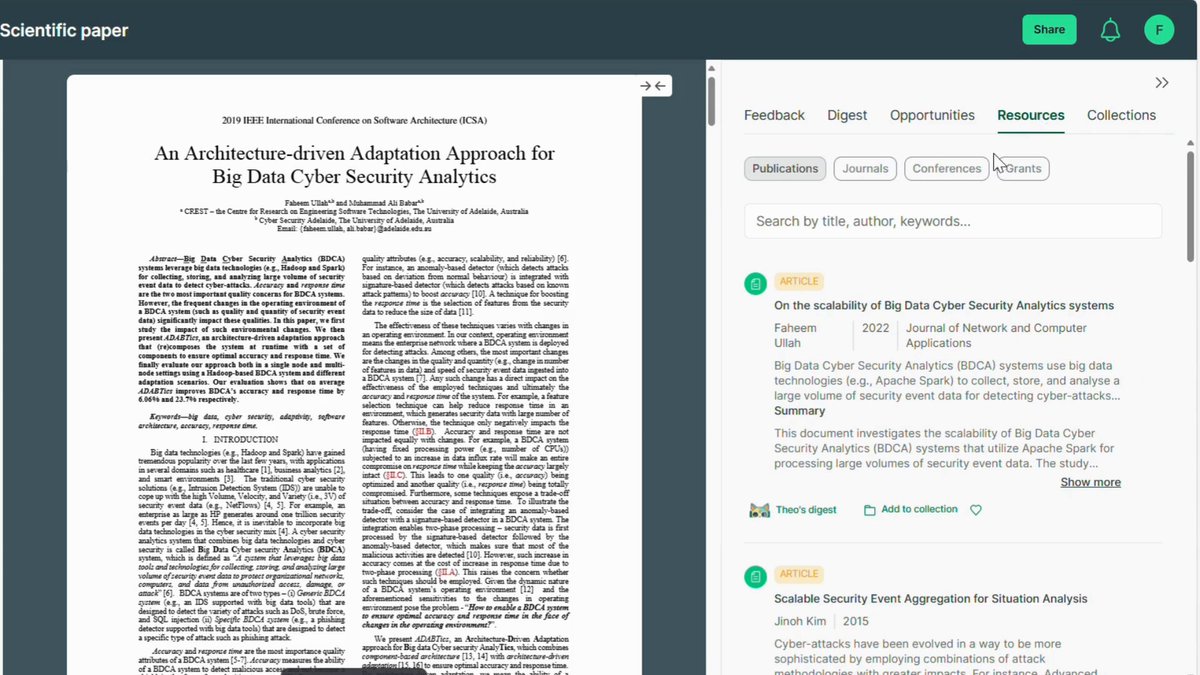

PhD Students – How to identify related papers for your research paper? 1. Go to 2. Paste your DOI or title of your research paper 3. ResearchCollab will display the network of papers 4. Explore the network in following ways → Filter the network of papers based on research field → Filter the network based on thematic clusters → Filter the network based on keywords → and much more As you find related papers, keep saving them. This use case has multiple advantages. ➟ You won’t miss a related paper to cite in your paper ➟ You can identify related papers for your lit review ➟ You can explore new research directions and trends ➟ You can visualize the entire collection of papers As a researcher, work smarter not just harder. For this, try ResearchCollab:
Faheem Ullah47,000 views • 4 months ago

PhD Students – How to identify top researchers in your research area? First, why it is important to know top researchers in your research area. 1️⃣ Help you identify top papers 2️⃣ Help you to collaborate with top researchers 3️⃣ Help you to learn from their work 4️⃣ Help you find your research ideals 🎯 Use Bohrium to identify the top researchers. 👉 Here is how it works? 1. Go to and log in. 2. From the left side menu, click Scholars. 3. In the search box, enter your research area. 4. For example, I entered cloud computing. 5. Bohrium will display the ranked list of top researchers. 6. This list is based on the number of citations for the researcher. 7. Then, click on the researcher’s name. 8. It will display the entire profile of the researcher. 9. This profile contains the work history of the researcher. 10. It contains the research areas of the researcher. 11. You will see the number of papers and citations. 12. You can sort the papers based on the latest/most cited. 13. You will also see the co-authors of the researcher. Once explored, you can go back and explore another researcher. This way you will know the top researchers in your research area. Bohrium has a large database of 20 million active scholars 🎗️Try Bohrium to find top researchers Bohrium Link: ❄️ Anything you'd like to add?
Faheem Ullah91,146 views • 9 months ago

PhD Students - How to write a research proposal in minutes? 1. Go to 2. Click on method design & enter your research topic 3. Novix will generate a proposal for you. This proposal contains the following. - The research problem - Experimental protocols to conduct this research - Detailed statistical approaches to apply - A summary of your entire research methodology - A built-in peer review of your proposed methods Treat this proposal only as a draft. Work on it and refine it as per your research You can continue using Novix for refinement.
Faheem Ullah57,454 views • 5 months ago