
Stitch by Google
@stitchbygoogle • 162,037 subscribers
Stitch by @GoogleLabs turns your ideas into beautiful interface designs, powered by some of the latest Gemini models. Try free of charge.
Shorts


![⚡️Instant Prototypes Click 'Play' to instantly preview your interactive app flow. ✨ Stitch automatically assesses the order of screens and adds connections ✨ You can ask Stitch to automatically generate the logical next screen based on where you click ✨ Here you can design transitions, and interactions [coming soon] ✨ You can even see the "states" of different screens, like logged in versus logged out views ✨ Share a direct link to your prototype (or mobile QR code)](https://image.24vids.com/tw-2034332861646709226/amplify_video_thumb/2034322974564855808/img/xps3EH1_0_h9DbIV.jpg)


Videos

Today, we’re open-sourcing the draft specification for DESIGN.md, so it can be used across any tool or platform. We’re also adding new capabilities. DESIGN.md lets you easily export and import your design rules from project to project. Instead of guessing intent, agents know exactly what a color is for and can even validate their choices against WCAG accessibility rules. Watch David East break down this shared visual language in action👇. New capabilities and links in 🧵
Stitch by Google6,863,083 views • 6 months ago

We have a Stitch MCP. We have a Stitch SDK. But, we don't have a Stitch CLI. Well, not until now. Introducing the @google/stitch CLI: 🔷 Connect to your local coding agents 🔷 Generate screens and design systems 🔷 Send a local dev server snapshot to Stitch Do it all without leaving the terminal or better yet, ask your favorite harness like Google Antigravity 😎 Learn more 👇
Stitch by Google373,160 views • 17 days ago

Your vibe design partner just got more collaborative! To celebrate I/O, here are 5 major upgrades (and one big bonus!): 🌊 Streaming 📄 Start with your existing design ⏩ In-place AI Edits 🎥 Motion on HTML-native Canvas 🚀 More Import / Export Options (.fig, Netlify, Loveable, Bolt) 🌟 BONUS: Import and sync your codebase Rolling out now. Details and product walkthrough video in 🧵
Stitch by Google510,216 views • 5 months ago

Meet Stitch by Google Labs, the easiest and fastest product to generate great designs and UIs. 🧵
Stitch by Google1,228,474 views • 1 year ago

Here is a quick walkthrough of everything new in Stitch: 🎨 The AI-native canvas can hold and reason across images, code, and text simultaneously. The new agent manager helps you design in parallel. (PS … light mode!) 🧠 A smarter design agent now understands your entire canvas context. You can swap images, generate product briefs, or mix mobile and desktop screens on the same canvas. 🎙️ You can vibe design with your voice (in Preview). Stitch can ‘see’ your canvas and your selected screens. You can ask for design critiques, variations, or navigate your canvas. ⚡️ Instant prototypes. Just hit the play button to see a prototype or preview your app in seconds. Stitch can imagine the next screen based on your mouse click. 📐 DESIGN.md and consistency. Every new design automatically starts with a cohesive design system which vastly improves consistency. The new DESIGN.md file can be used to export or import your design rules. Walkthrough video👇 Details for each major improvement 🧵
Stitch by Google489,594 views • 7 months ago

At I/O, we announced a big new export partner: Bolt by StackBlitz! ⚡️ bolt.new is an AI-powered builder that generates full-stack web apps directly in your browser. Now, you can take your Stitch screens from a visual concept to a fully coded application with a single click. Here is how it works: 🔹 Select your screens in Stitch 🔹 Click export 🔹 Your screens are automatically transferred to Bolt, ready to be built into a working product 🛠️ (Note: Bolt will accept up to 5 screens at a time for Bolt Free users, and up to 20 screens for Paid users)
Stitch by Google284,830 views • 5 months ago

Developer Week Day 2. 🛠️ We just gave your Coding Agent a Design Degree🎓🎨 Introducing the Stitch MCP Server. 🔌 You can now pipe Stitch designs directly into your favorite tools like Antigravity. * Generate new screens without leaving your IDE * Fetch the code from any design * Inject context: Give your agent full visual awareness Docs and more information 👇
Stitch by Google360,211 views • 9 months ago

Introducing 1-Click Export to AI Studio. 🚀 No more manual copy-pasting HTML or dragging images. Just hit the export button, and Stitch automatically opens AI Studio with your full context (HTML + Screens) attached and ready to go. Yesterday: AI Studio gets Gemini 3. Today: Stitch gets 1-Click Export to AI Studio. 📅 It's the perfect storm. You can now easily build your beautiful designs with the most capable model available. It was our most requested feature for a reason. Go build something real, fast.
Stitch by Google411,054 views • 11 months ago

Introducing 🎨 Design Systems in Stitch! Build a single source of truth to keep your screens visually consistent. Create your styles once, then instantly apply them to any new or existing designs. We’ve got more for design systems coming over the next few weeks, stay tuned! 👀
Stitch by Google294,461 views • 8 months ago

The DESIGN.md upgrade is officially live in Stitch! 🚀 Yesterday we open-sourced the spec, and today we are giving you more tools to use it: 📄 Start with DESIGN.md: Attach a DESIGN.md right at the start of a project. Don't have one? Our new wizard will help you extract one from your code base or the web. 🔄 DESIGN.md to Design System: Upload a DESIGN.md file to generate a Design System on the canvas. 🧩 Token Support: Design Systems now support design tokens from DESIGN.md! Add them to your file and Stitch will seamlessly incorporate them. 🗑️ Clean Up: (You asked, we listened) You can now easily delete a design system. We’re excited to build the open design standard together. 👇
Stitch by Google195,615 views • 5 months ago

🚨 Our #1 most requested feature is here: You can now export designs from any Stitch agent directly to Figma as editable layers. Vibe Design is perfect for exploring many ideas in minutes. But sometimes, you need that final layer of polish. Now you can move seamlessly between vibe design and polish.
Stitch by Google261,645 views • 8 months ago


One of our most requested features is here! ✍️✨ Introducing Direct Edits. Vibe Design is incredible for exploring ideas at lightspeed, but sometimes you just need to fix a typo or swap an image. Now, you can add that final layer of polish right inside Stitch. You can manually edit text and images, or highlight a specific part of the screen and ask the agent to surgically update it. 3 ways to jump in: 1️⃣ Select a screen and hit the Edit dropdown. 2️⃣ Grab the Edit Tool from the global toolbar. 3️⃣ Select Tool: Double-click a screen to center it, then double-click again to enter Direct Edit mode. Go perfect those vibes. ✨
Stitch by Google187,748 views • 7 months ago

We are thrilled to announce one-click publishing to Netlify! 🌐 Netlify is the pioneer in simple, lightning-fast deployment. With just one click, your Stitch screens become live URLs on the web. It is perfect for resume websites, event pages, restaurant menus, and portfolios. The workflow is magic: 🚀 Click deploy and instantly get a live preview URL ✅ Love the result? "Claim" the URL to save it to your Netlify account 🔗 From there, Netlify helps you purchase a custom domain, manage your hosting, and scale your site Currently supports single-screen export. More options coming in the future. ✨
Stitch by Google122,676 views • 5 months ago
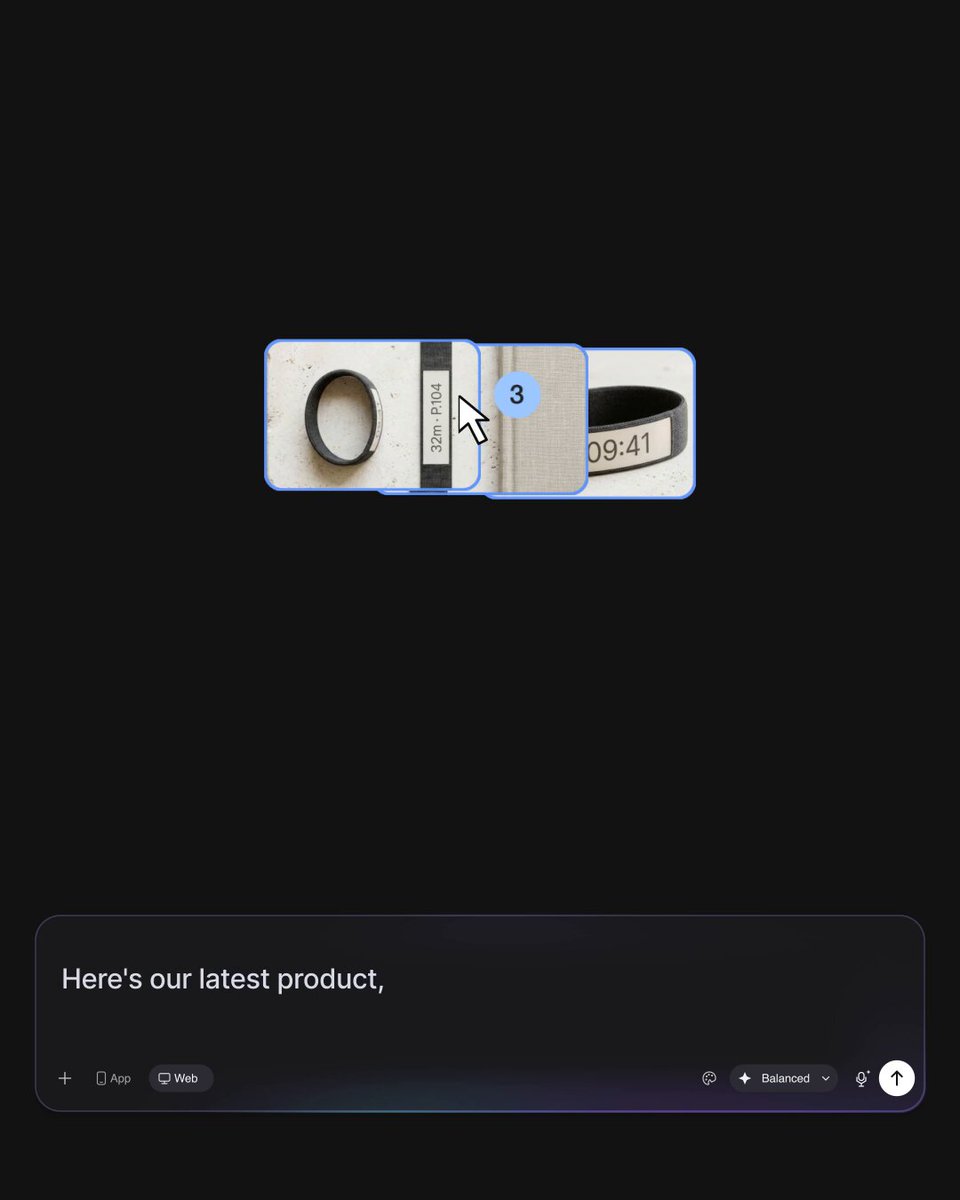
Your brand assets, brought to life. ⚡️🖼️ Gemini 3.8 Flash excels at understanding visual context. Just drag your brand kit and product shots straight onto the Stitch prompt: ✨ Automatically extracts design systems and styling ✨ Generates cohesive layouts around your brand rules ✨ Seamlessly weaves your product imagery into marketing & product pages Check out the workflow in the video below! 👇
Stitch by Google22,577 views • 24 days ago

Welcome to Shipmas Day 3 part 1… the big one. 🚢🎁 Today, we remove the ceiling on what you can generate. Starting today, our new default agent is Thinking with Gemini 3 Pro. This agent uses advanced reasoning to "think" through your design before writing a single line of code. The community has been calling Gemini 3 "too good at frontend" and "unmatched in visual reasoning." We agree. It handles complex dashboards, intricate DOM manipulation, and pixel-perfect CSS better than anything we've tested. All designs are backed by code and exportable to your favorite coding agent. The video below shows some single prompt examples to inspire you. Sound on for a preview of the new Stitch theme song 🔊
Stitch by Google192,632 views • 10 months ago

Introducing the💡 Ideate agent in Stitch. Use it at the start of a project to explore what’s possible before you converge on a solution. It takes a moment to think deeply, fetching context and exploring ideas so you don't have to. Think of it as your design buddy that: 🌐 Fetches context from the web 🎨 Learns styles from existing sites ⚡️ Explores multiple solutions in parallel Once you've found the spark, pick your winner and continue vibe designing. Example prompts in 🧵 (Video accelerated)
Stitch by Google157,716 views • 8 months ago

We're building a new kind of agent: a collaborative design partner that works alongside you. Jumping straight into coding agents often locks you into the first idea; starting in Stitch lets you rapidly explore variations to find the best idea. 🎨⚡ Watch this "Only Positive News" mobile app go from simple prompt to multiple UI iterations to a live AI Studio prototype in seconds. Turn the sound up! 🔊👇
Stitch by Google40,583 views • 1 month ago

Spreadsheets are great for storing numbers. They’re terrible for showing them off. 📈👀 Lately, the Stitch community has been using their design partner to turn raw data dumps into sleek, production-ready dashboards: 🔹 Paste in CSVs, analytics exports, or workout logs 🔹 Ask Stitch for a specific vibe, layout, or design system 🔹 Instantly explore high-fidelity charts, stat callouts, and clean data hierarchies 🤖 Automation Hack: Pair Gemini Spark or Antigravity with the Stitch MCP Server. You can automate your daily tracking so a fresh, tailored dashboard is generated before your first cup of coffee. Check out the demo to see how we turn raw data into eye candy! 🔊👇
Stitch by Google25,433 views • 1 month ago

Introducing Stitch’s Redesign Agent powered by the newly announced Nano Banana Pro. 🍌 It takes a screenshot or URL and lets you edit and redesign your product with natural language. We threw 🍌 Pro at real-world design challenges: - "Redesign this page for a younger audience" - "Create the page that most likely comes next" - "Increase the number of users who add to cart" - “Move the button down 10 pixels” More info and demos in 🧵
Stitch by Google192,747 views • 11 months ago