Loading video...

Video Failed to Load

Go Home

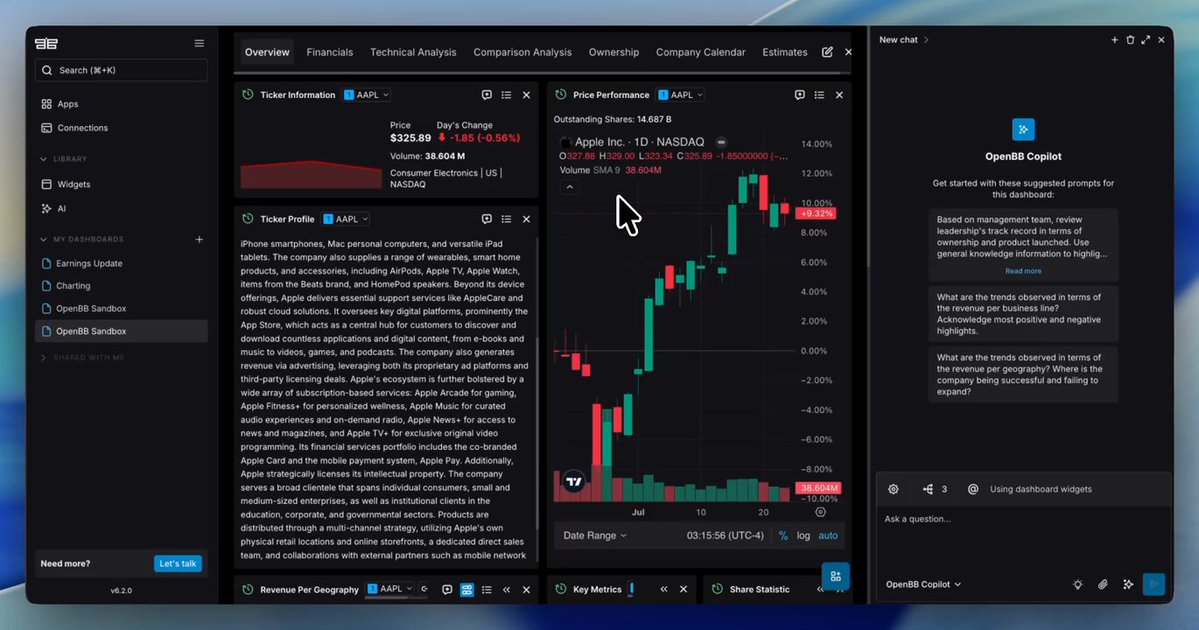
Spreadsheets are great for storing numbers. They’re terrible for showing them off. 📈👀 Lately, the Stitch community has been using their design partner to turn raw data dumps into sleek, production-ready dashboards: 🔹 Paste in CSVs, analytics exports, or workout logs 🔹 Ask Stitch for a specific vibe, layout,...

23,005 views • 2 days ago •via X (Twitter)

5 Comments

Lucas Lopes's profile picture
Lucas Lopes2 days ago

I love it

The kyan's profile picture
The kyan1 day ago

Can we export to Power BI or something like that?

matthias's profile picture
matthias2 days ago

this is really cool

AI Mastery Guide's profile picture
AI Mastery Guide2 days ago

turning csvs into dashboards, need this

Prabhat Pandit's profile picture
Prabhat Pandit1 day ago

Is this new?

Related Videos

Building Data Pipelines has levels to it: - level 0 Understand the basic flow: Extract → Transform → Load (ETL) or ELT This is the foundation. - Extract: Pull data from sources (APIs, DBs, files) - Transform: Clean, filter, join, or enrich the data - Load: Store into a warehouse or lake for analysis You’re not a data engineer until you’ve scheduled a job to pull CSVs off an SFTP server at 3AM! level 1 Master the tools: - Airflow for orchestration - dbt for transformations - Spark or PySpark for big data - Snowflake, BigQuery, Redshift for warehouses - Kafka or Kinesis for streaming Understand when to batch vs stream. Most companies think they need real-time data. They usually don’t. level 2 Handle complexity with modular design: - DAGs should be atomic, idempotent, and parameterized - Use task dependencies and sensors wisely - Break transformations into layers (staging → clean → marts) - Design for failure recovery. If a step fails, how do you re-run it? From scratch or just that part? Learn how to backfill without breaking the world. level 3 Data quality and observability: - Add tests for nulls, duplicates, and business logic - Use tools like Great Expectations, Monte Carlo, or built-in dbt tests - Track lineage so you know what downstream will break if upstream changes Know the difference between: - a late-arriving dimension - a broken SCD2 - and a pipeline silently dropping rows At this level, you understand that reliability > cleverness. level 4 Build for scale and maintainability: - Version control your pipeline configs - Use feature flags to toggle behavior in prod - Push vs pull architecture - Decouple compute and storage (e.g. Iceberg and Delta Lake) - Data mesh, data contracts, streaming joins, and CDC are words you throw around because you know how and when to use them. What else belongs in the journey to mastering data pipelines?

Zach Wilson

16,688 views • 1 year ago

Today, Box is announcing major new AI agent capabilities to let customers tap into the full value of their unstructured data. First, we’re announcing all new updates to the Box AI Studio to make it even easier to build AI agents that tap into your enterprise content for any job function, business process, or industry specific use case. We are also expanding our set of foundational agents that customers will be able to use to work with their enterprise content, including new features like search and research on unstructured data. Next, we’re announcing Box Extract to enable customers to use AI agents seamlessly for complex data extraction from any type of document or content. This makes it easier than ever to pull out data from contracts, invoices, research data, marketing assets, medical charts, and more. Finally, we’re introducing Box Automate, a new workflow automation solution within Box that lets you deploy AI agents across enterprise content-centric workflows. With Box Automate, you can design your business process in a simple drag and drop builder and then drop in AI agents at any step in the process. This ensures agents execute tasks at the right steps in a workflow every time. Best of all, our AI agents and workflow tools are designed to work across any system our customers work within, whether it’s leveraging pre-built integrations, Box APIs, or the new Box MCP Server. Ultimately, all of these capabilities come together to transform how companies can work with their enterprise content. Software has historically only been good at automating work that deals with structured data, which is why ERP, CRM, and HR systems have been mainstays of enterprise software for so long. The data in these systems fits neatly into a database, and the workflows are very ripe for automation. But it turns out most of the work in the world deals with unstructured data. It’s ideating through research documents, working with a client on contracts, reviewing details for a new product launch, looking at a patient’s healthcare record to make a diagnosis, working through due diligence documents for an M&A deal, and so on. For the first time ever, we can begin to bring all new insights and automation to this work with AI agents. At Box, we’re incredibly excited to be on this journey to help customers transform how they work with their most important data.

Aaron Levie

91,863 views • 1 year ago

The VeBetter ecosystem is one of the most practical applications of crypto in the real world! They are turning sustainable actions into onchain value. Here’s a look at the growing ecosystem of dApps powered by VeChain and how they’re creating a better future through blockchain: 🔹 Mugshot – Get rewarded for using a reusable coffee mug 🔹 Cleanify – Track your litter-picking impact and earn as you clean 🔹 Greencart – Scan grocery receipts and earn rewards for shopping sustainably 🔹 Green Ambassador Challenge – Join gamified education missions around sustainability 🔹 EVearn – Earn $B3TR for charging your electric vehicle 🔹 Vyvo – Connect health data and blockchain for a smarter, healthier lifestyle 🔹 NFBC – A sustainable alternative for audio-book lovers 🔹 Pause Your Carbon – Rewards for participating in carbon sequestration 🔹 Green Commuter – Walk, bike, or run to earn rewards through Strava 🔹 SolarWise – Tokenized solar participation for green energy adoption 🔹 Carbonlarity – ReFi meets DePIN for real carbon traceability 🔹 ST3PR – Walk-to-earn for every step you take 🔹 veDelegate – Delegate and earn passively within the ecosystem 🔹 BetterSwap – A sustainable liquidity DEX with Pool2Earn incentives 🔹 VeSwap – Trade while supporting sustainability goals 🔹 LETSTOP – Promote safer driving and earn 🔹 World of V – A green NFT marketplace that pays to collect responsibly 🔹 VeRecycle – Earn $B3TR for every bottle you return 🔹 VeMeal – Get rewarded for your zero-waste meals 🔹 BetterBag – Use a reusable bag when shopping and earn 🔹 EatGreen – Sustainable food habits, tracked and rewarded 🔹 Turtle Labs – Building infra for VeBetter growth 🔹 MeterMate – Monitor and reduce energy use at home 🔹 ScoopUp – Yes, you can earn crypto for cleaning up dog poop All of this is powered by VeChain’s blockchain, using smart contracts and tokens to ensure rewards are transparent, fair, and immutable. DYOR

CryptoBusy

40,010 views • 1 year ago

Major program launch: Data Analytics Professional Certificate! This large, five-course sequence takes you all the way to being job-ready as a data analyst, and shows how to use Generative AI as a thought partner to enhance your work in this role. Offered by on Coursera, this is taught by Sean Barnes, Ph.D., a Data Science & Engineering Leader at Netflix. Analyzing data remains one of the most important skills in where the world is going with AI. This comprehensive certificate takes you all the way to being job-ready. Each course comes with practical projects demonstrated in real-world contexts, such as analyzing sales data for a Korean bakery, video game sales trends across different regions, or identifying factors impacting customer retention for a communications company. You'll also work on estimating fire distribution for forest fire prevention, analyzing how a diamond's properties affect its market value, and developing predictive models for retail sales analysis, carbon emissions, and coral reef conservation. Here's some of what you'll learn: - How to define data and categorize it into its many types such as discrete & continuous numerical, structured & unstructured, time series, categorical, and know what insights can be derived from the different types of data categories. - How to differentiate between data-related job roles and their responsibilities, and how data flows through an organization from the moment of capture to decision-making. - How to perform data processing functions and apply conditional formatting in spreadsheets to extract business value from your data using statistical calculations and best practices for visualizing and interpreting data. - How to use LLMs for stakeholder analysis, data exploration, and data visualization. - Best practices for using LLMs for as a thought partner to data analysis work By the end of this professional certificate program, you will have learned core statistical concepts, analysis techniques, and visualization methodologies that will serve as the foundation for working as a data analyst. The world needs more data analysts, especially ones who know how to use modern generative AI. With data science roles projected to grow 36% by 2033, the skills taught in this program create new professional opportunities in data. Sign up here!

Andrew Ng

85,107 views • 1 year ago

is our AI project to make computing feel more human L A N D E R Here are the 4 best demo videos of the magic of DATA in action. DATA is a personalized assistant who knows and remembers every conversation you have with it accross your iPhone, Mac, iPad, Watch, Texts, Emails, and HomePods. You can talk to DATA right in your AirPods or text it just like a person. DATA can read, write, understand, speak any language, and translate between them. It can help with real work and home life tasks like research, writing, scheduling, reminders, and triage. And it's easily customizable so you can have DATA automatically do whatever you want whenever you want with just a few taps and natural language instructions - no code required. DATA can do just about anything you can do on your phone on your behalf automatically including very advanced things Siri can't, like summarizing, analyzing, and drafting replies or writing documents. It can read web pages, texts or emails you show it, or PDFs of any kind. It can do other real world tasks that require complex analysis and common sense too, like: - figure out where the nearest beach is (even when you're in Colorado) and instantly fetch the current surf report up to the current minute. - summarize and drafting replies to entire email chains - plan out entire work projects or multi-day vacations on your calendar - sketch out ideas for you in picture form or drafting Notion pages with charts and graphs. DATA can also use its own judgement to determine when to run an action or not, even if you've scheduled it, allowing you to make VERY complex automations that require many different inputs to make a decision, like for example: - only opening the blinds on your lunch break if it's sunny out and you're working from home. DATA works natively and easily with Apple HomeKit & other shortcuts. DATA can also take initiative and check in with you throughout the day by voice or text and proactively send messages to you and others on your behalf based on your personal and professional goals, current tasks, and calendar. DATA can integrate with many apps on your phone, and is compatible with multiple large AI language models. I've gotten to make a few demo videos that I think really capture how powerful DATA can be for every day life. Here they are all in one tweet. Make sure your sound is on as you watch them. 1. This is the first demo video I ever made from April 19th, 2023. It walks through all the ways you can interact with and use the DATA shortcuts. Everything from saying "Hey Siri" to tapping on custom apps on your home-screen. 2. The second demo video was made May 5 and is an example use case I made of how commands work - commands allow DATA to actually run actions on your phone like taking pictures and sending messages. This demo shows me taking a picture of an email template, and data drafting an email based on that template. It's gotten much better at realizing when it has just run a command and incorporating that information naturally into the conversation now, especially on GPT-4. 3. This third Commands video, May 12 is a walkthrough of ALL the phone functions that commands allow DATA to do: sending texts and emails, making pictures, seeing pictures, reading things, and scheduling events. Since this video we've added auto-replies to texts and emails, summarizing documents, writing documents, health app data retrieval, web surfing, scheduling alarms, making playlists, and more. 4. This last demo I made today, June 15, shows everything DATA does working in concert to generate a crazy detailed morning briefing with background music - including making a unique playlist and giving a detailed analysis of current events complete with Ski & Surf conditions near me other live information from the internet. So now that you've seen everything DATA can do, what's the coolest feature? What features should we add? What would you use DATA for first?

steve

640,176 views • 3 years ago