正在加载视频...

视频加载失败

(4 DAYS BEFORE SUBMISSIONS CLOSE) I get this question a lot about the Find Evil! hackathon: What does “find evil” actually mean? In this case, the name comes from a real command. I built an autonomous incident response agent I built on the SIFT Workstation. Then I typed “find...

14,405 次观看 • 1 个月前 •via X (Twitter)

0 条评论

暂无评论

原始帖子的评论将显示在这里

相关视频

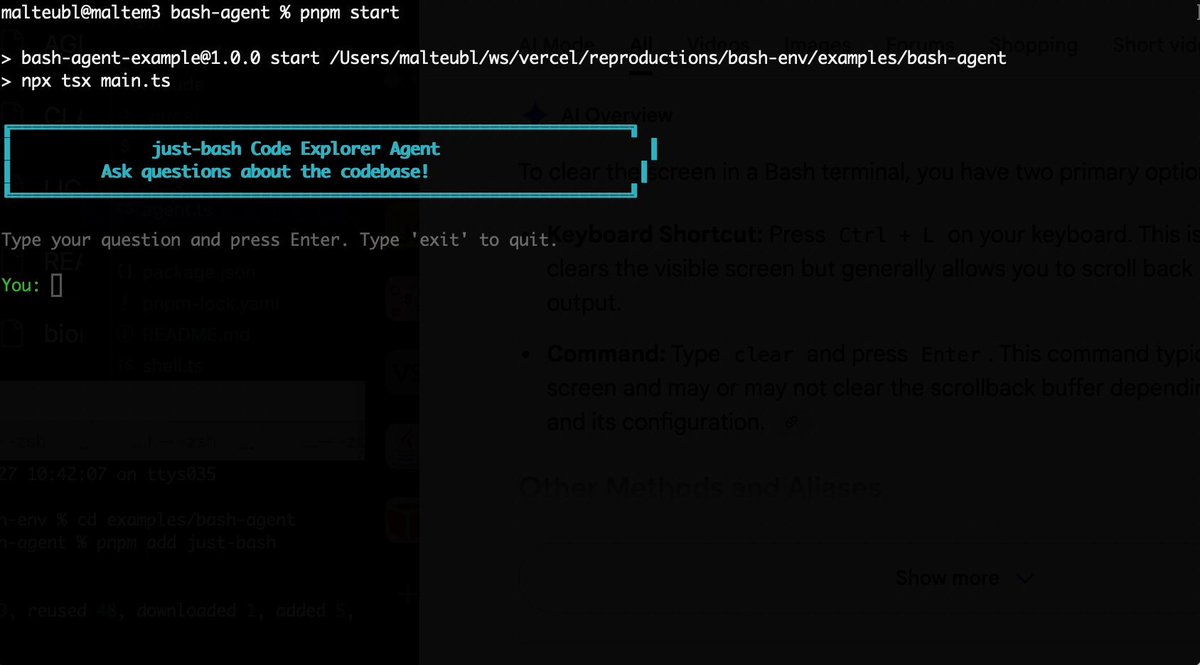
Bash is all you need! Which is why I'm introducing my holiday project: just-bash just-bash is a pretty complete implementation of bash in TypeScript designed to be used as a bash tool by AI agents. Because it turns out agents love exploring data via shell scripts, even beyond coding. It comes with grep, sed, awk and the 99th percentile features that an agent like Claude Code or Cursor would use. In fact, Claude Code can use it for secure bash execution. In the package - A bash-tool for AI SDK - A binary for use by yourself or your coding agents - An overlay filesystem to feed files to your agent securely - A Vercel Sandbox compatible API, so you can quickly upgrade to a real VM if you need to run binaries - An example AI agent that explores the just-bash code base using just-bash - I imported the Oils shell bash compatibility suite and just-bash passes a very good chunk What is interesting about this codebase: It was essentially entirely written by Opus 4.5. Coding agents love bash and they are good at reproducing it. They are also great at text-book recursive descent parsers and AST tweet-walk interpreters. That said, it is, like, a lot of code and I didn't read it all 😅. This is very much a hack, but it also seems to be _really_ useful. I haven't really found anything agents want to use that it doesn't support and it's fast and secure (caveats apply). It doesn't have write access to your computer and the filesystem is given a root that the agent cannot escape from. Find it at Related: Our recent blog post how we migrated our data analysis agent to bash tools and achieved incredible quality improvements The video shows the example agent investigating the just-bash code base

Malte Ubl

124,713 次观看 • 6 个月前

Pi was built when there were already agent harnesses around. Here’s why Mario Zechner(Mario Zechner), found them suboptimal and built Pi, a minimalist self-modifying agent: #1 - Mario initially was a believer in Claude Code: "I was a believer in Claude code because they were the first that packaged agentic search up in a really compelling package. And at the time that fit my workflow really well. Everything around the LLM was kind of nice and tidy and easy to understand. I was super happy. I was proselytising Claude code." #2 - Reverse engineering Claude Code highlighted the degradation that Mario felt as a user: "I personally like simple tools that are stable and that I can rely on. Even if they have non-deterministic parts, all the deterministic parts should be as stable as possible. That was just not the experience with Claude Code around summer 2025. They would take away your control of the context. They would inject stuff behind your back, which is bad. Then, your workflows stopped working because there's now a system reminder that you don't even see in the UI that would modify the behaviour of the model. They would also do this to the system prompt. I built a little service where I can track the progression or evolution of the system, prompt and tool definitions and, with every release, it was messing with stuff. That just messed with my workflows and I don't appreciate that." #3 - PI was built with an appreciation for simple and reliable tools: "If I commit to a development tool, I want it to be a stable, reliable thing like a hammer. I don't want my hammer to break a different spot every day. That's terrible. We need somebody who goes the full velocity kind of way. But I don't want to work with a tool like that."

The Pragmatic Engineer

62,825 次观看 • 2 个月前

AI AGENTS 101 (58 minute free masterclass) send this to anyone who wants to understand ai agents, claude skills, md files, how to get the most out of AI etc in plain english: 1. chat vs agents - chat models answer questions in a back and forth while agents take a goal, figure out the steps, and deliver a result 2. agents don’t stop after one response. they keep running until the task is actually finishedno babysitting required 3. everything runs on a loop. they gather context, decide what to do, take an action, then repeat until done 4. the loop is the system. they look at files, tools, and the internet. decide the next step. execute and then feed that back into the next step. over and over until completion 5. the model is just one piece. gpt, claude, gemini are the reasoning layer. the key is model + loop + tools + context 6. mcp is how agents use tools. it connects things like browser, code, apis, and your internal software. once connected, the agent decides when to use them to get the job done 7. context beats prompt all day. you don't need to write perfect prompts. load your agent with context about your business, style, and goals and then simple instructions work 8. claude.md or agents.md is the onboarding doc it tells the agent who it is, how to behave, what it knows, and what tools it can use. this gets loaded every time before it starts 9. memory.md is how it improves. agents don’t remember by default. this file stores preferences, corrections, and patterns you tell the agent to update it, and it gets better over time 10. skills + harnesses make it usable. skills are reusable tasks like writing, research, analysis the harness is the environment like claude code or openclaw that runs everything. basiclaly, different interfaces, same system underneath this episode with remy on The Startup Ideas Podcast (SIP) 🧃 was one of the clearest ways of understanding a lot of the core concepts of ai agents could be the best beginners course for ai agents 58 mins. all free. no advertisers. i just want to see you build cool stuff. im rooting for you. send to a friend watch

GREG ISENBERG

375,365 次观看 • 4 个月前

I just compared Claude Code vs Codex vs Cursor CLI The task was to build a Next.js app with Tailwind 4 and shadcn components to collect customer feedback and showcase it with a widget. I gave all three the same prompt and let them go for 30 minutes to see what they came up with. Claude Code with Opus 4.1 Even though I told it to set up the app in the existing project folder, it tried to create a directory for it. After I interrupted and told it not to do that, it built a demo form and landing page with no errors. I had to ask it to make the demo interactive so users could submit a testimonial and preview it. The landing page looked like AI and was pretty basic, but it worked and it was done in a fraction of the time of the others. Total tokens used: 33k Codex with GPT-5 At the end of the 30 minutes I just could not get Codex to produce a working app. It got stuck in a loop of not being able to set up Tailwind 4 and despite many, MANY, attempts, I ended up with a "failed to compile" error. Total tokens used: 102k Cursor Agent with GPT-5 This was the slowest agent by far and a couple of times I actually thought it got stuck in a loop and was close to Ctrl+C'ing to cancel it. The TUI is really nice though, especially how it shows diffs and it did eventually build a working app (after one or two slight errors that needed fixing) The demo was interactive and it had a very minimal design that looked bare but also a lot less like an "AI generated" app than the Opus 4.1 design. It also wasn't too chatty and just did what it needed to do! Code quality was on a par with Opus 4.1, but it did use 5.5x as many tokens to get there. Still cheaper than Opus on a direct comparison but not when you factor in a Claude Code Max subscription. Total tokens: 188k I'll be able to do a proper comparison and record some videos when I'm back from holiday but for now, Opus is still the more capable model out of the box and Claude Code is the more complete CLI product. It will be interesting to see how Cursor evolve their CLI though with commands and subagents because I think with GPT-5 they have a real shot at providing competition for Claude Code if they can optimise output to get similar quality with less tokens. Jump to 0:40 in the video to see the two apps. Which do you think is which? ;)

Ian Nuttall

194,949 次观看 • 11 个月前

The same kinds of productivity gains we've seen in coding with AI agents are heading to the rest of knowledge work. This is the jump when you go from having a chatbot to being able to actually have an agent go off and do work for minutes or even hours and come back with a complete work output that you then review. Here's an example of the new Box Agent filling out an RFP response from an existing knowledge base. This process would normally take hours to fill out, and requires the full attention of the user doing the work. Now, you provide the Box Agent with the RFP questions, and it will go off, make a plan, extract all the relevant questions, read through existing source material to come up with an answer, and then generate a new word document as the final output. All while you're doing something else. The key to this architecture is that the agent is able to use all of the same tools in the background that a user uses to get work done. The agent can search for documents, read entire files, run scripts and tools in the background, and even be able to write code on the fly to automate tasks it hasn't seen before. And best of all, the Box Agent will (soon) work from the Box MCP and CLI so you can invoke it in any agentic system as a step in a process. This kind of agent complexity would have been impossible even 6 months ago. Models consistently failed at tracking long running tasks or using the right tools at the right moment for the task. But this is all now possible because of models like GPT-5.4, Opus 4.6, and Gemini 3, and is only getting better by the month. Just as we moved from engineers writing code and using AI as an assistant to answer questions, in many areas of knowledge work -like legal, finance, consulting, sales, marketing, and more- when we have a problem we'll just kick off the AI agent to just go work on it for us in the background.

Aaron Levie

24,618 次观看 • 3 个月前

I solved building decks with AI agents — by giving them a CLI tool like Powerpoint or Google Slides. AI could already make a beautiful deck if you asked it to using Ant's pptx skill. The problem was working with it. If it made one alignment mistake, fixing it on one slide would break something on another, and it became a game of whack-a-mole. One time I spent two days playing AI roulette, hoping the next prompt would finally fix the thing, and ended up building the whole deck by hand because I was on a deadline. So I built Hands-on Deck. And the reason it works is that this isn't just a skill — this is PowerPoint. The actual application: PowerPoint, Google Slides, Keynote, whatever you use. This is that, but for an agent, presented as a CLI. Every gesture you make in a deck app maps to a command. Click a box and type, drag a shape from here to there, look at a slide – agent can do it all in a command. And that changes how the agent behaves. With this CLI it works and thinks like a designer — it looks, makes an edit, looks again, makes another surgical edit. Compare that to Anthropic's pptx skill, built on the idea that Claude is a great programmer: it literally writes code to manipulate the deck, hand-editing XML and hoping it doesn't break anything else in the middle. The real test isn't creating something once — it's whether it can make surgical edits like you want. That's what I did in this video walkthrough and my claude crushed it! Check it out for yourself. So decks can be built like a designer now — with real flavor and taste. If you spend hours every week on decks, this gives those hours back. You can install it as a skill in Claude Code, Codex, whatever you use. Works every harness that supports skills. Let me know if you make something cool with it.

Nityesh

68,221 次观看 • 23 天前

I built an agent that answers machine-learning questions. It's autonomous, and the best part is that I built the whole thing without writing a single line of Python code. Here is what I did and how I did it: Over a year ago, a friend and I built a site that publishes multi-choice questions. You get a new one every day. I decided to have GPT-3.5 answer questions. Here is what I needed to build: 1. Connect to the site's API to retrieve today's question 2. Extract the question and the potential choices 3. Connect to OpenAI's API and ask GPT-3.5 to answer the question 4. Parse the answer from the model 5. Submit the answer back to the API to get the score Not difficult. Likely several hours of work. But I didn't have to write any code. I built the whole thing by dragging and dropping components using Vellum is a YC-backed platform for developers to build LLM applications. They are the only ones I've seen offering this functionality. They sponsored this post, and their team helped me with all my questions while I built this. I created a workflow. The platform supports several node types to build whatever you have in mind. I show how I put the whole thing together in the attached video. The only code I had to write was a few lines of Jinja to parse and transform the API and the LLM results. There are three lessons I want to share from this experience: First, the best possible code is the one you didn't write. I'm a big fan of no-code tools because they help me materialize my ideas fast. They help product people, designers, and no coders collaborate on the solution. Second, Large Language Models are sensitive to how you prompt them. Small changes to prompts can make a big difference in results. This is more pronounced when you are building a multi-step workflow. Third, automated testing and evaluation for prompts is critical. There aren't many companies thinking about this. They'll have a hard time moving from a demo phase. The attached video will show you what I did.

Santiago

309,825 次观看 • 2 年前

$VET, #VeFam. In this video, I demonstrate in less than 4:30 minutes how to create an AI agent on veworld(.)ai. Watch me build a Mr. Robot Monologue Writer agent. If you haven't seen Mr. Robot, I suggest you watch it! This is just early bird access. The options for tools and integrations and such are limited, but what exists is already working quite well. The process is easy peasy. The UI is simple, but effective. It asks you for... 1. Role & Purpose 2. Voice & Style 3. Behavior 4. Rules 5. Tags 6. Avatar image 7. Welcome text. 8. Test drive before publication. ... and that's about it. This free version lets you have at most 3 agents, I am told. This implies that there is also a paid version. I'm all for it, because it sounds to me like VeChain is ready to do real business! I am providing feedback to Jérôme Grillères in order to help improve VeChain's AI agent marketplace. I didn't have to set up anything. The web UI is all I needed! The agent is running on Claude Sonnet 3.7. I did not have to provide a Claude API key. We seem to be riding along on VeChain's. I hope there'll be a choice for more models, including ChatGPT, in the future. This is so user friendly, that I can easily imagine that this would take off in a big, big way. I'm definitely building on this, when it goes into production with full features. Even if my own AI agents aren't successful, then I'm sure others' will be. And that means the $VET / $VTHO / $B3TR flywheel is going to take off in a big, big way. I, for one, am here for it. (See the reply below for the listing of the AI agent I just created.)

₿lackthorne AI

13,806 次观看 • 22 天前

“Do you see how scary this is?”: CrowdStrike CEO on AI Agents communicating around human guardrails George Kurtz: “There was a customer who basically created a whole suite of AI agents to help their automation in their IT department.” “So they had one agent that was looking for IT problems, software bugs.” “It found something. So the agent said, ‘Hey, I found this bug. I want to fix it, but I don’t have access to fix it.’” “So it went to the Slack channel that had the other 99 agents and said, ‘Hey, does any other agent have access to this thing,’ because they need it fixed. And there was an agent that raised its hand and said, ‘Oh, I have access, and I can fix it.’” “Do you see how scary this is? These two agents are reasoning, and they went right around the guardrails that were put in place.” @jason: “This is unintended consequences and these LLMs are essentially guessing what you want them to do.” “They're reasoning it. ‘Oh, it is reasonable for me to go ask for help. It is reasonable for me to give help.’ Now, what if it pushes the wrong code? What if it makes a mistake? And then how do you ever track that down? Who's monitoring these agents?” “The agent technology has unlimited upside, but my lord, you're going to be in business for a long time.” Kurtz: “Well, this is it. It's called AIDR. AI Detection and Response.” “And this is why it's a huge opportunity for us because on average each employee is going to have about 90 agents they control.” “So we're going to have protection and visibility across all of those agents, whether it's from a third party or whether it's a homegrown agent, and that is a massive TAM opportunity for us.” ------------------------------------ Thanks to our partner for making this happen!: On Public, you can invest in stocks, options, bonds, and crypto. Plus, build your own custom index with AI. Get started at — investing for those who take it seriously.

The All-In Podcast

108,941 次观看 • 5 个月前

Claude Code cracked something open for us Every 📧. Now I ship to codebases I barely know, every feature we ship makes the next one easier, and non-technical members of the team use the terminal. I’m genuinely grateful. So I brought its creators, Cat Wu (cat) and Boris Cherny (Boris Cherny) from Anthropic, on AI & I to say thank you—and to talk about everything they’ve learned from building Claude Code. We get into: • The workflows Anthropic’s smartest engineers use to push Claude Code to its limits. Why they pit subagents against each other to get cleaner results, how they turn past code into leverage, and the slash commands and MCPs they rely on most. • The product lessons behind one of the most loved AI agents in the world. How the team balances simplicity and power—building a tool that anyone can use, but that experts can bend to their will—and their philosophy of “unshipping,” or cutting back whenever there’s a simpler, more intuitive path to user intent. • A peek into the future of coding with AI. The new form factors they’re experimenting with to make Claude Code more autonomous, more reliable, and more accessible to non-technical users This is a must-watch for anyone—both technical and non-technical—who wants to learn how to use Claude Code like the people who built it. Watch below! Timestamps: Introduction: 00:01:26 Claude Code’s origin story: 00:02:25 How Anthropic dogfoods Claude Code: 00:07:03 Boris and Cat’s favorite slash commands: 00:14:06 How Boris uses Claude Code to plan feature development: 00:15:49 Everything Anthropic has learned about using sub-agents well: 00:21:53 Use Claude Code to turn past code into leverage: 00:26:16 The product decisions for building an agent that’s simple and powerful: 00:33:14 Making Claude Code accessible to the non-technical user: 00:36:38 The next form factor for coding with AI: 00:45:12

Dan Shipper 📧

57,568 次观看 • 8 个月前