Video wird geladen...

Video konnte nicht geladen werden

Zur Startseite

🚨 AI coding agents hallucinate because they can't actually read your codebase. This MCP server fixes that. It's called Context+ and it gives AI 99% accuracy on large-scale engineering projects by building a real semantic map of your code before touching a single line. Here's what makes it different...

31,051 Aufrufe • vor 3 Monaten •via X (Twitter)

0 Kommentare

Keine Kommentare verfügbar

Kommentare vom Original-Post werden hier angezeigt

Ähnliche Videos

THIS MIGHT BE THE #1 OPEN-SOURCE REPO FOR CLAUDE CODE RIGHT NOW. IT GIVES CLAUDE A MEMORY AND SLASHES YOUR TOKEN COST ON EVERY QUESTION The repo is safishamsi/graphify, a free open-source skill that turns any codebase into a knowledge graph Claude Code can read instantly. Instead of grepping through your files every session, Claude gets a map of how everything connects The problem it fixes: Every time you ask Claude Code about a big repo, it does the same thing, greps through dozens of files like a brute-force Ctrl+F, blows through your context window, and sometimes still misses the answer hiding in a file nobody searched. Claude Code has no memory of how your project is structured. Every session starts from zero What it does: It maps your entire codebase into a knowledge graph, capturing not just which files exist, but which functions depend on which, which modules are central, and which files cluster around the same concern. Claude queries the map instead of scanning files How it works, three passes: 1. Code structure, free and local. Tree-sitter parses your files and pulls out classes, functions, imports and call graphs. No LLM, no tokens, just your actual code mapped deterministically 2. Audio and video, if you have them. Transcribed locally and folded into the graph 3. Docs, papers, images. Here an LLM does semantic analysis, figuring out what each document means and where it fits. Only the meaning gets sent up, never your raw source It saves you money: Normally a question about a big repo makes Claude spawn explore agents that scan file after file, eating your context window and your token budget before you get an answer. With the graph already built, Claude queries the map instead of re-reading the codebase every time. Same answer, a fraction of the tokens. The graph only gets built once, then a hook rebuilds it after each commit for free, so you never pay that scanning cost again. The bigger the repo, the bigger the gap The best parts: it's a skill, so once installed Claude knows when to use it without you memorizing commands. It works on non-code folders too, point it at docs or notes and it can spin up an Obsidian vault How to add it to your Claude: 1. Install Claude Code if you haven't: npm install -g Paul Jankura-ai/claude-code 2. Add the skill: claude skill add safishamsi/graphify 3. Open your project folder and run /graphify . to build the graph 4. Optional, make it automatic: graphify hook install so the graph rebuilds after every commit That's it. Ask Claude about your repo and it reads the map instead of burning tokens on a file hunt Bookmark this

Yarchi

55,345 Aufrufe • vor 1 Monat

A DEVELOPER CONNECTED CLAUDE CODE TO OBSIDIAN SO HIS AI AGENT WOULD STOP FORGETTING THE PROJECT EVERY MORNING. Every coding session used to start the same way. Claude would understand the repo, fix the bug, explain the architecture, and then the moment the session ended, all of that context disappeared. Same codebase. Same decisions. Same architecture. Same mistakes repeated again. So he added a memory layer. Instead of treating Claude Code like a smart terminal, he connected it to a local Obsidian vault through MCP. Now Claude can read the repo, open the vault, create notes, link concepts, and write important decisions back into the system. When it studies the codebase, it does not just answer once and forget. It creates notes for the major services, maps how the architecture works, links auth to the database, connects APIs to storage, and records why certain migrations or design choices exist. Obsidian becomes the project graph. Now when he asks why something was built a certain way, Claude does not guess from the current prompt. It reads the decision notes. When he starts a new branch, Claude checks the active context file. When the work is done, it updates what changed, what is blocked, and what the next agent needs to know before touching the repo. That is the real loop: read context, write code, capture decisions, update memory. Most people are still using AI coding tools like disposable chat windows. Ask, patch, close, forget. This setup turns Claude Code into infrastructure. The repo gets a memory layer that survives every session, and multiple AI agents can work from the same project map without stepping on each other. The unlock is not better prompting. The unlock is giving the agent somewhere to remember what it already learned.

DegenCalls

20,104 Aufrufe • vor 20 Tagen

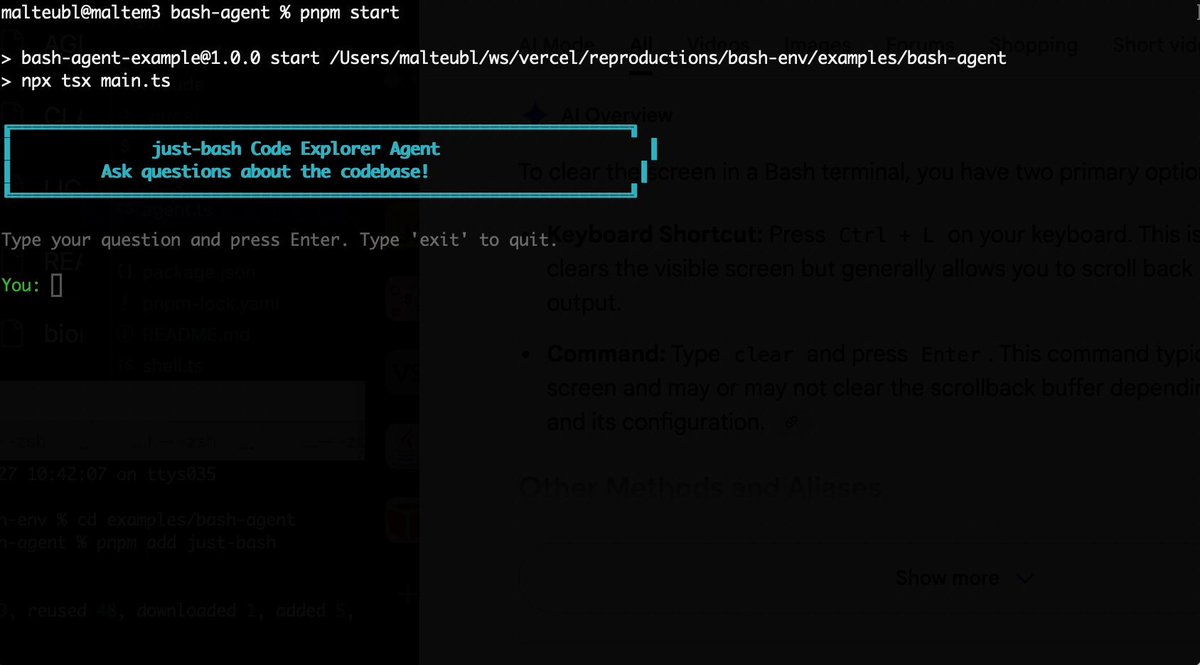
Bash is all you need! Which is why I'm introducing my holiday project: just-bash just-bash is a pretty complete implementation of bash in TypeScript designed to be used as a bash tool by AI agents. Because it turns out agents love exploring data via shell scripts, even beyond coding. It comes with grep, sed, awk and the 99th percentile features that an agent like Claude Code or Cursor would use. In fact, Claude Code can use it for secure bash execution. In the package - A bash-tool for AI SDK - A binary for use by yourself or your coding agents - An overlay filesystem to feed files to your agent securely - A Vercel Sandbox compatible API, so you can quickly upgrade to a real VM if you need to run binaries - An example AI agent that explores the just-bash code base using just-bash - I imported the Oils shell bash compatibility suite and just-bash passes a very good chunk What is interesting about this codebase: It was essentially entirely written by Opus 4.5. Coding agents love bash and they are good at reproducing it. They are also great at text-book recursive descent parsers and AST tweet-walk interpreters. That said, it is, like, a lot of code and I didn't read it all 😅. This is very much a hack, but it also seems to be _really_ useful. I haven't really found anything agents want to use that it doesn't support and it's fast and secure (caveats apply). It doesn't have write access to your computer and the filesystem is given a root that the agent cannot escape from. Find it at Related: Our recent blog post how we migrated our data analysis agent to bash tools and achieved incredible quality improvements The video shows the example agent investigating the just-bash code base

Malte Ubl

124,713 Aufrufe • vor 6 Monaten

Marc Andreessen explains why AI coding won't replace programmers, but fundamentally change what they do. He argues that AI coding is just the latest abstraction layer, and the job of a programmer has always evolved with each one. Andreessen's key reframe of what's actually happening: "AI coding actually abstracts away the process of actually writing the scripting code... This is the next layer of the task redefinition under the job of programmer." He's clear that the best programmers aren't being replaced. They're already adapting, even if their day-to-day looks radically different now. Their job has shifted from writing code line by line to managing dozens of AI agents working in parallel. "The world's best programmers today will tell you, 'My job is I'm sitting there and I'm orchestrating 10 code bots running in parallel.' Their day job now is kind of arguing with the AI bots to try to get them to write the right code." But Marc Andreessen 🇺🇸 is adamant this doesn't make foundational knowledge obsolete — it makes it more important. "You need to still fully understand and learn how to write and understand code, because if it doesn't work or it's not doing what you expect, you need to be able to understand the results of what the AI is giving you." He draws a direct parallel: Just as someone writing scripting languages still needs to understand how a microprocessor works, someone orchestrating AI bots needs to understand the code those bots produce. "It's this upleveling of capability where you actually want the depth to go down and understand what the thing is actually doing, even if you're not spending your day doing that by hand." The result, in his view, is transformative: "Now programmers are going to be 10 times or 100 times or a thousand times more productive. And that is overwhelmingly a good thing." The pattern: New abstraction layer emerges → tasks change → the job gets redefined upward → productivity explodes It raises a question every programmer should be sitting with... Are you building the depth to evaluate what AI gives you, or just accepting the output?

Big Brain AI

45,270 Aufrufe • vor 5 Monaten

THIS GUY CONNECTED HIS AI AGENTS TO HIS OBSIDIAN AND BUILT A BRAIN THAT LEARNS ON ITS OWN. HERE'S HOW TO BUILD IT Obsidian is just markdown files sitting in a folder. That turns out to be the perfect memory for an AI agent, because an agent can read and write those files directly. He wired his agents into the vault so they pull context from it, do the work, and write what they learned back. The notes aren't the point. The loop is, and it gets sharper every cycle How to build it: 1. Point an agent at your vault. The fastest way, no plugins, no API keys: open a terminal and run npx obsidian-mcp /path/to/your/vault. That exposes your Obsidian folder to Claude as a tool it can read, search, and write to. Add it to your Claude Code or Cowork config and restart 2. Confirm it can see the brain. Ask it: "list the notes in my vault and summarize what's in them." If it reads them back, the connection is live. Now it starts every task with everything the vault already holds instead of from zero 3. Give each agent one job and a write-back rule. Tell it: "research this, then save what you found as a new note in /brain with links to related notes." One agent researches, one summarizes, one plans. Each writes its output back into the vault 4. Close the loop. Add one line to every agent's instructions: "read /brain before starting, write your result back when done." Now each task leaves the vault richer, and the next run reads that before it works. It compounds instead of resetting 5. You only steer. Review what the brain produces, point it at the next thing. The agents handle the reading, writing, and connecting The edge isn't better notes. It's a brain that feeds itself, so the work gets sharper every cycle instead of starting over Bookmark this

Yarchi

58,186 Aufrufe • vor 1 Monat

I got curious how compaction works as a PM, so I did some brain surgery on Claude Code: (Anthropic's been doing really interesting work on context editing - they showed Claude Opus playing Settlers of Catan for 75+ minutes in a single thread by constantly editing the context instead of starting fresh. When I saw that Claude Code has a compaction command with optional custom instructions, I wanted to understand what's actually happening.) Abhishek Katiyar and Aman Khan gave me the key tip: Claude Code stores all your conversation history as text files on your computer. Open a new directory and give Claude Code a task. Here's how to watch compaction happening: 1. Go to your user's root directory 2. Press Command+Shift+Period (Mac) to show hidden folders 3. Navigate to ~/.claude/projects/ 4. Find your project folder and use Cursor/VSCode to open it (there's a reason) 5. Install the JSONL Gazelle plugin (open source, thank you Gabor Cselle!) 6. Open the most recent JSONL file - each row is a message in your conversation 7. Run the compact command in Claude Code with custom instructions 8. Watch what happens in the file What I learned: When you compact, Claude Code doesn't just summarize and delete everything. It creates a "compact boundary" in the conversation file, writes a summary of what happened before, but keeps the full original conversation (!!!!) The new thread can still retrieve any details from before compaction if needed. That is so damn cool. Why this matters: What you're getting in Claude Code is similar to what Anthropic ships in their developer SDK - so inspecting your daily tools is how you build real product intuition. The best way to understand AI systems is to open them up and look inside. Everything is text files.

Tal Raviv

57,910 Aufrufe • vor 6 Monaten